> ## Documentation Index
> Fetch the complete documentation index at: https://docs.apiyi.com/llms.txt
> Use this file to discover all available pages before exploring further.
# Balance Query API
> Retrieve account balance, usage quota, and request count to enable proactive balance monitoring and alerts
## API Overview
The Balance Query API retrieves your account's current quota usage, including total quota, used quota, remaining balance, and request count.
This API helps you easily monitor your account balance, enabling proactive and flexible balance alert management.
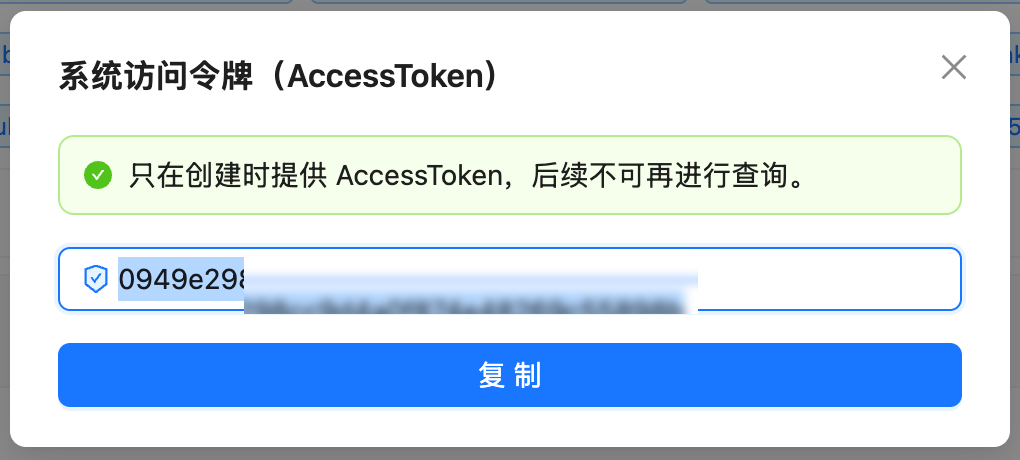
## How to Get Authorization Token
Visit `api.apiyi.com/account/profile` to access your profile page
Locate the "Account Options - System Token" section at the bottom of the page
Enter your account password to receive an AccessToken that can be used for subsequent API queries
 ## API Information
| Item | Description |
| ------------------- | ------------------------------------- |
| **API URL** | `https://api.apiyi.com/api/user/self` |
| **Method** | `GET` |
| **Authentication** | Authorization Header |
| **Response Format** | JSON |
## Request Details
### Request Headers
| Header Name | Required | Description |
| --------------- | -------- | --------------------------------------------- |
| `Authorization` | Yes | API access token, format: direct token string |
| `Accept` | No | Recommended: `application/json` |
| `Content-Type` | No | Recommended: `application/json` |
### Request Parameters
This is a GET request and **does not require** any request body parameters.
## Response Details
### Success Response Example
```json theme={null}
{
"success": true,
"message": null,
"data": {
"id": 19489,
"username": "testnano",
"display_name": "testnano",
"role": 1,
"status": 1,
"email": "",
"quota": 24997909,
"used_quota": 10027091,
"request_count": 339,
"group": "ceshi",
"aff_code": "ZM0H",
"inviter_id": 0,
"access_token": "...",
"ModelFixedPrice": [...]
}
}
```
### Key Response Fields
| Field Name | Type | Description |
| ---------------------- | ------- | --------------------------------------------------------------- |
| `success` | Boolean | Whether the request was successful |
| `message` | String | Error message (null on success) |
| `data.username` | String | Username |
| `data.display_name` | String | Display name |
| `data.quota` | Integer | **Remaining quota** (current available balance, in quota units) |
| `data.used_quota` | Integer | **Used quota** (in quota units) |
| `data.request_count` | Integer | **Total request count** |
| `data.group` | String | User group |
| `data.ModelFixedPrice` | Array | Model pricing list (can be ignored) |
### Quota Conversion
500,000 quota = \$1.00 USD
**Calculation Formulas:**
* USD amount = quota ÷ 500,000
* Remaining quota = quota (quota represents current remaining balance)
* Remaining USD = quota ÷ 500,000
**Examples:**
* `quota: 24997909` → \$49.99 USD (current remaining balance)
* `used_quota: 10027091` → \$20.05 USD (used amount)
## Error Responses
### HTTP 401 - Authentication Failed
```json theme={null}
{
"success": false,
"message": "Unauthorized"
}
```
**Reason:** Authorization token is invalid or expired
**Solution:** Verify and update your API token
### HTTP 403 - Permission Denied
```json theme={null}
{
"success": false,
"message": "Forbidden"
}
```
**Reason:** Current token lacks permission to access this API
**Solution:** Contact administrator to verify permission settings
## Code Examples
### cURL Example
```bash theme={null}
curl --compressed 'https://api.apiyi.com/api/user/self' \
-H 'Accept: application/json' \
-H 'Authorization: YOUR_TOKEN_HERE' \
-H 'Content-Type: application/json'
```
**Important:** The `--compressed` option is required because the API returns gzip-compressed content, otherwise you'll receive garbled output.
**Quick Test (replace YOUR\_TOKEN\_HERE):**
```bash theme={null}
export APIYI_TOKEN='YOUR_TOKEN_HERE'
curl --compressed -s 'https://api.apiyi.com/api/user/self' \
-H 'Accept: application/json' \
-H "Authorization: $APIYI_TOKEN" \
-H 'Content-Type: application/json' | \
jq '.data | {quota, used_quota, request_count}'
```
Note: The `-s` option hides progress bar, `--compressed` automatically decompresses gzip response
### Python Example (Basic)
```python theme={null}
import requests
{/* Configuration */}
url = "https://api.apiyi.com/api/user/self"
authorization = "YOUR_TOKEN_HERE" # Replace with your token
{/* Request headers */}
headers = {
'Accept': 'application/json',
'Authorization': authorization,
'Content-Type': 'application/json'
}
{/* Send request */}
response = requests.get(url, headers=headers, timeout=10)
{/* Check response */}
if response.status_code == 200:
data = response.json()
user_data = data['data']
{/* Extract key information */}
quota = user_data['quota']
used_quota = user_data['used_quota']
request_count = user_data['request_count']
{/* Calculate USD amounts */}
{/* Note: quota represents current remaining balance */}
remaining_usd = quota / 500000
used_usd = used_quota / 500000
{/* Print results */}
print(f"Remaining quota: ${remaining_usd:.2f} USD ({quota:,} quota)")
print(f"Used: ${used_usd:.2f} USD ({used_quota:,} quota)")
print(f"Request count: {request_count:,} times")
else:
print(f"Request failed: HTTP {response.status_code}")
print(response.text)
```
### Python Example (Optimized)
We provide a complete optimized script `quota_optimized.py` with the following features:
Complete exception handling and error capture
Secure token management, avoid hardcoding
Beautiful table display and number formatting
Automatic USD amount calculation
**Usage:**
```bash theme={null}
{/* Method 1: Using environment variable (recommended) */}
export APIYI_TOKEN='YOUR_TOKEN_HERE'
python quota_optimized.py
{/* Method 2: Command line argument */}
python quota_optimized.py 'YOUR_TOKEN_HERE'
```
**Output Example:**
```
============================================================
📊 APIYI Account Balance Information
============================================================
Username: testnano (testnano)
------------------------------------------------------------
Remaining quota: 24,997,909 quota ($49.99 USD)
Used: 10,027,091 quota ($20.05 USD)
Request count: 339 times
============================================================
💡 Conversion: 500,000 quota = $1.00 USD
============================================================
```
## FAQ
Please refer to the "How to Get Authorization Token" section above, or visit the profile page in the console to obtain a system token.
No, the balance query API does not consume your quota.
We recommend a query interval of at least 1 second to avoid triggering rate limits.
This field returns pricing information for various AI models. You can ignore it if you only need balance information.
The `quota` field represents the current remaining balance. If `quota` is 0 or close to 0, your account balance is insufficient and needs recharging.
**Issue:** Executing curl returns garbled text, or jq reports "Invalid numeric literal"
**Reason:** The API returns gzip-compressed content (`Content-Encoding: gzip`), and curl doesn't automatically decompress it.
**Solution:** Add the `--compressed` option to make curl decompress automatically:
```bash theme={null}
{/* ✅ Correct (with --compressed) */}
curl --compressed 'https://api.apiyi.com/api/user/self' \
-H 'Authorization: YOUR_TOKEN' | jq
{/* ❌ Wrong (missing --compressed) */}
curl 'https://api.apiyi.com/api/user/self' \
-H 'Authorization: YOUR_TOKEN' | jq
```
## Important Notes
**Security Reminders**
* Never hardcode Authorization tokens in your code
* Use environment variables or configuration files to manage sensitive information
* Don't commit code containing tokens to public repositories
**Request Limits**
* Set reasonable request timeout (recommended: 10 seconds)
* Avoid excessively frequent query requests
* Always handle network exceptions, timeouts, and authentication failures
* Log errors for easier troubleshooting
* API returns gzip-compressed content; curl requires the `--compressed` option
* Python's requests library automatically handles gzip decompression without additional configuration
## API Information
| Item | Description |
| ------------------- | ------------------------------------- |
| **API URL** | `https://api.apiyi.com/api/user/self` |
| **Method** | `GET` |
| **Authentication** | Authorization Header |
| **Response Format** | JSON |
## Request Details
### Request Headers
| Header Name | Required | Description |
| --------------- | -------- | --------------------------------------------- |
| `Authorization` | Yes | API access token, format: direct token string |
| `Accept` | No | Recommended: `application/json` |
| `Content-Type` | No | Recommended: `application/json` |
### Request Parameters
This is a GET request and **does not require** any request body parameters.
## Response Details
### Success Response Example
```json theme={null}
{
"success": true,
"message": null,
"data": {
"id": 19489,
"username": "testnano",
"display_name": "testnano",
"role": 1,
"status": 1,
"email": "",
"quota": 24997909,
"used_quota": 10027091,
"request_count": 339,
"group": "ceshi",
"aff_code": "ZM0H",
"inviter_id": 0,
"access_token": "...",
"ModelFixedPrice": [...]
}
}
```
### Key Response Fields
| Field Name | Type | Description |
| ---------------------- | ------- | --------------------------------------------------------------- |
| `success` | Boolean | Whether the request was successful |
| `message` | String | Error message (null on success) |
| `data.username` | String | Username |
| `data.display_name` | String | Display name |
| `data.quota` | Integer | **Remaining quota** (current available balance, in quota units) |
| `data.used_quota` | Integer | **Used quota** (in quota units) |
| `data.request_count` | Integer | **Total request count** |
| `data.group` | String | User group |
| `data.ModelFixedPrice` | Array | Model pricing list (can be ignored) |
### Quota Conversion
500,000 quota = \$1.00 USD
**Calculation Formulas:**
* USD amount = quota ÷ 500,000
* Remaining quota = quota (quota represents current remaining balance)
* Remaining USD = quota ÷ 500,000
**Examples:**
* `quota: 24997909` → \$49.99 USD (current remaining balance)
* `used_quota: 10027091` → \$20.05 USD (used amount)
## Error Responses
### HTTP 401 - Authentication Failed
```json theme={null}
{
"success": false,
"message": "Unauthorized"
}
```
**Reason:** Authorization token is invalid or expired
**Solution:** Verify and update your API token
### HTTP 403 - Permission Denied
```json theme={null}
{
"success": false,
"message": "Forbidden"
}
```
**Reason:** Current token lacks permission to access this API
**Solution:** Contact administrator to verify permission settings
## Code Examples
### cURL Example
```bash theme={null}
curl --compressed 'https://api.apiyi.com/api/user/self' \
-H 'Accept: application/json' \
-H 'Authorization: YOUR_TOKEN_HERE' \
-H 'Content-Type: application/json'
```
**Important:** The `--compressed` option is required because the API returns gzip-compressed content, otherwise you'll receive garbled output.
**Quick Test (replace YOUR\_TOKEN\_HERE):**
```bash theme={null}
export APIYI_TOKEN='YOUR_TOKEN_HERE'
curl --compressed -s 'https://api.apiyi.com/api/user/self' \
-H 'Accept: application/json' \
-H "Authorization: $APIYI_TOKEN" \
-H 'Content-Type: application/json' | \
jq '.data | {quota, used_quota, request_count}'
```
Note: The `-s` option hides progress bar, `--compressed` automatically decompresses gzip response
### Python Example (Basic)
```python theme={null}
import requests
{/* Configuration */}
url = "https://api.apiyi.com/api/user/self"
authorization = "YOUR_TOKEN_HERE" # Replace with your token
{/* Request headers */}
headers = {
'Accept': 'application/json',
'Authorization': authorization,
'Content-Type': 'application/json'
}
{/* Send request */}
response = requests.get(url, headers=headers, timeout=10)
{/* Check response */}
if response.status_code == 200:
data = response.json()
user_data = data['data']
{/* Extract key information */}
quota = user_data['quota']
used_quota = user_data['used_quota']
request_count = user_data['request_count']
{/* Calculate USD amounts */}
{/* Note: quota represents current remaining balance */}
remaining_usd = quota / 500000
used_usd = used_quota / 500000
{/* Print results */}
print(f"Remaining quota: ${remaining_usd:.2f} USD ({quota:,} quota)")
print(f"Used: ${used_usd:.2f} USD ({used_quota:,} quota)")
print(f"Request count: {request_count:,} times")
else:
print(f"Request failed: HTTP {response.status_code}")
print(response.text)
```
### Python Example (Optimized)
We provide a complete optimized script `quota_optimized.py` with the following features:
Complete exception handling and error capture
Secure token management, avoid hardcoding
Beautiful table display and number formatting
Automatic USD amount calculation
**Usage:**
```bash theme={null}
{/* Method 1: Using environment variable (recommended) */}
export APIYI_TOKEN='YOUR_TOKEN_HERE'
python quota_optimized.py
{/* Method 2: Command line argument */}
python quota_optimized.py 'YOUR_TOKEN_HERE'
```
**Output Example:**
```
============================================================
📊 APIYI Account Balance Information
============================================================
Username: testnano (testnano)
------------------------------------------------------------
Remaining quota: 24,997,909 quota ($49.99 USD)
Used: 10,027,091 quota ($20.05 USD)
Request count: 339 times
============================================================
💡 Conversion: 500,000 quota = $1.00 USD
============================================================
```
## FAQ
Please refer to the "How to Get Authorization Token" section above, or visit the profile page in the console to obtain a system token.
No, the balance query API does not consume your quota.
We recommend a query interval of at least 1 second to avoid triggering rate limits.
This field returns pricing information for various AI models. You can ignore it if you only need balance information.
The `quota` field represents the current remaining balance. If `quota` is 0 or close to 0, your account balance is insufficient and needs recharging.
**Issue:** Executing curl returns garbled text, or jq reports "Invalid numeric literal"
**Reason:** The API returns gzip-compressed content (`Content-Encoding: gzip`), and curl doesn't automatically decompress it.
**Solution:** Add the `--compressed` option to make curl decompress automatically:
```bash theme={null}
{/* ✅ Correct (with --compressed) */}
curl --compressed 'https://api.apiyi.com/api/user/self' \
-H 'Authorization: YOUR_TOKEN' | jq
{/* ❌ Wrong (missing --compressed) */}
curl 'https://api.apiyi.com/api/user/self' \
-H 'Authorization: YOUR_TOKEN' | jq
```
## Important Notes
**Security Reminders**
* Never hardcode Authorization tokens in your code
* Use environment variables or configuration files to manage sensitive information
* Don't commit code containing tokens to public repositories
**Request Limits**
* Set reasonable request timeout (recommended: 10 seconds)
* Avoid excessively frequent query requests
* Always handle network exceptions, timeouts, and authentication failures
* Log errors for easier troubleshooting
* API returns gzip-compressed content; curl requires the `--compressed` option
* Python's requests library automatically handles gzip decompression without additional configuration