> ## Documentation Index
> Fetch the complete documentation index at: https://docs.apiyi.com/llms.txt
> Use this file to discover all available pages before exploring further.
# GPT-Image-2-All Image Gen/Editing
> GPT image generation reverse-engineered model gpt-image-2-all (ChatGPT web line). Flat $0.03/image per-call pricing, ~30–60s generation. Supports text-to-image, multi-image fusion editing, natural-language editing, high text-rendering fidelity, Chinese prompt friendly.
All image APIs are **synchronous** — there is no task ID to poll, and if your client disconnects the result is lost while the request is still billed. Set a generous timeout for this model; see [Image API Essentials & Best Practices](/en/api-capabilities/image-api-best-practices).
## Overview
**gpt-image-2-all** is a **GPT image generation reverse-engineered model** (ChatGPT web line) available on the APIYI platform. With extremely competitive pricing at **\$0.03/image** per call, it generates images in **about 30–60 seconds** and supports **text-to-image / single-image editing / multi-image fusion / natural-language editing** — with high text-rendering fidelity and native support for Chinese prompts.
**🎨 Highlights**: Reliable reverse-engineered channel with a flat \$0.03/image rate. No need to worry about size/quality/n parameters — just describe size and style in the prompt. Uses the OpenAI Images API standard endpoints: `/v1/images/generations` (text-to-image) and `/v1/images/edits` (image editing).
**Need to lock the output size or 4K?** Switch to the sister model [`gpt-image-2-vip`](/en/api-capabilities/gpt-image-2-vip/overview) — same call format, just one extra `size` field.
`/v1/images/generations` — generate images from text prompts.
`/v1/images/edits` — multipart upload with edit/fusion instructions.
## Core Features
Flat per-call pricing of \$0.03/image, no resolution tiers, predictable costs
Stable rendering of Chinese/English text, signs, and poster text — ideal for infographics and marketing assets
Native understanding of Chinese descriptions without translation
Supports multiple reference images; prompts can reference them as "image1/image2/image3"
\~30–60s generation — faster than both `gpt-image-2-vip` and the official-relay `gpt-image-2`
Pass `response_format: "url"` explicitly for R2 CDN links with low-latency global delivery
Edit via conversational descriptions, no masks required, supports multi-turn iteration
Compatible with the OpenAI Images API standard endpoints `/images/generations` and `/images/edits`
## Pricing
| Model | Billing | Price | Output |
| ----------------- | -------- | ------------------ | ---------------- |
| `gpt-image-2-all` | Per-call | **\$0.03 / image** | 1 image per call |
**Billing notes**:
* Flat pricing; no tiers by resolution, quality, or prompt length
* Failed requests are not charged (auth failures, parameter validation errors)
* For N images, call the API N times in parallel
**Same-price sister model**: [`gpt-image-2-vip`](/en/api-capabilities/gpt-image-2-vip/overview) (Codex reverse line) — same \$0.03/image, supports 30 explicit sizes (incl. 4K), same call format. Switch when you need locked output dimensions.
## Group Setup
`gpt-image-2-all` lives on the `Default` group — **no extra group needed**. The reverse channel currently has stable supply, so there's no enterprise-group fallback story like the official-relay `gpt-image-2` has.
| Model | Group | Notes |
| ----------------- | ------------ | ---------------------------------------------------------------------------------------------------------------------------- |
| `gpt-image-2-all` | `Default` | ChatGPT-web reverse, flat \$0.03/img, \~30–60s |
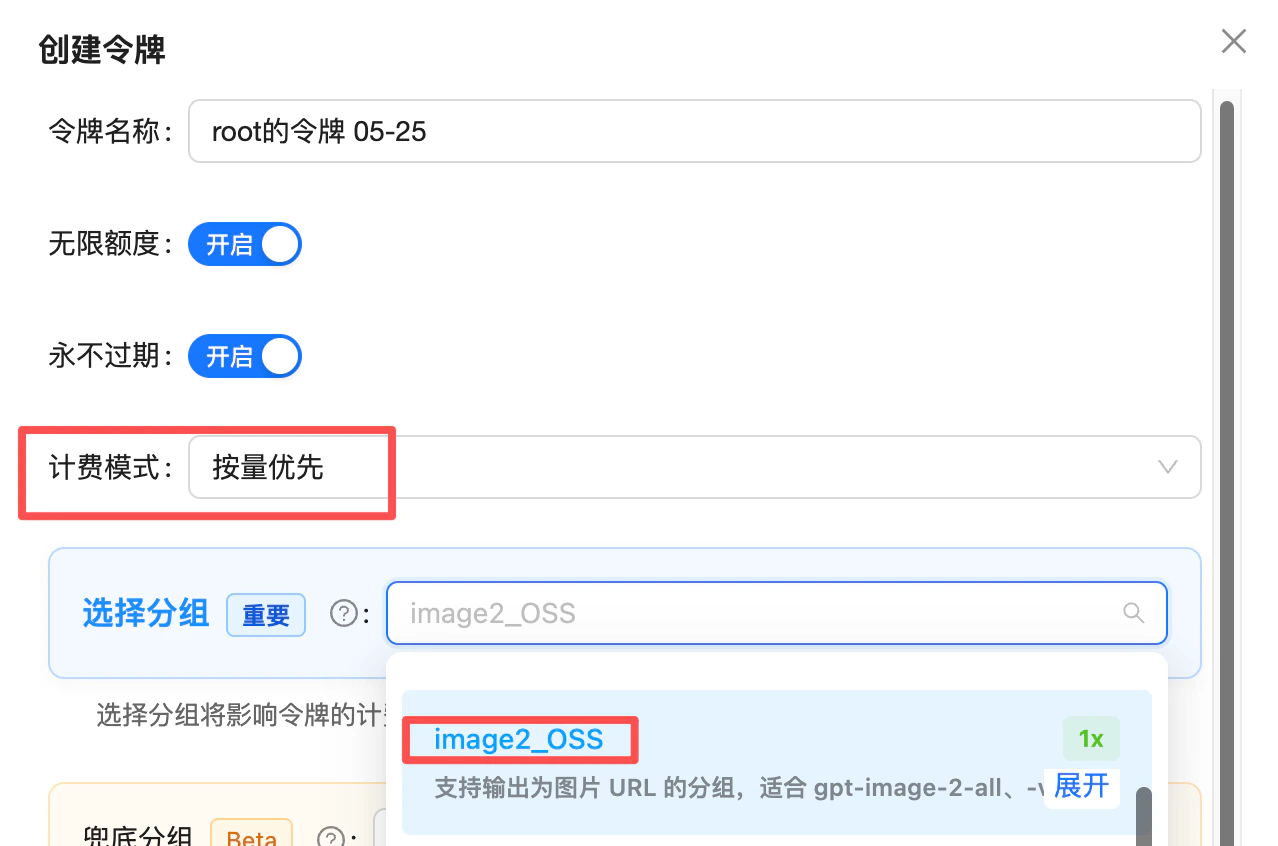
| `gpt-image-2-all` | `image2_OSS` | **1x multiplier (no surcharge)**, deterministic URL output — never falls back to base64 when the default group is under load |
### Need deterministic URL output → switch to the `image2_OSS` group
As measured in July 2026 on the default group, `gpt-image-2-all` (and `gpt-image-2-vip`) return `b64_json` when `response_format` is omitted; pass `response_format: "url"` explicitly to get an image URL. The default group's output format is **not guaranteed** — it has historically defaulted to `url` with fallback to `b64_json` under load, and has changed across channel versions.
If your business **depends on URL output** (writing URLs straight to your database, frontend rendering by URL, base64 not acceptable), switch your token's group to **`image2_OSS`** — a group purpose-built for **deterministic URL output**, at a **1x multiplier (no surcharge)**, effective for both reverse models `gpt-image-2-all` and `gpt-image-2-vip`. It guarantees the response always carries an image URL and never falls back to base64.
 **Advanced (when you also use `gpt-image-2-vip` and the official-relay `gpt-image-2`)**: if your token covers all three models, set the token's group priority like this:
* **First priority**: `image2Enterprise` (1.2x enterprise group, dedicated stable lane for the official relay)
* **Default fallback**: `Default` (both reverse models live here and route by model)
Result: official-relay `gpt-image-2` rides the enterprise lane for stability, while the two reverse models stay on the default group — one token covers all three, no interference.
📖 About the `image2Enterprise` group: [/en/live/2026-04/image2-enterprise-stable](/en/live/2026-04/image2-enterprise-stable)
## Technical Specs
| Attribute | Value |
| --------------------------- | ---------------------------------------------------------------------------------------------------------- |
| **Model name** | `gpt-image-2-all` |
| **Channel type** | Official reverse-engineered (ChatGPT web) |
| **Pricing** | \$0.03 / image, per-call |
| **Generation time** | \~30–60 seconds |
| **Output resolution** | No explicit size parameter; adaptive (describe in prompt) |
| **Default response format** | `b64_json` (raw base64, **no `data:` prefix**, verified 2026-07; always pass `response_format` explicitly) |
| **Optional format** | `url` (R2 CDN accelerated link, **\~1-day validity**, requires explicit `response_format: "url"`) |
| **Chinese prompts** | ✅ Natively supported |
| **Capabilities** | Text-to-image, single-image editing, multi-image fusion, natural-language editing |
This model has **adaptive output sizes** and is not equivalent to the official `gpt-image-2` API. For strictly locked output sizes or 4K, use [`gpt-image-2-vip`](/en/api-capabilities/gpt-image-2-vip/overview) (Codex reverse line, 30 explicit sizes including 4K). For full official-API parity, use [`gpt-image-2`](/en/api-capabilities/gpt-image-2/overview).
**⏰ Image URL validity: \~1 day (default)**
The `url` field of a `url`-mode response is an R2 CDN link that **expires in about 24 hours** — requests after that will 404. For images that need long-term retention (product shots, user artwork, history records, etc.), **download and persist them to your own storage as soon as possible** after generation.
Two common approaches:
* **Server-side download**: as soon as you receive the response, use `requests` / `fetch` to pull the image and store it in S3 / OSS / R2 / local disk
* **Use `b64_json` response format**: you get the image as base64 data directly, skipping the extra cross-origin download — perfect for frontend rendering or writing straight to a file
## Endpoints
| Endpoint | Purpose | Content-Type | Best for |
| ----------------------------- | ---------------------------- | --------------------- | ---------------------------------------------------------------------------------------- |
| `POST /v1/images/generations` | Text-to-image | `application/json` | OpenAI Images API standard format — same code can hit both official and reverse channels |
| `POST /v1/images/edits` | Image editing (single/multi) | `multipart/form-data` | OpenAI Images API standard format — same code can hit both official and reverse channels |
**Use the OpenAI Images API** (`/v1/images/generations` + `/v1/images/edits`), for two reasons:
1. **More stable**: upstream resource supply for the Images API channel is more plentiful, so call success rates are higher
2. **Compatible with the official relay for easy switching**: the call method and parameters like `size` are fully compatible with the official-relay [`gpt-image-2`](/en/api-capabilities/gpt-image-2/overview) — if the reverse channel hits risk-control turbulence, **just swap the `model` name** with zero code changes
There is also a chat-based endpoint (`/v1/chat/completions`, no longer recommended) — see the FAQ below.
**Domain options**: `api.apiyi.com` is the main domain. You can also use alternate gateway domains such as `b.apiyi.com` / `vip.apiyi.com`. Response behavior is identical.
**Want to lock the output size with a `size` parameter?** Use the sister model [`gpt-image-2-vip`](/en/api-capabilities/gpt-image-2-vip/overview) — identical endpoints, just one extra `size` field (30 explicit sizes including 4K).
## Size and Aspect Ratio Control (describe in prompt)
`gpt-image-2-all` has no `size` parameter — size is described in the prompt. If you need strictly locked output sizes (e-commerce hero shots, poster templates, 4K wallpapers), use [`gpt-image-2-vip`](/en/api-capabilities/gpt-image-2-vip/overview) instead.
### Verified "prompt phrasing → actual resolution" table
The 8 phrasings below have been empirically verified to reproduce reliably. Put the first-column phrasing at the **start** of your prompt and you'll get the resolution shown in the second column (all outputs sit at the \~1.5K-pixel tier):
| Prompt phrasing (sent verbatim) | Verified resolution | Approx. size | Actual ratio |
| ------------------------------- | ------------------- | ------------ | ------------ |
| `横版 16:9` (Landscape 16:9) | 1672 × 941 | \~1.9 MB | 16:9 |
| `竖屏 9:16` (Portrait 9:16) | 941 × 1672 | \~2.1 MB | 9:16 |
| `4:3` | 1448 × 1086 | \~2.3 MB | 4:3 |
| `3:4` | 1086 × 1448 | \~2.5 MB | 3:4 |
| `3:2 尺寸` (3:2 size) | 1536 × 1024 | \~2.9 MB | 3:2 |
| `2:3 尺寸` (2:3 size) | 1024 × 1536 | \~3.0 MB | 2:3 |
| `2:5 竖屏` (2:5 portrait) | 793 × 1983 | \~1.9 MB | 2:5 |
| `5:2 横屏` (5:2 landscape) | 1983 × 793 | \~1.9 MB | 5:2 |
**Notes**:
* All outputs are in the **\~1.5K-pixel tier** (longest edge between 1500 and 2000 px). This is the model's effective ceiling — it's not truly "any resolution".
* Reproducibility is highest when the prompt **only** contains a phrasing from the table; mixing in other composition words causes drift.
* The Chinese strings are the actual values you send; we recommend keeping them as-is rather than translating.
### Stylistic phrasings (no fixed resolution)
The phrasings below have no verified resolution — use them only as style modifiers, paired with the table above:
| Need | Phrasing (style guidance only — no resolution guarantee) |
| ----------------- | -------------------------------------------------------- |
| Square | `1024×1024 square` / `1:1 square composition` |
| Ultra-wide banner | `Banner 21:9 ultra-widescreen` |
| Style modifier | `cinematic` / `phone poster` / `square composition` |
**Tip**: Put size/composition words at the **beginning** of the prompt for better adherence.
### Exposing this table to your end users
Even though `gpt-image-2-all` has no `size` parameter, you can still offer your users a "Size / Aspect Ratio" dropdown that **feels just like an official `size` field**:
* Use the prompt phrasing from the table above as the option `value` (e.g., `横版 16:9`)
* Show the **expected resolution** in the option label (e.g., `Landscape 16:9 (1672×941)`) so users know what they'll get
* On the backend, prepend the selected phrasing to the user's original prompt before sending it to the API
```js theme={null}
const SIZE_OPTIONS = [
{ label: "Landscape 16:9 (1672×941)", prefix: "横版 16:9" },
{ label: "Portrait 9:16 (941×1672)", prefix: "竖屏 9:16" },
{ label: "4:3 (1448×1086)", prefix: "4:3" },
{ label: "3:4 (1086×1448)", prefix: "3:4" },
{ label: "3:2 (1536×1024)", prefix: "3:2 尺寸" },
{ label: "2:3 (1024×1536)", prefix: "2:3 尺寸" },
{ label: "2:5 portrait (793×1983)", prefix: "2:5 竖屏" },
{ label: "5:2 landscape (1983×793)", prefix: "5:2 横屏" },
];
const finalPrompt = `${selected.prefix}, ${userPrompt}`;
```
The underlying model is still **adaptive** — small pixel-level deviations are normal. Don't promise pixel-perfect output to your end users. **For strictly locked output sizes** (e-commerce hero shots, poster templates, 4K wallpapers), use the sister model [`gpt-image-2-vip`](/en/api-capabilities/gpt-image-2-vip/overview) — same price, same call code, just one extra `size` field.
## Best Practices
Compress each image you upload to **under 1.5MB** (JPEG quality 80-90 / down-sized resolution); apply the same cap per image in multi-image fusion. Sporadic server-side errors are most often triggered by oversized inputs — compressing measurably improves success rate and latency. **Output resolution is governed by the prompt phrasing, not by input size** — shrinking the input only speeds things up, it does not hurt quality. Stuffing `4K` / `8K` into the prompt does not produce a high-resolution image either; for reliable larger output, use the verified phrasings in the "Verified prompt phrasing → actual resolution" table above.
Ratio, resolution, and composition words at the front yield better adherence.
Text rendering fidelity is a key selling point — signs, posters, infographics with Chinese/English text all work well.
The order in which you repeat the `image` field is meaningful. Reference explicitly as "image1/image2/image3" in the prompt.
Use `b64_json` for direct web rendering; `url` for server-side storage/forwarding.
Typical generation is 30–60s, but image upload / download time and reverse-channel peak tails make actual end-to-end time vary widely. **Set 300s as a conservative baseline** to avoid frequent false timeouts.
`gpt-image-2-all` rejects `size`, `n`, `quality`, `aspect_ratio` — sending them may trigger validation errors. To pass `size`, switch to [`gpt-image-2-vip`](/en/api-capabilities/gpt-image-2-vip/overview).
## Error Codes and Retries
| Status | Meaning | Suggestion |
| ------- | ------------------------------------------------------ | -------------------------------------------- |
| `401` | Invalid token | Check Bearer Token |
| `429` | Rate limit / quota exhausted | Exponential backoff retry |
| `5xx` | Transient gateway/backend error | Retry 1–2 times |
| Timeout | Reverse-channel peak + image upload/download long tail | Set client timeout **≥ 300s** (conservative) |
**Client recommendations**:
* Request timeout **starting at 300 seconds** (conservative; typical 30–60s, but image upload / download and reverse-channel peak tails cause wide variance — 120s causes frequent false timeouts)
* Use **exponential backoff** for 5xx and timeouts (2–3 retries recommended)
* Log the `request-id` response header for debugging
## FAQ
Both are reverse-engineered channels at the same price (\$0.03/call), with **identical call format**. The differences are `size` support and generation time:
* **Don't need strict size control, want faster output** → `gpt-image-2-all` (\~30–60s, describe size in the prompt).
* **Need locked output size or 4K** → [`gpt-image-2-vip`](/en/api-capabilities/gpt-image-2-vip/overview) (\~90–150s, 30 explicit sizes incl. 4K).
* **Need a `quality` knob or full OpenAI-API field parity** → use the official [`gpt-image-2`](/en/api-capabilities/gpt-image-2/overview).
No. This model returns 1 image per call. For N images, call the API N times in parallel. Each call is billed independently at \$0.03.
**No.** This model returns 1 image per call — for multiple images, use **repeated / concurrent calls** instead.
⚠️ **Important**: if you pass `n=3` in the request, **billing will be 0.03 × 3 = \$0.09**, but **only 1 image is actually returned**. Make sure to drop the `n` field from your requests to avoid wasted charges.
This is a reverse-engineered channel using **synchronous chat-style responses**. Outcomes split into two cases with **different billing rules**:
**1) HTTP 5xx returned → NOT billed**
When upstream content policy hard-blocks the request, you'll see something like:
```json theme={null}
{
"error": {
"message": "Image was not generated as expected. Please adjust the prompt and retry (traceid: 0672821c6951af183dbf847130caaf16)",
"localized_message": "Unknown error",
"type": "invalid_request_error",
"param": "",
"code": null
}
}
```
These hard errors are **not billed**. Ask the user to adjust the prompt and retry.
**2) HTTP 200 with a text "soft refusal" → BILLED**
When the model soft-refuses inside the conversation (e.g. "I can't do that", "Sorry, this request involves…"), at the protocol level it looks like a normal chat completion, so **it is billed**. The reverse channel cannot reliably distinguish "refusal text" from "image output" at the protocol layer.
**Why we can't just waive soft refusals**
Auto-waiving every soft refusal would mean the platform absorbs every failed upstream call. More importantly, **frequently triggering upstream content safety also raises the risk of the supplier's account being banned** — that's a real supply-side cost we can't fully eliminate.
**Recommendations for integrators**
* ✅ **Pre-filter and warn users**: add a keyword/scenario filter at the frontend or gateway (real-person names, copyrighted characters, sensitive topics) and surface a UI hint like "Celebrity / IP topics may fail and still be billed by upstream policy." This cuts wasted charges sharply.
* ✅ **Monthly reimbursement for consumer products**: we understand consumer-facing products can't fully gate user input. If your monthly spend is large enough (**\$1000+/month**), you can **batch your logs monthly** (short-latency calls are usually soft refusals) and contact support for a one-off manual credit — no need to file per-call appeals.
📖 Related: [500 errors are usually content-policy hits (not billed)](/en/live/2026-04/gpt-image-2-all-500-content-policy)
**Detect first, then handle.** As verified in July 2026, the returned `b64_json` is **raw base64 without the `data:` prefix** — decode it to write a file, or prepend the prefix yourself before rendering; **earlier versions did include the prefix**. Add a `startsWith('data:')` check in your code: if the prefix is present, use the value directly as `img src`; if not, decode or prepend first — this avoids double-prefixing or decoding a prefixed string into a broken image.
Adaptive models treat size descriptions as "guidance" rather than "forced". To improve adherence: put size/composition words at the very start of the prompt, and combine with style descriptors (e.g., `cinematic`, `phone poster`, `square composition`).
For phrasings that **reliably** map to a specific resolution, see the "Verified prompt phrasing → actual resolution" table earlier in this page (under "Size and Aspect Ratio Control").
**Yes, strongly recommended.** Compress each input image to **under 1.5MB** (JPEG quality 80-90 / down-sized resolution): sporadic server-side errors are most often triggered by oversized inputs, and compressing measurably improves success rate and latency. Note: 1.5MB is the **recommended ceiling** for reliability and speed; the 10MB number in the FAQ above is the gateway hard limit.
**Don't worry about compression hurting quality** — this model's output resolution is governed by the prompt's composition phrasing, not by your input size. Shrinking the input only speeds things up.
**Stuffing `4K` / `8K` into the prompt does not actually produce a high-resolution image** — those words are decoration, the model doesn't bump resolution because of them. For reliable larger output, use the verified phrasings in the "Verified prompt phrasing → actual resolution" table above (e.g., `cinematic`, `phone poster`, `square composition`). For strict size locking or 4K, switch to [`gpt-image-2-vip`](/en/api-capabilities/gpt-image-2-vip/overview) (30 explicit sizes incl. 4K, flat \$0.03/image).
Recommended **≤ 10MB per image**, formats `png` / `jpg` / `webp`. Overly large images may hit gateway limits. Each image in multi-image fusion must meet this limit.
The `url` field of a `url`-mode response is an **R2 CDN link that expires in about 1 day (24 hours)** — requests after that will 404.
**Strongly recommended**: download and persist generated images to your **own object storage (S3 / OSS / R2), CDN, or database** shortly after generation. Don't hotlink the returned URL long-term.
**Two recommended approaches**:
* **Server-side proxy**: immediately `requests.get(url)` after the response, store to your own storage, and return your own URL to the frontend;
* **Use `b64_json`**: add `"response_format": "b64_json"` to your request to get base64 image data directly — one less cross-origin download, ideal for frontend rendering or writing straight to a file.
For short-lived previews (single-session display), the R2 URL works as-is without persistence.
No. This model returns the image in one shot; streaming is not supported. If latency matters, show a "generating..." progress indicator on the client side and configure a **300s timeout** (conservative).
Yes. Point `base_url` to `https://api.apiyi.com/v1` and set `api_key` to your APIYI token. However, `client.images.generate()` sends `size`/`n` by default — this model rejects both parameters, so we recommend making raw HTTP calls with `requests` / `fetch` against `/v1/images/generations` and `/v1/images/edits`.
This model natively supports Chinese, and results are comparable. For Chinese-specific scenarios (calligraphy, traditional festival elements), Chinese phrasing feels more natural.
Yes, the endpoint still works, but it is **no longer recommended** — use `/v1/images/generations` and `/v1/images/edits` instead (more stable, and the same code works with the official-relay `gpt-image-2`).
The chat-based style only makes sense in two scenarios: multi-turn iterative editing, or passing online image URLs directly. Note that when the image intent is ambiguous, the model may return plain text instead of an image (prepend a fixed prefix like "Generate an image:" to your prompt to reinforce it).
For full parameters, see the [chat-based API reference](/en/api-capabilities/gpt-image-2-all/chat-completions).
## Related Documentation
* [⚖️ Official vs Reverse Comparison](/en/api-capabilities/gpt-image-2/vs-gpt-image-2-all) - Side-by-side selection guide vs the official `gpt-image-2`
* [Text-to-Image Playground](/en/api-capabilities/gpt-image-2-all/text-to-image) - `/v1/images/generations` compatible endpoint
* [Image Editing Playground](/en/api-capabilities/gpt-image-2-all/image-edit) - `/v1/images/edits` multi-image fusion and editing
* [GPT-Image-2-VIP (same price, supports `size` and 4K)](/en/api-capabilities/gpt-image-2-vip/overview) - Same-price sister model with 30 explicit sizes (incl. 4K); identical call format
* [GPT-Image-2 Official (token-billed)](/en/api-capabilities/gpt-image-2/overview) - For `quality` parameter / mask-based repaint / strict OpenAI-API field parity
* [GPT-Image Series Overview](/en/api-capabilities/gpt-image-series) - Official GPT-Image comparison
* [Community: Luck GPT-Image 2 ComfyUI Nodes](/en/scenarios/ecosystem/luckgpt2-comfyui) - Call `gpt-image-2-all` directly in ComfyUI (dual endpoints: chat\_completions / images\_api)
* [Community: APIYI GPT-Image 2 Skills](/en/scenarios/ecosystem/apiyi-gpt-image-skills) - Invoke from Codex CLI / Cursor / Gemini CLI and other AI coding tools with one sentence
* [API Manual](/en/api-manual) - General calling conventions
gpt-image-2-all is a reverse-engineered channel. Behavior is aligned but pricing/capabilities may not fully match the official version. For the official direct version, see [GPT-Image-1.5](/en/api-capabilities/gpt-image-1-5).
**Advanced (when you also use `gpt-image-2-vip` and the official-relay `gpt-image-2`)**: if your token covers all three models, set the token's group priority like this:
* **First priority**: `image2Enterprise` (1.2x enterprise group, dedicated stable lane for the official relay)
* **Default fallback**: `Default` (both reverse models live here and route by model)
Result: official-relay `gpt-image-2` rides the enterprise lane for stability, while the two reverse models stay on the default group — one token covers all three, no interference.
📖 About the `image2Enterprise` group: [/en/live/2026-04/image2-enterprise-stable](/en/live/2026-04/image2-enterprise-stable)
## Technical Specs
| Attribute | Value |
| --------------------------- | ---------------------------------------------------------------------------------------------------------- |
| **Model name** | `gpt-image-2-all` |
| **Channel type** | Official reverse-engineered (ChatGPT web) |
| **Pricing** | \$0.03 / image, per-call |
| **Generation time** | \~30–60 seconds |
| **Output resolution** | No explicit size parameter; adaptive (describe in prompt) |
| **Default response format** | `b64_json` (raw base64, **no `data:` prefix**, verified 2026-07; always pass `response_format` explicitly) |
| **Optional format** | `url` (R2 CDN accelerated link, **\~1-day validity**, requires explicit `response_format: "url"`) |
| **Chinese prompts** | ✅ Natively supported |
| **Capabilities** | Text-to-image, single-image editing, multi-image fusion, natural-language editing |
This model has **adaptive output sizes** and is not equivalent to the official `gpt-image-2` API. For strictly locked output sizes or 4K, use [`gpt-image-2-vip`](/en/api-capabilities/gpt-image-2-vip/overview) (Codex reverse line, 30 explicit sizes including 4K). For full official-API parity, use [`gpt-image-2`](/en/api-capabilities/gpt-image-2/overview).
**⏰ Image URL validity: \~1 day (default)**
The `url` field of a `url`-mode response is an R2 CDN link that **expires in about 24 hours** — requests after that will 404. For images that need long-term retention (product shots, user artwork, history records, etc.), **download and persist them to your own storage as soon as possible** after generation.
Two common approaches:
* **Server-side download**: as soon as you receive the response, use `requests` / `fetch` to pull the image and store it in S3 / OSS / R2 / local disk
* **Use `b64_json` response format**: you get the image as base64 data directly, skipping the extra cross-origin download — perfect for frontend rendering or writing straight to a file
## Endpoints
| Endpoint | Purpose | Content-Type | Best for |
| ----------------------------- | ---------------------------- | --------------------- | ---------------------------------------------------------------------------------------- |
| `POST /v1/images/generations` | Text-to-image | `application/json` | OpenAI Images API standard format — same code can hit both official and reverse channels |
| `POST /v1/images/edits` | Image editing (single/multi) | `multipart/form-data` | OpenAI Images API standard format — same code can hit both official and reverse channels |
**Use the OpenAI Images API** (`/v1/images/generations` + `/v1/images/edits`), for two reasons:
1. **More stable**: upstream resource supply for the Images API channel is more plentiful, so call success rates are higher
2. **Compatible with the official relay for easy switching**: the call method and parameters like `size` are fully compatible with the official-relay [`gpt-image-2`](/en/api-capabilities/gpt-image-2/overview) — if the reverse channel hits risk-control turbulence, **just swap the `model` name** with zero code changes
There is also a chat-based endpoint (`/v1/chat/completions`, no longer recommended) — see the FAQ below.
**Domain options**: `api.apiyi.com` is the main domain. You can also use alternate gateway domains such as `b.apiyi.com` / `vip.apiyi.com`. Response behavior is identical.
**Want to lock the output size with a `size` parameter?** Use the sister model [`gpt-image-2-vip`](/en/api-capabilities/gpt-image-2-vip/overview) — identical endpoints, just one extra `size` field (30 explicit sizes including 4K).
## Size and Aspect Ratio Control (describe in prompt)
`gpt-image-2-all` has no `size` parameter — size is described in the prompt. If you need strictly locked output sizes (e-commerce hero shots, poster templates, 4K wallpapers), use [`gpt-image-2-vip`](/en/api-capabilities/gpt-image-2-vip/overview) instead.
### Verified "prompt phrasing → actual resolution" table
The 8 phrasings below have been empirically verified to reproduce reliably. Put the first-column phrasing at the **start** of your prompt and you'll get the resolution shown in the second column (all outputs sit at the \~1.5K-pixel tier):
| Prompt phrasing (sent verbatim) | Verified resolution | Approx. size | Actual ratio |
| ------------------------------- | ------------------- | ------------ | ------------ |
| `横版 16:9` (Landscape 16:9) | 1672 × 941 | \~1.9 MB | 16:9 |
| `竖屏 9:16` (Portrait 9:16) | 941 × 1672 | \~2.1 MB | 9:16 |
| `4:3` | 1448 × 1086 | \~2.3 MB | 4:3 |
| `3:4` | 1086 × 1448 | \~2.5 MB | 3:4 |
| `3:2 尺寸` (3:2 size) | 1536 × 1024 | \~2.9 MB | 3:2 |
| `2:3 尺寸` (2:3 size) | 1024 × 1536 | \~3.0 MB | 2:3 |
| `2:5 竖屏` (2:5 portrait) | 793 × 1983 | \~1.9 MB | 2:5 |
| `5:2 横屏` (5:2 landscape) | 1983 × 793 | \~1.9 MB | 5:2 |
**Notes**:
* All outputs are in the **\~1.5K-pixel tier** (longest edge between 1500 and 2000 px). This is the model's effective ceiling — it's not truly "any resolution".
* Reproducibility is highest when the prompt **only** contains a phrasing from the table; mixing in other composition words causes drift.
* The Chinese strings are the actual values you send; we recommend keeping them as-is rather than translating.
### Stylistic phrasings (no fixed resolution)
The phrasings below have no verified resolution — use them only as style modifiers, paired with the table above:
| Need | Phrasing (style guidance only — no resolution guarantee) |
| ----------------- | -------------------------------------------------------- |
| Square | `1024×1024 square` / `1:1 square composition` |
| Ultra-wide banner | `Banner 21:9 ultra-widescreen` |
| Style modifier | `cinematic` / `phone poster` / `square composition` |
**Tip**: Put size/composition words at the **beginning** of the prompt for better adherence.
### Exposing this table to your end users
Even though `gpt-image-2-all` has no `size` parameter, you can still offer your users a "Size / Aspect Ratio" dropdown that **feels just like an official `size` field**:
* Use the prompt phrasing from the table above as the option `value` (e.g., `横版 16:9`)
* Show the **expected resolution** in the option label (e.g., `Landscape 16:9 (1672×941)`) so users know what they'll get
* On the backend, prepend the selected phrasing to the user's original prompt before sending it to the API
```js theme={null}
const SIZE_OPTIONS = [
{ label: "Landscape 16:9 (1672×941)", prefix: "横版 16:9" },
{ label: "Portrait 9:16 (941×1672)", prefix: "竖屏 9:16" },
{ label: "4:3 (1448×1086)", prefix: "4:3" },
{ label: "3:4 (1086×1448)", prefix: "3:4" },
{ label: "3:2 (1536×1024)", prefix: "3:2 尺寸" },
{ label: "2:3 (1024×1536)", prefix: "2:3 尺寸" },
{ label: "2:5 portrait (793×1983)", prefix: "2:5 竖屏" },
{ label: "5:2 landscape (1983×793)", prefix: "5:2 横屏" },
];
const finalPrompt = `${selected.prefix}, ${userPrompt}`;
```
The underlying model is still **adaptive** — small pixel-level deviations are normal. Don't promise pixel-perfect output to your end users. **For strictly locked output sizes** (e-commerce hero shots, poster templates, 4K wallpapers), use the sister model [`gpt-image-2-vip`](/en/api-capabilities/gpt-image-2-vip/overview) — same price, same call code, just one extra `size` field.
## Best Practices
Compress each image you upload to **under 1.5MB** (JPEG quality 80-90 / down-sized resolution); apply the same cap per image in multi-image fusion. Sporadic server-side errors are most often triggered by oversized inputs — compressing measurably improves success rate and latency. **Output resolution is governed by the prompt phrasing, not by input size** — shrinking the input only speeds things up, it does not hurt quality. Stuffing `4K` / `8K` into the prompt does not produce a high-resolution image either; for reliable larger output, use the verified phrasings in the "Verified prompt phrasing → actual resolution" table above.
Ratio, resolution, and composition words at the front yield better adherence.
Text rendering fidelity is a key selling point — signs, posters, infographics with Chinese/English text all work well.
The order in which you repeat the `image` field is meaningful. Reference explicitly as "image1/image2/image3" in the prompt.
Use `b64_json` for direct web rendering; `url` for server-side storage/forwarding.
Typical generation is 30–60s, but image upload / download time and reverse-channel peak tails make actual end-to-end time vary widely. **Set 300s as a conservative baseline** to avoid frequent false timeouts.
`gpt-image-2-all` rejects `size`, `n`, `quality`, `aspect_ratio` — sending them may trigger validation errors. To pass `size`, switch to [`gpt-image-2-vip`](/en/api-capabilities/gpt-image-2-vip/overview).
## Error Codes and Retries
| Status | Meaning | Suggestion |
| ------- | ------------------------------------------------------ | -------------------------------------------- |
| `401` | Invalid token | Check Bearer Token |
| `429` | Rate limit / quota exhausted | Exponential backoff retry |
| `5xx` | Transient gateway/backend error | Retry 1–2 times |
| Timeout | Reverse-channel peak + image upload/download long tail | Set client timeout **≥ 300s** (conservative) |
**Client recommendations**:
* Request timeout **starting at 300 seconds** (conservative; typical 30–60s, but image upload / download and reverse-channel peak tails cause wide variance — 120s causes frequent false timeouts)
* Use **exponential backoff** for 5xx and timeouts (2–3 retries recommended)
* Log the `request-id` response header for debugging
## FAQ
Both are reverse-engineered channels at the same price (\$0.03/call), with **identical call format**. The differences are `size` support and generation time:
* **Don't need strict size control, want faster output** → `gpt-image-2-all` (\~30–60s, describe size in the prompt).
* **Need locked output size or 4K** → [`gpt-image-2-vip`](/en/api-capabilities/gpt-image-2-vip/overview) (\~90–150s, 30 explicit sizes incl. 4K).
* **Need a `quality` knob or full OpenAI-API field parity** → use the official [`gpt-image-2`](/en/api-capabilities/gpt-image-2/overview).
No. This model returns 1 image per call. For N images, call the API N times in parallel. Each call is billed independently at \$0.03.
**No.** This model returns 1 image per call — for multiple images, use **repeated / concurrent calls** instead.
⚠️ **Important**: if you pass `n=3` in the request, **billing will be 0.03 × 3 = \$0.09**, but **only 1 image is actually returned**. Make sure to drop the `n` field from your requests to avoid wasted charges.
This is a reverse-engineered channel using **synchronous chat-style responses**. Outcomes split into two cases with **different billing rules**:
**1) HTTP 5xx returned → NOT billed**
When upstream content policy hard-blocks the request, you'll see something like:
```json theme={null}
{
"error": {
"message": "Image was not generated as expected. Please adjust the prompt and retry (traceid: 0672821c6951af183dbf847130caaf16)",
"localized_message": "Unknown error",
"type": "invalid_request_error",
"param": "",
"code": null
}
}
```
These hard errors are **not billed**. Ask the user to adjust the prompt and retry.
**2) HTTP 200 with a text "soft refusal" → BILLED**
When the model soft-refuses inside the conversation (e.g. "I can't do that", "Sorry, this request involves…"), at the protocol level it looks like a normal chat completion, so **it is billed**. The reverse channel cannot reliably distinguish "refusal text" from "image output" at the protocol layer.
**Why we can't just waive soft refusals**
Auto-waiving every soft refusal would mean the platform absorbs every failed upstream call. More importantly, **frequently triggering upstream content safety also raises the risk of the supplier's account being banned** — that's a real supply-side cost we can't fully eliminate.
**Recommendations for integrators**
* ✅ **Pre-filter and warn users**: add a keyword/scenario filter at the frontend or gateway (real-person names, copyrighted characters, sensitive topics) and surface a UI hint like "Celebrity / IP topics may fail and still be billed by upstream policy." This cuts wasted charges sharply.
* ✅ **Monthly reimbursement for consumer products**: we understand consumer-facing products can't fully gate user input. If your monthly spend is large enough (**\$1000+/month**), you can **batch your logs monthly** (short-latency calls are usually soft refusals) and contact support for a one-off manual credit — no need to file per-call appeals.
📖 Related: [500 errors are usually content-policy hits (not billed)](/en/live/2026-04/gpt-image-2-all-500-content-policy)
**Detect first, then handle.** As verified in July 2026, the returned `b64_json` is **raw base64 without the `data:` prefix** — decode it to write a file, or prepend the prefix yourself before rendering; **earlier versions did include the prefix**. Add a `startsWith('data:')` check in your code: if the prefix is present, use the value directly as `img src`; if not, decode or prepend first — this avoids double-prefixing or decoding a prefixed string into a broken image.
Adaptive models treat size descriptions as "guidance" rather than "forced". To improve adherence: put size/composition words at the very start of the prompt, and combine with style descriptors (e.g., `cinematic`, `phone poster`, `square composition`).
For phrasings that **reliably** map to a specific resolution, see the "Verified prompt phrasing → actual resolution" table earlier in this page (under "Size and Aspect Ratio Control").
**Yes, strongly recommended.** Compress each input image to **under 1.5MB** (JPEG quality 80-90 / down-sized resolution): sporadic server-side errors are most often triggered by oversized inputs, and compressing measurably improves success rate and latency. Note: 1.5MB is the **recommended ceiling** for reliability and speed; the 10MB number in the FAQ above is the gateway hard limit.
**Don't worry about compression hurting quality** — this model's output resolution is governed by the prompt's composition phrasing, not by your input size. Shrinking the input only speeds things up.
**Stuffing `4K` / `8K` into the prompt does not actually produce a high-resolution image** — those words are decoration, the model doesn't bump resolution because of them. For reliable larger output, use the verified phrasings in the "Verified prompt phrasing → actual resolution" table above (e.g., `cinematic`, `phone poster`, `square composition`). For strict size locking or 4K, switch to [`gpt-image-2-vip`](/en/api-capabilities/gpt-image-2-vip/overview) (30 explicit sizes incl. 4K, flat \$0.03/image).
Recommended **≤ 10MB per image**, formats `png` / `jpg` / `webp`. Overly large images may hit gateway limits. Each image in multi-image fusion must meet this limit.
The `url` field of a `url`-mode response is an **R2 CDN link that expires in about 1 day (24 hours)** — requests after that will 404.
**Strongly recommended**: download and persist generated images to your **own object storage (S3 / OSS / R2), CDN, or database** shortly after generation. Don't hotlink the returned URL long-term.
**Two recommended approaches**:
* **Server-side proxy**: immediately `requests.get(url)` after the response, store to your own storage, and return your own URL to the frontend;
* **Use `b64_json`**: add `"response_format": "b64_json"` to your request to get base64 image data directly — one less cross-origin download, ideal for frontend rendering or writing straight to a file.
For short-lived previews (single-session display), the R2 URL works as-is without persistence.
No. This model returns the image in one shot; streaming is not supported. If latency matters, show a "generating..." progress indicator on the client side and configure a **300s timeout** (conservative).
Yes. Point `base_url` to `https://api.apiyi.com/v1` and set `api_key` to your APIYI token. However, `client.images.generate()` sends `size`/`n` by default — this model rejects both parameters, so we recommend making raw HTTP calls with `requests` / `fetch` against `/v1/images/generations` and `/v1/images/edits`.
This model natively supports Chinese, and results are comparable. For Chinese-specific scenarios (calligraphy, traditional festival elements), Chinese phrasing feels more natural.
Yes, the endpoint still works, but it is **no longer recommended** — use `/v1/images/generations` and `/v1/images/edits` instead (more stable, and the same code works with the official-relay `gpt-image-2`).
The chat-based style only makes sense in two scenarios: multi-turn iterative editing, or passing online image URLs directly. Note that when the image intent is ambiguous, the model may return plain text instead of an image (prepend a fixed prefix like "Generate an image:" to your prompt to reinforce it).
For full parameters, see the [chat-based API reference](/en/api-capabilities/gpt-image-2-all/chat-completions).
## Related Documentation
* [⚖️ Official vs Reverse Comparison](/en/api-capabilities/gpt-image-2/vs-gpt-image-2-all) - Side-by-side selection guide vs the official `gpt-image-2`
* [Text-to-Image Playground](/en/api-capabilities/gpt-image-2-all/text-to-image) - `/v1/images/generations` compatible endpoint
* [Image Editing Playground](/en/api-capabilities/gpt-image-2-all/image-edit) - `/v1/images/edits` multi-image fusion and editing
* [GPT-Image-2-VIP (same price, supports `size` and 4K)](/en/api-capabilities/gpt-image-2-vip/overview) - Same-price sister model with 30 explicit sizes (incl. 4K); identical call format
* [GPT-Image-2 Official (token-billed)](/en/api-capabilities/gpt-image-2/overview) - For `quality` parameter / mask-based repaint / strict OpenAI-API field parity
* [GPT-Image Series Overview](/en/api-capabilities/gpt-image-series) - Official GPT-Image comparison
* [Community: Luck GPT-Image 2 ComfyUI Nodes](/en/scenarios/ecosystem/luckgpt2-comfyui) - Call `gpt-image-2-all` directly in ComfyUI (dual endpoints: chat\_completions / images\_api)
* [Community: APIYI GPT-Image 2 Skills](/en/scenarios/ecosystem/apiyi-gpt-image-skills) - Invoke from Codex CLI / Cursor / Gemini CLI and other AI coding tools with one sentence
* [API Manual](/en/api-manual) - General calling conventions
gpt-image-2-all is a reverse-engineered channel. Behavior is aligned but pricing/capabilities may not fully match the official version. For the official direct version, see [GPT-Image-1.5](/en/api-capabilities/gpt-image-1-5).