> ## Documentation Index
> Fetch the complete documentation index at: https://docs.apiyi.com/llms.txt
> Use this file to discover all available pages before exploring further.
# HappyHorse Video Generation (Alibaba Cloud)
> Complete guide to the Alibaba Cloud HappyHorse-1.0 video generation series: Text-to-Video / Image-to-Video / Reference-to-Video (up to 9 reference images) / Video Edit, unified DashScope async endpoint, high-fidelity subject preservation.
## Overview
**HappyHorse (快马)** is Alibaba's video generation model series, focused on **high-fidelity dynamic video generation** — it precisely understands text semantics and outputs smooth, natural, detail-rich, high-quality videos that keep subjects stable. APIYI connects directly through the **DashScope passthrough channel**, so a single APIYI Key lets you call every HappyHorse capability. The current version, **HappyHorse-1.0**, covers four core use cases:
| Use case | Model ID | Your input | Output |
| ---------------------- | --------------------------- | ---------------------------------------------- | ---------------------------------------------------------- |
| **Text-to-Video** | `happyhorse-1.0-t2v` | A text prompt | Short video |
| **Image-to-Video** | `happyhorse-1.0-i2v` | First-frame image + prompt | Brings a still image to life (**no audio-driven support**) |
| **Reference-to-Video** | `happyhorse-1.0-r2v` | Up to 9 reference images + prompt | Video with high-fidelity subject and scene preservation |
| **Video Edit** | `happyhorse-1.0-video-edit` | Video + up to 5 reference images + instruction | Locally/globally edited video |
**🐎 Key highlight**: All four capabilities share the same async endpoint and the same request structure — **switching use cases only changes the `model` field**. HappyHorse leans toward "high-fidelity dynamic video"; Reference-to-Video supports **up to 9 reference images** and Video Edit supports **up to 5 reference images**, with strong subject consistency. It shares the same endpoint as the [Wan series](/en/api-capabilities/wan/overview) and is directly interchangeable.
`happyhorse-1.0-t2v`, generate video from a pure text prompt.
`happyhorse-1.0-i2v`, generate video from a first-frame image (no audio-driven).
`happyhorse-1.0-r2v`, up to 9 reference images to preserve the subject.
`happyhorse-1.0-video-edit`, edit video with up to 5 reference images.
## Why Choose APIYI for HappyHorse
No Alibaba Cloud sign-up, no region configuration. A single APIYI Key calls all four HappyHorse capabilities plus the [Wan series](/en/api-capabilities/wan/overview).
Connect directly to `api.apiyi.com`, accessible from domestic data centers and home broadband.
Tasks that enter the `failed` state (unreachable media URL, sensitive prompt, etc.) are **not billed**, so retry with confidence.
Shares the same endpoint and schema as the Wan series; existing Wan code can call HappyHorse just by changing the `model` name.
## Core Features
t2v / i2v / r2v / video-edit share `POST /wan/api/v1/...video-synthesis`; after submission it returns a `task_id`, then you poll and download.
The model leans toward a "high-fidelity dynamic video" style, keeping people/objects more stable throughout motion.
`happyhorse-1.0-r2v` officially supports up to 9 `reference_image` entries, giving stronger subject consistency in multi-reference scenarios.
720P / 1080P resolutions, integer durations of 2–15 seconds, and `prompt_extend` smart rewriting to improve the quality of short prompts.
## Supported Models
| Model ID | Capability | Required media input | Notes |
| --------------------------- | ------------------ | ------------------------------------- | ------------------------------------ |
| `happyhorse-1.0-t2v` | Text-to-Video | None | Pure text generation |
| `happyhorse-1.0-i2v` | Image-to-Video | `first_frame` | **Does not support** `driving_audio` |
| `happyhorse-1.0-r2v` | Reference-to-Video | `reference_image` (up to 9) | Multi-reference subject preservation |
| `happyhorse-1.0-video-edit` | Video Edit | `video` + `reference_image` (up to 5) | Model name **has a hyphen** |
## ⚠️ Endpoint Selection (Most Important)
APIYI mounts two paths simultaneously, and **only the DashScope passthrough endpoint is fully usable for all HappyHorse capabilities**:
| Path | Protocol style | i2v / r2v availability | Conclusion |
| ------------------------------------------------------------ | ---------------------------- | -------------------------- | ----------------------- |
| `/v1/videos` | OpenAI flat style | ❌ Media fields are dropped | **Do not use** |
| `/wan/api/v1/services/aigc/video-generation/video-synthesis` | DashScope native passthrough | ✅ Fully usable | **Always use this one** |
HappyHorse and Wan share the same passthrough endpoint. If you see any doc/example submitting a video task via `/v1/videos`, **ignore it**. All create requests go through `/wan/api/v1/...video-synthesis`, and all queries go through `/v1/tasks/{task_id}`.
## Async Call Flow
The whole flow is asynchronous, in three steps: **create task → poll status → download video**.
`POST /wan/api/v1/services/aigc/video-generation/video-synthesis`, with the request header `X-DashScope-Async: enable`. It immediately returns a `task_id`.
`GET /v1/tasks/{task_id}` (with `Authorization`), querying every 5–10 seconds (**not less than 3 seconds**), until `status` becomes `completed`.
GET the mp4 directly from the `result_url` in the response, **without the `Authorization` header** (it's a signed OSS direct link; including Auth will cause a 403).
### Task Status Reference
| Status | Meaning | Next step |
| ------------- | ----------------- | ------------------------------------------------------------------------------------------------------------------ |
| `submitted` | Submitted, queued | Keep polling |
| `in_progress` | Generating | Keep polling (progress often stalls at 30% — that's the upstream's coarse reporting granularity, not a stuck task) |
| `completed` | Succeeded | Download from `result_url` |
| `failed` | Failed | Check `error.message` / `fail_reason` |
### Complete Python Client
```python theme={null}
import json, time, urllib.request
BASE = "https://api.apiyi.com"
KEY = "sk-your-api-key" # Your APIYI Key
def post(path, body):
h = {"Authorization": f"Bearer {KEY}", "Content-Type": "application/json",
"X-DashScope-Async": "enable"}
req = urllib.request.Request(BASE + path, data=json.dumps(body).encode(), headers=h, method="POST")
return json.loads(urllib.request.urlopen(req).read())
def get(path):
req = urllib.request.Request(BASE + path, headers={"Authorization": f"Bearer {KEY}"})
return json.loads(urllib.request.urlopen(req).read())
# 1. Create task (switching use cases only changes model and media)
r = post("/wan/api/v1/services/aigc/video-generation/video-synthesis", {
"model": "happyhorse-1.0-t2v",
"input": {"prompt": "A cat running across a meadow, bright sunshine, camera following"},
"parameters": {"resolution": "720P", "duration": 5, "prompt_extend": True, "watermark": True}
})
task_id = r["output"]["task_id"]
print("task_id:", task_id)
# 2. Poll (every 5-10 seconds)
while True:
info = get(f"/v1/tasks/{task_id}")
status = info["status"]
print("status:", status, "progress:", info.get("progress"))
if status == "completed":
url = info["result_url"]
break
if status == "failed":
raise RuntimeError(info.get("error") or info.get("fail_reason"))
time.sleep(10)
# 3. Download (do NOT include Authorization! result_url is a signed OSS direct link)
urllib.request.urlretrieve(url, "out.mp4")
print("saved out.mp4")
```
## Key Parameters Explained
When submitting, the body uses the DashScope nested structure: `{ model, input: { prompt, media[] }, parameters: {...} }`.
### `media[]` Types
| `type` | Purpose | Applicable models |
| ----------------- | --------------------------------------------------------- | ----------------- |
| `first_frame` | First-frame image (≤1) | i2v, r2v |
| `reference_image` | Reference image (up to 9 for r2v, up to 5 for video-edit) | r2v, video-edit |
| `video` | Input video | video-edit |
HappyHorse's i2v **does not support `driving_audio`** (audio-driven is a capability exclusive to [Wan2.7-i2v](/en/api-capabilities/wan/image-to-video)). For lip-sync / rap, use Wan2.7.
### `parameters` Fields
| Field | Type | Values | Notes |
| --------------- | ------ | ---------------- | ------------------------------------------------------- |
| `resolution` | string | `720P` / `1080P` | Uppercase, explicit specification recommended |
| `duration` | int | 2–15 | Seconds (integer), commonly 5 / 10 |
| `prompt_extend` | bool | `true` / `false` | Smart prompt rewriting, **strongly recommended `true`** |
| `watermark` | bool | `true` / `false` | "AI Generated" watermark in the bottom-right corner |
| `seed` | int | 0–2147483647 | Fixing it improves reproducibility |
`duration` must be an **integer** `5`, not the string `"5"`; writing `resolution` in **uppercase** `720P` is more reliable.
## How to Choose HappyHorse vs. Wan
HappyHorse and [Wan](/en/api-capabilities/wan/overview) are both Alibaba video models that share the same endpoint and schema (interchangeable by just changing the `model` name), but they emphasize different things:
| Dimension | HappyHorse-1.0 | Wan2.7 |
| --------------------------- | -------------------------------------------- | ------------------------------------------------- |
| Audio-driven lip-sync (i2v) | ❌ Not supported, i2v is first-frame only | ✅ `wan2.7-i2v` supports `driving_audio` |
| Reference-to-Video limit | Up to 9 reference images | Reference images + reference videos combined ≤5 |
| Video Edit reference images | ≤5 | ≤5 |
| Style emphasis | High-fidelity dynamic video, stable subjects | Multi-subject interaction, voice timbre reference |
**Need multiple reference images to keep the subject consistent** → choose `happyhorse-1.0-r2v` (up to 9).
**Need lip-sync / rap / digital-human voiceover** → choose [Wan2.7-i2v](/en/api-capabilities/wan/image-to-video) (the only one that supports audio-driven).
## Best Practices
During development, use low-resolution short videos to quickly validate prompts and reference images, then scale up resolution and duration once finalized.
`prompt_extend: true` noticeably improves quality for short prompts.
Do not go below 3 seconds (you'll be rate-limited). Each HappyHorse capability at 720P / 5 seconds typically takes 105–115 seconds.
1080P or long videos are significantly slower; set a 20-minute fallback timeout on the polling loop.
`result_url` **expires in 24 hours** by default, and it is a signed OSS direct link — do **not** include the Authorization header when downloading.
## Error Codes and Retries
| Source | Characteristics | Handling |
| -------------------------------------------------------- | ----------------------------------------------------------------------------------------------------------------------- | ------------------------------------------------------------------------------- |
| **Create stage (rejected by APIYI)** | HTTP 4xx/5xx, with `type` of `task_error` / `parse_request_failed` / `build_request_failed` | Fix the body and retry (wrong field type, missing media, wrong endpoint) |
| **Execution stage (rejected by upstream Alibaba Cloud)** | Task `status=failed`, with `error.message` prefixed by a bracketed code like `[InvalidParameter]` / `[InvalidImageUrl]` | Read the bracketed hint; usually an unreachable media URL or a sensitive prompt |
**Recommended client behavior**: use exponential backoff retries for HTTP 5xx / network errors; surface HTTP 4xx immediately without retrying; a `failed` task with `[InvalidImageUrl]` is retryable, while `[InvalidParameter]` / sensitive-word failures are not.
## FAQ
**No.** They share the same DashScope passthrough endpoint, the same request structure, the same set of media type names, and the same query endpoint. **Switching only changes the `model` field** (e.g., `wan2.7-t2v` → `happyhorse-1.0-t2v`); the rest of the body stays identical.
`happyhorse-1.0-i2v` does not support the `driving_audio` (audio-driven) field; i2v only accepts `first_frame`. For lip-sync / rap / digital-human voiceover, use [Wan2.7-i2v](/en/api-capabilities/wan/image-to-video).
Yes. Officially it supports up to 9 `reference_image` entries — just put them in the `media` array. More reference images give stronger consistency for the subject / clothing / scene.
`/v1/videos` has incomplete support for the `media` field of i2v / r2v, causing the upstream to report `[InvalidParameter] Field required: input.media`. **All create requests go through `/wan/api/v1/services/aigc/video-generation/video-synthesis`**, and queries go through `/v1/tasks/{task_id}`.
Remove the `Authorization` header. `result_url` is already a signed OSS direct link; adding your APIYI Key gets it rejected by OSS instead. `result_url` expires in 24 hours by default, so download it promptly.
`status=failed` is not billed. But resubmitting the same task bills again, so handle idempotency.
## Group Setup
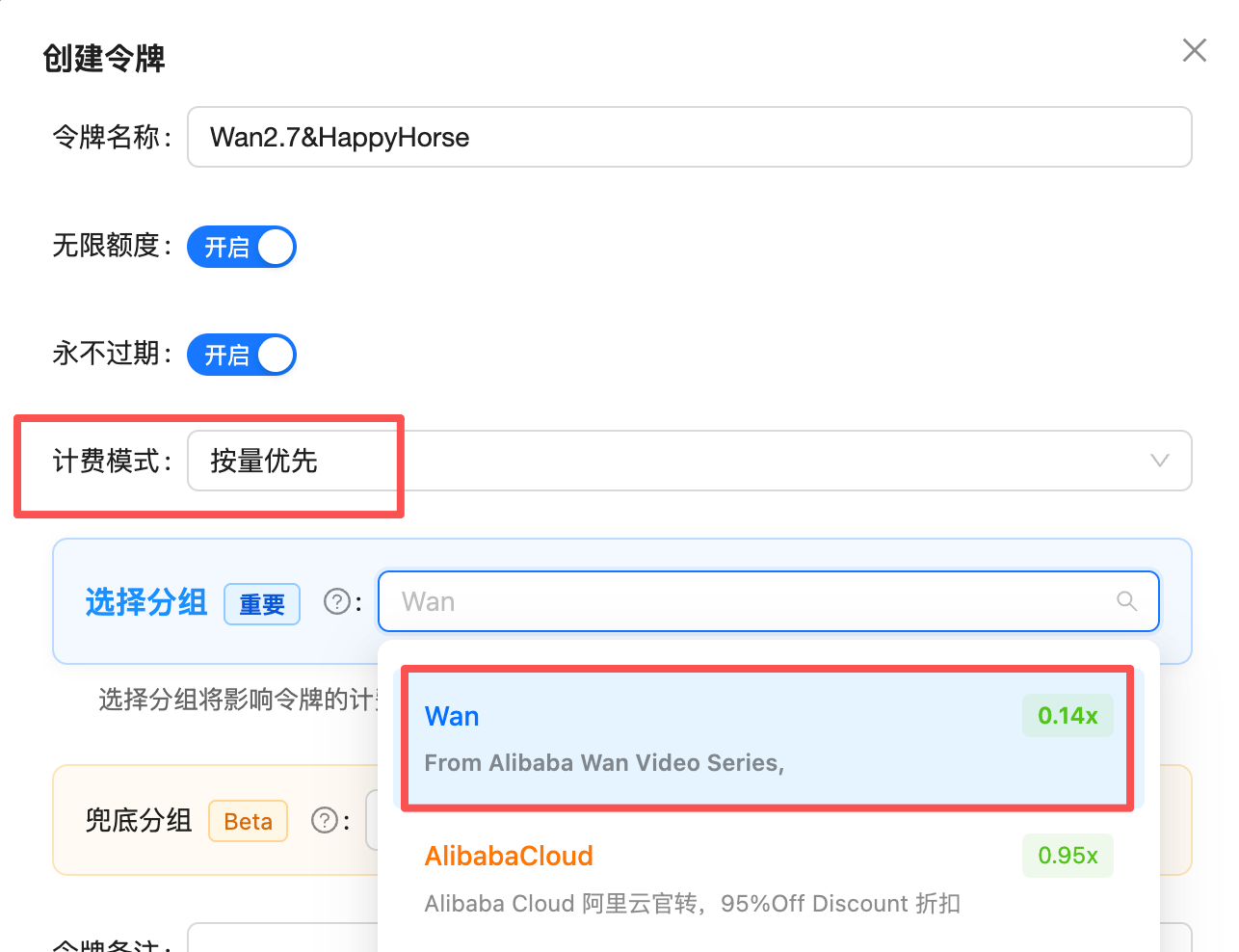
The HappyHorse and [Wan](/en/api-capabilities/wan/overview) series **share a single `Wan` group** — one Token can call both series (the Token in the screenshot is named `Wan2.7&HappyHorse`). Video models are billed **per second**, so the Token must meet two conditions to route successfully:
1. **Billing model**: choose **Pay-as-you-go Priority** or **Pay-as-you-go** — video is billed per second, so **Pay-per-request Tokens cannot route**
2. **Group**: select a group that includes `Wan`
 ## Pricing
### Default price = 98% of Alibaba's official price (simple to reason about)
In the console the `Wan` group shows a rate of **0.14x**, which is denominated in the built-in **RMB** pricing unit. Because APIYI bills in **USD at a fixed 1:7 exchange rate**, the effective conversion is:
```
0.14 (RMB pricing unit) × 7 (fixed exchange rate) = 0.98
```
In other words, the **default price = 98% of Alibaba's official price** — cheaper than buying direct from Alibaba, with no overseas link to build yourself.
> Conversion: **USD price per second = official RMB price × 0.14** (i.e. `× 0.98 ÷ 7`).
### Price detail (default price, billed per second)
HappyHorse-1.0 text-to-video / image-to-video / reference-to-video are priced the same, with two tiers — `720P` / `1080P` (480P is not supported):
| Resolution | Official price | Our default /s | 5 s | 10 s | 12 s |
| ---------- | -------------- | -------------- | ------ | ------ | ------ |
| `720P` | ¥0.9/s | \$0.126/s | \$0.63 | \$1.26 | \$1.51 |
| `1080P` | ¥1.6/s | \$0.224/s | \$1.12 | \$2.24 | \$2.69 |
* `happyhorse-1.0-video-edit` output duration follows the source video and is billed by actual output seconds, not by `duration`.
* Prices shown are the **default (98% of official)**; with the maximum top-up bonus, the effective price is roughly the table value **÷ 1.2** (e.g. 1080P 5 s \$1.12 → about \$0.93).
### Stack top-up bonuses for an even lower effective price
After joining the [top-up bonus program](/en/faq/recharge-promotions), credited balance can be boosted up to \~1.2x, pushing the effective price lower still:
```
0.98 ÷ 1.2 ≈ 0.816
```
So large customers can reach as low as **\~81.6% of the official price**.
| Tier | Effective price (vs Alibaba official) | Formula |
| -------------------------------------------------- | ------------------------------------- | ---------------------------------- |
| Default | **98%** | rate 0.14x × fixed exchange rate 7 |
| With top-up bonuses (max tier for large customers) | **\~81.6%** | 0.98 ÷ 1.2 |
* Billing dimension = **resolution tier × duration (seconds)**; failed tasks are not billed.
* 1:7 is a **fixed settlement exchange rate** (not a preferential rate); it applies uniformly to all USD top-ups.
* For the highest bonus tiers and eligible channels, see [top-up bonuses](/en/faq/recharge-promotions). The latest rate is authoritative in the [console](https://api.apiyi.com/token).
## Related Documentation
`happyhorse-1.0-t2v` online debugging
`happyhorse-1.0-i2v` first-frame generation
`happyhorse-1.0-r2v` up to 9 reference images
`happyhorse-1.0-video-edit` outfit swap / background swap
Also Alibaba's, model selection comparison
The HappyHorse series is provided via the APIYI DashScope passthrough channel. For questions or suggestions, please submit a ticket in the [APIYI Console](https://api.apiyi.com).
## Pricing
### Default price = 98% of Alibaba's official price (simple to reason about)
In the console the `Wan` group shows a rate of **0.14x**, which is denominated in the built-in **RMB** pricing unit. Because APIYI bills in **USD at a fixed 1:7 exchange rate**, the effective conversion is:
```
0.14 (RMB pricing unit) × 7 (fixed exchange rate) = 0.98
```
In other words, the **default price = 98% of Alibaba's official price** — cheaper than buying direct from Alibaba, with no overseas link to build yourself.
> Conversion: **USD price per second = official RMB price × 0.14** (i.e. `× 0.98 ÷ 7`).
### Price detail (default price, billed per second)
HappyHorse-1.0 text-to-video / image-to-video / reference-to-video are priced the same, with two tiers — `720P` / `1080P` (480P is not supported):
| Resolution | Official price | Our default /s | 5 s | 10 s | 12 s |
| ---------- | -------------- | -------------- | ------ | ------ | ------ |
| `720P` | ¥0.9/s | \$0.126/s | \$0.63 | \$1.26 | \$1.51 |
| `1080P` | ¥1.6/s | \$0.224/s | \$1.12 | \$2.24 | \$2.69 |
* `happyhorse-1.0-video-edit` output duration follows the source video and is billed by actual output seconds, not by `duration`.
* Prices shown are the **default (98% of official)**; with the maximum top-up bonus, the effective price is roughly the table value **÷ 1.2** (e.g. 1080P 5 s \$1.12 → about \$0.93).
### Stack top-up bonuses for an even lower effective price
After joining the [top-up bonus program](/en/faq/recharge-promotions), credited balance can be boosted up to \~1.2x, pushing the effective price lower still:
```
0.98 ÷ 1.2 ≈ 0.816
```
So large customers can reach as low as **\~81.6% of the official price**.
| Tier | Effective price (vs Alibaba official) | Formula |
| -------------------------------------------------- | ------------------------------------- | ---------------------------------- |
| Default | **98%** | rate 0.14x × fixed exchange rate 7 |
| With top-up bonuses (max tier for large customers) | **\~81.6%** | 0.98 ÷ 1.2 |
* Billing dimension = **resolution tier × duration (seconds)**; failed tasks are not billed.
* 1:7 is a **fixed settlement exchange rate** (not a preferential rate); it applies uniformly to all USD top-ups.
* For the highest bonus tiers and eligible channels, see [top-up bonuses](/en/faq/recharge-promotions). The latest rate is authoritative in the [console](https://api.apiyi.com/token).
## Related Documentation
`happyhorse-1.0-t2v` online debugging
`happyhorse-1.0-i2v` first-frame generation
`happyhorse-1.0-r2v` up to 9 reference images
`happyhorse-1.0-video-edit` outfit swap / background swap
Also Alibaba's, model selection comparison
The HappyHorse series is provided via the APIYI DashScope passthrough channel. For questions or suggestions, please submit a ticket in the [APIYI Console](https://api.apiyi.com).