> ## Documentation Index
> Fetch the complete documentation index at: https://docs.apiyi.com/llms.txt
> Use this file to discover all available pages before exploring further.
# Advanced Image Generation: Workflow and Realism
> Same model, better output: what consumer image apps add on top of the API — a prompt rewrite layer, reference anchoring, parallel sampling with vision-model selection, and step-by-step retouching. Includes copy-paste realism vocabulary, side-by-side tests, and the cost math.
[How to Get the Image You Want](/en/api-capabilities/image-generation-success-tips) answers "this one attempt failed, how do I rescue it." This page answers the next question: **how do I make every attempt land**.
A question that comes up constantly: consumer image products like `freepik.com` and `higgsfield.ai` run on the same base models you do — the same Nano Banana, GPT-Image and FLUX families — yet their output looks more finished. The gap is not in the model weights. **It is the layer wrapped around the model**, and you can build that layer yourself. This page shows how.
## 1. What consumer image products wrap around the model
Take one of these products apart and you find roughly eight layers outside the model. Every one of them is reproducible on the API:
| What the product does | Problem it solves | How to reproduce it on the API |
| --------------------------------------------------------------------------------------------------------- | ------------------------------------------------------------------------------------- | ------------------------------------------------------------------------------------------------ |
| **Prompt rewrite layer** (Prompt Enhancer) | Users write casually; models want structured description | Call a text model to rewrite first, then hit the image model (section 2) |
| **Style presets** (dozens of clickable presets, plus saved custom ones) | Freezes an aesthetic so users need no photography vocabulary | A preset is just a prompt-fragment constant in your code plus a fixed set of reference images |
| **Identity anchoring** (e.g. Higgsfield's `Soul ID`, which trains a persistent identity on 20–80 photos) | Same person stays the same across generations | Approximate it with reference images (see the boundaries below) |
| **Sampling several, showing one** | The user only ever sees the best candidate, so the perceived hit rate approaches 100% | Generate N in parallel, then let a vision model score and pick (section 3, steps 3–4) |
| **Step-by-step editing** | Compound instructions in one shot reliably break down | Lock composition first, then edit locally, then add text |
| **Upscaling and post-processing** (Freepik acquired Magnific in 2024, offering 2×–16× creative upscaling) | Turns small output into print-ready sizes | APIYI has no such endpoint — generate at the high resolution tier instead (see boundaries below) |
| **Negative prompts and safety fallbacks** | Steers around known model habits, and catches requests moderation would reject | Bake fixed negative phrasing into your template, plus a downgrade path for moderation failures |
| **Asset library and rehosting** | User images never expire or disappear | Copy every result into your own object storage immediately |
**Two platform boundaries to settle before you copy a competitor's feature list:**
1. **APIYI has no upscaling, background-removal, or face-restoration endpoint.** If you need a large image, pick the high resolution tier at generation time (`gpt-image-2` at 4K, Nano Banana Pro at 4K) rather than planning to enlarge afterwards. For a transparent background, only `seedream-5-0` and `seedream-5-0-pro` can be prompted to return PNG with an alpha channel.
2. **APIYI does not offer LoRA or identity training.** The "train once, lock the face forever" capability behind `Soul ID` can only be approximated with reference images: the same character will still drift across scenes and lighting changes, and holds best when the new shot stays close to a frontal view and the original lighting. For commercial characters that demand strict consistency, budget for a human review step.
## 2. The first layer already separates the results: turn casual input into structure
This is the highest-leverage layer, and the one most often skipped.
### Side-by-side test: one model, one brief, two prompts
The brief is "an e-commerce product shot for coffee." On the left is what a user actually types; on the right is the same brief with the missing decisions filled in. Both ran once on `gemini-3-pro-image` (Nano Banana Pro) at `2K`, `1:1`:
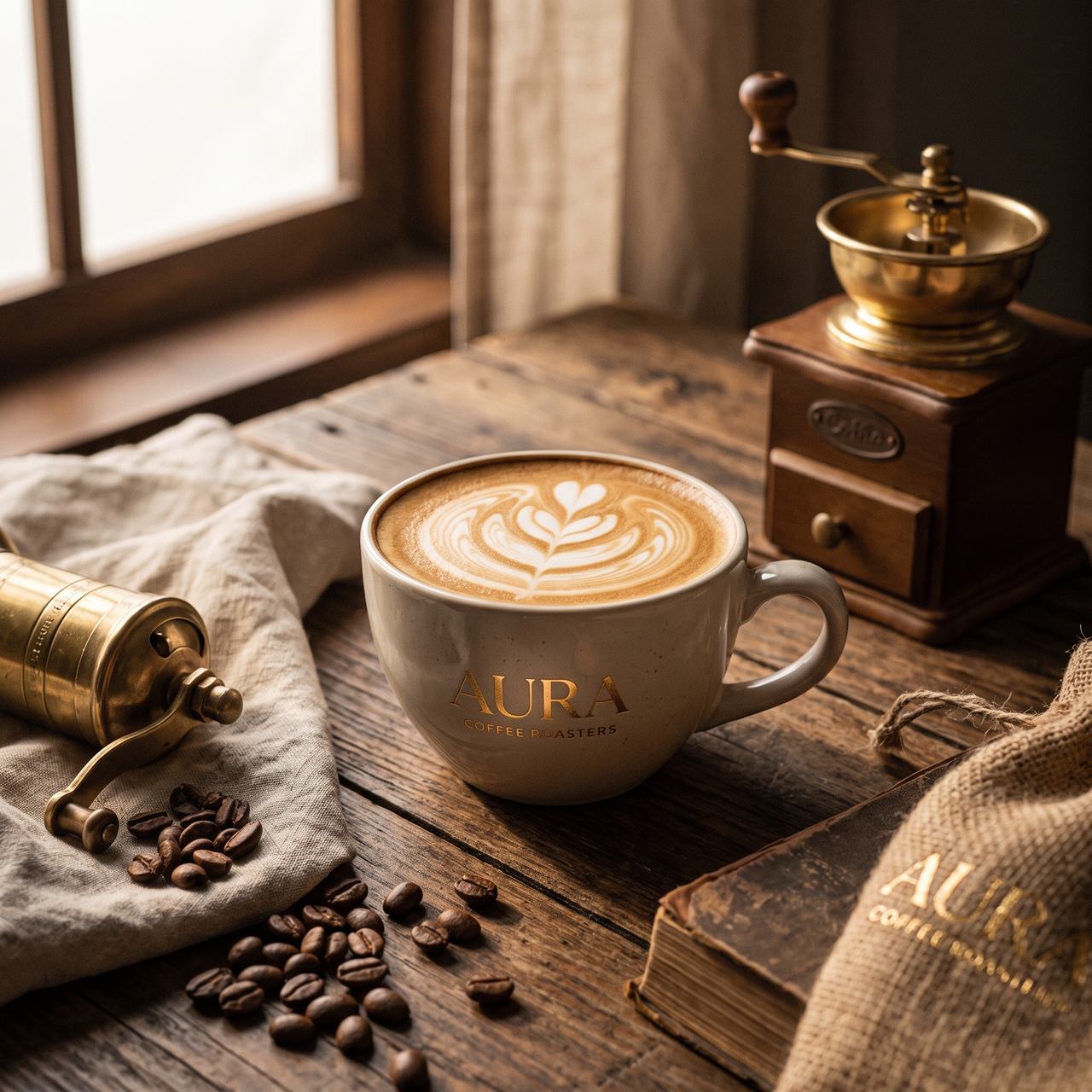
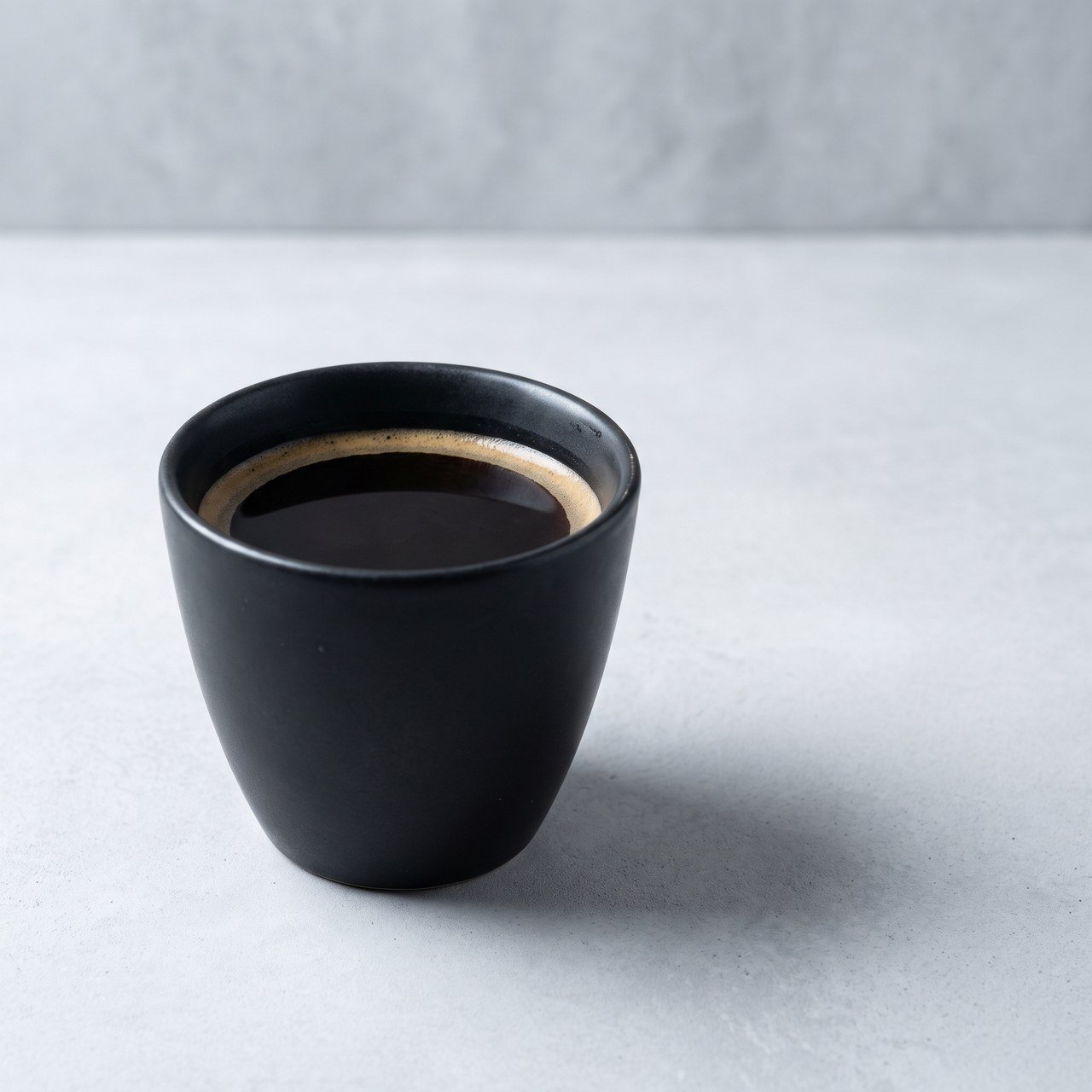 The left image is not ugly, but it is **unusable**. The model made a pile of decisions nobody authorized: it added a grinder and a burlap sack, settled on nostalgic warm grading, and printed an invented brand name on the cup — auto-generated text like that makes the frame worthless commercially. The right image can go straight onto a product page: neutral background, a light setup you can describe out loud, and room for copy.
**"Looks nice" and "is usable" are different targets.** A casual prompt can only reach the first one.
### The six elements a rewrite layer must supply
Rewriting does not mean making the prompt longer. It means filling in missing decisions. An image prompt has six load-bearing parts:
| Element | What happens without it | Example |
| ---------------------- | ------------------------------------------------------ | ------------------------------------------------------------------------------------ |
| **Subject** | The model improvises and adds props you did not want | "A matte black ceramic pour-over cup, filled to 80% with black coffee" |
| **Environment** | Random backgrounds, so a set of images never matches | "Light grey microcement surface, wall in the same tone, blurred" |
| **Light** | Flat global illumination that reads as fake instantly | "Key light from a softbox at upper left, 45 degrees; white bounce card on the right" |
| **Lens and angle** | Perspective and depth of field are out of your control | "85mm macro, f/5.6, front view angled 15 degrees down" |
| **Grading and medium** | Defaults to saturated, rendered-looking output | "Cool neutral white balance, low overall saturation" |
| **Composition** | The subject is always dead centre | "Cup on the left third of the frame, large negative space to the right" |
Resolution is **not** a seventh element. Output resolution comes only from parameters such as `size` / `imageSize`; writing "4K" or "8K" in the prompt does not add a single pixel. See [Image Compression and Output Resolution](/en/api-capabilities/image-compression-resolution).
### The rewrite layer in code
A cheap, fast text model is enough here; its cost is negligible next to generation:
```python theme={null}
import os
import requests
BASE = "https://api.apiyi.com/v1"
API_KEY = os.environ["APIYI_API_KEY"] # never hard-code the key
REWRITE_SYSTEM = """You are an image prompt engineer. Rewrite the user's casual brief
into one structured image prompt.
Fill in all six elements. Supply whatever is missing; never ask the user:
1 Subject: material, colour, count, state
2 Environment: what the background is, what is sharp and what is blurred
3 Light: direction, hardness, fill or no fill — there must be one identifiable key light
4 Lens and angle: focal length, aperture, camera height, tilt
5 Grading and medium: white balance bias, saturation, film or digital character
6 Composition: where the subject sits in the frame, where the negative space is
Rules:
- Output only the prompt body: no explanation, no bullet points, no heading
- No brand names, logos, or legible text unless the user asked for them
- Never use vague quality words such as 8K, ultra HD, masterpiece, perfect
- Keep any element the user specified exactly as written"""
def rewrite(user_prompt: str) -> str:
r = requests.post(
f"{BASE}/chat/completions",
headers={"Authorization": f"Bearer {API_KEY}"},
json={
"model": "gemini-3.5-flash",
"messages": [
{"role": "system", "content": REWRITE_SYSTEM},
{"role": "user", "content": user_prompt},
],
},
timeout=60,
)
r.raise_for_status()
return r.json()["choices"][0]["message"]["content"].strip()
```
Note the rule banning "8K, ultra HD, masterpiece, perfect" — section 4 explains why.
## 3. A pipeline you can actually ship
Chain the remaining four layers onto the rewrite layer and you have the whole thing:
See section 2. This step also neutralizes sensitive content in user input along the way, which measurably reduces how often the request is blocked downstream.
Style is pinned by two things: **a style constant appended to every prompt** (your preset), and **a fixed set of reference images**.
Reference limits differ sharply by family — confirm yours before you design the pipeline:
| Model family | Reference limit | Notes |
| ----------------------- | ----------------- | --------------------------------------------------------------------------------- |
| Nano Banana (all) | **14** (measured) | See [Multi-Image Fusion Testing](/en/api-capabilities/multi-image-fusion-testing) |
| `gpt-image-2` family | **16** | Repeat `image[]` |
| Seedream | **10** | Inputs plus outputs must stay at or below 15 |
| FLUX.2 pro / max / flex | **8** | `input_image_2` … `input_image_8`; klein takes 4, Kontext takes 1 |
| Grok Imagine | **1–4** | A fifth image returns 400 |
Two rules to respect: **"image 1 / image 2" in the prompt map strictly to array order**, so state explicitly which is which; and **Grok only honours reference images on `/v1/images/edits`** — passing them to `/v1/images/generations` silently discards them and still bills you.
The "it nailed it first try" feel of a consumer product is really the product drawing several cards on your behalf.
But **the server-side `n` parameter has no effect on most image models** (Seedream ignores it outright). To get multiple candidates, fire multiple requests concurrently from the client — the skill pages on this site cap it at 5 at a time. Tune concurrency per channel; some start returning 429 at 2, so add exponential backoff.
Once you have N candidates you must pick automatically, otherwise you have simply pushed the choice onto the user.
Send the candidates back to a vision model for scoring over the standard `/v1/chat/completions` image input; see [Vision Understanding](/en/api-capabilities/vision-understanding) for eligible models. Fix the rubric at five dimensions and demand JSON back: instruction compliance, structure and anatomy, text correctness, texture realism, composition.
Do not use `/v1/rerank` for this. `bge-reranker-v2-m3` is a **text-only** reranking model and does not accept images. Scoring images requires a vision understanding model.
Adjust locally after the composition is settled — far higher success rate than one compound instruction:
* **Pixel-level local repaint**: only the **official-relay `gpt-image-2`** supports masks; see [Mask Inpainting Guide](/en/api-capabilities/gpt-image-2/mask-editing).
* **Multi-turn cumulative editing**: supported on the **native Gemini endpoint** for Nano Banana models (feed the previous image back as `role: "model"`); the reverse-engineered routes do not support it.
* **Rehost immediately**: every returned URL is temporary (FLUX about 10 minutes and without CORS; Seedream and R2 about 24 hours), so download into your own object storage as soon as you have it.
### Minimal end-to-end implementation
```python theme={null}
import base64
import json
import os
from concurrent.futures import ThreadPoolExecutor
import requests
BASE = "https://api.apiyi.com"
API_KEY = os.environ["APIYI_API_KEY"]
HEAD = {"Authorization": f"Bearer {API_KEY}"}
STYLE_CONST = "Cool neutral white balance, low saturation, clean frame with generous negative space."
def draw(prompt: str, size: str = "2K", aspect: str = "1:1") -> bytes:
"""Generate one image (Nano Banana Pro, native Gemini endpoint)."""
url = f"{BASE}/v1beta/models/gemini-3-pro-image:generateContent"
body = {
"contents": [{"parts": [{"text": prompt}]}],
"generationConfig": {
"responseModalities": ["IMAGE"],
"imageConfig": {"aspectRatio": aspect, "imageSize": size},
},
}
r = requests.post(url, headers=HEAD, json=body, timeout=600) # headroom for 4K
r.raise_for_status()
parts = r.json()["candidates"][0]["content"]["parts"]
part = next((p for p in parts if p.get("inlineData")), None)
if part is None: # HTTP 200 with no image usually means moderation
raise RuntimeError("no image returned: " + json.dumps(parts)[:300])
return base64.b64decode(part["inlineData"]["data"])
def score(image: bytes, prompt: str) -> dict:
"""Score a candidate with a vision model; returns per-dimension scores and one issue line."""
data_url = "data:image/png;base64," + base64.b64encode(image).decode()
rubric = (
"Score this image and return strict JSON: "
'{"instruction":0-10,"anatomy":0-10,"text":0-10,"texture":0-10,'
'"composition":0-10,"total":0-50,"issue":"one sentence"}. '
"instruction = does it satisfy the brief below; anatomy = errors in hands, limbs, object structure; "
"text = is any text in the image correct (score 10 if there is none); "
"texture = does it read as a real photograph rather than a render; "
"composition = is the framing usable. The brief:\n" + prompt
)
r = requests.post(
f"{BASE}/v1/chat/completions",
headers=HEAD,
json={
"model": "gemini-3.5-flash",
"messages": [{"role": "user", "content": [
{"type": "text", "text": rubric},
{"type": "image_url", "image_url": {"url": data_url}},
]}],
"response_format": {"type": "json_object"},
},
timeout=120,
)
r.raise_for_status()
return json.loads(r.json()["choices"][0]["message"]["content"])
def best_of(user_input: str, n: int = 4) -> bytes:
prompt = rewrite(user_input) + "\n" + STYLE_CONST # steps 1 and 2
with ThreadPoolExecutor(max_workers=n) as pool: # step 3: client-side fan-out
results = list(pool.map(lambda _: _safe(draw, prompt), range(n)))
cands = [img for ok, img in results if ok]
if not cands:
raise RuntimeError("all candidates failed; check moderation or fall back to another model")
with ThreadPoolExecutor(max_workers=len(cands)) as pool: # step 4: score in parallel
scores = list(pool.map(lambda im: score(im, prompt), cands))
ranked = sorted(zip(cands, scores), key=lambda x: x[1]["total"], reverse=True)
return ranked[0][0] # step 5 retouch/rehost hooks in here
def _safe(fn, *args):
try:
return True, fn(*args)
except Exception as e: # one failure must not sink the batch
return False, str(e)
```
## 4. Removing the AI look
"AI look" is not a mystery. It is **a set of concrete traits you can remove one at a time**.
### Side-by-side test
Same model (`gemini-3-pro-image`), same subject, two prompt styles, two images each, first one shown from each batch:
The left image is not ugly, but it is **unusable**. The model made a pile of decisions nobody authorized: it added a grinder and a burlap sack, settled on nostalgic warm grading, and printed an invented brand name on the cup — auto-generated text like that makes the frame worthless commercially. The right image can go straight onto a product page: neutral background, a light setup you can describe out loud, and room for copy.
**"Looks nice" and "is usable" are different targets.** A casual prompt can only reach the first one.
### The six elements a rewrite layer must supply
Rewriting does not mean making the prompt longer. It means filling in missing decisions. An image prompt has six load-bearing parts:
| Element | What happens without it | Example |
| ---------------------- | ------------------------------------------------------ | ------------------------------------------------------------------------------------ |
| **Subject** | The model improvises and adds props you did not want | "A matte black ceramic pour-over cup, filled to 80% with black coffee" |
| **Environment** | Random backgrounds, so a set of images never matches | "Light grey microcement surface, wall in the same tone, blurred" |
| **Light** | Flat global illumination that reads as fake instantly | "Key light from a softbox at upper left, 45 degrees; white bounce card on the right" |
| **Lens and angle** | Perspective and depth of field are out of your control | "85mm macro, f/5.6, front view angled 15 degrees down" |
| **Grading and medium** | Defaults to saturated, rendered-looking output | "Cool neutral white balance, low overall saturation" |
| **Composition** | The subject is always dead centre | "Cup on the left third of the frame, large negative space to the right" |
Resolution is **not** a seventh element. Output resolution comes only from parameters such as `size` / `imageSize`; writing "4K" or "8K" in the prompt does not add a single pixel. See [Image Compression and Output Resolution](/en/api-capabilities/image-compression-resolution).
### The rewrite layer in code
A cheap, fast text model is enough here; its cost is negligible next to generation:
```python theme={null}
import os
import requests
BASE = "https://api.apiyi.com/v1"
API_KEY = os.environ["APIYI_API_KEY"] # never hard-code the key
REWRITE_SYSTEM = """You are an image prompt engineer. Rewrite the user's casual brief
into one structured image prompt.
Fill in all six elements. Supply whatever is missing; never ask the user:
1 Subject: material, colour, count, state
2 Environment: what the background is, what is sharp and what is blurred
3 Light: direction, hardness, fill or no fill — there must be one identifiable key light
4 Lens and angle: focal length, aperture, camera height, tilt
5 Grading and medium: white balance bias, saturation, film or digital character
6 Composition: where the subject sits in the frame, where the negative space is
Rules:
- Output only the prompt body: no explanation, no bullet points, no heading
- No brand names, logos, or legible text unless the user asked for them
- Never use vague quality words such as 8K, ultra HD, masterpiece, perfect
- Keep any element the user specified exactly as written"""
def rewrite(user_prompt: str) -> str:
r = requests.post(
f"{BASE}/chat/completions",
headers={"Authorization": f"Bearer {API_KEY}"},
json={
"model": "gemini-3.5-flash",
"messages": [
{"role": "system", "content": REWRITE_SYSTEM},
{"role": "user", "content": user_prompt},
],
},
timeout=60,
)
r.raise_for_status()
return r.json()["choices"][0]["message"]["content"].strip()
```
Note the rule banning "8K, ultra HD, masterpiece, perfect" — section 4 explains why.
## 3. A pipeline you can actually ship
Chain the remaining four layers onto the rewrite layer and you have the whole thing:
See section 2. This step also neutralizes sensitive content in user input along the way, which measurably reduces how often the request is blocked downstream.
Style is pinned by two things: **a style constant appended to every prompt** (your preset), and **a fixed set of reference images**.
Reference limits differ sharply by family — confirm yours before you design the pipeline:
| Model family | Reference limit | Notes |
| ----------------------- | ----------------- | --------------------------------------------------------------------------------- |
| Nano Banana (all) | **14** (measured) | See [Multi-Image Fusion Testing](/en/api-capabilities/multi-image-fusion-testing) |
| `gpt-image-2` family | **16** | Repeat `image[]` |
| Seedream | **10** | Inputs plus outputs must stay at or below 15 |
| FLUX.2 pro / max / flex | **8** | `input_image_2` … `input_image_8`; klein takes 4, Kontext takes 1 |
| Grok Imagine | **1–4** | A fifth image returns 400 |
Two rules to respect: **"image 1 / image 2" in the prompt map strictly to array order**, so state explicitly which is which; and **Grok only honours reference images on `/v1/images/edits`** — passing them to `/v1/images/generations` silently discards them and still bills you.
The "it nailed it first try" feel of a consumer product is really the product drawing several cards on your behalf.
But **the server-side `n` parameter has no effect on most image models** (Seedream ignores it outright). To get multiple candidates, fire multiple requests concurrently from the client — the skill pages on this site cap it at 5 at a time. Tune concurrency per channel; some start returning 429 at 2, so add exponential backoff.
Once you have N candidates you must pick automatically, otherwise you have simply pushed the choice onto the user.
Send the candidates back to a vision model for scoring over the standard `/v1/chat/completions` image input; see [Vision Understanding](/en/api-capabilities/vision-understanding) for eligible models. Fix the rubric at five dimensions and demand JSON back: instruction compliance, structure and anatomy, text correctness, texture realism, composition.
Do not use `/v1/rerank` for this. `bge-reranker-v2-m3` is a **text-only** reranking model and does not accept images. Scoring images requires a vision understanding model.
Adjust locally after the composition is settled — far higher success rate than one compound instruction:
* **Pixel-level local repaint**: only the **official-relay `gpt-image-2`** supports masks; see [Mask Inpainting Guide](/en/api-capabilities/gpt-image-2/mask-editing).
* **Multi-turn cumulative editing**: supported on the **native Gemini endpoint** for Nano Banana models (feed the previous image back as `role: "model"`); the reverse-engineered routes do not support it.
* **Rehost immediately**: every returned URL is temporary (FLUX about 10 minutes and without CORS; Seedream and R2 about 24 hours), so download into your own object storage as soon as you have it.
### Minimal end-to-end implementation
```python theme={null}
import base64
import json
import os
from concurrent.futures import ThreadPoolExecutor
import requests
BASE = "https://api.apiyi.com"
API_KEY = os.environ["APIYI_API_KEY"]
HEAD = {"Authorization": f"Bearer {API_KEY}"}
STYLE_CONST = "Cool neutral white balance, low saturation, clean frame with generous negative space."
def draw(prompt: str, size: str = "2K", aspect: str = "1:1") -> bytes:
"""Generate one image (Nano Banana Pro, native Gemini endpoint)."""
url = f"{BASE}/v1beta/models/gemini-3-pro-image:generateContent"
body = {
"contents": [{"parts": [{"text": prompt}]}],
"generationConfig": {
"responseModalities": ["IMAGE"],
"imageConfig": {"aspectRatio": aspect, "imageSize": size},
},
}
r = requests.post(url, headers=HEAD, json=body, timeout=600) # headroom for 4K
r.raise_for_status()
parts = r.json()["candidates"][0]["content"]["parts"]
part = next((p for p in parts if p.get("inlineData")), None)
if part is None: # HTTP 200 with no image usually means moderation
raise RuntimeError("no image returned: " + json.dumps(parts)[:300])
return base64.b64decode(part["inlineData"]["data"])
def score(image: bytes, prompt: str) -> dict:
"""Score a candidate with a vision model; returns per-dimension scores and one issue line."""
data_url = "data:image/png;base64," + base64.b64encode(image).decode()
rubric = (
"Score this image and return strict JSON: "
'{"instruction":0-10,"anatomy":0-10,"text":0-10,"texture":0-10,'
'"composition":0-10,"total":0-50,"issue":"one sentence"}. '
"instruction = does it satisfy the brief below; anatomy = errors in hands, limbs, object structure; "
"text = is any text in the image correct (score 10 if there is none); "
"texture = does it read as a real photograph rather than a render; "
"composition = is the framing usable. The brief:\n" + prompt
)
r = requests.post(
f"{BASE}/v1/chat/completions",
headers=HEAD,
json={
"model": "gemini-3.5-flash",
"messages": [{"role": "user", "content": [
{"type": "text", "text": rubric},
{"type": "image_url", "image_url": {"url": data_url}},
]}],
"response_format": {"type": "json_object"},
},
timeout=120,
)
r.raise_for_status()
return json.loads(r.json()["choices"][0]["message"]["content"])
def best_of(user_input: str, n: int = 4) -> bytes:
prompt = rewrite(user_input) + "\n" + STYLE_CONST # steps 1 and 2
with ThreadPoolExecutor(max_workers=n) as pool: # step 3: client-side fan-out
results = list(pool.map(lambda _: _safe(draw, prompt), range(n)))
cands = [img for ok, img in results if ok]
if not cands:
raise RuntimeError("all candidates failed; check moderation or fall back to another model")
with ThreadPoolExecutor(max_workers=len(cands)) as pool: # step 4: score in parallel
scores = list(pool.map(lambda im: score(im, prompt), cands))
ranked = sorted(zip(cands, scores), key=lambda x: x[1]["total"], reverse=True)
return ranked[0][0] # step 5 retouch/rehost hooks in here
def _safe(fn, *args):
try:
return True, fn(*args)
except Exception as e: # one failure must not sink the batch
return False, str(e)
```
## 4. Removing the AI look
"AI look" is not a mystery. It is **a set of concrete traits you can remove one at a time**.
### Side-by-side test
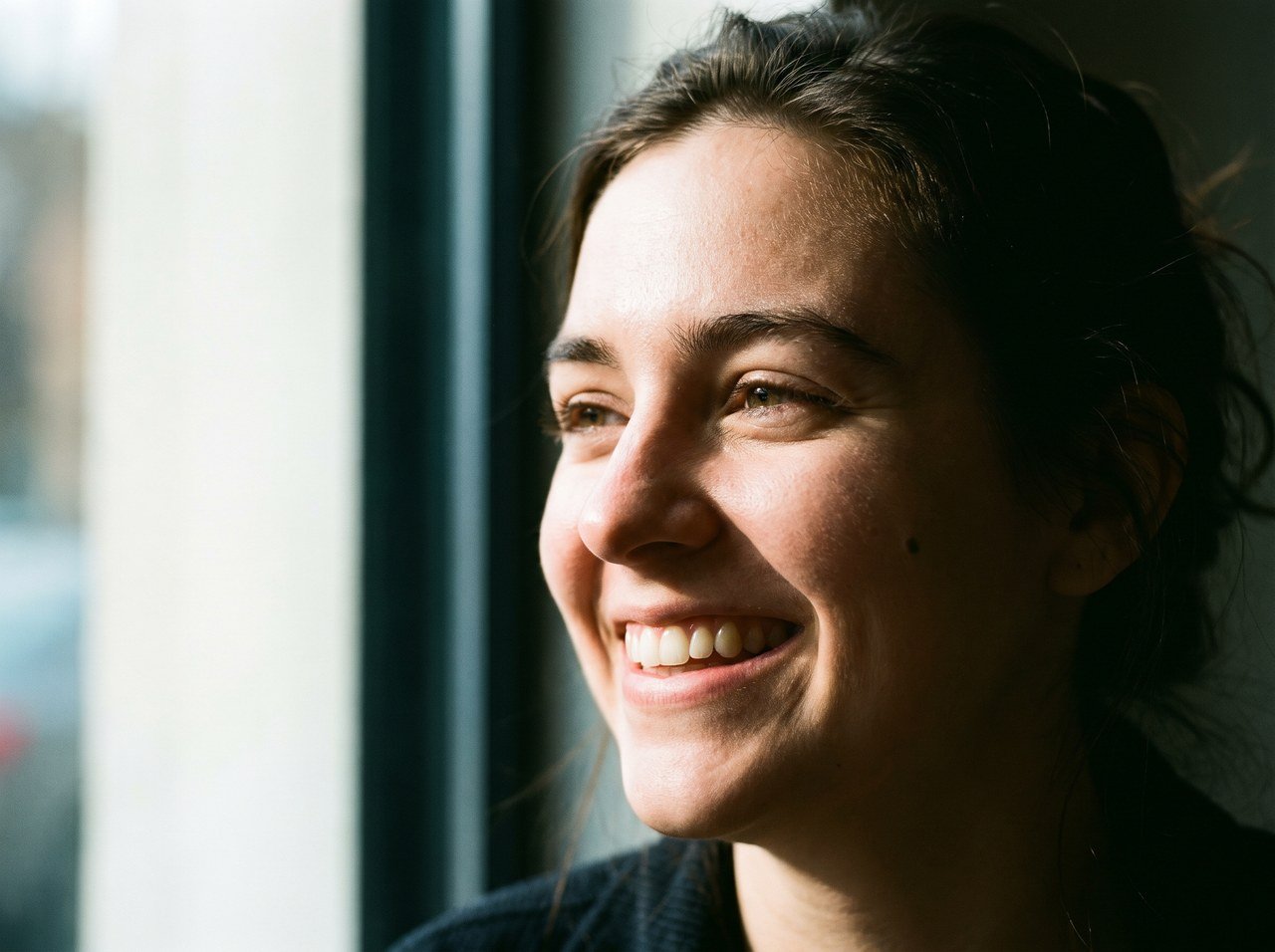
Same model (`gemini-3-pro-image`), same subject, two prompt styles, two images each, first one shown from each batch:
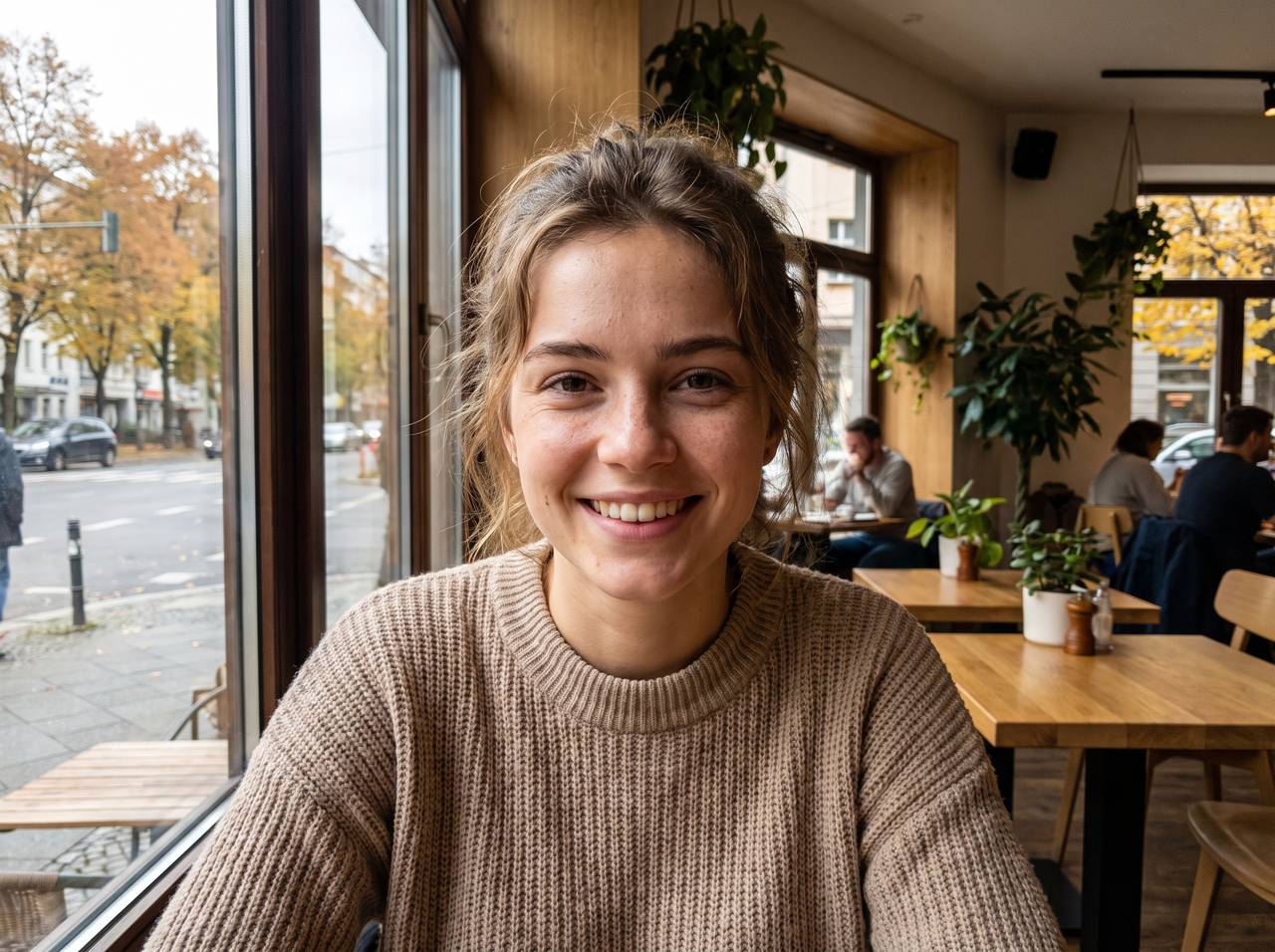
 The left image is not bad — the base model is strong enough that a bare prompt still yields a good-looking picture. But it carries the full trait set: **the subject is locked dead centre, the light is so even you cannot say where it comes from, and every element is agreeable**. And it is not a fluke: both images from that batch shared essentially the same framing and lighting pattern.
The right image switched approach: the light has a direction, half the face is allowed to fall into shadow, skin shows oil and pores, there is a mole on the cheek, stray hairs are unbrushed, and the subject sits right of centre. It reads as **a specific person photographed at a specific moment**, rather than "stock image of woman smiling in cafe."
This is also where the real value of a pipeline shows. It does not turn ugly output into pretty output — it **turns "lucky good" into "the good you specified, can describe, and can reproduce."** A stakeholder might not prefer the right image, but with the left one you cannot say why it looks the way it does, and you cannot ask the next image to match it.
### Symptom, fix, and what not to write
| Symptom of the AI look | Fix (write this into the prompt) | Do not write this |
| ----------------------------------------------- | ---------------------------------------------------------------------------------------------------------------------- | ----------------------------------------- |
| Subject always centred, symmetric framing | Specify placement: "subject right of centre, negative space at left" | "perfect composition", "golden ratio" |
| Plastic skin with no pores | "natural skin texture, visible pores and facial fuzz, slight shine on the nose, no retouching" | "flawless skin", "exquisite", "beautiful" |
| Even light with no identifiable source | Name one key light and its hardness: "window light from the left is the only source, right half of the face in shadow" | "perfect lighting", "soft lighting" |
| Fake depth of field, background looks pasted on | Give focal length and aperture: "85mm, f/2.8, focus on the near eye" | "blurred background", "cinematic" |
| Oversaturated, glowing colour | Give medium and white balance: "Kodak Portra 400 character, warm highlights and cool shadows, low saturation" | "vivid colours", "HDR" |
| Everything brand new and unworn | Add wear deliberately: "pilled sweater, water rings and crumbs on the table" | "clean and tidy", "premium texture" |
| Reads like a poster or a render | Specify the shooting situation: "candid", "eye level from the next table" | "8K", "ultra HD", "masterpiece" |
**Vague quality words such as `8K`, `ultra HD`, `ultra detailed`, `masterpiece` and `perfect` are a net negative.** They add no resolution (only parameters do that) and they push the model toward an over-sharpened, oversaturated render — precisely the core of the AI look. The left-hand prompt above was stuffed with them, and the result shows it. If you want quality, write specific light, lens and medium instead.
### Four blocks of copy-paste control language
Mix into the prompt as needed; one or two lines from each block is usually enough:
window light from the left is the only source in frame / hard back-side light at three in the afternoon / backlit, with a rim light on the hair / a desk lamp as a practical light inside the frame / overcast diffuse light with no distinct shadows
35mm f/2.0, candid, at eye level / 85mm f/2.8, focus on the near eye / 24mm from a low camera position, slight edge distortion / long lens compressing the space, flattened background layers / mild vignetting in the corners
Kodak Portra 400 character, fine grain / warm highlights, cool shadows / Polaroid instant film, low contrast, soft edges / noise and colour cast of an early CCD digital camera / low saturation overall, no sharpening
natural skin texture, visible pores and facial fuzz / a few loose strands of hair, unbrushed / pilled sweater, worn cuffs / water rings, fingerprints and crumbs on the table / off-centre framing, part of the subject cropped at the edge
### Three complete examples
Candid half-body portrait: a woman in her mid-twenties by a cafe window, turned to the side, looking out, a smile she is not quite holding back. Window light from the left is the only source in the frame; the right half of her face falls into shadow, with a small hard-edged shadow under the bridge of her nose. 85mm lens, f/2.8, eye level, focus on the near eye. Kodak Portra 400 character with fine visible grain, warm highlights and cool shadows, low saturation overall. Natural skin: visible pores and facial fuzz, a little shine on the side of the nose, a small mole on the left cheek, a few stray eyebrow hairs, loose strands of hair unbrushed at the forehead. No skin smoothing, no beauty retouching, no sharpening. Subject right of centre, negative space at left.
E-commerce hero shot: a matte black ceramic pour-over cup filled to 80% with black coffee, a fine ring of crema on the surface. It sits on a light grey microcement surface, with a wall in the same tone blurred behind it. Key light from a softbox at upper left, 45 degrees; a white bounce card at the right leaves a narrow highlight along the right edge of the cup; a soft cast shadow falls to the rear right. 85mm macro lens, f/5.6, front view angled 15 degrees down, the whole cup sharp. Cool neutral white balance, low saturation overall. The glaze has slight handmade unevenness and one tiny kiln mark, and the rim shows a very faint trace of use. Generous negative space, cup on the left third of the frame. No brand names or text anywhere in the image.
A narrow old-town street at six in the evening, just after rain, puddles reflecting the light boxes of the shops on both sides. The only key light is a warm street lamp at the end of the street, with shop windows as fill, and a trace of cold dusk still in the sky, setting up a warm-cool contrast. 28mm lens, f/4, camera at eye level, tilted slightly up. Low saturation overall, noise retained in the shadows, no shadow lifting. The walls carry water stains, torn old posters and air-conditioning units; power lines cross the upper part of the frame. Nobody faces the camera; the passers-by are seen from behind and slightly motion blurred.
## 5. Facts that will reshape your pipeline design
Knowing these up front saves a round of rework:
| Fact | Consequence for the pipeline |
| ----------------------------------------------------------------------------------------------------------------------------------------------------------------------------------------------------------------- | ------------------------------------------------------------------------------------------------------------------------------------------------------------------------------------------------- |
| **Seed is effectively unavailable across this product line**: no Nano Banana or GPT-Image model exposes a seed, Seedream 4.x / 5.x seeds have been measured as ineffective, and Grok Imagine does not support one | Do not build reproducibility on seeds. **The only reliable reproduction is archiving the full successful request** — prompt, reference images, every parameter — and replaying it verbatim |
| **The server-side `n` parameter has no effect on most image models** | Multiple candidates must come from client-side concurrency; load-test the concurrency per channel and add exponential backoff |
| **All image APIs are synchronous, have no task ID, and still bill on disconnect** | The pipeline needs its own task queue; see [Build Your Own Async Queue](/en/api-capabilities/image-async-queue) and [Image API Essentials](/en/api-capabilities/image-api-best-practices) |
| **No upscaling, background-removal, or face-restoration endpoint** | Settle the output size at generation time; a transparent background is only reachable by prompting the `seedream-5-0` family |
| **HTTP 200 with no image usually means a moderation block** | Selection logic must distinguish "no image came back" from "an image came back and it is bad"; for the former see [Gemini Image Error Handling](/en/api-capabilities/gemini-image-error-handling) |
| **Every returned image URL is a temporary link** | Rehost the moment you receive it; never store the upstream URL in your database |
## 6. Cost math: when the pipeline is worth it
A pipeline trades money for success rate. Output dominates image cost (`gpt-image-2` bills output at \$30 per million tokens), while the text and vision models used for rewriting and scoring are close to noise. So cost is essentially "how many candidates did you generate."
Use three tiers rather than one setting for everything:
| Tier | Composition | Relative cost | Use for |
| ------------ | ---------------------------------------------------- | ------------- | --------------------------------------------------------------- |
| **Draft** | Single shot from a Lite model | 1× | Internal previews, bulk placeholders, casual user experiments |
| **Standard** | Rewrite + 2 candidates + scored pick | about 2× | The default path in a consumer product |
| **Premium** | Rewrite + 4 candidates + scoring + one local retouch | about 5× | Product hero images, ad creative, anything delivered externally |
The test is simple: **will anyone outside your team see this image?** If yes, Standard or above pays for itself; if it is an internal glance, Draft is enough. You can also add a gate in between — only generate more candidates when the top score falls below a threshold, which lets most requests converge at two.
## Quick summary
* The gap is not in the model weights, it is in **the eight layers around the model**: rewrite, presets, anchoring, sampling, selection, step-by-step editing, post-processing, rehosting.
* **The rewrite layer has the best return**: fill in subject, environment, light, lens, grading and composition, and "looks nice" becomes "is usable."
* **Multiple candidates plus vision-model scoring** is where the high perceived success rate of consumer products actually comes from. `n` does not work, so fan out client-side; `/v1/rerank` cannot score images.
* **Removing the AI look means adding specifics, not adjectives**: name one light source, give focal length and aperture, specify medium and grain, add imperfections on purpose, and move the subject off centre.
* **`8K` / `masterpiece` / `perfect lighting` are net negatives** — no extra resolution, and they push the frame toward a rendered look.
* **Do not count on seeds for reproduction**; archive the full request instead. Image APIs are synchronous and bill on disconnect, so the pipeline needs a queue.
* APIYI has no upscaling, background-removal, or identity-training endpoints; design around those layers from the start.
## Related documentation
Rescuing a single failed call: rewrite the prompt, retry, switch models, isolate with a test tool
Synchronous calls, timeout tiers, billing, base64 handling, input image preprocessing
Pixel-level local edits, exclusive to the official-relay gpt-image-2
How reference limits were measured, plus a 14-image fusion result
Vision models you can use to score candidate images, and how to call them
Wrapping synchronous generation in a task queue to support a multi-candidate pipeline
The left image is not bad — the base model is strong enough that a bare prompt still yields a good-looking picture. But it carries the full trait set: **the subject is locked dead centre, the light is so even you cannot say where it comes from, and every element is agreeable**. And it is not a fluke: both images from that batch shared essentially the same framing and lighting pattern.
The right image switched approach: the light has a direction, half the face is allowed to fall into shadow, skin shows oil and pores, there is a mole on the cheek, stray hairs are unbrushed, and the subject sits right of centre. It reads as **a specific person photographed at a specific moment**, rather than "stock image of woman smiling in cafe."
This is also where the real value of a pipeline shows. It does not turn ugly output into pretty output — it **turns "lucky good" into "the good you specified, can describe, and can reproduce."** A stakeholder might not prefer the right image, but with the left one you cannot say why it looks the way it does, and you cannot ask the next image to match it.
### Symptom, fix, and what not to write
| Symptom of the AI look | Fix (write this into the prompt) | Do not write this |
| ----------------------------------------------- | ---------------------------------------------------------------------------------------------------------------------- | ----------------------------------------- |
| Subject always centred, symmetric framing | Specify placement: "subject right of centre, negative space at left" | "perfect composition", "golden ratio" |
| Plastic skin with no pores | "natural skin texture, visible pores and facial fuzz, slight shine on the nose, no retouching" | "flawless skin", "exquisite", "beautiful" |
| Even light with no identifiable source | Name one key light and its hardness: "window light from the left is the only source, right half of the face in shadow" | "perfect lighting", "soft lighting" |
| Fake depth of field, background looks pasted on | Give focal length and aperture: "85mm, f/2.8, focus on the near eye" | "blurred background", "cinematic" |
| Oversaturated, glowing colour | Give medium and white balance: "Kodak Portra 400 character, warm highlights and cool shadows, low saturation" | "vivid colours", "HDR" |
| Everything brand new and unworn | Add wear deliberately: "pilled sweater, water rings and crumbs on the table" | "clean and tidy", "premium texture" |
| Reads like a poster or a render | Specify the shooting situation: "candid", "eye level from the next table" | "8K", "ultra HD", "masterpiece" |
**Vague quality words such as `8K`, `ultra HD`, `ultra detailed`, `masterpiece` and `perfect` are a net negative.** They add no resolution (only parameters do that) and they push the model toward an over-sharpened, oversaturated render — precisely the core of the AI look. The left-hand prompt above was stuffed with them, and the result shows it. If you want quality, write specific light, lens and medium instead.
### Four blocks of copy-paste control language
Mix into the prompt as needed; one or two lines from each block is usually enough:
window light from the left is the only source in frame / hard back-side light at three in the afternoon / backlit, with a rim light on the hair / a desk lamp as a practical light inside the frame / overcast diffuse light with no distinct shadows
35mm f/2.0, candid, at eye level / 85mm f/2.8, focus on the near eye / 24mm from a low camera position, slight edge distortion / long lens compressing the space, flattened background layers / mild vignetting in the corners
Kodak Portra 400 character, fine grain / warm highlights, cool shadows / Polaroid instant film, low contrast, soft edges / noise and colour cast of an early CCD digital camera / low saturation overall, no sharpening
natural skin texture, visible pores and facial fuzz / a few loose strands of hair, unbrushed / pilled sweater, worn cuffs / water rings, fingerprints and crumbs on the table / off-centre framing, part of the subject cropped at the edge
### Three complete examples
Candid half-body portrait: a woman in her mid-twenties by a cafe window, turned to the side, looking out, a smile she is not quite holding back. Window light from the left is the only source in the frame; the right half of her face falls into shadow, with a small hard-edged shadow under the bridge of her nose. 85mm lens, f/2.8, eye level, focus on the near eye. Kodak Portra 400 character with fine visible grain, warm highlights and cool shadows, low saturation overall. Natural skin: visible pores and facial fuzz, a little shine on the side of the nose, a small mole on the left cheek, a few stray eyebrow hairs, loose strands of hair unbrushed at the forehead. No skin smoothing, no beauty retouching, no sharpening. Subject right of centre, negative space at left.
E-commerce hero shot: a matte black ceramic pour-over cup filled to 80% with black coffee, a fine ring of crema on the surface. It sits on a light grey microcement surface, with a wall in the same tone blurred behind it. Key light from a softbox at upper left, 45 degrees; a white bounce card at the right leaves a narrow highlight along the right edge of the cup; a soft cast shadow falls to the rear right. 85mm macro lens, f/5.6, front view angled 15 degrees down, the whole cup sharp. Cool neutral white balance, low saturation overall. The glaze has slight handmade unevenness and one tiny kiln mark, and the rim shows a very faint trace of use. Generous negative space, cup on the left third of the frame. No brand names or text anywhere in the image.
A narrow old-town street at six in the evening, just after rain, puddles reflecting the light boxes of the shops on both sides. The only key light is a warm street lamp at the end of the street, with shop windows as fill, and a trace of cold dusk still in the sky, setting up a warm-cool contrast. 28mm lens, f/4, camera at eye level, tilted slightly up. Low saturation overall, noise retained in the shadows, no shadow lifting. The walls carry water stains, torn old posters and air-conditioning units; power lines cross the upper part of the frame. Nobody faces the camera; the passers-by are seen from behind and slightly motion blurred.
## 5. Facts that will reshape your pipeline design
Knowing these up front saves a round of rework:
| Fact | Consequence for the pipeline |
| ----------------------------------------------------------------------------------------------------------------------------------------------------------------------------------------------------------------- | ------------------------------------------------------------------------------------------------------------------------------------------------------------------------------------------------- |
| **Seed is effectively unavailable across this product line**: no Nano Banana or GPT-Image model exposes a seed, Seedream 4.x / 5.x seeds have been measured as ineffective, and Grok Imagine does not support one | Do not build reproducibility on seeds. **The only reliable reproduction is archiving the full successful request** — prompt, reference images, every parameter — and replaying it verbatim |
| **The server-side `n` parameter has no effect on most image models** | Multiple candidates must come from client-side concurrency; load-test the concurrency per channel and add exponential backoff |
| **All image APIs are synchronous, have no task ID, and still bill on disconnect** | The pipeline needs its own task queue; see [Build Your Own Async Queue](/en/api-capabilities/image-async-queue) and [Image API Essentials](/en/api-capabilities/image-api-best-practices) |
| **No upscaling, background-removal, or face-restoration endpoint** | Settle the output size at generation time; a transparent background is only reachable by prompting the `seedream-5-0` family |
| **HTTP 200 with no image usually means a moderation block** | Selection logic must distinguish "no image came back" from "an image came back and it is bad"; for the former see [Gemini Image Error Handling](/en/api-capabilities/gemini-image-error-handling) |
| **Every returned image URL is a temporary link** | Rehost the moment you receive it; never store the upstream URL in your database |
## 6. Cost math: when the pipeline is worth it
A pipeline trades money for success rate. Output dominates image cost (`gpt-image-2` bills output at \$30 per million tokens), while the text and vision models used for rewriting and scoring are close to noise. So cost is essentially "how many candidates did you generate."
Use three tiers rather than one setting for everything:
| Tier | Composition | Relative cost | Use for |
| ------------ | ---------------------------------------------------- | ------------- | --------------------------------------------------------------- |
| **Draft** | Single shot from a Lite model | 1× | Internal previews, bulk placeholders, casual user experiments |
| **Standard** | Rewrite + 2 candidates + scored pick | about 2× | The default path in a consumer product |
| **Premium** | Rewrite + 4 candidates + scoring + one local retouch | about 5× | Product hero images, ad creative, anything delivered externally |
The test is simple: **will anyone outside your team see this image?** If yes, Standard or above pays for itself; if it is an internal glance, Draft is enough. You can also add a gate in between — only generate more candidates when the top score falls below a threshold, which lets most requests converge at two.
## Quick summary
* The gap is not in the model weights, it is in **the eight layers around the model**: rewrite, presets, anchoring, sampling, selection, step-by-step editing, post-processing, rehosting.
* **The rewrite layer has the best return**: fill in subject, environment, light, lens, grading and composition, and "looks nice" becomes "is usable."
* **Multiple candidates plus vision-model scoring** is where the high perceived success rate of consumer products actually comes from. `n` does not work, so fan out client-side; `/v1/rerank` cannot score images.
* **Removing the AI look means adding specifics, not adjectives**: name one light source, give focal length and aperture, specify medium and grain, add imperfections on purpose, and move the subject off centre.
* **`8K` / `masterpiece` / `perfect lighting` are net negatives** — no extra resolution, and they push the frame toward a rendered look.
* **Do not count on seeds for reproduction**; archive the full request instead. Image APIs are synchronous and bill on disconnect, so the pipeline needs a queue.
* APIYI has no upscaling, background-removal, or identity-training endpoints; design around those layers from the start.
## Related documentation
Rescuing a single failed call: rewrite the prompt, retry, switch models, isolate with a test tool
Synchronous calls, timeout tiers, billing, base64 handling, input image preprocessing
Pixel-level local edits, exclusive to the official-relay gpt-image-2
How reference limits were measured, plus a 14-image fusion result
Vision models you can use to score candidate images, and how to call them
Wrapping synchronous generation in a task queue to support a multi-candidate pipeline