> ## Documentation Index
> Fetch the complete documentation index at: https://docs.apiyi.com/llms.txt
> Use this file to discover all available pages before exploring further.
# Troubleshooting Safety Rejections: Find the Trigger Word by Ablation
> A real case: the same prompt renders fine in the ChatGPT web app but the API returns safety_violations=[sexual]. Learn which layer blocks the request, why moderation: low does not help, why the web app passes, and how a 20-call ablation pinpoints the trigger word with a fix that keeps the original intent.
Getting blocked by the safety system **does not mean your prompt contains anything explicit**. Far more often, one word in the prompt pushes the *rendered image* over the line, and you cannot see the problem by reading the prompt. This page walks through a real customer case: which layer does the blocking, why the web app passes, why `moderation: low` does nothing, and a method that finds the trigger word in about 20 calls.
## The case: web app renders, API returns sexual
A customer used `gpt-image-2.5-sunburst` to generate a character sheet (face close-up on the left, front / side / back turnaround on the right). The request:
```json theme={null}
{
"model": "gpt-image-2.5-sunburst-2026-09-08",
"prompt": "帮我生成一个妈感美艳女主(外国人),皮肤通透有自然光泽,无过度磨皮;皮肤保留自然原生纹理、皮肤通透有自然光泽;整体画面自然真实,8K超高清,细节丰富,真实人像摄影质感,纯白背景#一张综合角色设定图,左侧为脸部大特写,右侧为全身标准三视图,露出完整的头部,脸部特写和全身三视图要在一张图。全身三视图:右侧依次排列全身的正面视角、90 度纯侧面视角(头部完全侧转)、背面视角。",
"size": "2736x1536",
"quality": "xhigh",
"background": "auto",
"n": 1
}
```
The prompt is in Chinese. Roughly: *a glamorous, mature-looking Western woman, natural skin texture, photorealistic, pure white background; a character sheet with a face close-up on the left and a full-body front / 90-degree side / back turnaround on the right, head fully visible.* The API consistently returned 400:
```json theme={null}
{
"status_code": 400,
"error": {
"message": "Your request was rejected by the safety system. If you believe this is an error, contact us at ***.***.com and include the request ID req_e97b3571a1e2433da4b154fe7ea7a82c. safety_violations=[sexual]."
}
}
```
The customer's reaction is typical:
> I get that it is content safety, but the same thing works in the ChatGPT web app. You have to tell me why the web app passes.
Nothing in the prompt is explicit. It is just "glamorous woman + turnaround + white background". A ticket of the form "I did not write anything bad but got blocked" needs a completely different approach from "I wrote something bad and got blocked".
## First: which layer is blocking?
Image models have two safety gates. They fail differently and are debugged differently:
| | Prompt-level block | Output-image block |
| --------------------- | ----------------------------------- | ------------------------------------------------------------------------------------------ |
| What is checked | The text you sent | The image that was generated |
| Response time | 400 within **a few seconds** | **Same as a successful call** (the image is rendered first, then rejected by a classifier) |
| Same prompt, repeated | Stable: rejected every time | **Stochastic**: every render differs, so it passes sometimes and fails sometimes |
| Fix | Remove the obviously violating word | Find the word that pushes the *render* over the line |
**Latency is the tell.** In this case the failed calls took 42 to 51 seconds and the successful ones 46 to 57 seconds. No difference, so the image was fully rendered and the output-side classifier flagged it as sexual. The ablation below confirms it: one prompt run three times came back 1 pass / 2 rejects.
A prompt-level block returns about as fast as a parameter error. If your 400 arrived after half a minute or more, treat it as an output-image block first, and do not start deleting words yet.
## Why the web app passes
This is the same point made in [How to Get Satisfying Images](/en/api-capabilities/image-generation-success-tips): **the web app is an agent, the API is a single atomic call**.
* The ChatGPT web app does not feed your text to the image model verbatim. The chat model **rewrites and expands** the prompt first, and it usually fills in clothing, setting and lighting on its own. That is exactly the "add clothing" step described below, done for you.
* The API sends your prompt as-is. You did not say what she wears, so the model decides. Under "glamorous + full-body turnaround + white background" it leans toward a tight or minimal outfit, which is what a character sheet often looks like, and the render crosses the line.
* Add the randomness of output-side moderation on top, and "web app passed once, API failed once" is not a contradiction.
So "the web app passes" does not imply "the API moderates harder". The two paths do not send the same prompt to the model.
## Word ablation: change one thing at a time
A prompt like this has a dozen adjectives and layout constraints. Guessing which one is at fault is slow. The effective approach is **ablation**: remove or replace exactly one word block per variant, keep everything else byte-identical, and watch which variant flips the result.
Three buckets: character adjectives (glamorous, sexy, alluring...), body-related verbs (reveal, show, form-fitting...), and layout constraints (full body, turnaround, white background...). Layout constraints look harmless alone but combine with the adjectives.
Delete it or swap in a neutral word, leave the rest untouched. Also run a variant that changes no words and only *adds* a constraint, such as an explicit outfit for the character.
Output-side blocks are stochastic, so one pass proves nothing. Re-run the winning variant at least twice more and only count it if every run passes.
The goal is not "it passes" but "it passes with the least change of intent". Prefer variants that keep the original words and only add a constraint.
The variants are independent, so **run them in parallel**. In this case a batch of six variants came back in about 50 seconds; sequentially it would have taken five minutes.
The full ablation log for this case (20 calls, same size and quality throughout):
| Variant | Result |
| --------------------------------------------------------------------------------------------------- | --------------- |
| Original prompt (2 runs) | 400 sexual ×2 |
| Original + `moderation: "low"` | 400 sexual |
| Only "reveal the full head" → "head fully in frame" | 400 sexual |
| Only remove "mature-looking", keep "glamorous" | 400 sexual |
| Only remove "glamorous", keep "mature-looking" | 200 |
| "glamorous woman" → "mature, elegant Western woman" (3 runs) | 200 ×3 |
| → "mature, elegant Western woman with refined features" (3 runs) | 400 / 200 / 400 |
| **Original prompt untouched, plus "wearing a beige turtleneck sweater and dark trousers" (3 runs)** | **200 ×3** |
Three things fall straight out of the table: the trigger is "glamorous" (removing "mature-looking" changes nothing, removing "glamorous" passes); "reveal" is not the cause; and the "refined features" row at 1 pass / 2 rejects shows the classifier is judging a different render each time, not the text.
## Conclusion and recommended fix
**Mechanism**: "glamorous" pushes the model toward a sensual rendering, and "full-body turnaround + white background" is the classic character-sheet layout. Together they produce renders the output-side classifier flags as sexual. Not a single word in the prompt is itself a violation.
**Recommended fix**: keep the entire original prompt and add one explicit clothing phrase right after the character description. This passed 3 of 3 runs and kept both the look and the layout the customer wanted:
```text theme={null}
帮我生成一个妈感美艳女主(外国人),身穿米色高领针织衫和深色长裤,皮肤通透有自然光泽,无过度磨皮;皮肤保留自然原生纹理、皮肤通透有自然光泽;整体画面自然真实,8K超高清,细节丰富,真实人像摄影质感,纯白背景#一张综合角色设定图,左侧为脸部大特写,右侧为全身标准三视图,露出完整的头部,脸部特写和全身三视图要在一张图。全身三视图:右侧依次排列全身的正面视角、90 度纯侧面视角(头部完全侧转)、背面视角。
```
The inserted phrase is "wearing a beige turtleneck sweater and dark trousers".
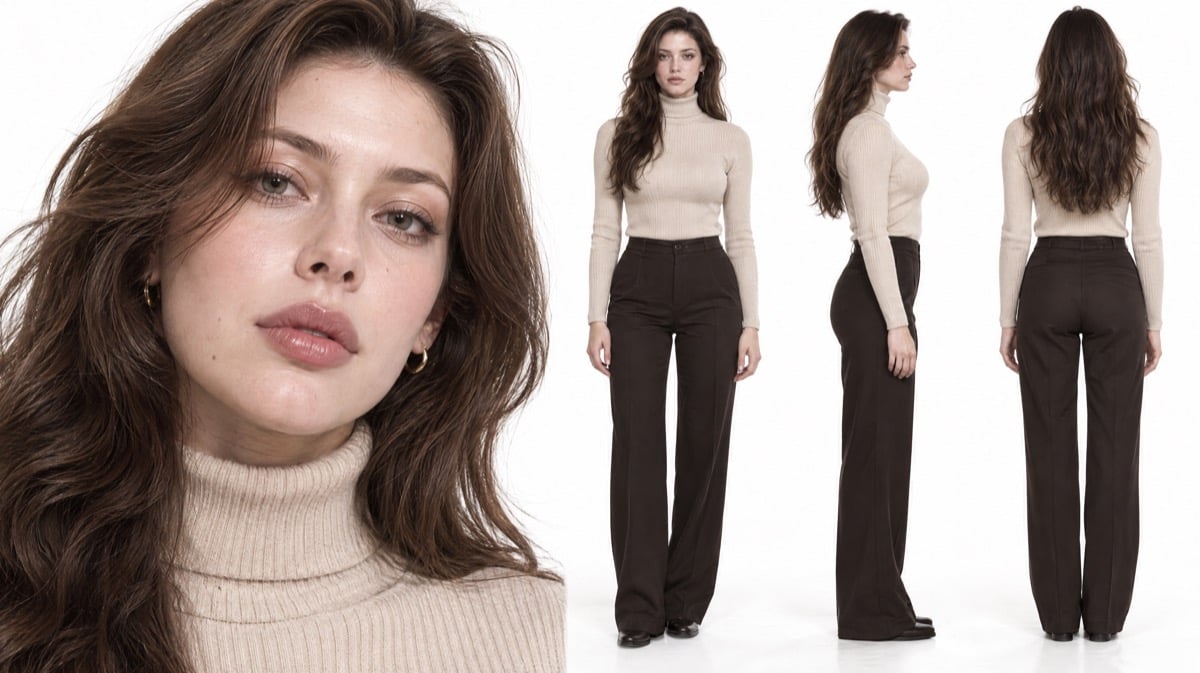 Any modest everyday outfit works. What matters is that **you write it**, instead of leaving it to the model.
**Alternative fix**: replace "glamorous" with "mature and elegant". Also 3 of 3, but the face reads softer and drifts further from the original intent.
## Why moderation: low did not help
The `moderation` parameter (see the [text-to-image parameter table](/en/api-capabilities/gpt-image-2/text-to-image)) accepts `auto` / `low` and lowers the strictness of **prompt-side** moderation. Passing `low` here still returned 400, because the block happens on the output side, which this parameter does not control.
From outside the gateway we cannot tell "the parameter was not forwarded" from "it was forwarded and had no effect", but the conclusion is the same either way: **for an output-side block, changing parameters does nothing; change the prompt**.
## General checklist
Instant means prompt-level; a wait comparable to a normal render means output-level. For the former, remove the obviously violating word. For the latter, run a word ablation to find what pushes the render over the line, and expect some randomness on the same prompt.
Character prompts that describe mood but not clothing are the most common source of output-side blocks. One explicit clothing phrase usually fixes it in a single step without touching the original intent.
Change three words at once and you will not know which one mattered, so the next prompt starts from scratch. One block per variant, then re-run any winner 2 to 3 times.
Token-billed gpt-image models are not billed when moderation returns 400. See the [gpt-image-2 FAQ](/en/api-capabilities/gpt-image-2/overview#faq) entry on failed generations. An ablation therefore costs time, not money.
## Quick reference
* **Use latency to find the layer**: an instant 400 is prompt-level; a 400 that took as long as a render is the output-side classifier rejecting the image.
* **Output-side blocks are stochastic**: the same prompt passes sometimes and fails sometimes, so a single result proves nothing. Re-run 2 to 3 times.
* **The web app passing does not mean the API is stricter**: the web app rewrites and expands the prompt (adding clothing, setting), the API sends it verbatim.
* **Word ablation**: change one block per variant, run variants in parallel, keep the edit with the least change of intent. Here the trigger was "glamorous".
* **Spell out clothing in character prompts**: one added clothing phrase with everything else untouched passed 3 of 3; `moderation: low` does nothing for output-side blocks.
## Related docs
* [How to Get Satisfying Images](/en/api-capabilities/image-generation-success-tips)
* [Image Prompt Doctor Skill](/en/api-capabilities/image-prompt-doctor)
* [Image API Essentials & Best Practices](/en/api-capabilities/image-api-best-practices)
* [gpt-image-2 FAQ](/en/api-capabilities/gpt-image-2/overview#faq)
Any modest everyday outfit works. What matters is that **you write it**, instead of leaving it to the model.
**Alternative fix**: replace "glamorous" with "mature and elegant". Also 3 of 3, but the face reads softer and drifts further from the original intent.
## Why moderation: low did not help
The `moderation` parameter (see the [text-to-image parameter table](/en/api-capabilities/gpt-image-2/text-to-image)) accepts `auto` / `low` and lowers the strictness of **prompt-side** moderation. Passing `low` here still returned 400, because the block happens on the output side, which this parameter does not control.
From outside the gateway we cannot tell "the parameter was not forwarded" from "it was forwarded and had no effect", but the conclusion is the same either way: **for an output-side block, changing parameters does nothing; change the prompt**.
## General checklist
Instant means prompt-level; a wait comparable to a normal render means output-level. For the former, remove the obviously violating word. For the latter, run a word ablation to find what pushes the render over the line, and expect some randomness on the same prompt.
Character prompts that describe mood but not clothing are the most common source of output-side blocks. One explicit clothing phrase usually fixes it in a single step without touching the original intent.
Change three words at once and you will not know which one mattered, so the next prompt starts from scratch. One block per variant, then re-run any winner 2 to 3 times.
Token-billed gpt-image models are not billed when moderation returns 400. See the [gpt-image-2 FAQ](/en/api-capabilities/gpt-image-2/overview#faq) entry on failed generations. An ablation therefore costs time, not money.
## Quick reference
* **Use latency to find the layer**: an instant 400 is prompt-level; a 400 that took as long as a render is the output-side classifier rejecting the image.
* **Output-side blocks are stochastic**: the same prompt passes sometimes and fails sometimes, so a single result proves nothing. Re-run 2 to 3 times.
* **The web app passing does not mean the API is stricter**: the web app rewrites and expands the prompt (adding clothing, setting), the API sends it verbatim.
* **Word ablation**: change one block per variant, run variants in parallel, keep the edit with the least change of intent. Here the trigger was "glamorous".
* **Spell out clothing in character prompts**: one added clothing phrase with everything else untouched passed 3 of 3; `moderation: low` does nothing for output-side blocks.
## Related docs
* [How to Get Satisfying Images](/en/api-capabilities/image-generation-success-tips)
* [Image Prompt Doctor Skill](/en/api-capabilities/image-prompt-doctor)
* [Image API Essentials & Best Practices](/en/api-capabilities/image-api-best-practices)
* [gpt-image-2 FAQ](/en/api-capabilities/gpt-image-2/overview#faq)