> ## Documentation Index
> Fetch the complete documentation index at: https://docs.apiyi.com/llms.txt
> Use this file to discover all available pages before exploring further.
# Log Query API
> Retrieve call logs programmatically to get the model, actual charge, latency, and error code for every request, enabling automated reconciliation and self-service troubleshooting
## API Overview
The Log Query API returns a detailed record of **every API call** made under your account,
including the model used, the actual amount charged, latency, whether the call was streamed,
and the error code when a call fails.
It complements the [Balance Query API](/en/api-capabilities/balance-query): balance query tells
you how much credit is left, log query tells you where it went.
Three typical use cases:
Aggregate actual spend by time range or by model and reconcile it against your own billing
Inspect error codes on failed requests to tell parameter problems from upstream problems
Provide the `request_id` to support so they can pinpoint the exact call
Logs are also viewable in the console under the Logs page. This API is the programmatic entry
point to the same data, intended for automated reconciliation, scheduled exports, or feeding
your own monitoring. For manual inspection, use the console — see
[How to view my call records](/en/faq/call-logs).
## How to Get Your System Token
The Log Query API authenticates with a **System Token**, which is not the same thing as an
API key (see Important Notes at the end of this page).
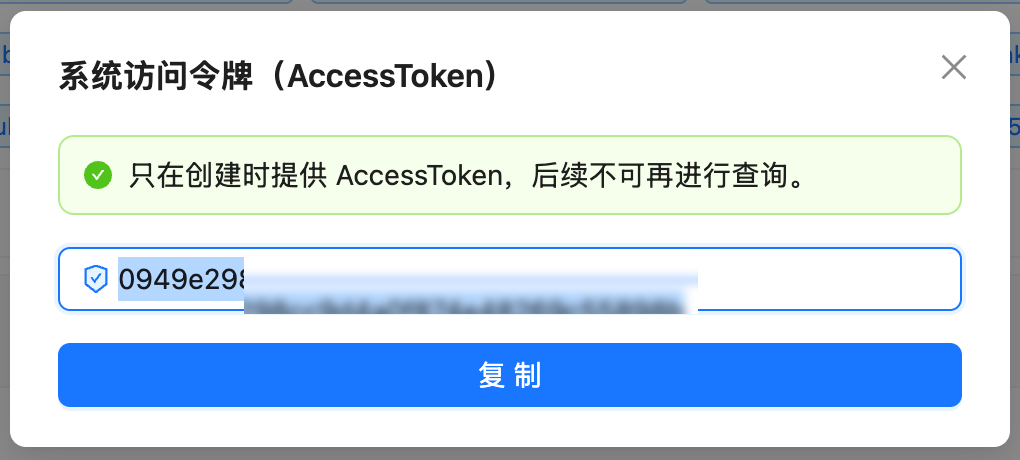
Visit `api.apiyi.com/account/profile` to access your profile page
Locate the "Account Options - System Token" section at the bottom of the page
Enter your account password to receive an AccessToken that can be used for subsequent API queries
 ## API Information
| Item | Description |
| ------------------- | --------------------------------------------------------------- |
| **API URL** | `https://api.apiyi.com/api/log/self` |
| **Method** | `GET` |
| **Authentication** | Authorization header (raw token string, **no `Bearer` prefix**) |
| **Response Format** | JSON (gzip compressed) |
| **Data Scope** | Your own account's logs only |
## Request Details
### Request Headers
| Header Name | Required | Description |
| --------------- | -------- | -------------------------------------------- |
| `Authorization` | Yes | System token, passed as the raw token string |
| `Accept` | No | Recommended: `application/json` |
### Query Parameters
| Parameter | Type | Required | Description |
| ----------------- | ------- | -------- | ---------------------------------------------------------- |
| `p` | Integer | No | Page number, **zero-based** (not 1) |
| `page_size` | Integer | No | Records per page, **capped at 10** (see the warning below) |
| `type` | Integer | No | Log type; pass `2` for reconciliation, see the table below |
| `model_name` | String | No | Exact-match filter by model, e.g. `gpt-5.6` |
| `token_name` | String | No | Filter by token name |
| `start_timestamp` | Integer | No | Start time, Unix seconds |
| `end_timestamp` | Integer | No | End time, Unix seconds |
| `group` | String | No | Filter by group |
**The effective cap on `page_size` is 10.** Passing `page_size=100` still returns only 10 records —
this is not an error, and it is easy to misread as "I only made 10 calls in this period."
**Any meaningful time range requires pagination**, looping until the response returns an empty
array. The Python and Node.js examples below already handle this.
### Log Types
| Value | Meaning | Notes |
| ----- | --------------- | --------------------------------------------------------------------------- |
| `1` | Top-up | Records balance before and after; `quota` is 0 |
| `2` | **Consumption** | **The only type you need for reconciliation**; `quota` is the actual charge |
| `3` | Administrative | Account changes and similar operations; `quota` is 0 |
| `4` | System | System-granted credit and similar; `quota` is 0 |
**Always pass `type=2` when calculating spend.** Without it, top-up and system-grant records are
returned as well. Their `quota` is 0, but `model_name` and `token_name` are also empty, so naively
summing or grouping by model will produce wrong results.
## Response Details
### Success Response Example
```json theme={null}
{
"success": true,
"message": "",
"data": [
{
"request_id": "2026080114481936471351696e93ae3FTV8WKfk",
"created_at": 1785595715,
"type": 2,
"content": "Fixed model price 0.015, group ratio 1",
"username": "your-account",
"token_name": "production-primary",
"token_group": "default",
"model_name": "gpt-5.6",
"quota": 7500,
"prompt_tokens": 1000,
"completion_tokens": 0,
"duration_for_view": 16,
"is_stream": false,
"error_code": "",
"other": "{\"billing_type\":\"by_count\",\"request_path\":\"/v1/images/generations\",\"group_ratio\":1,\"model_ratio\":1,\"usage\":{}}"
}
]
}
```
### Key Response Fields
| Field Name | Type | Description |
| ------------------------------------- | ------- | ---------------------------------------------------------------------------------- |
| `quota` | Integer | **The amount actually charged for this call**, in credits; ÷ 500,000 = USD |
| `content` | String | Human-readable pricing note, e.g. fixed model price and group ratio |
| `model_name` | String | The model actually billed |
| `token_name` | String | Which API key made the call |
| `token_group` | String | The token's group — note this is the group identifier, see FAQ |
| `prompt_tokens` / `completion_tokens` | Integer | Input / output token counts |
| `duration_for_view` | Integer | Call duration in seconds |
| `is_stream` | Boolean | Whether the call was streamed |
| `error_code` | String | Failure reason code; empty string on success |
| `created_at` | Integer | Call time, Unix seconds |
| `request_id` | String | **Request ID — provide this when opening a support ticket** |
| `other` | String | Additional billing and request detail, **a JSON string that must be parsed again** |
The `other` field holds a JSON **string**, not a nested object, so it needs a second parse
(`json.loads()` in Python, `JSON.parse()` in JavaScript). It contains `billing_type`,
`request_path` (the endpoint actually called), `group_ratio`, `model_ratio`, and `usage`.
### Quota Conversion
500,000 quota = \$1.00 USD
**Formula:** USD amount = `quota` ÷ 500,000
**Examples:**
* `quota: 7500` → \$0.015 USD
* `quota: 22500` → \$0.045 USD
* `quota: 18` → \$0.000036 USD
This is the same conversion used by the [Balance Query API](/en/api-capabilities/balance-query),
so the two line up directly.
## Error Responses
### HTTP 401 - Authentication Failed
```json theme={null}
{
"success": false,
"message": "You are not authorized to perform this operation. The access token is invalid."
}
```
**Reason:** The system token is invalid or expired, or an API key (starting with `sk-`) was
mistakenly used as a system token.
**Solution:** Regenerate the system token in the console, and make sure `Authorization` carries
the raw value **without a `Bearer` prefix**.
## Code Examples
### cURL Example (single page, quick check)
```bash theme={null}
export APIYI_SYS_TOKEN='YOUR_SYSTEM_TOKEN'
curl --compressed -s 'https://api.apiyi.com/api/log/self?p=0&page_size=10&type=2' \
-H "Authorization: $APIYI_SYS_TOKEN" \
-H 'Accept: application/json' | jq '.data[] | {created_at, model_name, quota, request_id}'
```
**The `--compressed` option is required**, because the API returns gzip-compressed content.
Without it you will get garbled output.
This command returns at most 10 records. For real reconciliation, use the paginated version below.
### Python Example (paginated, ready to run)
```python theme={null}
import json
import os
import time
from collections import defaultdict
import requests
BASE = "https://api.apiyi.com"
TOKEN = os.environ["APIYI_SYS_TOKEN"]
QUOTA_PER_USD = 500_000
HEADERS = {"Authorization": TOKEN, "Accept": "application/json"}
def fetch_logs(hours=24, model_name=None):
"""Fetch consumption logs for the last N hours, paginating automatically."""
now = int(time.time())
params = {
"page_size": 10, # server-side cap is 10; larger values have no effect
"type": 2, # 2 = consumption, the only type used for reconciliation
"start_timestamp": now - hours * 3600,
"end_timestamp": now,
}
if model_name:
params["model_name"] = model_name
rows, seen = [], set()
page = 0
while True:
resp = requests.get(f"{BASE}/api/log/self",
headers=HEADERS, params={**params, "p": page}, timeout=30)
resp.raise_for_status()
data = resp.json().get("data") or []
if not data:
break # an empty array means we reached the end
fresh = 0
for row in data:
# some records always report id as 0, so deduplicate on request_id instead
key = row.get("request_id")
if key in seen:
continue
seen.add(key)
rows.append(row)
fresh += 1
if fresh == 0:
break # whole page was duplicates, defensive exit
page += 1
return rows
def summarize(rows):
"""Aggregate call count and spend per model."""
stat = defaultdict(lambda: {"count": 0, "quota": 0})
for row in rows:
s = stat[row.get("model_name") or "(none)"]
s["count"] += 1
s["quota"] += row.get("quota") or 0
total = sum(s["quota"] for s in stat.values())
print(f"{'MODEL':32s} {'CALLS':>6s} {'SPEND(USD)':>12s}")
for model, s in sorted(stat.items(), key=lambda kv: -kv[1]["quota"]):
print(f"{model:32s} {s['count']:6d} {s['quota'] / QUOTA_PER_USD:12.4f}")
print(f"\n{len(rows)} calls, {total:,} quota = ${total / QUOTA_PER_USD:.4f} USD")
if __name__ == "__main__":
logs = fetch_logs(hours=24)
summarize(logs)
# other is a JSON string and needs a second parse
if logs:
extra = json.loads(logs[0].get("other") or "{}")
print("\nEndpoint of the most recent call:", extra.get("request_path"))
```
**Sample output:**
```
MODEL CALLS SPEND(USD)
gpt-5.6 128 2.3850
gemini-3-pro-image 30 1.3500
deepseek-chat 412 0.0148
570 calls, 1,867,400 quota = $3.7348 USD
```
### Node.js Example (paginated)
```javascript theme={null}
const BASE = "https://api.apiyi.com";
const TOKEN = process.env.APIYI_SYS_TOKEN;
const QUOTA_PER_USD = 500_000;
async function fetchLogs({ hours = 24, modelName = null } = {}) {
const now = Math.floor(Date.now() / 1000);
const base = {
page_size: "10", // server-side cap is 10
type: "2", // 2 = consumption
start_timestamp: String(now - hours * 3600),
end_timestamp: String(now),
};
if (modelName) base.model_name = modelName;
const rows = [];
const seen = new Set();
for (let page = 0; ; page += 1) {
const qs = new URLSearchParams({ ...base, p: String(page) });
const resp = await fetch(`${BASE}/api/log/self?${qs}`, {
headers: { Authorization: TOKEN, Accept: "application/json" },
});
if (!resp.ok) throw new Error(`HTTP ${resp.status}`);
const { data } = await resp.json();
if (!data || data.length === 0) break;
let fresh = 0;
for (const row of data) {
// deduplicate on request_id, since some records always report id as 0
if (seen.has(row.request_id)) continue;
seen.add(row.request_id);
rows.push(row);
fresh += 1;
}
if (fresh === 0) break;
}
return rows;
}
const logs = await fetchLogs({ hours: 24 });
const total = logs.reduce((sum, r) => sum + (r.quota || 0), 0);
console.log(`${logs.length} calls, $${(total / QUOTA_PER_USD).toFixed(4)} USD`);
```
Both the Python requests library and the Node.js fetch API decompress gzip automatically,
so no extra configuration is needed there. Only curl requires the explicit `--compressed` flag.
## Common Scenarios
### Calculating spend over a time range
Use the Python example above. The two things that matter are passing `type=2` and dividing the
summed `quota` by 500,000. To scope it to a single model, add the `model_name` parameter.
### Finding failed calls
```python theme={null}
failed = [r for r in fetch_logs(hours=24) if r.get("error_code")]
for r in failed:
print(r["created_at"], r["model_name"], r["error_code"], r["request_id"])
```
Requests rejected by the gateway (invalid parameters and similar) have `quota` of 0 and
**are not charged**. The `error_code` in the log lets you separate "the call failed" from
"the call succeeded but I did not like the result."
### Providing a request ID for support
Locate the problematic call in the logs and give support the `request_id`. That identifies the
exact request end to end, which is far more efficient than describing "a call to some model
failed around a certain time."
## FAQ
The server-side cap on `page_size` is 10. Larger values do not error but do not take effect
either. To retrieve more you must paginate (`p=0`, `p=1`, `p=2` and so on) until the response
returns an empty array. The Python and Node.js examples above already encapsulate this.
No. Certain fields hold platform-internal information and are empty or zero from a regular
account's perspective. This is expected and does not affect the fields you need for
reconciliation or troubleshooting — `quota`, `model_name`, `error_code`, and `request_id`
are all fully populated.
The API returns the group **identifier**, while the console displays the group's **label**.
These can differ — for example the API returns `default` while the console shows Default.
The full mapping is available from the public endpoint `https://api.apiyi.com/api/pricing`
under the `usable_group` field, which maps identifier to label. If you want your reports to
match the console, apply that mapping yourself.
Use `quota`. It is the amount **actually deducted** for the call and the only field suitable
for reconciliation. For per-call priced models such as image and video generation, the token
counts in the response may be placeholder values that do not participate in pricing —
those models report `by_count` in `other.billing_type`.
Specify any range with `start_timestamp` and `end_timestamp`. For the exact retention period
of historical data, please contact support. We recommend exporting reconciliation data
periodically rather than relying on the API for long-term lookback.
**Reason:** the API returns gzip-compressed content (`Content-Encoding: gzip`) and curl is
not decompressing it.
**Solution:** add the `--compressed` flag:
```bash theme={null}
curl --compressed 'https://api.apiyi.com/api/log/self?p=0' \
-H "Authorization: $APIYI_SYS_TOKEN" | jq
```
The Python requests library and the Node.js fetch API decompress automatically.
No. The log query endpoint does not consume any quota.
## Important Notes
**A system token is not an API key, and the two are not interchangeable**
* An **API key** (starting with `sk-`) is for `/v1/*` inference endpoints. Using it against
`/api/log/self` returns 401.
* A **system token** (a plain string with no prefix) is for `/api/*` management endpoints.
Using it against `/v1/chat/completions` returns an invalid-token error.
A system token's scope covers your entire account, so **treat it like your account password**:
store it in a secret manager rather than in code, never commit it to a repository, and rotate
it periodically.
**Log responses contain your own API keys in plain text**
Each log record carries information about the token that made the call. **Do not paste raw log
responses into public places, share screenshots of them, or hand them to third parties** —
strip sensitive fields before exporting.
Note in particular that this plaintext does not carry the `sk-` prefix, so **common secret
scanners may not detect it**. Do not rely on automated checks to catch it for you.
**Request limits**
* Keep at least 1 second between queries to avoid rate limiting
* Set a reasonable request timeout (30 seconds recommended)
* For wide time ranges, implement pagination and retry handling
* [Balance Query API](/en/api-capabilities/balance-query) — check remaining account credit
* [Token Management API](/en/api-capabilities/token-management) — create and manage API keys programmatically
* [How to view my call records](/en/faq/call-logs) — manual inspection in the console
* [Understanding logs and billing](/en/faq/log-billing-explained) — how to read the billing fields
## API Information
| Item | Description |
| ------------------- | --------------------------------------------------------------- |
| **API URL** | `https://api.apiyi.com/api/log/self` |
| **Method** | `GET` |
| **Authentication** | Authorization header (raw token string, **no `Bearer` prefix**) |
| **Response Format** | JSON (gzip compressed) |
| **Data Scope** | Your own account's logs only |
## Request Details
### Request Headers
| Header Name | Required | Description |
| --------------- | -------- | -------------------------------------------- |
| `Authorization` | Yes | System token, passed as the raw token string |
| `Accept` | No | Recommended: `application/json` |
### Query Parameters
| Parameter | Type | Required | Description |
| ----------------- | ------- | -------- | ---------------------------------------------------------- |
| `p` | Integer | No | Page number, **zero-based** (not 1) |
| `page_size` | Integer | No | Records per page, **capped at 10** (see the warning below) |
| `type` | Integer | No | Log type; pass `2` for reconciliation, see the table below |
| `model_name` | String | No | Exact-match filter by model, e.g. `gpt-5.6` |
| `token_name` | String | No | Filter by token name |
| `start_timestamp` | Integer | No | Start time, Unix seconds |
| `end_timestamp` | Integer | No | End time, Unix seconds |
| `group` | String | No | Filter by group |
**The effective cap on `page_size` is 10.** Passing `page_size=100` still returns only 10 records —
this is not an error, and it is easy to misread as "I only made 10 calls in this period."
**Any meaningful time range requires pagination**, looping until the response returns an empty
array. The Python and Node.js examples below already handle this.
### Log Types
| Value | Meaning | Notes |
| ----- | --------------- | --------------------------------------------------------------------------- |
| `1` | Top-up | Records balance before and after; `quota` is 0 |
| `2` | **Consumption** | **The only type you need for reconciliation**; `quota` is the actual charge |
| `3` | Administrative | Account changes and similar operations; `quota` is 0 |
| `4` | System | System-granted credit and similar; `quota` is 0 |
**Always pass `type=2` when calculating spend.** Without it, top-up and system-grant records are
returned as well. Their `quota` is 0, but `model_name` and `token_name` are also empty, so naively
summing or grouping by model will produce wrong results.
## Response Details
### Success Response Example
```json theme={null}
{
"success": true,
"message": "",
"data": [
{
"request_id": "2026080114481936471351696e93ae3FTV8WKfk",
"created_at": 1785595715,
"type": 2,
"content": "Fixed model price 0.015, group ratio 1",
"username": "your-account",
"token_name": "production-primary",
"token_group": "default",
"model_name": "gpt-5.6",
"quota": 7500,
"prompt_tokens": 1000,
"completion_tokens": 0,
"duration_for_view": 16,
"is_stream": false,
"error_code": "",
"other": "{\"billing_type\":\"by_count\",\"request_path\":\"/v1/images/generations\",\"group_ratio\":1,\"model_ratio\":1,\"usage\":{}}"
}
]
}
```
### Key Response Fields
| Field Name | Type | Description |
| ------------------------------------- | ------- | ---------------------------------------------------------------------------------- |
| `quota` | Integer | **The amount actually charged for this call**, in credits; ÷ 500,000 = USD |
| `content` | String | Human-readable pricing note, e.g. fixed model price and group ratio |
| `model_name` | String | The model actually billed |
| `token_name` | String | Which API key made the call |
| `token_group` | String | The token's group — note this is the group identifier, see FAQ |
| `prompt_tokens` / `completion_tokens` | Integer | Input / output token counts |
| `duration_for_view` | Integer | Call duration in seconds |
| `is_stream` | Boolean | Whether the call was streamed |
| `error_code` | String | Failure reason code; empty string on success |
| `created_at` | Integer | Call time, Unix seconds |
| `request_id` | String | **Request ID — provide this when opening a support ticket** |
| `other` | String | Additional billing and request detail, **a JSON string that must be parsed again** |
The `other` field holds a JSON **string**, not a nested object, so it needs a second parse
(`json.loads()` in Python, `JSON.parse()` in JavaScript). It contains `billing_type`,
`request_path` (the endpoint actually called), `group_ratio`, `model_ratio`, and `usage`.
### Quota Conversion
500,000 quota = \$1.00 USD
**Formula:** USD amount = `quota` ÷ 500,000
**Examples:**
* `quota: 7500` → \$0.015 USD
* `quota: 22500` → \$0.045 USD
* `quota: 18` → \$0.000036 USD
This is the same conversion used by the [Balance Query API](/en/api-capabilities/balance-query),
so the two line up directly.
## Error Responses
### HTTP 401 - Authentication Failed
```json theme={null}
{
"success": false,
"message": "You are not authorized to perform this operation. The access token is invalid."
}
```
**Reason:** The system token is invalid or expired, or an API key (starting with `sk-`) was
mistakenly used as a system token.
**Solution:** Regenerate the system token in the console, and make sure `Authorization` carries
the raw value **without a `Bearer` prefix**.
## Code Examples
### cURL Example (single page, quick check)
```bash theme={null}
export APIYI_SYS_TOKEN='YOUR_SYSTEM_TOKEN'
curl --compressed -s 'https://api.apiyi.com/api/log/self?p=0&page_size=10&type=2' \
-H "Authorization: $APIYI_SYS_TOKEN" \
-H 'Accept: application/json' | jq '.data[] | {created_at, model_name, quota, request_id}'
```
**The `--compressed` option is required**, because the API returns gzip-compressed content.
Without it you will get garbled output.
This command returns at most 10 records. For real reconciliation, use the paginated version below.
### Python Example (paginated, ready to run)
```python theme={null}
import json
import os
import time
from collections import defaultdict
import requests
BASE = "https://api.apiyi.com"
TOKEN = os.environ["APIYI_SYS_TOKEN"]
QUOTA_PER_USD = 500_000
HEADERS = {"Authorization": TOKEN, "Accept": "application/json"}
def fetch_logs(hours=24, model_name=None):
"""Fetch consumption logs for the last N hours, paginating automatically."""
now = int(time.time())
params = {
"page_size": 10, # server-side cap is 10; larger values have no effect
"type": 2, # 2 = consumption, the only type used for reconciliation
"start_timestamp": now - hours * 3600,
"end_timestamp": now,
}
if model_name:
params["model_name"] = model_name
rows, seen = [], set()
page = 0
while True:
resp = requests.get(f"{BASE}/api/log/self",
headers=HEADERS, params={**params, "p": page}, timeout=30)
resp.raise_for_status()
data = resp.json().get("data") or []
if not data:
break # an empty array means we reached the end
fresh = 0
for row in data:
# some records always report id as 0, so deduplicate on request_id instead
key = row.get("request_id")
if key in seen:
continue
seen.add(key)
rows.append(row)
fresh += 1
if fresh == 0:
break # whole page was duplicates, defensive exit
page += 1
return rows
def summarize(rows):
"""Aggregate call count and spend per model."""
stat = defaultdict(lambda: {"count": 0, "quota": 0})
for row in rows:
s = stat[row.get("model_name") or "(none)"]
s["count"] += 1
s["quota"] += row.get("quota") or 0
total = sum(s["quota"] for s in stat.values())
print(f"{'MODEL':32s} {'CALLS':>6s} {'SPEND(USD)':>12s}")
for model, s in sorted(stat.items(), key=lambda kv: -kv[1]["quota"]):
print(f"{model:32s} {s['count']:6d} {s['quota'] / QUOTA_PER_USD:12.4f}")
print(f"\n{len(rows)} calls, {total:,} quota = ${total / QUOTA_PER_USD:.4f} USD")
if __name__ == "__main__":
logs = fetch_logs(hours=24)
summarize(logs)
# other is a JSON string and needs a second parse
if logs:
extra = json.loads(logs[0].get("other") or "{}")
print("\nEndpoint of the most recent call:", extra.get("request_path"))
```
**Sample output:**
```
MODEL CALLS SPEND(USD)
gpt-5.6 128 2.3850
gemini-3-pro-image 30 1.3500
deepseek-chat 412 0.0148
570 calls, 1,867,400 quota = $3.7348 USD
```
### Node.js Example (paginated)
```javascript theme={null}
const BASE = "https://api.apiyi.com";
const TOKEN = process.env.APIYI_SYS_TOKEN;
const QUOTA_PER_USD = 500_000;
async function fetchLogs({ hours = 24, modelName = null } = {}) {
const now = Math.floor(Date.now() / 1000);
const base = {
page_size: "10", // server-side cap is 10
type: "2", // 2 = consumption
start_timestamp: String(now - hours * 3600),
end_timestamp: String(now),
};
if (modelName) base.model_name = modelName;
const rows = [];
const seen = new Set();
for (let page = 0; ; page += 1) {
const qs = new URLSearchParams({ ...base, p: String(page) });
const resp = await fetch(`${BASE}/api/log/self?${qs}`, {
headers: { Authorization: TOKEN, Accept: "application/json" },
});
if (!resp.ok) throw new Error(`HTTP ${resp.status}`);
const { data } = await resp.json();
if (!data || data.length === 0) break;
let fresh = 0;
for (const row of data) {
// deduplicate on request_id, since some records always report id as 0
if (seen.has(row.request_id)) continue;
seen.add(row.request_id);
rows.push(row);
fresh += 1;
}
if (fresh === 0) break;
}
return rows;
}
const logs = await fetchLogs({ hours: 24 });
const total = logs.reduce((sum, r) => sum + (r.quota || 0), 0);
console.log(`${logs.length} calls, $${(total / QUOTA_PER_USD).toFixed(4)} USD`);
```
Both the Python requests library and the Node.js fetch API decompress gzip automatically,
so no extra configuration is needed there. Only curl requires the explicit `--compressed` flag.
## Common Scenarios
### Calculating spend over a time range
Use the Python example above. The two things that matter are passing `type=2` and dividing the
summed `quota` by 500,000. To scope it to a single model, add the `model_name` parameter.
### Finding failed calls
```python theme={null}
failed = [r for r in fetch_logs(hours=24) if r.get("error_code")]
for r in failed:
print(r["created_at"], r["model_name"], r["error_code"], r["request_id"])
```
Requests rejected by the gateway (invalid parameters and similar) have `quota` of 0 and
**are not charged**. The `error_code` in the log lets you separate "the call failed" from
"the call succeeded but I did not like the result."
### Providing a request ID for support
Locate the problematic call in the logs and give support the `request_id`. That identifies the
exact request end to end, which is far more efficient than describing "a call to some model
failed around a certain time."
## FAQ
The server-side cap on `page_size` is 10. Larger values do not error but do not take effect
either. To retrieve more you must paginate (`p=0`, `p=1`, `p=2` and so on) until the response
returns an empty array. The Python and Node.js examples above already encapsulate this.
No. Certain fields hold platform-internal information and are empty or zero from a regular
account's perspective. This is expected and does not affect the fields you need for
reconciliation or troubleshooting — `quota`, `model_name`, `error_code`, and `request_id`
are all fully populated.
The API returns the group **identifier**, while the console displays the group's **label**.
These can differ — for example the API returns `default` while the console shows Default.
The full mapping is available from the public endpoint `https://api.apiyi.com/api/pricing`
under the `usable_group` field, which maps identifier to label. If you want your reports to
match the console, apply that mapping yourself.
Use `quota`. It is the amount **actually deducted** for the call and the only field suitable
for reconciliation. For per-call priced models such as image and video generation, the token
counts in the response may be placeholder values that do not participate in pricing —
those models report `by_count` in `other.billing_type`.
Specify any range with `start_timestamp` and `end_timestamp`. For the exact retention period
of historical data, please contact support. We recommend exporting reconciliation data
periodically rather than relying on the API for long-term lookback.
**Reason:** the API returns gzip-compressed content (`Content-Encoding: gzip`) and curl is
not decompressing it.
**Solution:** add the `--compressed` flag:
```bash theme={null}
curl --compressed 'https://api.apiyi.com/api/log/self?p=0' \
-H "Authorization: $APIYI_SYS_TOKEN" | jq
```
The Python requests library and the Node.js fetch API decompress automatically.
No. The log query endpoint does not consume any quota.
## Important Notes
**A system token is not an API key, and the two are not interchangeable**
* An **API key** (starting with `sk-`) is for `/v1/*` inference endpoints. Using it against
`/api/log/self` returns 401.
* A **system token** (a plain string with no prefix) is for `/api/*` management endpoints.
Using it against `/v1/chat/completions` returns an invalid-token error.
A system token's scope covers your entire account, so **treat it like your account password**:
store it in a secret manager rather than in code, never commit it to a repository, and rotate
it periodically.
**Log responses contain your own API keys in plain text**
Each log record carries information about the token that made the call. **Do not paste raw log
responses into public places, share screenshots of them, or hand them to third parties** —
strip sensitive fields before exporting.
Note in particular that this plaintext does not carry the `sk-` prefix, so **common secret
scanners may not detect it**. Do not rely on automated checks to catch it for you.
**Request limits**
* Keep at least 1 second between queries to avoid rate limiting
* Set a reasonable request timeout (30 seconds recommended)
* For wide time ranges, implement pagination and retry handling
* [Balance Query API](/en/api-capabilities/balance-query) — check remaining account credit
* [Token Management API](/en/api-capabilities/token-management) — create and manage API keys programmatically
* [How to view my call records](/en/faq/call-logs) — manual inspection in the console
* [Understanding logs and billing](/en/faq/log-billing-explained) — how to read the billing fields