> ## Documentation Index
> Fetch the complete documentation index at: https://docs.apiyi.com/llms.txt
> Use this file to discover all available pages before exploring further.
# Image Editing API Reference
> MAI-Image 2.6 image editing API reference with live Playground — upload a reference image plus an instruction, two-image fusion via image + image2, multipart/form-data file upload only
The interactive Playground on the right supports uploading local images. Enter your API key under **Authorization** (format: `Bearer sk-xxx`), pick an `image` file, fill in `prompt` and `model`, and send.
**🔴 This endpoint only accepts `multipart/form-data` file uploads**
Sending JSON to `/v1/images/edits` (with `image` as a URL, data URI, or raw base64) returns 400:
```text theme={null}
request Content-Type isn't multipart/form-data
```
**Image URLs are not supported as input.** If you only have a URL, download it on your server first, then upload the file. File upload needs no image hosting; just send the local file.
**Use case**: this page is for editing a reference image or fusing two images. To generate from text only, use the [Text-to-Image API](/en/api-capabilities/mai-image/text-to-image).
**⚠️ For two images the field names are `image` + `image2`, not `image[]`**
With two reference images, name the first field `image` and the second `image2`. Repeating `image[]`, repeating `image`, or adding a `mask` field all return 400 `File must be attached in a form field with a name starting with 'image'`.
That means the OpenAI SDK's multi-image form `client.images.edit(image=[f1, f2])` **does not work** (it sends `image[]`). Single-image edits with the SDK work fine.
**Same forbidden parameters as text-to-image**: do not send `response_format`, `seed`, or `negative_prompt` (400). The response is always `data[0].b64_json` (PNG).
## Code Examples
### Python (OpenAI SDK · single image)
```python theme={null}
from openai import OpenAI
import base64
client = OpenAI(
api_key="sk-your-api-key",
base_url="https://api.apiyi.com/v1",
timeout=180.0
)
# images.edit uses a multipart file upload under the hood; do not pass response_format
resp = client.images.edit(
model="MAI-Image-2.6-Flash",
image=open("teaset.jpg", "rb"),
prompt="Change the teapot to a deep cobalt blue glaze, keep everything else identical"
)
with open("edited.png", "wb") as f:
f.write(base64.b64decode(resp.data[0].b64_json))
```
### Python (requests · single image)
```python theme={null}
import base64
import os
import requests
# Pass the file via files=; requests sets multipart/form-data and the boundary for you
# Do not use json=, and do not set Content-Type by hand
with open("teaset.jpg", "rb") as fp:
response = requests.post(
"https://api.apiyi.com/v1/images/edits",
headers={"Authorization": f"Bearer {os.environ['APIYI_API_KEY']}"},
data={
"model": "MAI-Image-2.6",
"prompt": "Change the teapot to a deep cobalt blue glaze, keep everything else exactly the same"
},
files={"image": ("teaset.jpg", fp, "image/jpeg")},
timeout=180
)
response.raise_for_status()
with open("edited.png", "wb") as f:
f.write(base64.b64decode(response.json()["data"][0]["b64_json"]))
```
### Python (two-image fusion · image + image2)
```python theme={null}
import base64
import os
import requests
files = {
"image": ("scene.jpg", open("scene.jpg", "rb"), "image/jpeg"), # image 1
"image2": ("person.jpg", open("person.jpg", "rb"), "image/jpeg"), # image 2: field name is image2
}
response = requests.post(
"https://api.apiyi.com/v1/images/edits",
headers={"Authorization": f"Bearer {os.environ['APIYI_API_KEY']}"},
data={
"model": "MAI-Image-2.6",
"prompt": "Have the person from image 2 sit at the table in image 1, arranging the tea set, natural light, photorealistic"
},
files=files,
timeout=180
)
response.raise_for_status()
with open("fused.png", "wb") as f:
f.write(base64.b64decode(response.json()["data"][0]["b64_json"]))
```
### cURL
```bash theme={null}
# Single-image edit: -F means multipart/form-data, @ uploads a local file
curl -X POST "https://api.apiyi.com/v1/images/edits" \
-H "Authorization: Bearer sk-your-api-key" \
-F "model=MAI-Image-2.6-Flash" \
-F "prompt=Change the teapot to a deep cobalt blue glaze, keep everything else identical" \
-F "image=@teaset.jpg" \
| python3 -c "import sys,json,base64; open('edited.png','wb').write(base64.b64decode(json.load(sys.stdin)['data'][0]['b64_json']))"
```
```bash theme={null}
# Two-image fusion with the canvas changed to 1536×1024
curl -X POST "https://api.apiyi.com/v1/images/edits" \
-H "Authorization: Bearer sk-your-api-key" \
-F "model=MAI-Image-2.6" \
-F "prompt=Have the person from image 2 sit at the table in image 1, arranging the tea set" \
-F "width=1536" \
-F "height=1024" \
-F "image=@scene.jpg" \
-F "image2=@person.jpg"
```
### Node.js (fetch + FormData)
```javascript theme={null}
import fs from 'node:fs';
const form = new FormData();
form.append('model', 'MAI-Image-2.6-Flash');
form.append('prompt', 'Replace the background with a snowy pine forest at night, keep the person unchanged');
form.append('image', new Blob([fs.readFileSync('./photo.jpg')]), 'photo.jpg');
// Second reference image: form.append('image2', ...)
const resp = await fetch('https://api.apiyi.com/v1/images/edits', {
method: 'POST',
// Do not set Content-Type by hand; FormData adds the boundary
headers: { 'Authorization': `Bearer ${process.env.APIYI_API_KEY}` },
body: form,
signal: AbortSignal.timeout(120000)
});
const data = await resp.json();
fs.writeFileSync('edited.png', Buffer.from(data.data[0].b64_json, 'base64'));
```
## Parameter Reference
| Parameter | Type | Required | Default | Description |
| - | - | - | - | - |
| `model` | string | ✅ | — | `MAI-Image-2.6` (\$0.12/image) or `MAI-Image-2.6-Flash` (\$0.06/image), **case-sensitive** |
| `prompt` | string | ✅ | — | Edit instruction. State what to change and that everything else stays the same |
| `image` | file | ✅ | — | Reference image file (the first one) |
| `image2` | file | ❌ | — | Second reference image (for two-image fusion) |
| `width` / `height` | integer | ❌ | Follows the original's ratio | Output size, same rules as text-to-image; a different aspect ratio **recomposes** the image |
| `n` | integer | ❌ | `1` | Number of images. **Works on this endpoint**, billed per image |
| ~~`mask`~~ | — | — | — | **Not supported**; returns 400 |
| ~~`response_format`~~ / ~~`seed`~~ / ~~`negative_prompt`~~ | — | — | — | **Return 400** |
**Output size when you omit it**: the output follows the original's aspect ratio snapped to multiples of 16, e.g. a 1344×756 input gives 1360×768. For local edits that should keep the composition, do not send `width` / `height`.
## Editing Results and Prompting
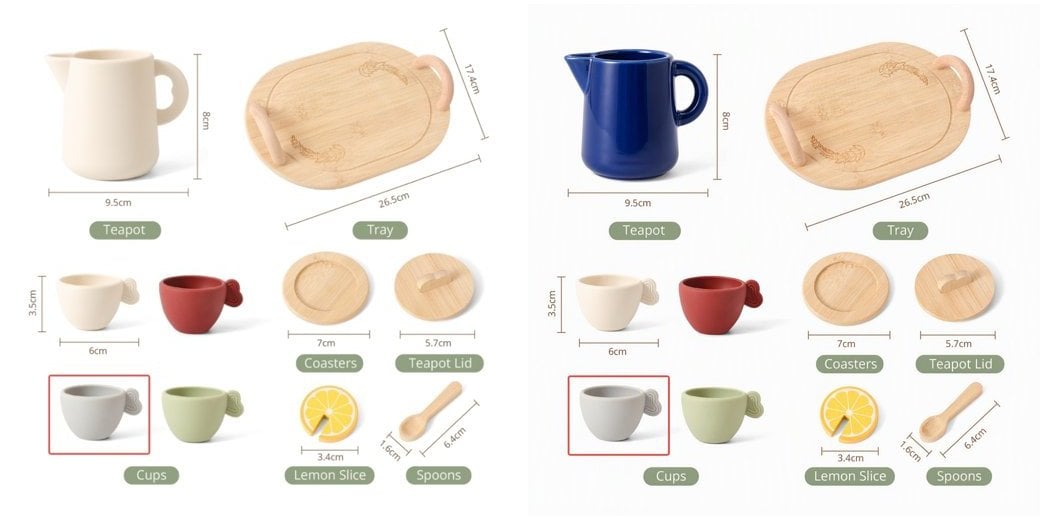
The editing endpoint **keeps the original's composition, colors, and details** and only changes what the prompt asks for:
 | Prompt | Result |
| - | - |
| ✅ `Change the teapot to a deep cobalt blue glaze, keep everything else exactly the same` | Only the teapot changes color; labels and other objects stay pixel-identical |
| ✅ `Turn this photo into a watercolor painting, keep the composition` | Style is repainted, composition kept |
| ✅ `Have the person from image 2 sit at the table in image 1` | Two-image fusion: image 1 provides the scene, image 2 the person |
| ⚠️ `Make it look better` | Too vague; the scope of changes is unpredictable |
For two-image fusion, refer to `image` / `image2` as "image 1 / image 2" in the prompt. In our tests **identity fidelity for people is only moderate** (facial features may drift), so validate on a small batch first if portrait consistency matters.
## Response Format
```json theme={null}
{
"created": 1791000788,
"data": [
{
"b64_json": "iVBORw0KGgoAAAANSUhEUgAABAAAAAQACAIAAADwf7zU..."
}
],
"usage": {
"prompt_tokens": 1000,
"total_tokens": 1000,
"input_tokens": 1000,
"output_tokens": 0
}
}
```
**Response fields**
* `b64_json` is **plain base64 without a `data:` prefix** and decodes to a PNG.
* With `n > 1` the `data` array has several items; don't read only `data[0]`.
* No `url` and no `revised_prompt` are returned.
**Do not reconcile billing with `usage`**: it holds placeholders (`prompt_tokens` is always 1000 × the image count). Editing **costs the same** as text-to-image, billed per image; the APIYI console bill is authoritative.
## OpenAPI
````yaml api-reference/mai-image-edit-openapi-en.yaml POST /v1/images/edits
openapi: 3.1.0
info:
title: MAI-Image 2.6 Image Editing API
description: >
Microsoft MAI-Image 2.6 image generation — image editing endpoint.
- **The request must be `multipart/form-data` (file upload)**; JSON or image
URLs return 400
- Single-image editing and two-image fusion (field names `image` + `image2`)
- No mask support; do not send `response_format` / `seed` /
`negative_prompt`
- Flat per-image pricing, same as text-to-image; `n` works on this endpoint
and is billed per image
**Authentication**: add `Authorization: Bearer YOUR_API_KEY` to the request
headers
**Get an API key**: create a token in the [APIYI
console](https://api.apiyi.com/token)
version: 1.0.0
servers:
- url: https://api.apiyi.com
description: Primary endpoint
security:
- bearerAuth: []
paths:
/v1/images/edits:
post:
tags:
- Image Editing
summary: 'Image editing: edit a reference image or fuse two images'
description: >
Edit an uploaded reference image, or fuse two images, from a text
instruction with MAI-Image 2.6.
- **Must use `multipart/form-data`**. Sending `application/json` returns
400: `request Content-Type isn't multipart/form-data`
- The second reference image's field is `image2`; repeated `image[]`,
repeated `image`, or a `mask` field all return 400
- Without `width` / `height` the output follows the original's ratio; a
different aspect ratio recomposes the image
operationId: editMaiImage
requestBody:
required: true
content:
multipart/form-data:
schema:
$ref: '#/components/schemas/MaiImageEditRequest'
encoding:
image:
contentType: image/png, image/jpeg, image/webp
image2:
contentType: image/png, image/jpeg, image/webp
responses:
'200':
description: Image generated
content:
application/json:
schema:
$ref: '#/components/schemas/ImageResponse'
'400':
description: >-
Not multipart/form-data, invalid field names, invalid parameters, or
blocked by moderation
'401':
description: Unauthorized - invalid API key
'429':
description: Rate limit exceeded or insufficient balance
'500':
description: No image file field in the request (`image is required`)
security:
- bearerAuth: []
components:
schemas:
MaiImageEditRequest:
type: object
required:
- model
- prompt
- image
properties:
model:
type: string
description: Model ID (case-sensitive)
enum:
- MAI-Image-2.6-Flash
- MAI-Image-2.6
default: MAI-Image-2.6-Flash
prompt:
type: string
description: >-
Edit instruction. State what to change and that everything else
stays the same
example: >-
Change the teapot to a deep cobalt blue glaze, keep everything else
identical
image:
type: string
format: binary
description: >-
Reference image file (the first one, "image 1" in the prompt). png /
jpg / webp
image2:
type: string
format: binary
description: >-
Optional second reference image ("image 2" in the prompt), for
two-image fusion
width:
type: integer
description: >-
Optional output width. Same rules as text-to-image: each side ≥ 768,
width × height ≤ 2,359,296, sent together with `height`
minimum: 768
height:
type: integer
description: Optional output height, same rules as `width`
minimum: 768
'n':
type: integer
description: Number of images. Works on this endpoint, billed per image
minimum: 1
default: 1
example: 1
ImageResponse:
type: object
properties:
created:
type: integer
description: Creation timestamp
example: 1791000788
data:
type: array
description: Image results; length equals `n`
items:
type: object
properties:
b64_json:
type: string
description: 'Plain base64 image data (PNG, no data: prefix)'
usage:
type: object
description: >-
**Placeholder values, not for billing reconciliation.**
`prompt_tokens` is always `1000 × images`
properties:
prompt_tokens:
type: integer
example: 1000
total_tokens:
type: integer
example: 1000
securitySchemes:
bearerAuth:
type: http
scheme: bearer
description: API key from the APIYI console
````
This documentation is built and hosted on [Mintlify](https://mintlify.com), a developer documentation platform.
| Prompt | Result |
| - | - |
| ✅ `Change the teapot to a deep cobalt blue glaze, keep everything else exactly the same` | Only the teapot changes color; labels and other objects stay pixel-identical |
| ✅ `Turn this photo into a watercolor painting, keep the composition` | Style is repainted, composition kept |
| ✅ `Have the person from image 2 sit at the table in image 1` | Two-image fusion: image 1 provides the scene, image 2 the person |
| ⚠️ `Make it look better` | Too vague; the scope of changes is unpredictable |
For two-image fusion, refer to `image` / `image2` as "image 1 / image 2" in the prompt. In our tests **identity fidelity for people is only moderate** (facial features may drift), so validate on a small batch first if portrait consistency matters.
## Response Format
```json theme={null}
{
"created": 1791000788,
"data": [
{
"b64_json": "iVBORw0KGgoAAAANSUhEUgAABAAAAAQACAIAAADwf7zU..."
}
],
"usage": {
"prompt_tokens": 1000,
"total_tokens": 1000,
"input_tokens": 1000,
"output_tokens": 0
}
}
```
**Response fields**
* `b64_json` is **plain base64 without a `data:` prefix** and decodes to a PNG.
* With `n > 1` the `data` array has several items; don't read only `data[0]`.
* No `url` and no `revised_prompt` are returned.
**Do not reconcile billing with `usage`**: it holds placeholders (`prompt_tokens` is always 1000 × the image count). Editing **costs the same** as text-to-image, billed per image; the APIYI console bill is authoritative.
## OpenAPI
````yaml api-reference/mai-image-edit-openapi-en.yaml POST /v1/images/edits
openapi: 3.1.0
info:
title: MAI-Image 2.6 Image Editing API
description: >
Microsoft MAI-Image 2.6 image generation — image editing endpoint.
- **The request must be `multipart/form-data` (file upload)**; JSON or image
URLs return 400
- Single-image editing and two-image fusion (field names `image` + `image2`)
- No mask support; do not send `response_format` / `seed` /
`negative_prompt`
- Flat per-image pricing, same as text-to-image; `n` works on this endpoint
and is billed per image
**Authentication**: add `Authorization: Bearer YOUR_API_KEY` to the request
headers
**Get an API key**: create a token in the [APIYI
console](https://api.apiyi.com/token)
version: 1.0.0
servers:
- url: https://api.apiyi.com
description: Primary endpoint
security:
- bearerAuth: []
paths:
/v1/images/edits:
post:
tags:
- Image Editing
summary: 'Image editing: edit a reference image or fuse two images'
description: >
Edit an uploaded reference image, or fuse two images, from a text
instruction with MAI-Image 2.6.
- **Must use `multipart/form-data`**. Sending `application/json` returns
400: `request Content-Type isn't multipart/form-data`
- The second reference image's field is `image2`; repeated `image[]`,
repeated `image`, or a `mask` field all return 400
- Without `width` / `height` the output follows the original's ratio; a
different aspect ratio recomposes the image
operationId: editMaiImage
requestBody:
required: true
content:
multipart/form-data:
schema:
$ref: '#/components/schemas/MaiImageEditRequest'
encoding:
image:
contentType: image/png, image/jpeg, image/webp
image2:
contentType: image/png, image/jpeg, image/webp
responses:
'200':
description: Image generated
content:
application/json:
schema:
$ref: '#/components/schemas/ImageResponse'
'400':
description: >-
Not multipart/form-data, invalid field names, invalid parameters, or
blocked by moderation
'401':
description: Unauthorized - invalid API key
'429':
description: Rate limit exceeded or insufficient balance
'500':
description: No image file field in the request (`image is required`)
security:
- bearerAuth: []
components:
schemas:
MaiImageEditRequest:
type: object
required:
- model
- prompt
- image
properties:
model:
type: string
description: Model ID (case-sensitive)
enum:
- MAI-Image-2.6-Flash
- MAI-Image-2.6
default: MAI-Image-2.6-Flash
prompt:
type: string
description: >-
Edit instruction. State what to change and that everything else
stays the same
example: >-
Change the teapot to a deep cobalt blue glaze, keep everything else
identical
image:
type: string
format: binary
description: >-
Reference image file (the first one, "image 1" in the prompt). png /
jpg / webp
image2:
type: string
format: binary
description: >-
Optional second reference image ("image 2" in the prompt), for
two-image fusion
width:
type: integer
description: >-
Optional output width. Same rules as text-to-image: each side ≥ 768,
width × height ≤ 2,359,296, sent together with `height`
minimum: 768
height:
type: integer
description: Optional output height, same rules as `width`
minimum: 768
'n':
type: integer
description: Number of images. Works on this endpoint, billed per image
minimum: 1
default: 1
example: 1
ImageResponse:
type: object
properties:
created:
type: integer
description: Creation timestamp
example: 1791000788
data:
type: array
description: Image results; length equals `n`
items:
type: object
properties:
b64_json:
type: string
description: 'Plain base64 image data (PNG, no data: prefix)'
usage:
type: object
description: >-
**Placeholder values, not for billing reconciliation.**
`prompt_tokens` is always `1000 × images`
properties:
prompt_tokens:
type: integer
example: 1000
total_tokens:
type: integer
example: 1000
securitySchemes:
bearerAuth:
type: http
scheme: bearer
description: API key from the APIYI console
````
This documentation is built and hosted on [Mintlify](https://mintlify.com), a developer documentation platform.