> ## Documentation Index
> Fetch the complete documentation index at: https://docs.apiyi.com/llms.txt
> Use this file to discover all available pages before exploring further.
# MAI-Image 2.6 Image Gen & Editing
> Complete guide to Microsoft MAI-Image 2.6 (MAI-Image-2.6 / MAI-Image-2.6-Flash): text-to-image and reference-image editing, custom width/height up to 1536×1536 area, strong Chinese text rendering, flat per-image pricing of $0.12 / $0.06 regardless of size.
## Overview
**MAI-Image 2.6** is Microsoft AI's in-house image generation model, released on 2026-09-04 and available in public preview on Microsoft Foundry. At launch it ranked **No. 2 for both text-to-image and image editing on Arena**, and **No. 1 for image editing on Artificial Analysis** (as of 2026-09-04, per Microsoft's announcement).
APIYI serves two variants through Microsoft's official channel. Both share the same endpoints and parameters:
* **`MAI-Image-2.6`**: the flagship, tuned for quality and precision
* **`MAI-Image-2.6-Flash`**: the fast variant. Microsoft says it generates 2.8× faster than GPT-Image-2-Medium, and it suits high-throughput production workloads
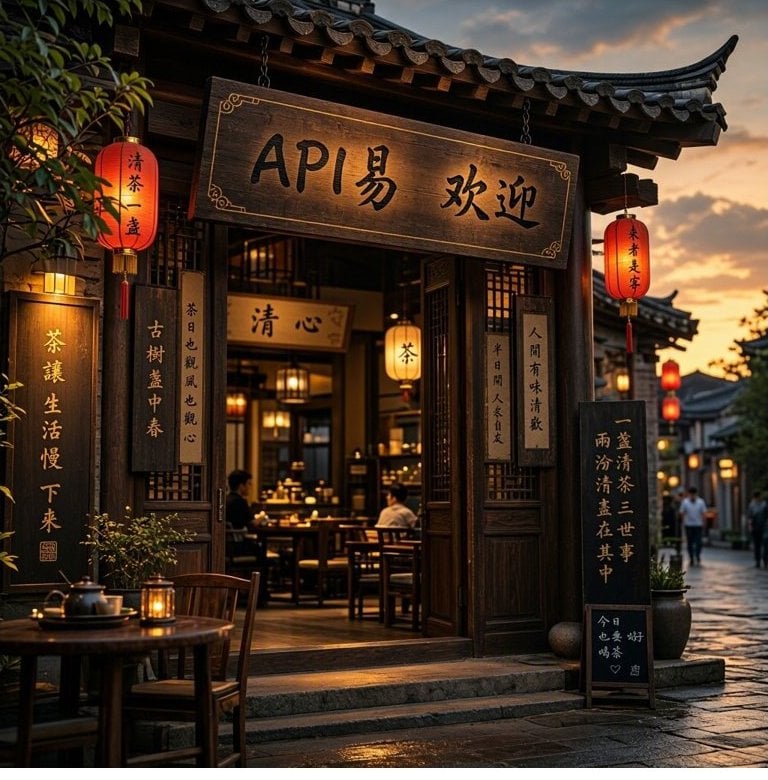
**Highlights**: **excellent Chinese text rendering** (shop signs, vertical couplets, and handwriting come out character-accurate), **high-fidelity editing** (only the requested part changes; the rest stays pixel-identical), any canvas you want via `width` + `height` (up to a 1536×1536 area), and **flat per-image pricing regardless of size**. A 1024×1024 image takes about 17 s on Flash and about 30 s on 2.6.
**📌 Three things to know before you start**
1. **Only two endpoints are supported**: `/v1/images/generations` (text-to-image, JSON) and `/v1/images/edits` (editing, `multipart/form-data`). **`/v1/chat/completions` and `/v1/responses` are not supported** and return 404.
2. **Do not send `response_format`, `seed`, or `negative_prompt`**. All three return 400 immediately. The response is always `data[0].b64_json` (PNG).
3. **Set the size with `width` + `height`, not `size`**. On the text-to-image endpoint `size` is silently ignored and you always get 1024×1024.
All image APIs are **synchronous**: there is no async task ID. If the client disconnects, the result is lost but the request is still billed. Give this model a generous timeout. See [Image API Essentials & Best Practices](/en/api-capabilities/image-api-best-practices).
Generate images from a text prompt, with an interactive Playground.
Upload a reference image plus an instruction; supports two-image fusion. Includes a Playground.
## Let an AI Agent Integrate It for You
If you build with Codex / Claude Code / Cursor, copy the prompt below into it. The agent first fetches the plain-text version of this page (append `.md` to any docs URL), then writes code for your stack. The common pitfalls are spelled out: timeouts, **the three parameters that return 400**, `width`/`height` instead of `size`, and file-upload-only editing.
Integrate (or debug) Microsoft MAI-Image 2.6 text-to-image and image editing in this project.
Read the docs before writing code: fetch [https://docs.apiyi.com/en/api-capabilities/mai-image/overview.md](https://docs.apiyi.com/en/api-capabilities/mai-image/overview.md) for the plain-text version of this page. For detailed parameters, append `.md` to the text-to-image and image-edit pages the same way.
Requirements:
1. Model names: flagship `MAI-Image-2.6`, fast variant `MAI-Image-2.6-Flash`. **Model names are case-sensitive**. An all-lowercase name returns 503, which looks like an outage but is just a wrong name.
2. Endpoints: only `/v1/images/generations` (JSON) and `/v1/images/edits` (`multipart/form-data`). **Do not call `/v1/chat/completions` or `/v1/responses`**. They return 404.
3. Timeouts: set the client timeout to 120 s for Flash and 180 s for 2.6. A 1024×1024 image measured about 17 s / 30 s, but peaks and larger sizes take longer. The image API is synchronous with no task ID: if the client disconnects, the result is lost and the request is still billed. Raise the limits on reverse proxies, gateways, and serverless execution caps too.
4. Forbidden parameters: **never send `response_format`, `seed`, or `negative_prompt`**. Each returns 400 `Invalid parameters`. Code migrated from gpt-image / DALL·E often sets `response_format="b64_json"` explicitly, so remove it. `quality`, `output_format`, `background`, and `style` are silently ignored, so remove them as well.
5. Response handling: the response is always `data[0].b64_json`, plain base64 with no `data:` prefix, decoding to a PNG (about 1.5–1.7 MB at 1024×1024). There is no `url` mode. `usage` holds placeholder values and cannot be used for reconciliation; the console bill is authoritative.
6. Size: use `width` + `height` (integers, always together). Each side must be at least 768, and width × height must not exceed 2,359,296 (the area of 1536×1536). Values that are not multiples of 16 are rounded down to a multiple of 16. If you send neither, the default is 1024×1024. **`size` is silently ignored on the text-to-image endpoint.**
7. Count: text-to-image always returns 1 image and `n` has no effect; send parallel requests if you need more. On the editing endpoint `n` works and is billed per image.
8. Editing: reference images must be **uploaded as files** in multipart, field name `image`. **URL and base64 JSON input are not supported** (400). For two reference images use the field names `image` and `image2`. The OpenAI SDK's `image=[f1, f2]` sends `image[]` twice and is rejected, so build the multipart request yourself with requests / fetch for multi-image edits. Masks are not supported. Compress before uploading: only touch files over 1.5 MB, scale the long side down to 2048 px or less, re-encode at quality 0.9, and fall back to the original if compression fails.
9. Errors: content moderation returns 400 `content_safety_violation` (real celebrities, gore, well-known IP characters, and nudity are blocked). Change the prompt; retrying is pointless. Out-of-range sizes return 400 `unsupported_request_value` with the exact constraint in the message.
10. Read the key from the `APIYI_API_KEY` environment variable and use base\_url [https://api.apiyi.com/v1](https://api.apiyi.com/v1). Never hard-code it or commit it to git.
11. When done, actually run one text-to-image call and one edit call, then show me the results and the cost of both calls.
| Requirement | Pitfall avoided |
| - | - |
| Remove `response_format` | The most common explicit parameter in migrated code. Sending it returns 400 and fails the whole batch |
| `width` / `height`, not `size` | `size` is silently ignored on text-to-image. You think you asked for 1536×1024 and get a 1024×1024 square |
| File upload only for editing | Passing an image URL or base64 JSON the OpenAI way returns 400 |
| `image` + `image2` for two images | The OpenAI SDK's multi-image form sends `image[]`, which is rejected |
| No chat / responses | Chat clients send chat requests for every model name, which return 404 here |
| Generous per-model timeouts | Disconnected requests are still billed. See [Image API Essentials & Best Practices](/en/api-capabilities/image-api-best-practices) |
## Why Use MAI-Image 2.6 on APIYI
Served through Microsoft's official channel. The model is the same as the one of the same name on Microsoft Foundry. Standard `/v1/images/generations` and `/v1/images/edits` endpoints, with responses shaped like the OpenAI Images API.
The provider bills by tokens, so larger images cost more. APIYI charges **a flat price per image regardless of size**: 768×768 and 1536×1536 cost the same, so you can budget per image.
**No Azure account or overseas server needed.** Reach `api.apiyi.com` directly from data centers, home networks, or overseas nodes, with one key for every model.
Combine with [GPT-Image-2](/en/api-capabilities/gpt-image-2/overview), [Nano Banana 2](/en/api-capabilities/nano-banana-2-image/overview), [Seedream](/en/api-capabilities/seedream-image/overview), and [FLUX](/en/api-capabilities/flux/overview) for different use cases.
## Key Features
Chinese shop signs, vertical couplets, and chalkboard handwriting come out character-accurate. Good for posters, product images, and merchandise
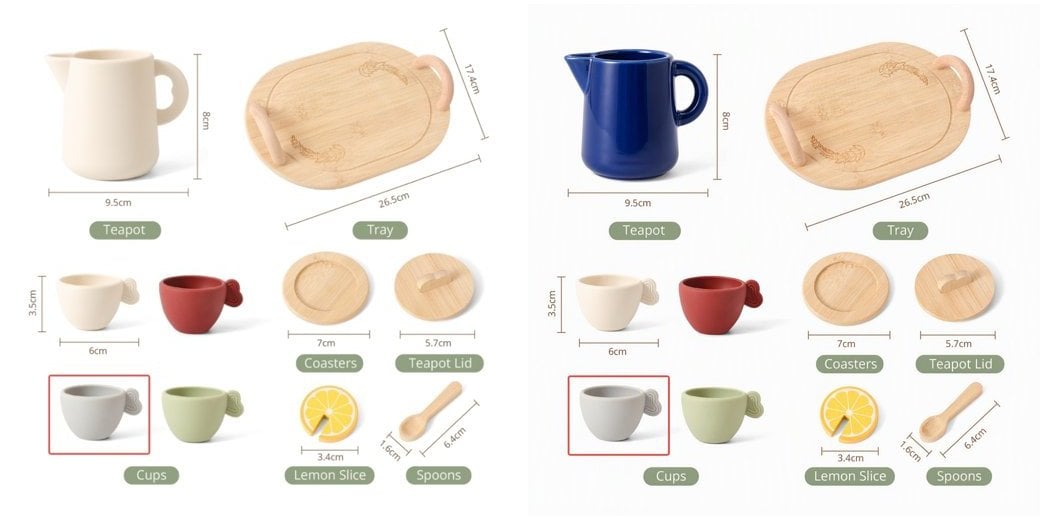
"Make the teapot cobalt blue" changes only the teapot; dimension labels and other objects stay pixel-identical
Any `width` + `height` combination, with the long side up to 3072 (e.g. a 3072×768 banner) and an area cap of 1536×1536
1024×1024 takes about 17 s on Flash and about 30 s on 2.6; latency holds steady at 10 concurrent requests
### Sample Results
**Chinese text rendering** (`MAI-Image-2.6-Flash`, prompt asked for a Chinese sign welcoming visitors to APIYI): the sign, lanterns, vertical couplets, and chalkboard all show legible Chinese.
 **Reference-image editing** (`MAI-Image-2.6-Flash`, instruction "Change the teapot to a deep cobalt blue glaze, keep everything else identical"): original on the left, result on the right. Only the teapot changes color; the dimension labels and other objects are untouched.
 ## Pricing
| Model | Positioning | APIYI price | Billing |
| - | - | - | - |
| **`MAI-Image-2.6`** | Flagship, quality first | **\$0.12 / image** | Per image, any size |
| **`MAI-Image-2.6-Flash`** | Fast, throughput first | **\$0.06 / image** | Per image, any size |
Model prices may change; the table above is for reference only, and the **Model Pricing** tab in the top navigation is authoritative: [Model Pricing](/en/models/index).
**Billing notes**
* **Per image, regardless of size**: 768×768 and 1536×1536 cost the same, and prompt length does not affect the price.
* **Editing costs the same as text-to-image**: single-image edits and two-image fusion are each billed as one image; `n=2` on the editing endpoint is billed as 2 images.
* **Requests that fail with 400** (moderation or invalid parameters) produce no image.
* **Do not reconcile with the `usage` field in the response**: `prompt_tokens` is always 1000 × the image count, a placeholder. The console bill is authoritative.
* Stacks with the [top-up bonus promotion](/en/faq/recharge-promotions).
## Groups and Tokens
This series is in the **`Default` group**. Any newly created token can call it; no application is needed.
**Token billing mode**: both `Pay-as-you-go Priority` and `Per-request` work for this series. We recommend `Pay-as-you-go Priority`, so the same token also works with the token-billed models on the platform.
**Rate**: keep a single key under **50 RPM**. For large batch workloads, contact support in advance.
## Technical Specs
| Item | Spec |
| - | - |
| Model IDs | `MAI-Image-2.6`, `MAI-Image-2.6-Flash` (**case-sensitive**) |
| Endpoints | `/v1/images/generations` (JSON), `/v1/images/edits` (multipart) |
| Size parameters | `width` + `height`, integers, always together |
| Size range | Each side ≥ 768; width × height ≤ 2,359,296 (= 1536×1536); rounded down to multiples of 16 |
| Default size | 1024×1024 |
| Output format | PNG (RGB), `b64_json` only, about 1.5–1.7 MB at 1024×1024 |
| Images per request | Text-to-image always 1; `n` works on the editing endpoint |
| Reference images | File upload on the editing endpoint, up to 2 (`image` + `image2`) |
| Mask inpainting | ❌ Not supported |
| `seed` / `negative_prompt` | ❌ Return 400 |
| Streaming | ❌ Not supported |
| Latency (1024×1024) | Flash P50 about 17 s, 2.6 P50 about 30 s |
| Recommended client timeout | Flash ≥ 120 s, 2.6 ≥ 180 s |
## Endpoints
| Function | Method | Path | Content-Type |
| - | - | - | - |
| Text-to-image | `POST` | `/v1/images/generations` | `application/json` |
| Image editing | `POST` | `/v1/images/edits` | **`multipart/form-data`** |
**❌ Chat endpoints are not supported**
`/v1/chat/completions` and `/v1/responses` return **404 `Requested path is not found`** for this series. Chat clients such as Cherry Studio and LobeChat send chat requests to every model in the list, so **do not pick MAI-Image in those clients**. Use a tool that supports the Images API, or call it from your own code.
**✅ The editing endpoint only accepts multipart file uploads**
Sending JSON (with `image` as a URL, data URI, or raw base64) to `/v1/images/edits` returns 400:
```text theme={null}
request Content-Type isn't multipart/form-data
```
Upload the local file directly with `-F "image=@photo.jpg"`. **No image hosting is needed.** See [Image Editing API](/en/api-capabilities/mai-image/image-edit) for full examples.
Primary domain `https://api.apiyi.com`, backup domain `https://b.apiyi.com`.
## Key Parameters
### `width` and `height` (output size)
| Rule | Details |
| - | - |
| Always together | Sending only one returns 400 |
| Minimum | Each side at least 768; 767 returns 400 `'width' must be at least 768 pixels` |
| Area cap | width × height ≤ 2,359,296; 1600×1600 returns 400 `exceeds the maximum of 2359296` |
| Rounding | Non-multiples of 16 round down: 1000×1000 → 992×992, 1024×1023 → 1024×1008 |
| Aspect ratio | Unrestricted; 3072×768 (a 4:1 banner) works |
**Common canvas sizes** (all within the area cap):
| Use | `width` × `height` |
| - | - |
| Square | 1024×1024 / 1536×1536 |
| Landscape 3:2 | 1536×1024 |
| Portrait 2:3 | 1024×1536 |
| Landscape 16:9 | 1792×1008 |
| Portrait 9:16 | 1008×1792 |
| Banner 4:1 | 3072×768 |
**`size` behaves differently on the two endpoints**: on text-to-image it is **silently ignored** (always 1024×1024), while on the editing endpoint it does take effect. To avoid confusion, **use `width` + `height` on both endpoints**.
### `n` (image count)
* **Text-to-image**: `n` has no effect. Sending 2, 4, or 10 still returns 1 image (and bills 1). Send parallel requests for more.
* **Editing**: `n` works. `n=2` returns 2 images, billed as 2.
## Best Practices
Batch generation or latency-sensitive work → `MAI-Image-2.6-Flash`. Hero posters, complex compositions, or high quality bars → `MAI-Image-2.6`. Parameters are identical, so switching is just a model-name change.
Put any text that should appear in the image in quotes and say where it goes, e.g. a sign reading "Grand Opening". The model reproduces quoted text very faithfully.
Write instructions like "Make the teapot cobalt blue, keep everything else exactly the same" to preserve as much of the original as possible.
If you pass a `width` / `height` with a different aspect ratio from the original, the model **re-lays out the scene** instead of cropping or padding. For local edits, omit the size and the output follows the original's ratio snapped to multiples of 16 (e.g. a 1344×756 input → 1360×768 output).
Text-to-image returns one image per call, so send 4 parallel requests for 4 images. At 10 concurrent requests, latency matched single requests in our tests.
## Error Codes and Retries
| HTTP | code / message | Meaning | What to do |
| - | - | - | - |
| `400` | `unsupported_request_value` | Size out of range, wrong type, or `width`/`height` not sent together | Fix per the constraint in the message; do not retry |
| `400` | `invalid_request`: `Invalid parameters: xxx` | Sent `response_format` / `seed` / `negative_prompt` | Remove the field |
| `400` | `invalid_request`: `Prompt must be …` | `prompt` empty or missing | Add a prompt |
| `400` | `invalid_request`: `File must be attached in a form field with a name starting with 'image'` | Repeated file field (`image[]`×2) or a `mask` on the editing endpoint | Use `image` + `image2`; masks are not supported |
| `400` | `content_safety_violation` | Blocked by content moderation | Change the prompt; retrying won't help |
| `400` | `request Content-Type isn't multipart/form-data` | JSON sent to the editing endpoint | Switch to multipart file upload |
| `404` | `Requested path is not found` | Sent to chat / responses | Use the Images API |
| `500` | `image is required` | No image file field in the edit request | Check that the file field is named `image` |
| `503` | `no available channels` | Wrong model-name case (e.g. all lowercase) | Use `MAI-Image-2.6` / `MAI-Image-2.6-Flash` |
**Client advice**: the 4xx / 500 errors above are deterministic, so retrying is pointless; alert on them instead. Only network timeouts and `429` are worth retrying, with exponential backoff and at most 3 attempts. Keep in mind that **requests dropped by a client timeout are still billed**, so raise the timeout first.
## FAQ
This series only returns `b64_json` and **does not accept the `response_format` parameter**. Even `"b64_json"` returns 400 `Invalid parameters: response_format`.
Code migrated from gpt-image / DALL·E often sets it explicitly. Remove it; the image is still in `data[0].b64_json`. The same applies to `seed` and `negative_prompt`.
The text-to-image endpoint **does not read `size`**. It silently ignores it and renders the default 1024×1024. Use `"width": 1536, "height": 1024` instead.
On the editing endpoint `size` does work, but use `width` + `height` on both for consistency.
**No.** The editing endpoint only accepts `multipart/form-data` file uploads. Passing a URL, data URI, or base64 string as `image` returns 400.
If you only have a URL, download it on your server first, then upload it:
```python theme={null}
import requests
img = requests.get("https://example.com/photo.jpg", timeout=30).content
files = {"image": ("photo.jpg", img, "image/jpeg")}
```
Name the second image's field **`image2`**:
```bash theme={null}
curl -X POST "https://api.apiyi.com/v1/images/edits" \
-H "Authorization: Bearer sk-your-api-key" \
-F "model=MAI-Image-2.6" \
-F "prompt=Place the person from image 2 into the scene in image 1" \
-F "image=@scene.jpg" \
-F "image2=@person.jpg"
```
The OpenAI SDK's `client.images.edit(image=[f1, f2])` sends both files as `image[]`. This series does not accept repeated file fields and returns 400. Single-image edits with the SDK work fine.
**No.** A `mask` field returns 400. For local changes, describe the area in the prompt, e.g. "Only make the teapot blue, keep everything else exactly the same". In our tests the model follows such constraints closely.
**Not recommended.** Those chat clients use `/v1/chat/completions`, which returns 404 for this series. Use a tool that supports the OpenAI Images API, or call it directly with the code samples in these docs.
Text-to-image **always returns 1**. Whatever `n` you send, you get and pay for 1 image. Send parallel requests for more.
On the editing endpoint `n` works: `n=2` returns 2 images and is billed as 2.
**No.** `usage.prompt_tokens` is always 1000 × the image count and `output_tokens` is always 0; these are placeholders. This series is billed per image, and the APIYI console bill is authoritative.
This series uses Microsoft's official content safety policy, which is **fairly strict**: real celebrities, gore, well-known IP characters (e.g. Disney), and nudity are blocked.
A block returns `400 content_safety_violation` with the specific reason in the message. Prompt-level blocks usually come back within 5–8 s; a few are applied after generation and take about as long as a normal image. Retrying the same prompt won't help; rephrase it.
**No.** Call it as a normal synchronous request and wait for the full response.
The most common cause is **wrong model-name case**. The name must be exactly `MAI-Image-2.6` or `MAI-Image-2.6-Flash`; `mai-image-2.6-flash` returns 503.
## Related Docs
* [MAI-Image 2.6 Text-to-Image API](/en/api-capabilities/mai-image/text-to-image) - API reference with Playground
* [MAI-Image 2.6 Image Editing API](/en/api-capabilities/mai-image/image-edit) - Reference-image editing and two-image fusion
* [Image API Essentials & Best Practices](/en/api-capabilities/image-api-best-practices) - Timeouts, disconnects, compression
* [Top-Up Bonus Promotion](/en/faq/recharge-promotions)
This documentation is built and hosted on [Mintlify](https://mintlify.com), a developer documentation platform.
## Pricing
| Model | Positioning | APIYI price | Billing |
| - | - | - | - |
| **`MAI-Image-2.6`** | Flagship, quality first | **\$0.12 / image** | Per image, any size |
| **`MAI-Image-2.6-Flash`** | Fast, throughput first | **\$0.06 / image** | Per image, any size |
Model prices may change; the table above is for reference only, and the **Model Pricing** tab in the top navigation is authoritative: [Model Pricing](/en/models/index).
**Billing notes**
* **Per image, regardless of size**: 768×768 and 1536×1536 cost the same, and prompt length does not affect the price.
* **Editing costs the same as text-to-image**: single-image edits and two-image fusion are each billed as one image; `n=2` on the editing endpoint is billed as 2 images.
* **Requests that fail with 400** (moderation or invalid parameters) produce no image.
* **Do not reconcile with the `usage` field in the response**: `prompt_tokens` is always 1000 × the image count, a placeholder. The console bill is authoritative.
* Stacks with the [top-up bonus promotion](/en/faq/recharge-promotions).
## Groups and Tokens
This series is in the **`Default` group**. Any newly created token can call it; no application is needed.
**Token billing mode**: both `Pay-as-you-go Priority` and `Per-request` work for this series. We recommend `Pay-as-you-go Priority`, so the same token also works with the token-billed models on the platform.
**Rate**: keep a single key under **50 RPM**. For large batch workloads, contact support in advance.
## Technical Specs
| Item | Spec |
| - | - |
| Model IDs | `MAI-Image-2.6`, `MAI-Image-2.6-Flash` (**case-sensitive**) |
| Endpoints | `/v1/images/generations` (JSON), `/v1/images/edits` (multipart) |
| Size parameters | `width` + `height`, integers, always together |
| Size range | Each side ≥ 768; width × height ≤ 2,359,296 (= 1536×1536); rounded down to multiples of 16 |
| Default size | 1024×1024 |
| Output format | PNG (RGB), `b64_json` only, about 1.5–1.7 MB at 1024×1024 |
| Images per request | Text-to-image always 1; `n` works on the editing endpoint |
| Reference images | File upload on the editing endpoint, up to 2 (`image` + `image2`) |
| Mask inpainting | ❌ Not supported |
| `seed` / `negative_prompt` | ❌ Return 400 |
| Streaming | ❌ Not supported |
| Latency (1024×1024) | Flash P50 about 17 s, 2.6 P50 about 30 s |
| Recommended client timeout | Flash ≥ 120 s, 2.6 ≥ 180 s |
## Endpoints
| Function | Method | Path | Content-Type |
| - | - | - | - |
| Text-to-image | `POST` | `/v1/images/generations` | `application/json` |
| Image editing | `POST` | `/v1/images/edits` | **`multipart/form-data`** |
**❌ Chat endpoints are not supported**
`/v1/chat/completions` and `/v1/responses` return **404 `Requested path is not found`** for this series. Chat clients such as Cherry Studio and LobeChat send chat requests to every model in the list, so **do not pick MAI-Image in those clients**. Use a tool that supports the Images API, or call it from your own code.
**✅ The editing endpoint only accepts multipart file uploads**
Sending JSON (with `image` as a URL, data URI, or raw base64) to `/v1/images/edits` returns 400:
```text theme={null}
request Content-Type isn't multipart/form-data
```
Upload the local file directly with `-F "image=@photo.jpg"`. **No image hosting is needed.** See [Image Editing API](/en/api-capabilities/mai-image/image-edit) for full examples.
Primary domain `https://api.apiyi.com`, backup domain `https://b.apiyi.com`.
## Key Parameters
### `width` and `height` (output size)
| Rule | Details |
| - | - |
| Always together | Sending only one returns 400 |
| Minimum | Each side at least 768; 767 returns 400 `'width' must be at least 768 pixels` |
| Area cap | width × height ≤ 2,359,296; 1600×1600 returns 400 `exceeds the maximum of 2359296` |
| Rounding | Non-multiples of 16 round down: 1000×1000 → 992×992, 1024×1023 → 1024×1008 |
| Aspect ratio | Unrestricted; 3072×768 (a 4:1 banner) works |
**Common canvas sizes** (all within the area cap):
| Use | `width` × `height` |
| - | - |
| Square | 1024×1024 / 1536×1536 |
| Landscape 3:2 | 1536×1024 |
| Portrait 2:3 | 1024×1536 |
| Landscape 16:9 | 1792×1008 |
| Portrait 9:16 | 1008×1792 |
| Banner 4:1 | 3072×768 |
**`size` behaves differently on the two endpoints**: on text-to-image it is **silently ignored** (always 1024×1024), while on the editing endpoint it does take effect. To avoid confusion, **use `width` + `height` on both endpoints**.
### `n` (image count)
* **Text-to-image**: `n` has no effect. Sending 2, 4, or 10 still returns 1 image (and bills 1). Send parallel requests for more.
* **Editing**: `n` works. `n=2` returns 2 images, billed as 2.
## Best Practices
Batch generation or latency-sensitive work → `MAI-Image-2.6-Flash`. Hero posters, complex compositions, or high quality bars → `MAI-Image-2.6`. Parameters are identical, so switching is just a model-name change.
Put any text that should appear in the image in quotes and say where it goes, e.g. a sign reading "Grand Opening". The model reproduces quoted text very faithfully.
Write instructions like "Make the teapot cobalt blue, keep everything else exactly the same" to preserve as much of the original as possible.
If you pass a `width` / `height` with a different aspect ratio from the original, the model **re-lays out the scene** instead of cropping or padding. For local edits, omit the size and the output follows the original's ratio snapped to multiples of 16 (e.g. a 1344×756 input → 1360×768 output).
Text-to-image returns one image per call, so send 4 parallel requests for 4 images. At 10 concurrent requests, latency matched single requests in our tests.
## Error Codes and Retries
| HTTP | code / message | Meaning | What to do |
| - | - | - | - |
| `400` | `unsupported_request_value` | Size out of range, wrong type, or `width`/`height` not sent together | Fix per the constraint in the message; do not retry |
| `400` | `invalid_request`: `Invalid parameters: xxx` | Sent `response_format` / `seed` / `negative_prompt` | Remove the field |
| `400` | `invalid_request`: `Prompt must be …` | `prompt` empty or missing | Add a prompt |
| `400` | `invalid_request`: `File must be attached in a form field with a name starting with 'image'` | Repeated file field (`image[]`×2) or a `mask` on the editing endpoint | Use `image` + `image2`; masks are not supported |
| `400` | `content_safety_violation` | Blocked by content moderation | Change the prompt; retrying won't help |
| `400` | `request Content-Type isn't multipart/form-data` | JSON sent to the editing endpoint | Switch to multipart file upload |
| `404` | `Requested path is not found` | Sent to chat / responses | Use the Images API |
| `500` | `image is required` | No image file field in the edit request | Check that the file field is named `image` |
| `503` | `no available channels` | Wrong model-name case (e.g. all lowercase) | Use `MAI-Image-2.6` / `MAI-Image-2.6-Flash` |
**Client advice**: the 4xx / 500 errors above are deterministic, so retrying is pointless; alert on them instead. Only network timeouts and `429` are worth retrying, with exponential backoff and at most 3 attempts. Keep in mind that **requests dropped by a client timeout are still billed**, so raise the timeout first.
## FAQ
This series only returns `b64_json` and **does not accept the `response_format` parameter**. Even `"b64_json"` returns 400 `Invalid parameters: response_format`.
Code migrated from gpt-image / DALL·E often sets it explicitly. Remove it; the image is still in `data[0].b64_json`. The same applies to `seed` and `negative_prompt`.
The text-to-image endpoint **does not read `size`**. It silently ignores it and renders the default 1024×1024. Use `"width": 1536, "height": 1024` instead.
On the editing endpoint `size` does work, but use `width` + `height` on both for consistency.
**No.** The editing endpoint only accepts `multipart/form-data` file uploads. Passing a URL, data URI, or base64 string as `image` returns 400.
If you only have a URL, download it on your server first, then upload it:
```python theme={null}
import requests
img = requests.get("https://example.com/photo.jpg", timeout=30).content
files = {"image": ("photo.jpg", img, "image/jpeg")}
```
Name the second image's field **`image2`**:
```bash theme={null}
curl -X POST "https://api.apiyi.com/v1/images/edits" \
-H "Authorization: Bearer sk-your-api-key" \
-F "model=MAI-Image-2.6" \
-F "prompt=Place the person from image 2 into the scene in image 1" \
-F "image=@scene.jpg" \
-F "image2=@person.jpg"
```
The OpenAI SDK's `client.images.edit(image=[f1, f2])` sends both files as `image[]`. This series does not accept repeated file fields and returns 400. Single-image edits with the SDK work fine.
**No.** A `mask` field returns 400. For local changes, describe the area in the prompt, e.g. "Only make the teapot blue, keep everything else exactly the same". In our tests the model follows such constraints closely.
**Not recommended.** Those chat clients use `/v1/chat/completions`, which returns 404 for this series. Use a tool that supports the OpenAI Images API, or call it directly with the code samples in these docs.
Text-to-image **always returns 1**. Whatever `n` you send, you get and pay for 1 image. Send parallel requests for more.
On the editing endpoint `n` works: `n=2` returns 2 images and is billed as 2.
**No.** `usage.prompt_tokens` is always 1000 × the image count and `output_tokens` is always 0; these are placeholders. This series is billed per image, and the APIYI console bill is authoritative.
This series uses Microsoft's official content safety policy, which is **fairly strict**: real celebrities, gore, well-known IP characters (e.g. Disney), and nudity are blocked.
A block returns `400 content_safety_violation` with the specific reason in the message. Prompt-level blocks usually come back within 5–8 s; a few are applied after generation and take about as long as a normal image. Retrying the same prompt won't help; rephrase it.
**No.** Call it as a normal synchronous request and wait for the full response.
The most common cause is **wrong model-name case**. The name must be exactly `MAI-Image-2.6` or `MAI-Image-2.6-Flash`; `mai-image-2.6-flash` returns 503.
## Related Docs
* [MAI-Image 2.6 Text-to-Image API](/en/api-capabilities/mai-image/text-to-image) - API reference with Playground
* [MAI-Image 2.6 Image Editing API](/en/api-capabilities/mai-image/image-edit) - Reference-image editing and two-image fusion
* [Image API Essentials & Best Practices](/en/api-capabilities/image-api-best-practices) - Timeouts, disconnects, compression
* [Top-Up Bonus Promotion](/en/faq/recharge-promotions)
This documentation is built and hosted on [Mintlify](https://mintlify.com), a developer documentation platform.