> ## Documentation Index
> Fetch the complete documentation index at: https://docs.apiyi.com/llms.txt
> Use this file to discover all available pages before exploring further.
# Multi-Image Fusion Testing Guide
> Customers often ask whether the reference image limit matches Google's official cap (14 images). Here are two reusable test methods, plus a real 14-image fusion test we ran ourselves.
A common question we get: **"Does your supported number of reference images match the official limit?"** Google's official Gemini image models cap out at **14 reference images per request** — the highest limit available in the industry today. The answer is **yes, we support it** — but "we support it" shouldn't just be a verbal claim. This page gives you a test methodology you can reproduce yourself, plus the results of a real 14-image fusion test.
## Why It's Worth Testing Yourself
14 reference images is an **extreme scenario** — you may not hit it in daily use, but if you ever need to merge multiple independently-designed elements into one composite (a poster, a campaign visual), you need to confirm two things:
1. **Does the call actually succeed?** Stacking 14 images noticeably inflates the request body — does that get rejected for being too large?
2. **Is the fusion result reasonable?** With that many input images, does the model drop some, misplace elements, or mix them up?
The two methods below each target one of these questions, and neither relies on subjective aesthetic judgment — you can tell at a glance whether the result is correct.
## Method 1: Objective Marker Test (Do This First)
**Idea**: instead of a complex real-world scene, generate N cards that are **visually distinct and individually countable** — the simplest version is numbers 1 through 14. Then ask the model to collage/fuse them into one image.
* Give each card a completely different color scheme and material style (neon tube, brushed metal, chalk handwriting, pixel art, carved wood…) so that in the fused result, **every number can be traced back to its source card by color and style alone**;
* After fusion, just eyeball it: **are all 14 numbers present, with no duplicates or omissions?** No need to judge "does it look good" — only "is it complete and correct".
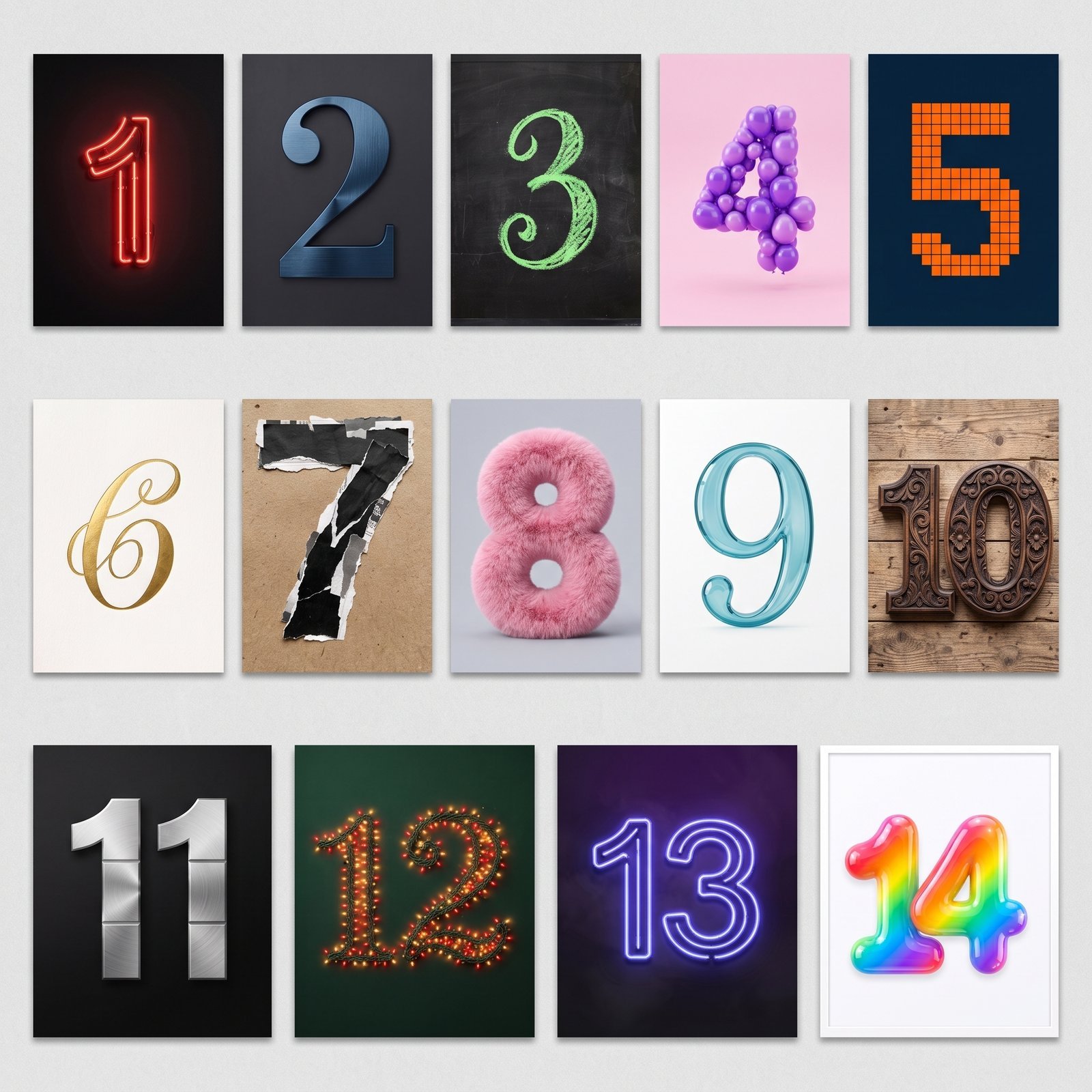 The value of this method is **eliminating noise**: if the model gets the most basic check right — "are the numbers correct" — that's strong evidence it's genuinely processing every input image, not just picking a few at random.
## Method 2: Real-Scenario Decomposition Test
**Idea**: break down the actual scene you want to produce into N independent elements generated separately, then have the model fuse them back into one scene. This is closer to real usage — e.g. managing character, outfit, props, and background separately, then compositing a final shot.
As an example, we decomposed a fashion editorial scene into 14 independent elements: a model portrait, an outerwear piece, a vehicle, a backdrop, a pet/accessory, a bag, jewelry, footwear, luggage, and so on — each generated as a standalone image with a consistent style baseline (e.g. all shot against "a light-gray studio backdrop, realistic photography").
The value of this method is **eliminating noise**: if the model gets the most basic check right — "are the numbers correct" — that's strong evidence it's genuinely processing every input image, not just picking a few at random.
## Method 2: Real-Scenario Decomposition Test
**Idea**: break down the actual scene you want to produce into N independent elements generated separately, then have the model fuse them back into one scene. This is closer to real usage — e.g. managing character, outfit, props, and background separately, then compositing a final shot.
As an example, we decomposed a fashion editorial scene into 14 independent elements: a model portrait, an outerwear piece, a vehicle, a backdrop, a pet/accessory, a bag, jewelry, footwear, luggage, and so on — each generated as a standalone image with a consistent style baseline (e.g. all shot against "a light-gray studio backdrop, realistic photography").
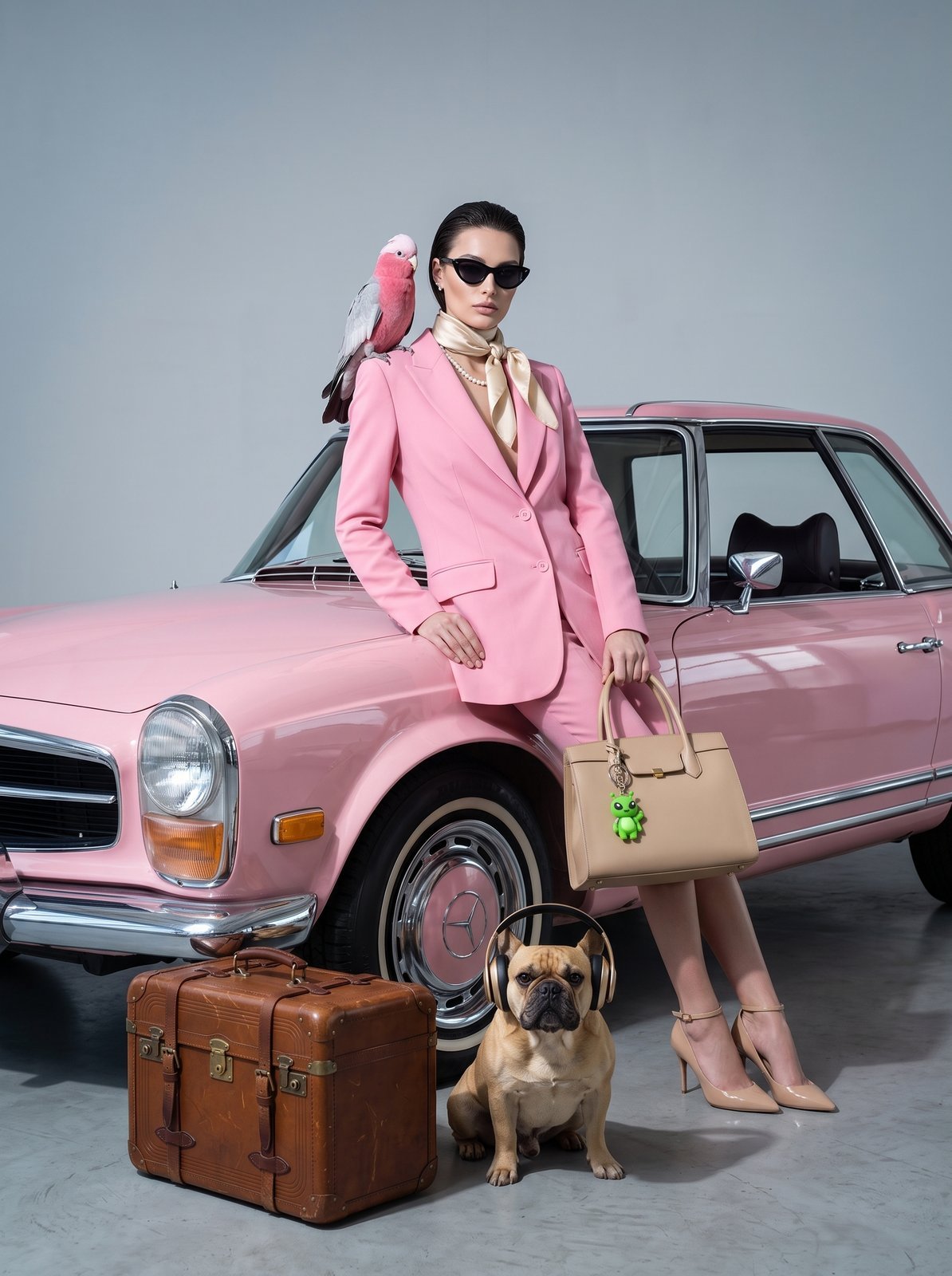 What to check: **are all 14 elements present in the shot**, is the placement/scale coherent, and is there any obvious element loss or distortion. A real-scenario fusion is naturally harder than a "number collage" (different elements need unified lighting and perspective), so this step is a more realistic test of fusion quality under complex, real business scenarios.
We recommend running **both methods**: Method 1 answers "did the model genuinely process every input image," Method 2 answers "is fusion quality good enough for a complex real scenario." If you only run Method 2, a failure is hard to diagnose — you can't tell whether "the model missed an image" or "the composition just isn't great" caused it.
## Request Format: Fitting 14 Images Into One Request
In the native Gemini format, the rule for multi-image fusion is simple: **one `text` part (the fusion instruction) + N `inlineData` parts (one per reference image)**. Each part can only be `text` or `inlineData`, never both at once.
```python theme={null}
import requests
import base64
API_KEY = "sk-your-api-key"
def to_b64(path):
with open(path, "rb") as f:
return base64.b64encode(f.read()).decode()
# Up to 14 reference images
image_paths = ["01.png", "02.png", "03.png", "..."] # max 14
parts = [{"text": "Fuse the elements from these images into a single coherent scene, keeping the style consistent and the composition balanced"}]
for path in image_paths:
parts.append({"inlineData": {"mimeType": "image/png", "data": to_b64(path)}})
response = requests.post(
"https://api.apiyi.com/v1beta/models/gemini-3.1-flash-image:generateContent",
headers={"Authorization": f"Bearer {API_KEY}", "Content-Type": "application/json"},
json={
"contents": [{"parts": parts}],
"generationConfig": {
"responseModalities": ["IMAGE"],
"imageConfig": {"aspectRatio": "1:1", "imageSize": "2K"}
}
},
timeout=600 # more images and a larger request body — allow a generous timeout
).json()
img_data = response["candidates"][0]["content"]["parts"][0]["inlineData"]["data"]
with open("fused.png", "wb") as f:
f.write(base64.b64decode(img_data))
```
For the full multi-image editing format (the `parts` structure, common errors), see the [Image Edit API Reference](/en/api-capabilities/nano-banana-image/image-edit) and the [Nano Banana Series Developer Guide](/en/api-capabilities/nano-banana-dev-guide).
## The Question Customers Care About Most: Will a Large Request Get Rejected?
Sending 14 uncompressed original images does noticeably inflate the request body. We ran a real test with actual numbers (14 images at 2K resolution, no compression applied):
| Item | Measured value |
| ------------------------------------------ | ---------------------------------------------------- |
| Single original image size | \~1.7MB – 4.0MB |
| 14 images combined (after Base64 encoding) | **\~42–43MB** |
| Request outcome | **All succeeded** — no rejection due to payload size |
APIYI's per-request image-payload cap is **100MB** (synchronous calls, to avoid excessive memory usage); a single image follows Google's official rule of no more than **7MB**. Our 14 images at 2K totaled 42–43MB, well within both limits, so the calls went through without issue.
**Conclusion**: even without compression, 14 reference images at 2K typically won't hit a payload ceiling. That said, **compression is still recommended** — not because uncompressed uploads get rejected, but because compressed uploads complete **noticeably faster** (in our test, the same fusion task took roughly 1/2 to 1/3 the time after compression, since it skips transferring and server-side decoding a much larger payload). For concrete compression parameters (target longest edge, JPEG quality, combined size budget for multiple images), see [Image Compression & Output Resolution](/en/api-capabilities/image-compression-resolution).
## If No Image Comes Back, Check for a Safety Block First
Multi-image fusion tasks occasionally hit `finishReason: IMAGE_SAFETY` (HTTP status is still 200, but `content.parts` is empty). In testing, **retrying the exact same input once or twice often succeeds** — this type of block has some randomness to it and doesn't necessarily mean there's actually a problem with the input.
Images blocked for safety reasons **aren't billed**. We recommend building automatic retry for `IMAGE_SAFETY` into your integration rather than treating it as a hard failure. For more error types (safety blocks, content moderation, timeouts) and how to handle them, see the [Gemini Image API Error Handling Guide](/en/api-capabilities/gemini-image-error-handling).
## Quick Reference
* Google's official cap is **14 reference images per request**; APIYI has verified full support — calls succeed and fusion results are coherent.
* When testing yourself, run **both methods**: the number-card test verifies completeness, the real-scenario decomposition test verifies fusion quality.
* 14 original images at 2K total roughly 40MB — **well within APIYI's 100MB request cap and Google's 7MB per-image limit**, so it won't be rejected. Compression is still recommended for faster turnaround.
* Multi-image request structure: **1 text part + N inlineData parts** — never combine both in the same part.
* If you get an empty image back with `IMAGE_SAFETY`, retry once or twice first — it often succeeds, and blocked images aren't billed.
## Related Docs
* [Nano Banana Series Developer Guide](/en/api-capabilities/nano-banana-dev-guide)
* [Image Compression & Output Resolution](/en/api-capabilities/image-compression-resolution)
* [Gemini Image API Error Handling Guide](/en/api-capabilities/gemini-image-error-handling)
* [How to Get Satisfying Images](/en/api-capabilities/image-generation-success-tips)
What to check: **are all 14 elements present in the shot**, is the placement/scale coherent, and is there any obvious element loss or distortion. A real-scenario fusion is naturally harder than a "number collage" (different elements need unified lighting and perspective), so this step is a more realistic test of fusion quality under complex, real business scenarios.
We recommend running **both methods**: Method 1 answers "did the model genuinely process every input image," Method 2 answers "is fusion quality good enough for a complex real scenario." If you only run Method 2, a failure is hard to diagnose — you can't tell whether "the model missed an image" or "the composition just isn't great" caused it.
## Request Format: Fitting 14 Images Into One Request
In the native Gemini format, the rule for multi-image fusion is simple: **one `text` part (the fusion instruction) + N `inlineData` parts (one per reference image)**. Each part can only be `text` or `inlineData`, never both at once.
```python theme={null}
import requests
import base64
API_KEY = "sk-your-api-key"
def to_b64(path):
with open(path, "rb") as f:
return base64.b64encode(f.read()).decode()
# Up to 14 reference images
image_paths = ["01.png", "02.png", "03.png", "..."] # max 14
parts = [{"text": "Fuse the elements from these images into a single coherent scene, keeping the style consistent and the composition balanced"}]
for path in image_paths:
parts.append({"inlineData": {"mimeType": "image/png", "data": to_b64(path)}})
response = requests.post(
"https://api.apiyi.com/v1beta/models/gemini-3.1-flash-image:generateContent",
headers={"Authorization": f"Bearer {API_KEY}", "Content-Type": "application/json"},
json={
"contents": [{"parts": parts}],
"generationConfig": {
"responseModalities": ["IMAGE"],
"imageConfig": {"aspectRatio": "1:1", "imageSize": "2K"}
}
},
timeout=600 # more images and a larger request body — allow a generous timeout
).json()
img_data = response["candidates"][0]["content"]["parts"][0]["inlineData"]["data"]
with open("fused.png", "wb") as f:
f.write(base64.b64decode(img_data))
```
For the full multi-image editing format (the `parts` structure, common errors), see the [Image Edit API Reference](/en/api-capabilities/nano-banana-image/image-edit) and the [Nano Banana Series Developer Guide](/en/api-capabilities/nano-banana-dev-guide).
## The Question Customers Care About Most: Will a Large Request Get Rejected?
Sending 14 uncompressed original images does noticeably inflate the request body. We ran a real test with actual numbers (14 images at 2K resolution, no compression applied):
| Item | Measured value |
| ------------------------------------------ | ---------------------------------------------------- |
| Single original image size | \~1.7MB – 4.0MB |
| 14 images combined (after Base64 encoding) | **\~42–43MB** |
| Request outcome | **All succeeded** — no rejection due to payload size |
APIYI's per-request image-payload cap is **100MB** (synchronous calls, to avoid excessive memory usage); a single image follows Google's official rule of no more than **7MB**. Our 14 images at 2K totaled 42–43MB, well within both limits, so the calls went through without issue.
**Conclusion**: even without compression, 14 reference images at 2K typically won't hit a payload ceiling. That said, **compression is still recommended** — not because uncompressed uploads get rejected, but because compressed uploads complete **noticeably faster** (in our test, the same fusion task took roughly 1/2 to 1/3 the time after compression, since it skips transferring and server-side decoding a much larger payload). For concrete compression parameters (target longest edge, JPEG quality, combined size budget for multiple images), see [Image Compression & Output Resolution](/en/api-capabilities/image-compression-resolution).
## If No Image Comes Back, Check for a Safety Block First
Multi-image fusion tasks occasionally hit `finishReason: IMAGE_SAFETY` (HTTP status is still 200, but `content.parts` is empty). In testing, **retrying the exact same input once or twice often succeeds** — this type of block has some randomness to it and doesn't necessarily mean there's actually a problem with the input.
Images blocked for safety reasons **aren't billed**. We recommend building automatic retry for `IMAGE_SAFETY` into your integration rather than treating it as a hard failure. For more error types (safety blocks, content moderation, timeouts) and how to handle them, see the [Gemini Image API Error Handling Guide](/en/api-capabilities/gemini-image-error-handling).
## Quick Reference
* Google's official cap is **14 reference images per request**; APIYI has verified full support — calls succeed and fusion results are coherent.
* When testing yourself, run **both methods**: the number-card test verifies completeness, the real-scenario decomposition test verifies fusion quality.
* 14 original images at 2K total roughly 40MB — **well within APIYI's 100MB request cap and Google's 7MB per-image limit**, so it won't be rejected. Compression is still recommended for faster turnaround.
* Multi-image request structure: **1 text part + N inlineData parts** — never combine both in the same part.
* If you get an empty image back with `IMAGE_SAFETY`, retry once or twice first — it often succeeds, and blocked images aren't billed.
## Related Docs
* [Nano Banana Series Developer Guide](/en/api-capabilities/nano-banana-dev-guide)
* [Image Compression & Output Resolution](/en/api-capabilities/image-compression-resolution)
* [Gemini Image API Error Handling Guide](/en/api-capabilities/gemini-image-error-handling)
* [How to Get Satisfying Images](/en/api-capabilities/image-generation-success-tips)