> ## Documentation Index
> Fetch the complete documentation index at: https://docs.apiyi.com/llms.txt
> Use this file to discover all available pages before exploring further.
# Nano Banana 2 Image Gen/Editing
> Google's latest image generation model Nano Banana 2 (gemini-3.1-flash-image-preview) - Pro-level quality at Flash-tier speed, 4K output, 14 aspect ratios, Image Search Grounding, per-call $0.055/image, token-based from $0.025/image.
## Overview
**Nano Banana 2** (codename) is Google's latest image generation model released on February 26, 2026, with model ID `gemini-3.1-flash-image-preview`. It redefines image generation cost-effectiveness with **Pro-level quality at Flash-tier speed and cost**, making it the latest flagship of the Nano Banana series.
**🔥 Released February 26, 2026**: Nano Banana 2 is live! Pro-level quality, Flash-tier speed, token-based billing as low as 36% of Google's pricing! 512px from just \$0.025/image! Supports 4K output, 14 aspect ratios, Image Search Grounding, and more exclusive features.
**🆕 Update May 29, 2026 (`-preview` dropped)**: Google updated its official docs and released the stable model name **`gemini-3.1-flash-image`** (without `-preview`). APIYI already supports it.
* **The old name still works**: `gemini-3.1-flash-image-preview` keeps working as usual, **pricing unchanged**, no code changes needed.
* **Both names work**: use either the new `gemini-3.1-flash-image` or the original `-preview` name.
Heads-up: Google hasn't clarified whether the stable version differs from the preview in output quality, safety filtering, or other behavior. We welcome you to test and share feedback.
Generate images from text prompts. Includes an interactive playground for online testing.
Upload an image + edit instructions to generate new images. Includes an interactive playground.
## Why APIYI's Nano Banana 2?
**Nano Banana Pro / 2 is the #1 model by usage volume on APIYI** — stable, reliable, and fast. If you want to work with a professional team, APIYI is the right choice.
A freshly released Google flagship still capacity-constrained at the source — APIYI deeply optimizes the experience across **reliability**, **cost**, and **integration**:
100% compatible with Google's native Gemini API (`/v1beta/models/.../generateContent`) and the OpenAI SDK pattern — same request body, response fields, and error codes. Zero-code migration.
Not bound by Google AI Studio's RPM/RPD ceilings. Enterprise-scale batch generation and peak traffic scale linearly without quota interruptions.
\$0.055/image per-call (vs Google \$0.151), 512px from \$0.025/image token-based (vs \$0.045). Stack with [top-up bonuses](/en/faq/recharge-promotions) for as low as 30.3% of the list.
**No overseas server or proxy required** — connect directly to `api.apiyi.com` from mainland data centers, residential networks, or overseas nodes. Stable latency, no cross-border re-architecture.
Same series covers [Nano Banana Pro](/en/api-capabilities/nano-banana-image/overview) (ultimate quality), Nano Banana 2 (best value), and the legacy Nano Banana — mix and match per scenario.
Our team specializes in production image-generation deployments, with deep experience in model selection, tuning, and integration — end-to-end support from PoC to production.
## Core Features
Vibrant lighting, rich textures, sharp details - quality rivaling Nano Banana Pro at much faster speeds
Supports 512px, 1K, 2K, 4K resolutions, up to 4096×4096
New additions: 1:4, 4:1, 1:8, 8:1 - total 14 aspect ratios covering more use cases
Nano Banana 2 exclusive - pulls visual context from Google Image Search
Clear, legible text in images with multilingual support - perfect for posters and marketing materials
Conversational image editing with iterative refinement through chat
Configurable minimal or high thinking levels for more precise complex prompt handling
Maintains resemblance across up to 5 characters and 14 reference objects
## Version Comparison
| Feature | **Nano Banana 2** | Nano Banana Pro | Nano Banana |
| ---------------------- | -------------------------------- | ---------------------------- | ------------------------ |
| Model ID | `gemini-3.1-flash-image-preview` | `gemini-3-pro-image-preview` | `gemini-2.5-flash-image` |
| Quality | ⭐⭐⭐⭐⭐ Pro-level | ⭐⭐⭐⭐⭐ Highest | ⭐⭐⭐⭐ Excellent |
| Speed | 🚀 Fastest | 🐢 Slower | ⚡ Fast |
| Max Resolution | 4K | 4K | 1K |
| Aspect Ratios | 14 | 10 | 10 |
| Image Search Grounding | ✅ Exclusive | ❌ | ❌ |
| APIYI Pricing | **\$0.055/image (per-call)** | \$0.09/image | \$0.02/image |
| Status | Preview | Preview | GA |
**Selection Guide**:
* 🔥 **Best Value** → Nano Banana 2 (token-based from \$0.025/image, Pro-level quality + Flash-tier speed)
* 🎨 **Ultimate Quality** → Nano Banana Pro (\$0.09/image, highest fidelity)
* ⚡ **Lowest Cost** → Nano Banana (\$0.025/image, fast and stable)
## Pricing
**Billing Mode Selection**: Nano Banana 2 supports two billing modes, selected via the "Billing model" setting when creating your API token:
* Select **Pay-as-you-go** or **Pay-as-you-go Priority** → Token-based billing
* Select **Pay-per-request** or **Pay-per-request Priority** → Per-call billing (same as Nano Banana Pro)
* ⚠️ **Do NOT select Hybrid billing**
### Per-call Billing
| Model | APIYI Pricing | Google Official 4K | Discount |
| -------------------------------------------------- | ----------------- | ----------------------- | ---------------- |
| **Nano Banana 2** `gemini-3.1-flash-image-preview` | **\$0.055/image** | \$0.151/image | **🔥 \~64% off** |
| Nano Banana Pro `gemini-3-pro-image-preview` | \$0.09/image | \$0.24/image | **\~63% off** |
| Nano Banana `gemini-2.5-flash-image` | \$0.02/image | \$0.039/image (1K only) | \~50% off |
**Enterprise HA Channel**: NanoBananaEnterprise is available at 1.4x the standard Nano Banana Pro rate (\$0.126/image), offering a dedicated high-availability fallback for enterprise workloads.
### Token-based Billing (Nano Banana 2 Exclusive)
| Billing Item | Google Official | APIYI | Discount |
| -------------------------------- | --------------------------- | --------------- | -------- |
| Input | \$0.50/M tokens | \$0.18/M tokens | **36%** |
| Output (images and text unified) | Images \$60/M, Text \$1.5/M | \$21.6/M tokens | **36%** |
### Token-based Billing Price Estimates
| Resolution | Google Official | APIYI | Fal AI |
| ---------- | --------------- | ------------- | ------ |
| 512px | \$0.045 | **\~\$0.025** | \$0.06 |
| 1K | \$0.067 | **\~\$0.035** | \$0.08 |
| 2K | \$0.101 | **\~\$0.045** | \$0.12 |
| 4K | \$0.151 | **\~\$0.07** | \$0.16 |
**💰 Token-based billing saves more!** With token-based billing, 512px images from just \$0.025 — only 36% of Google's pricing! For low-resolution use cases, this is much cheaper than per-call billing (\$0.055/image). For 4K, token-based pricing (\~\$0.07) is even cheaper than per-call billing, and both are far below Google's official \$0.151/image. Combined with top-up bonuses, actual costs are even lower.
## Group Setup
Nano Banana 2 ships with two groups on APIYI. Switch in dashboard → **Token Settings**:
| Group | Rate | When to use |
| ---------------------- | ---- | ------------------------------------------------------------------------------------------------- |
| `Default` | 1.0x | Base lane, matches the price table; recommended default |
| `NanoBananaEnterprise` | 1.4x | Fallback lane — manually switch when the default is tight or timeouts spike, capacity-prioritized |
**Why 1.4x?** Even at 1.4x, the price is still around 50% of Google's list — far below official pricing. This is a fallback lane for higher-concurrency workloads and unexpected upstream risk-control events, providing high-availability guarantees for enterprise customers. When the default group is tight, switch your Token to `NanoBananaEnterprise` to ride out the spike.
**Recommended Billing model**: pick `Pay-as-you-go Priority` — covers Nano Banana 2's token-based billing AND Nano Banana Pro's per-call billing, **one Token for the whole series**.
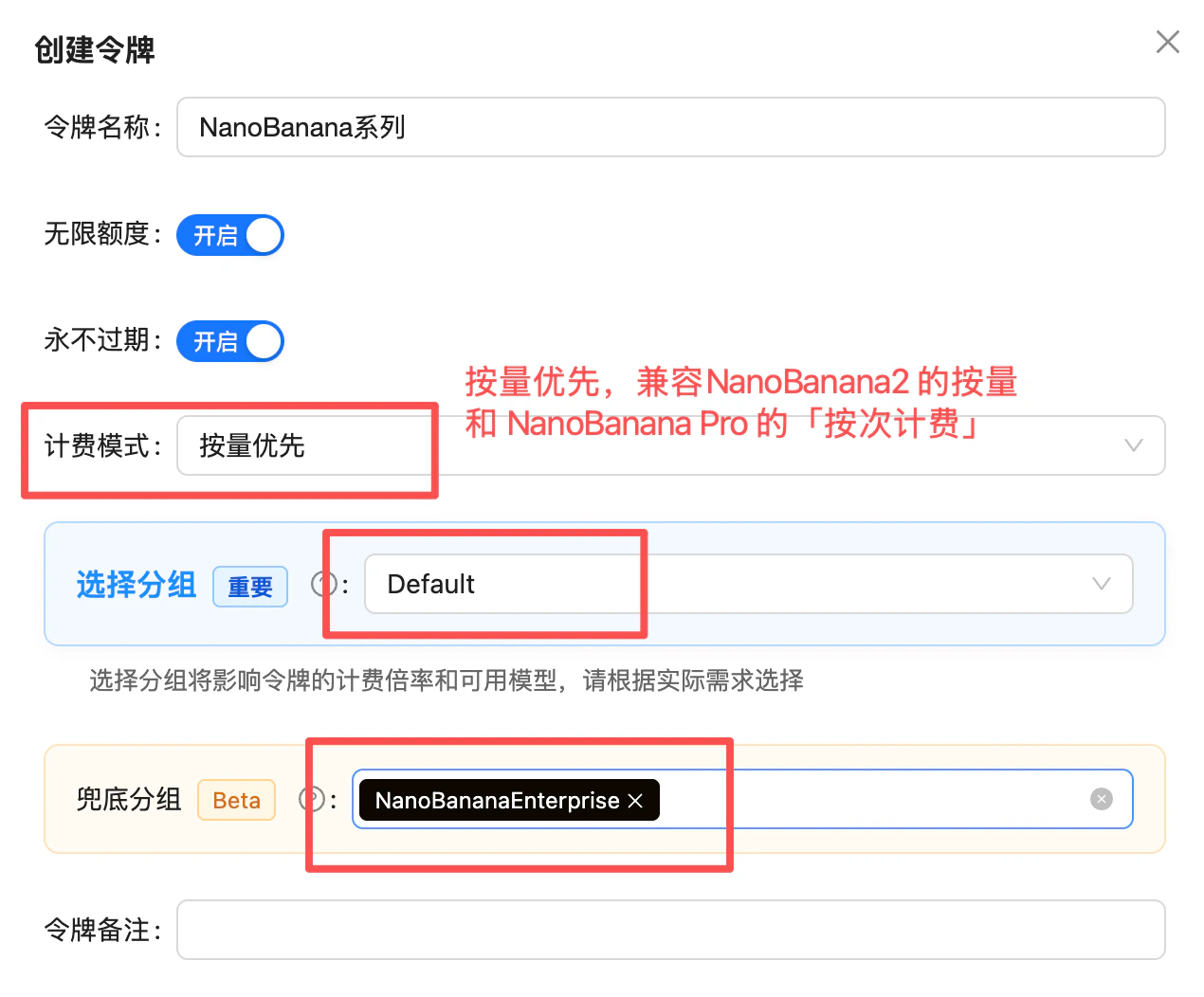 **Going further**: if your Token also covers other image models (e.g. GPT-image-2), keep the more stable `Default` as the primary group and put `NanoBananaEnterprise` in the fallback slot — 429s on the primary will auto-failover to the enterprise group without a token swap.
## Supported Resolutions & Aspect Ratios
### Output Resolutions
| Resolution | Description | Recommended Use |
| ---------- | --------------------- | --------------------------------------- |
| 512px | Low resolution | Thumbnails, quick previews |
| 1K | Default | Social media, web display |
| 2K | High definition | HD displays, print materials |
| 4K | Ultra-high definition | Professional design, commercial posters |
### Supported Aspect Ratios (14 total)
`1:1`, `1:4`, `4:1`, `1:8`, `8:1`, `2:3`, `3:2`, `3:4`, `4:3`, `4:5`, `5:4`, `9:16`, `16:9`, `21:9`
### Output Dimensions per Aspect Ratio (pixels)
The table below lists Nano Banana 2's actual output dimensions for all 14 aspect ratios across the 512px / 1K / 2K / 4K resolution tiers (source: Google official docs). In your request, set `aspect_ratio` for the ratio and `image_size` (or `resolution`) for the tier:
| Aspect Ratio | 512px | 1K | 2K | 4K |
| ------------ | -------- | --------- | --------- | ---------- |
| **1:1** | 512×512 | 1024×1024 | 2048×2048 | 4096×4096 |
| **1:4** | 256×1024 | 512×2048 | 1024×4096 | 2048×8192 |
| **1:8** | 192×1536 | 384×3072 | 768×6144 | 1536×12288 |
| **2:3** | 424×632 | 848×1264 | 1696×2528 | 3392×5056 |
| **3:2** | 632×424 | 1264×848 | 2528×1696 | 5056×3392 |
| **3:4** | 448×600 | 896×1200 | 1792×2400 | 3584×4800 |
| **4:1** | 1024×256 | 2048×512 | 4096×1024 | 8192×2048 |
| **4:3** | 600×448 | 1200×896 | 2400×1792 | 4800×3584 |
| **4:5** | 464×576 | 928×1152 | 1856×2304 | 3712×4608 |
| **5:4** | 576×464 | 1152×928 | 2304×1856 | 4608×3712 |
| **8:1** | 1536×192 | 3072×384 | 6144×768 | 12288×1536 |
| **9:16** | 384×688 | 768×1376 | 1536×2752 | 3072×5504 |
| **16:9** | 688×384 | 1376×768 | 2752×1536 | 5504×3072 |
| **21:9** | 792×168 | 1584×672 | 3168×1344 | 6336×2688 |
Compared to Nano Banana Pro's 10 aspect ratios, Nano Banana 2 adds `1:4`, `4:1`, `1:8`, `8:1` - ultra-tall/ultra-wide ratios ideal for long-form images and infographics. It is also the only model with a 512px low-resolution tier, great for thumbnails and quick previews.
## FAQ
**Nano Banana 2** (`gemini-3.1-flash-image-preview`) is based on Gemini 3.1 Flash, while **Nano Banana Pro** (`gemini-3-pro-image-preview`) is based on Gemini 3 Pro. Key differences:
* ✅ **Speed**: Nano Banana 2 is faster (Flash-tier speed)
* ✅ **Price**: Nano Banana 2 token-based billing is cheaper (from \$0.025 vs \$0.09)
* ✅ **Aspect Ratios**: Nano Banana 2 supports 14 (4 more)
* ✅ **Image Search Grounding**: Nano Banana 2 exclusive
* ⚠️ **Ultimate Quality**: Nano Banana Pro still slightly better
**Recommended!** Nano Banana 2 offers near-Pro-level quality at a lower price with faster speed. Unless you have extreme quality requirements, Nano Banana 2 is the better choice.
Simply change the model name from `gemini-3-pro-image-preview` to `gemini-3.1-flash-image-preview`.
**For code / API calls, we recommend always using the general model name `gemini-3.1-flash-image-preview` (without the `-4k` suffix), not `gemini-3.1-flash-image-preview-4k`.**
* **The official name has no `-4k`**: Google's official model name is `gemini-3.1-flash-image-preview`. This is also the general channel we invest the most resources in maintaining, so it offers the best stability and compatibility.
* **Where `-4k` comes from**: `gemini-3.1-flash-image-preview-4k` was originally a configuration prepared for "chat-to-image" scenarios in conversational clients like Chatbox—generating images directly through chat in a messaging UI.
* **Code + Gemini native format favors the general name**: If you're calling via code using the Gemini native format (`/v1beta/models/.../generateContent`), the regular model name `gemini-3.1-flash-image-preview` is more stable.
When you need 4K output, there's no need to rely on the `-4k` model name—just specify the 4K resolution in your request parameters (see "Supported Resolutions and Aspect Ratios" above).
Image Search Grounding is a Nano Banana 2 exclusive feature. It pulls visual context from Google Image Search to generate images that better match real-world subjects. For example, when generating images of real landmarks, it can reference search results for improved accuracy.
Thinking Mode allows the model to reason and analyze before generating images, improving accuracy for complex prompts. Setting it to `high` produces the best results but slightly increases generation time. Best for tasks requiring precise composition, text rendering, or complex scenes.
Generation time depends on resolution and thinking mode:
* **1K resolution**: \~5-10 seconds
* **2K resolution**: \~10-15 seconds
* **4K resolution**: \~15-25 seconds
* Enabling high thinking mode adds a few extra seconds
Recommend setting a longer timeout (at least 360 seconds) for occasional delays and peak congestion.
**The API has no concurrency limit and does not process serially.** You can safely fire concurrent requests yourself — requests don't queue or block each other. For 20 users calling simultaneously, just issue 20 concurrent requests; no extra quota request or throttling needed.
Unlike Google AI Studio, the APIYI channel has no hard RPM/RPD limits, so enterprise batch generation and peak traffic scale linearly.
**What actually matters is the `timeout`**: image generation (especially 4K or during peak congestion) can take a while per request, so **set your client timeout to 360 seconds** to avoid cutting off requests that are still being processed normally.
If you occasionally hit 429 (throttled due to high concurrency), add `NanoBananaEnterprise` as the fallback group on your token (see "Group Setup" above). When the primary group is saturated it auto-falls back, further improving success rates under high concurrency.
Supports `image/png` and `image/jpeg` formats. Can be uploaded via base64 encoding or Files API.
All output images carry SynthID invisible digital watermarks (Google's AI-generated content identification technology) - invisible to the naked eye and doesn't affect usage.
The full error looks like:
```text theme={null}
[&{{write tcp ip:port->ip:port: write: connection reset by peer Unknown error shell_api_error write_response_body_failed} 500 }]
```
This is **usually caused by oversized image uploads — the request body gets too large and the connection collapses**. Follow these best practices:
* **Limit the image count**: stay within the official rules (max 14 images per prompt) — don't pile on reference images.
* **Limit per-image size**: keep each image under 5MB — the official per-image cap is 7MB, and base64 encoding inflates size by roughly 1/3, so leave headroom.
* **Compress on the frontend before uploading**: compress images on the frontend (or a server-side relay) before sending them to the API — common practice is capping the longest edge, converting to JPEG/WebP, and tuning the quality parameter.
* **Switch to URL input**: the Gemini native format supports passing an image URL via `fileData.fileUri`, sidestepping oversized base64 request bodies entirely — see the [Nano Banana Dev Guide](/en/api-capabilities/nano-banana-dev-guide).
## Related Documentation
* [Nano Banana Pro Image Generation](/en/api-capabilities/nano-banana-image) - Previous flagship version
* [Nano Banana Image Editing](/en/api-capabilities/nano-banana-image-edit) - Image editing features
* [Image Generation Comparison Testing](https://imagen.apiyi.com/)
* [API Usage Manual](/en/api-manual)
Nano Banana 2 is currently in Preview status. Features and pricing may be adjusted. Please follow documentation updates for the latest information.
**Going further**: if your Token also covers other image models (e.g. GPT-image-2), keep the more stable `Default` as the primary group and put `NanoBananaEnterprise` in the fallback slot — 429s on the primary will auto-failover to the enterprise group without a token swap.
## Supported Resolutions & Aspect Ratios
### Output Resolutions
| Resolution | Description | Recommended Use |
| ---------- | --------------------- | --------------------------------------- |
| 512px | Low resolution | Thumbnails, quick previews |
| 1K | Default | Social media, web display |
| 2K | High definition | HD displays, print materials |
| 4K | Ultra-high definition | Professional design, commercial posters |
### Supported Aspect Ratios (14 total)
`1:1`, `1:4`, `4:1`, `1:8`, `8:1`, `2:3`, `3:2`, `3:4`, `4:3`, `4:5`, `5:4`, `9:16`, `16:9`, `21:9`
### Output Dimensions per Aspect Ratio (pixels)
The table below lists Nano Banana 2's actual output dimensions for all 14 aspect ratios across the 512px / 1K / 2K / 4K resolution tiers (source: Google official docs). In your request, set `aspect_ratio` for the ratio and `image_size` (or `resolution`) for the tier:
| Aspect Ratio | 512px | 1K | 2K | 4K |
| ------------ | -------- | --------- | --------- | ---------- |
| **1:1** | 512×512 | 1024×1024 | 2048×2048 | 4096×4096 |
| **1:4** | 256×1024 | 512×2048 | 1024×4096 | 2048×8192 |
| **1:8** | 192×1536 | 384×3072 | 768×6144 | 1536×12288 |
| **2:3** | 424×632 | 848×1264 | 1696×2528 | 3392×5056 |
| **3:2** | 632×424 | 1264×848 | 2528×1696 | 5056×3392 |
| **3:4** | 448×600 | 896×1200 | 1792×2400 | 3584×4800 |
| **4:1** | 1024×256 | 2048×512 | 4096×1024 | 8192×2048 |
| **4:3** | 600×448 | 1200×896 | 2400×1792 | 4800×3584 |
| **4:5** | 464×576 | 928×1152 | 1856×2304 | 3712×4608 |
| **5:4** | 576×464 | 1152×928 | 2304×1856 | 4608×3712 |
| **8:1** | 1536×192 | 3072×384 | 6144×768 | 12288×1536 |
| **9:16** | 384×688 | 768×1376 | 1536×2752 | 3072×5504 |
| **16:9** | 688×384 | 1376×768 | 2752×1536 | 5504×3072 |
| **21:9** | 792×168 | 1584×672 | 3168×1344 | 6336×2688 |
Compared to Nano Banana Pro's 10 aspect ratios, Nano Banana 2 adds `1:4`, `4:1`, `1:8`, `8:1` - ultra-tall/ultra-wide ratios ideal for long-form images and infographics. It is also the only model with a 512px low-resolution tier, great for thumbnails and quick previews.
## FAQ
**Nano Banana 2** (`gemini-3.1-flash-image-preview`) is based on Gemini 3.1 Flash, while **Nano Banana Pro** (`gemini-3-pro-image-preview`) is based on Gemini 3 Pro. Key differences:
* ✅ **Speed**: Nano Banana 2 is faster (Flash-tier speed)
* ✅ **Price**: Nano Banana 2 token-based billing is cheaper (from \$0.025 vs \$0.09)
* ✅ **Aspect Ratios**: Nano Banana 2 supports 14 (4 more)
* ✅ **Image Search Grounding**: Nano Banana 2 exclusive
* ⚠️ **Ultimate Quality**: Nano Banana Pro still slightly better
**Recommended!** Nano Banana 2 offers near-Pro-level quality at a lower price with faster speed. Unless you have extreme quality requirements, Nano Banana 2 is the better choice.
Simply change the model name from `gemini-3-pro-image-preview` to `gemini-3.1-flash-image-preview`.
**For code / API calls, we recommend always using the general model name `gemini-3.1-flash-image-preview` (without the `-4k` suffix), not `gemini-3.1-flash-image-preview-4k`.**
* **The official name has no `-4k`**: Google's official model name is `gemini-3.1-flash-image-preview`. This is also the general channel we invest the most resources in maintaining, so it offers the best stability and compatibility.
* **Where `-4k` comes from**: `gemini-3.1-flash-image-preview-4k` was originally a configuration prepared for "chat-to-image" scenarios in conversational clients like Chatbox—generating images directly through chat in a messaging UI.
* **Code + Gemini native format favors the general name**: If you're calling via code using the Gemini native format (`/v1beta/models/.../generateContent`), the regular model name `gemini-3.1-flash-image-preview` is more stable.
When you need 4K output, there's no need to rely on the `-4k` model name—just specify the 4K resolution in your request parameters (see "Supported Resolutions and Aspect Ratios" above).
Image Search Grounding is a Nano Banana 2 exclusive feature. It pulls visual context from Google Image Search to generate images that better match real-world subjects. For example, when generating images of real landmarks, it can reference search results for improved accuracy.
Thinking Mode allows the model to reason and analyze before generating images, improving accuracy for complex prompts. Setting it to `high` produces the best results but slightly increases generation time. Best for tasks requiring precise composition, text rendering, or complex scenes.
Generation time depends on resolution and thinking mode:
* **1K resolution**: \~5-10 seconds
* **2K resolution**: \~10-15 seconds
* **4K resolution**: \~15-25 seconds
* Enabling high thinking mode adds a few extra seconds
Recommend setting a longer timeout (at least 360 seconds) for occasional delays and peak congestion.
**The API has no concurrency limit and does not process serially.** You can safely fire concurrent requests yourself — requests don't queue or block each other. For 20 users calling simultaneously, just issue 20 concurrent requests; no extra quota request or throttling needed.
Unlike Google AI Studio, the APIYI channel has no hard RPM/RPD limits, so enterprise batch generation and peak traffic scale linearly.
**What actually matters is the `timeout`**: image generation (especially 4K or during peak congestion) can take a while per request, so **set your client timeout to 360 seconds** to avoid cutting off requests that are still being processed normally.
If you occasionally hit 429 (throttled due to high concurrency), add `NanoBananaEnterprise` as the fallback group on your token (see "Group Setup" above). When the primary group is saturated it auto-falls back, further improving success rates under high concurrency.
Supports `image/png` and `image/jpeg` formats. Can be uploaded via base64 encoding or Files API.
All output images carry SynthID invisible digital watermarks (Google's AI-generated content identification technology) - invisible to the naked eye and doesn't affect usage.
The full error looks like:
```text theme={null}
[&{{write tcp ip:port->ip:port: write: connection reset by peer Unknown error shell_api_error write_response_body_failed} 500 }]
```
This is **usually caused by oversized image uploads — the request body gets too large and the connection collapses**. Follow these best practices:
* **Limit the image count**: stay within the official rules (max 14 images per prompt) — don't pile on reference images.
* **Limit per-image size**: keep each image under 5MB — the official per-image cap is 7MB, and base64 encoding inflates size by roughly 1/3, so leave headroom.
* **Compress on the frontend before uploading**: compress images on the frontend (or a server-side relay) before sending them to the API — common practice is capping the longest edge, converting to JPEG/WebP, and tuning the quality parameter.
* **Switch to URL input**: the Gemini native format supports passing an image URL via `fileData.fileUri`, sidestepping oversized base64 request bodies entirely — see the [Nano Banana Dev Guide](/en/api-capabilities/nano-banana-dev-guide).
## Related Documentation
* [Nano Banana Pro Image Generation](/en/api-capabilities/nano-banana-image) - Previous flagship version
* [Nano Banana Image Editing](/en/api-capabilities/nano-banana-image-edit) - Image editing features
* [Image Generation Comparison Testing](https://imagen.apiyi.com/)
* [API Usage Manual](/en/api-manual)
Nano Banana 2 is currently in Preview status. Features and pricing may be adjusted. Please follow documentation updates for the latest information.