> ## Documentation Index
> Fetch the complete documentation index at: https://docs.apiyi.com/llms.txt
> Use this file to discover all available pages before exploring further.
# Nano Banana Series Developer Guide
> A one-stop guide to model selection, billing, endpoints, development formats, and FAQs for the Nano Banana series (Pro / 2 / 2 Lite / Gen 1), helping developers get started with the Gemini image generation API.
## Model Cards
| Model | Official Model ID | Billing | Notes |
| ----------------------- | -------------------------------- | -------------------------------------------------------------------------------------------------------------- | --------------------------- |
| **Nano Banana Pro** | `gemini-3-pro-image-preview` | Fixed per-request **\$0.09/req** (approx. ¥0.63; approx. ¥0.55 after top-up promotions) | Highest quality |
| **Nano Banana 2** | `gemini-3.1-flash-image-preview` | Per-request **\$0.055/req** (recommended for 4K output); or dynamic token-based billing, 2K approx. **\$0.04** | Best value |
| **Nano Banana 2 Lite** | `gemini-3.1-flash-lite-image` | Fixed per-request **\$0.025/req**; or token-based billing approx. **\$0.018/req** (40% of official price) | Fastest & cheapest, 1K only |
| **Nano Banana** (Gen 1) | `gemini-2.5-flash-image` | Fixed per-request **\$0.02/req** | Cheapest |
For a complete price comparison, per-request vs. token-based billing, and token selection advice, see [Nano Banana Series Pricing](/en/api-capabilities/nano-banana-pricing).
### Size Control
* **Follow the source image ratio**: simply omit `aspectRatio`; in multi-image editing scenarios, the **size of the last image** takes precedence
* **Resolution `imageSize`**: supports `1K` / `2K` / `4K`
* Nano Banana (Gen 1) **supports 1K only**
* Nano Banana 2 **adds 512px**
* Nano Banana 2 Lite **supports 1K only** (no 2K/4K/512px)
When using the same code to call the first-gen `gemini-2.5-flash-image`, you **must remove the `imageSize` parameter** (it does not support `2K` / `4K`), otherwise the call will fail.
## How to Integrate
### Official Documentation
* Google official docs: `ai.google.dev/gemini-api/docs/image-generation`
* To integrate with APIYI, just replace the **request URL + KEY with APIYI's**; all other parameters are identical to the official ones
### Checking Official Status (diagnosing upstream issues)
The Nano Banana series runs on top of Google's AIStudio / Gemini API. In rare cases, **blurry or failing 2K / 4K output** can be a problem on **Google's side** rather than the integration layer — you can check Google's official status page (copy and visit it yourself): `aistudio.google.com/status`.
For example, on Jun 19, 2026 that page reported "Issues with Nano Banana": Nano Banana 2 / Pro on the Gemini API and AI Studio had problems at 2K or 4K resolution. When you see similar symptoms, compare against the official status page first to quickly tell whether it's an upstream outage.
APIYI runs the Nano Banana series across **dual AIStudio + Vertex channels** for redundancy: when one official channel has issues, the other can take over to keep the service available.
### Endpoint Support
* **Recommended endpoint** (Gemini native): `https://api.apiyi.com/v1beta/models/gemini-3-pro-image-preview:generateContent`
* Supports calls via **OpenAI-compatible mode** (note: **URL upload is not supported**, use Base64 instead)
* **Does not support** `/v1/image/generations`
### Development Format (Default Recommendation)
* **\[Recommended] Use the Google native endpoint format**
* Images: **upload as Base64, download and re-host**
* Call method: **synchronous multi-threaded calls**; asynchronous calls are not yet supported
## Input Image Requirements
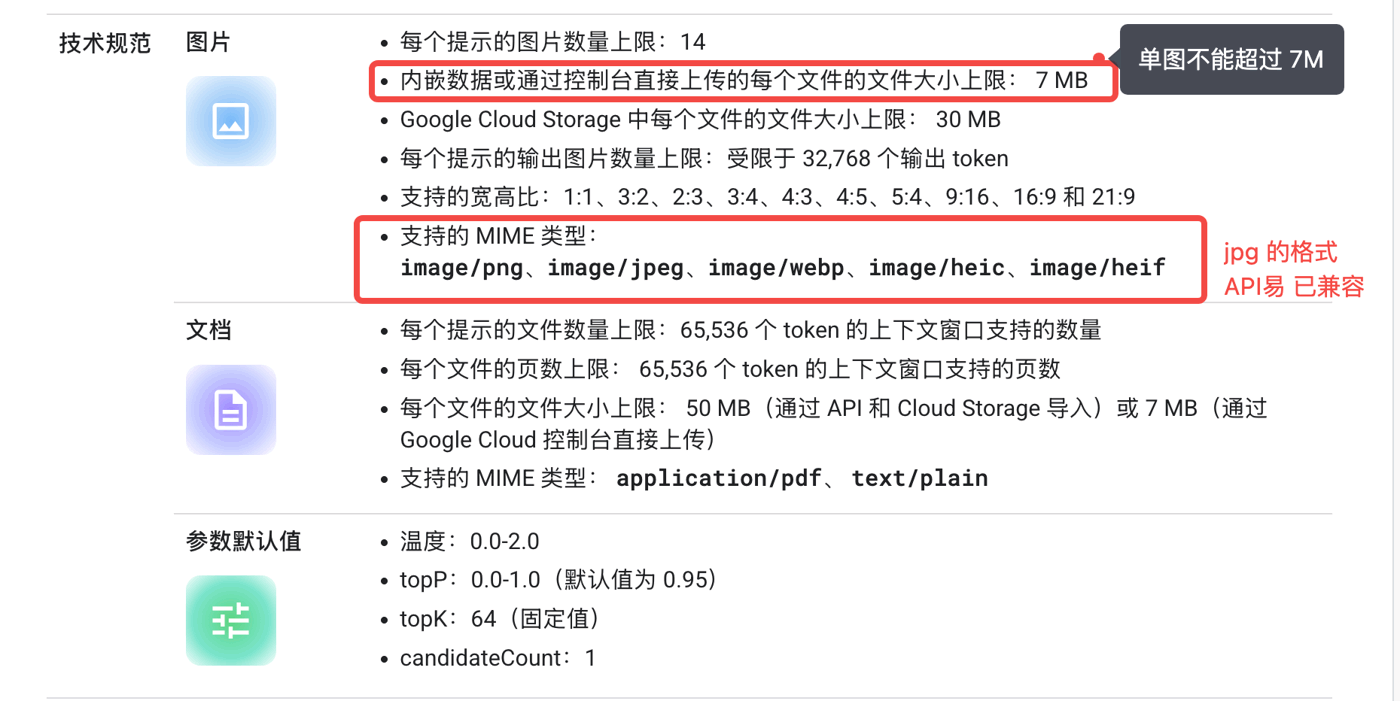
* **A single image cannot exceed 7MB** (Google's rule); if imported via Google Cloud Storage, the per-file limit is 30MB
* **Up to 14 images per prompt**
* **Supported MIME types**: `image/png`, `image/jpeg`, `image/webp`, `image/heic`, `image/heif` (the `jpg` format is already supported by APIYI)
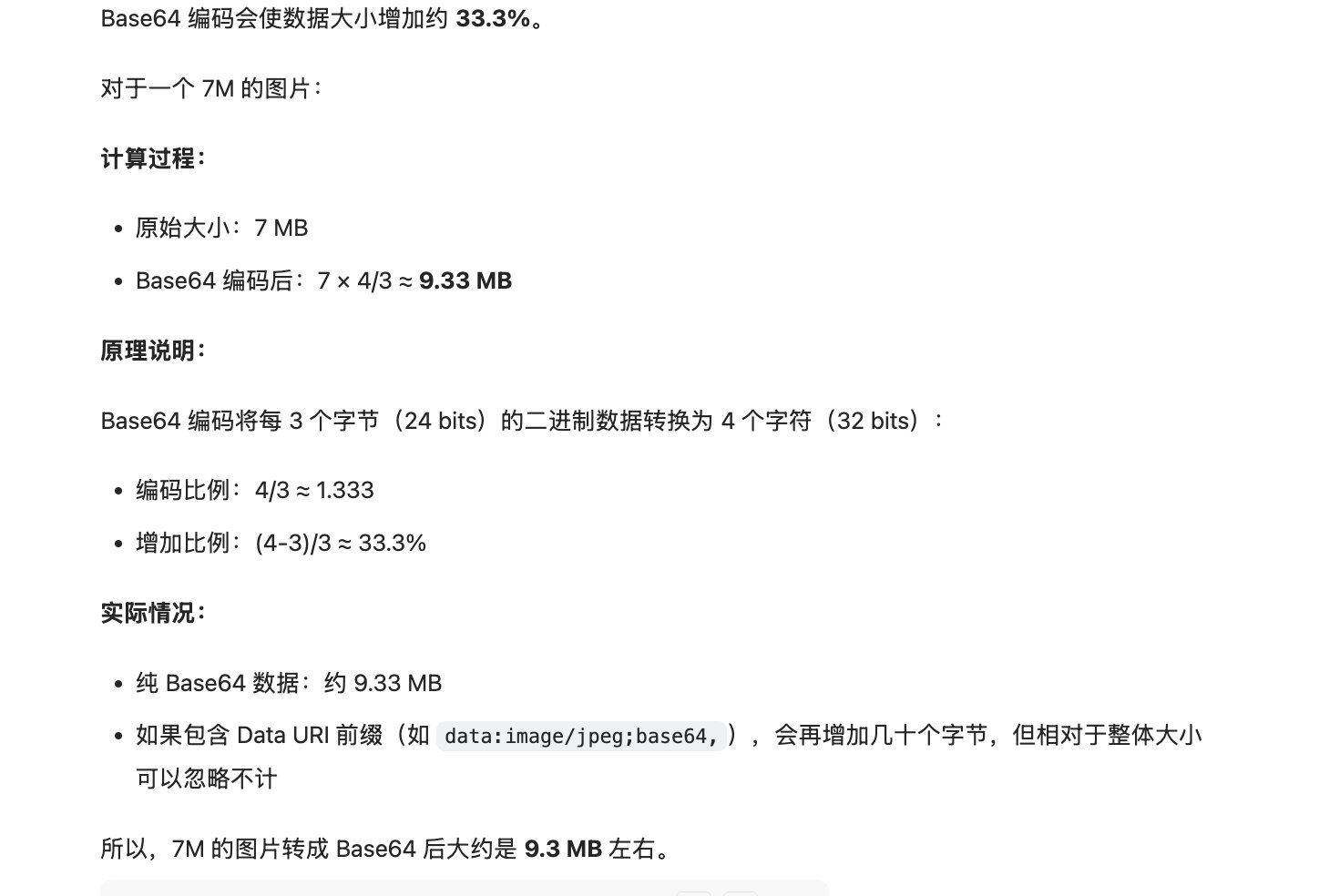
* **Base64 size inflation**: converting an image to Base64 increases its size by about **33.3%** (a 7MB image becomes about 9.3MB)
* **APIYI limit**: the total volume of images uploaded in a single request must be **under 100MB** — all calls are synchronous, and oversized payloads can cause memory blowup
 **Best practice**: apply **lossless compression** to images before sending them to the API, to avoid oversized resolutions slowing down requests.
Google official spec reference (please copy and visit it yourself): `docs.cloud.google.com/vertex-ai/generative-ai/docs/models/gemini/3-pro-image`
## URL Image Input
In addition to Base64, the **Gemini native endpoint** also supports passing image URLs (image hosts / OSS addresses) directly via `fileData.fileUri`, eliminating the need for local encoding.
**URL upload has strict requirements on image hosts and OSS addresses**: if the address is not on a global CDN (e.g., Tencent Cloud Object Storage defaults to a China-only CDN), Google's servers very likely cannot reach the image, causing the request to fail (typical symptom: **the image is not referenced** in the output).
**If possible, prefer Base64 upload for better stability** — from the platform's perspective, this is the most operationally invested, most reliable path.
URL upload only works on the **Gemini native endpoint**; **OpenAI-compatible mode does not support URL upload** and requires Base64.
### Curl Example (fileUri)
```bash theme={null}
curl --location 'https://api.apiyi.com/v1beta/models/gemini-3-pro-image-preview:generateContent' \
--header 'Authorization: Bearer sk-' \
--header 'Content-Type: application/json' \
--data '{
"contents": [
{
"parts": [
{
"fileData": {
"fileUri": "https://raw.githubusercontent.com/apiyi-api/ai-api-code-samples/refs/heads/main/Vision-API-OpenAI/otter.png",
"mimeType": "image/png"
}
},
{
"text": "add five dogs"
}
],
"role": "user"
}
],
"generationConfig": {"responseModalities": ["IMAGE"],
"imageConfig": {
"aspectRatio": "16:9",
"imageSize": "2K"
}},
"safetySettings": []
}' > output.json
```
### Python Example (fileUri)
```python theme={null}
#!/usr/bin/env python3
# -*- coding: utf-8 -*-
"""
Gemini 3 Pro Image - Image editing (minimal file_uri version)
Purpose: only for a quick check that the endpoint works
"""
import requests
import base64
import json
from pathlib import Path
from datetime import datetime
# ============================================================================
# Configuration
# ============================================================================
API_KEY = "sk-"
API_URL = "https://api.apiyi.com/v1beta/models/gemini-3-pro-image-preview:generateContent"
# Image URL
IMAGE_URL = "https://raw.githubusercontent.com/apiyi-api/ai-pics/refs/heads/main/1762260696217_dd0352c1f9604540.png"
IMAGE_MIME_TYPE = "image/png"
# Edit instructions
EDIT_PROMPT = "Change the person's clothes to a blue jacket and hair to a purple gradient; keep pose, gaze direction, and other structural features unchanged."
SYSTEM_PROMPT = "You are a professional expert in image description and generation. Your task is to produce high-quality image prompts with rich detail and a clear artistic style, or to make accurate, creative edits to existing images, based on the user's request."
# Output parameters
ASPECT_RATIO = "9:16"
RESOLUTION = "4K"
MAX_OUTPUT_TOKENS = 8000
OUTPUT_FILE = f"minimal_{datetime.now().strftime('%Y%m%d_%H%M%S')}.png"
# ============================================================================
# Core
# ============================================================================
def main():
print("=" * 60)
print("Testing file_uri endpoint")
print("=" * 60)
print(f"Image URL: {IMAGE_URL[:80]}...")
print(f"Edit prompt: {EDIT_PROMPT}")
print(f"Output params: {RESOLUTION}, {ASPECT_RATIO}")
print("-" * 60)
# Build the request body
# Note: fileData, mimeType, fileUri must be in camelCase
payload = {
"generationConfig": {
"responseModalities": ["IMAGE", "TEXT"],
"imageConfig": {
"imageSize": RESOLUTION,
"aspectRatio": ASPECT_RATIO
},
"maxOutputTokens": MAX_OUTPUT_TOKENS
},
"contents": [
{
"role": "model",
"parts": [{"text": SYSTEM_PROMPT}]
},
{
"role": "user",
"parts": [
{
"fileData": { # camelCase: fileData (not file_data)
"mimeType": IMAGE_MIME_TYPE, # camelCase: mimeType
"fileUri": IMAGE_URL # camelCase: fileUri
}
},
{"text": EDIT_PROMPT}
]
}
]
}
# Send the request
print("\nSending request...")
try:
response = requests.post(
API_URL,
json=payload,
headers={
"Content-Type": "application/json",
"Authorization": f"Bearer {API_KEY}"
},
timeout=300
)
print(f"Response status: {response.status_code}")
if response.status_code != 200:
print(f"❌ Error: {response.text}")
return
# Parse the response
data = response.json()
print("✅ Response received")
# Save full response for debugging
with open(OUTPUT_FILE + ".response.json", "w", encoding="utf-8") as f:
json.dump(data, f, indent=2, ensure_ascii=False)
print(f"📄 Response saved: {OUTPUT_FILE}.response.json")
# Extract and print text
parts = data["candidates"][0]["content"]["parts"]
for part in parts:
if "text" in part:
print(f"\n💬 Text response: {part['text']}")
# Save image
for part in parts:
if "inlineData" in part or "inline_data" in part:
image_data = part.get("inlineData", part.get("inline_data", {})).get("data")
if image_data:
image_bytes = base64.b64decode(image_data)
with open(OUTPUT_FILE, "wb") as f:
f.write(image_bytes)
print(f"\n✅ Image saved: {OUTPUT_FILE}")
print(f"📦 File size: {len(image_bytes) / 1024:.1f} KB")
print(f"🔗 File path: {Path(OUTPUT_FILE).resolve()}")
return
print("⚠️ No image data found in the response")
except requests.Timeout:
print("❌ Request timed out")
except Exception as e:
print(f"❌ Error: {e}")
if __name__ == "__main__":
main()
print("\n" + "=" * 60)
print("Test finished")
print("=" * 60)
```
`fileData`, `mimeType`, and `fileUri` must be in **camelCase** (not `file_data` / `file_uri`); otherwise the parameters are ignored and the image will not be referenced.
## Billing Basics (Important)
* **Synchronous call duration**: Pro / 2 at 4K take a reasonable generation time of approx. **30–150s**
* **Disconnecting on timeout still incurs charges**: for example, if generation takes 120s but the client sets the timeout to 100s and disconnects, you are still charged
* **429 / 503 are not charged**: failed requests are not billed (we try not to keep customers waiting or stuck without an image)
* **Content-safety refusals still incur charges**: when a customer's input has content-safety issues and Google refuses to generate the image, a **status code 200 is still charged** — see error handling and the guarantee plan below
## Timeout Settings (Important)
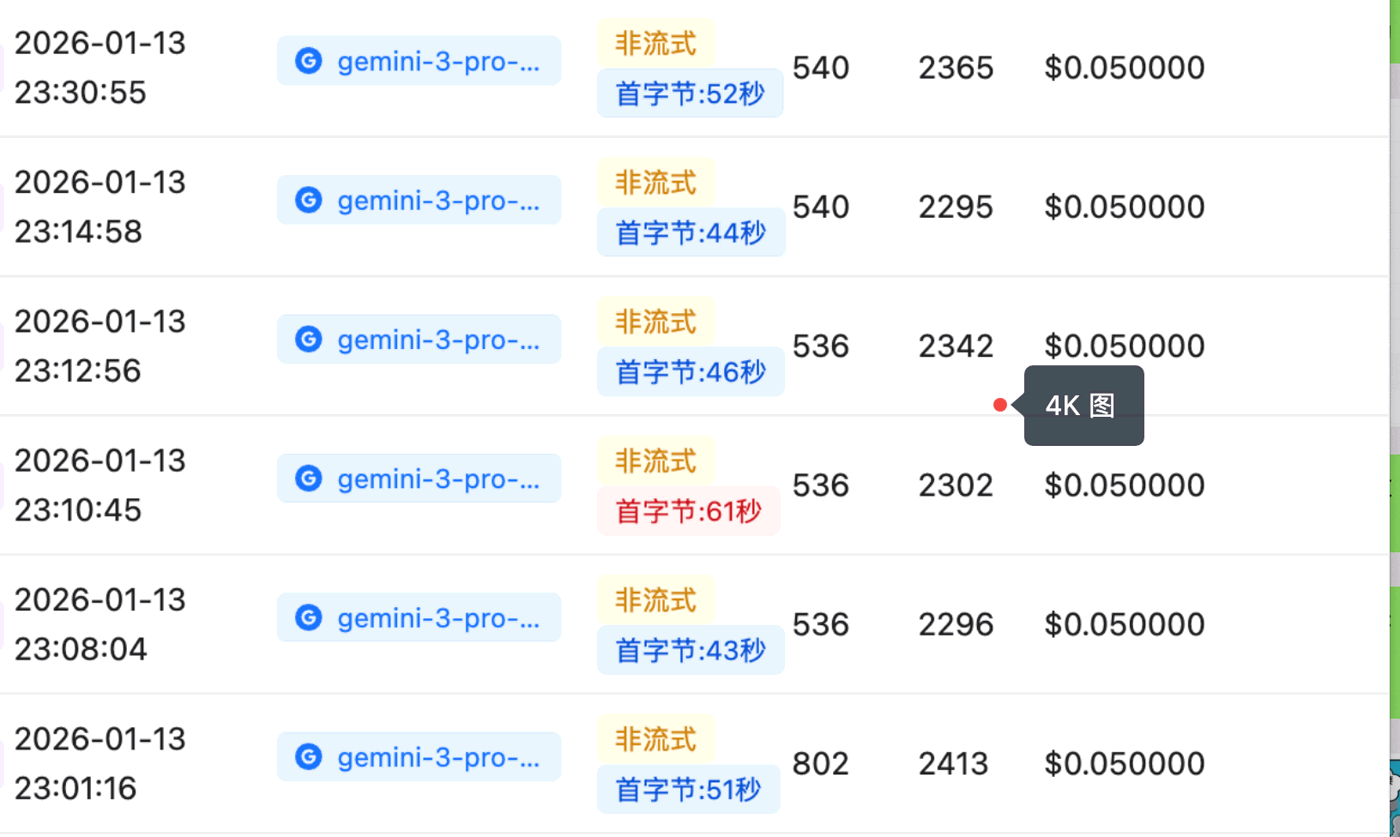
4K image generation takes longer overall, involving stages such as **image upload, API processing, and Base64 image download** (our backend bills by **API processing time**). Under normal conditions, 4K takes about **50s** (excluding polling), but if the client sets the timeout too short, it will **disconnect prematurely** before generation completes and report an error:
```text theme={null}
API Connection Error: HTTPSConnectionPool(host='api.apiyi.com', port=443): Read timed out. (read timeout=120)
```
**Best practice**: apply **lossless compression** to images before sending them to the API, to avoid oversized resolutions slowing down requests.
Google official spec reference (please copy and visit it yourself): `docs.cloud.google.com/vertex-ai/generative-ai/docs/models/gemini/3-pro-image`
## URL Image Input
In addition to Base64, the **Gemini native endpoint** also supports passing image URLs (image hosts / OSS addresses) directly via `fileData.fileUri`, eliminating the need for local encoding.
**URL upload has strict requirements on image hosts and OSS addresses**: if the address is not on a global CDN (e.g., Tencent Cloud Object Storage defaults to a China-only CDN), Google's servers very likely cannot reach the image, causing the request to fail (typical symptom: **the image is not referenced** in the output).
**If possible, prefer Base64 upload for better stability** — from the platform's perspective, this is the most operationally invested, most reliable path.
URL upload only works on the **Gemini native endpoint**; **OpenAI-compatible mode does not support URL upload** and requires Base64.
### Curl Example (fileUri)
```bash theme={null}
curl --location 'https://api.apiyi.com/v1beta/models/gemini-3-pro-image-preview:generateContent' \
--header 'Authorization: Bearer sk-' \
--header 'Content-Type: application/json' \
--data '{
"contents": [
{
"parts": [
{
"fileData": {
"fileUri": "https://raw.githubusercontent.com/apiyi-api/ai-api-code-samples/refs/heads/main/Vision-API-OpenAI/otter.png",
"mimeType": "image/png"
}
},
{
"text": "add five dogs"
}
],
"role": "user"
}
],
"generationConfig": {"responseModalities": ["IMAGE"],
"imageConfig": {
"aspectRatio": "16:9",
"imageSize": "2K"
}},
"safetySettings": []
}' > output.json
```
### Python Example (fileUri)
```python theme={null}
#!/usr/bin/env python3
# -*- coding: utf-8 -*-
"""
Gemini 3 Pro Image - Image editing (minimal file_uri version)
Purpose: only for a quick check that the endpoint works
"""
import requests
import base64
import json
from pathlib import Path
from datetime import datetime
# ============================================================================
# Configuration
# ============================================================================
API_KEY = "sk-"
API_URL = "https://api.apiyi.com/v1beta/models/gemini-3-pro-image-preview:generateContent"
# Image URL
IMAGE_URL = "https://raw.githubusercontent.com/apiyi-api/ai-pics/refs/heads/main/1762260696217_dd0352c1f9604540.png"
IMAGE_MIME_TYPE = "image/png"
# Edit instructions
EDIT_PROMPT = "Change the person's clothes to a blue jacket and hair to a purple gradient; keep pose, gaze direction, and other structural features unchanged."
SYSTEM_PROMPT = "You are a professional expert in image description and generation. Your task is to produce high-quality image prompts with rich detail and a clear artistic style, or to make accurate, creative edits to existing images, based on the user's request."
# Output parameters
ASPECT_RATIO = "9:16"
RESOLUTION = "4K"
MAX_OUTPUT_TOKENS = 8000
OUTPUT_FILE = f"minimal_{datetime.now().strftime('%Y%m%d_%H%M%S')}.png"
# ============================================================================
# Core
# ============================================================================
def main():
print("=" * 60)
print("Testing file_uri endpoint")
print("=" * 60)
print(f"Image URL: {IMAGE_URL[:80]}...")
print(f"Edit prompt: {EDIT_PROMPT}")
print(f"Output params: {RESOLUTION}, {ASPECT_RATIO}")
print("-" * 60)
# Build the request body
# Note: fileData, mimeType, fileUri must be in camelCase
payload = {
"generationConfig": {
"responseModalities": ["IMAGE", "TEXT"],
"imageConfig": {
"imageSize": RESOLUTION,
"aspectRatio": ASPECT_RATIO
},
"maxOutputTokens": MAX_OUTPUT_TOKENS
},
"contents": [
{
"role": "model",
"parts": [{"text": SYSTEM_PROMPT}]
},
{
"role": "user",
"parts": [
{
"fileData": { # camelCase: fileData (not file_data)
"mimeType": IMAGE_MIME_TYPE, # camelCase: mimeType
"fileUri": IMAGE_URL # camelCase: fileUri
}
},
{"text": EDIT_PROMPT}
]
}
]
}
# Send the request
print("\nSending request...")
try:
response = requests.post(
API_URL,
json=payload,
headers={
"Content-Type": "application/json",
"Authorization": f"Bearer {API_KEY}"
},
timeout=300
)
print(f"Response status: {response.status_code}")
if response.status_code != 200:
print(f"❌ Error: {response.text}")
return
# Parse the response
data = response.json()
print("✅ Response received")
# Save full response for debugging
with open(OUTPUT_FILE + ".response.json", "w", encoding="utf-8") as f:
json.dump(data, f, indent=2, ensure_ascii=False)
print(f"📄 Response saved: {OUTPUT_FILE}.response.json")
# Extract and print text
parts = data["candidates"][0]["content"]["parts"]
for part in parts:
if "text" in part:
print(f"\n💬 Text response: {part['text']}")
# Save image
for part in parts:
if "inlineData" in part or "inline_data" in part:
image_data = part.get("inlineData", part.get("inline_data", {})).get("data")
if image_data:
image_bytes = base64.b64decode(image_data)
with open(OUTPUT_FILE, "wb") as f:
f.write(image_bytes)
print(f"\n✅ Image saved: {OUTPUT_FILE}")
print(f"📦 File size: {len(image_bytes) / 1024:.1f} KB")
print(f"🔗 File path: {Path(OUTPUT_FILE).resolve()}")
return
print("⚠️ No image data found in the response")
except requests.Timeout:
print("❌ Request timed out")
except Exception as e:
print(f"❌ Error: {e}")
if __name__ == "__main__":
main()
print("\n" + "=" * 60)
print("Test finished")
print("=" * 60)
```
`fileData`, `mimeType`, and `fileUri` must be in **camelCase** (not `file_data` / `file_uri`); otherwise the parameters are ignored and the image will not be referenced.
## Billing Basics (Important)
* **Synchronous call duration**: Pro / 2 at 4K take a reasonable generation time of approx. **30–150s**
* **Disconnecting on timeout still incurs charges**: for example, if generation takes 120s but the client sets the timeout to 100s and disconnects, you are still charged
* **429 / 503 are not charged**: failed requests are not billed (we try not to keep customers waiting or stuck without an image)
* **Content-safety refusals still incur charges**: when a customer's input has content-safety issues and Google refuses to generate the image, a **status code 200 is still charged** — see error handling and the guarantee plan below
## Timeout Settings (Important)
4K image generation takes longer overall, involving stages such as **image upload, API processing, and Base64 image download** (our backend bills by **API processing time**). Under normal conditions, 4K takes about **50s** (excluding polling), but if the client sets the timeout too short, it will **disconnect prematurely** before generation completes and report an error:
```text theme={null}
API Connection Error: HTTPSConnectionPool(host='api.apiyi.com', port=443): Read timed out. (read timeout=120)
```
 To be safer, we recommend setting the timeout by resolution:
```python theme={null}
timeout = {
"1K": 300, # 5 minutes - quick preview
"2K": 300, # 5 minutes - recommended
"4K": 600, # 10 minutes - ultra HD
}
```
## Multi-turn conversational editing (native supports it; reverse models don't)
The Nano Banana series uses the **Gemini native format** and supports **true conversational multi-turn editing**: append each turn's generated image back into `contents` as a **`role: "model"` `inlineData`**, then send the next user instruction. The model edits based on the **full conversation history** and **accumulates changes** (e.g. recolor the sofa first, then add an accessory — the earlier change is preserved).
This differs fundamentally from "reverse" image models — be clear on it before integrating:
| Aspect | Nano Banana (Gemini native) | Reverse model (e.g. `gpt-image-2-all`) |
| ------------------------------ | ------------------------------------------------------------------------------------------------ | ---------------------------------------------------------------------- |
| Endpoint | `/v1beta/...:generateContent` | `/v1/chat/completions` (chat-style) |
| Multi-turn mechanism | ✅ **True conversational**: backfill `role:model` images into `contents`; the model reads history | ❌ No conversation state: images in `assistant` history are **ignored** |
| Cross-turn accumulation | ✅ Supported (red sofa → add hat, sofa stays red) | ⚠️ Re-feed only, one-step edits |
| How to edit the previous image | Backfill the last output as a `model` image in the conversation history | Pass the previous image URL as the reference in a **new user message** |
Tested: backfilling the previous image as a `model`-role turn lets Nano Banana 2 (`gemini-3.1-flash-image-preview`) correctly keep editing and accumulate changes; a reverse model only reads the reference image from the **last user message**, so keeping conversation history does not work for multi-turn there.
Minimal example (backfill each output into the same `contents`):
```python theme={null}
import requests, base64
API_KEY = "sk-your-api-key"
URL = "https://api.apiyi.com/v1beta/models/gemini-3.1-flash-image-preview:generateContent"
H = {"Authorization": f"Bearer {API_KEY}", "Content-Type": "application/json"}
CFG = {"responseModalities": ["IMAGE"], "imageConfig": {"imageSize": "2K"}}
contents = [] # keep one running conversation history
def turn(instruction, save_to):
contents.append({"role": "user", "parts": [{"text": instruction}]})
data = requests.post(URL, headers=H,
json={"contents": contents, "generationConfig": CFG}, timeout=300).json()
part = next(p for p in data["candidates"][0]["content"]["parts"] if "inlineData" in p)
contents.append({"role": "model", "parts": [part]}) # key: backfill the output image
with open(save_to, "wb") as f:
f.write(base64.b64decode(part["inlineData"]["data"]))
turn("Generate an orange cat sitting on a blue sofa, simple line-art style", "step1.png")
turn("Make the sofa red; keep the cat and composition unchanged", "step2.png") # edits the previous image
turn("Put a small yellow hat on the cat; keep everything else the same", "step3.png") # accumulates; red sofa kept
```
Full details (history-backfill vs re-feed styles, starting multi-turn from an existing image) are in [Image Editing API · Multi-turn conversational editing](/en/api-capabilities/nano-banana-2-image/image-edit#multi-turn-conversational-editing).
## Why Do Responses Occasionally Contain Multiple Images
When calling `gemini-3-pro-image`, you may occasionally see **multiple image parts in a single response (2–10 observed in testing)**, matching sporadic 6000+ (even five-digit) output-token entries in your logs. This is not an anomaly: Google's official docs state that Gemini 3 image models have "Thinking" enabled by default (it cannot be disabled in the API), the model generates interim images to test composition and logic, these drafts appear in `parts` alongside the final version, and "the last image within Thinking is also the final rendered image" (official docs: `ai.google.dev/gemini-api/docs/image-generation`). Based on our testing in July 2026 (Google native `generateContent` format):
| Scenario | Images returned |
| ----------------------------------------------------------------------------------------------------------------------- | ------------------------------------------------------------------- |
| Pure text-to-image | Always 1 (even if the prompt explicitly asks for "multiple images") |
| Simple image editing (add accessories / change background / restyle) | Always 1 |
| Complex task-style editing (e.g. "4-view character sheet + outfit change + white background" with multiple constraints) | 2–10, consistently reproducible |
The trigger is the **task complexity of the prompt**, not "image editing" itself. The multiple images still live in a **single candidate** (not multiple candidates), and each one is a complete image — they are the thinking process's successive drafts of the same design (same composition, slightly different details), and **the last part is the final version**. These drafts come back as ordinary image parts (with a `thoughtSignature` field, without a `thought: true` flag); Google's docs say Thinking generates at most two interim images, but we observed up to 10 on complex tasks.
**Billing impact**: each image is billed at a fixed token count (1120 tokens per image at 1K/2K resolution, 2000 at 4K), so output tokens grow strictly linearly with the number of images. A sporadic 6000+ (up to \~13.5k in extreme cases) output-token entry in your logs is simply a 4–10 image response, **not a billing anomaly**.
**Recommended downstream code**:
```python theme={null}
parts = response["candidates"][0]["content"]["parts"] or [] # parts is null on safety refusals
images = [p["inlineData"]["data"] for p in parts if "inlineData" in p]
if images:
final_image = images[-1] # last one = final version
```
* **Always iterate over parts** — do not assume one image per response; any per-image counting or saving logic must go by the actual number of parts
* **Take the last image when you only need one**: the earlier drafts have unfinished details and slightly lower quality, so avoid taking the first
* **Controlling the image count via the prompt is largely ineffective** (in testing, "output only one image" instructions were ignored) — handle it in code
* Multi-image responses take 35–142s (at 1K resolution, longer with more images), noticeably longer than single-image ones — keep the timeout recommendations above (≥ 5 minutes)
For the full breakdown of usageMetadata fields (the gap between details and totals, the counting quirk on refusal responses, and more), see [Usage Fields & Output Explained](/en/api-capabilities/nano-banana-usage-metadata).
## FAQs
The three key indicators for diagnosing failed generations, content moderation policies, and friendly prompt strategies
Troubleshooting failed generations and common questions
For failures not caused by your input, credits are reimbursed per the number of failed requests
The full error looks like:
```text theme={null}
[&{{write tcp ip:port->ip:port: write: connection reset by peer Unknown error shell_api_error write_response_body_failed} 500 }]
```
This is **usually caused by oversized image uploads — the request body gets too large and the connection collapses**. Follow these best practices:
* **Limit the image count**: stay within the official rules (max 14 images per prompt — see the official spec above).
* **Limit per-image size**: keep each image under 5MB — the official per-image cap is 7MB, and base64 encoding inflates size by roughly 1/3, so leave headroom.
* **Compress on the frontend before uploading**: compress images on the frontend (or a server-side relay) before sending them to the API — common practice is capping the longest edge, converting to JPEG/WebP, and tuning the quality parameter.
* **Switch to URL input**: the Gemini native format supports passing an image URL via `fileData.fileUri`, sidestepping oversized base64 request bodies entirely — see [URL Image Input](#url-image-input) above.
## Use Cases
* **AI chat clients**: clients such as [Cherry Studio](/en/scenarios/chat/cherry-studio) can be configured to generate images directly via APIYI
* **Generation testing**: quickly verify model performance in a chat client or the console
## Advanced Needs
* **Want to upload images via URL?** The Gemini native endpoint supports passing an image URL through `fileData.fileUri`; however, OpenAI-compatible mode does not support URL upload, so use Base64 instead. See the code examples and caveats in [URL Image Input](#url-image-input) above.
* **Want to get a download URL directly (instead of Base64)?** Use the NB-OSS group — see [Nano Banana OSS Group](/en/api-capabilities/nano-banana-oss-group).
To be safer, we recommend setting the timeout by resolution:
```python theme={null}
timeout = {
"1K": 300, # 5 minutes - quick preview
"2K": 300, # 5 minutes - recommended
"4K": 600, # 10 minutes - ultra HD
}
```
## Multi-turn conversational editing (native supports it; reverse models don't)
The Nano Banana series uses the **Gemini native format** and supports **true conversational multi-turn editing**: append each turn's generated image back into `contents` as a **`role: "model"` `inlineData`**, then send the next user instruction. The model edits based on the **full conversation history** and **accumulates changes** (e.g. recolor the sofa first, then add an accessory — the earlier change is preserved).
This differs fundamentally from "reverse" image models — be clear on it before integrating:
| Aspect | Nano Banana (Gemini native) | Reverse model (e.g. `gpt-image-2-all`) |
| ------------------------------ | ------------------------------------------------------------------------------------------------ | ---------------------------------------------------------------------- |
| Endpoint | `/v1beta/...:generateContent` | `/v1/chat/completions` (chat-style) |
| Multi-turn mechanism | ✅ **True conversational**: backfill `role:model` images into `contents`; the model reads history | ❌ No conversation state: images in `assistant` history are **ignored** |
| Cross-turn accumulation | ✅ Supported (red sofa → add hat, sofa stays red) | ⚠️ Re-feed only, one-step edits |
| How to edit the previous image | Backfill the last output as a `model` image in the conversation history | Pass the previous image URL as the reference in a **new user message** |
Tested: backfilling the previous image as a `model`-role turn lets Nano Banana 2 (`gemini-3.1-flash-image-preview`) correctly keep editing and accumulate changes; a reverse model only reads the reference image from the **last user message**, so keeping conversation history does not work for multi-turn there.
Minimal example (backfill each output into the same `contents`):
```python theme={null}
import requests, base64
API_KEY = "sk-your-api-key"
URL = "https://api.apiyi.com/v1beta/models/gemini-3.1-flash-image-preview:generateContent"
H = {"Authorization": f"Bearer {API_KEY}", "Content-Type": "application/json"}
CFG = {"responseModalities": ["IMAGE"], "imageConfig": {"imageSize": "2K"}}
contents = [] # keep one running conversation history
def turn(instruction, save_to):
contents.append({"role": "user", "parts": [{"text": instruction}]})
data = requests.post(URL, headers=H,
json={"contents": contents, "generationConfig": CFG}, timeout=300).json()
part = next(p for p in data["candidates"][0]["content"]["parts"] if "inlineData" in p)
contents.append({"role": "model", "parts": [part]}) # key: backfill the output image
with open(save_to, "wb") as f:
f.write(base64.b64decode(part["inlineData"]["data"]))
turn("Generate an orange cat sitting on a blue sofa, simple line-art style", "step1.png")
turn("Make the sofa red; keep the cat and composition unchanged", "step2.png") # edits the previous image
turn("Put a small yellow hat on the cat; keep everything else the same", "step3.png") # accumulates; red sofa kept
```
Full details (history-backfill vs re-feed styles, starting multi-turn from an existing image) are in [Image Editing API · Multi-turn conversational editing](/en/api-capabilities/nano-banana-2-image/image-edit#multi-turn-conversational-editing).
## Why Do Responses Occasionally Contain Multiple Images
When calling `gemini-3-pro-image`, you may occasionally see **multiple image parts in a single response (2–10 observed in testing)**, matching sporadic 6000+ (even five-digit) output-token entries in your logs. This is not an anomaly: Google's official docs state that Gemini 3 image models have "Thinking" enabled by default (it cannot be disabled in the API), the model generates interim images to test composition and logic, these drafts appear in `parts` alongside the final version, and "the last image within Thinking is also the final rendered image" (official docs: `ai.google.dev/gemini-api/docs/image-generation`). Based on our testing in July 2026 (Google native `generateContent` format):
| Scenario | Images returned |
| ----------------------------------------------------------------------------------------------------------------------- | ------------------------------------------------------------------- |
| Pure text-to-image | Always 1 (even if the prompt explicitly asks for "multiple images") |
| Simple image editing (add accessories / change background / restyle) | Always 1 |
| Complex task-style editing (e.g. "4-view character sheet + outfit change + white background" with multiple constraints) | 2–10, consistently reproducible |
The trigger is the **task complexity of the prompt**, not "image editing" itself. The multiple images still live in a **single candidate** (not multiple candidates), and each one is a complete image — they are the thinking process's successive drafts of the same design (same composition, slightly different details), and **the last part is the final version**. These drafts come back as ordinary image parts (with a `thoughtSignature` field, without a `thought: true` flag); Google's docs say Thinking generates at most two interim images, but we observed up to 10 on complex tasks.
**Billing impact**: each image is billed at a fixed token count (1120 tokens per image at 1K/2K resolution, 2000 at 4K), so output tokens grow strictly linearly with the number of images. A sporadic 6000+ (up to \~13.5k in extreme cases) output-token entry in your logs is simply a 4–10 image response, **not a billing anomaly**.
**Recommended downstream code**:
```python theme={null}
parts = response["candidates"][0]["content"]["parts"] or [] # parts is null on safety refusals
images = [p["inlineData"]["data"] for p in parts if "inlineData" in p]
if images:
final_image = images[-1] # last one = final version
```
* **Always iterate over parts** — do not assume one image per response; any per-image counting or saving logic must go by the actual number of parts
* **Take the last image when you only need one**: the earlier drafts have unfinished details and slightly lower quality, so avoid taking the first
* **Controlling the image count via the prompt is largely ineffective** (in testing, "output only one image" instructions were ignored) — handle it in code
* Multi-image responses take 35–142s (at 1K resolution, longer with more images), noticeably longer than single-image ones — keep the timeout recommendations above (≥ 5 minutes)
For the full breakdown of usageMetadata fields (the gap between details and totals, the counting quirk on refusal responses, and more), see [Usage Fields & Output Explained](/en/api-capabilities/nano-banana-usage-metadata).
## FAQs
The three key indicators for diagnosing failed generations, content moderation policies, and friendly prompt strategies
Troubleshooting failed generations and common questions
For failures not caused by your input, credits are reimbursed per the number of failed requests
The full error looks like:
```text theme={null}
[&{{write tcp ip:port->ip:port: write: connection reset by peer Unknown error shell_api_error write_response_body_failed} 500 }]
```
This is **usually caused by oversized image uploads — the request body gets too large and the connection collapses**. Follow these best practices:
* **Limit the image count**: stay within the official rules (max 14 images per prompt — see the official spec above).
* **Limit per-image size**: keep each image under 5MB — the official per-image cap is 7MB, and base64 encoding inflates size by roughly 1/3, so leave headroom.
* **Compress on the frontend before uploading**: compress images on the frontend (or a server-side relay) before sending them to the API — common practice is capping the longest edge, converting to JPEG/WebP, and tuning the quality parameter.
* **Switch to URL input**: the Gemini native format supports passing an image URL via `fileData.fileUri`, sidestepping oversized base64 request bodies entirely — see [URL Image Input](#url-image-input) above.
## Use Cases
* **AI chat clients**: clients such as [Cherry Studio](/en/scenarios/chat/cherry-studio) can be configured to generate images directly via APIYI
* **Generation testing**: quickly verify model performance in a chat client or the console
## Advanced Needs
* **Want to upload images via URL?** The Gemini native endpoint supports passing an image URL through `fileData.fileUri`; however, OpenAI-compatible mode does not support URL upload, so use Base64 instead. See the code examples and caveats in [URL Image Input](#url-image-input) above.
* **Want to get a download URL directly (instead of Base64)?** Use the NB-OSS group — see [Nano Banana OSS Group](/en/api-capabilities/nano-banana-oss-group).