> ## Documentation Index
> Fetch the complete documentation index at: https://docs.apiyi.com/llms.txt
> Use this file to discover all available pages before exploring further.
# Nano Banana Pro Image Generation
> Nano Banana Pro (Gemini 3 Pro) Image Generation API - 4K Support, Advanced Text Rendering. Custom resolution, 10 aspect ratios, 10-second quick generation, 70-83% off official pricing.
**🔥 Latest Release**: Google launched **Nano Banana 2** (`gemini-3.1-flash-image-preview`) on February 26, 2026 — Pro-level quality at Flash-tier speed, pay-as-you-go as low as \$0.025/image! [View Nano Banana 2 Documentation](/en/api-capabilities/nano-banana-2-image/overview)
**🆕 Update May 29, 2026 (`-preview` dropped)**: Google updated its official docs and released the stable model name **`gemini-3-pro-image`** (without `-preview`). APIYI already supports it.
* **The old name still works**: `gemini-3-pro-image-preview` keeps working as usual, **pricing unchanged**, no code changes needed.
* **Both names work**: use either the new `gemini-3-pro-image` or the original `-preview` name.
Heads-up: Google hasn't clarified whether the stable version differs from the preview in output quality, safety filtering, or other behavior. We welcome you to test and share feedback.
All image APIs are **synchronous** — there is no task ID to poll, and if your client disconnects the result is lost while the request is still billed. Set a generous timeout for this model; see [Image API Essentials & Best Practices](/en/api-capabilities/image-api-best-practices).
**Nano Banana Pro** (codename) is Google's image generation model series, currently with the following available versions:
### Latest Versions
* **Nano Banana 2**: `gemini-3.1-flash-image-preview` (🔥 Launched February 26, 2026) — [View Details](/en/api-capabilities/nano-banana-2-image/overview)
* **Nano Banana Pro**: `gemini-3-pro-image-preview` (Launched November 20, 2025)
### Previous Versions
* **Official Release**: `gemini-2.5-flash-image` (Stable version, supports 10 aspect ratios)
* **Preview Version**: `gemini-2.5-flash-image-preview` (⚠️ Discontinued on October 30, 2025)
**Core Advantages**
* 🔥 **Nano Banana Pro New Features**:
* 🎯 **4K High-Resolution Support**: Supports 1K, 2K, 4K three resolutions, up to 4096×4096
* 📝 **Text Rendering King**: Clear and readable text in images, perfect for posters and ads
* ✨ **Local Editing**: Supports camera angle, focus, color grading, scene lighting adjustments
* 🧠 **Smart Reasoning**: Based on Gemini 3 Pro, better understanding of complex prompts
* 🚀 **Universal Advantages**:
* ⚡ **Generation Speed**: Nano Banana Pro \~20 seconds, previous version \~10 seconds
* 💰 **Affordable Pricing**: Combined with top-up bonuses, extremely cost-effective
* 🔄 **Full Compatibility**: Fully compatible with Google official Gemini API format
* 🎨 **Google Technology**: Based on Google's latest and strongest image generation/editing technology
## Interactive API Testing
Enter a text prompt to generate images, with interactive Playground for online testing.
Upload an image + edit instructions to generate edited images, with interactive Playground for online testing.
## Why APIYI's Nano Banana Pro?
**Nano Banana Pro / 2 is the #1 model by usage volume on APIYI** — stable, reliable, and fast. If you want to work with a professional team, APIYI is the right choice.
Google's flagship with strict content-safety controls, optimized by APIYI across **reliability**, **cost**, and **integration**:
100% compatible with Google's native Gemini API (`/v1beta/models/.../generateContent`) and the OpenAI SDK pattern — same request body, response fields, and error codes. Zero-code migration.
Not bound by Google AI Studio's RPM/RPD ceilings. Enterprise-scale batch generation and peak traffic scale linearly without quota interruptions.
\$0.09/image per-call (vs Google 4K \$0.24). Stack with [top-up bonuses](/en/faq/recharge-promotions) for as low as 31.25% of list — 4K savings up to 68.75%.
**No overseas server or proxy required** — connect directly to `api.apiyi.com` from mainland data centers, residential networks, or overseas nodes. Stable latency, no cross-border re-architecture.
Same series covers [Nano Banana 2](/en/api-capabilities/nano-banana-2-image/overview) (best value + Flash speed), Nano Banana Pro (ultimate quality), and the legacy Nano Banana — mix and match per scenario.
Our team specializes in production image-generation deployments, with deep experience in model selection, tuning, and integration — end-to-end support from PoC to production.
## Calling Method
Use Google's native Gemini API format:
```
POST /v1beta/models/gemini-3-pro-image-preview:generateContent
```
* ✅ Supports 4K high-resolution (1K / 2K / 4K)
* ✅ 10 aspect ratios to choose from
* ✅ Industry-best text rendering
* ✅ Advanced local editing
* 📖 Fully compatible with Google official API format, refer to `ai.google.dev/gemini-api/docs/image-generation`
### Unsupported Features
The following Google official features are **not supported** via APIYI and require separate billing:
* **Grounding with Google Search**: Real-time search info via `tools: [{"google_search": {}}]`
* **thinkingConfig** (Thinking mode): Only supported on Nano Banana 2, not on Nano Banana Pro
* **Image Search Grounding**: Nano Banana 2 exclusive feature
All other image generation and editing capabilities are fully supported.
## Price Comparison
| Model | Pricing | Advantage |
| --------------------------- | ------------------------------------ | ------------------------------------------- |
| **Nano Banana Pro** (4K) | \$0.09/image (\~¥0.52 with bonuses) | 🔥 4K support, \~38% of official price |
| **Nano Banana Pro** (1K-2K) | \$0.09/image (\~¥0.52 with bonuses) | 🔥 High-res output, \~67% of official price |
| **Nano Banana** | \$0.025/image (\~¥0.15 with bonuses) | ⭐ Fast generation, 52% of official price |
| gpt-image-1 | Higher | - |
| flux-kontext-pro | \$0.035/image | On par |
**Cost-effectiveness Recommendation**:
* **Nano Banana Pro**: 4K support, strongest text rendering, pricing at \~38-67% of official
* **NanoBananaEnterprise**: Enterprise HA channel available at 1.4x rate (\$0.126/image) for high-availability needs
* **Nano Banana**: Fast generation (\~10 seconds), 52% of official price, suitable for regular high-quality image generation
## Group Setup
Nano Banana Pro ships with two groups on APIYI. Switch in dashboard → **Token Settings**:
| Group | Rate | When to use |
| ---------------------- | ---- | ------------------------------------------------------------------------------------------------------------------------- |
| `Default` | 1.0x | Base lane, per-call \$0.09/image; recommended default |
| `NanoBananaEnterprise` | 1.4x | Fallback lane, per-call \$0.126/image — manually switch when the default is tight or timeouts spike, capacity-prioritized |
**Why 1.4x?** Even at 1.4x, the price is still around 50% of Google's list — far below official pricing. This is a fallback lane for higher-concurrency workloads and unexpected upstream risk-control events, providing high-availability guarantees for enterprise customers. When the default group is tight, switch your Token to `NanoBananaEnterprise` to ride out the spike.
**Recommended Billing model**: pick `Pay-as-you-go Priority` — covers Nano Banana Pro's per-call billing AND Nano Banana 2's token-based billing, **one Token for the whole series**.
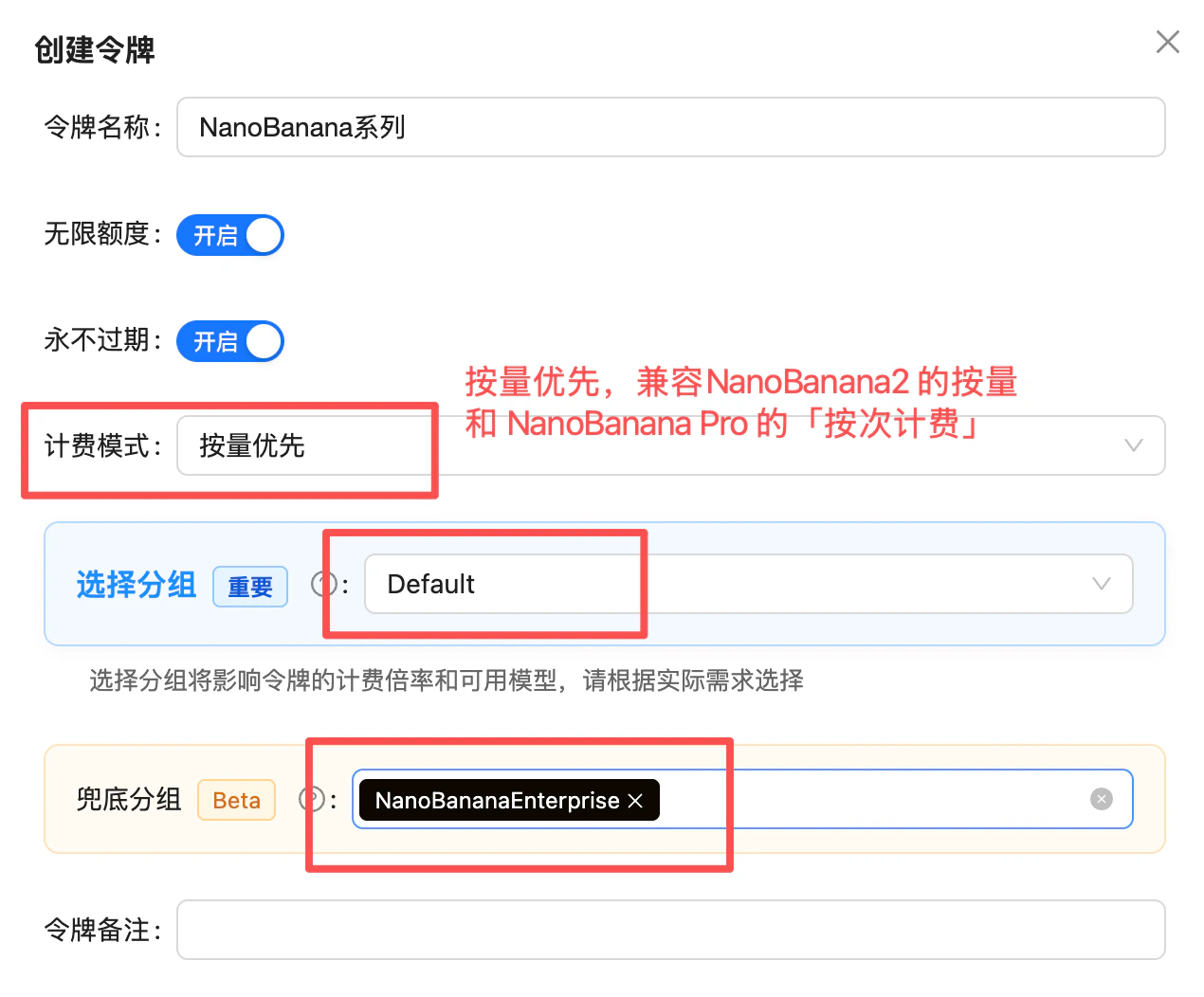 **Going further**: if your Token also covers other image models (e.g. GPT-image-2), keep the more stable `Default` as the primary group and put `NanoBananaEnterprise` in the fallback slot — 429s on the primary will auto-failover to the enterprise group without a token swap.
## Compatibility Notes
If you've previously used the following models, simply replace the model name:
### Upgrade to Latest Version
* Any old version → `gemini-3-pro-image-preview` (🔥 Recommended, Nano Banana Pro)
* Supports 4K high-resolution output
* Strongest text rendering capabilities
* Local editing features
### Use Stable Version
* `gpt-4o-image` → `gemini-2.5-flash-image`
* `sora_image` → `gemini-2.5-flash-image`
* Old Nano Banana → `gemini-2.5-flash-image`
Keep other parameters unchanged for seamless switching.
## Supported Resolutions & Aspect Ratios
### Output Resolutions
Nano Banana Pro supports three resolution tiers — 1K, 2K, 4K (the 512px tier is exclusive to Nano Banana 2):
| Resolution | Description | Recommended Use |
| ---------- | ----------- | --------------------------------------- |
| 1K | Default | Social media, web display |
| 2K | HD | HD displays, print materials |
| 4K | Ultra HD | Professional design, commercial posters |
### Output Dimensions per Aspect Ratio (pixels)
The table below lists Nano Banana Pro's actual output dimensions for all 10 aspect ratios across the 1K / 2K / 4K resolution tiers (source: Google official docs). In your request, set `aspect_ratio` for the ratio and `image_size` (or `resolution`) for the tier:
| Aspect Ratio | 1K | 2K | 4K |
| ------------ | --------- | --------- | --------- |
| **1:1** | 1024×1024 | 2048×2048 | 4096×4096 |
| **2:3** | 848×1264 | 1696×2528 | 3392×5056 |
| **3:2** | 1264×848 | 2528×1696 | 5056×3392 |
| **3:4** | 896×1200 | 1792×2400 | 3584×4800 |
| **4:3** | 1200×896 | 2400×1792 | 4800×3584 |
| **4:5** | 928×1152 | 1856×2304 | 3712×4608 |
| **5:4** | 1152×928 | 2304×1856 | 4608×3712 |
| **9:16** | 768×1376 | 1536×2752 | 3072×5504 |
| **16:9** | 1376×768 | 2752×1536 | 5504×3072 |
| **21:9** | 1584×672 | 3168×1344 | 6336×2688 |
If you need `1:4`, `4:1`, `1:8`, `8:1` ultra-tall/ultra-wide ratios or the 512px low-resolution tier, use [Nano Banana 2](/en/api-capabilities/nano-banana-2-image/overview) (14 aspect ratios + 512px).
## FAQ
**For best value** choose **Nano Banana 2** (`gemini-3.1-flash-image-preview`):
* Pro-level quality + Flash-tier speed
* Pay-as-you-go as low as \$0.025/image
* 14 aspect ratios (4 more than Pro)
* Exclusive: thinking mode, Image Search Grounding
**For ultimate quality** choose **Nano Banana Pro** (`gemini-3-pro-image-preview`):
* Highest fidelity
* \$0.09/request
See [Nano Banana 2 docs](/en/api-capabilities/nano-banana-2-image/overview) for details.
**Recommended for new projects: Nano Banana Pro** (`gemini-3-pro-image-preview`)
✅ **Pro Version Advantages**:
* Supports 4K ultra-high resolution (1K, 2K, 4K)
* Industry-leading text rendering quality
* Advanced local editing features
* Only \~38-67% of official pricing
⚡ **Legacy Version** (`gemini-2.5-flash-image`) suitable for:
* Budget-sensitive scenarios (\~\$0.025/image vs \$0.09/image)
* Need fast generation (10s vs 20s)
* Existing project migration
Simply change the model name from `gpt-4o-image` or `sora_image` to `gemini-3-pro-image-preview` (recommended Pro) or `gemini-2.5-flash-image` (legacy), keeping other parameters unchanged.
The model returns base64-encoded image data, typically in PNG or JPEG format. Code automatically detects format and saves to corresponding file type.
Yes, Nano Banana Pro supports both image generation and editing. See [Image Editing API Reference](/en/api-capabilities/nano-banana-image/image-edit).
The full error looks like:
```text theme={null}
[&{{write tcp ip:port->ip:port: write: connection reset by peer Unknown error shell_api_error write_response_body_failed} 500 }]
```
This is **usually caused by oversized image uploads — the request body gets too large and the connection collapses**. Follow these best practices:
* **Limit the image count**: stay within the official rules (max 14 images per prompt) — don't pile on reference images.
* **Limit per-image size**: keep each image under 5MB — the official per-image cap is 7MB, and base64 encoding inflates size by roughly 1/3, so leave headroom.
* **Compress on the frontend before uploading**: compress images on the frontend (or a server-side relay) before sending them to the API — common practice is capping the longest edge, converting to JPEG/WebP, and tuning the quality parameter.
* **Switch to URL input**: the Gemini native format supports passing an image URL via `fileData.fileUri`, sidestepping oversized base64 request bodies entirely — see the [Nano Banana Dev Guide](/en/api-capabilities/nano-banana-dev-guide).
## Related Documentation
* [Nano Banana 2 Image Generation](/en/api-capabilities/nano-banana-2-image/overview)
* [Nano Banana Pricing](/en/api-capabilities/nano-banana-pricing)
* [Other Image Generation Models](/en/api-capabilities/gpt-image-1)
* [API Usage Manual](/en/api-manual)
**Going further**: if your Token also covers other image models (e.g. GPT-image-2), keep the more stable `Default` as the primary group and put `NanoBananaEnterprise` in the fallback slot — 429s on the primary will auto-failover to the enterprise group without a token swap.
## Compatibility Notes
If you've previously used the following models, simply replace the model name:
### Upgrade to Latest Version
* Any old version → `gemini-3-pro-image-preview` (🔥 Recommended, Nano Banana Pro)
* Supports 4K high-resolution output
* Strongest text rendering capabilities
* Local editing features
### Use Stable Version
* `gpt-4o-image` → `gemini-2.5-flash-image`
* `sora_image` → `gemini-2.5-flash-image`
* Old Nano Banana → `gemini-2.5-flash-image`
Keep other parameters unchanged for seamless switching.
## Supported Resolutions & Aspect Ratios
### Output Resolutions
Nano Banana Pro supports three resolution tiers — 1K, 2K, 4K (the 512px tier is exclusive to Nano Banana 2):
| Resolution | Description | Recommended Use |
| ---------- | ----------- | --------------------------------------- |
| 1K | Default | Social media, web display |
| 2K | HD | HD displays, print materials |
| 4K | Ultra HD | Professional design, commercial posters |
### Output Dimensions per Aspect Ratio (pixels)
The table below lists Nano Banana Pro's actual output dimensions for all 10 aspect ratios across the 1K / 2K / 4K resolution tiers (source: Google official docs). In your request, set `aspect_ratio` for the ratio and `image_size` (or `resolution`) for the tier:
| Aspect Ratio | 1K | 2K | 4K |
| ------------ | --------- | --------- | --------- |
| **1:1** | 1024×1024 | 2048×2048 | 4096×4096 |
| **2:3** | 848×1264 | 1696×2528 | 3392×5056 |
| **3:2** | 1264×848 | 2528×1696 | 5056×3392 |
| **3:4** | 896×1200 | 1792×2400 | 3584×4800 |
| **4:3** | 1200×896 | 2400×1792 | 4800×3584 |
| **4:5** | 928×1152 | 1856×2304 | 3712×4608 |
| **5:4** | 1152×928 | 2304×1856 | 4608×3712 |
| **9:16** | 768×1376 | 1536×2752 | 3072×5504 |
| **16:9** | 1376×768 | 2752×1536 | 5504×3072 |
| **21:9** | 1584×672 | 3168×1344 | 6336×2688 |
If you need `1:4`, `4:1`, `1:8`, `8:1` ultra-tall/ultra-wide ratios or the 512px low-resolution tier, use [Nano Banana 2](/en/api-capabilities/nano-banana-2-image/overview) (14 aspect ratios + 512px).
## FAQ
**For best value** choose **Nano Banana 2** (`gemini-3.1-flash-image-preview`):
* Pro-level quality + Flash-tier speed
* Pay-as-you-go as low as \$0.025/image
* 14 aspect ratios (4 more than Pro)
* Exclusive: thinking mode, Image Search Grounding
**For ultimate quality** choose **Nano Banana Pro** (`gemini-3-pro-image-preview`):
* Highest fidelity
* \$0.09/request
See [Nano Banana 2 docs](/en/api-capabilities/nano-banana-2-image/overview) for details.
**Recommended for new projects: Nano Banana Pro** (`gemini-3-pro-image-preview`)
✅ **Pro Version Advantages**:
* Supports 4K ultra-high resolution (1K, 2K, 4K)
* Industry-leading text rendering quality
* Advanced local editing features
* Only \~38-67% of official pricing
⚡ **Legacy Version** (`gemini-2.5-flash-image`) suitable for:
* Budget-sensitive scenarios (\~\$0.025/image vs \$0.09/image)
* Need fast generation (10s vs 20s)
* Existing project migration
Simply change the model name from `gpt-4o-image` or `sora_image` to `gemini-3-pro-image-preview` (recommended Pro) or `gemini-2.5-flash-image` (legacy), keeping other parameters unchanged.
The model returns base64-encoded image data, typically in PNG or JPEG format. Code automatically detects format and saves to corresponding file type.
Yes, Nano Banana Pro supports both image generation and editing. See [Image Editing API Reference](/en/api-capabilities/nano-banana-image/image-edit).
The full error looks like:
```text theme={null}
[&{{write tcp ip:port->ip:port: write: connection reset by peer Unknown error shell_api_error write_response_body_failed} 500 }]
```
This is **usually caused by oversized image uploads — the request body gets too large and the connection collapses**. Follow these best practices:
* **Limit the image count**: stay within the official rules (max 14 images per prompt) — don't pile on reference images.
* **Limit per-image size**: keep each image under 5MB — the official per-image cap is 7MB, and base64 encoding inflates size by roughly 1/3, so leave headroom.
* **Compress on the frontend before uploading**: compress images on the frontend (or a server-side relay) before sending them to the API — common practice is capping the longest edge, converting to JPEG/WebP, and tuning the quality parameter.
* **Switch to URL input**: the Gemini native format supports passing an image URL via `fileData.fileUri`, sidestepping oversized base64 request bodies entirely — see the [Nano Banana Dev Guide](/en/api-capabilities/nano-banana-dev-guide).
## Related Documentation
* [Nano Banana 2 Image Generation](/en/api-capabilities/nano-banana-2-image/overview)
* [Nano Banana Pricing](/en/api-capabilities/nano-banana-pricing)
* [Other Image Generation Models](/en/api-capabilities/gpt-image-1)
* [API Usage Manual](/en/api-manual)