> ## Documentation Index
> Fetch the complete documentation index at: https://docs.apiyi.com/llms.txt
> Use this file to discover all available pages before exploring further.
# Token Management API
> Create, list, disable, and delete API keys programmatically, with batch issuance and per-key limits on quota, models, and expiry
## API Overview
The Token Management API lets you handle the full lifecycle of your API keys in code, instead of
clicking through the console one key at a time.
The most common use case is **batch issuance**: giving each team member, downstream customer, or
project its own key, each with its own limits on **how much it can spend**, **which models it can
call**, and **how long it stays valid**.
`remain_quota` caps how much this key can spend in total
`models` sets an allowlist; calls to anything outside it are rejected
`expired_time` sets an expiry timestamp, after which the key stops working
If you only need one or two keys, the console is faster — see
[How to create an API key](/en/faq/token-management). This API is aimed at automated issuance,
scheduled rotation, or integrating key management into your own systems.
## How to Get Your System Token
The Token Management API authenticates with a **System Token**, which is not the same thing as
an API key.
Visit `api.apiyi.com/account/profile` to access your profile page
Locate the "Account Options - System Token" section at the bottom of the page
Enter your account password to receive an AccessToken that can be used for subsequent API queries
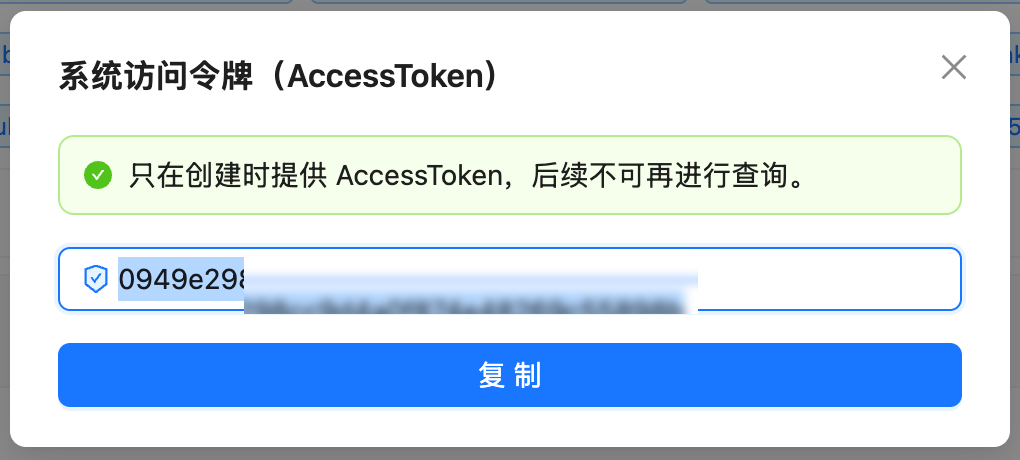 **A system token can create and delete API keys. Treat it like your account password.**
A system token cannot call models directly — using it against `/v1/chat/completions` is rejected —
but it can create API keys that can. **Leaking a system token is therefore considerably worse than
leaking a single API key.** Store it in a secret manager rather than in code, never commit it to a
repository, and rotate it periodically.
## Endpoints
All endpoints authenticate the same way: put the raw system token in the `Authorization` header,
**with no `Bearer` prefix**.
| Method | Path | Purpose |
| -------- | ------------------------------- | -------------------------------------------------------------- |
| `GET` | `/api/token/?p=0&page_size=100` | List all tokens on your account |
| `GET` | `/api/token/{id}` | Retrieve a single token |
| `POST` | `/api/token/` | **Create a token**; the response returns the key in plain text |
| `PUT` | `/api/token/` | Update a token (requires the complete object) |
| `PUT` | `/api/token/?status_only=true` | Toggle enabled/disabled state only |
| `DELETE` | `/api/token/{id}` | Delete a token |
The base URL is `https://api.apiyi.com`.
## Creating a Token
### Request Example
```bash theme={null}
export APIYI_SYS_TOKEN='YOUR_SYSTEM_TOKEN'
curl --compressed -s -X POST 'https://api.apiyi.com/api/token/' \
-H "Authorization: $APIYI_SYS_TOKEN" \
-H 'Content-Type: application/json' \
-d '{
"name": "team-alice",
"remain_quota": 500000,
"unlimited_quota": false,
"group": "default",
"models": "gpt-5.6,deepseek-chat",
"expired_time": -1
}'
```
### Request Fields
| Field | Type | Description |
| ----------------- | ------- | ------------------------------------------------------------- |
| `name` | String | Token name, for your own identification |
| `remain_quota` | Integer | Quota cap in credits; 500,000 = \$1.00 |
| `unlimited_quota` | Boolean | Whether quota is unlimited; **defaults to `false`** |
| `group` | String | The group identifier the token is bound to, e.g. `default` |
| `models` | String | **Model allowlist**, comma-separated; omit for no restriction |
| `expired_time` | Integer | Expiry timestamp in Unix seconds; `-1` means never expires |
**`unlimited_quota` defaults to `false` and `remain_quota` defaults to 0** — omitting both
produces a token with zero quota that cannot be used. Either set `remain_quota` explicitly or
set `unlimited_quota` to `true`.
**Use the `models` field for the model allowlist.**
The response structure also contains `model_limits`, `model_limits_enabled`, and `allow_ips`.
Passing these does not raise an error — the endpoint still returns 200 — but they **currently have
no effect**, and reading the token back shows them unset. Use `models` to restrict available
models. Source-IP restrictions need to be implemented on your own side for now.
### Response Example
```json theme={null}
{
"success": true,
"message": "",
"data": {
"id": 119431,
"user_id": 80778,
"key": "K1RPzapuXLfBU4kDC5D9C0E70b1841AeAa542186B2F54b75",
"status": 1,
"name": "team-alice",
"group": "default",
"models": "gpt-5.6,deepseek-chat",
"remain_quota": 500000,
"unlimited_quota": false,
"used_quota": 0,
"expired_time": -1,
"created_time": 1785599000
}
}
```
**The `key` in the response is plain text and does not include the `sk-` prefix.** You need to
prepend it yourself — in the example above the actual API key is `sk-K1RPzapu…`.
Save and distribute the key at creation time, and do not leave response bodies containing `key`
sitting in log files.
## Batch Creation
**There is no server-side batch endpoint** — passing something like `count` in the request body
has no effect and still creates a single token. Batch issuance is done by looping on the client.
```python theme={null}
import json
import os
import time
import requests
BASE = "https://api.apiyi.com"
HEADERS = {"Authorization": os.environ["APIYI_SYS_TOKEN"],
"Content-Type": "application/json"}
QUOTA_PER_USD = 500_000
def create_token(name, quota_usd=None, group="default", models=None, days=0):
"""Create one token. quota_usd=None means unlimited; days=0 means never expires."""
body = {
"name": name,
"group": group,
"unlimited_quota": quota_usd is None,
"remain_quota": 0 if quota_usd is None else int(quota_usd * QUOTA_PER_USD),
"expired_time": -1 if not days else int(time.time()) + days * 86400,
}
if models:
body["models"] = models
resp = requests.post(f"{BASE}/api/token/", headers=HEADERS, json=body, timeout=30)
resp.raise_for_status()
data = resp.json()["data"]
return {"id": data["id"], "name": data["name"], "key": "sk-" + data["key"]}
if __name__ == "__main__":
names = ["team-alice", "team-bob", "team-carol"]
created = [
create_token(n, quota_usd=1, group="default", models="gpt-5.6", days=30)
for n in names
]
for row in created:
print(f"{row['name']:16s} id={row['id']} {row['key']}")
# the plaintext key is only returned at creation time, so store it carefully
with open("keys.json", "w") as f:
json.dump(created, f, ensure_ascii=False, indent=1)
```
```javascript theme={null}
const BASE = "https://api.apiyi.com";
const HEADERS = {
Authorization: process.env.APIYI_SYS_TOKEN,
"Content-Type": "application/json",
};
const QUOTA_PER_USD = 500_000;
async function createToken(name, { quotaUsd = null, group = "default",
models = null, days = 0 } = {}) {
const body = {
name,
group,
unlimited_quota: quotaUsd === null,
remain_quota: quotaUsd === null ? 0 : Math.round(quotaUsd * QUOTA_PER_USD),
expired_time: days ? Math.floor(Date.now() / 1000) + days * 86400 : -1,
};
if (models) body.models = models;
const resp = await fetch(`${BASE}/api/token/`, {
method: "POST",
headers: HEADERS,
body: JSON.stringify(body),
});
if (!resp.ok) throw new Error(`HTTP ${resp.status}`);
const { data } = await resp.json();
return { id: data.id, name: data.name, key: `sk-${data.key}` };
}
const names = ["team-alice", "team-bob", "team-carol"];
for (const name of names) {
const row = await createToken(name, { quotaUsd: 1, models: "gpt-5.6", days: 30 });
console.log(row.name, row.id, row.key);
}
```
```bash theme={null}
export APIYI_SYS_TOKEN='YOUR_SYSTEM_TOKEN'
for NAME in team-alice team-bob team-carol; do
curl --compressed -s -X POST 'https://api.apiyi.com/api/token/' \
-H "Authorization: $APIYI_SYS_TOKEN" \
-H 'Content-Type: application/json' \
-d "{\"name\":\"$NAME\",\"remain_quota\":500000,\"unlimited_quota\":false,\"group\":\"default\",\"expired_time\":-1}" \
| jq -r '"\(.data.name)\tsk-\(.data.key)"'
done
```
## Using the Three Limits
### Quota limit
`remain_quota` caps what the token can spend. The conversion matches the
[Balance Query API](/en/api-capabilities/balance-query):
500,000 quota = \$1.00 USD
For example, to issue a downstream customer a key capped at \$10, set `remain_quota` to
`5000000` with `unlimited_quota` set to `false`. Consumption so far is readable from the token's
`used_quota` field.
### Model limit
`models` is a comma-separated allowlist. Once set, calling a model outside the list is rejected:
```json theme={null}
{
"error": {
"message": "This token is not authorized to use model: deepseek-chat"
}
}
```
The response is HTTP 403 and **no charge is incurred**. Omitting `models` means no restriction.
### Expiry limit
`expired_time` is a Unix-seconds timestamp, with `-1` meaning never. For example, a key that
expires in 30 days:
```python theme={null}
import time
expired_time = int(time.time()) + 30 * 86400
```
## Listing Tokens
```bash theme={null}
curl --compressed -s 'https://api.apiyi.com/api/token/?p=0&page_size=100' \
-H "Authorization: $APIYI_SYS_TOKEN" | jq '.data[] | {id, name, status, remain_quota, used_quota, models}'
```
Key fields:
| Field | Description |
| ----------------------------- | ----------------------------------------------- |
| `id` | Token ID, used for updates and deletion |
| `key` | The key in plain text, without the `sk-` prefix |
| `status` | `1` = enabled, `2` = disabled |
| `remain_quota` / `used_quota` | Remaining / consumed quota |
| `unlimited_quota` | Whether quota is unlimited |
| `models` | Model allowlist; empty means no restriction |
| `expired_time` | Expiry timestamp; `-1` means never |
## Updating a Token
**The update endpoint requires the complete object — it is not a patch.**
The correct flow is: `GET` the full token object, modify the fields you want to change, then
`PUT` **the whole object** back. Sending only the changed fields will clear the rest.
```python theme={null}
import os
import requests
BASE = "https://api.apiyi.com"
HEADERS = {"Authorization": os.environ["APIYI_SYS_TOKEN"],
"Content-Type": "application/json"}
# 1. fetch the complete object
token = requests.get(f"{BASE}/api/token/119431", headers=HEADERS, timeout=30).json()["data"]
# 2. change only what you need, leaving everything else as-is
token["remain_quota"] = 2_500_000 # raise the cap to $5
token["models"] = "gpt-5.6,gemini-3-pro"
# 3. PUT the whole object back
resp = requests.put(f"{BASE}/api/token/", headers=HEADERS, json=token, timeout=30)
print(resp.json()["success"])
```
## Disabling and Deleting
### Disable (keeps the record)
Once disabled, the key stops working immediately — calls with it return 401 — but the token
record and its usage history are retained.
```python theme={null}
token = requests.get(f"{BASE}/api/token/119431", headers=HEADERS, timeout=30).json()["data"]
token["status"] = 2 # 1 = enabled, 2 = disabled
requests.put(f"{BASE}/api/token/", headers=HEADERS,
params={"status_only": "true"}, json=token, timeout=30)
```
### Delete (irreversible)
```bash theme={null}
curl --compressed -s -X DELETE 'https://api.apiyi.com/api/token/119431' \
-H "Authorization: $APIYI_SYS_TOKEN"
```
Batch deletion is likewise a client-side loop:
```python theme={null}
for token_id in [119431, 119432, 119433]:
requests.delete(f"{BASE}/api/token/{token_id}", headers=HEADERS, timeout=30)
```
Deletion cannot be undone. If you only want to suspend a key temporarily, disable it instead —
the usage history stays available for reconciliation.
## FAQ
The `key` in the response does not include the `sk-` prefix. Prepend it yourself:
the usable API key is `sk-` followed by the returned value.
Most likely neither `remain_quota` was set nor `unlimited_quota` was set to `true` at creation.
That default combination produces a token with zero quota. Recreate it with one of the two
specified explicitly.
Those fields — along with `model_limits_enabled` — currently do not take effect. Passing them
raises no error but nothing is stored. Use `models` to restrict available models; source-IP
restrictions need to be handled on your own side for now.
There is no server-side batch endpoint, and passing something like `count` in the body has no
effect. Loop the create call on the client instead — see the batch creation section above.
The update endpoint requires the complete object. `GET` the full object first, modify it, then
`PUT` the whole thing back rather than sending only the changed fields.
Disabling (`status: 2`) stops the key working immediately but keeps the record and usage
history, and you can set it back to `1` at any time. Deleting is irreversible and removes the
record. For temporary suspension, prefer disabling.
The token's `used_quota` field is that key's cumulative spend (÷ 500,000 = USD). For a
per-period breakdown or call-level detail, use the
[Log Query API](/en/api-capabilities/log-query) with the `token_name` filter.
## Important Notes
**A system token is not an API key, and the two are not interchangeable**
* An **API key** (starting with `sk-`) is for `/v1/*` inference endpoints
* A **system token** (a plain string with no prefix) is for `/api/*` management endpoints
Mixing them up returns 401 and an invalid-token error respectively.
**Handle plaintext keys carefully**
Both the create response and the token list return keys in plain text. Therefore:
* Do not write response bodies containing `key` into log files or commit them to a repository
* Distribute keys to team members over secure channels, not group chats
* This plaintext does not carry the `sk-` prefix, so **common secret scanners may not detect it** —
do not rely on automated checks to catch it for you
**Operational tips**
* When creating in bulk, add a modest delay between calls to avoid high instantaneous concurrency
* Give each key a meaningful `name` (such as `team-alice` or `prod-webhook`) so you can attribute
usage by `token_name` in the logs later
* For rotation: create the new key, shift traffic, disable the old key, observe for a while, and
only delete it once you confirm no calls remain
* [Log Query API](/en/api-capabilities/log-query) — per-key call detail and charges
* [Balance Query API](/en/api-capabilities/balance-query) — remaining account credit
* [How to create an API key](/en/faq/token-management) — manual creation in the console
* [Tokens and groups](/en/faq/token-and-groups) — what groups do and how to choose
**A system token can create and delete API keys. Treat it like your account password.**
A system token cannot call models directly — using it against `/v1/chat/completions` is rejected —
but it can create API keys that can. **Leaking a system token is therefore considerably worse than
leaking a single API key.** Store it in a secret manager rather than in code, never commit it to a
repository, and rotate it periodically.
## Endpoints
All endpoints authenticate the same way: put the raw system token in the `Authorization` header,
**with no `Bearer` prefix**.
| Method | Path | Purpose |
| -------- | ------------------------------- | -------------------------------------------------------------- |
| `GET` | `/api/token/?p=0&page_size=100` | List all tokens on your account |
| `GET` | `/api/token/{id}` | Retrieve a single token |
| `POST` | `/api/token/` | **Create a token**; the response returns the key in plain text |
| `PUT` | `/api/token/` | Update a token (requires the complete object) |
| `PUT` | `/api/token/?status_only=true` | Toggle enabled/disabled state only |
| `DELETE` | `/api/token/{id}` | Delete a token |
The base URL is `https://api.apiyi.com`.
## Creating a Token
### Request Example
```bash theme={null}
export APIYI_SYS_TOKEN='YOUR_SYSTEM_TOKEN'
curl --compressed -s -X POST 'https://api.apiyi.com/api/token/' \
-H "Authorization: $APIYI_SYS_TOKEN" \
-H 'Content-Type: application/json' \
-d '{
"name": "team-alice",
"remain_quota": 500000,
"unlimited_quota": false,
"group": "default",
"models": "gpt-5.6,deepseek-chat",
"expired_time": -1
}'
```
### Request Fields
| Field | Type | Description |
| ----------------- | ------- | ------------------------------------------------------------- |
| `name` | String | Token name, for your own identification |
| `remain_quota` | Integer | Quota cap in credits; 500,000 = \$1.00 |
| `unlimited_quota` | Boolean | Whether quota is unlimited; **defaults to `false`** |
| `group` | String | The group identifier the token is bound to, e.g. `default` |
| `models` | String | **Model allowlist**, comma-separated; omit for no restriction |
| `expired_time` | Integer | Expiry timestamp in Unix seconds; `-1` means never expires |
**`unlimited_quota` defaults to `false` and `remain_quota` defaults to 0** — omitting both
produces a token with zero quota that cannot be used. Either set `remain_quota` explicitly or
set `unlimited_quota` to `true`.
**Use the `models` field for the model allowlist.**
The response structure also contains `model_limits`, `model_limits_enabled`, and `allow_ips`.
Passing these does not raise an error — the endpoint still returns 200 — but they **currently have
no effect**, and reading the token back shows them unset. Use `models` to restrict available
models. Source-IP restrictions need to be implemented on your own side for now.
### Response Example
```json theme={null}
{
"success": true,
"message": "",
"data": {
"id": 119431,
"user_id": 80778,
"key": "K1RPzapuXLfBU4kDC5D9C0E70b1841AeAa542186B2F54b75",
"status": 1,
"name": "team-alice",
"group": "default",
"models": "gpt-5.6,deepseek-chat",
"remain_quota": 500000,
"unlimited_quota": false,
"used_quota": 0,
"expired_time": -1,
"created_time": 1785599000
}
}
```
**The `key` in the response is plain text and does not include the `sk-` prefix.** You need to
prepend it yourself — in the example above the actual API key is `sk-K1RPzapu…`.
Save and distribute the key at creation time, and do not leave response bodies containing `key`
sitting in log files.
## Batch Creation
**There is no server-side batch endpoint** — passing something like `count` in the request body
has no effect and still creates a single token. Batch issuance is done by looping on the client.
```python theme={null}
import json
import os
import time
import requests
BASE = "https://api.apiyi.com"
HEADERS = {"Authorization": os.environ["APIYI_SYS_TOKEN"],
"Content-Type": "application/json"}
QUOTA_PER_USD = 500_000
def create_token(name, quota_usd=None, group="default", models=None, days=0):
"""Create one token. quota_usd=None means unlimited; days=0 means never expires."""
body = {
"name": name,
"group": group,
"unlimited_quota": quota_usd is None,
"remain_quota": 0 if quota_usd is None else int(quota_usd * QUOTA_PER_USD),
"expired_time": -1 if not days else int(time.time()) + days * 86400,
}
if models:
body["models"] = models
resp = requests.post(f"{BASE}/api/token/", headers=HEADERS, json=body, timeout=30)
resp.raise_for_status()
data = resp.json()["data"]
return {"id": data["id"], "name": data["name"], "key": "sk-" + data["key"]}
if __name__ == "__main__":
names = ["team-alice", "team-bob", "team-carol"]
created = [
create_token(n, quota_usd=1, group="default", models="gpt-5.6", days=30)
for n in names
]
for row in created:
print(f"{row['name']:16s} id={row['id']} {row['key']}")
# the plaintext key is only returned at creation time, so store it carefully
with open("keys.json", "w") as f:
json.dump(created, f, ensure_ascii=False, indent=1)
```
```javascript theme={null}
const BASE = "https://api.apiyi.com";
const HEADERS = {
Authorization: process.env.APIYI_SYS_TOKEN,
"Content-Type": "application/json",
};
const QUOTA_PER_USD = 500_000;
async function createToken(name, { quotaUsd = null, group = "default",
models = null, days = 0 } = {}) {
const body = {
name,
group,
unlimited_quota: quotaUsd === null,
remain_quota: quotaUsd === null ? 0 : Math.round(quotaUsd * QUOTA_PER_USD),
expired_time: days ? Math.floor(Date.now() / 1000) + days * 86400 : -1,
};
if (models) body.models = models;
const resp = await fetch(`${BASE}/api/token/`, {
method: "POST",
headers: HEADERS,
body: JSON.stringify(body),
});
if (!resp.ok) throw new Error(`HTTP ${resp.status}`);
const { data } = await resp.json();
return { id: data.id, name: data.name, key: `sk-${data.key}` };
}
const names = ["team-alice", "team-bob", "team-carol"];
for (const name of names) {
const row = await createToken(name, { quotaUsd: 1, models: "gpt-5.6", days: 30 });
console.log(row.name, row.id, row.key);
}
```
```bash theme={null}
export APIYI_SYS_TOKEN='YOUR_SYSTEM_TOKEN'
for NAME in team-alice team-bob team-carol; do
curl --compressed -s -X POST 'https://api.apiyi.com/api/token/' \
-H "Authorization: $APIYI_SYS_TOKEN" \
-H 'Content-Type: application/json' \
-d "{\"name\":\"$NAME\",\"remain_quota\":500000,\"unlimited_quota\":false,\"group\":\"default\",\"expired_time\":-1}" \
| jq -r '"\(.data.name)\tsk-\(.data.key)"'
done
```
## Using the Three Limits
### Quota limit
`remain_quota` caps what the token can spend. The conversion matches the
[Balance Query API](/en/api-capabilities/balance-query):
500,000 quota = \$1.00 USD
For example, to issue a downstream customer a key capped at \$10, set `remain_quota` to
`5000000` with `unlimited_quota` set to `false`. Consumption so far is readable from the token's
`used_quota` field.
### Model limit
`models` is a comma-separated allowlist. Once set, calling a model outside the list is rejected:
```json theme={null}
{
"error": {
"message": "This token is not authorized to use model: deepseek-chat"
}
}
```
The response is HTTP 403 and **no charge is incurred**. Omitting `models` means no restriction.
### Expiry limit
`expired_time` is a Unix-seconds timestamp, with `-1` meaning never. For example, a key that
expires in 30 days:
```python theme={null}
import time
expired_time = int(time.time()) + 30 * 86400
```
## Listing Tokens
```bash theme={null}
curl --compressed -s 'https://api.apiyi.com/api/token/?p=0&page_size=100' \
-H "Authorization: $APIYI_SYS_TOKEN" | jq '.data[] | {id, name, status, remain_quota, used_quota, models}'
```
Key fields:
| Field | Description |
| ----------------------------- | ----------------------------------------------- |
| `id` | Token ID, used for updates and deletion |
| `key` | The key in plain text, without the `sk-` prefix |
| `status` | `1` = enabled, `2` = disabled |
| `remain_quota` / `used_quota` | Remaining / consumed quota |
| `unlimited_quota` | Whether quota is unlimited |
| `models` | Model allowlist; empty means no restriction |
| `expired_time` | Expiry timestamp; `-1` means never |
## Updating a Token
**The update endpoint requires the complete object — it is not a patch.**
The correct flow is: `GET` the full token object, modify the fields you want to change, then
`PUT` **the whole object** back. Sending only the changed fields will clear the rest.
```python theme={null}
import os
import requests
BASE = "https://api.apiyi.com"
HEADERS = {"Authorization": os.environ["APIYI_SYS_TOKEN"],
"Content-Type": "application/json"}
# 1. fetch the complete object
token = requests.get(f"{BASE}/api/token/119431", headers=HEADERS, timeout=30).json()["data"]
# 2. change only what you need, leaving everything else as-is
token["remain_quota"] = 2_500_000 # raise the cap to $5
token["models"] = "gpt-5.6,gemini-3-pro"
# 3. PUT the whole object back
resp = requests.put(f"{BASE}/api/token/", headers=HEADERS, json=token, timeout=30)
print(resp.json()["success"])
```
## Disabling and Deleting
### Disable (keeps the record)
Once disabled, the key stops working immediately — calls with it return 401 — but the token
record and its usage history are retained.
```python theme={null}
token = requests.get(f"{BASE}/api/token/119431", headers=HEADERS, timeout=30).json()["data"]
token["status"] = 2 # 1 = enabled, 2 = disabled
requests.put(f"{BASE}/api/token/", headers=HEADERS,
params={"status_only": "true"}, json=token, timeout=30)
```
### Delete (irreversible)
```bash theme={null}
curl --compressed -s -X DELETE 'https://api.apiyi.com/api/token/119431' \
-H "Authorization: $APIYI_SYS_TOKEN"
```
Batch deletion is likewise a client-side loop:
```python theme={null}
for token_id in [119431, 119432, 119433]:
requests.delete(f"{BASE}/api/token/{token_id}", headers=HEADERS, timeout=30)
```
Deletion cannot be undone. If you only want to suspend a key temporarily, disable it instead —
the usage history stays available for reconciliation.
## FAQ
The `key` in the response does not include the `sk-` prefix. Prepend it yourself:
the usable API key is `sk-` followed by the returned value.
Most likely neither `remain_quota` was set nor `unlimited_quota` was set to `true` at creation.
That default combination produces a token with zero quota. Recreate it with one of the two
specified explicitly.
Those fields — along with `model_limits_enabled` — currently do not take effect. Passing them
raises no error but nothing is stored. Use `models` to restrict available models; source-IP
restrictions need to be handled on your own side for now.
There is no server-side batch endpoint, and passing something like `count` in the body has no
effect. Loop the create call on the client instead — see the batch creation section above.
The update endpoint requires the complete object. `GET` the full object first, modify it, then
`PUT` the whole thing back rather than sending only the changed fields.
Disabling (`status: 2`) stops the key working immediately but keeps the record and usage
history, and you can set it back to `1` at any time. Deleting is irreversible and removes the
record. For temporary suspension, prefer disabling.
The token's `used_quota` field is that key's cumulative spend (÷ 500,000 = USD). For a
per-period breakdown or call-level detail, use the
[Log Query API](/en/api-capabilities/log-query) with the `token_name` filter.
## Important Notes
**A system token is not an API key, and the two are not interchangeable**
* An **API key** (starting with `sk-`) is for `/v1/*` inference endpoints
* A **system token** (a plain string with no prefix) is for `/api/*` management endpoints
Mixing them up returns 401 and an invalid-token error respectively.
**Handle plaintext keys carefully**
Both the create response and the token list return keys in plain text. Therefore:
* Do not write response bodies containing `key` into log files or commit them to a repository
* Distribute keys to team members over secure channels, not group chats
* This plaintext does not carry the `sk-` prefix, so **common secret scanners may not detect it** —
do not rely on automated checks to catch it for you
**Operational tips**
* When creating in bulk, add a modest delay between calls to avoid high instantaneous concurrency
* Give each key a meaningful `name` (such as `team-alice` or `prod-webhook`) so you can attribute
usage by `token_name` in the logs later
* For rotation: create the new key, shift traffic, disable the old key, observe for a while, and
only delete it once you confirm no calls remain
* [Log Query API](/en/api-capabilities/log-query) — per-key call detail and charges
* [Balance Query API](/en/api-capabilities/balance-query) — remaining account credit
* [How to create an API key](/en/faq/token-management) — manual creation in the console
* [Tokens and groups](/en/faq/token-and-groups) — what groups do and how to choose