> ## Documentation Index
> Fetch the complete documentation index at: https://docs.apiyi.com/llms.txt
> Use this file to discover all available pages before exploring further.
# Wan3.0 Video Generation (Alibaba Tongyi Wanxiang)
> Complete guide to Alibaba Tongyi Wanxiang Wan3.0 video generation: one model ID covers text-to-video, image-to-video, reference-to-video and video editing, up to 30 seconds, 480P-1080P, native audio track, with per-tier pricing for Standard and Prime; 98% of official by default, as low as 81.7% with top-up bonuses ($0.0245/sec at 480P).
## Overview
**Wan3.0 is Tongyi Wanxiang's all-in-one video model.** Unlike Wan2.7, which makes you switch between four model IDs (`t2v` / `i2v` / `r2v` / `videoedit`), Wan3.0 handles **every mode through a single model ID** — what you send as media decides what it does. Text-to-video, image-to-video, reference-to-video and video editing all share one request body.
Two variants, identical capabilities, different speed and price:
| Model ID | Position | Relative speed | APIYI price at 720P | **With 20% top-up bonus, as low as** |
| - | - | - | - | - |
| `wan3.0-video` | Standard | Baseline | \$0.0588/sec | **\$0.049/sec** (≈ ¥0.34/sec) |
| `wan3.0-video-prime` | **Prime (faster)** | Faster delivery | \$0.126/sec | **\$0.105/sec** (≈ ¥0.74/sec) |
Both variants share **exactly the same parameters, endpoint and media rules** — only speed and unit price differ. Build against `wan3.0-video` first, then switch latency-sensitive production traffic to `wan3.0-video-prime`.
## What changed from Wan2.7
| Dimension | Wan2.7 | **Wan3.0** |
| - | - | - |
| Model IDs | 4 (t2v / i2v / r2v / videoedit) | **1** (media decides the mode) |
| Max duration | 15 sec (10 sec with reference video) | **30 sec** (input + output combined) |
| Resolutions | 720P / 1080P | **480P** / 720P / 1080P |
| Audio | Requires `driving_audio` for lip sync | **Native audio track by default** |
| 720P price | \$0.084/sec | **\$0.0588/sec** (\~30% cheaper) |
| 1080P price | \$0.14/sec | **\$0.1176/sec** (\~16% cheaper) |
Wan2.7 remains fully available — see [Wan2.7 Video Generation](/en/api-capabilities/wan/overview).
## Key features
Text-to-video, image-to-video (first/last frame), reference-to-video (image, video, audio) and video editing share one model ID and one endpoint, distinguished by the `type` in `input.media[]`.
Up to 30 seconds per request (input reference video + output combined) — double Wan2.7's 15 seconds, enough for a full voice-over segment or a short-drama shot.
Output ships with a `soun` track by default, no driving audio required. Use `reference_audio` when you want a specific voice timbre.
The new 480P tier costs a quarter of 1080P — draft cheaply, then upscale for the final render.
## Group setup
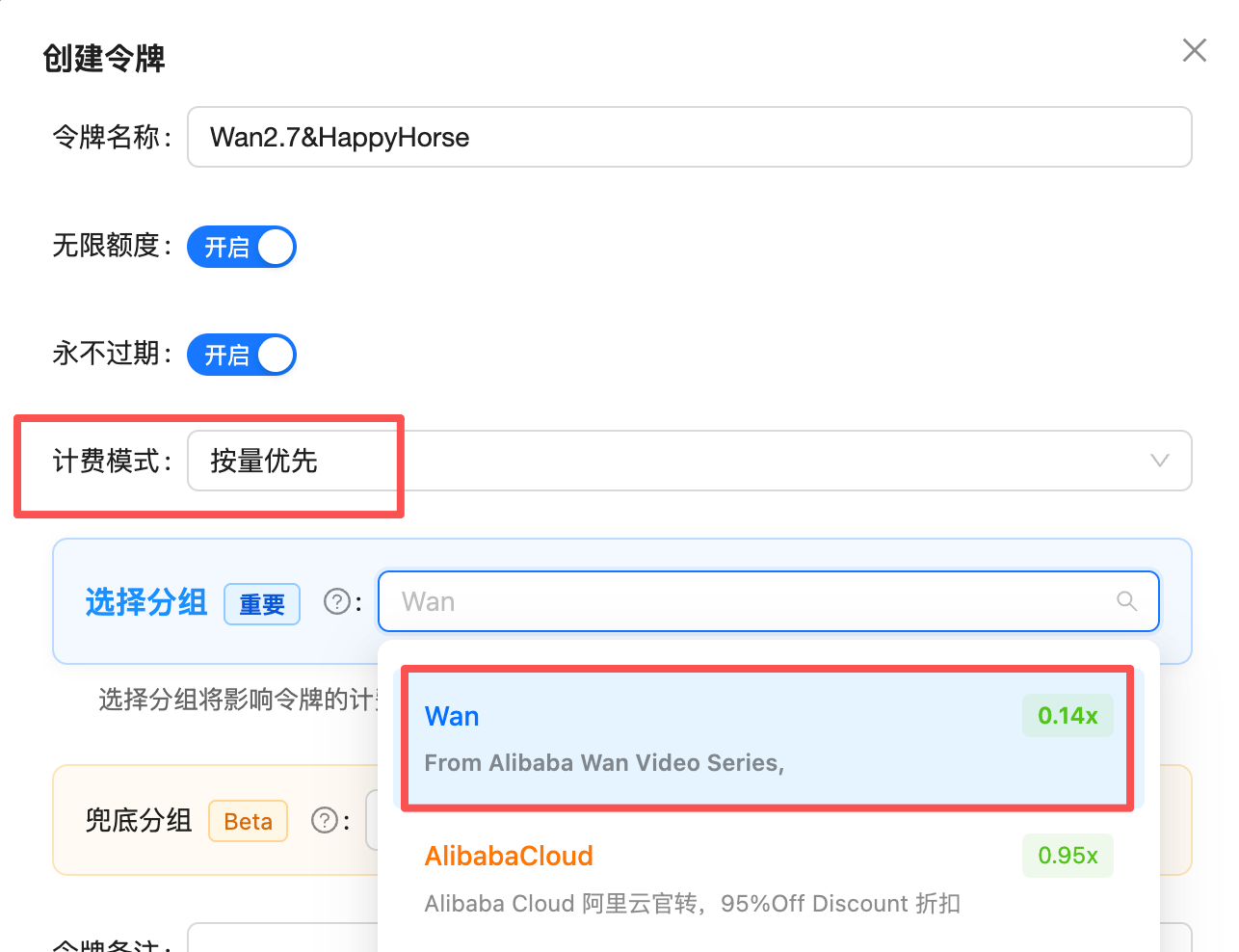
Wan3.0 shares the **`Wan&HappyHorse` group** with Wan2.7 and [HappyHorse](/en/api-capabilities/happyhorse/overview) — one key calls them all. Video is billed **per second**, so your key must satisfy two conditions to route successfully:
1. **Billing mode**: choose "Pay-as-you-go priority" or "Pay-as-you-go" — per-second video **cannot route on a per-call key**
2. **Group**: include `Wan&HappyHorse`
 ## Pricing
**98% of Alibaba's official price by default — as low as 81.7% with the highest top-up bonus.**
That puts 480P at **\$0.0245/sec** (≈ ¥0.17/sec) and 720P at **\$0.049/sec** (≈ ¥0.34/sec) for `wan3.0-video`.
### How the rate is derived: 0.98x by default, as low as 0.817x with bonuses
The console shows the `Wan&HappyHorse` group at a **0.14x** multiplier, denominated in **CNY**. APIYI settles in **USD at a fixed 1:7 exchange rate**:
```
0.14 (CNY-denominated unit) × 7 (fixed rate) = 0.98
```
So **APIYI price per second (USD) = Alibaba's official CNY price per second × 0.14**, which is 98% of the official rate.
### Table 1: APIYI pricing in detail (billed per second)
| Model | Resolution | Default | With 10% bonus | **With 20% bonus** | 20%-bonus price in CNY |
| - | - | - | - | - | - |
| `wan3.0-video` | 480P | \$0.0294/sec | \$0.0267/sec | **\$0.0245/sec** | ¥0.1715/sec |
| `wan3.0-video` | 720P | \$0.0588/sec | \$0.0535/sec | **\$0.049/sec** | ¥0.343/sec |
| `wan3.0-video` | 1080P | \$0.1176/sec | \$0.1069/sec | **\$0.098/sec** | ¥0.686/sec |
| `wan3.0-video-prime` | 480P | \$0.063/sec | \$0.0573/sec | **\$0.0525/sec** | ¥0.3675/sec |
| `wan3.0-video-prime` | 720P | \$0.126/sec | \$0.1145/sec | **\$0.105/sec** | ¥0.735/sec |
| `wan3.0-video-prime` | 1080P | \$0.252/sec | \$0.2291/sec | **\$0.21/sec** | ¥1.47/sec |
| Tier | Share of Alibaba's official price | Formula |
| - | - | - |
| Default | **98%** | 0.14x multiplier × fixed rate 7 |
| 10% top-up bonus (standard) | **\~89.1%** | 0.98 ÷ 1.1 |
| 20% top-up bonus (large accounts) | **\~81.7%** | 0.98 ÷ 1.2 |
"With 10% / 20% bonus" is the **effective unit price** after a [top-up bonus](/en/faq/recharge-promotions) scales your credited balance — the amount deducted on each call is still the default price.
### Table 2: Tier-by-tier against Alibaba's official pricing
| Model | Resolution | Official list | Official current | APIYI default (CNY) | vs official | **With 20% bonus** |
| - | - | - | - | - | - | - |
| `wan3.0-video` | 480P | ¥0.30/sec | **¥0.21/sec** | ¥0.2058/sec | 98% | **¥0.1715/sec · 81.7%** |
| `wan3.0-video` | 720P | ¥0.60/sec | **¥0.42/sec** | ¥0.4116/sec | 98% | **¥0.343/sec · 81.7%** |
| `wan3.0-video` | 1080P | ¥1.20/sec | **¥0.84/sec** | ¥0.8232/sec | 98% | **¥0.686/sec · 81.7%** |
| `wan3.0-video-prime` | 480P | ¥0.45/sec | ¥0.45/sec | ¥0.441/sec | 98% | **¥0.3675/sec · 81.7%** |
| `wan3.0-video-prime` | 720P | ¥0.90/sec | ¥0.90/sec | ¥0.882/sec | 98% | **¥0.735/sec · 81.7%** |
| `wan3.0-video-prime` | 1080P | ¥1.80/sec | ¥1.80/sec | ¥1.764/sec | 98% | **¥1.47/sec · 81.7%** |
`wan3.0-video` currently carries an official **limited-time 30% discount** (applied to all users by default), and APIYI pricing follows the discounted rate. `wan3.0-video-prime` has no discount. APIYI pricing will be adjusted when the promotion ends.
### Table 3: Total cost for common durations
| Model | Resolution | 5 sec | 10 sec | 30 sec (max) |
| - | - | - | - | - |
| `wan3.0-video` | 480P | \$0.147 | \$0.294 | \$0.882 |
| `wan3.0-video` | 720P | \$0.294 | \$0.588 | \$1.764 |
| `wan3.0-video` | 1080P | \$0.588 | \$1.176 | \$3.528 |
| `wan3.0-video-prime` | 480P | \$0.315 | \$0.63 | \$1.89 |
| `wan3.0-video-prime` | 720P | \$0.63 | \$1.26 | \$3.78 |
| `wan3.0-video-prime` | 1080P | \$1.26 | \$2.52 | \$7.56 |
### Stacking top-up bonuses
With a [top-up bonus](/en/faq/recharge-promotions), credited balance scales by up to \~1.2x, pushing the effective rate lower:
```
0.98 ÷ 1.2 ≈ 0.816
```
| Tier | Effective price (vs Alibaba official) | Formula |
| - | - | - |
| Default | **98%** | 0.14x multiplier × fixed rate 7 |
| 10% top-up bonus (standard) | **\~89.1%** | 0.98 ÷ 1.1 |
| 20% top-up bonus (large accounts, highest tier) | **\~81.7%** | 0.98 ÷ 1.2 |
1:7 is a **fixed settlement rate** (not a promotional rate) and applies to all USD top-ups.
Prices match the provider's official rates and may change along with them; the table above is for reference only, and the **Model Pricing** tab in the top navigation is authoritative: [Model Pricing](/en/models/index).
## ⚠️ Billing rules (different from other video models)
**Billed seconds = input reference video duration + output video duration.** Per Alibaba: "Both input and output video are billed by duration; the unit price is determined by the output resolution."
| Rule | Detail |
| - | - |
| Reference **video** seconds are billed | A 10-second `reference_video` with a 2-second output bills **12 seconds** |
| Reference **images / audio / files** are free | Only video material counts toward billed duration |
| Unit price follows the **output** resolution | A 720P input with 1080P output bills the whole thing at the 1080P rate |
| 30-second combined cap | Input + output above 30 seconds is rejected upstream |
| No `duration` passed | Defaults to a 5-second output, billed as 5 seconds |
| Failed tasks | **Fully refunded**, no support ticket needed |
To cut cost, **trim the reference video** — lowering `duration` does nothing for the input seconds. Example: a 10-second reference plus a 2-second output bills 12 seconds; trimming the reference to 3 seconds bills only 5.
### Pre-authorization and settlement
* **Without a reference video**: the requested `duration` is charged up front and that is the final amount — no settlement entry.
* **With a reference video**: at submit time the gateway does not yet know how long your input video is, so it pre-authorizes at the **30-second cap**, then recalculates against the actual billed seconds and refunds the difference (a separate negative entry on your bill).
The cap-based hold temporarily freezes a larger amount: \$0.147 at 480P, \$0.294 at 720P, \$0.588 at 1080P (`wan3.0-video`, 30 seconds). Keep enough balance available; the refund lands within seconds of task completion.
## ⚠️ Endpoint choice (most important)
APIYI exposes two paths, but **only the DashScope passthrough endpoint works fully with Wan3.0**:
| Path | Protocol style | Availability | Verdict |
| - | - | - | - |
| `/v1/videos` | OpenAI flat style | ❌ Media fields dropped, **and billing is inaccurate** | **Do not use** |
| `/wan/api/v1/services/aigc/video-generation/video-synthesis` | Native DashScope passthrough | ✅ Fully supported | **Always use this** |
Ignore any doc or sample that submits Wan video jobs to `/v1/videos`. That path drops the `media` field, **ignores resolution and duration parameters, and overcharges**. Send every Wan3.0 request to `/wan/api/v1/...video-synthesis`.
## Async workflow
`POST /wan/api/v1/services/aigc/video-generation/video-synthesis` with the `X-DashScope-Async: enable` header. Returns a `task_id` immediately.
`GET /v1/tasks/{task_id}` (with `Authorization`), every 5–10 seconds (**never below 3**), until `status` becomes `completed`.
GET the `result_url` from the response directly — **without the `Authorization` header** (it is a signed OSS link; sending auth returns 403). Valid for 24 hours.
### Task states
| Status | Meaning | Next step |
| - | - | - |
| `submitted` | Queued | Keep polling |
| `in_progress` | Generating | Keep polling (progress often sits at 30% — coarse upstream reporting, not a stall) |
| `completed` | Done | Download from `result_url` |
| `failed` | Failed | Check `error.message` / `fail_reason`; **not billed** |
The terminal values are **`completed` / `failed`**, not DashScope's native `SUCCEEDED` / `FAILED`. Code written against the native enum will poll forever.
**Invalid parameters also return HTTP 200 first and fail asynchronously** — not a synchronous 400. An unreachable media URL or an input+output total above 30 seconds only surfaces once you poll to the terminal state. Never trust the submit status code alone.
### Complete Python client
```python theme={null}
import json, time, urllib.request
BASE = "https://api.apiyi.com"
KEY = "sk-your-api-key" # your APIYI key
def post(path, body):
h = {"Authorization": f"Bearer {KEY}", "Content-Type": "application/json",
"X-DashScope-Async": "enable"}
req = urllib.request.Request(BASE + path, data=json.dumps(body).encode(), headers=h, method="POST")
return json.loads(urllib.request.urlopen(req).read())
def get(path):
req = urllib.request.Request(BASE + path, headers={"Authorization": f"Bearer {KEY}"})
return json.loads(urllib.request.urlopen(req).read())
# 1. Create the task (switch modes by changing input.media only — model ID stays the same)
r = post("/wan/api/v1/services/aigc/video-generation/video-synthesis", {
"model": "wan3.0-video",
"input": {"prompt": "A lighthouse by the sea at dusk, slow dolly-in, waves on the rocks, seagulls"},
"parameters": {"resolution": "720P", "ratio": "16:9", "duration": 5, "prompt_extend": True}
})
task_id = r["output"]["task_id"]
print("task_id:", task_id)
# 2. Poll every 5–10 seconds
while True:
info = get(f"/v1/tasks/{task_id}")
status = info["status"]
print("status:", status, "progress:", info.get("progress"))
if status == "completed":
url = info["result_url"]
break
if status == "failed":
raise RuntimeError(info.get("error") or info.get("fail_reason"))
time.sleep(10)
# 3. Download (no Authorization header! result_url is a signed OSS link)
urllib.request.urlretrieve(url, "out.mp4")
print("saved out.mp4")
```
## Parameter reference
The request body uses the nested DashScope structure: `{ model, input: { prompt, media[] }, parameters: {...} }`.
### `input` fields
| Field | Type | Required | Description |
| - | - | - | - |
| `prompt` | string | ✓ | Natural-language description. With multiple assets, refer to them as "image 1 / video 1" in the prompt |
| `negative_prompt` | string | | Negative prompt |
| `media` | array | Required for non-text-to-video | Media asset array, see below |
### `media[]` types and the mode they select
| `type` | Mode | Notes |
| - | - | - |
| no `media` | **Text-to-video** | Prompt only |
| `first_frame` | **Image-to-video** | Uses this image as the first frame |
| `last_frame` | First/last-frame video | Pairs with `first_frame` |
| `reference_image` | **Reference-to-video** | Keeps subject / outfit / scene consistent |
| `reference_video` | Reference-to-video / editing | **This video's duration is billed** |
| `reference_audio` | Voice / rhythm reference | Not billed |
| `file` / `link` | Document or web page to video | Not billed |
**`first_frame` / `last_frame` cannot be mixed with `reference_*` / `file` / `link`** — the two asset families are mutually exclusive and mixing them is rejected upstream.
Every media object needs at least `type` and `url`. The `url` must be a publicly reachable https link (upload local files to OSS / a CDN first, and **keep them reachable until the task finishes**).
### `parameters` fields
| Field | Type | Values | Description |
| - | - | - | - |
| `resolution` | string | `480P` / `720P` / `1080P` | Uppercase. **Set it explicitly** — it determines the unit price |
| `ratio` | string | `16:9` / `9:16` / `1:1` / `4:3` / `3:4` / `adaptive` | Aspect ratio; ignored when a first frame is supplied |
| `duration` | int | Integer seconds | Output length; defaults to 5. **Input + output must total ≤ 30** |
| `prompt_extend` | bool | `true` / `false` | Prompt rewriting, defaults to `true` — **keep it on** |
| `audio` | bool | `true` / `false` | Whether to output an audio track, defaults to `true` |
| `watermark` | bool | `true` / `false` | "AI generated" watermark in the lower-right corner |
| `seed` | int | 0–2147483647 | Fixing it improves reproducibility |
`duration` must be an **integer** (`5`, not `"5"`), and `resolution` is more reliable in **uppercase** (`720P`).
## Choosing: Wan3.0 / Wan2.7 / HappyHorse
| Scenario | Pick |
| - | - |
| Need 30-second clips, a cheap 480P tier, or native audio | **Wan3.0** |
| Need audio-driven lip sync (`driving_audio`) | [Wan2.7 `i2v`](/en/api-capabilities/wan/overview) |
| Latency-sensitive production traffic | **`wan3.0-video-prime`** |
| Want a lower unit price for similar capabilities | [HappyHorse](/en/api-capabilities/happyhorse/overview) |
## Best practices
480P costs a quarter of 1080P. Nail the prompt and camera movement cheaply — the price of one 5-second 1080P render buys four drafts.
Input video seconds are billed. If you only need 3 seconds of a clip, do not upload the 30-second original — this is the easiest cost trap on Wan3.0.
Video models respond to "who does what, and how the camera moves". "A ginger cat stretching on a windowsill, slow dolly-in" beats "a cute ginger cat, sunlight, high definition".
Measured delivery for a 5-second clip: \~100 sec at 480P, \~120 sec at 720P, \~170 sec at 1080P. Polling every 5–10 seconds is plenty.
Failed tasks are refunded in full, but resubmitting **bills again**. For moderation failures change the prompt; for asset failures check URL reachability first.
## FAQ
Billed seconds = **input reference video duration + output duration**. A 10-second reference with a 2-second output bills 12 seconds. Reference images, audio and files are free.
Tasks with a reference video pre-authorize at the 30-second cap, then settle against actual billed seconds and refund the difference. You will see a negative adjustment entry on your bill.
That is coarse upstream reporting, not a stall. 1080P or long clips can take 3–5 minutes. Keep polling.
Do **not** send the `Authorization` header — it is a signed OSS link. Links expire after 24 hours, so re-host promptly.
Parameter and asset errors fail asynchronously, not as a synchronous 400. Common causes: unreachable media URL (including expired signed links), input + output above 30 seconds, content moderation. Failed tasks are fully refunded.
Check that your key's **billing mode** is pay-as-you-go (per-call keys cannot route video models) and that its **group** includes `Wan&HappyHorse`.
## Related documentation
Live Playground plus cURL / Python / Node samples
The previous four-model generation, with audio-driven lip sync
The other video series in the same group
Authoritative site-wide pricing table
Official references: `help.aliyun.com/zh/model-studio/wan3-video-generation-guide`, `help.aliyun.com/zh/model-studio/wan3-video-generation-api-reference`
This documentation is built and hosted on [Mintlify](https://mintlify.com), a developer documentation platform.
## Pricing
**98% of Alibaba's official price by default — as low as 81.7% with the highest top-up bonus.**
That puts 480P at **\$0.0245/sec** (≈ ¥0.17/sec) and 720P at **\$0.049/sec** (≈ ¥0.34/sec) for `wan3.0-video`.
### How the rate is derived: 0.98x by default, as low as 0.817x with bonuses
The console shows the `Wan&HappyHorse` group at a **0.14x** multiplier, denominated in **CNY**. APIYI settles in **USD at a fixed 1:7 exchange rate**:
```
0.14 (CNY-denominated unit) × 7 (fixed rate) = 0.98
```
So **APIYI price per second (USD) = Alibaba's official CNY price per second × 0.14**, which is 98% of the official rate.
### Table 1: APIYI pricing in detail (billed per second)
| Model | Resolution | Default | With 10% bonus | **With 20% bonus** | 20%-bonus price in CNY |
| - | - | - | - | - | - |
| `wan3.0-video` | 480P | \$0.0294/sec | \$0.0267/sec | **\$0.0245/sec** | ¥0.1715/sec |
| `wan3.0-video` | 720P | \$0.0588/sec | \$0.0535/sec | **\$0.049/sec** | ¥0.343/sec |
| `wan3.0-video` | 1080P | \$0.1176/sec | \$0.1069/sec | **\$0.098/sec** | ¥0.686/sec |
| `wan3.0-video-prime` | 480P | \$0.063/sec | \$0.0573/sec | **\$0.0525/sec** | ¥0.3675/sec |
| `wan3.0-video-prime` | 720P | \$0.126/sec | \$0.1145/sec | **\$0.105/sec** | ¥0.735/sec |
| `wan3.0-video-prime` | 1080P | \$0.252/sec | \$0.2291/sec | **\$0.21/sec** | ¥1.47/sec |
| Tier | Share of Alibaba's official price | Formula |
| - | - | - |
| Default | **98%** | 0.14x multiplier × fixed rate 7 |
| 10% top-up bonus (standard) | **\~89.1%** | 0.98 ÷ 1.1 |
| 20% top-up bonus (large accounts) | **\~81.7%** | 0.98 ÷ 1.2 |
"With 10% / 20% bonus" is the **effective unit price** after a [top-up bonus](/en/faq/recharge-promotions) scales your credited balance — the amount deducted on each call is still the default price.
### Table 2: Tier-by-tier against Alibaba's official pricing
| Model | Resolution | Official list | Official current | APIYI default (CNY) | vs official | **With 20% bonus** |
| - | - | - | - | - | - | - |
| `wan3.0-video` | 480P | ¥0.30/sec | **¥0.21/sec** | ¥0.2058/sec | 98% | **¥0.1715/sec · 81.7%** |
| `wan3.0-video` | 720P | ¥0.60/sec | **¥0.42/sec** | ¥0.4116/sec | 98% | **¥0.343/sec · 81.7%** |
| `wan3.0-video` | 1080P | ¥1.20/sec | **¥0.84/sec** | ¥0.8232/sec | 98% | **¥0.686/sec · 81.7%** |
| `wan3.0-video-prime` | 480P | ¥0.45/sec | ¥0.45/sec | ¥0.441/sec | 98% | **¥0.3675/sec · 81.7%** |
| `wan3.0-video-prime` | 720P | ¥0.90/sec | ¥0.90/sec | ¥0.882/sec | 98% | **¥0.735/sec · 81.7%** |
| `wan3.0-video-prime` | 1080P | ¥1.80/sec | ¥1.80/sec | ¥1.764/sec | 98% | **¥1.47/sec · 81.7%** |
`wan3.0-video` currently carries an official **limited-time 30% discount** (applied to all users by default), and APIYI pricing follows the discounted rate. `wan3.0-video-prime` has no discount. APIYI pricing will be adjusted when the promotion ends.
### Table 3: Total cost for common durations
| Model | Resolution | 5 sec | 10 sec | 30 sec (max) |
| - | - | - | - | - |
| `wan3.0-video` | 480P | \$0.147 | \$0.294 | \$0.882 |
| `wan3.0-video` | 720P | \$0.294 | \$0.588 | \$1.764 |
| `wan3.0-video` | 1080P | \$0.588 | \$1.176 | \$3.528 |
| `wan3.0-video-prime` | 480P | \$0.315 | \$0.63 | \$1.89 |
| `wan3.0-video-prime` | 720P | \$0.63 | \$1.26 | \$3.78 |
| `wan3.0-video-prime` | 1080P | \$1.26 | \$2.52 | \$7.56 |
### Stacking top-up bonuses
With a [top-up bonus](/en/faq/recharge-promotions), credited balance scales by up to \~1.2x, pushing the effective rate lower:
```
0.98 ÷ 1.2 ≈ 0.816
```
| Tier | Effective price (vs Alibaba official) | Formula |
| - | - | - |
| Default | **98%** | 0.14x multiplier × fixed rate 7 |
| 10% top-up bonus (standard) | **\~89.1%** | 0.98 ÷ 1.1 |
| 20% top-up bonus (large accounts, highest tier) | **\~81.7%** | 0.98 ÷ 1.2 |
1:7 is a **fixed settlement rate** (not a promotional rate) and applies to all USD top-ups.
Prices match the provider's official rates and may change along with them; the table above is for reference only, and the **Model Pricing** tab in the top navigation is authoritative: [Model Pricing](/en/models/index).
## ⚠️ Billing rules (different from other video models)
**Billed seconds = input reference video duration + output video duration.** Per Alibaba: "Both input and output video are billed by duration; the unit price is determined by the output resolution."
| Rule | Detail |
| - | - |
| Reference **video** seconds are billed | A 10-second `reference_video` with a 2-second output bills **12 seconds** |
| Reference **images / audio / files** are free | Only video material counts toward billed duration |
| Unit price follows the **output** resolution | A 720P input with 1080P output bills the whole thing at the 1080P rate |
| 30-second combined cap | Input + output above 30 seconds is rejected upstream |
| No `duration` passed | Defaults to a 5-second output, billed as 5 seconds |
| Failed tasks | **Fully refunded**, no support ticket needed |
To cut cost, **trim the reference video** — lowering `duration` does nothing for the input seconds. Example: a 10-second reference plus a 2-second output bills 12 seconds; trimming the reference to 3 seconds bills only 5.
### Pre-authorization and settlement
* **Without a reference video**: the requested `duration` is charged up front and that is the final amount — no settlement entry.
* **With a reference video**: at submit time the gateway does not yet know how long your input video is, so it pre-authorizes at the **30-second cap**, then recalculates against the actual billed seconds and refunds the difference (a separate negative entry on your bill).
The cap-based hold temporarily freezes a larger amount: \$0.147 at 480P, \$0.294 at 720P, \$0.588 at 1080P (`wan3.0-video`, 30 seconds). Keep enough balance available; the refund lands within seconds of task completion.
## ⚠️ Endpoint choice (most important)
APIYI exposes two paths, but **only the DashScope passthrough endpoint works fully with Wan3.0**:
| Path | Protocol style | Availability | Verdict |
| - | - | - | - |
| `/v1/videos` | OpenAI flat style | ❌ Media fields dropped, **and billing is inaccurate** | **Do not use** |
| `/wan/api/v1/services/aigc/video-generation/video-synthesis` | Native DashScope passthrough | ✅ Fully supported | **Always use this** |
Ignore any doc or sample that submits Wan video jobs to `/v1/videos`. That path drops the `media` field, **ignores resolution and duration parameters, and overcharges**. Send every Wan3.0 request to `/wan/api/v1/...video-synthesis`.
## Async workflow
`POST /wan/api/v1/services/aigc/video-generation/video-synthesis` with the `X-DashScope-Async: enable` header. Returns a `task_id` immediately.
`GET /v1/tasks/{task_id}` (with `Authorization`), every 5–10 seconds (**never below 3**), until `status` becomes `completed`.
GET the `result_url` from the response directly — **without the `Authorization` header** (it is a signed OSS link; sending auth returns 403). Valid for 24 hours.
### Task states
| Status | Meaning | Next step |
| - | - | - |
| `submitted` | Queued | Keep polling |
| `in_progress` | Generating | Keep polling (progress often sits at 30% — coarse upstream reporting, not a stall) |
| `completed` | Done | Download from `result_url` |
| `failed` | Failed | Check `error.message` / `fail_reason`; **not billed** |
The terminal values are **`completed` / `failed`**, not DashScope's native `SUCCEEDED` / `FAILED`. Code written against the native enum will poll forever.
**Invalid parameters also return HTTP 200 first and fail asynchronously** — not a synchronous 400. An unreachable media URL or an input+output total above 30 seconds only surfaces once you poll to the terminal state. Never trust the submit status code alone.
### Complete Python client
```python theme={null}
import json, time, urllib.request
BASE = "https://api.apiyi.com"
KEY = "sk-your-api-key" # your APIYI key
def post(path, body):
h = {"Authorization": f"Bearer {KEY}", "Content-Type": "application/json",
"X-DashScope-Async": "enable"}
req = urllib.request.Request(BASE + path, data=json.dumps(body).encode(), headers=h, method="POST")
return json.loads(urllib.request.urlopen(req).read())
def get(path):
req = urllib.request.Request(BASE + path, headers={"Authorization": f"Bearer {KEY}"})
return json.loads(urllib.request.urlopen(req).read())
# 1. Create the task (switch modes by changing input.media only — model ID stays the same)
r = post("/wan/api/v1/services/aigc/video-generation/video-synthesis", {
"model": "wan3.0-video",
"input": {"prompt": "A lighthouse by the sea at dusk, slow dolly-in, waves on the rocks, seagulls"},
"parameters": {"resolution": "720P", "ratio": "16:9", "duration": 5, "prompt_extend": True}
})
task_id = r["output"]["task_id"]
print("task_id:", task_id)
# 2. Poll every 5–10 seconds
while True:
info = get(f"/v1/tasks/{task_id}")
status = info["status"]
print("status:", status, "progress:", info.get("progress"))
if status == "completed":
url = info["result_url"]
break
if status == "failed":
raise RuntimeError(info.get("error") or info.get("fail_reason"))
time.sleep(10)
# 3. Download (no Authorization header! result_url is a signed OSS link)
urllib.request.urlretrieve(url, "out.mp4")
print("saved out.mp4")
```
## Parameter reference
The request body uses the nested DashScope structure: `{ model, input: { prompt, media[] }, parameters: {...} }`.
### `input` fields
| Field | Type | Required | Description |
| - | - | - | - |
| `prompt` | string | ✓ | Natural-language description. With multiple assets, refer to them as "image 1 / video 1" in the prompt |
| `negative_prompt` | string | | Negative prompt |
| `media` | array | Required for non-text-to-video | Media asset array, see below |
### `media[]` types and the mode they select
| `type` | Mode | Notes |
| - | - | - |
| no `media` | **Text-to-video** | Prompt only |
| `first_frame` | **Image-to-video** | Uses this image as the first frame |
| `last_frame` | First/last-frame video | Pairs with `first_frame` |
| `reference_image` | **Reference-to-video** | Keeps subject / outfit / scene consistent |
| `reference_video` | Reference-to-video / editing | **This video's duration is billed** |
| `reference_audio` | Voice / rhythm reference | Not billed |
| `file` / `link` | Document or web page to video | Not billed |
**`first_frame` / `last_frame` cannot be mixed with `reference_*` / `file` / `link`** — the two asset families are mutually exclusive and mixing them is rejected upstream.
Every media object needs at least `type` and `url`. The `url` must be a publicly reachable https link (upload local files to OSS / a CDN first, and **keep them reachable until the task finishes**).
### `parameters` fields
| Field | Type | Values | Description |
| - | - | - | - |
| `resolution` | string | `480P` / `720P` / `1080P` | Uppercase. **Set it explicitly** — it determines the unit price |
| `ratio` | string | `16:9` / `9:16` / `1:1` / `4:3` / `3:4` / `adaptive` | Aspect ratio; ignored when a first frame is supplied |
| `duration` | int | Integer seconds | Output length; defaults to 5. **Input + output must total ≤ 30** |
| `prompt_extend` | bool | `true` / `false` | Prompt rewriting, defaults to `true` — **keep it on** |
| `audio` | bool | `true` / `false` | Whether to output an audio track, defaults to `true` |
| `watermark` | bool | `true` / `false` | "AI generated" watermark in the lower-right corner |
| `seed` | int | 0–2147483647 | Fixing it improves reproducibility |
`duration` must be an **integer** (`5`, not `"5"`), and `resolution` is more reliable in **uppercase** (`720P`).
## Choosing: Wan3.0 / Wan2.7 / HappyHorse
| Scenario | Pick |
| - | - |
| Need 30-second clips, a cheap 480P tier, or native audio | **Wan3.0** |
| Need audio-driven lip sync (`driving_audio`) | [Wan2.7 `i2v`](/en/api-capabilities/wan/overview) |
| Latency-sensitive production traffic | **`wan3.0-video-prime`** |
| Want a lower unit price for similar capabilities | [HappyHorse](/en/api-capabilities/happyhorse/overview) |
## Best practices
480P costs a quarter of 1080P. Nail the prompt and camera movement cheaply — the price of one 5-second 1080P render buys four drafts.
Input video seconds are billed. If you only need 3 seconds of a clip, do not upload the 30-second original — this is the easiest cost trap on Wan3.0.
Video models respond to "who does what, and how the camera moves". "A ginger cat stretching on a windowsill, slow dolly-in" beats "a cute ginger cat, sunlight, high definition".
Measured delivery for a 5-second clip: \~100 sec at 480P, \~120 sec at 720P, \~170 sec at 1080P. Polling every 5–10 seconds is plenty.
Failed tasks are refunded in full, but resubmitting **bills again**. For moderation failures change the prompt; for asset failures check URL reachability first.
## FAQ
Billed seconds = **input reference video duration + output duration**. A 10-second reference with a 2-second output bills 12 seconds. Reference images, audio and files are free.
Tasks with a reference video pre-authorize at the 30-second cap, then settle against actual billed seconds and refund the difference. You will see a negative adjustment entry on your bill.
That is coarse upstream reporting, not a stall. 1080P or long clips can take 3–5 minutes. Keep polling.
Do **not** send the `Authorization` header — it is a signed OSS link. Links expire after 24 hours, so re-host promptly.
Parameter and asset errors fail asynchronously, not as a synchronous 400. Common causes: unreachable media URL (including expired signed links), input + output above 30 seconds, content moderation. Failed tasks are fully refunded.
Check that your key's **billing mode** is pay-as-you-go (per-call keys cannot route video models) and that its **group** includes `Wan&HappyHorse`.
## Related documentation
Live Playground plus cURL / Python / Node samples
The previous four-model generation, with audio-driven lip sync
The other video series in the same group
Authoritative site-wide pricing table
Official references: `help.aliyun.com/zh/model-studio/wan3-video-generation-guide`, `help.aliyun.com/zh/model-studio/wan3-video-generation-api-reference`
This documentation is built and hosted on [Mintlify](https://mintlify.com), a developer documentation platform.