> ## Documentation Index
> Fetch the complete documentation index at: https://docs.apiyi.com/llms.txt
> Use this file to discover all available pages before exploring further.
# What Is a Personal Access Token and How Do I Replace the System Token?
> Personal access tokens authenticate management APIs such as balance, log and token management, with per-scope permissions, expiry and IP allowlists. Legacy system tokens are scheduled to retire on 2026-11-11.
## Short Answer
A **personal access token** is the new credential for APIYI's management APIs. It lets your scripts and automation tools call the balance query, log query and token management APIs.
It replaces the old **system token**. You can **grant only the permissions you need**, **set an expiry date** and **restrict it to an IP allowlist**. Each account can hold up to 20 tokens, so you can issue one per purpose.
**Legacy system tokens are scheduled to retire on 2026-11-11 (UTC+8).** After that, management API calls made with a system token return 401.
We will review actual usage before that date and may extend it, but we recommend switching to a personal access token now. You only need to replace the value in the `Authorization` header. Your code stays the same.
Personal access tokens **cannot call models**. To call models, keep using your API Key (called a "model key" in the console, starting with `sk-`).
## How It Differs from the System Token
| | Legacy system token | Personal access token |
| - | - | - |
| Permissions | Full account permissions | Pick per scope; read, write and reveal-secret are independent |
| Count | 1 per account | Up to 20 per account, one per purpose |
| Expiry | Never expires | 30 / 90 / 180 / 365 days, custom, or never |
| IP allowlist | Not supported | IPv4, IPv6 and CIDR |
| Prefix | No fixed prefix | Starts with `nap_` |
| Status | Scheduled to retire on 2026-11-11 (UTC+8) | Recommended |
## How to Create One
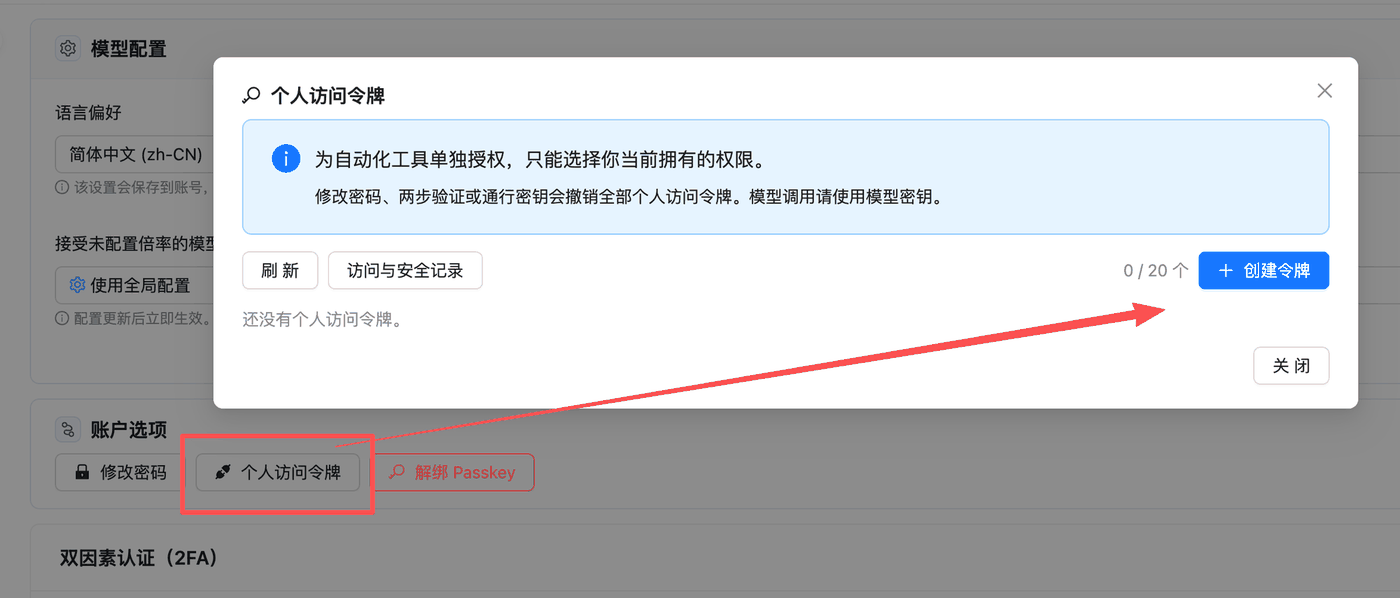
Sign in to the console and go to your profile page at `api.apiyi.com/account/profile`. Under **Account Options**, click **Personal Access Tokens**, then click **Create Token** in the top-right corner.
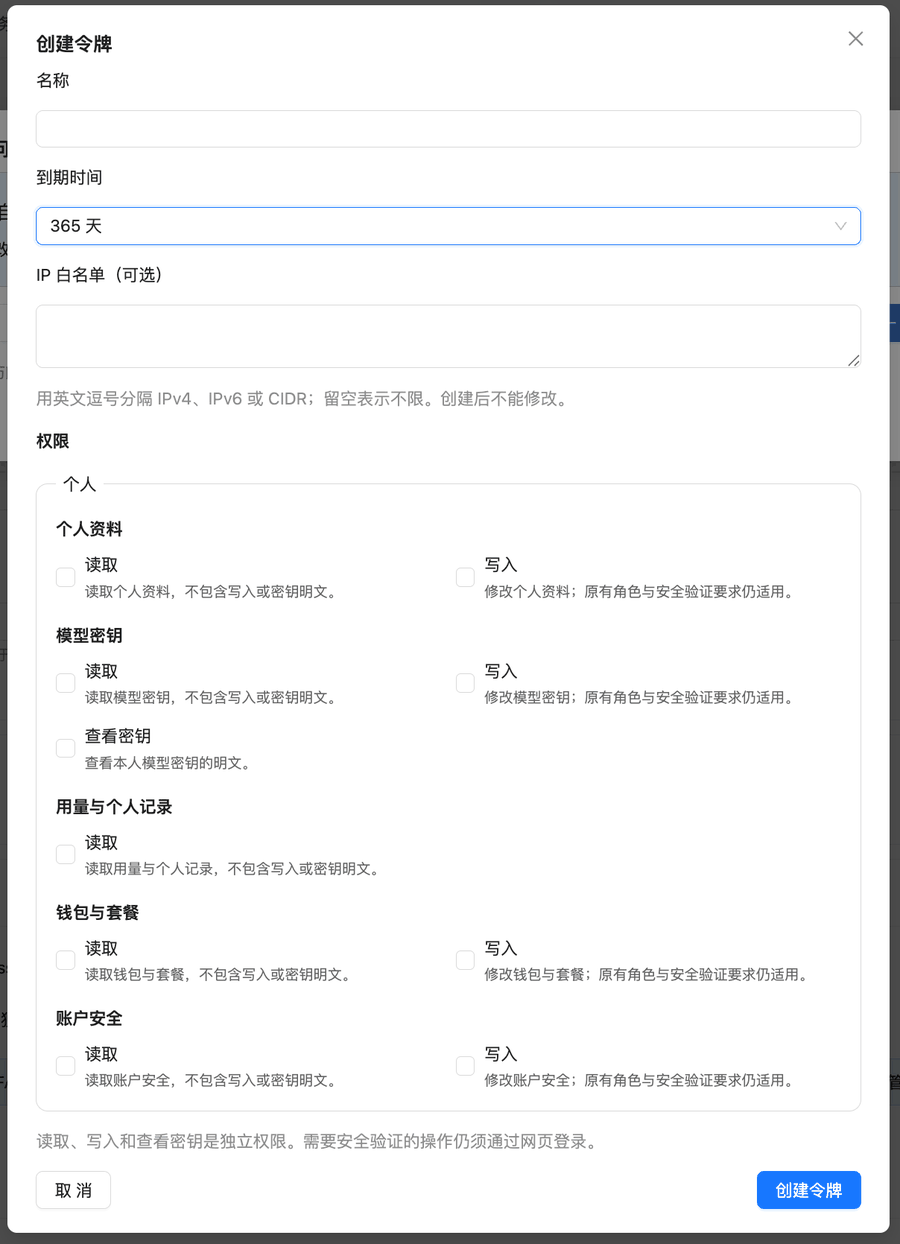
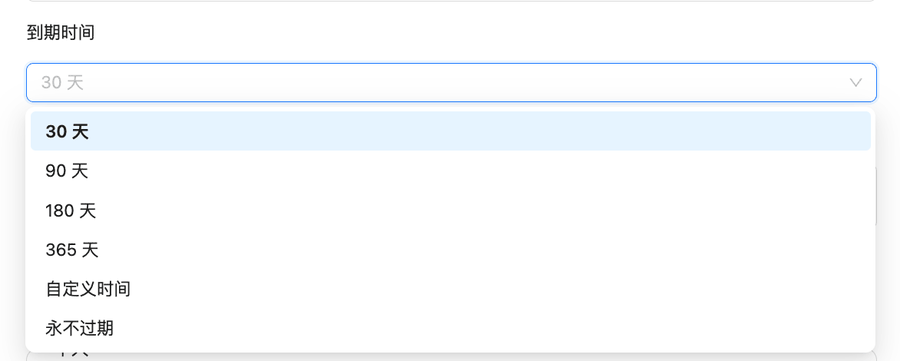
Give it a name that says what it is for, such as "reconciliation script" or "balance monitor". The default expiry is 30 days, and the token stops working when it expires. **We recommend a longer period** (for example 365 days) so your scripts don't break unexpectedly.
Separate multiple entries with commas. IPv4, IPv6 and CIDR are supported. Leave it empty for no restriction. **The allowlist cannot be edited after creation.** See the recommended workflow below.
Select only what your script uses. See the table below.
Click **Create Token**, then copy the token right away and store it securely.
 ## Which Permissions to Select
There are three kinds of permission: read, write and reveal secret. Each is granted separately. Write does not include read, and read does not show a key's plaintext.
| API you want to call | Permission to select |
| - | - |
| [Balance query](/en/api-capabilities/balance-query) (`GET /api/user/self`) | Profile · Read |
| [Log query](/en/api-capabilities/log-query) (`GET /api/log/self`) | Usage & personal records · Read |
| [Token management](/en/api-capabilities/token-management): list or get API Keys | Model keys · Read |
| [Token management](/en/api-capabilities/token-management): create, update or delete API Keys | Model keys · Write |
| [Token management](/en/api-capabilities/token-management): retrieve an API Key's plaintext | Model keys · Reveal secret |
For example, a daily reconciliation job only needs "Usage & personal records · Read", and a balance monitor only needs "Profile · Read".
**Actions that require security verification, such as changing your password or two-factor settings, still have to be done after signing in to the website.** A personal access token cannot perform them, even with write permission.
Use one token per script, and grant it only the permissions that script uses. When a script is retired or a token leaks, delete that one token. Your other scripts are unaffected.
## Setting Up the IP Allowlist Safely
The allowlist cannot be edited after creation. To change it, you must create a new token. We recommend this order:
1. **Create a token without an allowlist** and get your script working.
2. Once it works, **create the production token with an allowlist**. Include every egress IP you might use: production servers, standby servers, and an office network you may need for troubleshooting.
3. Switch to the production token and **delete the test token that has no allowlist**.
Enter **public egress IPs**, not private network addresses. If your egress IP changes, as it often does on home broadband or office networks, don't use an allowlist. Instead, grant read-only permissions and set a shorter expiry.
## How to Use It
Usage is the same as with the system token. Put the token itself in the `Authorization` header. The `Bearer ` prefix is optional.
```bash theme={null}
curl --compressed -s 'https://api.apiyi.com/api/user/self' \
-H "Authorization: $APIYI_TOKEN"
```
If a script currently uses a system token, replace the value in its environment variable or config with the new token.
## Common Errors
| HTTP status | Response | Cause and fix |
| - | - | - |
| 401 | `ACCESS_TOKEN_LEGACY_RETIRED`, `Legacy management tokens have been retired...` | You are still using a legacy system token after the retirement date. Create a personal access token as described above. |
| 401 | `This access token may not be used from the current IP address.` | The request came from an IP outside the token's allowlist. Check your server's public egress IP. The allowlist can't be edited, so create a new token. |
| 403 | `ACCESS_TOKEN_SCOPE_DENIED`, `This endpoint is outside this access token's granted permissions.` | The token lacks the permission this API needs. Create a new token with the permission from the table above. |
| 401 | Invalid token | The token has expired or been deleted, or someone changed the account's password, two-factor authentication or passkey. **Any of these three changes revokes every personal access token on the account.** Create a new one. |
## Related Docs
Check your account balance with a personal access token
Pull call records by time range for reconciliation
Create, rotate and delete API Keys programmatically
Permission boundaries and leak prevention for API Keys
This documentation is built and hosted on [Mintlify](https://mintlify.com), a developer documentation platform.
## Which Permissions to Select
There are three kinds of permission: read, write and reveal secret. Each is granted separately. Write does not include read, and read does not show a key's plaintext.
| API you want to call | Permission to select |
| - | - |
| [Balance query](/en/api-capabilities/balance-query) (`GET /api/user/self`) | Profile · Read |
| [Log query](/en/api-capabilities/log-query) (`GET /api/log/self`) | Usage & personal records · Read |
| [Token management](/en/api-capabilities/token-management): list or get API Keys | Model keys · Read |
| [Token management](/en/api-capabilities/token-management): create, update or delete API Keys | Model keys · Write |
| [Token management](/en/api-capabilities/token-management): retrieve an API Key's plaintext | Model keys · Reveal secret |
For example, a daily reconciliation job only needs "Usage & personal records · Read", and a balance monitor only needs "Profile · Read".
**Actions that require security verification, such as changing your password or two-factor settings, still have to be done after signing in to the website.** A personal access token cannot perform them, even with write permission.
Use one token per script, and grant it only the permissions that script uses. When a script is retired or a token leaks, delete that one token. Your other scripts are unaffected.
## Setting Up the IP Allowlist Safely
The allowlist cannot be edited after creation. To change it, you must create a new token. We recommend this order:
1. **Create a token without an allowlist** and get your script working.
2. Once it works, **create the production token with an allowlist**. Include every egress IP you might use: production servers, standby servers, and an office network you may need for troubleshooting.
3. Switch to the production token and **delete the test token that has no allowlist**.
Enter **public egress IPs**, not private network addresses. If your egress IP changes, as it often does on home broadband or office networks, don't use an allowlist. Instead, grant read-only permissions and set a shorter expiry.
## How to Use It
Usage is the same as with the system token. Put the token itself in the `Authorization` header. The `Bearer ` prefix is optional.
```bash theme={null}
curl --compressed -s 'https://api.apiyi.com/api/user/self' \
-H "Authorization: $APIYI_TOKEN"
```
If a script currently uses a system token, replace the value in its environment variable or config with the new token.
## Common Errors
| HTTP status | Response | Cause and fix |
| - | - | - |
| 401 | `ACCESS_TOKEN_LEGACY_RETIRED`, `Legacy management tokens have been retired...` | You are still using a legacy system token after the retirement date. Create a personal access token as described above. |
| 401 | `This access token may not be used from the current IP address.` | The request came from an IP outside the token's allowlist. Check your server's public egress IP. The allowlist can't be edited, so create a new token. |
| 403 | `ACCESS_TOKEN_SCOPE_DENIED`, `This endpoint is outside this access token's granted permissions.` | The token lacks the permission this API needs. Create a new token with the permission from the table above. |
| 401 | Invalid token | The token has expired or been deleted, or someone changed the account's password, two-factor authentication or passkey. **Any of these three changes revokes every personal access token on the account.** Create a new one. |
## Related Docs
Check your account balance with a personal access token
Pull call records by time range for reconciliation
Create, rotate and delete API Keys programmatically
Permission boundaries and leak prevention for API Keys
This documentation is built and hosted on [Mintlify](https://mintlify.com), a developer documentation platform.