> ## Documentation Index
> Fetch the complete documentation index at: https://docs.apiyi.com/llms.txt
> Use this file to discover all available pages before exploring further.
# How do I apply for an agent partnership? Can I earn rebates by inviting friends?
> APIYI offers a built-in referral rebate program — invite friends and earn a continuous 5% credit rebate. No separate agent application required.
## Quick Answer
APIYI does **not** have a separate "agent partnership" application channel. Instead, every user has access to the built-in **referral rebate** program: grab your invite link / invite code from the Account Center, and you'll earn a **continuous 5% credit rebate** on every friend you successfully invite.
Rebates are issued as **in-platform credits** (API usage balance). They **cannot be withdrawn** — they can only be spent on your own API calls.
## Where can I find my invite link and invite code?
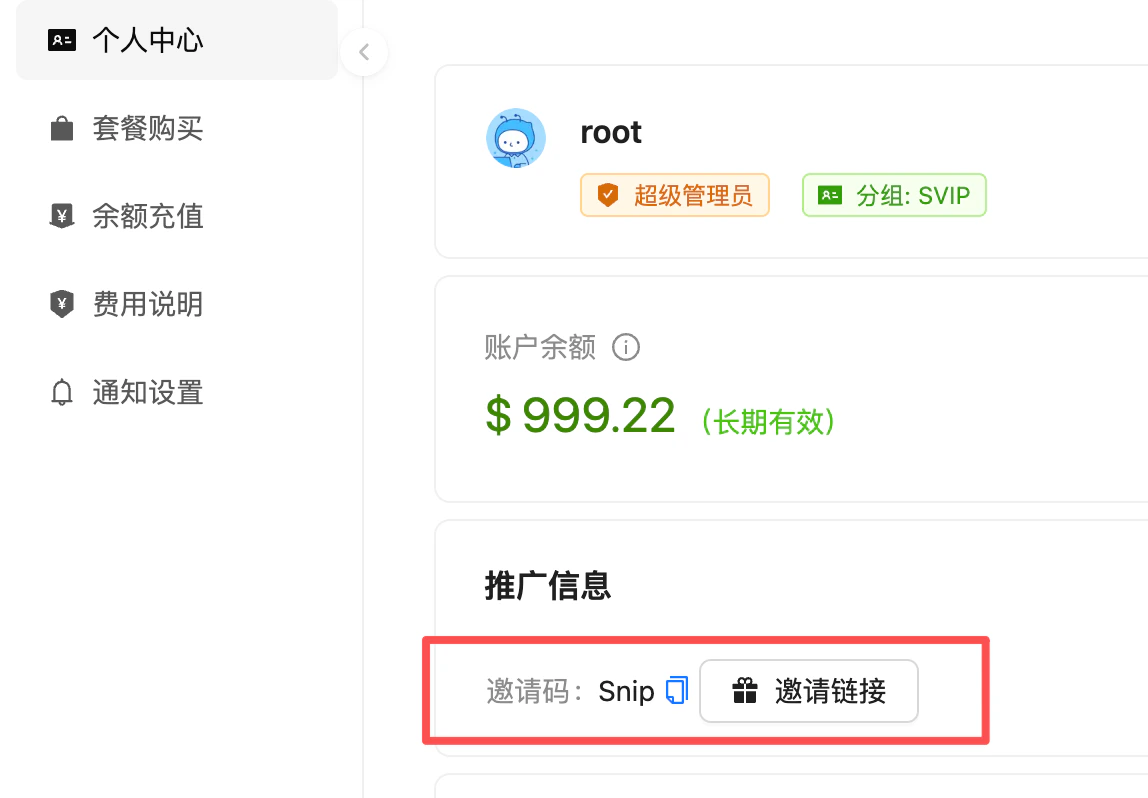
After signing in, go directly to the [Account Center / Profile](https://api.apiyi.com/account/profile) page
Scroll to the **推广信息 (Referral Info)** card on the page — you'll see your **Invite Code** and an **Invite Link** button
Click to copy, then share with your friends
 ## How do rebates arrive and get spent?
Each time an invitee **completes a recharge**, your share is credited to your **Reward (奖励金) balance**. You can then **manually transfer the reward into your main API balance**, after which it can be spent on regular API calls.
**Track your rebate history**: in the **Logs** page, filter by **Type = 奖励金划转 (Reward Transfer)** to see each rebate entry along with its source and amount.
## How the rebate works
**5%** credit rebate
Earn an ongoing rebate on every recharge and spend by the friends you invited
**Long-term effective**
As long as the referral relationship is established, rebates are **continuous** — not a one-time payout
**In-platform credit**
Rebates are deposited directly as API usage balance — not withdrawable as cash
**All models**
Rebate credits can be used to call any model on the platform
**Historical rate change**: Starting **May 15, 2026 (UTC+8)**, the referral rebate rate was adjusted from **10%** to **5%**. Existing referral relationships are unaffected and settle at the current rate.
## What if the invite link loses the referral relationship at signup?
In some browsers, private/incognito modes, or redirected flows, the cookie/parameter from the invite link can be lost, so the referral relationship may not be established automatically. In that case, your friend can bind it manually:
Have your friend visit the APIYI signup page
On the registration form, enter your personal invite code in the **Invite Code** field
Submit the form — the referral relationship will be established successfully
**Recommendation**: When sharing your invite link, **also send your invite code** as a backup, so the relationship can still be linked even if the link parameter gets dropped. Once registration is complete without an invite code, the referral relationship **cannot be added retroactively**.
## FAQ
**No.** Rebates are issued as **in-platform API usage credits** — for your own use only. They cannot be withdrawn to a bank account, WeChat, or Alipay.
**Ongoing.** As long as the referral relationship is in place, every recharge and spend by your invitee continues to generate a 5% rebate to your account at the current rate.
Settlement always follows the **current rule** — rebates earned after **May 15, 2026 (UTC+8)** are calculated at 5%. Rebates already paid before that date are not retroactively adjusted.
**No.** Both enterprise and individual users are settled uniformly at **5%** — no tiered or custom rates are offered.
**Self-invitation is strictly prohibited.** The platform identifies suspicious accounts via multiple signals including **IP, device fingerprint, and payment information**. If detected:
* The platform **reserves the right to unilaterally cancel the referral relationship**
* Any suspicious rebates already paid out **may be reclaimed or frozen**
* Severe cases may trigger account risk-control actions
The referral rebate program is designed to reward genuine new-user acquisition — please do not attempt any form of abuse.
Open the [Account Center](https://api.apiyi.com/account/profile) to view your invitee data. For per-transaction rebate entries, go to the **Logs** page and filter by **Type = 奖励金划转 (Reward Transfer)**.
## Related Docs
First-recharge bonuses, tiered bonuses, and other recharge offers
Supported payment channels and corporate bank transfer instructions
## How do rebates arrive and get spent?
Each time an invitee **completes a recharge**, your share is credited to your **Reward (奖励金) balance**. You can then **manually transfer the reward into your main API balance**, after which it can be spent on regular API calls.
**Track your rebate history**: in the **Logs** page, filter by **Type = 奖励金划转 (Reward Transfer)** to see each rebate entry along with its source and amount.
## How the rebate works
**5%** credit rebate
Earn an ongoing rebate on every recharge and spend by the friends you invited
**Long-term effective**
As long as the referral relationship is established, rebates are **continuous** — not a one-time payout
**In-platform credit**
Rebates are deposited directly as API usage balance — not withdrawable as cash
**All models**
Rebate credits can be used to call any model on the platform
**Historical rate change**: Starting **May 15, 2026 (UTC+8)**, the referral rebate rate was adjusted from **10%** to **5%**. Existing referral relationships are unaffected and settle at the current rate.
## What if the invite link loses the referral relationship at signup?
In some browsers, private/incognito modes, or redirected flows, the cookie/parameter from the invite link can be lost, so the referral relationship may not be established automatically. In that case, your friend can bind it manually:
Have your friend visit the APIYI signup page
On the registration form, enter your personal invite code in the **Invite Code** field
Submit the form — the referral relationship will be established successfully
**Recommendation**: When sharing your invite link, **also send your invite code** as a backup, so the relationship can still be linked even if the link parameter gets dropped. Once registration is complete without an invite code, the referral relationship **cannot be added retroactively**.
## FAQ
**No.** Rebates are issued as **in-platform API usage credits** — for your own use only. They cannot be withdrawn to a bank account, WeChat, or Alipay.
**Ongoing.** As long as the referral relationship is in place, every recharge and spend by your invitee continues to generate a 5% rebate to your account at the current rate.
Settlement always follows the **current rule** — rebates earned after **May 15, 2026 (UTC+8)** are calculated at 5%. Rebates already paid before that date are not retroactively adjusted.
**No.** Both enterprise and individual users are settled uniformly at **5%** — no tiered or custom rates are offered.
**Self-invitation is strictly prohibited.** The platform identifies suspicious accounts via multiple signals including **IP, device fingerprint, and payment information**. If detected:
* The platform **reserves the right to unilaterally cancel the referral relationship**
* Any suspicious rebates already paid out **may be reclaimed or frozen**
* Severe cases may trigger account risk-control actions
The referral rebate program is designed to reward genuine new-user acquisition — please do not attempt any form of abuse.
Open the [Account Center](https://api.apiyi.com/account/profile) to view your invitee data. For per-transaction rebate entries, go to the **Logs** page and filter by **Type = 奖励金划转 (Reward Transfer)**.
## Related Docs
First-recharge bonuses, tiered bonuses, and other recharge offers
Supported payment channels and corporate bank transfer instructions