> ## Documentation Index
> Fetch the complete documentation index at: https://docs.apiyi.com/llms.txt
> Use this file to discover all available pages before exploring further.
# When the console suggests switching your timezone, choose "Dismiss"
> The console detects a mismatch between your account timezone and your device timezone and shows a Local Settings Suggestion dialog; choose Dismiss and keep the account timezone at London (UTC+0/+1), otherwise the Call Data Overview chart at the top of the Logs page renders incorrectly.
**2026/8/9 11:06 (UTC+8)** · Service Notice
⚠️ **If the console shows a "Local Settings Suggestion" dialog offering to switch your timezone, choose "Dismiss" — do not switch**
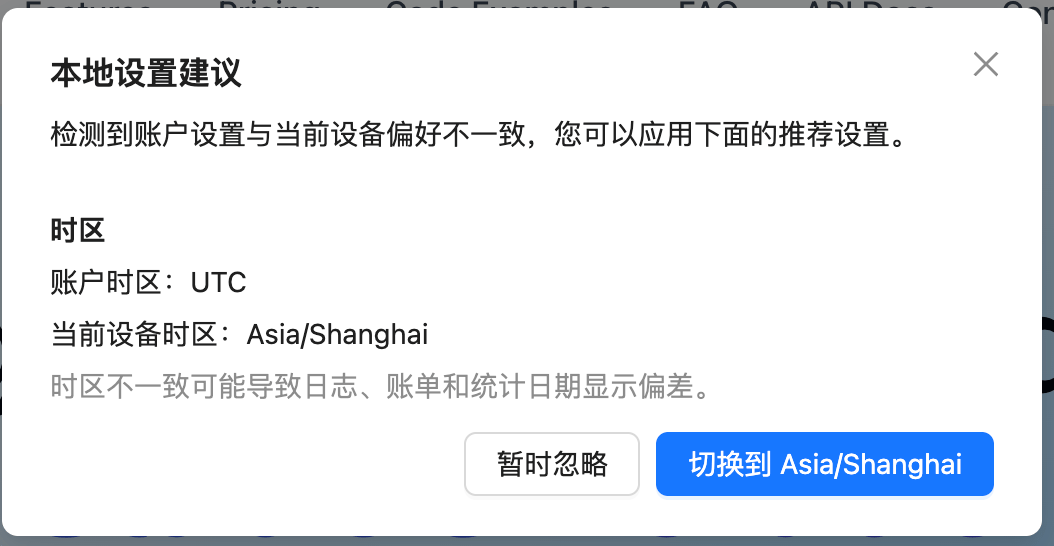
After you sign in, if the console detects that your **account timezone** (UTC) differs from your **current device timezone** (for example `Asia/Shanghai`), it opens a "Local Settings Suggestion" dialog with a button to switch. **Do not press that button** — choose "Dismiss" on the left instead.
The reason is that switching breaks the **Call Data Overview** chart at the top of the Logs page: the time buckets no longer line up with the chart range, so the data looks missing or shifted. Keep the account timezone at its default `London (UTC+0/+1)` — that is UTC+0 — and the chart renders correctly.
 You can check the current setting under "User Info" in the console; it should read `London (UTC+0/+1)`. If you already switched by mistake, setting it back restores the chart. Timestamps in the log detail list still follow the account timezone, so convert from UTC+0.
The two export paths on the Logs page (Export and Billing Summary) use different timezone bases — see [What should I know about log timezone settings and data export?](/en/faq/log-timezone-and-export).
***
← [Back to Live Updates](/en/live) · 📚 [Archive by month](/en/live/archive)
You can check the current setting under "User Info" in the console; it should read `London (UTC+0/+1)`. If you already switched by mistake, setting it back restores the chart. Timestamps in the log detail list still follow the account timezone, so convert from UTC+0.
The two export paths on the Logs page (Export and Billing Summary) use different timezone bases — see [What should I know about log timezone settings and data export?](/en/faq/log-timezone-and-export).
***
← [Back to Live Updates](/en/live) · 📚 [Archive by month](/en/live/archive)