> ## Documentation Index
> Fetch the complete documentation index at: https://docs.apiyi.com/llms.txt
> Use this file to discover all available pages before exploring further.
# AI Image Master Adds GPT-Image-2.5 VIP and a Redesigned Model Picker
> AI Image Master (imagen.apiyi.com), APIYI's companion image testing tool, adds gpt-image-2.5-sunburst-vip (quality-first) and gpt-image-2.5-flare-vip (speed-first), two high-quality 2.5 reverse models with 1K/2K/4K sizes, 4 quality levels and transparent backgrounds at $0.03 per image; gpt-image-2-all is renamed gpt-image-2.5-all. The model picker is redesigned: filter by vendor, tell official relay from reverse at a glance, and see billing prices inline.
**2026/9/9 23:30 (UTC+8)** · New Model · OpenAI
🚀 **AI Image Master now offers two GPT-Image-2.5 VIP reverse models, with a redesigned model picker**
[AI Image Master](https://imagen.apiyi.com/) is APIYI's companion image testing tool: paste an APIYI token and try every image model in the browser, no code required. This release adds `gpt-image-2.5-sunburst-vip` (quality- and editing-first) and `gpt-image-2.5-flare-vip` (speed-first, softer output), two high-quality 2.5 reverse models on the same Adobe line as `gpt-image-2-vip`. Both support all 30 `size` presets (1K / 2K / 4K), 4 `quality` levels and transparent backgrounds, billed per image at **\$0.03**. On the ChatGPT web line, `gpt-image-2-all` has moved to Images 2.5 and is renamed `gpt-image-2.5-all` in the tool, with price and behavior unchanged.
The model picker is redesigned as well:
* Models are grouped by vendor in the left column (Google / OpenAI / Seedream / Flux) with counts, so filtering is quicker
* Every model carries an "Official" or "Reverse" badge, so the line is obvious at a glance
* Billing mode and price sit right under the model name (per-image \$0.03, metered from 17% off, and so on), no need to open the pricing table
* The typical generation time is shown in the top-right corner of each entry
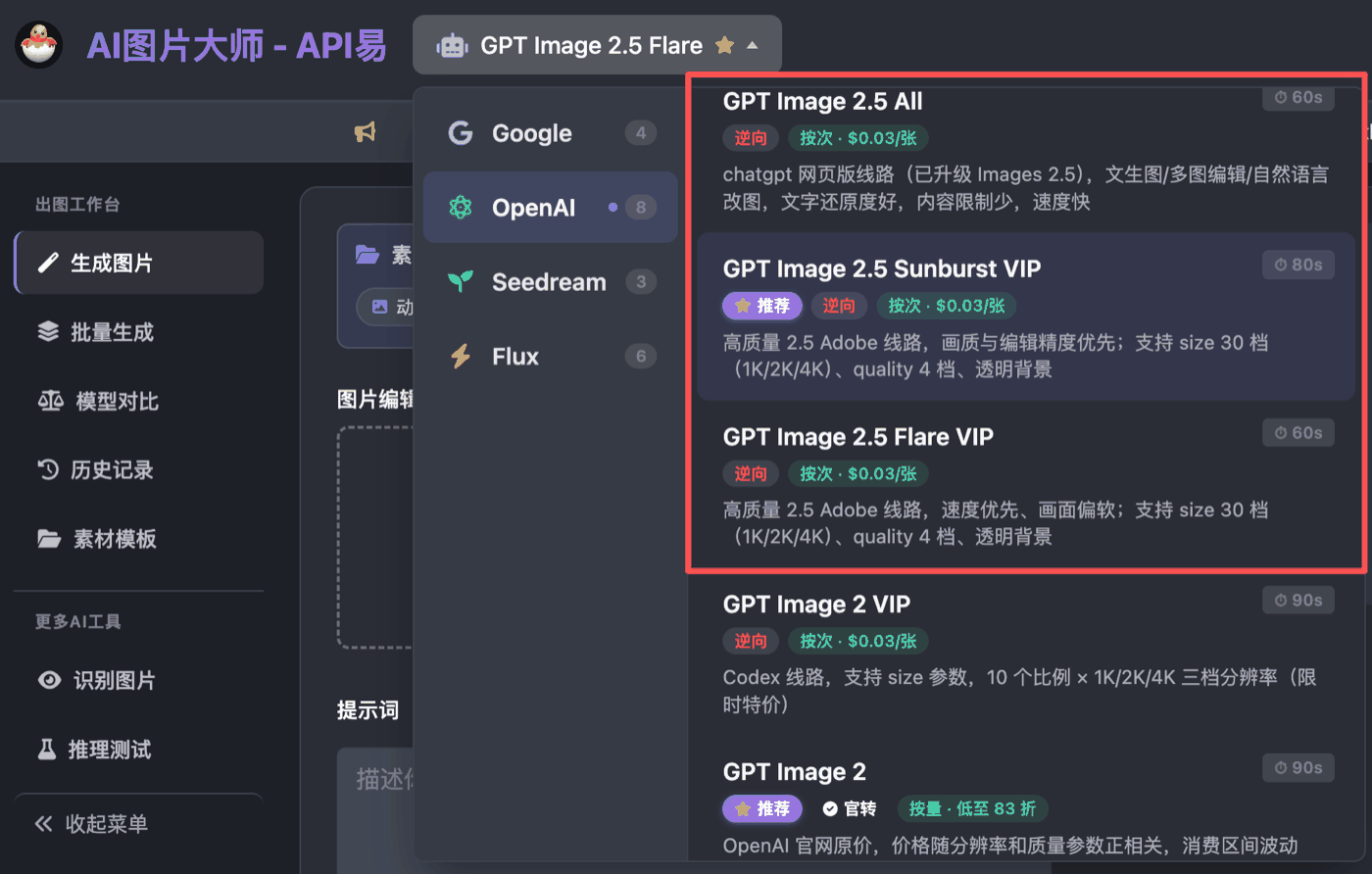 For the matching API model names and parameters, see the [GPT-Image-2.5-VIP Overview](/en/api-capabilities/gpt-image-2-vip/overview). Try the settings in the tool first, then carry the same parameters into your code.
***
← [Back to Live Updates](/en/live) · 📚 [Monthly Archive](/en/live/archive)
For the matching API model names and parameters, see the [GPT-Image-2.5-VIP Overview](/en/api-capabilities/gpt-image-2-vip/overview). Try the settings in the tool first, then carry the same parameters into your code.
***
← [Back to Live Updates](/en/live) · 📚 [Monthly Archive](/en/live/archive)