> ## Documentation Index
> Fetch the complete documentation index at: https://docs.apiyi.com/llms.txt
> Use this file to discover all available pages before exploring further.
# ChatHub
> A browser-extension AI client that compares multiple model answers side-by-side; unified access to 400+ models via APIYI
ChatHub is a Chrome / Edge browser extension that lets you ask multiple AI models the same question in one conversation and displays their answers side-by-side, so you can quickly judge which model best fits the current task. With APIYI, ChatHub can unify access to 400+ mainstream models including OpenAI, Claude, Gemini, DeepSeek, and Qwen.
## Core capability: side-by-side model comparison
ChatHub's biggest differentiator from other clients is **multi-model parallel Q\&A**:
* Send the same question to 2–6 models in one tab
* View their answers in either **side-by-side** or **table** layout
* Any combination works: GPT-5.5 + Claude Opus 4.7 + Gemini 3 Pro + DeepSeek V4 together
* Comparison view supports Markdown rendering, code highlighting, and image previews
**Best fit scenarios**
* Writing code / fixing bugs: see GPT-5.5 and Claude Opus 4.7 patches at once
* Long-form writing: compare Claude Sonnet and Qwen3.7 Chinese phrasing
* Translation / summarization: feed the same paragraph to GPT-5.5, Gemini 3 Flash, and DeepSeek V4
* Model selection: stress-test multiple models with the same prompt to pick a default
## Install
Visit `https://chathub.gg/zh-CN/download` to install ChatHub.
## Quick setup (OpenAI-compatible mode)
This is the most universal setup and supports all 400+ models on APIYI.
### Step 1: Get an API key
Refer to [API key creation and management](/en/faq/token-management) to get your APIYI key.
### Step 2: Open ChatHub settings
1. Click the ChatHub icon in the top-right corner of your browser
2. In the popup, click the **Settings** (gear) icon in the top-right
3. Go to the **Custom Providers** tab
### Step 3: Add the APIYI provider
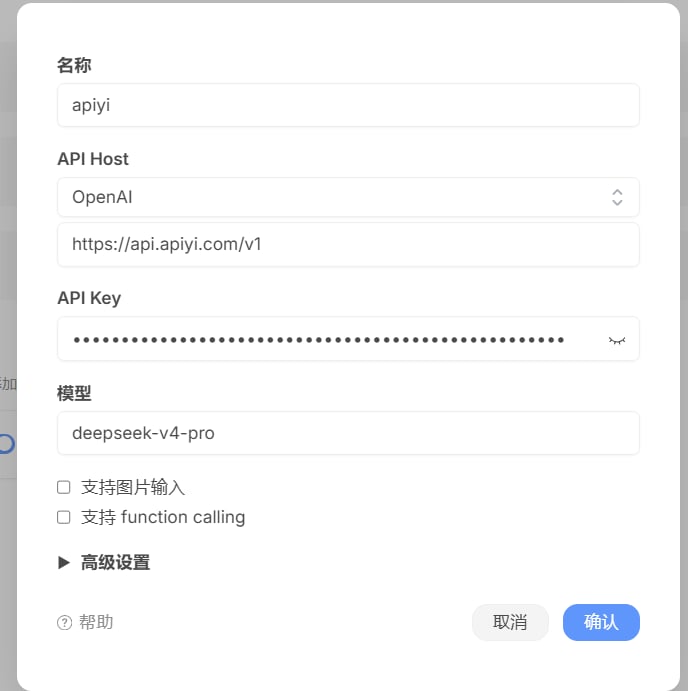 Following the screenshot above, fill in the add-provider dialog as follows:
* **Name**: `apiyi` (anything that helps you tell this provider apart in the list)
* **API Host**: pick `OpenAI` from the dropdown, and put `https://api.apiyi.com/v1` in the URL field below it
* **API Key**: paste your APIYI key
* **Model**: a model you use often, e.g. `deepseek-v4-pro`
Optional advanced options:
* **Image input**: enable if the model supports vision (e.g. `gpt-5-chat-latest`, `gemini-3-pro-preview`, `claude-sonnet-4-5`)
* **Function calling**: enable if the model supports tool/function calls
* **Advanced settings**: collapsed by default — expand to customize request headers, timeouts, etc.
When done, click **Confirm** in the bottom-right to save.
**Configuration notes**
* The API Host URL field must include the `/v1` suffix
* "Model" is the default; you can switch models anytime during a chat
* No browser restart needed — settings take effect immediately
* To add another provider, repeat this step
### Step 4: Pick a model
After saving, return to the ChatHub main interface. The models you just added will appear in the dropdown — switch freely.
## Three usage modes
| Mode | Trigger | When to use |
| ----------------------- | -------------------------------------------------- | -------------------------------------------- |
| **Single-model chat** | Talk to one model like a normal ChatGPT | Daily Q\&A, tasks one model excels at |
| **Multi-model compare** | Tick 2–6 models on the right of the input box | Selection tests, finding the best answer |
| **Web assistant** | Select text on any page to pop the ChatHub toolbar | Translate/summarize a paper, polish an email |
**Tips for compare mode**
* In compare mode each model's reply is **independent**; the left main panel still shows your default model
* Want to export everyone's replies? Click the **Export** button in the top-right of the conversation — Markdown / JSON / PNG are all supported
* Pick **stylistically distinct** models for comparison, e.g. "GPT-5.5 + Claude Opus 4.7 + DeepSeek V4" — differences are far easier to spot
## Advanced: the strongest compare setup
ChatHub's killer feature is "run multiple vendors at once". Through APIYI you can mix any vendor's models in a single compare session.
### Recommended compare combinations
| Task | Recommended mix | Why |
| -------------------------------- | ------------------------------------------------ | --------------------------------------------- |
| **Code generation / bug fixes** | GPT-5.5 + Claude Opus 4.7 + DeepSeek V4 | Top coding + a cost-effective domestic option |
| **Long-form / creative writing** | Claude Sonnet 4.5 + Qwen3.7-Max + GPT-5.5 | Chinese expression + Western storytelling |
| **Translation / multilingual** | GPT-5.5 + Gemini 3 Flash + DeepSeek V4 | Three vendors cross-validate |
| **Reasoning / math** | GPT-5.5 (xhigh) + Claude Opus 4.7 + Gemini 3 Pro | Three top reasoning configs |
## Supported models
Through APIYI, ChatHub supports 400+ mainstream AI models, including OpenAI, Google Gemini, Claude, DeepSeek, domestic models, and more.
Latest model recommendations, performance comparisons, and scenario-based usage tips. Covers text creation, programming, fast response, image generation, video generation, and more.
**Why no model list on this page?**
Models iterate very quickly. To make sure you always get accurate recommendations, we maintain the latest list on the [Model recommendations page](/en/api-capabilities/model-info) along with benchmarks and usage tips.
## Core features
### Keyboard shortcuts
| Shortcut | Action |
| -------------------------- | ------------------------------------------ |
| `Ctrl/Cmd + Shift + Y` | Open the ChatHub sidebar on any web page |
| `Ctrl/Cmd + B` | Toggle sidebar visibility |
| `Ctrl/Cmd + Enter` | Send message (single-model mode) |
| `Ctrl/Cmd + Shift + Enter` | Send to all selected models (compare mode) |
### Web assistant
Select any text on a web page and ChatHub pops a toolbar that can:
* Translate the selected text
* Summarize the selected paragraph
* Rewrite / polish
* Explain code
### Conversation management
* Multiple independent conversations with their own contexts
* Local storage of conversation history (no cloud dependency)
* Markdown rendering and code highlighting
* One-click export to Markdown / PDF
### Prompt library
Built-in prompt template marketplace; you can also save your own reusable prompts and use variables.
## Advanced settings
### Parameter tuning
```yaml theme={null}
Chat parameters:
- Temperature: 0.7 # Creativity control (reasoning models like GPT-5 only support 1)
- Max Tokens: 4096 # Maximum output length
- Top P: 0.9 # Nucleus sampling threshold
- Frequency Penalty: 0 # Repetition penalty
- Presence Penalty: 0 # New-topic tendency
```
### Streaming output
Streaming is on by default in ChatHub for a smoother experience.
### Proxy settings
If you need to access through a proxy:
1. Go to Settings > Advanced
2. Configure the HTTP/HTTPS proxy
3. Set proxy authentication if needed
## Troubleshooting
### Connection failed
* Verify the API Base URL: `https://api.apiyi.com/v1`
* Confirm the API key is valid
* Check your network connection
### Models not showing
* Wait for the model list to auto-refresh
* Click the "Refresh models" button manually
* Check API key permissions
### Compare mode shows only one response
* Make sure you ticked multiple models on the right side of the input box
* Confirm every model comes from a configured provider
### Slow response
* Try a faster model
* Check network latency
* Shorten the context
## Best practices
### Performance optimization
1. **Pick models wisely**
* Match model size to task complexity
* See [Model recommendations](/en/api-capabilities/model-info) for the latest selection tips
2. **Compare strategy**
* Comparing two similar models (two GPTs) tells you very little
* Pick models with **different strengths**: one for coding, one for writing, one for reasoning, one for translation
* Don't compare more than 4 models at once — token usage scales linearly
3. **Resource management**
* Monitor API usage
* Set spending alerts
* Update the extension regularly
### Security tips
* Never share API keys
* Rotate keys periodically
* Protect your browser with a strong password
* Handle sensitive information carefully
### Team collaboration
Although ChatHub is primarily for individuals, you can still support teams through:
* Shared prompt templates
* Exported conversation records
* Standardized API configuration
## Comparison
### vs other clients
| Feature | ChatHub | Single-model clients | Other extensions |
| ------------------------------ | ----------------- | ------------------------ | ------------------------ |
| **Side-by-side multi-model** | ✅ Core capability | ❌ | A few |
| **Browser sidebar** | ✅ | ❌ | Some |
| **Web assistant** | ✅ | ❌ | Some |
| **Custom API** | ✅ | ✅ | ✅ |
| **Cross-device sync** | ✅ (browser sync) | ❌ | Implementation dependent |
| **Local conversation history** | ✅ | Implementation dependent | Implementation dependent |
### Why choose ChatHub
1. **Selection tool**: comparing multiple models at once is irreplaceable
2. **Multi-vendor mix**: combine OpenAI / Claude / Gemini / domestic models freely
3. **Web-native**: as a browser extension it's callable on any page
4. **Privacy first**: conversations stored locally; the extension doesn't collect your data
5. **Active development**: continuously maintained
***
Need more help? Visit the ChatHub GitHub repository: `github.com/chathub-dev/chathub` or the APIYI website: `api.apiyi.com`.
Following the screenshot above, fill in the add-provider dialog as follows:
* **Name**: `apiyi` (anything that helps you tell this provider apart in the list)
* **API Host**: pick `OpenAI` from the dropdown, and put `https://api.apiyi.com/v1` in the URL field below it
* **API Key**: paste your APIYI key
* **Model**: a model you use often, e.g. `deepseek-v4-pro`
Optional advanced options:
* **Image input**: enable if the model supports vision (e.g. `gpt-5-chat-latest`, `gemini-3-pro-preview`, `claude-sonnet-4-5`)
* **Function calling**: enable if the model supports tool/function calls
* **Advanced settings**: collapsed by default — expand to customize request headers, timeouts, etc.
When done, click **Confirm** in the bottom-right to save.
**Configuration notes**
* The API Host URL field must include the `/v1` suffix
* "Model" is the default; you can switch models anytime during a chat
* No browser restart needed — settings take effect immediately
* To add another provider, repeat this step
### Step 4: Pick a model
After saving, return to the ChatHub main interface. The models you just added will appear in the dropdown — switch freely.
## Three usage modes
| Mode | Trigger | When to use |
| ----------------------- | -------------------------------------------------- | -------------------------------------------- |
| **Single-model chat** | Talk to one model like a normal ChatGPT | Daily Q\&A, tasks one model excels at |
| **Multi-model compare** | Tick 2–6 models on the right of the input box | Selection tests, finding the best answer |
| **Web assistant** | Select text on any page to pop the ChatHub toolbar | Translate/summarize a paper, polish an email |
**Tips for compare mode**
* In compare mode each model's reply is **independent**; the left main panel still shows your default model
* Want to export everyone's replies? Click the **Export** button in the top-right of the conversation — Markdown / JSON / PNG are all supported
* Pick **stylistically distinct** models for comparison, e.g. "GPT-5.5 + Claude Opus 4.7 + DeepSeek V4" — differences are far easier to spot
## Advanced: the strongest compare setup
ChatHub's killer feature is "run multiple vendors at once". Through APIYI you can mix any vendor's models in a single compare session.
### Recommended compare combinations
| Task | Recommended mix | Why |
| -------------------------------- | ------------------------------------------------ | --------------------------------------------- |
| **Code generation / bug fixes** | GPT-5.5 + Claude Opus 4.7 + DeepSeek V4 | Top coding + a cost-effective domestic option |
| **Long-form / creative writing** | Claude Sonnet 4.5 + Qwen3.7-Max + GPT-5.5 | Chinese expression + Western storytelling |
| **Translation / multilingual** | GPT-5.5 + Gemini 3 Flash + DeepSeek V4 | Three vendors cross-validate |
| **Reasoning / math** | GPT-5.5 (xhigh) + Claude Opus 4.7 + Gemini 3 Pro | Three top reasoning configs |
## Supported models
Through APIYI, ChatHub supports 400+ mainstream AI models, including OpenAI, Google Gemini, Claude, DeepSeek, domestic models, and more.
Latest model recommendations, performance comparisons, and scenario-based usage tips. Covers text creation, programming, fast response, image generation, video generation, and more.
**Why no model list on this page?**
Models iterate very quickly. To make sure you always get accurate recommendations, we maintain the latest list on the [Model recommendations page](/en/api-capabilities/model-info) along with benchmarks and usage tips.
## Core features
### Keyboard shortcuts
| Shortcut | Action |
| -------------------------- | ------------------------------------------ |
| `Ctrl/Cmd + Shift + Y` | Open the ChatHub sidebar on any web page |
| `Ctrl/Cmd + B` | Toggle sidebar visibility |
| `Ctrl/Cmd + Enter` | Send message (single-model mode) |
| `Ctrl/Cmd + Shift + Enter` | Send to all selected models (compare mode) |
### Web assistant
Select any text on a web page and ChatHub pops a toolbar that can:
* Translate the selected text
* Summarize the selected paragraph
* Rewrite / polish
* Explain code
### Conversation management
* Multiple independent conversations with their own contexts
* Local storage of conversation history (no cloud dependency)
* Markdown rendering and code highlighting
* One-click export to Markdown / PDF
### Prompt library
Built-in prompt template marketplace; you can also save your own reusable prompts and use variables.
## Advanced settings
### Parameter tuning
```yaml theme={null}
Chat parameters:
- Temperature: 0.7 # Creativity control (reasoning models like GPT-5 only support 1)
- Max Tokens: 4096 # Maximum output length
- Top P: 0.9 # Nucleus sampling threshold
- Frequency Penalty: 0 # Repetition penalty
- Presence Penalty: 0 # New-topic tendency
```
### Streaming output
Streaming is on by default in ChatHub for a smoother experience.
### Proxy settings
If you need to access through a proxy:
1. Go to Settings > Advanced
2. Configure the HTTP/HTTPS proxy
3. Set proxy authentication if needed
## Troubleshooting
### Connection failed
* Verify the API Base URL: `https://api.apiyi.com/v1`
* Confirm the API key is valid
* Check your network connection
### Models not showing
* Wait for the model list to auto-refresh
* Click the "Refresh models" button manually
* Check API key permissions
### Compare mode shows only one response
* Make sure you ticked multiple models on the right side of the input box
* Confirm every model comes from a configured provider
### Slow response
* Try a faster model
* Check network latency
* Shorten the context
## Best practices
### Performance optimization
1. **Pick models wisely**
* Match model size to task complexity
* See [Model recommendations](/en/api-capabilities/model-info) for the latest selection tips
2. **Compare strategy**
* Comparing two similar models (two GPTs) tells you very little
* Pick models with **different strengths**: one for coding, one for writing, one for reasoning, one for translation
* Don't compare more than 4 models at once — token usage scales linearly
3. **Resource management**
* Monitor API usage
* Set spending alerts
* Update the extension regularly
### Security tips
* Never share API keys
* Rotate keys periodically
* Protect your browser with a strong password
* Handle sensitive information carefully
### Team collaboration
Although ChatHub is primarily for individuals, you can still support teams through:
* Shared prompt templates
* Exported conversation records
* Standardized API configuration
## Comparison
### vs other clients
| Feature | ChatHub | Single-model clients | Other extensions |
| ------------------------------ | ----------------- | ------------------------ | ------------------------ |
| **Side-by-side multi-model** | ✅ Core capability | ❌ | A few |
| **Browser sidebar** | ✅ | ❌ | Some |
| **Web assistant** | ✅ | ❌ | Some |
| **Custom API** | ✅ | ✅ | ✅ |
| **Cross-device sync** | ✅ (browser sync) | ❌ | Implementation dependent |
| **Local conversation history** | ✅ | Implementation dependent | Implementation dependent |
### Why choose ChatHub
1. **Selection tool**: comparing multiple models at once is irreplaceable
2. **Multi-vendor mix**: combine OpenAI / Claude / Gemini / domestic models freely
3. **Web-native**: as a browser extension it's callable on any page
4. **Privacy first**: conversations stored locally; the extension doesn't collect your data
5. **Active development**: continuously maintained
***
Need more help? Visit the ChatHub GitHub repository: `github.com/chathub-dev/chathub` or the APIYI website: `api.apiyi.com`.