> ## Documentation Index
> Fetch the complete documentation index at: https://docs.apiyi.com/llms.txt
> Use this file to discover all available pages before exploring further.
# GPT Image 2 Coze Plugin
> Community-contributed Python plugin for the Coze platform that wraps GPT Image 2 calls, error classification, and an OSS upload pipeline via APIYI, so Coze workflows can do text-to-image, image-to-image, and direct result delivery.
## Overview
This is a custom Python plugin for the Coze platform (`coze.cn`) that wraps OpenAI's GPT Image 2 model (`gpt-image-2`) through the **APIYI** gateway into a node that Coze workflows can call directly. The plugin ships with complete request construction, error-code classification, content-safety filtering detection, and an Alibaba Cloud OSS upload pipeline. **It returns a publicly accessible URL ready for display**, saving you from building another result-forwarding step in your Coze workflow.
**Project Info**
* 📦 Distribution: shared as a code package (**not published on GitHub**)
* 👤 Author: community contribution
* 🎯 Target platform: Coze (China / global) custom plugins
* 🔌 Model called: `gpt-image-2` (APIYI, released April 21, 2026)
* 🌐 Gateway: [APIYI](https://api.apiyi.com) — direct access from mainland China, no VPN required
* 📝 The full source code is provided in the 'Full Plugin Source Code' section below, ready to copy and use
## About the APIYI Gateway
[APIYI](https://api.apiyi.com) is a gateway for GPT Image 2 with direct connectivity from mainland China, offering three routes that share a single API Key:
| Domain | Description |
| --------------- | ------------- |
| `api.apiyi.com` | Default route |
| `vip.apiyi.com` | VIP route |
| `b.apiyi.com` | Backup route |
APIYI offers three ways to access GPT Image 2:
| Model ID | Channel | Billing | Generation speed | Highlights |
| ----------------- | ----------------- | ----------------- | ---------------- | --------------------------------------------------------------------------- |
| `gpt-image-2` | Official relay | Per-token billing | \~120s | Fully compatible with the official OpenAI API, supports quality/size/4K |
| `gpt-image-2-all` | Reverse (ChatGPT) | \$0.03/image | 30-60s | Chinese-friendly, called via the Chat endpoint, returns image URLs directly |
| `gpt-image-2-vip` | Reverse (Codex) | \$0.03/image | 90-150s | 30 locked size presets, including 4K |
> This plugin uses **`gpt-image-2` (official relay)** by default, fully compatible with the official OpenAI API and supporting full parameter control. If you need faster generation, switch to `gpt-image-2-all` mode (see below).
Request an API Key (starting with `sk-`) in the [APIYI console](https://api.apiyi.com/token). We recommend setting a daily quota limit (e.g. ¥20-50) to keep costs under control.
## Core Features
Automatically switches between text-to-image (/v1/images/generations) and editing (/v1/images/edits) modes based on whether fileurls is empty — no need to build two separate nodes in your Coze workflow
All requests go through the APIYI gateway (api.apiyi.com) — directly reachable from Chinese networks, with low latency and reliable stability
Pass a list of image URLs and the plugin downloads them and injects them into the request as multipart/form-data file uploads — up to 16 reference images (each ≤ 50MB), preserving original image details
Distinguishes MODERATION\_BLOCKED, INVALID\_API\_KEY, RATE\_LIMIT, SERVER\_ERROR, TIMEOUT, NO\_DATA and other failure causes, making workflow branching easy
Distinguishes input-stage moderation\_blocked (400) from output-stage content\_filter (200), and returns a clear rejection message when triggered, avoiding pointless retries
The generated base64 image is uploaded straight to Alibaba Cloud OSS — the workflow receives a URL ready to share externally or store
Supports quality (low/medium/high/auto), moderation (auto/low), output\_format (png/jpeg/webp) and other parameters, so you can tune the generation strategy as needed
## Supported Models
| Model | Model ID | Purpose | API Docs |
| ---------------------------- | ----------------- | -------------------------------------------------------------------------------------- | ------------------------------------------------------------------ |
| GPT Image 2 (official relay) | `gpt-image-2` | Text-to-image, image-to-image (editing), fully compatible with the official OpenAI API | [View docs](/en/api-capabilities/gpt-image-2/overview) |
| GPT Image 2-All (reverse) | `gpt-image-2-all` | Text-to-image, image-to-image via the Chat endpoint, Chinese-friendly | [View docs](/en/api-capabilities/gpt-image-2-all/chat-completions) |
| GPT Image 2-VIP (reverse) | `gpt-image-2-vip` | Fixed-size generation with 30 size presets including 4K | [View docs](/en/api-capabilities/gpt-image-2-vip/overview) |
The plugin uses `gpt-image-2` (official relay) by default, with endpoints `https://api.apiyi.com/v1/images/generations` (text-to-image) and `https://api.apiyi.com/v1/images/edits` (image-to-image), and requires a valid APIYI API Key (starting with `sk-`). To switch routes, change `API_BASE` in the code to `https://vip.apiyi.com/v1` or `https://b.apiyi.com/v1`.
## GPT Image 2 Key Specs
| Feature | Description |
| ---------------------- | ----------------------------------------------------------------------- |
| **Release date** | April 21, 2026 |
| **Max resolution** | 3840×2160 (4K), total pixels ≤ 8,294,400 |
| **Aspect ratios** | 1:1 / 16:9 / 9:16 / 4:3 / 3:2 / 3:1 / 1:3 |
| **Quality levels** | low / medium / high / auto (default) |
| **Output formats** | png (default) / jpeg / webp |
| **Output compression** | 0-100 (jpeg / webp only) |
| **Background modes** | auto / opaque (❌ transparent not supported) |
| **Moderation level** | auto (default) / low |
| **Text rendering** | Accuracy > 99% |
| **Images per request** | 1 (`n` only supports 1) |
| **Response format** | b64\_json (raw base64, no data:image prefix) |
| **input\_fidelity** | Locked to high, **must not be passed** (passing it returns a 400 error) |
## API Endpoints
| Endpoint | Method | Content-Type | Purpose |
| --------------------------------------------- | ------ | --------------------- | --------------------------------------------------------------------------- |
| `https://api.apiyi.com/v1/images/generations` | POST | `application/json` | Text-to-image (generate from a text prompt) |
| `https://api.apiyi.com/v1/images/edits` | POST | `multipart/form-data` | Image-to-image (upload reference images via `-F "image[]=@file"`, up to 16) |
> To switch routes: `https://vip.apiyi.com/v1/...` or `https://b.apiyi.com/v1/...`. All routes are functionally identical.
## Plugin Architecture
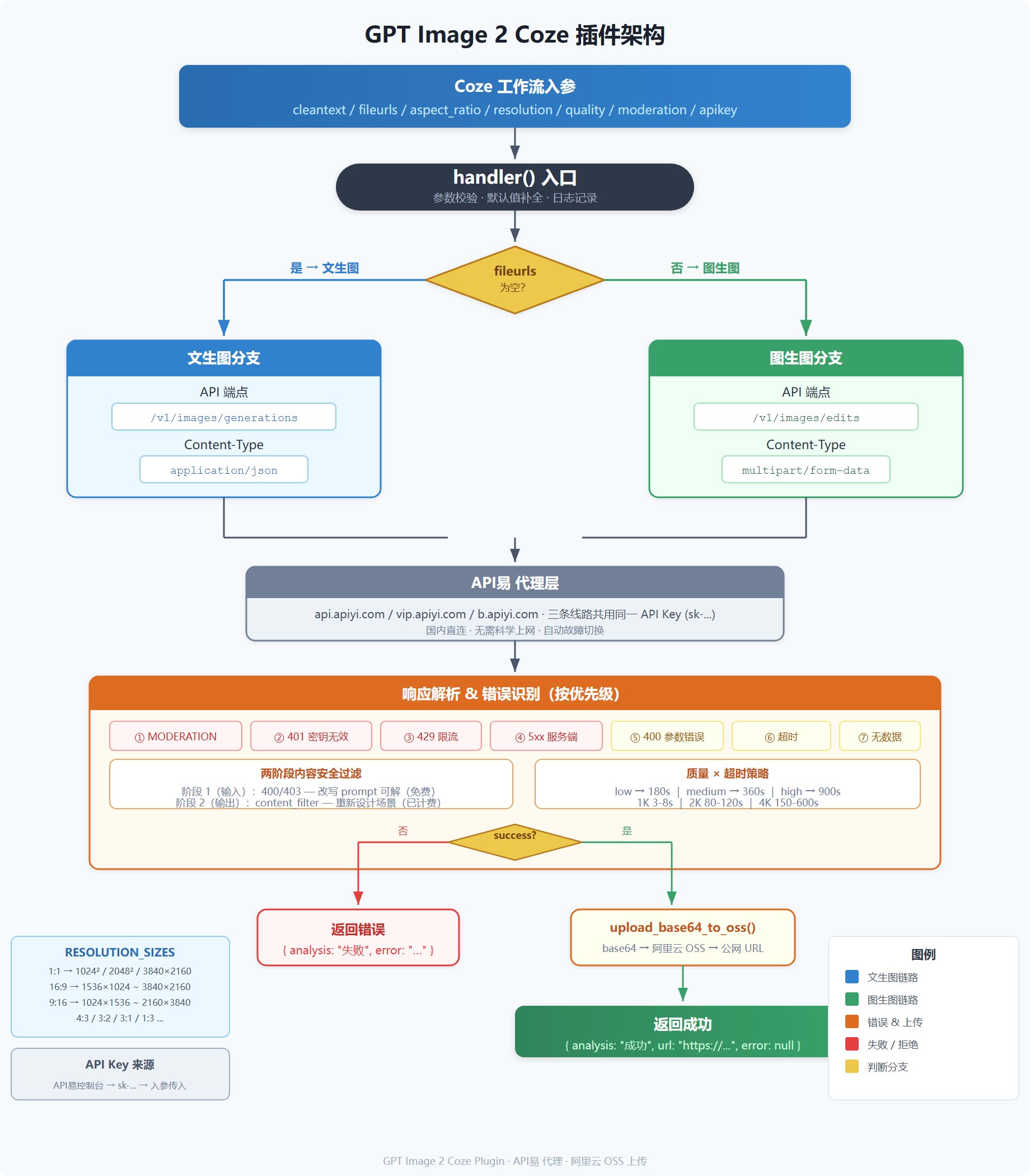 The plugin's core call chain:
```text theme={null}
Coze workflow inputs (cleantext / fileurls / aspect_ratio / resolution / quality / apikey)
↓
handler() entry point
↓
Check whether reference images exist (fileurls)
↓ ↓
Text-to-image Image-to-image
↓ ↓
POST api.apiyi.com/v1/images/generations POST api.apiyi.com/v1/images/edits
(application/json) (multipart/form-data)
↓ ↓
Parse response / classify error codes
↓
upload_base64_to_oss() — upload to Alibaba Cloud OSS
↓
Return { analysis, url, error }
```
## Resolution and Size Reference
The plugin selects the size automatically from `aspect_ratio` and `resolution` (based on APIYI's official presets):
| Aspect ratio | 1K (size / pixels) | 2K (size / pixels) | 4K (size / pixels) |
| ------------ | ------------------ | ------------------ | ------------------ |
| 1:1 | 1024×1024 ≈ 1.0M | 2048×2048 ≈ 4.2M | 3840×2160 ≈ 8.3M |
| 16:9 | 1536×1024 ≈ 1.6M | 2048×1152 ≈ 2.4M | 3840×2160 ≈ 8.3M |
| 9:16 | 1024×1536 ≈ 1.6M | 1152×2048 ≈ 2.4M | 2160×3840 ≈ 8.3M |
| 4:3 | 1024×768 ≈ 0.8M | 2048×1536 ≈ 3.1M | 3264×2448 ≈ 8.0M |
| 3:2 | 1536×1024 ≈ 1.6M | 2048×1360 ≈ 2.8M | 3456×2304 ≈ 8.0M |
| 3:1 | 1536×512 ≈ 0.8M | 3072×1024 ≈ 3.1M | 3840×1280 ≈ 4.9M |
| 1:3 | 512×1536 ≈ 0.8M | 1024×3072 ≈ 3.1M | 1280×3840 ≈ 4.9M |
> **Constraints**: every dimension must be divisible by 16, aspect ratio ≤ 3:1, total pixels ≤ 8,294,400.
>
> **Note**: 1:1 at 4K outputs 3840×2160 (landscape 16:9), not a square — this is an API limitation, and the effective aspect ratio becomes 16:9. Outputs above `2560×1440` are still experimental; for production, prefer the preset sizes.
## Input and Output Parameters
### Input (`Input`)
| Parameter | Type | Required | Default | Description |
| --------------- | --------- | -------- | ------- | -------------------------------------------------------------------------------------------------- |
| `cleantext` | string | Yes | — | User text prompt or edit instruction (up to 32,000 characters) |
| `fileurls` | string\[] | No | — | List of reference image URLs; leave empty for text-to-image |
| `aspect_ratio` | string | Yes | — | Aspect ratio, e.g. `1:1`, `16:9`, `9:16` |
| `resolution` | string | Yes | — | Resolution, must be uppercase: `1K` / `2K` / `4K` |
| `quality` | string | No | `auto` | Quality level: `low` / `medium` / `high` / `auto` |
| `moderation` | string | No | `auto` | Moderation level: `auto` / `low` (relaxed moderation) |
| `output_format` | string | No | `png` | Output format: `png` / `jpeg` / `webp` |
| `apikey` | string | Yes | — | APIYI API Key (starts with `sk-`, request one in the [APIYI console](https://api.apiyi.com/token)) |
### Output (`Output`)
| Field | Type | Description |
| ---------- | -------------- | ---------------------------------------------------- |
| `analysis` | string | Status text: `图片生成成功` (success) / `图片生成失败` (failure) |
| `url` | string \| null | On success, the public OSS URL |
| `error` | string \| null | On failure, a friendly error description |
## Deployment Steps
* Request an API Key (starting with `sk-`) in the [APIYI console](https://api.apiyi.com/token); we recommend setting a daily quota limit (e.g. ¥20-50)
* Create an OSS bucket on Alibaba Cloud and a RAM sub-account with `oss:PutObject` permission on that bucket
* Record the `AccessKey ID`, `AccessKey Secret`, `Bucket name`, and `Endpoint` (e.g. `oss-cn-beijing.aliyuncs.com`)
1. Go to Coze workspace → Plugins → Plugin marketplace
2. Search for 'GPT Image 2' or 'APIYI' to find this plugin
3. Open the plugin card to review the details, then click 'Add' to install it into your workspace
The plugin's core call chain:
```text theme={null}
Coze workflow inputs (cleantext / fileurls / aspect_ratio / resolution / quality / apikey)
↓
handler() entry point
↓
Check whether reference images exist (fileurls)
↓ ↓
Text-to-image Image-to-image
↓ ↓
POST api.apiyi.com/v1/images/generations POST api.apiyi.com/v1/images/edits
(application/json) (multipart/form-data)
↓ ↓
Parse response / classify error codes
↓
upload_base64_to_oss() — upload to Alibaba Cloud OSS
↓
Return { analysis, url, error }
```
## Resolution and Size Reference
The plugin selects the size automatically from `aspect_ratio` and `resolution` (based on APIYI's official presets):
| Aspect ratio | 1K (size / pixels) | 2K (size / pixels) | 4K (size / pixels) |
| ------------ | ------------------ | ------------------ | ------------------ |
| 1:1 | 1024×1024 ≈ 1.0M | 2048×2048 ≈ 4.2M | 3840×2160 ≈ 8.3M |
| 16:9 | 1536×1024 ≈ 1.6M | 2048×1152 ≈ 2.4M | 3840×2160 ≈ 8.3M |
| 9:16 | 1024×1536 ≈ 1.6M | 1152×2048 ≈ 2.4M | 2160×3840 ≈ 8.3M |
| 4:3 | 1024×768 ≈ 0.8M | 2048×1536 ≈ 3.1M | 3264×2448 ≈ 8.0M |
| 3:2 | 1536×1024 ≈ 1.6M | 2048×1360 ≈ 2.8M | 3456×2304 ≈ 8.0M |
| 3:1 | 1536×512 ≈ 0.8M | 3072×1024 ≈ 3.1M | 3840×1280 ≈ 4.9M |
| 1:3 | 512×1536 ≈ 0.8M | 1024×3072 ≈ 3.1M | 1280×3840 ≈ 4.9M |
> **Constraints**: every dimension must be divisible by 16, aspect ratio ≤ 3:1, total pixels ≤ 8,294,400.
>
> **Note**: 1:1 at 4K outputs 3840×2160 (landscape 16:9), not a square — this is an API limitation, and the effective aspect ratio becomes 16:9. Outputs above `2560×1440` are still experimental; for production, prefer the preset sizes.
## Input and Output Parameters
### Input (`Input`)
| Parameter | Type | Required | Default | Description |
| --------------- | --------- | -------- | ------- | -------------------------------------------------------------------------------------------------- |
| `cleantext` | string | Yes | — | User text prompt or edit instruction (up to 32,000 characters) |
| `fileurls` | string\[] | No | — | List of reference image URLs; leave empty for text-to-image |
| `aspect_ratio` | string | Yes | — | Aspect ratio, e.g. `1:1`, `16:9`, `9:16` |
| `resolution` | string | Yes | — | Resolution, must be uppercase: `1K` / `2K` / `4K` |
| `quality` | string | No | `auto` | Quality level: `low` / `medium` / `high` / `auto` |
| `moderation` | string | No | `auto` | Moderation level: `auto` / `low` (relaxed moderation) |
| `output_format` | string | No | `png` | Output format: `png` / `jpeg` / `webp` |
| `apikey` | string | Yes | — | APIYI API Key (starts with `sk-`, request one in the [APIYI console](https://api.apiyi.com/token)) |
### Output (`Output`)
| Field | Type | Description |
| ---------- | -------------- | ---------------------------------------------------- |
| `analysis` | string | Status text: `图片生成成功` (success) / `图片生成失败` (failure) |
| `url` | string \| null | On success, the public OSS URL |
| `error` | string \| null | On failure, a friendly error description |
## Deployment Steps
* Request an API Key (starting with `sk-`) in the [APIYI console](https://api.apiyi.com/token); we recommend setting a daily quota limit (e.g. ¥20-50)
* Create an OSS bucket on Alibaba Cloud and a RAM sub-account with `oss:PutObject` permission on that bucket
* Record the `AccessKey ID`, `AccessKey Secret`, `Bucket name`, and `Endpoint` (e.g. `oss-cn-beijing.aliyuncs.com`)
1. Go to Coze workspace → Plugins → Plugin marketplace
2. Search for 'GPT Image 2' or 'APIYI' to find this plugin
3. Open the plugin card to review the details, then click 'Add' to install it into your workspace
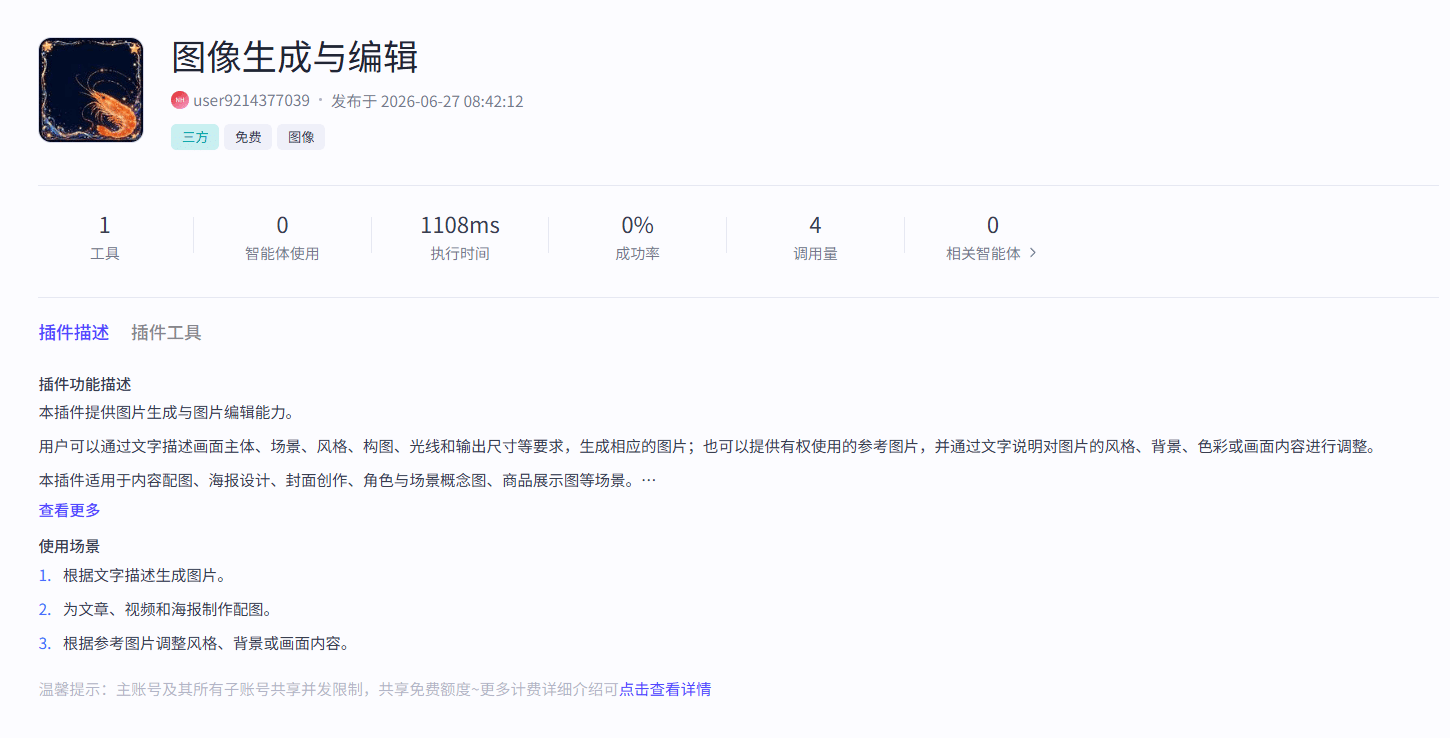 Paste the full Python code from the 'Full Plugin Source Code' section below into the Coze IDE, and replace the Alibaba Cloud OSS configuration at the top with your own:
```python theme={null}
# API易 线路配置(可选)
API_BASE = "https://api.apiyi.com/v1"
# 也可切换为: "https://vip.apiyi.com/v1" 或 "https://b.apiyi.com/v1"
# 阿里云 OSS 配置
ACCESS_KEY_ID = "你的 AK"
ACCESS_KEY_SECRET = "你的 SK"
BUCKET_NAME = "你的 Bucket 名称"
ENDPOINT = "oss-cn-beijing.aliyuncs.com"
```
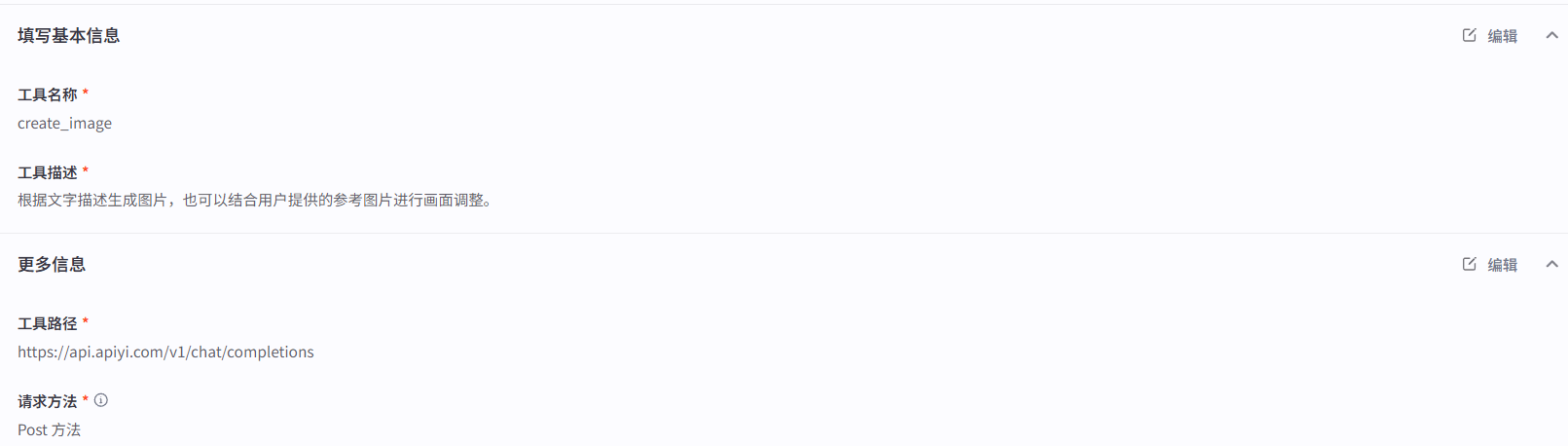
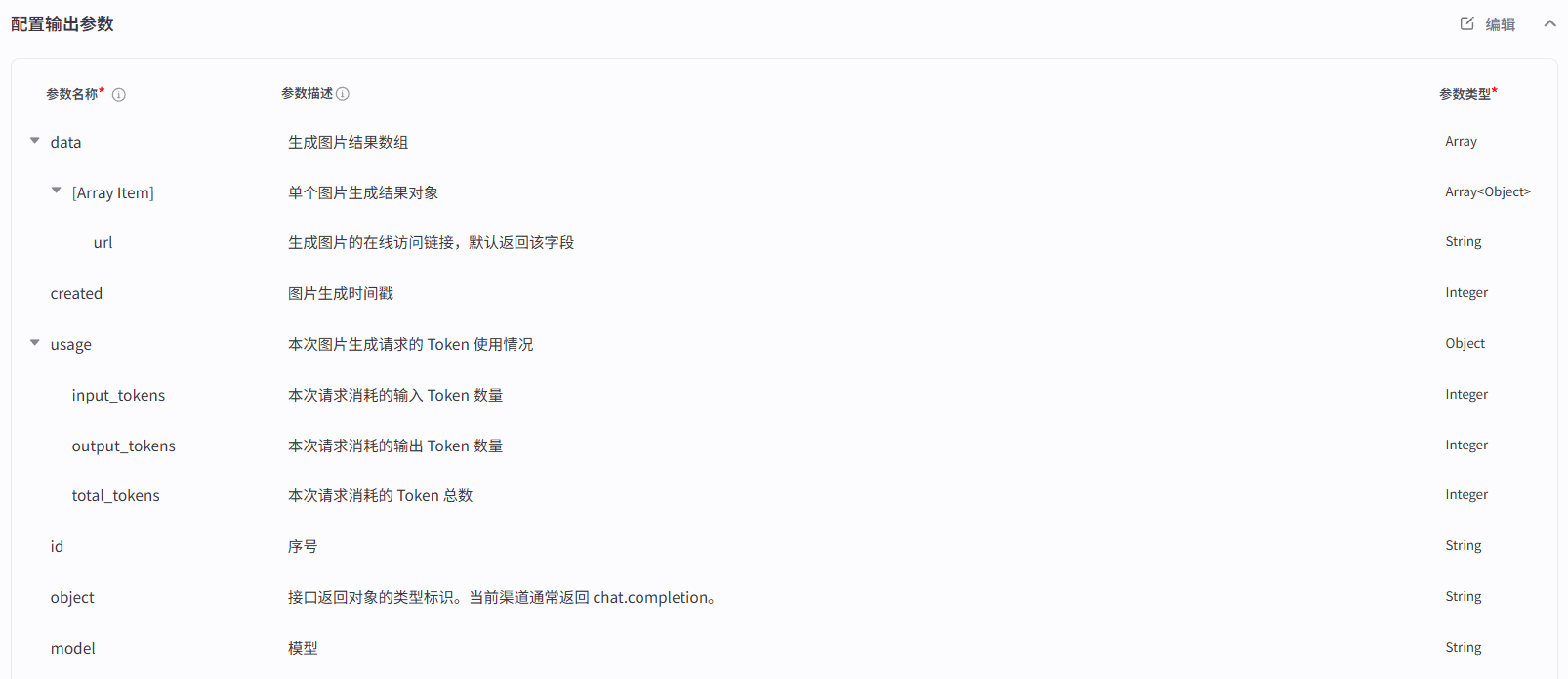
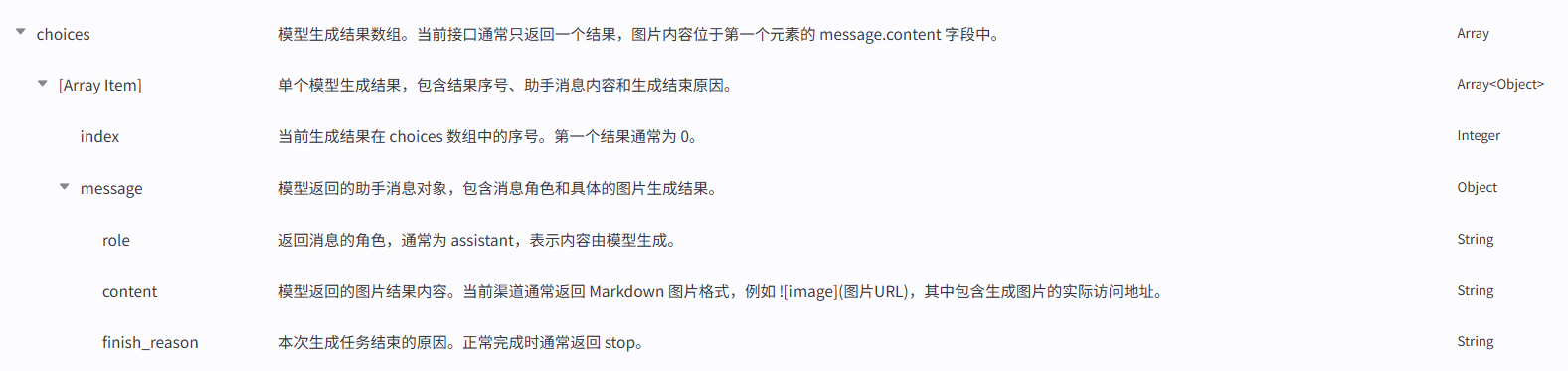
Configure the Input / Output field types and required flags as shown below, matching the `args.input` fields in the code:
Input parameter configuration:
Paste the full Python code from the 'Full Plugin Source Code' section below into the Coze IDE, and replace the Alibaba Cloud OSS configuration at the top with your own:
```python theme={null}
# API易 线路配置(可选)
API_BASE = "https://api.apiyi.com/v1"
# 也可切换为: "https://vip.apiyi.com/v1" 或 "https://b.apiyi.com/v1"
# 阿里云 OSS 配置
ACCESS_KEY_ID = "你的 AK"
ACCESS_KEY_SECRET = "你的 SK"
BUCKET_NAME = "你的 Bucket 名称"
ENDPOINT = "oss-cn-beijing.aliyuncs.com"
```
Configure the Input / Output field types and required flags as shown below, matching the `args.input` fields in the code:
Input parameter configuration:
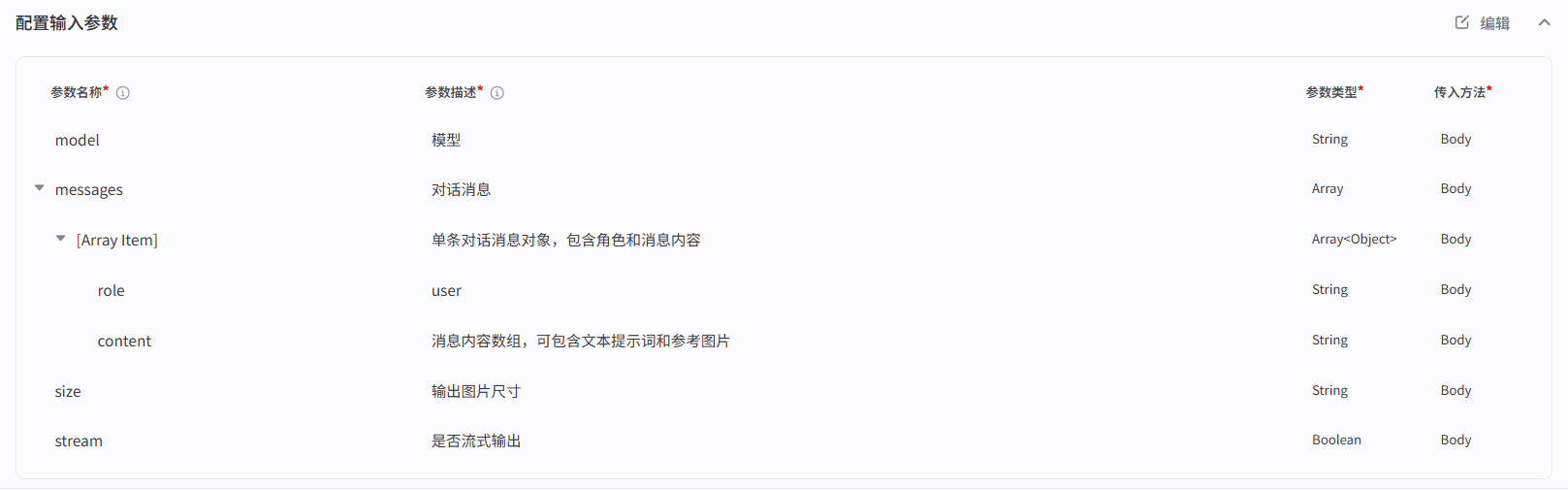 Output parameter configuration:
 * Fill in test parameters in the Coze IDE (start with `quality=low` + `resolution=1K` + a simple prompt to verify the APIYI pipeline)
* Once tests pass, click 'Publish' and drag the plugin into any workflow
## Error Classification Strategy
The plugin does not just report `success=True/False` — it classifies the failure cause in the following priority order, so your Coze workflow can branch accordingly:
| Priority | Error type | Trigger condition | Recommended handling |
| -------- | ----------------------- | ------------------------------------------- | ----------------------------------------------------------------------------------------------------------- |
| 1 | `MODERATION_BLOCKED` | HTTP 400 / 403, content-safety block | The prompt or image triggered moderation; rewrite and retry — **do not retry with the original input** |
| 2 | `INVALID_API_KEY` | HTTP 401 | Check whether the APIYI API Key is correct or has expired |
| 3 | `RATE_LIMIT` | HTTP 429 | Request rate exceeded; try switching routes or lowering concurrency |
| 4 | `SERVER_ERROR` | HTTP 500 / 502 / 503 | APIYI / OpenAI server-side failure; back off and retry 2-3 times |
| 5 | `BAD_REQUEST` | HTTP 400 (non-moderation) | Check parameters: size validity, or whether input\_fidelity or background:transparent was passed by mistake |
| 6 | `TIMEOUT` | Request exceeded the quality-based timeout | Lower quality or resolution and retry |
| 7 | `NO_DATA` | `data` in the response is empty | Retry |
| 8 | `NO_IMAGE_DATA` | `b64_json` field is empty | Retry |
| 9 | `IMAGE_DOWNLOAD_FAILED` | Reference image URL could not be downloaded | Check URL accessibility |
| 10 | `EDIT_FAILED` | Edit endpoint returned non-200 | Check reference image format, count (≤16), and per-image size (≤50MB) |
### Two-Stage Content Filtering
GPT Image 2 uses **two-stage content-safety filtering**, unlike Nano Banana Pro:
```text theme={null}
User request
↓
[Stage 1: Input Filter]
├── Blocked → HTTP 400 / 403 (moderation_blocked)
│ ↑ Rewriting the prompt fixes it (free, not billed)
├── Passed ↓
[Model inference generates the image] (billed at this point)
↓
[Stage 2: Output Filter]
├── Blocked → HTTP 200 but empty b64_json (content_filter, already billed)
├── Passed ↓
Image returned (HTTP 200)
```
| Dimension | moderation\_blocked | content\_filter |
| ------------- | -------------------------- | ------------------------------------- |
| Trigger stage | Input stage | Output stage |
| HTTP status | 400 | 200 |
| Billed | No | **Yes** (inference already completed) |
| How to fix | Rewrite the prompt wording | Redesign the entire scene |
### Common moderation\_blocked Triggers
| # | Scenario | Notes |
| - | --------------------------------------- | -------------------------------------------- |
| 1 | Real-person portraits / celebrity names | Elon Musk, Taylor Swift, etc. |
| 2 | Names of living artists | Hayao Miyazaki = blocked, Van Gogh = allowed |
| 3 | Copyrighted characters / IP | Spider-Man, Pikachu, Mickey Mouse, etc. |
| 4 | Violence / gore / weapon details | Blocked automatically |
| 5 | Sexual innuendo / revealing clothing | Descriptors like bikini, tight-fitting, sexy |
| 6 | Photorealistic images of children | Near-zero tolerance |
| 7 | Hate symbols / political extremism | Blocked automatically |
### APIYI-Specific Errors
| Error | Cause | Fix |
| ----------------------- | ---------------------------------------------- | ------------------------------------------ |
| 401 + `invalid_api_key` | Key is missing the `sk-` prefix or has expired | Copy the full Key from the APIYI console |
| 404 Not Found | base\_url is missing the `/v1` suffix | Make sure it is `https://api.apiyi.com/v1` |
| 429 + frequent triggers | APIYI rate limit hit | Switch routes and retry |
| Connection timeout | DNS / network fluctuation | Try another route and retry |
## Expected Latency by Resolution/Quality
| Resolution | Quality | Expected latency | Plugin timeout |
| -------------- | ------- | ---------------- | -------------- |
| 1K (1024×1024) | low | 3-8 s | 180 s |
| 1K (1024×1024) | medium | 20-40 s | 360 s |
| 1K (1024×1024) | high | 145-280 s | 900 s |
| 2K (2048×2048) | medium | 80-120 s | 360 s |
| 2K (2048×2048) | high | 200-250 s | 900 s |
| 4K (3840×2160) | medium | 150-200 s | 360 s |
| 4K (3840×2160) | high | 300-600 s | 900 s |
> Recommendation: use `resolution=1K + quality=medium` for day-to-day work (20-40 s per image), and `resolution=4K + quality=high` for final deliverables.
>
> With `quality=auto` (omitted or set to auto), the plugin applies a uniform 360-second timeout, and the API decides the actual quality level.
## Full Plugin Source Code
Below is the complete code of `coze-gptimage2.py`, ready to paste straight into the Coze IDE. **Only the OSS configuration at the top needs to be changed** before use.
The plugin source is kept verbatim as contributed; comments and user-facing error strings are in Chinese and can be freely localized for your workflow.
```python coze-gptimage2.py theme={null}
from runtime import Args
from typings.gptimage2.gptimage2 import Input, Output
import requests
import base64
import io
import oss2
import uuid
import re
# ╔══════════════════════════════════════════════════════════╗
# ║ API易 线路配置(按需切换) ║
# ╚══════════════════════════════════════════════════════════╝
API_BASE = "https://api.apiyi.com/v1"
# 也可切换为: "https://vip.apiyi.com/v1" 或 "https://b.apiyi.com/v1"
# ╔══════════════════════════════════════════════════════════╗
# ║ 阿里云 OSS 配置(请修改为你的值) ║
# ╚══════════════════════════════════════════════════════════╝
ACCESS_KEY_ID = "" # 填入你的阿里云 Access Key ID
ACCESS_KEY_SECRET = "" # 填入你的阿里云 Access Key Secret
BUCKET_NAME = "" # 填入你的阿里云 OSS Bucket 名称
ENDPOINT = "oss-cn-beijing.aliyuncs.com" # 填入你的 OSS Endpoint
# ╔══════════════════════════════════════════════════════════╗
# ║ 质量超时配置(GPT Image 2 基于 quality 分级) ║
# ╚══════════════════════════════════════════════════════════╝
TIMEOUT = {
"low": 180, # 低质量快速出图(3-8 秒实际耗时)
"medium": 360, # 中等质量(20-40 秒实际耗时,推荐)
"high": 900, # 高质量精细渲染(145-280 秒实际耗时)
}
# ╔══════════════════════════════════════════════════════════╗
# ║ 分辨率 → 尺寸映射表(宽高比 × 分辨率 → W×H) ║
# ╚══════════════════════════════════════════════════════════╝
RESOLUTION_SIZES = {
"1:1": {"1K": "1024x1024", "2K": "2048x2048", "4K": "3840x2160"},
"16:9": {"1K": "1536x1024", "2K": "2048x1152", "4K": "3840x2160"},
"9:16": {"1K": "1024x1536", "2K": "1152x2048", "4K": "2160x3840"},
"4:3": {"1K": "1024x768", "2K": "2048x1536", "4K": "3264x2448"},
"3:2": {"1K": "1536x1024", "2K": "2048x1360", "4K": "3456x2304"},
"3:1": {"1K": "1536x512", "2K": "3072x1024", "4K": "3840x1280"},
"1:3": {"1K": "512x1536", "2K": "1024x3072", "4K": "1280x3840"},
}
# ==============================
# OSS 上传工具
# ==============================
def upload_base64_to_oss(image_base64: str) -> str:
"""
将 base64 图片上传到阿里云 OSS 并返回公网 URL
支持带 data:image/...;base64, 前缀和纯 base64 两种情况
"""
base64_str = re.sub(r"^data:image/[^;]+;base64,", "", image_base64)
image_data = base64.b64decode(base64_str)
image_io = io.BytesIO(image_data)
auth = oss2.Auth(ACCESS_KEY_ID, ACCESS_KEY_SECRET)
bucket = oss2.Bucket(auth, ENDPOINT, BUCKET_NAME)
object_name = f"coze/gptimage2_{uuid.uuid4().hex}.png"
bucket.put_object(object_name, image_io)
return f"https://{BUCKET_NAME}.{ENDPOINT}/{object_name}"
# ==============================
# 工具函数
# ==============================
def get_size(aspect_ratio: str, resolution: str) -> str:
"""根据宽高比和分辨率获取推荐尺寸"""
ratio_map = RESOLUTION_SIZES.get(aspect_ratio, RESOLUTION_SIZES["1:1"])
return ratio_map.get(resolution, ratio_map.get("1K", "1024x1024"))
def guess_mime_from_url(url: str) -> str:
"""根据 URL 后缀猜测 MIME 类型"""
url_lower = url.lower()
if url_lower.endswith(".png"):
return "image/png"
if url_lower.endswith(".jpg") or url_lower.endswith(".jpeg"):
return "image/jpeg"
if url_lower.endswith(".webp"):
return "image/webp"
if url_lower.endswith(".gif"):
return "image/gif"
return "image/png"
# ==============================
# 核心:GPT Image 2 生图 / 编辑
# ==============================
def generate_image(prompt: str, aspect_ratio: str, resolution: str,
quality: str, apikey: str, output_format: str = "png",
moderation: str = "auto", image_urls=None):
"""
GPT Image 2 文生图 / 图生图核心函数
- image_urls 为空:纯文生图 → API易 /v1/images/generations(JSON)
- image_urls 不为空:参考图编辑 → API易 /v1/images/edits(multipart/form-data)
"""
size = get_size(aspect_ratio, resolution)
headers = {
"Authorization": f"Bearer {apikey}",
"Content-Type": "application/json"
}
# ── 分支 1:有参考图 → 图生图(编辑) ──
if image_urls:
return _generate_edit(prompt, size, quality, apikey,
output_format, moderation, image_urls, headers)
# ── 分支 2:无参考图 → 文生图(/v1/images/generations,JSON)──
payload = {
"model": "gpt-image-2",
"prompt": prompt,
"size": size,
}
if quality and quality != "auto":
payload["quality"] = quality
if output_format and output_format != "png":
payload["output_format"] = output_format
if moderation and moderation != "auto":
payload["moderation"] = moderation
timeout_seconds = TIMEOUT.get(quality, 360)
api_url = f"{API_BASE}/images/generations"
try:
response = requests.post(
api_url,
headers=headers,
json=payload,
timeout=timeout_seconds
)
# ── HTTP 错误分发 ──
if response.status_code in (400, 403):
try:
err_body = response.json()
err = err_body.get("error", {})
err_msg = err.get("message", "")
except Exception:
err_msg = response.text
if "moderation" in err_msg.lower() or response.status_code == 403:
return {
"success": False,
"errorType": "MODERATION_BLOCKED",
"error": "❌ 内容安全审核不通过\n"
"您的提示词触发了内容安全策略,"
"请修改提示词后重试(不要用原提示词重试)",
}
return {
"success": False,
"errorType": "BAD_REQUEST",
"error": f"❌ 请求参数错误: {err_msg[:500]}\n"
"常见原因:误传了 input_fidelity 或 background:transparent",
}
if response.status_code == 401:
return {
"success": False,
"errorType": "INVALID_API_KEY",
"error": "❌ API Key 无效\n请检查您的 API易 API 密钥是否正确,"
"或是否已过期。可在 https://api.apiyi.com/token 查看",
}
if response.status_code == 429:
return {
"success": False,
"errorType": "RATE_LIMIT",
"error": "❌ 请求频率超限\nAPI 调用过于频繁,"
"可尝试切换线路或降低并发",
}
if response.status_code in (500, 502, 503):
return {
"success": False,
"errorType": "SERVER_ERROR",
"error": f"❌ 服务端故障(HTTP {response.status_code}),"
"请稍后重试或尝试切换线路",
}
if response.status_code != 200:
return {
"success": False,
"errorType": "HTTP_ERROR",
"error": f"HTTP {response.status_code}: "
f"{(response.text or '')[:500]}",
}
# ── JSON 解析 ──
try:
data = response.json()
except ValueError:
return {
"success": False,
"errorType": "INVALID_JSON",
"error": "响应不是有效 JSON",
}
images = data.get("data", [])
if not isinstance(images, list) or len(images) == 0:
return {
"success": False,
"errorType": "NO_DATA",
"error": "生成失败:未返回图片数据(可能触发了 output filter)",
"response": data,
}
# ── 提取 b64_json(API易 返回纯 base64,无 data:image 前缀)──
image_b64 = images[0].get("b64_json", "")
if not image_b64:
return {
"success": False,
"errorType": "NO_IMAGE_DATA",
"error": "生成失败:b64_json 为空(可能被 content_filter 过滤)",
"response": data,
}
return {"success": True, "image_data": image_b64}
except requests.exceptions.Timeout:
return {
"success": False,
"errorType": "TIMEOUT",
"error": f"图片生成请求超时"
f"(超过 {timeout_seconds} 秒,"
f"当前 quality={quality})\n"
f"建议降低 quality 或 resolution 重试",
}
except Exception as e:
return {
"success": False,
"errorType": "EXCEPTION",
"error": f"图片生成请求失败: {str(e)}",
}
def _generate_edit(prompt: str, size: str, quality: str,
apikey: str, output_format: str, moderation: str,
image_urls: list, headers: dict):
"""
GPT Image 2 图生图(编辑)子函数
调用 API易 /v1/images/edits 端点(multipart/form-data 方式上传参考图)
注意:API易 的 /v1/images/edits 要求 Content-Type: multipart/form-data,
通过 -F "image[]=@file" 方式传图,不支持 JSON base64 data URI。
参考图数量最多 16 张,单张 ≤ 50MB(建议压到 1.5MB 以内)。
"""
# ── 下载参考图到内存 ──
image_files = []
for i, url in enumerate(image_urls):
try:
resp = requests.get(url, timeout=180)
if resp.status_code != 200:
return {
"success": False,
"errorType": "IMAGE_DOWNLOAD_FAILED",
"error": f"图片获取失败({url})HTTP {resp.status_code}",
}
mime = guess_mime_from_url(url)
ext = mime.split("/")[-1] # png / jpeg / webp
if ext == "jpeg":
ext = "jpg"
image_files.append(
("image[]", (f"image{i}.{ext}", io.BytesIO(resp.content), mime))
)
except Exception as e:
return {
"success": False,
"errorType": "IMAGE_DOWNLOAD_FAILED",
"error": f"图片获取失败({url}): {e}",
}
# ── 构造 multipart/form-data 请求(-F 方式)──
form_data = {
"model": "gpt-image-2",
"prompt": prompt,
}
if size:
form_data["size"] = size
if quality and quality != "auto":
form_data["quality"] = quality
if output_format and output_format != "png":
form_data["output_format"] = output_format
if moderation and moderation != "auto":
form_data["moderation"] = moderation
# multipart/form-data 不传 Content-Type(让 requests 自动生成 boundary)
auth_headers = {
"Authorization": headers["Authorization"],
}
timeout_seconds = TIMEOUT.get(quality, 360)
api_url = f"{API_BASE}/images/edits"
try:
response = requests.post(
api_url,
headers=auth_headers,
data=form_data,
files=image_files,
timeout=timeout_seconds
)
# ── 错误处理 ──
if response.status_code in (400, 403):
try:
err = response.json().get("error", {})
err_msg = err.get("message", "")
except Exception:
err_msg = response.text[:500]
if "moderation" in err_msg.lower() or response.status_code == 403:
return {
"success": False,
"errorType": "MODERATION_BLOCKED",
"error": "❌ 内容安全审核不通过",
}
return {
"success": False,
"errorType": "EDIT_FAILED",
"error": f"图片编辑请求参数错误: {err_msg[:500]}\n"
"常见原因:误传了 input_fidelity、background:transparent、"
"超过 16 张参考图或单张超过 50MB",
}
if response.status_code == 401:
return {
"success": False,
"errorType": "INVALID_API_KEY",
"error": "❌ API Key 无效",
}
if response.status_code == 429:
return {
"success": False,
"errorType": "RATE_LIMIT",
"error": "❌ 请求频率超限,可尝试切换线路重试",
}
if response.status_code in (500, 502, 503):
return {
"success": False,
"errorType": "SERVER_ERROR",
"error": f"❌ 服务端故障(HTTP {response.status_code})",
}
if response.status_code != 200:
try:
err = response.json().get("error", {}).get("message", "")
except Exception:
err = response.text[:500]
return {
"success": False,
"errorType": "EDIT_FAILED",
"error": f"图片编辑失败(HTTP {response.status_code}): {err}",
}
# ── 提取图片(b64_json 是纯 base64,无前缀)──
data = response.json()
images = data.get("data", [])
if not images:
return {
"success": False,
"errorType": "NO_DATA",
"error": "编辑结果为空",
}
image_b64 = images[0].get("b64_json", "")
if not image_b64:
return {
"success": False,
"errorType": "NO_IMAGE_DATA",
"error": "编辑结果图片数据为空",
}
return {"success": True, "image_data": image_b64}
except requests.exceptions.Timeout:
return {
"success": False,
"errorType": "TIMEOUT",
"error": f"图片编辑请求超时(超过 {timeout_seconds} 秒)",
}
except Exception as e:
return {
"success": False,
"errorType": "EXCEPTION",
"error": f"图片编辑请求失败: {str(e)}",
}
# ==============================
# Coze Node 入口
# ==============================
def handler(args: Args[Input]) -> Output:
"""
Coze / GPT Image 2(API易 代理)节点入口
- args.input.cleantext: 用户文字提示词
- args.input.fileurls: 参考图 URL 列表(用于图生图)
- args.input.aspect_ratio: 宽高比,如 "1:1" / "16:9" / "9:16"
- args.input.resolution: 分辨率,如 "1K" / "2K" / "4K"
- args.input.quality: 质量等级,如 "low" / "medium" / "high"(默认 auto)
- args.input.moderation: 审核强度,如 "auto" / "low"(默认 auto)
- args.input.output_format: 输出格式,如 "png" / "jpeg" / "webp"(默认 png)
- args.input.apikey: API易 API Key(sk-开头)
"""
API_KEY = args.input.apikey
cleantext = args.input.cleantext or ""
fileurls = args.input.fileurls or []
aspect_ratio = args.input.aspect_ratio or "1:1"
resolution = args.input.resolution or "1K"
quality = getattr(args.input, 'quality', None) or "auto"
output_format = getattr(args.input, 'output_format', None) or "png"
moderation = getattr(args.input, 'moderation', None) or "auto"
prompt = cleantext.strip()
if not prompt:
prompt = "根据参考图片进行合理的编辑与优化。"
# 调用 GPT Image 2 生图 / 编辑
result = generate_image(
prompt=prompt,
aspect_ratio=aspect_ratio,
resolution=resolution,
quality=quality,
apikey=API_KEY,
output_format=output_format,
moderation=moderation,
image_urls=fileurls if fileurls else None
)
if result["success"]:
image_base64 = result["image_data"]
oss_url = upload_base64_to_oss(image_base64)
return {
"analysis": "图片生成成功",
"url": oss_url,
"error": None,
}
else:
return {
"analysis": "图片生成失败",
"url": None,
"error": result.get("error", "未知错误"),
}
```
## Optional: gpt-image-2-all Fast Mode
If you need **faster generation (30-60s) and do not care about size parameter control**, you can switch the plugin to APIYI's `gpt-image-2-all` (reverse edition), called via the Chat Completions endpoint. This mode costs \$0.03/image and returns image URLs directly, with no base64 parsing needed.
The core change (just replace the `generate_image` function):
```python theme={null}
def generate_image_chat(prompt: str, apikey: str, image_urls=None):
"""
gpt-image-2-all 快速模式(通过 API易 Chat Completions 端点)
价格 $0.03/张,出图 30-60s,尺寸由 prompt 描述驱动
"""
api_url = f"{API_BASE}/chat/completions"
headers = {
"Authorization": f"Bearer {apikey}",
"Content-Type": "application/json"
}
# 构造消息
if image_urls:
# 图生图:多模态 message
content = [{"type": "text", "text": prompt}]
for url in image_urls:
content.append({
"type": "image_url",
"image_url": {"url": url}
})
else:
# 文生图:纯文本 message
content = prompt
payload = {
"model": "gpt-image-2-all",
"messages": [{"role": "user", "content": content}],
}
try:
response = requests.post(api_url, headers=headers, json=payload, timeout=300)
if response.status_code != 200:
err = response.json().get("error", {}).get("message", response.text)
return {"success": False, "errorType": "API_ERROR", "error": str(err)[:500]}
data = response.json()
content_text = data["choices"][0]["message"]["content"]
# 从 Markdown  中提取图片 URL
match = re.search(r'!\[[^\]]*\]\((.*?)\)', content_text)
if not match:
return {"success": False, "errorType": "NO_URL", "error": "未从响应中提取到图片 URL"}
image_url = match.group(1)
# 如果是 base64 data URL,直接使用
if image_url.startswith("data:image/"):
return {"success": True, "image_data": image_url.split(",", 1)[1]}
# 如果是 HTTP URL,下载图片 → 转 base64
img_resp = requests.get(image_url, timeout=60)
if img_resp.status_code != 200:
return {"success": False, "errorType": "DOWNLOAD_FAILED", "error": f"下载图片失败: HTTP {img_resp.status_code}"}
image_b64 = base64.b64encode(img_resp.content).decode("utf-8")
return {"success": True, "image_data": image_b64}
except requests.exceptions.Timeout:
return {"success": False, "errorType": "TIMEOUT", "error": "请求超时"}
except Exception as e:
return {"success": False, "errorType": "EXCEPTION", "error": str(e)}
```
> How to switch: replace `generate_image(...)` in `handler()` with `generate_image_chat(...)`. The only inputs needed are `prompt`, `apikey`, and optionally `fileurls`.
## Using It in a Coze Workflow
After publishing the plugin, drag the plugin node into the Coze workflow editor and wire it up as follows:
```text theme={null}
Start node (user enters prompt + images)
↓
Prompt/image splitter (code node that splits the user message into cleantext and fileurls)
↓
Per-user apikey dispatch (dictionary lookup that maps each user to their APIYI API Key)
↓
gptimage2 plugin node (this plugin)
↓
Success / failure branches
↓
End node (outputs url or error)
```
We recommend pairing this with the [Feishu Base AI image generation solution](/en/scenarios/ecosystem/feishu-bitable-image-shortcut). The combined setup lets ops/design teammates **batch-generate images just by filling in prompts in a Feishu table**, without opening any code. Simply swap the Nano Banana Pro plugin in that solution for this one.
## Comparison with Nano Banana Pro
| Dimension | Nano Banana Pro (APIYI) | GPT Image 2 (APIYI) |
| ----------------------- | ------------------------------------------------------- | -------------------------------------------- |
| Model | `gemini-3-pro-image-preview` | `gpt-image-2` |
| Gateway | APIYI (same platform, same Key) | APIYI (same platform, same Key) |
| Text-to-image endpoint | Gemini `generateContent` (JSON) | `/v1/images/generations` (JSON) |
| Image-to-image endpoint | Same endpoint + inline\_data (JSON) | `/v1/images/edits` (**multipart/form-data**) |
| Resolution scheme | 1K / 2K / 4K (fixed) | Flexible resolution (up to 3840×2160) |
| Timeout strategy | By resolution (360s / 600s / 1200s) | By quality (180s / 360s / 900s) |
| Content filtering | Single-stage (ZERO\_CANDIDATES\_TOKEN + TEXT\_RESPONSE) | Two-stage (HTTP 400/403 + content\_filter) |
| Reference image count | Unlimited (inline\_data) | Up to 16 |
| Transparent background | ✅ Supported | ❌ Not supported |
| Text rendering | Good | Excellent (>99%) |
| Output compression | Not supported | ✅ jpeg/webp compression |
| Moderation control | Not supported | ✅ moderation parameter (auto/low) |
## FAQ
Yes. The 'Full Plugin Source Code' section of this page contains the complete `coze-gptimage2.py`. **Just change the OSS configuration and API\_BASE at the top** and paste it straight into the Coze IDE — nothing else to request.
If you also need:
* The Feishu field shortcut code → see the 'Full Feishu Field Shortcut Source Code' section in the [Feishu Base AI image generation solution](/en/scenarios/ecosystem/feishu-bitable-image-shortcut)
* The Nano Banana Pro plugin → see the [Nano Banana Pro Coze plugin](/en/scenarios/ecosystem/coze-nanobanana-plugin)
So each user can be handed a different APIYI API Key. In the Coze workflow, put a 'per-user apikey dispatch' dictionary node in front that matches the caller's name to their API Key — convenient for usage accounting and access control.
APIYI is a gateway with direct connectivity from mainland China. Its API Keys also start with `sk-`, but:
* Direct access from mainland China, no VPN required
* Requested and managed in the [APIYI console](https://api.apiyi.com/token)
* Supports daily/monthly quota limits, making cost control easy
* One Key works for both Nano Banana Pro and GPT Image 2
All three routes are functionally identical — use any of them with the same API Key:
| Domain | Description |
| --------------- | ------------- |
| `api.apiyi.com` | Default route |
| `vip.apiyi.com` | VIP route |
| `b.apiyi.com` | Backup route |
Just change the `API_BASE` variable in the code to switch.
Downstream Coze workflow nodes (especially Feishu field shortcuts) mostly require an **accessible URL** to convert the result into an image attachment. Returning base64 directly makes the data shuttle back and forth through the workflow — poor performance, and the Feishu side cannot render it directly. An OSS link is also convenient for long-term archiving and external sharing.
It means the input prompt or reference image triggered content-safety filtering. This error **does not need a retry** — retrying yields the same result. Suggestions:
1. Rewrite the prompt wording
2. Avoid real-person names, copyrighted character names, and names of living artists
3. Avoid sexual innuendo, violence, gore, and other sensitive descriptions
This usually means the model completed inference (already billed) but the output was blocked by the content-safety filter (`content_filter`). Suggestions:
1. Redesign the entire visual scene rather than tweaking wording
2. Try a completely different prompt direction
3. Lowering quality can sometimes get past the stricter output filter
GPT Image 2's high quality takes 145-280 seconds even at 1K, and 4K can exceed 600 seconds. The plugin already sets a 900-second timeout for high quality. If it still times out:
1. Debug your prompt with `quality=medium` first
2. Check the APIYI console for rate limiting
3. Try switching routes and retrying
4. Reduce the number of concurrent calls
5. Consider the `gpt-image-2-all` mode (30-60s per image)
**GPT Image 2 does not support it.** If you need transparent backgrounds, use the [Nano Banana Pro plugin](/en/scenarios/ecosystem/coze-nanobanana-plugin) instead.
**No.** The parameter list of APIYI's official-relay gpt-image-2 is not fully identical to OpenAI's; `thinking` is not among the parameters APIYI supports. For fine control over output quality, use the `quality` parameter (low / medium / high / auto) instead.
Other unsupported parameters include:
* `response_format` — the response always returns `b64_json`
* `n` — fixed at 1
* `background: "transparent"` — transparent backgrounds are not supported
* `input_fidelity` — locked to high; **passing it returns a 400 error**
Both plugins use the **same APIYI platform**, and one API Key works for both. Recommendations:
| Scenario | Recommended |
| ------------------------------------------------- | ------------------------------------- |
| High text-rendering demands (posters, covers, UI) | GPT Image 2 (text accuracy > 99%) |
| 4K ultra-high resolution | GPT Image 2 (up to 3840×2160) |
| Editing with multiple reference images | GPT Image 2 (up to 16) |
| Output compression (smaller file sizes) | GPT Image 2 (jpeg / webp compression) |
| Transparent backgrounds | Nano Banana Pro |
| Budget-sensitive | GPT Image 2-All (\$0.03/image) |
| Chinese-friendly prompts | GPT Image 2-All (reverse edition) |
## Related Resources
The perfect companion to this plugin: connect the whole Coze workflow to Feishu Base so ops teammates can batch-generate images by filling in a table
Another Coze image-generation solution, built on Gemini 3 Pro Image, sharing the same APIYI Key with GPT Image 2
Full documentation, parameter reference and code examples for APIYI's official-relay GPT Image 2
APIYI's reverse-edition Chat Completions endpoint docs (\$0.03/image, 30-60s per image)
Manage API keys, check usage and balance, set quota limits
moderation\_blocked 400 error diagnosis and mitigation strategies
* Fill in test parameters in the Coze IDE (start with `quality=low` + `resolution=1K` + a simple prompt to verify the APIYI pipeline)
* Once tests pass, click 'Publish' and drag the plugin into any workflow
## Error Classification Strategy
The plugin does not just report `success=True/False` — it classifies the failure cause in the following priority order, so your Coze workflow can branch accordingly:
| Priority | Error type | Trigger condition | Recommended handling |
| -------- | ----------------------- | ------------------------------------------- | ----------------------------------------------------------------------------------------------------------- |
| 1 | `MODERATION_BLOCKED` | HTTP 400 / 403, content-safety block | The prompt or image triggered moderation; rewrite and retry — **do not retry with the original input** |
| 2 | `INVALID_API_KEY` | HTTP 401 | Check whether the APIYI API Key is correct or has expired |
| 3 | `RATE_LIMIT` | HTTP 429 | Request rate exceeded; try switching routes or lowering concurrency |
| 4 | `SERVER_ERROR` | HTTP 500 / 502 / 503 | APIYI / OpenAI server-side failure; back off and retry 2-3 times |
| 5 | `BAD_REQUEST` | HTTP 400 (non-moderation) | Check parameters: size validity, or whether input\_fidelity or background:transparent was passed by mistake |
| 6 | `TIMEOUT` | Request exceeded the quality-based timeout | Lower quality or resolution and retry |
| 7 | `NO_DATA` | `data` in the response is empty | Retry |
| 8 | `NO_IMAGE_DATA` | `b64_json` field is empty | Retry |
| 9 | `IMAGE_DOWNLOAD_FAILED` | Reference image URL could not be downloaded | Check URL accessibility |
| 10 | `EDIT_FAILED` | Edit endpoint returned non-200 | Check reference image format, count (≤16), and per-image size (≤50MB) |
### Two-Stage Content Filtering
GPT Image 2 uses **two-stage content-safety filtering**, unlike Nano Banana Pro:
```text theme={null}
User request
↓
[Stage 1: Input Filter]
├── Blocked → HTTP 400 / 403 (moderation_blocked)
│ ↑ Rewriting the prompt fixes it (free, not billed)
├── Passed ↓
[Model inference generates the image] (billed at this point)
↓
[Stage 2: Output Filter]
├── Blocked → HTTP 200 but empty b64_json (content_filter, already billed)
├── Passed ↓
Image returned (HTTP 200)
```
| Dimension | moderation\_blocked | content\_filter |
| ------------- | -------------------------- | ------------------------------------- |
| Trigger stage | Input stage | Output stage |
| HTTP status | 400 | 200 |
| Billed | No | **Yes** (inference already completed) |
| How to fix | Rewrite the prompt wording | Redesign the entire scene |
### Common moderation\_blocked Triggers
| # | Scenario | Notes |
| - | --------------------------------------- | -------------------------------------------- |
| 1 | Real-person portraits / celebrity names | Elon Musk, Taylor Swift, etc. |
| 2 | Names of living artists | Hayao Miyazaki = blocked, Van Gogh = allowed |
| 3 | Copyrighted characters / IP | Spider-Man, Pikachu, Mickey Mouse, etc. |
| 4 | Violence / gore / weapon details | Blocked automatically |
| 5 | Sexual innuendo / revealing clothing | Descriptors like bikini, tight-fitting, sexy |
| 6 | Photorealistic images of children | Near-zero tolerance |
| 7 | Hate symbols / political extremism | Blocked automatically |
### APIYI-Specific Errors
| Error | Cause | Fix |
| ----------------------- | ---------------------------------------------- | ------------------------------------------ |
| 401 + `invalid_api_key` | Key is missing the `sk-` prefix or has expired | Copy the full Key from the APIYI console |
| 404 Not Found | base\_url is missing the `/v1` suffix | Make sure it is `https://api.apiyi.com/v1` |
| 429 + frequent triggers | APIYI rate limit hit | Switch routes and retry |
| Connection timeout | DNS / network fluctuation | Try another route and retry |
## Expected Latency by Resolution/Quality
| Resolution | Quality | Expected latency | Plugin timeout |
| -------------- | ------- | ---------------- | -------------- |
| 1K (1024×1024) | low | 3-8 s | 180 s |
| 1K (1024×1024) | medium | 20-40 s | 360 s |
| 1K (1024×1024) | high | 145-280 s | 900 s |
| 2K (2048×2048) | medium | 80-120 s | 360 s |
| 2K (2048×2048) | high | 200-250 s | 900 s |
| 4K (3840×2160) | medium | 150-200 s | 360 s |
| 4K (3840×2160) | high | 300-600 s | 900 s |
> Recommendation: use `resolution=1K + quality=medium` for day-to-day work (20-40 s per image), and `resolution=4K + quality=high` for final deliverables.
>
> With `quality=auto` (omitted or set to auto), the plugin applies a uniform 360-second timeout, and the API decides the actual quality level.
## Full Plugin Source Code
Below is the complete code of `coze-gptimage2.py`, ready to paste straight into the Coze IDE. **Only the OSS configuration at the top needs to be changed** before use.
The plugin source is kept verbatim as contributed; comments and user-facing error strings are in Chinese and can be freely localized for your workflow.
```python coze-gptimage2.py theme={null}
from runtime import Args
from typings.gptimage2.gptimage2 import Input, Output
import requests
import base64
import io
import oss2
import uuid
import re
# ╔══════════════════════════════════════════════════════════╗
# ║ API易 线路配置(按需切换) ║
# ╚══════════════════════════════════════════════════════════╝
API_BASE = "https://api.apiyi.com/v1"
# 也可切换为: "https://vip.apiyi.com/v1" 或 "https://b.apiyi.com/v1"
# ╔══════════════════════════════════════════════════════════╗
# ║ 阿里云 OSS 配置(请修改为你的值) ║
# ╚══════════════════════════════════════════════════════════╝
ACCESS_KEY_ID = "" # 填入你的阿里云 Access Key ID
ACCESS_KEY_SECRET = "" # 填入你的阿里云 Access Key Secret
BUCKET_NAME = "" # 填入你的阿里云 OSS Bucket 名称
ENDPOINT = "oss-cn-beijing.aliyuncs.com" # 填入你的 OSS Endpoint
# ╔══════════════════════════════════════════════════════════╗
# ║ 质量超时配置(GPT Image 2 基于 quality 分级) ║
# ╚══════════════════════════════════════════════════════════╝
TIMEOUT = {
"low": 180, # 低质量快速出图(3-8 秒实际耗时)
"medium": 360, # 中等质量(20-40 秒实际耗时,推荐)
"high": 900, # 高质量精细渲染(145-280 秒实际耗时)
}
# ╔══════════════════════════════════════════════════════════╗
# ║ 分辨率 → 尺寸映射表(宽高比 × 分辨率 → W×H) ║
# ╚══════════════════════════════════════════════════════════╝
RESOLUTION_SIZES = {
"1:1": {"1K": "1024x1024", "2K": "2048x2048", "4K": "3840x2160"},
"16:9": {"1K": "1536x1024", "2K": "2048x1152", "4K": "3840x2160"},
"9:16": {"1K": "1024x1536", "2K": "1152x2048", "4K": "2160x3840"},
"4:3": {"1K": "1024x768", "2K": "2048x1536", "4K": "3264x2448"},
"3:2": {"1K": "1536x1024", "2K": "2048x1360", "4K": "3456x2304"},
"3:1": {"1K": "1536x512", "2K": "3072x1024", "4K": "3840x1280"},
"1:3": {"1K": "512x1536", "2K": "1024x3072", "4K": "1280x3840"},
}
# ==============================
# OSS 上传工具
# ==============================
def upload_base64_to_oss(image_base64: str) -> str:
"""
将 base64 图片上传到阿里云 OSS 并返回公网 URL
支持带 data:image/...;base64, 前缀和纯 base64 两种情况
"""
base64_str = re.sub(r"^data:image/[^;]+;base64,", "", image_base64)
image_data = base64.b64decode(base64_str)
image_io = io.BytesIO(image_data)
auth = oss2.Auth(ACCESS_KEY_ID, ACCESS_KEY_SECRET)
bucket = oss2.Bucket(auth, ENDPOINT, BUCKET_NAME)
object_name = f"coze/gptimage2_{uuid.uuid4().hex}.png"
bucket.put_object(object_name, image_io)
return f"https://{BUCKET_NAME}.{ENDPOINT}/{object_name}"
# ==============================
# 工具函数
# ==============================
def get_size(aspect_ratio: str, resolution: str) -> str:
"""根据宽高比和分辨率获取推荐尺寸"""
ratio_map = RESOLUTION_SIZES.get(aspect_ratio, RESOLUTION_SIZES["1:1"])
return ratio_map.get(resolution, ratio_map.get("1K", "1024x1024"))
def guess_mime_from_url(url: str) -> str:
"""根据 URL 后缀猜测 MIME 类型"""
url_lower = url.lower()
if url_lower.endswith(".png"):
return "image/png"
if url_lower.endswith(".jpg") or url_lower.endswith(".jpeg"):
return "image/jpeg"
if url_lower.endswith(".webp"):
return "image/webp"
if url_lower.endswith(".gif"):
return "image/gif"
return "image/png"
# ==============================
# 核心:GPT Image 2 生图 / 编辑
# ==============================
def generate_image(prompt: str, aspect_ratio: str, resolution: str,
quality: str, apikey: str, output_format: str = "png",
moderation: str = "auto", image_urls=None):
"""
GPT Image 2 文生图 / 图生图核心函数
- image_urls 为空:纯文生图 → API易 /v1/images/generations(JSON)
- image_urls 不为空:参考图编辑 → API易 /v1/images/edits(multipart/form-data)
"""
size = get_size(aspect_ratio, resolution)
headers = {
"Authorization": f"Bearer {apikey}",
"Content-Type": "application/json"
}
# ── 分支 1:有参考图 → 图生图(编辑) ──
if image_urls:
return _generate_edit(prompt, size, quality, apikey,
output_format, moderation, image_urls, headers)
# ── 分支 2:无参考图 → 文生图(/v1/images/generations,JSON)──
payload = {
"model": "gpt-image-2",
"prompt": prompt,
"size": size,
}
if quality and quality != "auto":
payload["quality"] = quality
if output_format and output_format != "png":
payload["output_format"] = output_format
if moderation and moderation != "auto":
payload["moderation"] = moderation
timeout_seconds = TIMEOUT.get(quality, 360)
api_url = f"{API_BASE}/images/generations"
try:
response = requests.post(
api_url,
headers=headers,
json=payload,
timeout=timeout_seconds
)
# ── HTTP 错误分发 ──
if response.status_code in (400, 403):
try:
err_body = response.json()
err = err_body.get("error", {})
err_msg = err.get("message", "")
except Exception:
err_msg = response.text
if "moderation" in err_msg.lower() or response.status_code == 403:
return {
"success": False,
"errorType": "MODERATION_BLOCKED",
"error": "❌ 内容安全审核不通过\n"
"您的提示词触发了内容安全策略,"
"请修改提示词后重试(不要用原提示词重试)",
}
return {
"success": False,
"errorType": "BAD_REQUEST",
"error": f"❌ 请求参数错误: {err_msg[:500]}\n"
"常见原因:误传了 input_fidelity 或 background:transparent",
}
if response.status_code == 401:
return {
"success": False,
"errorType": "INVALID_API_KEY",
"error": "❌ API Key 无效\n请检查您的 API易 API 密钥是否正确,"
"或是否已过期。可在 https://api.apiyi.com/token 查看",
}
if response.status_code == 429:
return {
"success": False,
"errorType": "RATE_LIMIT",
"error": "❌ 请求频率超限\nAPI 调用过于频繁,"
"可尝试切换线路或降低并发",
}
if response.status_code in (500, 502, 503):
return {
"success": False,
"errorType": "SERVER_ERROR",
"error": f"❌ 服务端故障(HTTP {response.status_code}),"
"请稍后重试或尝试切换线路",
}
if response.status_code != 200:
return {
"success": False,
"errorType": "HTTP_ERROR",
"error": f"HTTP {response.status_code}: "
f"{(response.text or '')[:500]}",
}
# ── JSON 解析 ──
try:
data = response.json()
except ValueError:
return {
"success": False,
"errorType": "INVALID_JSON",
"error": "响应不是有效 JSON",
}
images = data.get("data", [])
if not isinstance(images, list) or len(images) == 0:
return {
"success": False,
"errorType": "NO_DATA",
"error": "生成失败:未返回图片数据(可能触发了 output filter)",
"response": data,
}
# ── 提取 b64_json(API易 返回纯 base64,无 data:image 前缀)──
image_b64 = images[0].get("b64_json", "")
if not image_b64:
return {
"success": False,
"errorType": "NO_IMAGE_DATA",
"error": "生成失败:b64_json 为空(可能被 content_filter 过滤)",
"response": data,
}
return {"success": True, "image_data": image_b64}
except requests.exceptions.Timeout:
return {
"success": False,
"errorType": "TIMEOUT",
"error": f"图片生成请求超时"
f"(超过 {timeout_seconds} 秒,"
f"当前 quality={quality})\n"
f"建议降低 quality 或 resolution 重试",
}
except Exception as e:
return {
"success": False,
"errorType": "EXCEPTION",
"error": f"图片生成请求失败: {str(e)}",
}
def _generate_edit(prompt: str, size: str, quality: str,
apikey: str, output_format: str, moderation: str,
image_urls: list, headers: dict):
"""
GPT Image 2 图生图(编辑)子函数
调用 API易 /v1/images/edits 端点(multipart/form-data 方式上传参考图)
注意:API易 的 /v1/images/edits 要求 Content-Type: multipart/form-data,
通过 -F "image[]=@file" 方式传图,不支持 JSON base64 data URI。
参考图数量最多 16 张,单张 ≤ 50MB(建议压到 1.5MB 以内)。
"""
# ── 下载参考图到内存 ──
image_files = []
for i, url in enumerate(image_urls):
try:
resp = requests.get(url, timeout=180)
if resp.status_code != 200:
return {
"success": False,
"errorType": "IMAGE_DOWNLOAD_FAILED",
"error": f"图片获取失败({url})HTTP {resp.status_code}",
}
mime = guess_mime_from_url(url)
ext = mime.split("/")[-1] # png / jpeg / webp
if ext == "jpeg":
ext = "jpg"
image_files.append(
("image[]", (f"image{i}.{ext}", io.BytesIO(resp.content), mime))
)
except Exception as e:
return {
"success": False,
"errorType": "IMAGE_DOWNLOAD_FAILED",
"error": f"图片获取失败({url}): {e}",
}
# ── 构造 multipart/form-data 请求(-F 方式)──
form_data = {
"model": "gpt-image-2",
"prompt": prompt,
}
if size:
form_data["size"] = size
if quality and quality != "auto":
form_data["quality"] = quality
if output_format and output_format != "png":
form_data["output_format"] = output_format
if moderation and moderation != "auto":
form_data["moderation"] = moderation
# multipart/form-data 不传 Content-Type(让 requests 自动生成 boundary)
auth_headers = {
"Authorization": headers["Authorization"],
}
timeout_seconds = TIMEOUT.get(quality, 360)
api_url = f"{API_BASE}/images/edits"
try:
response = requests.post(
api_url,
headers=auth_headers,
data=form_data,
files=image_files,
timeout=timeout_seconds
)
# ── 错误处理 ──
if response.status_code in (400, 403):
try:
err = response.json().get("error", {})
err_msg = err.get("message", "")
except Exception:
err_msg = response.text[:500]
if "moderation" in err_msg.lower() or response.status_code == 403:
return {
"success": False,
"errorType": "MODERATION_BLOCKED",
"error": "❌ 内容安全审核不通过",
}
return {
"success": False,
"errorType": "EDIT_FAILED",
"error": f"图片编辑请求参数错误: {err_msg[:500]}\n"
"常见原因:误传了 input_fidelity、background:transparent、"
"超过 16 张参考图或单张超过 50MB",
}
if response.status_code == 401:
return {
"success": False,
"errorType": "INVALID_API_KEY",
"error": "❌ API Key 无效",
}
if response.status_code == 429:
return {
"success": False,
"errorType": "RATE_LIMIT",
"error": "❌ 请求频率超限,可尝试切换线路重试",
}
if response.status_code in (500, 502, 503):
return {
"success": False,
"errorType": "SERVER_ERROR",
"error": f"❌ 服务端故障(HTTP {response.status_code})",
}
if response.status_code != 200:
try:
err = response.json().get("error", {}).get("message", "")
except Exception:
err = response.text[:500]
return {
"success": False,
"errorType": "EDIT_FAILED",
"error": f"图片编辑失败(HTTP {response.status_code}): {err}",
}
# ── 提取图片(b64_json 是纯 base64,无前缀)──
data = response.json()
images = data.get("data", [])
if not images:
return {
"success": False,
"errorType": "NO_DATA",
"error": "编辑结果为空",
}
image_b64 = images[0].get("b64_json", "")
if not image_b64:
return {
"success": False,
"errorType": "NO_IMAGE_DATA",
"error": "编辑结果图片数据为空",
}
return {"success": True, "image_data": image_b64}
except requests.exceptions.Timeout:
return {
"success": False,
"errorType": "TIMEOUT",
"error": f"图片编辑请求超时(超过 {timeout_seconds} 秒)",
}
except Exception as e:
return {
"success": False,
"errorType": "EXCEPTION",
"error": f"图片编辑请求失败: {str(e)}",
}
# ==============================
# Coze Node 入口
# ==============================
def handler(args: Args[Input]) -> Output:
"""
Coze / GPT Image 2(API易 代理)节点入口
- args.input.cleantext: 用户文字提示词
- args.input.fileurls: 参考图 URL 列表(用于图生图)
- args.input.aspect_ratio: 宽高比,如 "1:1" / "16:9" / "9:16"
- args.input.resolution: 分辨率,如 "1K" / "2K" / "4K"
- args.input.quality: 质量等级,如 "low" / "medium" / "high"(默认 auto)
- args.input.moderation: 审核强度,如 "auto" / "low"(默认 auto)
- args.input.output_format: 输出格式,如 "png" / "jpeg" / "webp"(默认 png)
- args.input.apikey: API易 API Key(sk-开头)
"""
API_KEY = args.input.apikey
cleantext = args.input.cleantext or ""
fileurls = args.input.fileurls or []
aspect_ratio = args.input.aspect_ratio or "1:1"
resolution = args.input.resolution or "1K"
quality = getattr(args.input, 'quality', None) or "auto"
output_format = getattr(args.input, 'output_format', None) or "png"
moderation = getattr(args.input, 'moderation', None) or "auto"
prompt = cleantext.strip()
if not prompt:
prompt = "根据参考图片进行合理的编辑与优化。"
# 调用 GPT Image 2 生图 / 编辑
result = generate_image(
prompt=prompt,
aspect_ratio=aspect_ratio,
resolution=resolution,
quality=quality,
apikey=API_KEY,
output_format=output_format,
moderation=moderation,
image_urls=fileurls if fileurls else None
)
if result["success"]:
image_base64 = result["image_data"]
oss_url = upload_base64_to_oss(image_base64)
return {
"analysis": "图片生成成功",
"url": oss_url,
"error": None,
}
else:
return {
"analysis": "图片生成失败",
"url": None,
"error": result.get("error", "未知错误"),
}
```
## Optional: gpt-image-2-all Fast Mode
If you need **faster generation (30-60s) and do not care about size parameter control**, you can switch the plugin to APIYI's `gpt-image-2-all` (reverse edition), called via the Chat Completions endpoint. This mode costs \$0.03/image and returns image URLs directly, with no base64 parsing needed.
The core change (just replace the `generate_image` function):
```python theme={null}
def generate_image_chat(prompt: str, apikey: str, image_urls=None):
"""
gpt-image-2-all 快速模式(通过 API易 Chat Completions 端点)
价格 $0.03/张,出图 30-60s,尺寸由 prompt 描述驱动
"""
api_url = f"{API_BASE}/chat/completions"
headers = {
"Authorization": f"Bearer {apikey}",
"Content-Type": "application/json"
}
# 构造消息
if image_urls:
# 图生图:多模态 message
content = [{"type": "text", "text": prompt}]
for url in image_urls:
content.append({
"type": "image_url",
"image_url": {"url": url}
})
else:
# 文生图:纯文本 message
content = prompt
payload = {
"model": "gpt-image-2-all",
"messages": [{"role": "user", "content": content}],
}
try:
response = requests.post(api_url, headers=headers, json=payload, timeout=300)
if response.status_code != 200:
err = response.json().get("error", {}).get("message", response.text)
return {"success": False, "errorType": "API_ERROR", "error": str(err)[:500]}
data = response.json()
content_text = data["choices"][0]["message"]["content"]
# 从 Markdown  中提取图片 URL
match = re.search(r'!\[[^\]]*\]\((.*?)\)', content_text)
if not match:
return {"success": False, "errorType": "NO_URL", "error": "未从响应中提取到图片 URL"}
image_url = match.group(1)
# 如果是 base64 data URL,直接使用
if image_url.startswith("data:image/"):
return {"success": True, "image_data": image_url.split(",", 1)[1]}
# 如果是 HTTP URL,下载图片 → 转 base64
img_resp = requests.get(image_url, timeout=60)
if img_resp.status_code != 200:
return {"success": False, "errorType": "DOWNLOAD_FAILED", "error": f"下载图片失败: HTTP {img_resp.status_code}"}
image_b64 = base64.b64encode(img_resp.content).decode("utf-8")
return {"success": True, "image_data": image_b64}
except requests.exceptions.Timeout:
return {"success": False, "errorType": "TIMEOUT", "error": "请求超时"}
except Exception as e:
return {"success": False, "errorType": "EXCEPTION", "error": str(e)}
```
> How to switch: replace `generate_image(...)` in `handler()` with `generate_image_chat(...)`. The only inputs needed are `prompt`, `apikey`, and optionally `fileurls`.
## Using It in a Coze Workflow
After publishing the plugin, drag the plugin node into the Coze workflow editor and wire it up as follows:
```text theme={null}
Start node (user enters prompt + images)
↓
Prompt/image splitter (code node that splits the user message into cleantext and fileurls)
↓
Per-user apikey dispatch (dictionary lookup that maps each user to their APIYI API Key)
↓
gptimage2 plugin node (this plugin)
↓
Success / failure branches
↓
End node (outputs url or error)
```
We recommend pairing this with the [Feishu Base AI image generation solution](/en/scenarios/ecosystem/feishu-bitable-image-shortcut). The combined setup lets ops/design teammates **batch-generate images just by filling in prompts in a Feishu table**, without opening any code. Simply swap the Nano Banana Pro plugin in that solution for this one.
## Comparison with Nano Banana Pro
| Dimension | Nano Banana Pro (APIYI) | GPT Image 2 (APIYI) |
| ----------------------- | ------------------------------------------------------- | -------------------------------------------- |
| Model | `gemini-3-pro-image-preview` | `gpt-image-2` |
| Gateway | APIYI (same platform, same Key) | APIYI (same platform, same Key) |
| Text-to-image endpoint | Gemini `generateContent` (JSON) | `/v1/images/generations` (JSON) |
| Image-to-image endpoint | Same endpoint + inline\_data (JSON) | `/v1/images/edits` (**multipart/form-data**) |
| Resolution scheme | 1K / 2K / 4K (fixed) | Flexible resolution (up to 3840×2160) |
| Timeout strategy | By resolution (360s / 600s / 1200s) | By quality (180s / 360s / 900s) |
| Content filtering | Single-stage (ZERO\_CANDIDATES\_TOKEN + TEXT\_RESPONSE) | Two-stage (HTTP 400/403 + content\_filter) |
| Reference image count | Unlimited (inline\_data) | Up to 16 |
| Transparent background | ✅ Supported | ❌ Not supported |
| Text rendering | Good | Excellent (>99%) |
| Output compression | Not supported | ✅ jpeg/webp compression |
| Moderation control | Not supported | ✅ moderation parameter (auto/low) |
## FAQ
Yes. The 'Full Plugin Source Code' section of this page contains the complete `coze-gptimage2.py`. **Just change the OSS configuration and API\_BASE at the top** and paste it straight into the Coze IDE — nothing else to request.
If you also need:
* The Feishu field shortcut code → see the 'Full Feishu Field Shortcut Source Code' section in the [Feishu Base AI image generation solution](/en/scenarios/ecosystem/feishu-bitable-image-shortcut)
* The Nano Banana Pro plugin → see the [Nano Banana Pro Coze plugin](/en/scenarios/ecosystem/coze-nanobanana-plugin)
So each user can be handed a different APIYI API Key. In the Coze workflow, put a 'per-user apikey dispatch' dictionary node in front that matches the caller's name to their API Key — convenient for usage accounting and access control.
APIYI is a gateway with direct connectivity from mainland China. Its API Keys also start with `sk-`, but:
* Direct access from mainland China, no VPN required
* Requested and managed in the [APIYI console](https://api.apiyi.com/token)
* Supports daily/monthly quota limits, making cost control easy
* One Key works for both Nano Banana Pro and GPT Image 2
All three routes are functionally identical — use any of them with the same API Key:
| Domain | Description |
| --------------- | ------------- |
| `api.apiyi.com` | Default route |
| `vip.apiyi.com` | VIP route |
| `b.apiyi.com` | Backup route |
Just change the `API_BASE` variable in the code to switch.
Downstream Coze workflow nodes (especially Feishu field shortcuts) mostly require an **accessible URL** to convert the result into an image attachment. Returning base64 directly makes the data shuttle back and forth through the workflow — poor performance, and the Feishu side cannot render it directly. An OSS link is also convenient for long-term archiving and external sharing.
It means the input prompt or reference image triggered content-safety filtering. This error **does not need a retry** — retrying yields the same result. Suggestions:
1. Rewrite the prompt wording
2. Avoid real-person names, copyrighted character names, and names of living artists
3. Avoid sexual innuendo, violence, gore, and other sensitive descriptions
This usually means the model completed inference (already billed) but the output was blocked by the content-safety filter (`content_filter`). Suggestions:
1. Redesign the entire visual scene rather than tweaking wording
2. Try a completely different prompt direction
3. Lowering quality can sometimes get past the stricter output filter
GPT Image 2's high quality takes 145-280 seconds even at 1K, and 4K can exceed 600 seconds. The plugin already sets a 900-second timeout for high quality. If it still times out:
1. Debug your prompt with `quality=medium` first
2. Check the APIYI console for rate limiting
3. Try switching routes and retrying
4. Reduce the number of concurrent calls
5. Consider the `gpt-image-2-all` mode (30-60s per image)
**GPT Image 2 does not support it.** If you need transparent backgrounds, use the [Nano Banana Pro plugin](/en/scenarios/ecosystem/coze-nanobanana-plugin) instead.
**No.** The parameter list of APIYI's official-relay gpt-image-2 is not fully identical to OpenAI's; `thinking` is not among the parameters APIYI supports. For fine control over output quality, use the `quality` parameter (low / medium / high / auto) instead.
Other unsupported parameters include:
* `response_format` — the response always returns `b64_json`
* `n` — fixed at 1
* `background: "transparent"` — transparent backgrounds are not supported
* `input_fidelity` — locked to high; **passing it returns a 400 error**
Both plugins use the **same APIYI platform**, and one API Key works for both. Recommendations:
| Scenario | Recommended |
| ------------------------------------------------- | ------------------------------------- |
| High text-rendering demands (posters, covers, UI) | GPT Image 2 (text accuracy > 99%) |
| 4K ultra-high resolution | GPT Image 2 (up to 3840×2160) |
| Editing with multiple reference images | GPT Image 2 (up to 16) |
| Output compression (smaller file sizes) | GPT Image 2 (jpeg / webp compression) |
| Transparent backgrounds | Nano Banana Pro |
| Budget-sensitive | GPT Image 2-All (\$0.03/image) |
| Chinese-friendly prompts | GPT Image 2-All (reverse edition) |
## Related Resources
The perfect companion to this plugin: connect the whole Coze workflow to Feishu Base so ops teammates can batch-generate images by filling in a table
Another Coze image-generation solution, built on Gemini 3 Pro Image, sharing the same APIYI Key with GPT Image 2
Full documentation, parameter reference and code examples for APIYI's official-relay GPT Image 2
APIYI's reverse-edition Chat Completions endpoint docs (\$0.03/image, 30-60s per image)
Manage API keys, check usage and balance, set quota limits
moderation\_blocked 400 error diagnosis and mitigation strategies