> ## Documentation Index
> Fetch the complete documentation index at: https://docs.apiyi.com/llms.txt
> Use this file to discover all available pages before exploring further.
# Nano Banana Pro Coze Plugin
> A community-contributed Coze platform Python plugin that wraps Nano Banana Pro (Gemini 3 Pro Image) calls, error classification, and OSS upload — letting your Coze workflow do text-to-image, image-to-image, and direct result delivery in one node.
## Overview
This is a custom Python plugin for the [Coze platform](https://www.coze.cn) that wraps APIYI's Nano Banana Pro model (`gemini-3-pro-image-preview`) into a node any Coze workflow can call directly. The plugin includes a complete request builder, fine-grained error classification, content-violation detection, and Aliyun OSS upload — **what comes back is a public URL ready to display**, so you don't need an extra forwarding node downstream.
**Project Info**
* 📦 Form: Shared as a code package (**not published on GitHub**)
* 👤 Author: Shuaila1996
* 🎯 Platforms: Coze CN / Global custom plugins
* 🔌 Model: `gemini-3-pro-image-preview` (via APIYI)
* 📝 The full source code is embedded below in the "Plugin Full Source" section — copy and paste, no separate download needed
## Core Features
Auto-switches between txt2img and img2img modes based on whether `fileurls` is empty — no need for two parallel branches in your workflow
Pass an array of image URLs and they're downloaded and injected as `inline_data`, preserving original detail
Distinguishes `ZERO_CANDIDATES_TOKEN`, `FINISH_REASON`, `INLINE_DATA_EMPTY`, `TEXT_RESPONSE` and more, so workflow branches can react precisely
For watermark removal / face-swap / NSFW / out-of-knowledge-cutoff prompts, returns a clear refusal type instead of forcing users to guess
The base64 result is uploaded straight to Aliyun OSS — your workflow gets back a URL ready to share or store
Independent timeouts for 1K / 2K / 4K (360s / 600s / 1200s), so 4K HD jobs don't get cut off
## Supported APIYI Models
| Model | Identifier | Use | API Doc |
| --------------- | ---------------------------- | ----------------------------- | -------------------------------------------------- |
| Nano Banana Pro | `gemini-3-pro-image-preview` | Text-to-image, image-to-image | [View doc](/en/api-capabilities/nano-banana-image) |
The plugin calls APIYI's `https://api.apiyi.com/v1beta/models/gemini-3-pro-image-preview:generateContent` endpoint (Gemini-native protocol), identical to Google AI Studio — so existing prompts port cleanly.
## Plugin Architecture
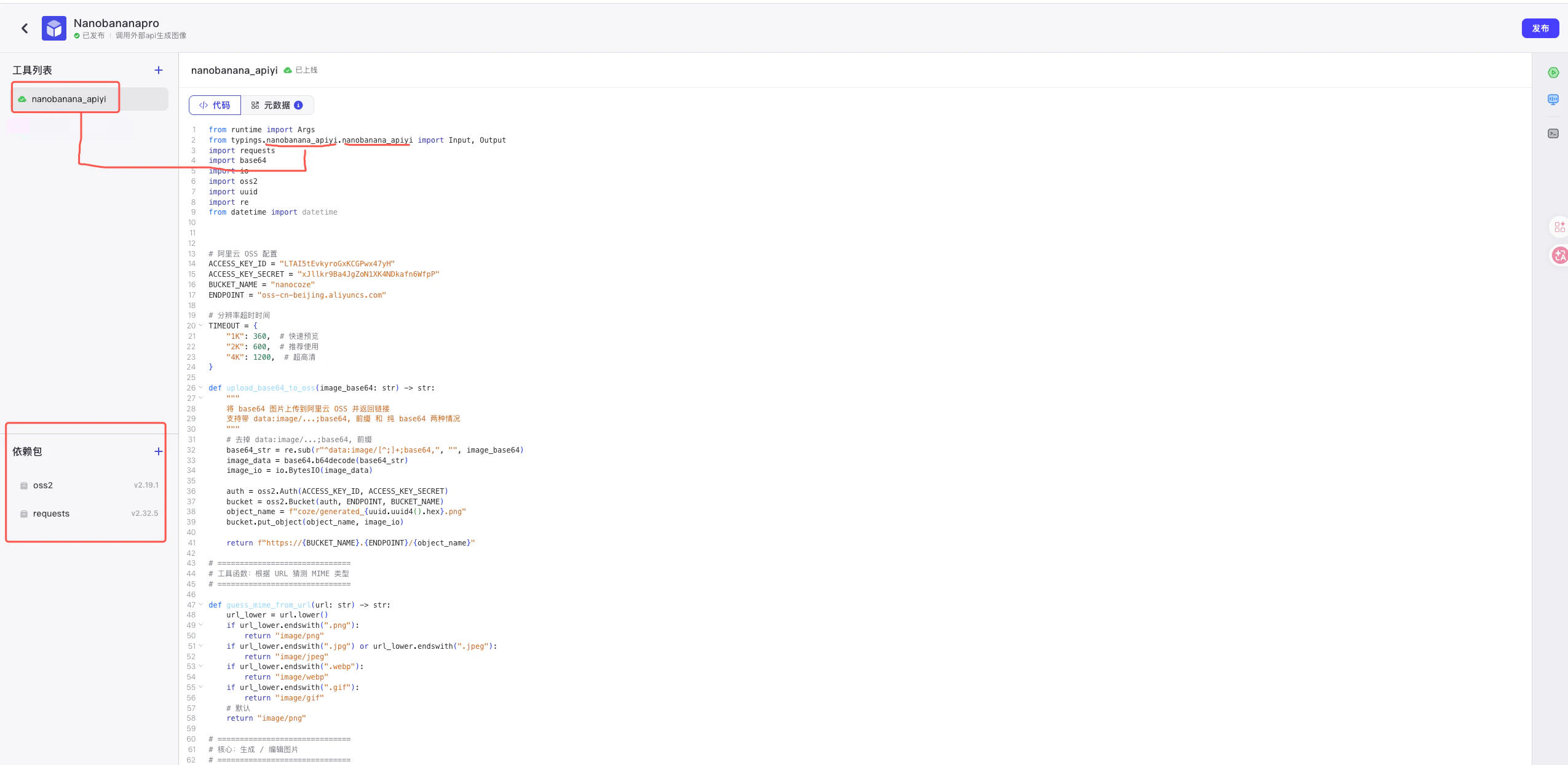 Core flow:
```text theme={null}
Coze workflow input (cleantext / fileurls / aspect_ratio / resolution / apikey)
↓
handler() entry
↓
generate_image() — build parts + call APIYI endpoint
↓
parse candidates / fallback errors
↓
upload_base64_to_oss() — upload to Aliyun OSS
↓
return { analysis, url, error }
```
## Inputs and Outputs
### Input
| Field | Type | Required | Description |
| -------------- | --------- | -------- | ------------------------------------------------------------------ |
| `cleantext` | string | yes | User prompt or edit instruction |
| `fileurls` | string\[] | no | Reference image URLs; empty triggers text-to-image |
| `aspect_ratio` | string | yes | Aspect ratio, e.g. `1:1`, `16:9`, `9:16` |
| `resolution` | string | yes | Resolution, must be uppercase: `1K` / `2K` / `4K` |
| `apikey` | string | yes | APIYI key (recommended: distribute per-user via the upstream node) |
### Output
| Field | Type | Description |
| ---------- | -------------- | --------------------------------- |
| `analysis` | string | Status label: `图片生成成功` / `图片生成失败` |
| `url` | string \| null | OSS public URL on success |
| `error` | string \| null | Friendly error message on failure |
## Deployment
* Generate an APIYI key (starts with `sk-`) at [APIYI Console](https://api.apiyi.com/token)
* Create an Aliyun OSS Bucket and a RAM sub-account with `oss:PutObject` permission on that bucket
* Note down `AccessKey ID`, `AccessKey Secret`, `Bucket name`, and `Endpoint` (e.g. `oss-cn-beijing.aliyuncs.com`)
1. Go to Coze Workspace → Library → Create custom plugin
2. Pick "Cloud-side plugin — create in Coze IDE"
3. Runtime: **Python**
4. Add dependencies: `requests`, `oss2`
Copy the complete Python code from the "Plugin Full Source" section below into Coze IDE, then update the 4 OSS config lines at the top of the file with your own values:
```python theme={null}
# Aliyun OSS configuration
ACCESS_KEY_ID = "your-AK"
ACCESS_KEY_SECRET = "your-SK"
BUCKET_NAME = "your-bucket"
ENDPOINT = "oss-cn-beijing.aliyuncs.com"
```
Configure Input / Output fields and required flags as below, matching the `args.input` fields in code:
Core flow:
```text theme={null}
Coze workflow input (cleantext / fileurls / aspect_ratio / resolution / apikey)
↓
handler() entry
↓
generate_image() — build parts + call APIYI endpoint
↓
parse candidates / fallback errors
↓
upload_base64_to_oss() — upload to Aliyun OSS
↓
return { analysis, url, error }
```
## Inputs and Outputs
### Input
| Field | Type | Required | Description |
| -------------- | --------- | -------- | ------------------------------------------------------------------ |
| `cleantext` | string | yes | User prompt or edit instruction |
| `fileurls` | string\[] | no | Reference image URLs; empty triggers text-to-image |
| `aspect_ratio` | string | yes | Aspect ratio, e.g. `1:1`, `16:9`, `9:16` |
| `resolution` | string | yes | Resolution, must be uppercase: `1K` / `2K` / `4K` |
| `apikey` | string | yes | APIYI key (recommended: distribute per-user via the upstream node) |
### Output
| Field | Type | Description |
| ---------- | -------------- | --------------------------------- |
| `analysis` | string | Status label: `图片生成成功` / `图片生成失败` |
| `url` | string \| null | OSS public URL on success |
| `error` | string \| null | Friendly error message on failure |
## Deployment
* Generate an APIYI key (starts with `sk-`) at [APIYI Console](https://api.apiyi.com/token)
* Create an Aliyun OSS Bucket and a RAM sub-account with `oss:PutObject` permission on that bucket
* Note down `AccessKey ID`, `AccessKey Secret`, `Bucket name`, and `Endpoint` (e.g. `oss-cn-beijing.aliyuncs.com`)
1. Go to Coze Workspace → Library → Create custom plugin
2. Pick "Cloud-side plugin — create in Coze IDE"
3. Runtime: **Python**
4. Add dependencies: `requests`, `oss2`
Copy the complete Python code from the "Plugin Full Source" section below into Coze IDE, then update the 4 OSS config lines at the top of the file with your own values:
```python theme={null}
# Aliyun OSS configuration
ACCESS_KEY_ID = "your-AK"
ACCESS_KEY_SECRET = "your-SK"
BUCKET_NAME = "your-bucket"
ENDPOINT = "oss-cn-beijing.aliyuncs.com"
```
Configure Input / Output fields and required flags as below, matching the `args.input` fields in code:
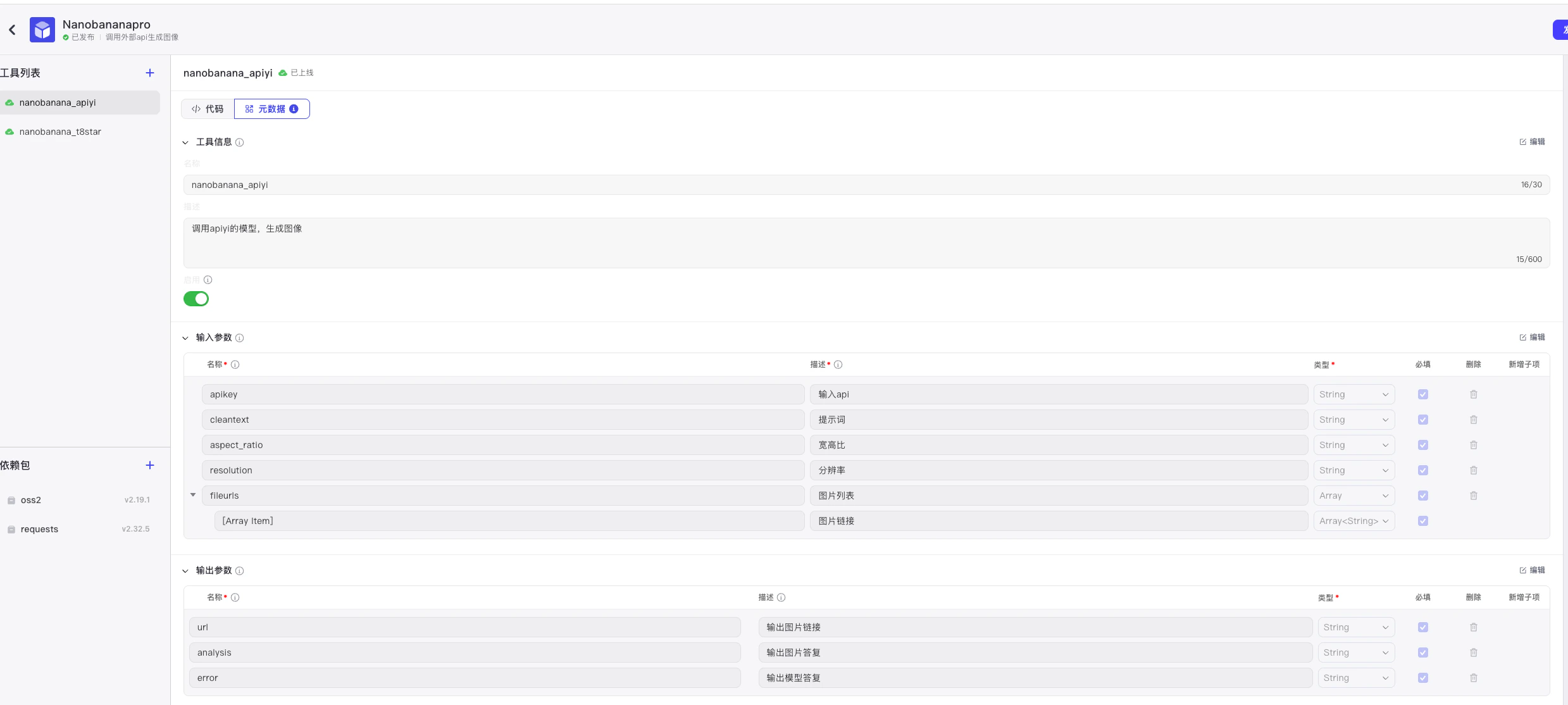 * In the Coze IDE, fill in test parameters (recommended: 1K + simple prompt to validate the OSS path first)
* When green, hit "Publish" and the node is now draggable in any workflow
## Error Classification Strategy
The plugin doesn't just return a boolean — it identifies failure causes in this priority order, so workflow branches can react differently:
| Priority | Error type | Trigger | Recommended action |
| -------- | ----------------------- | ----------------------------------------- | -------------------------------------------------------------- |
| 1 | `ZERO_CANDIDATES_TOKEN` | `usageMetadata.candidatesTokenCount == 0` | Prompt or image flagged in moderation; rewrite |
| 2 | `NO_CANDIDATES` | `candidates` is empty | System error; retry |
| 3 | `FINISH_REASON` | `finishReason` not `STOP` | Mapped: `PROHIBITED_CONTENT` / `SAFETY` / etc. |
| 4 | `NO_PARTS` | `content.parts` is empty | Retry |
| 5 | `INLINE_DATA_EMPTY` | `inlineData` present but `data` empty | Retry or rephrase |
| 6 | `TEXT_RESPONSE` | Only text returned | Auto-categorized as watermark / face-swap / NSFW / year-cutoff |
## Plugin Full Source
Below is the complete `coze-nanobanana-pro.py`. You can copy it into Coze IDE as-is — **just update the 4 OSS config lines at the top** and you're ready to publish.
```python coze-nanobanana-pro.py theme={null}
from runtime import Args
from typings.nanobanana_apiyi.nanobanana_apiyi import Input, Output
import requests
import base64
import io
import oss2
import uuid
import re
from datetime import datetime
# 阿里云 OSS 配置
ACCESS_KEY_ID = "" #填入自己的阿里云 Access Key ID
ACCESS_KEY_SECRET = "" #填入自己的阿里云 Access Key Secret
BUCKET_NAME = "" #填入自己的阿里云 OSS Bucket 名称
ENDPOINT = "oss-cn-beijing.aliyuncs.com" #填入自己的阿里云 OSS Endpoint,例如 "oss-cn-beijing.aliyuncs.com"
# 分辨率超时时间
TIMEOUT = {
"1K": 360, # 快速预览
"2K": 600, # 推荐使用
"4K": 1200, # 超高清
}
def upload_base64_to_oss(image_base64: str) -> str:
"""
将 base64 图片上传到阿里云 OSS 并返回链接
支持带 data:image/...;base64, 前缀 和 纯 base64 两种情况
"""
# 去掉 data:image/...;base64, 前缀
base64_str = re.sub(r"^data:image/[^;]+;base64,", "", image_base64)
image_data = base64.b64decode(base64_str)
image_io = io.BytesIO(image_data)
auth = oss2.Auth(ACCESS_KEY_ID, ACCESS_KEY_SECRET)
bucket = oss2.Bucket(auth, ENDPOINT, BUCKET_NAME)
object_name = f"coze/generated_{uuid.uuid4().hex}.png"
bucket.put_object(object_name, image_io)
return f"https://{BUCKET_NAME}.{ENDPOINT}/{object_name}"
# ==============================
# 工具函数:根据 URL 猜测 MIME 类型
# ==============================
def guess_mime_from_url(url: str) -> str:
url_lower = url.lower()
if url_lower.endswith(".png"):
return "image/png"
if url_lower.endswith(".jpg") or url_lower.endswith(".jpeg"):
return "image/jpeg"
if url_lower.endswith(".webp"):
return "image/webp"
if url_lower.endswith(".gif"):
return "image/gif"
# 默认
return "image/png"
# ==============================
# 核心:生成 / 编辑图片
# ==============================
def generate_image(prompt: str, aspect_ratio: str, resolution: str, apikey:str,apiurl:str,image_urls=None):
"""
生成 / 编辑图片的核心函数
- 如果 image_urls 为空:纯文生图
- 如果 image_urls 不为空:把 URL 指向的图片下载下来,按 inline_data 方式传给 API,实现改图
"""
# 组装 parts
parts = []
# 1. 如果有图片 URL,则按 apiyi 改图 demo 的方式构造 inline_data
if image_urls:
for url in image_urls:
try:
resp = requests.get(url, timeout=180)
if resp.status_code != 200:
return {
"success": False,
"error": f"图片上传阶段,获取图片失败({url})HTTP {resp.status_code}"
}
image_bytes = resp.content
image_base64 = base64.b64encode(image_bytes).decode("utf-8")
mime_type = guess_mime_from_url(url)
parts.append({
"inline_data": {
"mime_type": mime_type,
"data": image_base64
}
})
except Exception as e:
return {
"success": False,
"error": f"图片上传阶段,获取图片失败({url}): {e}"
}
# 2. 文字部分(编辑指令或文生图提示词)
# 注意:这里不再把图片 URL 塞进 prompt 里,仅用纯文字描述
if prompt:
parts.append({"text": prompt})
else:
# 没有文字时给一个默认提示(可按需要修改)
parts.append({"text": "根据图片进行合理的编辑生成。"})
# 3. 构造请求 payload(和官方改图 demo 一致的结构)
payload = {
"contents": [
{
"parts": parts
}
],
"generationConfig": {
"responseModalities": ["IMAGE"],
"imageConfig": {
"aspectRatio": aspect_ratio,
"image_size": resolution
}
}
}
headers = {
"Authorization": f"Bearer {apikey}",
"Content-Type": "application/json"
}
try:
response = requests.post(apiurl, headers=headers, json=payload, timeout=TIMEOUT[resolution])
# HTTP 非200
if response.status_code != 200:
return {"success": False, "error": f"HTTP {response.status_code}: {response.text}"}
# JSON 解析
try:
data = response.json()
except ValueError:
return {"success": False, "error": "响应不是有效JSON", "response": (response.text or "")[:500]}
# 1️⃣ 最高优先级:candidatesTokenCount
usage = data.get("usageMetadata") or {}
if usage.get("candidatesTokenCount") == 0:
return {
"success": False,
"errorType": "ZERO_CANDIDATES_TOKEN",
"error": "❌ 内容审核失败\n您的请求在内容审核阶段被拒绝,请修改提示词或图片",
"response": data
}
# 2️⃣ candidates 检查
candidates = data.get("candidates")
if not isinstance(candidates, list) or len(candidates) == 0:
return {
"success": False,
"errorType": "NO_CANDIDATES",
"error": "系统出错,请稍后重试",
"response": data
}
candidate = candidates[0] if isinstance(candidates[0], dict) else None
if candidate is None:
return {
"success": False,
"errorType": "NO_CANDIDATES",
"error": "系统出错,请稍后重试(candidates[0]结构异常)",
"response": data
}
# 3️⃣ finishReason
finish_reason = candidate.get("finishReason")
if isinstance(finish_reason, str) and finish_reason != "STOP":
reason_map = {
"PROHIBITED_CONTENT": "内容违反安全策略,已被拒绝处理",
"SAFETY": "内容触发了安全过滤器",
"RECITATION": "内容可能涉及版权问题",
"MAX_TOKENS": "内容长度超出限制",
}
return {
"success": False,
"errorType": "FINISH_REASON",
"finishReason": finish_reason,
"error": reason_map.get(finish_reason, f"请求被拒绝:{finish_reason}"),
"response": data
}
# 4️⃣ content.parts
content = candidate.get("content") or {}
parts = content.get("parts")
if not isinstance(parts, list) or len(parts) == 0:
return {
"success": False,
"errorType": "NO_PARTS",
"error": "生成失败,请重试(content.parts为空)",
"response": data
}
# 5️⃣ 提取图片和文本(更精准:识别 inlineData 存在但 data 为空)
images = []
texts = []
saw_inline_but_empty = False
for i, part in enumerate(parts):
if not isinstance(part, dict):
continue
# 收集 text(即使有 thoughtSignature,也照收)
t = part.get("text")
if isinstance(t, str) and t.strip() and not t.startswith("data:image/"):
texts.append(t.strip())
# 兼容 inlineData / inline_data
inline = None
if isinstance(part.get("inlineData"), dict):
inline = part["inlineData"]
elif isinstance(part.get("inline_data"), dict):
inline = part["inline_data"]
if inline is not None:
b64 = inline.get("data")
if not isinstance(b64, str) or not b64.strip():
saw_inline_but_empty = True
continue
images.append(b64.strip())
# ✅ 更精准:inlineData 存在但全都没 data
if not images and saw_inline_but_empty:
return {
"success": False,
"errorType": "INLINE_DATA_EMPTY",
"error": "生成失败:检测到 inlineData 但图片数据为空(inlineData.data为空)",
"response": data
}
# 6️⃣ 有图片:成功(保持你原来的返回结构)
if images:
return {"success": True, "image_data": images[0]}
# 7️⃣ 无图片:有文本 -> TEXT_RESPONSE
if texts:
text_content = "\n".join(texts)
# —— 可选:不做函数,直接就地识别类型(想更简单可删掉这段 detectedType)——
low = text_content.lower()
detected = "general"
if any(k in low for k in ["watermark", "remove watermark", "去水印", "移除水印", "删除水印"]):
detected = "拒绝处理水印任务"
elif any(k in low for k in ["faceswap", "face swap", "换脸", "deepfake"]):
detected = "拒绝处理换脸任务"
elif any(k in low for k in ["sexually", "explicit", "porn", "nude", "nsfw", "色情", "不雅", "裸"]):
detected = "拒绝色情任务"
elif any(str(y) in low for y in range(2026, 2101)):
detected = "拒绝超过知识库范围任务"
return {
"success": False,
"errorType": "TEXT_RESPONSE",
"error": detected, # 你文档要求:直接展示 API text
"response": data
}
# ✅ 更精准:parts 有结构但既无图也无文本
return {
"success": False,
"error": "生成失败:parts存在但未找到图片数据或文本说明",
"response": data
}
except requests.exceptions.Timeout:
return {"success": False, "error": f"图片生成请求超时(超过 {TIMEOUT[resolution]} 秒)"}
except Exception as e:
return {"success": False, "error": f"图片生成请求失败: {str(e)}"}
# ==============================
# Coze Node 入口
# ==============================
def handler(args: Args[Input]) -> Output:
"""
Coze / NanobananaPro 节点入口
- args.input.cleantext: 用户文字提示词
- args.input.fileurls: 用户上传图片的 URL 列表(用于改图)
- args.input.aspect_ratio: 宽高比,如 "1:1" / "9:16"
- args.input.resolution: 分辨率,如 "1K" / "2K" / "4K"
"""
API_URL = "https://api.apiyi.com/v1beta/models/gemini-3-pro-image-preview:generateContent"
API_KEY = args.input.apikey
cleanttext = args.input.cleantext or ""
fileurls = args.input.fileurls or []
aspectratio = args.input.aspect_ratio
resolution = args.input.resolution
# - 图片通过 image_urls 传入 generate_image,走 inline_data 改图逻辑
prompt = cleanttext.strip()
# 调用 Gemini 3 Pro 生成 / 编辑图片
# 如果 fileurls 不为空,会按"改图"模式调用
result = generate_image(prompt, aspectratio, resolution, API_KEY,API_URL,image_urls=fileurls if fileurls else None)
if result["success"]:
image_base64 = result["image_data"]
oss_url = upload_base64_to_oss(image_base64)
return {"analysis": "图片生成成功", "url": oss_url, "error": None}
else:
return {"analysis": "图片生成失败", "url": None, "error": result["error"]}
```
## Using It in a Coze Workflow
Once published, drag the plugin node into your Coze workflow and wire it like this:
```text theme={null}
Start node (user prompt + images)
↓
Prompt / image splitter (code node)
↓
Per-user API key dictionary (route by caller name)
↓
nanobanana_apiyi plugin node (this plugin)
↓
Success / failure branch
↓
End node (output url or error)
```
Pair it with the [Feishu Bitable AI Image Generation Workflow](/en/scenarios/ecosystem/feishu-bitable-image-shortcut) for a no-code production line — operators just fill rows in Feishu Bitable to batch-generate images.
## FAQ
Downstream Coze workflow nodes (especially Feishu field shortcuts) generally need an **accessible URL** to convert results into image attachments. Returning base64 means the data hops through the workflow inefficiently, and Feishu can't render it directly. OSS links also make long-term archiving and external sharing trivial.
Coze custom plugins don't expose system environment variables today. Recommended approach: keep the OSS credentials as constants at the top of the file and protect them with Coze's plugin encryption feature. For multi-tenant workflows, also write per-tenant prefixes into the OSS path.
To distribute different keys per caller. Add a "Per-user API key" dictionary node upstream that maps a caller's name to their APIYI key — clean for usage accounting and access control.
Nano Banana Pro 4K generation is genuinely slow (typically 5–15 minutes). The plugin already configures a 1200-second timeout for 4K. If still timing out:
1. Drop to 2K to debug your prompt
2. Check APIYI Console for rate limits
3. Reduce concurrent calls
This usually means the model refused (violation, year-cutoff, etc.). The plugin auto-classifies the type: watermark removal / face-swap / NSFW / year > 2025. Show the `error` field to the user — **don't retry**, the result will be the same.
Yes. The "Plugin Full Source" section above contains the complete `coze-nanobanana-pro.py` (contributed by Shuaila1996). **Just update the 4 OSS config lines at the top** and paste it into Coze IDE — no separate download needed.
If you also need:
* The Feishu field shortcut → see "Feishu Field Shortcut Full Source" in [Feishu Bitable AI Image Generation Workflow](/en/scenarios/ecosystem/feishu-bitable-image-shortcut)
* The Aliyun FC code → see "Aliyun Function Compute Full Source" in the same doc
## Related Resources
The perfect companion: hook this Coze workflow into Feishu Bitable so operators just fill rows to batch-generate
Full Nano Banana Pro API doc, pricing, and generation samples
Nano Banana failure-troubleshooting guide aligned with this plugin's error codes
Manage API keys, view usage and balance
* In the Coze IDE, fill in test parameters (recommended: 1K + simple prompt to validate the OSS path first)
* When green, hit "Publish" and the node is now draggable in any workflow
## Error Classification Strategy
The plugin doesn't just return a boolean — it identifies failure causes in this priority order, so workflow branches can react differently:
| Priority | Error type | Trigger | Recommended action |
| -------- | ----------------------- | ----------------------------------------- | -------------------------------------------------------------- |
| 1 | `ZERO_CANDIDATES_TOKEN` | `usageMetadata.candidatesTokenCount == 0` | Prompt or image flagged in moderation; rewrite |
| 2 | `NO_CANDIDATES` | `candidates` is empty | System error; retry |
| 3 | `FINISH_REASON` | `finishReason` not `STOP` | Mapped: `PROHIBITED_CONTENT` / `SAFETY` / etc. |
| 4 | `NO_PARTS` | `content.parts` is empty | Retry |
| 5 | `INLINE_DATA_EMPTY` | `inlineData` present but `data` empty | Retry or rephrase |
| 6 | `TEXT_RESPONSE` | Only text returned | Auto-categorized as watermark / face-swap / NSFW / year-cutoff |
## Plugin Full Source
Below is the complete `coze-nanobanana-pro.py`. You can copy it into Coze IDE as-is — **just update the 4 OSS config lines at the top** and you're ready to publish.
```python coze-nanobanana-pro.py theme={null}
from runtime import Args
from typings.nanobanana_apiyi.nanobanana_apiyi import Input, Output
import requests
import base64
import io
import oss2
import uuid
import re
from datetime import datetime
# 阿里云 OSS 配置
ACCESS_KEY_ID = "" #填入自己的阿里云 Access Key ID
ACCESS_KEY_SECRET = "" #填入自己的阿里云 Access Key Secret
BUCKET_NAME = "" #填入自己的阿里云 OSS Bucket 名称
ENDPOINT = "oss-cn-beijing.aliyuncs.com" #填入自己的阿里云 OSS Endpoint,例如 "oss-cn-beijing.aliyuncs.com"
# 分辨率超时时间
TIMEOUT = {
"1K": 360, # 快速预览
"2K": 600, # 推荐使用
"4K": 1200, # 超高清
}
def upload_base64_to_oss(image_base64: str) -> str:
"""
将 base64 图片上传到阿里云 OSS 并返回链接
支持带 data:image/...;base64, 前缀 和 纯 base64 两种情况
"""
# 去掉 data:image/...;base64, 前缀
base64_str = re.sub(r"^data:image/[^;]+;base64,", "", image_base64)
image_data = base64.b64decode(base64_str)
image_io = io.BytesIO(image_data)
auth = oss2.Auth(ACCESS_KEY_ID, ACCESS_KEY_SECRET)
bucket = oss2.Bucket(auth, ENDPOINT, BUCKET_NAME)
object_name = f"coze/generated_{uuid.uuid4().hex}.png"
bucket.put_object(object_name, image_io)
return f"https://{BUCKET_NAME}.{ENDPOINT}/{object_name}"
# ==============================
# 工具函数:根据 URL 猜测 MIME 类型
# ==============================
def guess_mime_from_url(url: str) -> str:
url_lower = url.lower()
if url_lower.endswith(".png"):
return "image/png"
if url_lower.endswith(".jpg") or url_lower.endswith(".jpeg"):
return "image/jpeg"
if url_lower.endswith(".webp"):
return "image/webp"
if url_lower.endswith(".gif"):
return "image/gif"
# 默认
return "image/png"
# ==============================
# 核心:生成 / 编辑图片
# ==============================
def generate_image(prompt: str, aspect_ratio: str, resolution: str, apikey:str,apiurl:str,image_urls=None):
"""
生成 / 编辑图片的核心函数
- 如果 image_urls 为空:纯文生图
- 如果 image_urls 不为空:把 URL 指向的图片下载下来,按 inline_data 方式传给 API,实现改图
"""
# 组装 parts
parts = []
# 1. 如果有图片 URL,则按 apiyi 改图 demo 的方式构造 inline_data
if image_urls:
for url in image_urls:
try:
resp = requests.get(url, timeout=180)
if resp.status_code != 200:
return {
"success": False,
"error": f"图片上传阶段,获取图片失败({url})HTTP {resp.status_code}"
}
image_bytes = resp.content
image_base64 = base64.b64encode(image_bytes).decode("utf-8")
mime_type = guess_mime_from_url(url)
parts.append({
"inline_data": {
"mime_type": mime_type,
"data": image_base64
}
})
except Exception as e:
return {
"success": False,
"error": f"图片上传阶段,获取图片失败({url}): {e}"
}
# 2. 文字部分(编辑指令或文生图提示词)
# 注意:这里不再把图片 URL 塞进 prompt 里,仅用纯文字描述
if prompt:
parts.append({"text": prompt})
else:
# 没有文字时给一个默认提示(可按需要修改)
parts.append({"text": "根据图片进行合理的编辑生成。"})
# 3. 构造请求 payload(和官方改图 demo 一致的结构)
payload = {
"contents": [
{
"parts": parts
}
],
"generationConfig": {
"responseModalities": ["IMAGE"],
"imageConfig": {
"aspectRatio": aspect_ratio,
"image_size": resolution
}
}
}
headers = {
"Authorization": f"Bearer {apikey}",
"Content-Type": "application/json"
}
try:
response = requests.post(apiurl, headers=headers, json=payload, timeout=TIMEOUT[resolution])
# HTTP 非200
if response.status_code != 200:
return {"success": False, "error": f"HTTP {response.status_code}: {response.text}"}
# JSON 解析
try:
data = response.json()
except ValueError:
return {"success": False, "error": "响应不是有效JSON", "response": (response.text or "")[:500]}
# 1️⃣ 最高优先级:candidatesTokenCount
usage = data.get("usageMetadata") or {}
if usage.get("candidatesTokenCount") == 0:
return {
"success": False,
"errorType": "ZERO_CANDIDATES_TOKEN",
"error": "❌ 内容审核失败\n您的请求在内容审核阶段被拒绝,请修改提示词或图片",
"response": data
}
# 2️⃣ candidates 检查
candidates = data.get("candidates")
if not isinstance(candidates, list) or len(candidates) == 0:
return {
"success": False,
"errorType": "NO_CANDIDATES",
"error": "系统出错,请稍后重试",
"response": data
}
candidate = candidates[0] if isinstance(candidates[0], dict) else None
if candidate is None:
return {
"success": False,
"errorType": "NO_CANDIDATES",
"error": "系统出错,请稍后重试(candidates[0]结构异常)",
"response": data
}
# 3️⃣ finishReason
finish_reason = candidate.get("finishReason")
if isinstance(finish_reason, str) and finish_reason != "STOP":
reason_map = {
"PROHIBITED_CONTENT": "内容违反安全策略,已被拒绝处理",
"SAFETY": "内容触发了安全过滤器",
"RECITATION": "内容可能涉及版权问题",
"MAX_TOKENS": "内容长度超出限制",
}
return {
"success": False,
"errorType": "FINISH_REASON",
"finishReason": finish_reason,
"error": reason_map.get(finish_reason, f"请求被拒绝:{finish_reason}"),
"response": data
}
# 4️⃣ content.parts
content = candidate.get("content") or {}
parts = content.get("parts")
if not isinstance(parts, list) or len(parts) == 0:
return {
"success": False,
"errorType": "NO_PARTS",
"error": "生成失败,请重试(content.parts为空)",
"response": data
}
# 5️⃣ 提取图片和文本(更精准:识别 inlineData 存在但 data 为空)
images = []
texts = []
saw_inline_but_empty = False
for i, part in enumerate(parts):
if not isinstance(part, dict):
continue
# 收集 text(即使有 thoughtSignature,也照收)
t = part.get("text")
if isinstance(t, str) and t.strip() and not t.startswith("data:image/"):
texts.append(t.strip())
# 兼容 inlineData / inline_data
inline = None
if isinstance(part.get("inlineData"), dict):
inline = part["inlineData"]
elif isinstance(part.get("inline_data"), dict):
inline = part["inline_data"]
if inline is not None:
b64 = inline.get("data")
if not isinstance(b64, str) or not b64.strip():
saw_inline_but_empty = True
continue
images.append(b64.strip())
# ✅ 更精准:inlineData 存在但全都没 data
if not images and saw_inline_but_empty:
return {
"success": False,
"errorType": "INLINE_DATA_EMPTY",
"error": "生成失败:检测到 inlineData 但图片数据为空(inlineData.data为空)",
"response": data
}
# 6️⃣ 有图片:成功(保持你原来的返回结构)
if images:
return {"success": True, "image_data": images[0]}
# 7️⃣ 无图片:有文本 -> TEXT_RESPONSE
if texts:
text_content = "\n".join(texts)
# —— 可选:不做函数,直接就地识别类型(想更简单可删掉这段 detectedType)——
low = text_content.lower()
detected = "general"
if any(k in low for k in ["watermark", "remove watermark", "去水印", "移除水印", "删除水印"]):
detected = "拒绝处理水印任务"
elif any(k in low for k in ["faceswap", "face swap", "换脸", "deepfake"]):
detected = "拒绝处理换脸任务"
elif any(k in low for k in ["sexually", "explicit", "porn", "nude", "nsfw", "色情", "不雅", "裸"]):
detected = "拒绝色情任务"
elif any(str(y) in low for y in range(2026, 2101)):
detected = "拒绝超过知识库范围任务"
return {
"success": False,
"errorType": "TEXT_RESPONSE",
"error": detected, # 你文档要求:直接展示 API text
"response": data
}
# ✅ 更精准:parts 有结构但既无图也无文本
return {
"success": False,
"error": "生成失败:parts存在但未找到图片数据或文本说明",
"response": data
}
except requests.exceptions.Timeout:
return {"success": False, "error": f"图片生成请求超时(超过 {TIMEOUT[resolution]} 秒)"}
except Exception as e:
return {"success": False, "error": f"图片生成请求失败: {str(e)}"}
# ==============================
# Coze Node 入口
# ==============================
def handler(args: Args[Input]) -> Output:
"""
Coze / NanobananaPro 节点入口
- args.input.cleantext: 用户文字提示词
- args.input.fileurls: 用户上传图片的 URL 列表(用于改图)
- args.input.aspect_ratio: 宽高比,如 "1:1" / "9:16"
- args.input.resolution: 分辨率,如 "1K" / "2K" / "4K"
"""
API_URL = "https://api.apiyi.com/v1beta/models/gemini-3-pro-image-preview:generateContent"
API_KEY = args.input.apikey
cleanttext = args.input.cleantext or ""
fileurls = args.input.fileurls or []
aspectratio = args.input.aspect_ratio
resolution = args.input.resolution
# - 图片通过 image_urls 传入 generate_image,走 inline_data 改图逻辑
prompt = cleanttext.strip()
# 调用 Gemini 3 Pro 生成 / 编辑图片
# 如果 fileurls 不为空,会按"改图"模式调用
result = generate_image(prompt, aspectratio, resolution, API_KEY,API_URL,image_urls=fileurls if fileurls else None)
if result["success"]:
image_base64 = result["image_data"]
oss_url = upload_base64_to_oss(image_base64)
return {"analysis": "图片生成成功", "url": oss_url, "error": None}
else:
return {"analysis": "图片生成失败", "url": None, "error": result["error"]}
```
## Using It in a Coze Workflow
Once published, drag the plugin node into your Coze workflow and wire it like this:
```text theme={null}
Start node (user prompt + images)
↓
Prompt / image splitter (code node)
↓
Per-user API key dictionary (route by caller name)
↓
nanobanana_apiyi plugin node (this plugin)
↓
Success / failure branch
↓
End node (output url or error)
```
Pair it with the [Feishu Bitable AI Image Generation Workflow](/en/scenarios/ecosystem/feishu-bitable-image-shortcut) for a no-code production line — operators just fill rows in Feishu Bitable to batch-generate images.
## FAQ
Downstream Coze workflow nodes (especially Feishu field shortcuts) generally need an **accessible URL** to convert results into image attachments. Returning base64 means the data hops through the workflow inefficiently, and Feishu can't render it directly. OSS links also make long-term archiving and external sharing trivial.
Coze custom plugins don't expose system environment variables today. Recommended approach: keep the OSS credentials as constants at the top of the file and protect them with Coze's plugin encryption feature. For multi-tenant workflows, also write per-tenant prefixes into the OSS path.
To distribute different keys per caller. Add a "Per-user API key" dictionary node upstream that maps a caller's name to their APIYI key — clean for usage accounting and access control.
Nano Banana Pro 4K generation is genuinely slow (typically 5–15 minutes). The plugin already configures a 1200-second timeout for 4K. If still timing out:
1. Drop to 2K to debug your prompt
2. Check APIYI Console for rate limits
3. Reduce concurrent calls
This usually means the model refused (violation, year-cutoff, etc.). The plugin auto-classifies the type: watermark removal / face-swap / NSFW / year > 2025. Show the `error` field to the user — **don't retry**, the result will be the same.
Yes. The "Plugin Full Source" section above contains the complete `coze-nanobanana-pro.py` (contributed by Shuaila1996). **Just update the 4 OSS config lines at the top** and paste it into Coze IDE — no separate download needed.
If you also need:
* The Feishu field shortcut → see "Feishu Field Shortcut Full Source" in [Feishu Bitable AI Image Generation Workflow](/en/scenarios/ecosystem/feishu-bitable-image-shortcut)
* The Aliyun FC code → see "Aliyun Function Compute Full Source" in the same doc
## Related Resources
The perfect companion: hook this Coze workflow into Feishu Bitable so operators just fill rows to batch-generate
Full Nano Banana Pro API doc, pricing, and generation samples
Nano Banana failure-troubleshooting guide aligned with this plugin's error codes
Manage API keys, view usage and balance