> ## Documentation Index
> Fetch the complete documentation index at: https://docs.apiyi.com/llms.txt
> Use this file to discover all available pages before exploring further.
# Trae
> ByteDance's AI-native IDE with Builder/Chat/Inline Chat modes. Connect to APIYI via custom model entries to cover both OpenAI and Anthropic protocols with 400+ leading models.
## Overview
**Trae** is an **AI-native IDE** launched by ByteDance in January 2025, positioned as a "Vibe Coding" productivity tool for professional developers — describe what you want in natural language and the AI handles completion, bug fixing, project scaffolding, and one-click preview. Trae ships in two flavors: **TRAE CN** (`trae.cn`) and the **international TRAE** (`trae.ai`), with the **SOLO** series (Desktop / App / Web) letting the agent take over the full task lifecycle.
By wiring APIYI in through Trae's "Custom Model" feature, you get:
Configure both OpenAI and Anthropic providers — one token, two protocols
GPT, Claude, Gemini, DeepSeek, Doubao, Qwen — all behind one gateway
Pick the ClaudeCode group when creating a token to save 5% on Claude, stackable with top-up bonuses
`api.apiyi.com` is directly reachable from mainland China — no extra proxy needed
**Product Info**
* 🔗 International: `www.trae.ai`
* 🔗 China edition: `www.trae.cn`
* 👥 Developer: ByteDance
* 📅 First released: January 2025
* 🧩 Modes: Builder (agent) / Chat (sidebar) / Inline Chat
* 🌐 Protocols supported: OpenAI, Anthropic, plus many other third-party providers
## Core Features
### Three Interaction Modes
* **Builder mode**: agent takes over — reads/writes files, runs commands, scaffolds projects
* **Chat mode**: sidebar conversation, similar to Cursor Chat / Cline, great for Q\&A and snippets
* **Inline Chat**: `Cmd/Ctrl + I` opens an in-editor inline conversation — fastest path for completion and refactoring
### MCP and Tooling Ecosystem
* Built-in **MCP (Model Context Protocol)** support for external tools and APIs
* **Remote-SSH** support — remote dev feels identical to local
* `.rules` files for project-level AI behavior
### Custom Model (focus of this guide)
The international Trae ships presets for **Anthropic, OpenAI, Gemini, xAI, OpenRouter, Ollama, DeepSeek, Volcano Engine, Aliyun, Tencent Cloud, SiliconFlow, PPIO, Novita, BytePlus** and more. Every preset lets you fill in a **custom model ID + API key + custom request URL** — that's the entry point we'll use to plug APIYI in.
**Why route through APIYI**: Trae's built-in models are region- and version-limited and there's no way to share usage across multiple upstream accounts. With APIYI, **one token covers both OpenAI and Anthropic** — switching between GPT and Claude no longer requires bouncing back to settings; just pick the model from Trae's top-bar dropdown.
## Quick Start
### Step 1: Install Trae
Download from `www.trae.ai` — supports macOS, Windows, Linux. The international build ships GPT / Claude / Gemini presets out of the box.
Download from `www.trae.cn` — supports macOS and Windows. Ships Doubao and DeepSeek presets; account login via mobile phone.
### Step 2: Get an APIYI Token
1. Visit the APIYI token console: `api.apiyi.com/token`
2. Click "New Token"
3. **For Claude-heavy usage**: pick the **ClaudeCode group** — Claude calls get **5% off**, stackable with the 10%-20% top-up bonus
4. **For mixed GPT/Gemini/DeepSeek usage**: the **Default group** is fine
5. Copy the `sk-` prefixed key
### Step 3: Open the Custom Model Panel in Trae
* **IDE mode**: click the ⚙️ icon in the top-right → **Models** in the left nav → "Add model" / "Custom model"
* **SOLO mode**: click ⚙️ in the top-right of the chat panel → **Models** → Add
### Step 4: Add the OpenAI-Protocol Entry (GPT / Gemini / DeepSeek / Doubao, etc.)
Fill in as shown below. **The custom request URL must include the full `/v1/chat/completions` path** — not just the domain:
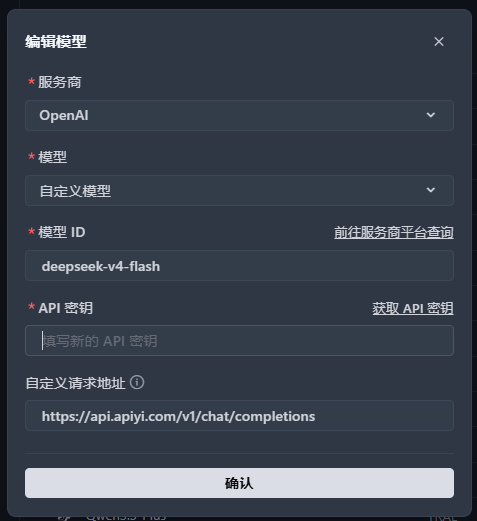 | Field | Value | Notes |
| ---------------------- | ----------------------------------------------------------- | --------------------------------------- |
| **Provider** | `OpenAI` | Pick the OpenAI preset |
| **Model** | `Custom Model` | Last entry in the dropdown |
| **Model ID** | e.g. `gpt-5.1`, `deepseek-v4-flash`, `gemini-3-pro-preview` | Full ID of the model you want |
| **API Key** | `sk-...` | Paste the APIYI token from Step 2 |
| **Custom Request URL** | `https://api.apiyi.com/v1/chat/completions` | **Must include `/v1/chat/completions`** |
**The base URL needs the full path**: starting with v3.3.51, Trae's custom-model baseURL field is used **verbatim** — it no longer auto-appends `/chat/completions`. Filling just `https://api.apiyi.com` or `https://api.apiyi.com/v1` will error.
### Step 5: Add the Anthropic-Protocol Entry (Claude family)
If you also want Claude Opus 4.6 / Sonnet 4.6 / Haiku 4.5, add a second provider entry:
| Field | Value | Notes |
| ---------------------- | ----------------------------------------------------------- | --------------------------------------- |
| **Provider** | `OpenAI` | Pick the OpenAI preset |
| **Model** | `Custom Model` | Last entry in the dropdown |
| **Model ID** | e.g. `gpt-5.1`, `deepseek-v4-flash`, `gemini-3-pro-preview` | Full ID of the model you want |
| **API Key** | `sk-...` | Paste the APIYI token from Step 2 |
| **Custom Request URL** | `https://api.apiyi.com/v1/chat/completions` | **Must include `/v1/chat/completions`** |
**The base URL needs the full path**: starting with v3.3.51, Trae's custom-model baseURL field is used **verbatim** — it no longer auto-appends `/chat/completions`. Filling just `https://api.apiyi.com` or `https://api.apiyi.com/v1` will error.
### Step 5: Add the Anthropic-Protocol Entry (Claude family)
If you also want Claude Opus 4.6 / Sonnet 4.6 / Haiku 4.5, add a second provider entry:
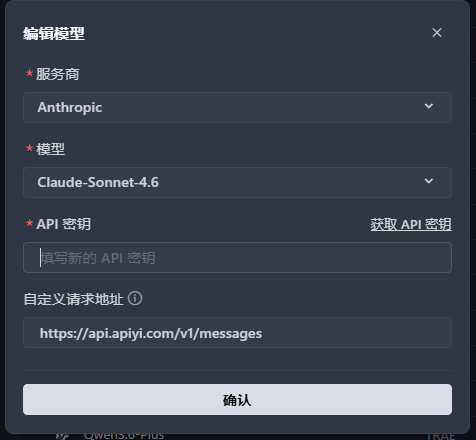 | Field | Value | Notes |
| ---------------------- | --------------------------------------------------------------- | ------------------------------------------------------------------------- |
| **Provider** | `Anthropic` | Pick the Anthropic preset |
| **Model** | `Claude-Sonnet-4.6` (or another Claude version in the dropdown) | Use the official preset — no need to go to "Custom model" |
| **API Key** | `sk-...` | Paste the APIYI token (ideally one from the ClaudeCode group) |
| **Custom Request URL** | `https://api.apiyi.com/v1/messages` | **Must include `/v1/messages`** — note this is NOT `/v1/chat/completions` |
**Two protocols, two paths**: OpenAI protocol goes through `/v1/chat/completions`; Anthropic protocol goes through `/v1/messages`. APIYI hosts both endpoints, so the same token can be bound to both Trae provider entries simultaneously without conflict.
### Step 6: Switch Models and Start Coding
Back in the editor, click the model dropdown at the top — both providers and all of their models will appear. Pick one and start chatting or enter Builder mode.
## Recommended Model Lineups
**Claude Sonnet 4.6** (Anthropic) + **GPT-5.1** (OpenAI)
Sonnet 4.6 has top-tier coding ability at great pricing; GPT-5.1 is faster for casual Chat
**Claude Opus 4.6** (Anthropic)
Best for large refactors, cross-file analysis, architectural decisions — pair with Builder mode
**Claude Sonnet 4.6 Thinking** / **GPT-5.1 Thinking**
Forces chain-of-thought — great for algorithms, logic puzzles, security review
**DeepSeek V4** / **Doubao 1.5 Pro** / **Qwen3 Coder**
Routes through OpenAI protocol — low per-token cost and natural Chinese output
APIYI exposes 400+ models behind a unified gateway. The model recommendations page is kept up to date with latest performance and pricing comparisons.
## Pro Tips
Add both the OpenAI and Anthropic entries — switching GPT/Gemini ↔ Claude no longer requires editing the baseURL.
Trae's built-in model presets lag behind APIYI's actual supply. **Pick "Custom model" and type the ID by hand** — refer to the APIYI console or the model recommendations page for the canonical ID.
Claude (especially Sonnet 4.6 / Opus 4.6) is meaningfully more reliable at instruction following and multi-turn tool calls in agent workflows.
Append `-thinking` to the model ID (e.g. `claude-sonnet-4-6-thinking`) to force chain-of-thought. Markedly reduces hallucinations on architecture decisions and security audits in Builder mode.
Create one **ClaudeCode-group token** (95% pricing) specifically for the Anthropic entry, and a **Default-group token** for GPT/Gemini/DeepSeek. Cleaner billing and quota visibility.
## FAQ
**No difference** — both versions support Custom Model and both accept adding OpenAI and Anthropic provider entries simultaneously. The only real difference is the built-in preset models (CN focuses on Doubao/DeepSeek; international focuses on GPT/Claude/Gemini).
Recommendation: pick TRAE CN (`trae.cn`) if you're in mainland China, pick international TRAE (`trae.ai`) for global teams or when you need the overseas preset models.
Starting from **v3.3.51**, Trae changed how the custom-model baseURL is parsed — it's now used verbatim in the request without auto-appending `/chat/completions`.
Correct:
* OpenAI protocol: `https://api.apiyi.com/v1/chat/completions`
* Anthropic protocol: `https://api.apiyi.com/v1/messages`
Wrong (will 404 or route-error):
* ❌ `https://api.apiyi.com`
* ❌ `https://api.apiyi.com/v1`
Yes. The Anthropic provider entry also offers a "Custom Model" option — type IDs like `claude-opus-4-6` / `claude-sonnet-4-6-thinking` / `claude-haiku-4-5-20251001` directly. APIYI's `/v1/messages` endpoint is fully compatible with official model IDs.
When creating a token at `api.apiyi.com/token`, **pick the ClaudeCode group** — Claude calls automatically get **5% off**, stackable with the 10%-20% top-up bonus.
Paste this ClaudeCode-group token into the Anthropic provider entry in Trae and the discount applies automatically.
Trae's preset list trails actual upstream availability. **Best practice: pick "Custom model" and type the ID by hand** — whatever APIYI's backend supports will work, no need to wait for the Trae client to update its presets.
1. **Prefer Claude Sonnet 4.6 or Opus 4.6**: they're notably more reliable in tool-call workflows
2. **Avoid small non-reasoning models**: DeepSeek-Chat / smaller Qwen variants can loop in Builder mode — switch to the `thinking` variant
3. **Watch context length**: for large multi-file changes switch to Opus 4.6 (200K context)
4. **Check APIYI live status**: occasional upstream wobbles affect all clients — confirm it's not a channel issue
Trae is a ByteDance client and uploads telemetry and conversation data per its official privacy policy. If you're sensitive about client-side telemetry, consider:
* Allow-listing at the corporate egress
* Redacting sensitive snippets before entering Builder mode
* Choosing open-source / auditable clients like [Claude Code](/en/scenarios/programming/claude-code) or [Cline](/en/scenarios/programming/cline) as an alternative
| Tool | Type | Agent mode | APIYI integration | Best for |
| --------------- | -------------- | ------------- | -------------------------------------- | ------------------------------------------- |
| **Trae** | Standalone IDE | ✅ Builder | Medium (two entries for dual protocol) | Cursor-style UX with strong Chinese support |
| **Cursor** | Standalone IDE | ❌ (Chat only) | Easy (OpenAI protocol only) | Best-in-class completion and diff preview |
| **Cline** | VS Code plugin | ✅ | Easy | Already a heavy VS Code user |
| **Claude Code** | CLI | ✅ | Easy | Terminal workflow, CI, remote dev |
See each integration guide: [Cursor](/en/scenarios/programming/cursor) · [Cline](/en/scenarios/programming/cline) · [Claude Code](/en/scenarios/programming/claude-code) · [Codex CLI](/en/scenarios/programming/codex-cli)
1. Verify the API key starts with `sk-` and has no extra whitespace
2. Verify the baseURL is correct — especially the trailing path (`/v1/chat/completions` vs `/v1/messages`)
3. In the APIYI console, check the token is enabled and the target model is bound to the token's group
4. Insufficient balance can also surface as 401 — double-check the account balance
## Related Resources
Performance comparison and coding-scenario picks across 400+ models
Create tokens, view usage, manage groups
Setup guide for another mainstream AI IDE
Full-featured agent inside VS Code
**Need more help?** Visit `api.apiyi.com` or join the official community for technical support.
| Field | Value | Notes |
| ---------------------- | --------------------------------------------------------------- | ------------------------------------------------------------------------- |
| **Provider** | `Anthropic` | Pick the Anthropic preset |
| **Model** | `Claude-Sonnet-4.6` (or another Claude version in the dropdown) | Use the official preset — no need to go to "Custom model" |
| **API Key** | `sk-...` | Paste the APIYI token (ideally one from the ClaudeCode group) |
| **Custom Request URL** | `https://api.apiyi.com/v1/messages` | **Must include `/v1/messages`** — note this is NOT `/v1/chat/completions` |
**Two protocols, two paths**: OpenAI protocol goes through `/v1/chat/completions`; Anthropic protocol goes through `/v1/messages`. APIYI hosts both endpoints, so the same token can be bound to both Trae provider entries simultaneously without conflict.
### Step 6: Switch Models and Start Coding
Back in the editor, click the model dropdown at the top — both providers and all of their models will appear. Pick one and start chatting or enter Builder mode.
## Recommended Model Lineups
**Claude Sonnet 4.6** (Anthropic) + **GPT-5.1** (OpenAI)
Sonnet 4.6 has top-tier coding ability at great pricing; GPT-5.1 is faster for casual Chat
**Claude Opus 4.6** (Anthropic)
Best for large refactors, cross-file analysis, architectural decisions — pair with Builder mode
**Claude Sonnet 4.6 Thinking** / **GPT-5.1 Thinking**
Forces chain-of-thought — great for algorithms, logic puzzles, security review
**DeepSeek V4** / **Doubao 1.5 Pro** / **Qwen3 Coder**
Routes through OpenAI protocol — low per-token cost and natural Chinese output
APIYI exposes 400+ models behind a unified gateway. The model recommendations page is kept up to date with latest performance and pricing comparisons.
## Pro Tips
Add both the OpenAI and Anthropic entries — switching GPT/Gemini ↔ Claude no longer requires editing the baseURL.
Trae's built-in model presets lag behind APIYI's actual supply. **Pick "Custom model" and type the ID by hand** — refer to the APIYI console or the model recommendations page for the canonical ID.
Claude (especially Sonnet 4.6 / Opus 4.6) is meaningfully more reliable at instruction following and multi-turn tool calls in agent workflows.
Append `-thinking` to the model ID (e.g. `claude-sonnet-4-6-thinking`) to force chain-of-thought. Markedly reduces hallucinations on architecture decisions and security audits in Builder mode.
Create one **ClaudeCode-group token** (95% pricing) specifically for the Anthropic entry, and a **Default-group token** for GPT/Gemini/DeepSeek. Cleaner billing and quota visibility.
## FAQ
**No difference** — both versions support Custom Model and both accept adding OpenAI and Anthropic provider entries simultaneously. The only real difference is the built-in preset models (CN focuses on Doubao/DeepSeek; international focuses on GPT/Claude/Gemini).
Recommendation: pick TRAE CN (`trae.cn`) if you're in mainland China, pick international TRAE (`trae.ai`) for global teams or when you need the overseas preset models.
Starting from **v3.3.51**, Trae changed how the custom-model baseURL is parsed — it's now used verbatim in the request without auto-appending `/chat/completions`.
Correct:
* OpenAI protocol: `https://api.apiyi.com/v1/chat/completions`
* Anthropic protocol: `https://api.apiyi.com/v1/messages`
Wrong (will 404 or route-error):
* ❌ `https://api.apiyi.com`
* ❌ `https://api.apiyi.com/v1`
Yes. The Anthropic provider entry also offers a "Custom Model" option — type IDs like `claude-opus-4-6` / `claude-sonnet-4-6-thinking` / `claude-haiku-4-5-20251001` directly. APIYI's `/v1/messages` endpoint is fully compatible with official model IDs.
When creating a token at `api.apiyi.com/token`, **pick the ClaudeCode group** — Claude calls automatically get **5% off**, stackable with the 10%-20% top-up bonus.
Paste this ClaudeCode-group token into the Anthropic provider entry in Trae and the discount applies automatically.
Trae's preset list trails actual upstream availability. **Best practice: pick "Custom model" and type the ID by hand** — whatever APIYI's backend supports will work, no need to wait for the Trae client to update its presets.
1. **Prefer Claude Sonnet 4.6 or Opus 4.6**: they're notably more reliable in tool-call workflows
2. **Avoid small non-reasoning models**: DeepSeek-Chat / smaller Qwen variants can loop in Builder mode — switch to the `thinking` variant
3. **Watch context length**: for large multi-file changes switch to Opus 4.6 (200K context)
4. **Check APIYI live status**: occasional upstream wobbles affect all clients — confirm it's not a channel issue
Trae is a ByteDance client and uploads telemetry and conversation data per its official privacy policy. If you're sensitive about client-side telemetry, consider:
* Allow-listing at the corporate egress
* Redacting sensitive snippets before entering Builder mode
* Choosing open-source / auditable clients like [Claude Code](/en/scenarios/programming/claude-code) or [Cline](/en/scenarios/programming/cline) as an alternative
| Tool | Type | Agent mode | APIYI integration | Best for |
| --------------- | -------------- | ------------- | -------------------------------------- | ------------------------------------------- |
| **Trae** | Standalone IDE | ✅ Builder | Medium (two entries for dual protocol) | Cursor-style UX with strong Chinese support |
| **Cursor** | Standalone IDE | ❌ (Chat only) | Easy (OpenAI protocol only) | Best-in-class completion and diff preview |
| **Cline** | VS Code plugin | ✅ | Easy | Already a heavy VS Code user |
| **Claude Code** | CLI | ✅ | Easy | Terminal workflow, CI, remote dev |
See each integration guide: [Cursor](/en/scenarios/programming/cursor) · [Cline](/en/scenarios/programming/cline) · [Claude Code](/en/scenarios/programming/claude-code) · [Codex CLI](/en/scenarios/programming/codex-cli)
1. Verify the API key starts with `sk-` and has no extra whitespace
2. Verify the baseURL is correct — especially the trailing path (`/v1/chat/completions` vs `/v1/messages`)
3. In the APIYI console, check the token is enabled and the target model is bound to the token's group
4. Insufficient balance can also surface as 401 — double-check the account balance
## Related Resources
Performance comparison and coding-scenario picks across 400+ models
Create tokens, view usage, manage groups
Setup guide for another mainstream AI IDE
Full-featured agent inside VS Code
**Need more help?** Visit `api.apiyi.com` or join the official community for technical support.