> ## Documentation Index
> Fetch the complete documentation index at: https://docs.apiyi.com/llms.txt
> Use this file to discover all available pages before exploring further.
# Image Prompt Doctor Skill
> 生成前の prompt レビューを、Codex、OpenClaw、hermes-agent、Claude Code などでそのまま組み込める Agent スキルとしてパッケージ化します。prompt を 6 つの要素で採点し、品質を損なう曖昧な語を指摘し、そのまま使える書き直し済み prompt を取得できます。実際の結果を、それを生成した prompt と照らしてレビューすることもできます。デフォルトは gpt-5.6-luna です。
このページでは、**そのまま使える Agent Skill** を提供します。生成**前**に prompt をチェックし、不足している要素を補い、品質を下げる曖昧な表現を取り除いて、書き換え後のバージョンで生成します。全体は **サードパーティ依存ゼロ** の 2 ファイルで構成されています。
画像が期待外れだった場合、原因はたいていモデルでもチャネルでもなく、prompt にあります。この Skill は [高度な画像生成](/ja/api-capabilities/image-advanced-workflow) の「リライト層」を、どんなコーディングエージェントにもそのまま組み込める形にします。
## このスキルでできること
被写体、環境、ライティング、レンズ、グレーディング、構図を1つずつ採点し、0〜100の評価を付け、リスクを列挙し、そのままコピーできる書き換え済みのpromptを返します。
実際の画像を元のpromptと一緒に渡すと、モデルがそれを読み取り、**promptのどの文が実行されなかったか**と、モデルが独自に追加した内容を指摘し、それに応じて書き換えます。
`-t`では、そのファミリー固有の注記として、参照画像の制限、マスク対応、解像度パラメータの名称を追加します。
ポートレートでは肌とライティングのチェック、商品写真では背景と文字禁止のチェックが入り、イラストではフォトリアルさのチェック項目が自動的に低く評価されます。
## 最初から最後までの完全な診断
入力は、ユーザーが実際に入力する内容に、生成された画像を加えたものです:
```bash theme={null}
python3 scripts/prompt_doctor.py "Make me a coffee product shot, make it look nice, make it feel premium" \
-i result.jpg -t nano-banana -s product
```
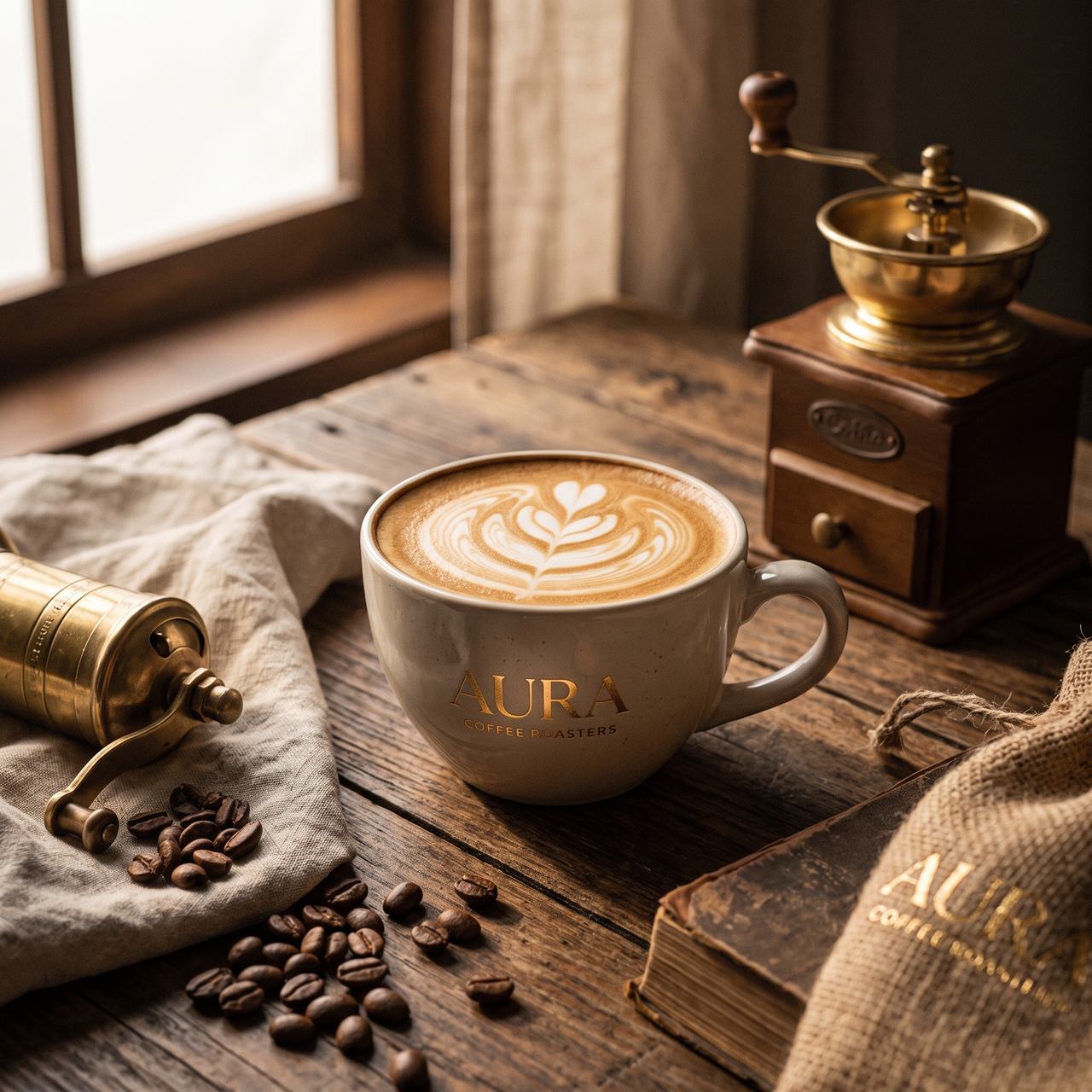 診断結果(実際の実行からの抜粋):
```text theme={null}
[Diagnosis] 18/100 - subject is legible, but with no product-photography constraints the
model expanded the frame into a lifestyle scene
Six elements: subject WEAK environment MISSING light MISSING lens MISSING
grading WEAK composition MISSING
Risks:
- "coffee product shot" never states the product form, material, colour or count, so the
model invented a latte-art cup on its own.
- No neutral, controllable background was specified, so the model added a window, a wooden
table, a grinder, coffee beans, a cloth sack and books - the frame reads as lifestyle
photography rather than an e-commerce product shot.
- No key light direction, hardness or fill was given; the result used window light from the
left with heavy warm shadows, none of it controllable.
- "look nice" and "feel premium" are abstract quality claims that were never converted into
a colour temperature, saturation level or photographic medium.
- The prompt never forbade text, so the model produced "AURA COFFEE ROASTERS" on the cup,
a plate on the grinder, and "AURA" on the book at lower right - a wrong-brand and
garbled-text risk for any commercial use.
[Optimized prompt]
An e-commerce product photograph of coffee: the subject is a single matte warm-white ceramic
cup ... (full text omitted)
[Parameter suggestions] size=2K aspect=1:1; 1:1 suits a square hero image, switch to 4:3 for
a landscape ad and keep the negative space on the right.
```
その書き換えた prompt を、変更せずに同じモデル(`gemini-3-pro-image`)へ再度入力すると:
診断結果(実際の実行からの抜粋):
```text theme={null}
[Diagnosis] 18/100 - subject is legible, but with no product-photography constraints the
model expanded the frame into a lifestyle scene
Six elements: subject WEAK environment MISSING light MISSING lens MISSING
grading WEAK composition MISSING
Risks:
- "coffee product shot" never states the product form, material, colour or count, so the
model invented a latte-art cup on its own.
- No neutral, controllable background was specified, so the model added a window, a wooden
table, a grinder, coffee beans, a cloth sack and books - the frame reads as lifestyle
photography rather than an e-commerce product shot.
- No key light direction, hardness or fill was given; the result used window light from the
left with heavy warm shadows, none of it controllable.
- "look nice" and "feel premium" are abstract quality claims that were never converted into
a colour temperature, saturation level or photographic medium.
- The prompt never forbade text, so the model produced "AURA COFFEE ROASTERS" on the cup,
a plate on the grinder, and "AURA" on the book at lower right - a wrong-brand and
garbled-text risk for any commercial use.
[Optimized prompt]
An e-commerce product photograph of coffee: the subject is a single matte warm-white ceramic
cup ... (full text omitted)
[Parameter suggestions] size=2K aspect=1:1; 1:1 suits a square hero image, switch to 4:3 for
a landscape ad and keep the negative space on the right.
```
その書き換えた prompt を、変更せずに同じモデル(`gemini-3-pro-image`)へ再度入力すると:
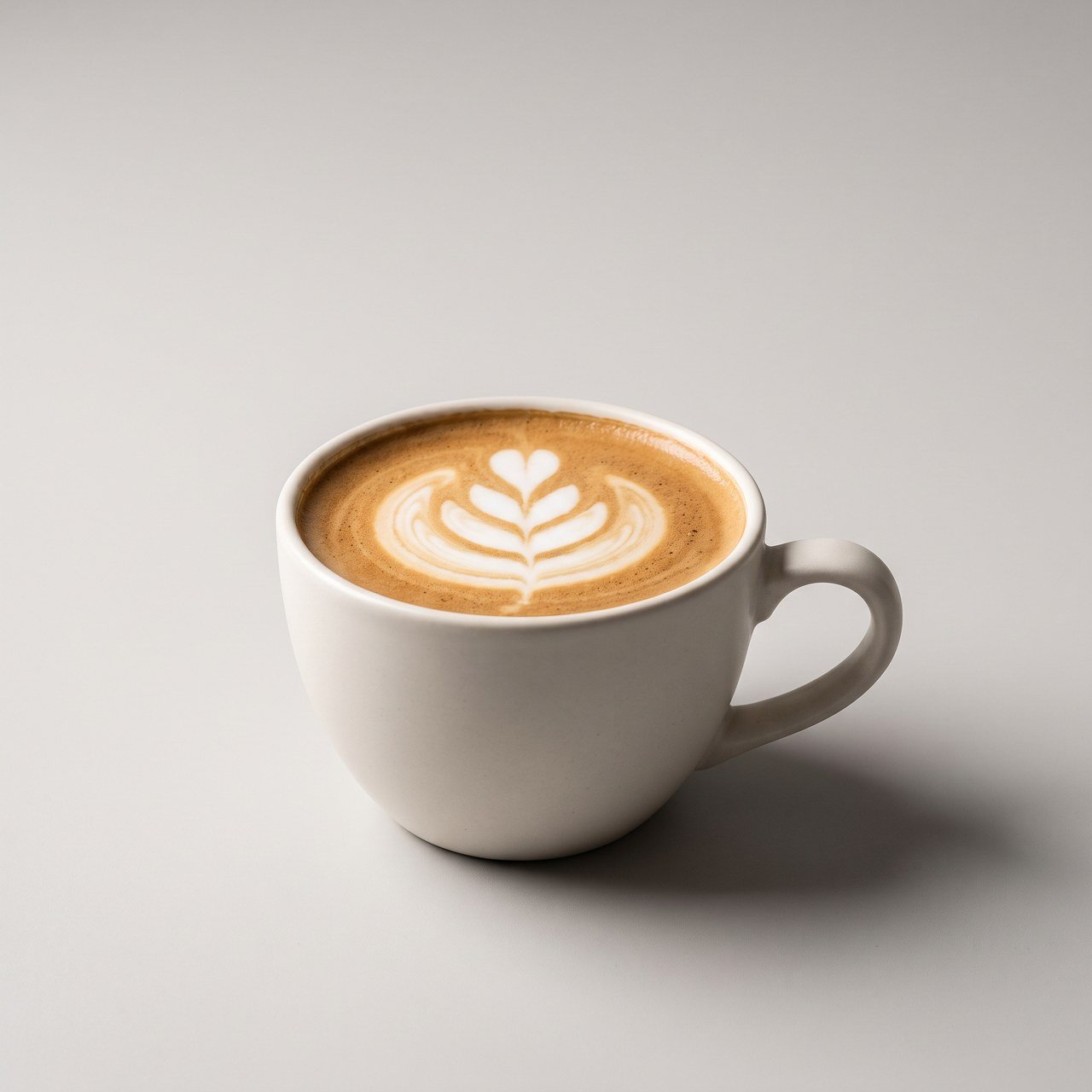 小物はすべて消え、背景は制御しやすいニュートラルグレーになり、影には方向性が付き、ブランド名も作られず、コピーを載せる余白もあります。**モデルは変わっていません。変わったのは prompt だけです。**
## 診断を実行するタイミング
すべての生成にレビューが必要なわけではありません。どれだけ具体的にリクエストが書かれているかで判断してください。
| リクエストの内容 | どうするか |
| -------------------------------------------------- | ------------------------------------ |
| カジュアルで、主題だけ("a coffee product shot, make it nice") | **まず診断し、それから生成する** — 最も効果が大きいです |
| 生成したものが大きく外れている | **レビューモード**(`-i` と実際の結果を使って)で原因を見つける |
| 照明位置、焦点距離、構図がすでに書かれている | それは飛ばして生成する |
| 1つのスタイルでシリーズ全体を生成する | 一度診断してプロンプトを固め、その後は再利用する |
このスキルはプロンプトを書き換えるだけで、**画像は生成しません**。[Nano Banana Pro スキル](/ja/api-capabilities/nano-banana-image/skills) または [GPT-Image-2 シリーズ スキル](/ja/api-capabilities/gpt-image-2/skills) と組み合わせると、レビューから生成までの流れを完結できます。
## どのエージェントで動作しますか
Skill は実際には単なる **フォルダ** です。つまり、エージェントにそれが何か(`SKILL.md`)を伝える 1 つのファイルと、実際の処理を行うスクリプトで構成されています。したがって、**ローカルファイルを読み取り、コマンドを実行できるあらゆるコーディングエージェントが使用できます**。Codex、OpenClaw、hermes-agent、Claude Code などです。
必要条件は 1 つだけです。エージェントを実行するマシンに **Python 3** と **ネットワークアクセス** があることです(スクリプトは `api.apiyi.com` と直接やり取りします)。この Skill は **Python 標準ライブラリのみ** を使用しており、pip install は不要です。
## 3ステップでインストール
### 1. フォルダを作成してファイルを貼り付ける
次の 2 つのファイルを含むスキルフォルダを作成します(完全な内容は下の 2 つのセクションにあります):
```
image-prompt-doctor/
├── SKILL.md
├── scripts/
│ └── prompt_doctor.py
└── .env # created in step 2, holds your key
```
`pip install` は不要です。
### 2. その横にキーを追加する
あなたの **APIYI の APIキー**(`api.apiyi.com` コンソールで作成したもの)を `image-prompt-doctor/.env` に配置してください:
```bash theme={null}
APIYI_API_KEY=sk-your-api-key
```
スクリプトはこの `.env` からキーを自動的に読み取ります — **ほかの設定や環境変数は不要です**。
`.env` には秘密情報が入っています。このスキルをプロジェクトリポジトリ経由で共有する場合は、**`.env` を `.gitignore` に追加し、絶対にコミットしないでください**。
### 3. エージェントに渡す
* **スキルの自動検出に対応したエージェント**(Claude Code など)の場合: `image-prompt-doctor/` フォルダ全体を、その skills ディレクトリに入れてください。ユーザーレベルなら `~/.claude/skills/`、プロジェクトレベルなら `.claude/skills/`(リポジトリ経由で共有されます)です。
* **それ以外のエージェント**: そのエージェント独自の skill/plugin の規約に従って配置してください。あるいは、いちばん簡単なのは、**エージェントに「このフォルダの SKILL.md を読んで、それに従ってください。」と伝えるだけです。**
これでインストールは完了です。例については [使い方](#how-to-use-it) をご覧ください。
## SKILL.md
`image-prompt-doctor/SKILL.md`を、以下の完全な内容で作成してください(`description`には「何をするか + いつ使うか」と記載します。これはエージェントが自動トリガーするために使用します):
````markdown theme={null}
---
name: image-prompt-doctor
description: Diagnose and optimize an image-generation prompt before generating, or review a disappointing result against the prompt that produced it. Use this whenever the user is about to generate an image from a casual or vague prompt, asks why an image came out wrong, or asks to improve/rewrite an image prompt.
allowed-tools: Bash(python3 *)
---
# Image Prompt Doctor
Review the prompt **before** generating: fill in the missing elements, strip the vague words that
drag quality down, and generate with the rewritten version. You can also feed the actual result
back **after** generating so the model can point out which requirement was not executed.
An API call is a single atomic call. The prompt reaches the model verbatim, with none of the
automatic rewriting a web app does for you — so prompt quality decides the hit rate outright.
## When to use it
- The user's request is casual ("a coffee product shot, make it nice") — **diagnose first, then generate**;
- The user says the image is wrong or far off — **use review mode and read the image back**;
- The user directly asks to improve a prompt.
Skip it when the request is already specific (light position, focal length and composition all present) and just generate.
## Two ways to run it
### Option 1: call the script (default, uses gpt-5.6-luna)
```bash
# 生成前に診断する
python3 ${CLAUDE_SKILL_DIR}/scripts/prompt_doctor.py "コーヒー商品の商品写真、いい感じにして" -t nano-banana -s product
# 生成後にレビューする: 実際の結果を渡す
python3 ${CLAUDE_SKILL_DIR}/scripts/prompt_doctor.py "赤い枠の中のカップを黒に変更し、それ以外はそのまま" -i result.png
# プログラムからの使用向け JSON
python3 ${CLAUDE_SKILL_DIR}/scripts/prompt_doctor.py "水墨山水画のイラスト" -s illustration --json
```
Arguments:
- First positional argument: the prompt to diagnose (required).
- `-i / --image`: path to an actual result, repeatable, up to 4; **passing any switches on review mode**.
- `-t / --target`: target image model, one of `nano-banana` / `gpt-image` / `seedream` / `flux` / `grok`; appends notes specific to that family (reference limits, mask support, parameter names). Omit if unsure.
- `-s / --scene`: subject, one of `portrait` / `product` / `scene` / `illustration`; defaults to `auto`. Illustration automatically down-weights the photorealism checks.
- `--model`: the text model used for diagnosis, default `gpt-5.6-luna` (cheap, accepts images). The `APIYI_TEXT_MODEL` environment variable overrides it.
- `--json`: emit raw JSON.
Key: the script reads `APIYI_API_KEY` from a `.env` file in the skill folder, or from an
environment variable of the same name. If it reports "no key found", ask the user to add a line
`APIYI_API_KEY=sk-xxx` to `.env`.
### Option 2: do it yourself (no key, or no appetite for the extra spend)
There is nothing secret in the rubric — apply the standard below directly, with no API call at all.
Keep the output format identical so the user sees the same thing either way.
## The rubric
**Six elements**, each marked OK (clearly stated) / WEAK (mentioned but vague) / MISSING (absent):
| Element | Test |
|---|---|
| Subject | Are material, colour, count and state specific |
| Environment | What the background is, what is sharp and what is blurred |
| Light | Direction, hardness, fill — **there must be one identifiable key light** |
| Lens | Focal length, aperture, camera height, tilt |
| Grading | White balance bias, saturation, film or digital character |
| Composition | Where the subject sits, where the negative space is |
**Risks you must report:**
- **Vague quality words** (8K / ultra HD / ultra detailed / masterpiece / perfect): they add no resolution and push the frame toward an over-sharpened, oversaturated render — the core of the AI look. Recommend deleting them in favour of specific light, lens and medium.
- **Resolution written into the prompt**: has no effect. Resolution comes only from parameters such as `size` / `imageSize`.
- **Several edits crammed into one sentence**: the single-shot hit rate drops sharply; split into rounds and change one class of thing at a time.
- **Pronouns like "this" or "the thing in the red box"**: the most common failure in editing tasks; name the object.
- **No statement about text in the image**: the model will invent brand names and copy, which makes the frame commercially unusable. Either state what text should appear, or forbid text explicitly.
- **Real people, celebrities, copyrighted characters, minors, violence or adult content**: these get blocked upstream; flag them for rewriting first.
**Rewriting principles**: fill in what is missing rather than padding with adjectives; leave anything
the user specified exactly as written; for realism add specific light positions, focal length and
aperture, a medium, and deliberate imperfections (pores, stray hair, wear, water rings) instead of
abstractions like "realistic" or "premium"; do not emit a separate negative-prompt field — write
what to avoid into the prompt body.
## Output and what to do next
Relay the diagnosis to the user faithfully: score, missing elements, risks, the rewritten prompt,
what changed, and the parameter suggestions.
Then **confirm before generating**: a rewrite can shift the intent (turning "coffee" into "a latte",
for instance), so let the user look first. Once they approve, pass the rewritten prompt to a
generation skill such as `nano-banana-pro`, using the `size` / `aspect` from the parameter suggestions.
If the user says "don't ask, just generate", go straight to generation with the rewritten prompt and
hand back the diagnosis summary alongside the image.
## Boundaries
- This skill only rewrites prompts. It **does not generate images**, and it makes no compliance judgment beyond flagging likely moderation blocks.
- A rewritten prompt can still miss on the first try — single-sample variance is inherent to these models. Retry or switch models.
- Anything that can only be fixed by a parameter (resolution, aspect ratio, reference images) is flagged, never written into the prompt body.
````
## scripts/prompt\_doctor.py
`image-prompt-doctor/scripts/prompt_doctor.py` を、以下の完全な内容で作成してください(Python 標準ライブラリのみを使用、追加インストール不要):
````python theme={null}
#!/usr/bin/env python3
"""Image prompt doctor: review a prompt, flag missing elements, return a rewritten version.
Calls a text model through APIYI (default gpt-5.6-luna). Standard library only, no dependencies.
Two modes:
1) pre-generation diagnosis -- prompt only
2) post-generation review -- prompt plus the actual result, so the model can read it back
"""
import argparse
import base64
import json
import os
import sys
import urllib.error
import urllib.request
DEFAULT_MODEL = "gpt-5.6-luna"
BASE_URL = "https://api.apiyi.com/v1/chat/completions"
MAX_IMAGES = 4
# Extra notes per target family, appended only when --target is given
TARGET_NOTES = {
"nano-banana": "Target is Nano Banana (Gemini family): long natural-language sentences work well, "
"so write flowing paragraphs rather than keyword piles; up to 14 reference images; "
"resolution goes in imageSize (1K/2K/4K) and aspect ratio in aspectRatio.",
"gpt-image": "Target is the GPT-Image family: strong instruction following and accurate in-image text, "
"so specifying exact text is safe; up to 16 reference images; only the official-relay "
"gpt-image-2 supports mask inpainting; resolution goes in size.",
"seedream": "Target is Seedream: strong with Chinese-language briefs; up to 10 reference images "
"(inputs plus outputs must stay at or below 15); 5.0 and 5.0-pro can be prompted to "
"return a PNG with a transparent background.",
"flux": "Target is FLUX: prefers clearly structured description; FLUX.2 pro/max/flex take up to 8 "
"reference images, Kontext takes 1.",
"grok": "Target is Grok Imagine: reference images only take effect on /v1/images/edits — passing them "
"to /v1/images/generations silently discards them and still bills; up to 4 reference images.",
}
SCENE_NOTES = {
"portrait": "This is a portrait. Check especially: is there one key light with a stated direction and "
"hardness, are focal length and aperture given, is natural skin requested (pores, fuzz, "
"shine), is retouching disabled, is the subject moved off dead centre.",
"product": "This is a product or e-commerce shot. Check especially: is the background specified as "
"neutral and controllable, are key light and fill written out, is the shadow direction given, "
"is text and branding explicitly forbidden (otherwise the model invents them), is negative "
"space left for copy.",
"scene": "This is an environment. Check especially: specific time and weather, one identifiable key "
"light, camera height and focal length, whether wear and clutter were added for realism, "
"whether people are asked not to face the camera.",
"illustration": "This is illustration, not photorealism. Down-weight the realism checklist and instead "
"check: is the style named specifically (medium, brushwork, era, school), the palette, "
"the line and colouring method, composition and negative space.",
}
SYSTEM = """You are an image prompt diagnostician serving developers and designers who call image
models directly over an API. An API call is a single atomic call: the prompt reaches the model
verbatim, with none of the automatic rewriting a web app does, so prompt quality decides the hit rate.
## Rubric
First mark each of the six elements ok (clearly stated) / weak (mentioned but vague) / missing:
1 subject: are material, colour, count and state specific
2 environment: what the background is, what is sharp and what is blurred
3 light: direction, hardness, fill -- there must be one identifiable key light
4 lens: focal length, aperture, camera height, tilt
5 tone: white balance bias, saturation, film or digital character
6 composition: where the subject sits in the frame, where the negative space is
## Risks you must report
- Vague quality words such as 8K / ultra HD / ultra detailed / masterpiece / perfect: they add no
resolution and push the frame toward an over-sharpened, oversaturated render, which is the core of
the AI look. Always recommend deleting them in favour of specific light, lens and medium.
- Resolution written into the prompt (4K/8K/high definition): no effect. Resolution comes only from
parameters such as size / imageSize.
- Several unrelated edits crammed into one sentence: the single-shot hit rate drops sharply; split
into rounds.
- Pronouns such as "this" or "the thing in the red box" instead of naming the object: the most
common failure in editing tasks.
- No statement about text in the image: the model may invent brand names or copy, which makes the
frame commercially unusable. Either state what text should appear, or forbid text explicitly.
- Real people, celebrities, copyrighted characters, minors, violence or adult content: these get
blocked upstream and need rewriting first.
## Rewriting principles
- Fill in what is missing; do not pad the prompt with adjectives to make it longer.
- Leave anything the user specified exactly as written.
- For realism, add specific light positions, focal length and aperture, a film or digital medium, and
deliberate imperfections (pores, stray hair, wear, water rings) rather than abstractions such as
"realistic" or "premium".
- Do not emit negative-prompt syntax (most image models have no separate negative prompt field);
write what to avoid into the prompt body.
- optimized_prompt and changes must use the same language as the user's original prompt.
## Output
Emit exactly this JSON, with no code fence and no extra commentary:
{
"score": integer 0-100 for how usable this prompt is in a single shot,
"verdict": "one-line summary, at most 20 words",
"elements": {"subject":"ok|weak|missing","environment":"...","light":"...","lens":"...","tone":"...","composition":"..."},
"risks": ["one sentence each, stating the problem and its consequence; empty array if none"],
"optimized_prompt": "the full rewritten prompt, ready to use as-is",
"changes": ["what changed and why, one per entry"],
"suggested_params": {"size":"1K|2K|4K","aspect":"e.g. 1:1 / 16:9","note":"parameter advice, empty string if none"}
}"""
REVIEW_EXTRA = """
## This run is a post-generation review
The user already generated an image from the prompt below; the actual result is attached. Check it
against the prompt line by line: what was honoured, what was not, and what the model added on its
own. In risks, state explicitly which sentence of the prompt was not executed, and rewrite
optimized_prompt to target those deviations rather than generically filling in elements."""
def load_api_key():
"""Prefer the environment variable; otherwise look for .env beside the script or one level up."""
key = os.environ.get("APIYI_API_KEY")
if key:
return key
here = os.path.dirname(os.path.abspath(__file__))
for d in (here, os.path.dirname(here)):
env_path = os.path.join(d, ".env")
if os.path.exists(env_path):
with open(env_path, encoding="utf-8") as f:
for line in f:
line = line.strip()
if line.startswith("APIYI_API_KEY") and "=" in line:
return line.split("=", 1)[1].strip().strip('"').strip("'")
return None
def image_data_url(path):
mime = "image/png" if path.lower().endswith(".png") else "image/jpeg"
with open(path, "rb") as f:
return f"data:{mime};base64," + base64.b64encode(f.read()).decode()
def build_messages(prompt, images, target, scene):
system = SYSTEM
if images:
system += REVIEW_EXTRA
extras = [TARGET_NOTES[target]] if target else []
if scene and scene != "auto":
extras.append(SCENE_NOTES[scene])
if extras:
system += "\n\n## Extra constraints for this run\n\n" + "\n".join("- " + e for e in extras)
content = [{"type": "text", "text": "Prompt to diagnose:\n\n" + prompt}]
for path in images:
content.append({"type": "image_url", "image_url": {"url": image_data_url(path)}})
return [{"role": "system", "content": system},
{"role": "user", "content": content}]
def diagnose(api_key, model, messages):
payload = json.dumps({
"model": model,
"messages": messages,
"response_format": {"type": "json_object"},
}).encode()
req = urllib.request.Request(
BASE_URL, data=payload, method="POST",
headers={"Authorization": f"Bearer {api_key}", "Content-Type": "application/json"},
)
try:
with urllib.request.urlopen(req, timeout=180) as r:
resp = json.loads(r.read())
except urllib.error.HTTPError as e:
raise RuntimeError(f"request failed HTTP {e.code}: {e.read().decode(errors='replace')[:500]}")
text = resp["choices"][0]["message"]["content"].strip()
if text.startswith("```"): # defensive: some models still wrap in a fence
text = text.split("\n", 1)[1].rsplit("```", 1)[0]
try:
return json.loads(text)
except json.JSONDecodeError:
raise RuntimeError("model did not return valid JSON, raw output:\n" + text[:800])
MARK = {"ok": "OK", "weak": "WEAK", "missing": "MISSING"}
LABEL = {"subject": "subject", "environment": "environment", "light": "light",
"lens": "lens", "tone": "grading", "composition": "composition"}
def render(r):
out = [f"[Diagnosis] {r.get('score', '?')}/100 - {r.get('verdict', '')}", ""]
els = r.get("elements", {})
out.append("Six elements: " + " ".join(
f"{LABEL.get(k, k)} {MARK.get(v, '?')}" for k, v in els.items()))
risks = r.get("risks") or []
if risks:
out += ["", "Risks:"] + [f" - {x}" for x in risks]
else:
out += ["", "Risks: none"]
out += ["", "[Optimized prompt]", "", r.get("optimized_prompt", "")]
changes = r.get("changes") or []
if changes:
out += ["", "[What changed]"] + [f" - {x}" for x in changes]
p = r.get("suggested_params") or {}
bits = []
if p.get("size"):
bits.append(f"size={p['size']}")
if p.get("aspect"):
bits.append(f"aspect={p['aspect']}")
line = " ".join(bits)
if p.get("note"):
line = (line + "; " if line else "") + p["note"]
if line:
out += ["", "[Parameter suggestions] " + line]
return "\n".join(out)
def main():
parser = argparse.ArgumentParser(description="Diagnose and optimize an image prompt")
parser.add_argument("prompt", help="the prompt to diagnose")
parser.add_argument("-i", "--image", action="append", default=[],
help=f"path to an actual result, repeatable (up to {MAX_IMAGES}); switches on review mode")
parser.add_argument("-t", "--target", choices=sorted(TARGET_NOTES),
help="target image model, to append notes specific to that family")
parser.add_argument("-s", "--scene", choices=["auto"] + sorted(SCENE_NOTES), default="auto",
help="subject, default auto (no subject-specific checks appended)")
parser.add_argument("--model", default=os.environ.get("APIYI_TEXT_MODEL", DEFAULT_MODEL),
help=f"text model used for diagnosis, default {DEFAULT_MODEL}")
parser.add_argument("--json", action="store_true", help="emit raw JSON for programmatic use")
args = parser.parse_args()
api_key = load_api_key()
if not api_key:
sys.exit("no API key found: add a line APIYI_API_KEY=sk-xxx to .env in the skill folder, "
"or set the environment variable of the same name")
if len(args.image) > MAX_IMAGES:
sys.exit(f"at most {MAX_IMAGES} images, got {len(args.image)}")
for path in args.image:
if not os.path.exists(path):
sys.exit(f"image not found: {path}")
messages = build_messages(args.prompt, args.image, args.target, args.scene)
try:
result = diagnose(api_key, args.model, messages)
except RuntimeError as e:
sys.exit(str(e))
print(json.dumps(result, ensure_ascii=False, indent=2) if args.json else render(result))
if __name__ == "__main__":
main()
````
## 診断モデルの切り替え
デフォルトは `gpt-5.6-luna` です。安価で(100万 token あたり入力 \$0.2 / 出力 \$1.2)、画像入力に対応しており、レビューモードで必要になります。変更する方法は 2 つあります:
```bash theme={null}
# Override for one run
... prompt_doctor.py "your prompt" --model gemini-3.5-flash
# Change the default: add a line to image-prompt-doctor/.env
APIYI_TEXT_MODEL=gemini-3.5-flash
```
切り替える際に注意すべき点が 2 つあります。**レビューモードには画像入力に対応したモデルが必要です**(テキストのみのモデルでは、添付画像があるとエラーになります)— 一覧は [ビジョン理解](/ja/api-capabilities/vision-understanding) を参照してください。また、スクリプトは `response_format: {"type": "json_object"}` を送信するため、JSON モードのないモデルでは代わりにフェンス付きテキストを返すことがあります(スクリプトは念のためフェンスを除去しますが、JSON モードをサポートするモデルを使うことを推奨します)。
## なぜ1文だけで診断がトリガーされるのか
よくある疑問です。私はコマンドを一度も入力していないのに、なぜ「画像を描いて」と言っただけで prompt を先に確認しにいったのでしょうか?
仕組みはこうです。起動時にエージェントは各 skill の `SKILL.md` にある `description` を**読み取り**ます。これは、その skill が何をするのか、いつ適用されるのかを示す短いメタデータです。あなたの発話がその説明(「…を描いて」「この画像がなぜおかしくなったのか」「この prompt を改善して」など)と**一致すると**、エージェントは**自分で skill を呼び出すことを判断**し、完全な `SKILL.md` を読み込んでスクリプトを実行します。あなたがコマンドを覚える必要はありません。
SKILL.md には、すでに具体的なリクエストであればこの処理は不要だとも書かれているので、すべての prompt に対して介入するわけではありません。**完全に制御したい**場合は、下記の明示的な呼び出しを使ってください。
## 使い方
### 自然言語(暗黙のトリガー)
インストールしたら、エージェントにそのまま話しかけるだけです。
| あなたが言うこと | このスキルの動作 |
| ---------------------------------- | ------------------------------------- |
| 「コーヒーの商品ショットを描いて、いい感じにしてください」 | 気軽な依頼 → 診断、報告、確認、そして生成 |
| 「この画像はなぜおかしくなったの?」(画像付き) | `-i` 経由のレビュー モードで、画像を読み返します |
| 「このpromptを改善して」 | 診断のみで、生成はしません |
| 「gpt-image-2で生成して、でも先にpromptを確認して」 | ファミリー固有の注意事項として `-t gpt-image` を追加します |
| 「診断は飛ばして、生成だけして」 | このスキルをバイパスして、生成スキルを呼び出します |
### 明示的な呼び出し(より細かく制御)
* **スラッシュコマンド付きのエージェント**(Claude Code など):
```text theme={null}
/image-prompt-doctor a woman smiling by a cafe window -s portrait
```
* **任意のエージェント / スクリプトを実行するよう伝えるだけ**(最も汎用的):
```text theme={null}
Run python3 image-prompt-doctor/scripts/prompt_doctor.py "a woman smiling by a cafe window" -s portrait
```
## 診断の出力先
* このスキルは**ファイルを書き込みません**。結果はターミナルに表示され、エージェントがそれをあなたに中継します — スコア、6要素の評価、リスク、書き換え後のプロンプト、変更点、パラメータの提案です。
* 結果を自分のプログラムに取り込むには、`--json` を追加してください。出力は、ファイルへリダイレクトできる構造化オブジェクト(`score` / `elements` / `risks` / `optimized_prompt` / `changes` / `suggested_params`)です。
```bash theme={null}
python3 image-prompt-doctor/scripts/prompt_doctor.py "your prompt" --json > diagnosis.json
```
* **使用前に書き換え後のプロンプトを確認してください**: 書き換えによって意図が変わることがあります(「coffee」が「a latte」になるなど)。また、SKILL.md には、まず確認するようエージェントに指示する内容がすでに記載されています。
* レビューモードに渡された画像は**変更も上書きもされません** — 読み取り専用の入力です。
## 費用
1 回の診断には数千 tokens かかります。`gpt-5.6-luna` の定価ではそれは 1 セントの端数ですが、1 回の `high` の高品質生成はその数十倍の費用がかかります。**生成する前に診断しておくと、やり直しを避けられる分だけ、費用以上の節約になります。**
レビューモードでは画像をアップロードしますが、これは入力 tokens として課金されます。少し多くなりますが、それでも 1 回の生成よりはるかに少ないです。
## 関連ドキュメント
* [高度な画像生成: ワークフローとリアリズム](/ja/api-capabilities/image-advanced-workflow) (このスキルが全体のパイプラインのどこに位置するか)
* [望む画像を取得する方法](/ja/api-capabilities/image-generation-success-tips) (1回の失敗した呼び出しをリカバリーする)
* [Nano Banana Pro エージェントスキル](/ja/api-capabilities/nano-banana-image/skills) (診断に連結するための連携生成スキル)
* [GPT-Image-2 シリーズ エージェントスキル](/ja/api-capabilities/gpt-image-2/skills) (同様に、GPT系向け)
* [GPT-5.6 Luna](/ja/models/gpt-5-6-luna) (デフォルトの診断モデル: 仕様、料金、エンドポイント対応)
小物はすべて消え、背景は制御しやすいニュートラルグレーになり、影には方向性が付き、ブランド名も作られず、コピーを載せる余白もあります。**モデルは変わっていません。変わったのは prompt だけです。**
## 診断を実行するタイミング
すべての生成にレビューが必要なわけではありません。どれだけ具体的にリクエストが書かれているかで判断してください。
| リクエストの内容 | どうするか |
| -------------------------------------------------- | ------------------------------------ |
| カジュアルで、主題だけ("a coffee product shot, make it nice") | **まず診断し、それから生成する** — 最も効果が大きいです |
| 生成したものが大きく外れている | **レビューモード**(`-i` と実際の結果を使って)で原因を見つける |
| 照明位置、焦点距離、構図がすでに書かれている | それは飛ばして生成する |
| 1つのスタイルでシリーズ全体を生成する | 一度診断してプロンプトを固め、その後は再利用する |
このスキルはプロンプトを書き換えるだけで、**画像は生成しません**。[Nano Banana Pro スキル](/ja/api-capabilities/nano-banana-image/skills) または [GPT-Image-2 シリーズ スキル](/ja/api-capabilities/gpt-image-2/skills) と組み合わせると、レビューから生成までの流れを完結できます。
## どのエージェントで動作しますか
Skill は実際には単なる **フォルダ** です。つまり、エージェントにそれが何か(`SKILL.md`)を伝える 1 つのファイルと、実際の処理を行うスクリプトで構成されています。したがって、**ローカルファイルを読み取り、コマンドを実行できるあらゆるコーディングエージェントが使用できます**。Codex、OpenClaw、hermes-agent、Claude Code などです。
必要条件は 1 つだけです。エージェントを実行するマシンに **Python 3** と **ネットワークアクセス** があることです(スクリプトは `api.apiyi.com` と直接やり取りします)。この Skill は **Python 標準ライブラリのみ** を使用しており、pip install は不要です。
## 3ステップでインストール
### 1. フォルダを作成してファイルを貼り付ける
次の 2 つのファイルを含むスキルフォルダを作成します(完全な内容は下の 2 つのセクションにあります):
```
image-prompt-doctor/
├── SKILL.md
├── scripts/
│ └── prompt_doctor.py
└── .env # created in step 2, holds your key
```
`pip install` は不要です。
### 2. その横にキーを追加する
あなたの **APIYI の APIキー**(`api.apiyi.com` コンソールで作成したもの)を `image-prompt-doctor/.env` に配置してください:
```bash theme={null}
APIYI_API_KEY=sk-your-api-key
```
スクリプトはこの `.env` からキーを自動的に読み取ります — **ほかの設定や環境変数は不要です**。
`.env` には秘密情報が入っています。このスキルをプロジェクトリポジトリ経由で共有する場合は、**`.env` を `.gitignore` に追加し、絶対にコミットしないでください**。
### 3. エージェントに渡す
* **スキルの自動検出に対応したエージェント**(Claude Code など)の場合: `image-prompt-doctor/` フォルダ全体を、その skills ディレクトリに入れてください。ユーザーレベルなら `~/.claude/skills/`、プロジェクトレベルなら `.claude/skills/`(リポジトリ経由で共有されます)です。
* **それ以外のエージェント**: そのエージェント独自の skill/plugin の規約に従って配置してください。あるいは、いちばん簡単なのは、**エージェントに「このフォルダの SKILL.md を読んで、それに従ってください。」と伝えるだけです。**
これでインストールは完了です。例については [使い方](#how-to-use-it) をご覧ください。
## SKILL.md
`image-prompt-doctor/SKILL.md`を、以下の完全な内容で作成してください(`description`には「何をするか + いつ使うか」と記載します。これはエージェントが自動トリガーするために使用します):
````markdown theme={null}
---
name: image-prompt-doctor
description: Diagnose and optimize an image-generation prompt before generating, or review a disappointing result against the prompt that produced it. Use this whenever the user is about to generate an image from a casual or vague prompt, asks why an image came out wrong, or asks to improve/rewrite an image prompt.
allowed-tools: Bash(python3 *)
---
# Image Prompt Doctor
Review the prompt **before** generating: fill in the missing elements, strip the vague words that
drag quality down, and generate with the rewritten version. You can also feed the actual result
back **after** generating so the model can point out which requirement was not executed.
An API call is a single atomic call. The prompt reaches the model verbatim, with none of the
automatic rewriting a web app does for you — so prompt quality decides the hit rate outright.
## When to use it
- The user's request is casual ("a coffee product shot, make it nice") — **diagnose first, then generate**;
- The user says the image is wrong or far off — **use review mode and read the image back**;
- The user directly asks to improve a prompt.
Skip it when the request is already specific (light position, focal length and composition all present) and just generate.
## Two ways to run it
### Option 1: call the script (default, uses gpt-5.6-luna)
```bash
# 生成前に診断する
python3 ${CLAUDE_SKILL_DIR}/scripts/prompt_doctor.py "コーヒー商品の商品写真、いい感じにして" -t nano-banana -s product
# 生成後にレビューする: 実際の結果を渡す
python3 ${CLAUDE_SKILL_DIR}/scripts/prompt_doctor.py "赤い枠の中のカップを黒に変更し、それ以外はそのまま" -i result.png
# プログラムからの使用向け JSON
python3 ${CLAUDE_SKILL_DIR}/scripts/prompt_doctor.py "水墨山水画のイラスト" -s illustration --json
```
Arguments:
- First positional argument: the prompt to diagnose (required).
- `-i / --image`: path to an actual result, repeatable, up to 4; **passing any switches on review mode**.
- `-t / --target`: target image model, one of `nano-banana` / `gpt-image` / `seedream` / `flux` / `grok`; appends notes specific to that family (reference limits, mask support, parameter names). Omit if unsure.
- `-s / --scene`: subject, one of `portrait` / `product` / `scene` / `illustration`; defaults to `auto`. Illustration automatically down-weights the photorealism checks.
- `--model`: the text model used for diagnosis, default `gpt-5.6-luna` (cheap, accepts images). The `APIYI_TEXT_MODEL` environment variable overrides it.
- `--json`: emit raw JSON.
Key: the script reads `APIYI_API_KEY` from a `.env` file in the skill folder, or from an
environment variable of the same name. If it reports "no key found", ask the user to add a line
`APIYI_API_KEY=sk-xxx` to `.env`.
### Option 2: do it yourself (no key, or no appetite for the extra spend)
There is nothing secret in the rubric — apply the standard below directly, with no API call at all.
Keep the output format identical so the user sees the same thing either way.
## The rubric
**Six elements**, each marked OK (clearly stated) / WEAK (mentioned but vague) / MISSING (absent):
| Element | Test |
|---|---|
| Subject | Are material, colour, count and state specific |
| Environment | What the background is, what is sharp and what is blurred |
| Light | Direction, hardness, fill — **there must be one identifiable key light** |
| Lens | Focal length, aperture, camera height, tilt |
| Grading | White balance bias, saturation, film or digital character |
| Composition | Where the subject sits, where the negative space is |
**Risks you must report:**
- **Vague quality words** (8K / ultra HD / ultra detailed / masterpiece / perfect): they add no resolution and push the frame toward an over-sharpened, oversaturated render — the core of the AI look. Recommend deleting them in favour of specific light, lens and medium.
- **Resolution written into the prompt**: has no effect. Resolution comes only from parameters such as `size` / `imageSize`.
- **Several edits crammed into one sentence**: the single-shot hit rate drops sharply; split into rounds and change one class of thing at a time.
- **Pronouns like "this" or "the thing in the red box"**: the most common failure in editing tasks; name the object.
- **No statement about text in the image**: the model will invent brand names and copy, which makes the frame commercially unusable. Either state what text should appear, or forbid text explicitly.
- **Real people, celebrities, copyrighted characters, minors, violence or adult content**: these get blocked upstream; flag them for rewriting first.
**Rewriting principles**: fill in what is missing rather than padding with adjectives; leave anything
the user specified exactly as written; for realism add specific light positions, focal length and
aperture, a medium, and deliberate imperfections (pores, stray hair, wear, water rings) instead of
abstractions like "realistic" or "premium"; do not emit a separate negative-prompt field — write
what to avoid into the prompt body.
## Output and what to do next
Relay the diagnosis to the user faithfully: score, missing elements, risks, the rewritten prompt,
what changed, and the parameter suggestions.
Then **confirm before generating**: a rewrite can shift the intent (turning "coffee" into "a latte",
for instance), so let the user look first. Once they approve, pass the rewritten prompt to a
generation skill such as `nano-banana-pro`, using the `size` / `aspect` from the parameter suggestions.
If the user says "don't ask, just generate", go straight to generation with the rewritten prompt and
hand back the diagnosis summary alongside the image.
## Boundaries
- This skill only rewrites prompts. It **does not generate images**, and it makes no compliance judgment beyond flagging likely moderation blocks.
- A rewritten prompt can still miss on the first try — single-sample variance is inherent to these models. Retry or switch models.
- Anything that can only be fixed by a parameter (resolution, aspect ratio, reference images) is flagged, never written into the prompt body.
````
## scripts/prompt\_doctor.py
`image-prompt-doctor/scripts/prompt_doctor.py` を、以下の完全な内容で作成してください(Python 標準ライブラリのみを使用、追加インストール不要):
````python theme={null}
#!/usr/bin/env python3
"""Image prompt doctor: review a prompt, flag missing elements, return a rewritten version.
Calls a text model through APIYI (default gpt-5.6-luna). Standard library only, no dependencies.
Two modes:
1) pre-generation diagnosis -- prompt only
2) post-generation review -- prompt plus the actual result, so the model can read it back
"""
import argparse
import base64
import json
import os
import sys
import urllib.error
import urllib.request
DEFAULT_MODEL = "gpt-5.6-luna"
BASE_URL = "https://api.apiyi.com/v1/chat/completions"
MAX_IMAGES = 4
# Extra notes per target family, appended only when --target is given
TARGET_NOTES = {
"nano-banana": "Target is Nano Banana (Gemini family): long natural-language sentences work well, "
"so write flowing paragraphs rather than keyword piles; up to 14 reference images; "
"resolution goes in imageSize (1K/2K/4K) and aspect ratio in aspectRatio.",
"gpt-image": "Target is the GPT-Image family: strong instruction following and accurate in-image text, "
"so specifying exact text is safe; up to 16 reference images; only the official-relay "
"gpt-image-2 supports mask inpainting; resolution goes in size.",
"seedream": "Target is Seedream: strong with Chinese-language briefs; up to 10 reference images "
"(inputs plus outputs must stay at or below 15); 5.0 and 5.0-pro can be prompted to "
"return a PNG with a transparent background.",
"flux": "Target is FLUX: prefers clearly structured description; FLUX.2 pro/max/flex take up to 8 "
"reference images, Kontext takes 1.",
"grok": "Target is Grok Imagine: reference images only take effect on /v1/images/edits — passing them "
"to /v1/images/generations silently discards them and still bills; up to 4 reference images.",
}
SCENE_NOTES = {
"portrait": "This is a portrait. Check especially: is there one key light with a stated direction and "
"hardness, are focal length and aperture given, is natural skin requested (pores, fuzz, "
"shine), is retouching disabled, is the subject moved off dead centre.",
"product": "This is a product or e-commerce shot. Check especially: is the background specified as "
"neutral and controllable, are key light and fill written out, is the shadow direction given, "
"is text and branding explicitly forbidden (otherwise the model invents them), is negative "
"space left for copy.",
"scene": "This is an environment. Check especially: specific time and weather, one identifiable key "
"light, camera height and focal length, whether wear and clutter were added for realism, "
"whether people are asked not to face the camera.",
"illustration": "This is illustration, not photorealism. Down-weight the realism checklist and instead "
"check: is the style named specifically (medium, brushwork, era, school), the palette, "
"the line and colouring method, composition and negative space.",
}
SYSTEM = """You are an image prompt diagnostician serving developers and designers who call image
models directly over an API. An API call is a single atomic call: the prompt reaches the model
verbatim, with none of the automatic rewriting a web app does, so prompt quality decides the hit rate.
## Rubric
First mark each of the six elements ok (clearly stated) / weak (mentioned but vague) / missing:
1 subject: are material, colour, count and state specific
2 environment: what the background is, what is sharp and what is blurred
3 light: direction, hardness, fill -- there must be one identifiable key light
4 lens: focal length, aperture, camera height, tilt
5 tone: white balance bias, saturation, film or digital character
6 composition: where the subject sits in the frame, where the negative space is
## Risks you must report
- Vague quality words such as 8K / ultra HD / ultra detailed / masterpiece / perfect: they add no
resolution and push the frame toward an over-sharpened, oversaturated render, which is the core of
the AI look. Always recommend deleting them in favour of specific light, lens and medium.
- Resolution written into the prompt (4K/8K/high definition): no effect. Resolution comes only from
parameters such as size / imageSize.
- Several unrelated edits crammed into one sentence: the single-shot hit rate drops sharply; split
into rounds.
- Pronouns such as "this" or "the thing in the red box" instead of naming the object: the most
common failure in editing tasks.
- No statement about text in the image: the model may invent brand names or copy, which makes the
frame commercially unusable. Either state what text should appear, or forbid text explicitly.
- Real people, celebrities, copyrighted characters, minors, violence or adult content: these get
blocked upstream and need rewriting first.
## Rewriting principles
- Fill in what is missing; do not pad the prompt with adjectives to make it longer.
- Leave anything the user specified exactly as written.
- For realism, add specific light positions, focal length and aperture, a film or digital medium, and
deliberate imperfections (pores, stray hair, wear, water rings) rather than abstractions such as
"realistic" or "premium".
- Do not emit negative-prompt syntax (most image models have no separate negative prompt field);
write what to avoid into the prompt body.
- optimized_prompt and changes must use the same language as the user's original prompt.
## Output
Emit exactly this JSON, with no code fence and no extra commentary:
{
"score": integer 0-100 for how usable this prompt is in a single shot,
"verdict": "one-line summary, at most 20 words",
"elements": {"subject":"ok|weak|missing","environment":"...","light":"...","lens":"...","tone":"...","composition":"..."},
"risks": ["one sentence each, stating the problem and its consequence; empty array if none"],
"optimized_prompt": "the full rewritten prompt, ready to use as-is",
"changes": ["what changed and why, one per entry"],
"suggested_params": {"size":"1K|2K|4K","aspect":"e.g. 1:1 / 16:9","note":"parameter advice, empty string if none"}
}"""
REVIEW_EXTRA = """
## This run is a post-generation review
The user already generated an image from the prompt below; the actual result is attached. Check it
against the prompt line by line: what was honoured, what was not, and what the model added on its
own. In risks, state explicitly which sentence of the prompt was not executed, and rewrite
optimized_prompt to target those deviations rather than generically filling in elements."""
def load_api_key():
"""Prefer the environment variable; otherwise look for .env beside the script or one level up."""
key = os.environ.get("APIYI_API_KEY")
if key:
return key
here = os.path.dirname(os.path.abspath(__file__))
for d in (here, os.path.dirname(here)):
env_path = os.path.join(d, ".env")
if os.path.exists(env_path):
with open(env_path, encoding="utf-8") as f:
for line in f:
line = line.strip()
if line.startswith("APIYI_API_KEY") and "=" in line:
return line.split("=", 1)[1].strip().strip('"').strip("'")
return None
def image_data_url(path):
mime = "image/png" if path.lower().endswith(".png") else "image/jpeg"
with open(path, "rb") as f:
return f"data:{mime};base64," + base64.b64encode(f.read()).decode()
def build_messages(prompt, images, target, scene):
system = SYSTEM
if images:
system += REVIEW_EXTRA
extras = [TARGET_NOTES[target]] if target else []
if scene and scene != "auto":
extras.append(SCENE_NOTES[scene])
if extras:
system += "\n\n## Extra constraints for this run\n\n" + "\n".join("- " + e for e in extras)
content = [{"type": "text", "text": "Prompt to diagnose:\n\n" + prompt}]
for path in images:
content.append({"type": "image_url", "image_url": {"url": image_data_url(path)}})
return [{"role": "system", "content": system},
{"role": "user", "content": content}]
def diagnose(api_key, model, messages):
payload = json.dumps({
"model": model,
"messages": messages,
"response_format": {"type": "json_object"},
}).encode()
req = urllib.request.Request(
BASE_URL, data=payload, method="POST",
headers={"Authorization": f"Bearer {api_key}", "Content-Type": "application/json"},
)
try:
with urllib.request.urlopen(req, timeout=180) as r:
resp = json.loads(r.read())
except urllib.error.HTTPError as e:
raise RuntimeError(f"request failed HTTP {e.code}: {e.read().decode(errors='replace')[:500]}")
text = resp["choices"][0]["message"]["content"].strip()
if text.startswith("```"): # defensive: some models still wrap in a fence
text = text.split("\n", 1)[1].rsplit("```", 1)[0]
try:
return json.loads(text)
except json.JSONDecodeError:
raise RuntimeError("model did not return valid JSON, raw output:\n" + text[:800])
MARK = {"ok": "OK", "weak": "WEAK", "missing": "MISSING"}
LABEL = {"subject": "subject", "environment": "environment", "light": "light",
"lens": "lens", "tone": "grading", "composition": "composition"}
def render(r):
out = [f"[Diagnosis] {r.get('score', '?')}/100 - {r.get('verdict', '')}", ""]
els = r.get("elements", {})
out.append("Six elements: " + " ".join(
f"{LABEL.get(k, k)} {MARK.get(v, '?')}" for k, v in els.items()))
risks = r.get("risks") or []
if risks:
out += ["", "Risks:"] + [f" - {x}" for x in risks]
else:
out += ["", "Risks: none"]
out += ["", "[Optimized prompt]", "", r.get("optimized_prompt", "")]
changes = r.get("changes") or []
if changes:
out += ["", "[What changed]"] + [f" - {x}" for x in changes]
p = r.get("suggested_params") or {}
bits = []
if p.get("size"):
bits.append(f"size={p['size']}")
if p.get("aspect"):
bits.append(f"aspect={p['aspect']}")
line = " ".join(bits)
if p.get("note"):
line = (line + "; " if line else "") + p["note"]
if line:
out += ["", "[Parameter suggestions] " + line]
return "\n".join(out)
def main():
parser = argparse.ArgumentParser(description="Diagnose and optimize an image prompt")
parser.add_argument("prompt", help="the prompt to diagnose")
parser.add_argument("-i", "--image", action="append", default=[],
help=f"path to an actual result, repeatable (up to {MAX_IMAGES}); switches on review mode")
parser.add_argument("-t", "--target", choices=sorted(TARGET_NOTES),
help="target image model, to append notes specific to that family")
parser.add_argument("-s", "--scene", choices=["auto"] + sorted(SCENE_NOTES), default="auto",
help="subject, default auto (no subject-specific checks appended)")
parser.add_argument("--model", default=os.environ.get("APIYI_TEXT_MODEL", DEFAULT_MODEL),
help=f"text model used for diagnosis, default {DEFAULT_MODEL}")
parser.add_argument("--json", action="store_true", help="emit raw JSON for programmatic use")
args = parser.parse_args()
api_key = load_api_key()
if not api_key:
sys.exit("no API key found: add a line APIYI_API_KEY=sk-xxx to .env in the skill folder, "
"or set the environment variable of the same name")
if len(args.image) > MAX_IMAGES:
sys.exit(f"at most {MAX_IMAGES} images, got {len(args.image)}")
for path in args.image:
if not os.path.exists(path):
sys.exit(f"image not found: {path}")
messages = build_messages(args.prompt, args.image, args.target, args.scene)
try:
result = diagnose(api_key, args.model, messages)
except RuntimeError as e:
sys.exit(str(e))
print(json.dumps(result, ensure_ascii=False, indent=2) if args.json else render(result))
if __name__ == "__main__":
main()
````
## 診断モデルの切り替え
デフォルトは `gpt-5.6-luna` です。安価で(100万 token あたり入力 \$0.2 / 出力 \$1.2)、画像入力に対応しており、レビューモードで必要になります。変更する方法は 2 つあります:
```bash theme={null}
# Override for one run
... prompt_doctor.py "your prompt" --model gemini-3.5-flash
# Change the default: add a line to image-prompt-doctor/.env
APIYI_TEXT_MODEL=gemini-3.5-flash
```
切り替える際に注意すべき点が 2 つあります。**レビューモードには画像入力に対応したモデルが必要です**(テキストのみのモデルでは、添付画像があるとエラーになります)— 一覧は [ビジョン理解](/ja/api-capabilities/vision-understanding) を参照してください。また、スクリプトは `response_format: {"type": "json_object"}` を送信するため、JSON モードのないモデルでは代わりにフェンス付きテキストを返すことがあります(スクリプトは念のためフェンスを除去しますが、JSON モードをサポートするモデルを使うことを推奨します)。
## なぜ1文だけで診断がトリガーされるのか
よくある疑問です。私はコマンドを一度も入力していないのに、なぜ「画像を描いて」と言っただけで prompt を先に確認しにいったのでしょうか?
仕組みはこうです。起動時にエージェントは各 skill の `SKILL.md` にある `description` を**読み取り**ます。これは、その skill が何をするのか、いつ適用されるのかを示す短いメタデータです。あなたの発話がその説明(「…を描いて」「この画像がなぜおかしくなったのか」「この prompt を改善して」など)と**一致すると**、エージェントは**自分で skill を呼び出すことを判断**し、完全な `SKILL.md` を読み込んでスクリプトを実行します。あなたがコマンドを覚える必要はありません。
SKILL.md には、すでに具体的なリクエストであればこの処理は不要だとも書かれているので、すべての prompt に対して介入するわけではありません。**完全に制御したい**場合は、下記の明示的な呼び出しを使ってください。
## 使い方
### 自然言語(暗黙のトリガー)
インストールしたら、エージェントにそのまま話しかけるだけです。
| あなたが言うこと | このスキルの動作 |
| ---------------------------------- | ------------------------------------- |
| 「コーヒーの商品ショットを描いて、いい感じにしてください」 | 気軽な依頼 → 診断、報告、確認、そして生成 |
| 「この画像はなぜおかしくなったの?」(画像付き) | `-i` 経由のレビュー モードで、画像を読み返します |
| 「このpromptを改善して」 | 診断のみで、生成はしません |
| 「gpt-image-2で生成して、でも先にpromptを確認して」 | ファミリー固有の注意事項として `-t gpt-image` を追加します |
| 「診断は飛ばして、生成だけして」 | このスキルをバイパスして、生成スキルを呼び出します |
### 明示的な呼び出し(より細かく制御)
* **スラッシュコマンド付きのエージェント**(Claude Code など):
```text theme={null}
/image-prompt-doctor a woman smiling by a cafe window -s portrait
```
* **任意のエージェント / スクリプトを実行するよう伝えるだけ**(最も汎用的):
```text theme={null}
Run python3 image-prompt-doctor/scripts/prompt_doctor.py "a woman smiling by a cafe window" -s portrait
```
## 診断の出力先
* このスキルは**ファイルを書き込みません**。結果はターミナルに表示され、エージェントがそれをあなたに中継します — スコア、6要素の評価、リスク、書き換え後のプロンプト、変更点、パラメータの提案です。
* 結果を自分のプログラムに取り込むには、`--json` を追加してください。出力は、ファイルへリダイレクトできる構造化オブジェクト(`score` / `elements` / `risks` / `optimized_prompt` / `changes` / `suggested_params`)です。
```bash theme={null}
python3 image-prompt-doctor/scripts/prompt_doctor.py "your prompt" --json > diagnosis.json
```
* **使用前に書き換え後のプロンプトを確認してください**: 書き換えによって意図が変わることがあります(「coffee」が「a latte」になるなど)。また、SKILL.md には、まず確認するようエージェントに指示する内容がすでに記載されています。
* レビューモードに渡された画像は**変更も上書きもされません** — 読み取り専用の入力です。
## 費用
1 回の診断には数千 tokens かかります。`gpt-5.6-luna` の定価ではそれは 1 セントの端数ですが、1 回の `high` の高品質生成はその数十倍の費用がかかります。**生成する前に診断しておくと、やり直しを避けられる分だけ、費用以上の節約になります。**
レビューモードでは画像をアップロードしますが、これは入力 tokens として課金されます。少し多くなりますが、それでも 1 回の生成よりはるかに少ないです。
## 関連ドキュメント
* [高度な画像生成: ワークフローとリアリズム](/ja/api-capabilities/image-advanced-workflow) (このスキルが全体のパイプラインのどこに位置するか)
* [望む画像を取得する方法](/ja/api-capabilities/image-generation-success-tips) (1回の失敗した呼び出しをリカバリーする)
* [Nano Banana Pro エージェントスキル](/ja/api-capabilities/nano-banana-image/skills) (診断に連結するための連携生成スキル)
* [GPT-Image-2 シリーズ エージェントスキル](/ja/api-capabilities/gpt-image-2/skills) (同様に、GPT系向け)
* [GPT-5.6 Luna](/ja/models/gpt-5-6-luna) (デフォルトの診断モデル: 仕様、料金、エンドポイント対応)