> ## Documentation Index
> Fetch the complete documentation index at: https://docs.apiyi.com/llms.txt
> Use this file to discover all available pages before exploring further.
# Dify
> Visual AIアプリケーション開発プラットフォームの統合ガイド
Difyは、AIアプリケーションを迅速に構築できるオープンソースのLLMアプリケーション開発プラットフォームです。APIYIを通じて、Difyでさまざまな主要AIモデルを利用できます。
## クイック連携
### 1. APIキーを取得
[APIYI コンソール](https://vip.apiyi.com)にアクセスして、APIキーを取得します。
### 2. モデルプロバイダーを設定
1. Difyプラットフォームにログインします
2. ユーザー名 > 設定をクリックします
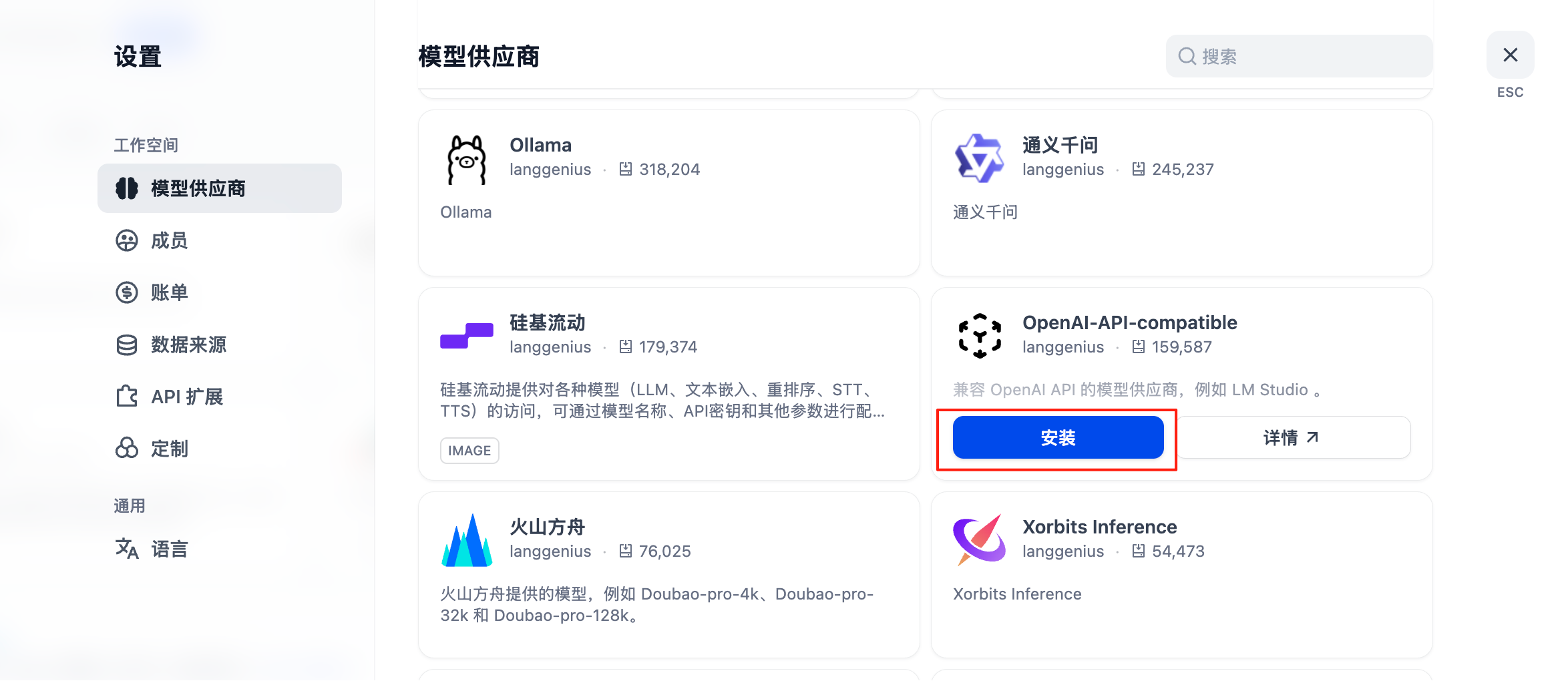
3. 「モデルプロバイダー」を選択し、OpenAI API互換を選びます
4. モデルタイプに応じて設定方法を選択します
 #### GPT、Claude、Geminiを含むすべてのモデルの設定
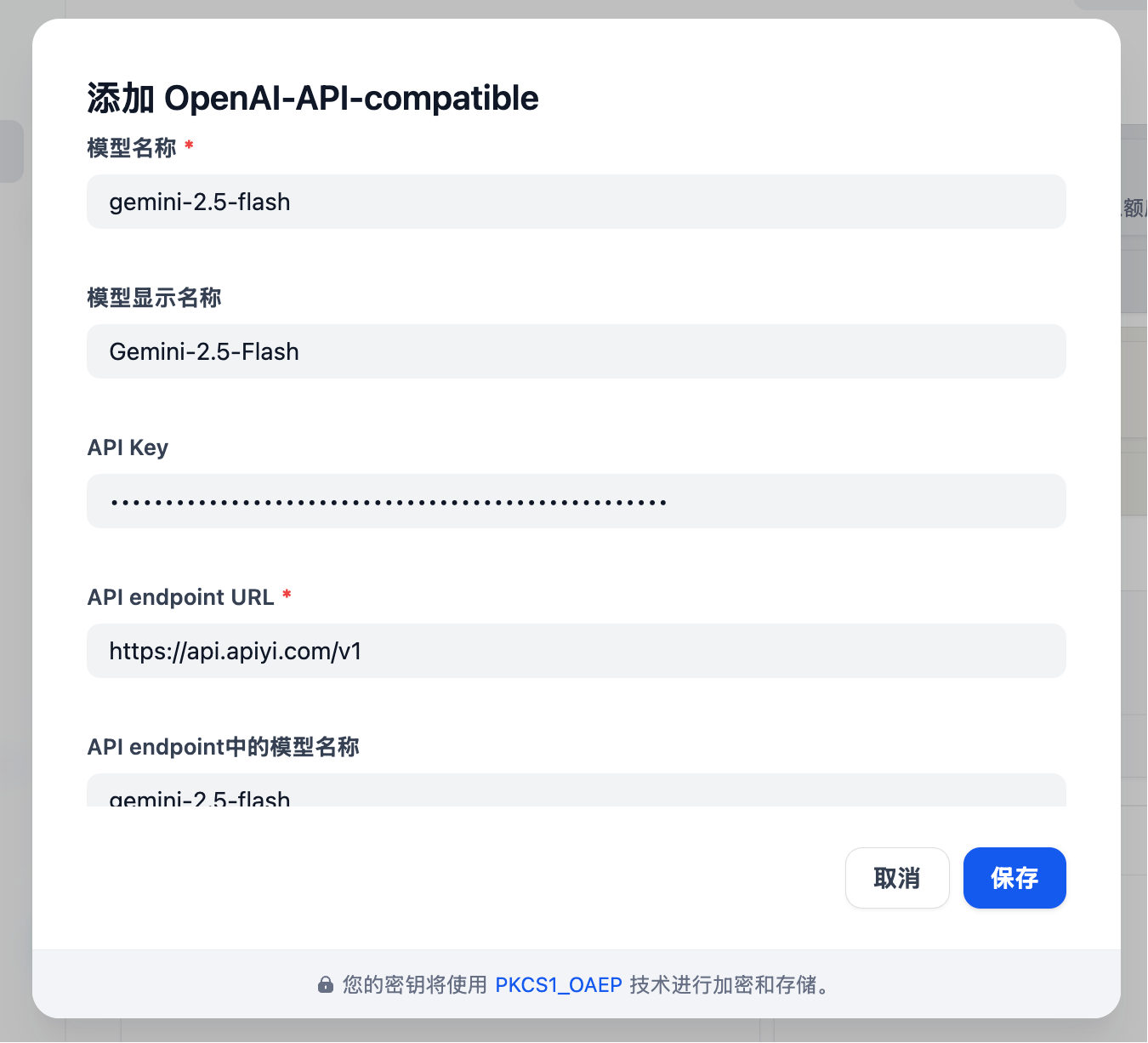
* モデルタイプ: LLMタイプを選択します(最初の列、画像は省略)
* モデル名: 任意ではなく、**標準モデル名**を入力する必要があります
* 例: Gemini 2.5 Flash ではなく gemini-2.5-flash を入力します
* モデル表示名: 識別しやすいように、たとえば Gemini 2.5 Flash など自由に設定できます
* **APIキー**: [APIYIキー](https://api.apiyi.com/token)を入力します
* **APIエンドポイントURL**: `https://api.apiyi.com/v1`
* APIエンドポイント内のモデル名: gemini-2.5-flash のような標準名を使用します
#### GPT、Claude、Geminiを含むすべてのモデルの設定
* モデルタイプ: LLMタイプを選択します(最初の列、画像は省略)
* モデル名: 任意ではなく、**標準モデル名**を入力する必要があります
* 例: Gemini 2.5 Flash ではなく gemini-2.5-flash を入力します
* モデル表示名: 識別しやすいように、たとえば Gemini 2.5 Flash など自由に設定できます
* **APIキー**: [APIYIキー](https://api.apiyi.com/token)を入力します
* **APIエンドポイントURL**: `https://api.apiyi.com/v1`
* APIエンドポイント内のモデル名: gemini-2.5-flash のような標準名を使用します
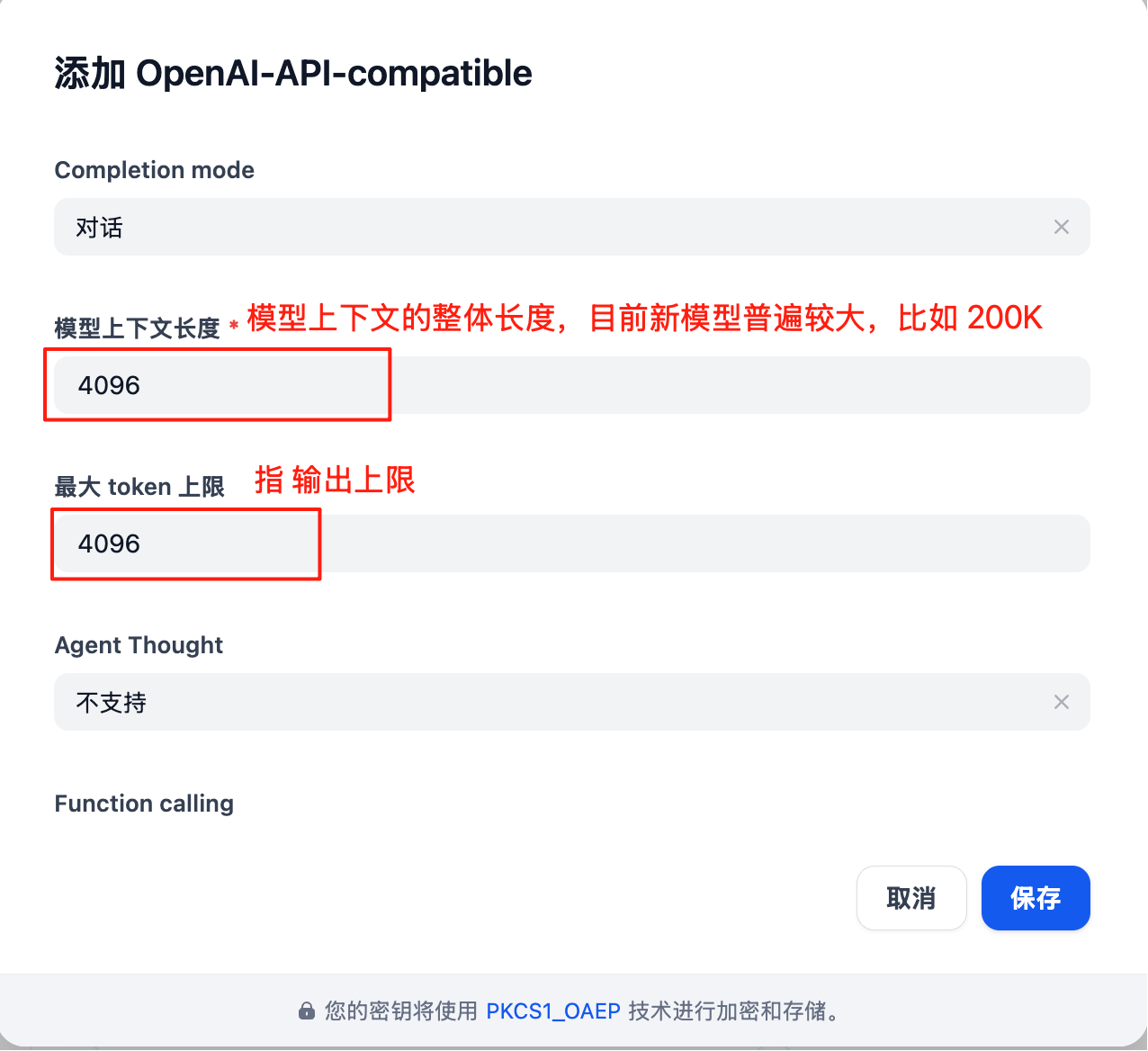
 モデル設定には、**実際の状況**に応じて更新すべきパラメータが多数あります:
注: Difyのモデル設定インターフェースは**最新ではありません**。たとえば、デフォルトのコンテキスト長4096はかなり小さいです。
各大規模モデルの具体的なコンテキスト長については、公式ドキュメント(このドキュメントセンターのリソースナビゲーションセクション)を参照してください
モデル設定には、**実際の状況**に応じて更新すべきパラメータが多数あります:
注: Difyのモデル設定インターフェースは**最新ではありません**。たとえば、デフォルトのコンテキスト長4096はかなり小さいです。
各大規模モデルの具体的なコンテキスト長については、公式ドキュメント(このドキュメントセンターのリソースナビゲーションセクション)を参照してください
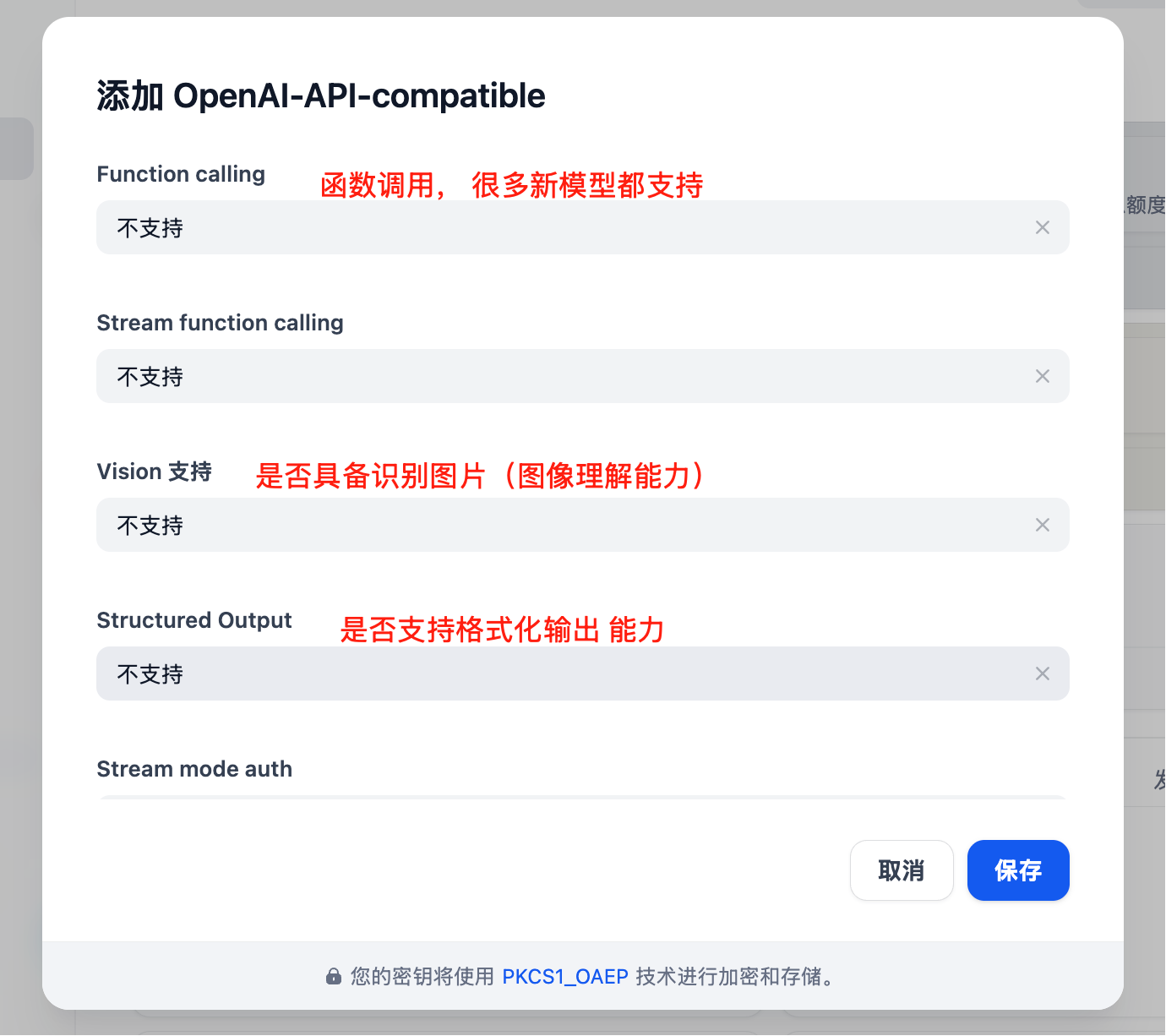
 利用可能なパラメータがさらにあります
 ## コア機能
### Chat Assistant
インテリジェントなチャットアシスタントを作成します:
1. 「Chat Assistant」テンプレートを選択します
2. システムプロンプトを設定します:
```text theme={null}
You are a professional customer service assistant responsible for:
- Answering user questions
- Providing product information
- Handling after-sales service
Please maintain a friendly and professional attitude.
```
3. 適切なモデルを選択します(例: GPT-4)
4. パラメータを調整します:
* Temperature: 0.7(創造性と正確性のバランスを取る)
* 最大出力: 2000 tokens
### ワークフローアプリケーション
複雑なAIワークフローを構築します:
```mermaid theme={null}
graph LR
A[User Input] --> B[Intent Recognition]
B --> C{Determine Type}
C -->|Q&A| D[Knowledge Base Retrieval]
C -->|Creation| E[Creative Generation]
C -->|Analysis| F[Data Analysis]
D --> G[Generate Answer]
E --> G
F --> G
G --> H[Output Result]
```
### ナレッジベースQ\&A
ドキュメントのナレッジベースを統合します:
1. ナレッジベースを作成します
2. ドキュメント(PDF、Word、Markdown)をアップロードします
3. 埋め込みモデルを選択します: `text-embedding-ada-002`
4. アプリケーション内でナレッジベースを参照します
5. 検索パラメータを設定します:
* 検索件数: 3-5セグメント
* 類似度しきい値: 0.7
* 再ランキング: 有効
## アプリケーションの種類
### 1. チャットアシスタント
```yaml theme={null}
Application Type: Chat Assistant
Model: gpt-4
System Prompt: |
You are a professional AI assistant with the following capabilities:
- Answering various questions
- Assisting in problem-solving
- Providing advice and guidance
Please always maintain a friendly, accurate, and helpful attitude.
Temperature: 0.7
Max Length: 2000
```
### 2. ドキュメント分析
```yaml theme={null}
Application Type: Workflow
Input: Document Upload
Processing Flow:
1. Document Parsing
2. Content Extraction
3. Structured Analysis
4. Generate Summary
Output: Analysis Report
```
### 3. コードアシスタント
```yaml theme={null}
Application Type: Chat Assistant
Model: gpt-4
System Prompt: |
You are a professional programming assistant specializing in:
- Code writing and optimization
- Error debugging
- Architecture design
- Best practice recommendations
Please provide clear and practical code solutions.
```
## 高度な機能
### API統合
DifyアプリケーションはAPI経由で呼び出せます:
```python theme={null}
import requests
url = "https://your-dify-instance/v1/chat-messages"
headers = {
"Authorization": "Bearer YOUR_APP_API_KEY",
"Content-Type": "application/json"
}
data = {
"inputs": {},
"query": "Hello, please introduce yourself",
"response_mode": "streaming",
"user": "user_123"
}
response = requests.post(url, headers=headers, json=data)
```
### バッチ処理
大量のデータを処理します:
1. CSVファイルを準備する
2. バッチタスクを作成する
3. 処理テンプレートを設定する
4. バッチタスクを実行する
5. 結果をエクスポートする
### マルチモーダルアプリケーション
テキストと画像の混在処理をサポートします:
```python theme={null}
# Multimodal input example
{
"inputs": {
"image": "data:image/jpeg;base64,...",
"text": "Analyze the content in this image"
},
"query": "Please describe the image content in detail and provide analysis"
}
```
## モデル選定戦略
### シナリオ別選定
| 適用シナリオ | 推奨モデル | 理由 |
| --------- | --------------- | --------- |
| カスタマーサービス | GPT-3.5-Turbo | 高速応答、低コスト |
| コンテンツ作成 | Claude 3 Sonnet | 高い創造性 |
| コードアシスタント | GPT-4 | 正確なロジック |
| 文書分析 | Claude 3 Opus | 長文理解に優れる |
| データ分析 | GPT-4 | 高い推論能力 |
### コスト最適化
```yaml theme={null}
Development Environment:
Model: gpt-3.5-turbo
Max Length: 1000
Temperature: 0.7
Production Environment:
Model: gpt-4
Max Length: 2000
Temperature: 0.5
```
## ベストプラクティス
### 1. プロンプトの最適化
```text theme={null}
# Structured Prompt
## Role Definition
You are a professional [specific role]
## Task Description
Please help users with [specific task]
## Output Format
Please output in the following format:
1. Overview
2. Detailed Analysis
3. Recommendations
## Constraints
- Answers must be accurate
- Language should be clear
- Keep length within 500 words
```
### 2. ワークフロー設計
```mermaid theme={null}
graph TD
A[User Input] --> B[Input Validation]
B --> C[Intent Classification]
C --> D{Select Processing Path}
D -->|Simple Question| E[Quick Answer]
D -->|Complex Question| F[In-depth Analysis]
D -->|Need Search| G[Knowledge Base Retrieval]
E --> H[Output Result]
F --> H
G --> I[Combine Search Results] --> H
```
### 3. モニタリングと最適化
定期的なチェック:
* ユーザー満足度のフィードバック
* 応答時間の統計
* コストの使用状況
* エラー率の分析
### 4. バージョン管理
* アプリケーション設定を定期的にバックアップする
* リリース前に新しいバージョンをテストする
* ロールバック用に複数のバージョンを保持する
## トラブルシューティング
### よくある問題
#### モデル呼び出しの失敗
* API key の正確性を確認する
* アカウント残高が十分であることを確認する
* ネットワーク接続を確認する
#### レスポンス品質が低い
* prompt 設計を最適化する
* モデルのパラメータを調整する
* コンテキスト情報を追加する
#### パフォーマンスの問題
* より高速なモデルを選択する
* 出力長の上限を下げる
* キャッシュを有効にする
### パフォーマンス最適化
```yaml theme={null}
Cache Settings:
Enabled: true
Expiration: 3600 seconds
Cache Condition: Same Input
Concurrency Control:
Max Concurrency: 10
Queue Size: 100
Timeout: 30 seconds
Resource Limits:
Memory Limit: 2GB
CPU Limit: 80%
```
## デプロイメントの推奨事項
### 本番環境
```yaml theme={null}
# docker-compose.yml
version: '3.8'
services:
dify-api:
image: langgenius/dify-api:latest
environment:
- SECRET_KEY=your-secret-key
- DB_HOST=postgres
- REDIS_HOST=redis
- OPENAI_API_KEY=your-apiyi-key
- OPENAI_API_BASE=https://api.apiyi.com/v1
depends_on:
- postgres
- redis
dify-web:
image: langgenius/dify-web:latest
ports:
- "3000:3000"
depends_on:
- dify-api
postgres:
image: postgres:14
environment:
- POSTGRES_DB=dify
- POSTGRES_USER=dify
- POSTGRES_PASSWORD=password
redis:
image: redis:alpine
```
### セキュリティ設定
* 機密情報の保存には環境変数を使用します
* HTTPSアクセスを有効にします
* アクセス制御を設定します
* 依存関係を定期的に更新します
### 監視の設定
```python theme={null}
# Monitoring script example
import requests
import time
def monitor_dify_health():
try:
response = requests.get("http://your-dify-instance/health")
if response.status_code == 200:
print("Dify running normally")
else:
print(f"Dify abnormal, status code: {response.status_code}")
except Exception as e:
print(f"Monitoring failed: {e}")
# Check every minute
while True:
monitor_dify_health()
time.sleep(60)
```
さらにサポートが必要ですか?[詳細な統合ドキュメント](/ja/scenarios/engineering/dify)をご確認ください。
## コア機能
### Chat Assistant
インテリジェントなチャットアシスタントを作成します:
1. 「Chat Assistant」テンプレートを選択します
2. システムプロンプトを設定します:
```text theme={null}
You are a professional customer service assistant responsible for:
- Answering user questions
- Providing product information
- Handling after-sales service
Please maintain a friendly and professional attitude.
```
3. 適切なモデルを選択します(例: GPT-4)
4. パラメータを調整します:
* Temperature: 0.7(創造性と正確性のバランスを取る)
* 最大出力: 2000 tokens
### ワークフローアプリケーション
複雑なAIワークフローを構築します:
```mermaid theme={null}
graph LR
A[User Input] --> B[Intent Recognition]
B --> C{Determine Type}
C -->|Q&A| D[Knowledge Base Retrieval]
C -->|Creation| E[Creative Generation]
C -->|Analysis| F[Data Analysis]
D --> G[Generate Answer]
E --> G
F --> G
G --> H[Output Result]
```
### ナレッジベースQ\&A
ドキュメントのナレッジベースを統合します:
1. ナレッジベースを作成します
2. ドキュメント(PDF、Word、Markdown)をアップロードします
3. 埋め込みモデルを選択します: `text-embedding-ada-002`
4. アプリケーション内でナレッジベースを参照します
5. 検索パラメータを設定します:
* 検索件数: 3-5セグメント
* 類似度しきい値: 0.7
* 再ランキング: 有効
## アプリケーションの種類
### 1. チャットアシスタント
```yaml theme={null}
Application Type: Chat Assistant
Model: gpt-4
System Prompt: |
You are a professional AI assistant with the following capabilities:
- Answering various questions
- Assisting in problem-solving
- Providing advice and guidance
Please always maintain a friendly, accurate, and helpful attitude.
Temperature: 0.7
Max Length: 2000
```
### 2. ドキュメント分析
```yaml theme={null}
Application Type: Workflow
Input: Document Upload
Processing Flow:
1. Document Parsing
2. Content Extraction
3. Structured Analysis
4. Generate Summary
Output: Analysis Report
```
### 3. コードアシスタント
```yaml theme={null}
Application Type: Chat Assistant
Model: gpt-4
System Prompt: |
You are a professional programming assistant specializing in:
- Code writing and optimization
- Error debugging
- Architecture design
- Best practice recommendations
Please provide clear and practical code solutions.
```
## 高度な機能
### API統合
DifyアプリケーションはAPI経由で呼び出せます:
```python theme={null}
import requests
url = "https://your-dify-instance/v1/chat-messages"
headers = {
"Authorization": "Bearer YOUR_APP_API_KEY",
"Content-Type": "application/json"
}
data = {
"inputs": {},
"query": "Hello, please introduce yourself",
"response_mode": "streaming",
"user": "user_123"
}
response = requests.post(url, headers=headers, json=data)
```
### バッチ処理
大量のデータを処理します:
1. CSVファイルを準備する
2. バッチタスクを作成する
3. 処理テンプレートを設定する
4. バッチタスクを実行する
5. 結果をエクスポートする
### マルチモーダルアプリケーション
テキストと画像の混在処理をサポートします:
```python theme={null}
# Multimodal input example
{
"inputs": {
"image": "data:image/jpeg;base64,...",
"text": "Analyze the content in this image"
},
"query": "Please describe the image content in detail and provide analysis"
}
```
## モデル選定戦略
### シナリオ別選定
| 適用シナリオ | 推奨モデル | 理由 |
| --------- | --------------- | --------- |
| カスタマーサービス | GPT-3.5-Turbo | 高速応答、低コスト |
| コンテンツ作成 | Claude 3 Sonnet | 高い創造性 |
| コードアシスタント | GPT-4 | 正確なロジック |
| 文書分析 | Claude 3 Opus | 長文理解に優れる |
| データ分析 | GPT-4 | 高い推論能力 |
### コスト最適化
```yaml theme={null}
Development Environment:
Model: gpt-3.5-turbo
Max Length: 1000
Temperature: 0.7
Production Environment:
Model: gpt-4
Max Length: 2000
Temperature: 0.5
```
## ベストプラクティス
### 1. プロンプトの最適化
```text theme={null}
# Structured Prompt
## Role Definition
You are a professional [specific role]
## Task Description
Please help users with [specific task]
## Output Format
Please output in the following format:
1. Overview
2. Detailed Analysis
3. Recommendations
## Constraints
- Answers must be accurate
- Language should be clear
- Keep length within 500 words
```
### 2. ワークフロー設計
```mermaid theme={null}
graph TD
A[User Input] --> B[Input Validation]
B --> C[Intent Classification]
C --> D{Select Processing Path}
D -->|Simple Question| E[Quick Answer]
D -->|Complex Question| F[In-depth Analysis]
D -->|Need Search| G[Knowledge Base Retrieval]
E --> H[Output Result]
F --> H
G --> I[Combine Search Results] --> H
```
### 3. モニタリングと最適化
定期的なチェック:
* ユーザー満足度のフィードバック
* 応答時間の統計
* コストの使用状況
* エラー率の分析
### 4. バージョン管理
* アプリケーション設定を定期的にバックアップする
* リリース前に新しいバージョンをテストする
* ロールバック用に複数のバージョンを保持する
## トラブルシューティング
### よくある問題
#### モデル呼び出しの失敗
* API key の正確性を確認する
* アカウント残高が十分であることを確認する
* ネットワーク接続を確認する
#### レスポンス品質が低い
* prompt 設計を最適化する
* モデルのパラメータを調整する
* コンテキスト情報を追加する
#### パフォーマンスの問題
* より高速なモデルを選択する
* 出力長の上限を下げる
* キャッシュを有効にする
### パフォーマンス最適化
```yaml theme={null}
Cache Settings:
Enabled: true
Expiration: 3600 seconds
Cache Condition: Same Input
Concurrency Control:
Max Concurrency: 10
Queue Size: 100
Timeout: 30 seconds
Resource Limits:
Memory Limit: 2GB
CPU Limit: 80%
```
## デプロイメントの推奨事項
### 本番環境
```yaml theme={null}
# docker-compose.yml
version: '3.8'
services:
dify-api:
image: langgenius/dify-api:latest
environment:
- SECRET_KEY=your-secret-key
- DB_HOST=postgres
- REDIS_HOST=redis
- OPENAI_API_KEY=your-apiyi-key
- OPENAI_API_BASE=https://api.apiyi.com/v1
depends_on:
- postgres
- redis
dify-web:
image: langgenius/dify-web:latest
ports:
- "3000:3000"
depends_on:
- dify-api
postgres:
image: postgres:14
environment:
- POSTGRES_DB=dify
- POSTGRES_USER=dify
- POSTGRES_PASSWORD=password
redis:
image: redis:alpine
```
### セキュリティ設定
* 機密情報の保存には環境変数を使用します
* HTTPSアクセスを有効にします
* アクセス制御を設定します
* 依存関係を定期的に更新します
### 監視の設定
```python theme={null}
# Monitoring script example
import requests
import time
def monitor_dify_health():
try:
response = requests.get("http://your-dify-instance/health")
if response.status_code == 200:
print("Dify running normally")
else:
print(f"Dify abnormal, status code: {response.status_code}")
except Exception as e:
print(f"Monitoring failed: {e}")
# Check every minute
while True:
monitor_dify_health()
time.sleep(60)
```
さらにサポートが必要ですか?[詳細な統合ドキュメント](/ja/scenarios/engineering/dify)をご確認ください。