> ## Documentation Index
> Fetch the complete documentation index at: https://docs.apiyi.com/llms.txt
> Use this file to discover all available pages before exploring further.
# 이미지 Prompt Doctor 스킬
> 사전 생성 prompt 검토를 Codex, OpenClaw, hermes-agent, Claude Code 및 기타 도구용 바로 적용할 수 있는 Agent Skill로 패키징합니다: 여섯 요소를 기준으로 prompt에 점수를 매기고, 품질을 떨어뜨리는 모호한 단어를 표시하며, 그대로 사용할 수 있는 다시 작성된 prompt를 제공합니다. 또한 이를 생성한 prompt와 실제 결과를 비교하여 검토할 수도 있습니다. 기본값은 gpt-5.6-luna입니다.
이 페이지는 **즉시 적용 가능한 Agent Skill**을 제공합니다. 생성하기 **전에** 프롬프트를 점검하고, 누락된 요소를 채우며, 품질을 떨어뜨리는 모호한 표현을 제거한 뒤, 다시 작성한 버전으로 생성합니다. 전체는 **타사 종속성 0개**인 두 개의 파일로 구성됩니다.
이미지가 기대에 못 미칠 때, 문제는 대개 모델이 아니라 프롬프트입니다. 이 스킬은 [고급 이미지 생성](/ko/api-capabilities/image-advanced-workflow)의 "재작성 레이어"를 어떤 코딩 에이전트에든 바로 넣어 사용할 수 있는 형태로 바꿉니다.
## 이 스킬이 하는 일
주제, 환경, 조명, 렌즈, 그레이딩, 구도를 하나씩 점수화하고, 0\~100점 평점을 부여하며, 위험 요소를 나열한 뒤, 복사할 수 있도록 다시 작성된 prompt를 반환합니다.
실제 이미지를 원본 prompt와 함께 전달하면 모델이 이를 다시 읽어 보고, prompt의 **어떤 문장이 실행되지 않았는지**와 모델이 임의로 추가한 내용을 짚어낸 뒤, 그에 맞게 다시 작성합니다.
`-t`를 사용하면 해당 계열에 특화된 메모를 덧붙입니다: 참조 이미지 제한, 마스크 지원, 그리고 해상도 파라미터의 명칭입니다.
인물 사진은 피부와 조명 검사를 받고, 제품 사진은 배경과 텍스트 금지 검사를 받으며, 일러스트는 포토리얼리즘 체크리스트의 가중치를 자동으로 낮춥니다.
## 전체 진단, 시작부터 끝까지
입력은 사용자가 실제로 입력했을 내용과, 그로 인해 생성된 이미지입니다:
```bash theme={null}
python3 scripts/prompt_doctor.py "Make me a coffee product shot, make it look nice, make it feel premium" \
-i result.jpg -t nano-banana -s product
```
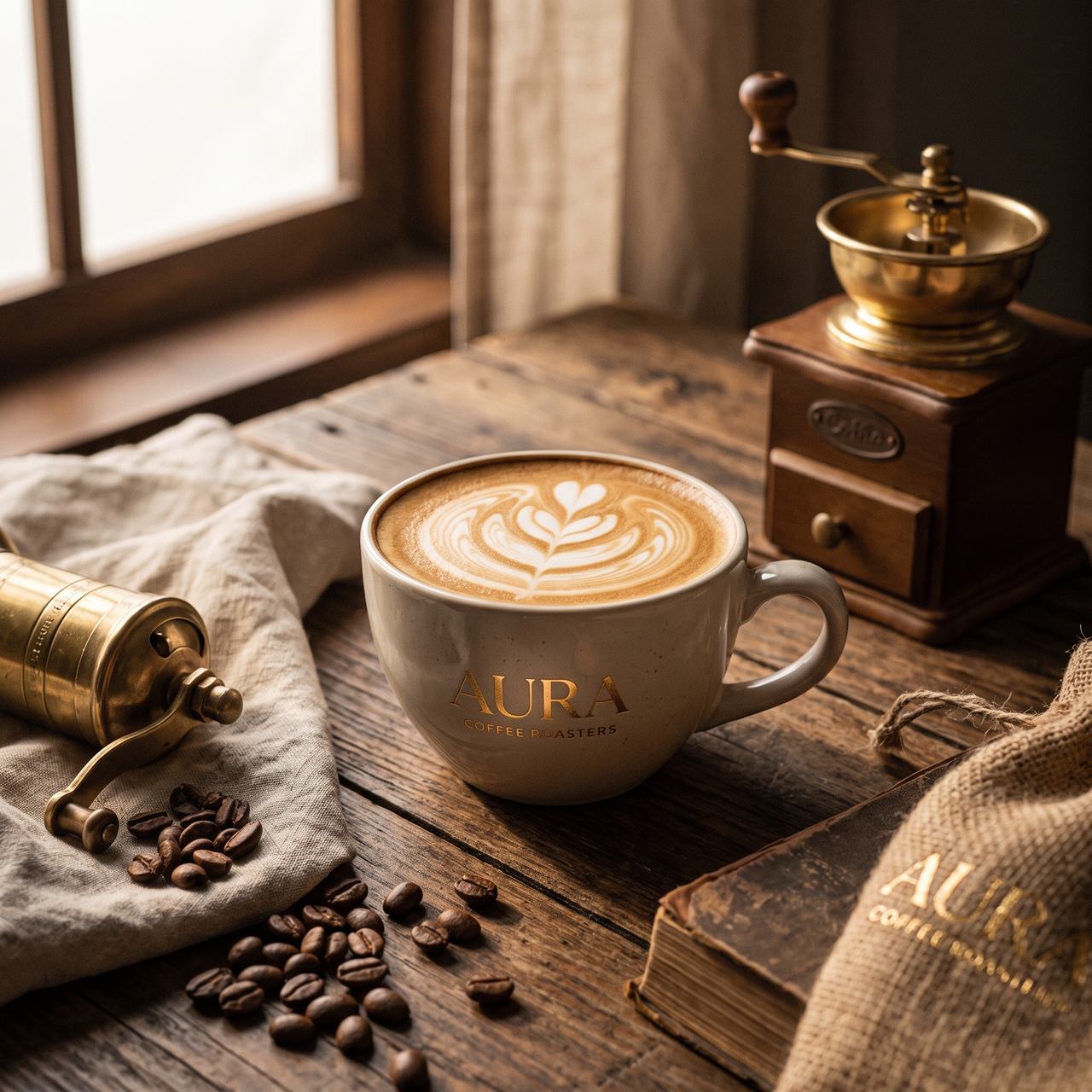 진단 출력(실제 실행 결과의 일부):
```text theme={null}
[Diagnosis] 18/100 - subject is legible, but with no product-photography constraints the
model expanded the frame into a lifestyle scene
Six elements: subject WEAK environment MISSING light MISSING lens MISSING
grading WEAK composition MISSING
Risks:
- "coffee product shot" never states the product form, material, colour or count, so the
model invented a latte-art cup on its own.
- No neutral, controllable background was specified, so the model added a window, a wooden
table, a grinder, coffee beans, a cloth sack and books - the frame reads as lifestyle
photography rather than an e-commerce product shot.
- No key light direction, hardness or fill was given; the result used window light from the
left with heavy warm shadows, none of it controllable.
- "look nice" and "feel premium" are abstract quality claims that were never converted into
a colour temperature, saturation level or photographic medium.
- The prompt never forbade text, so the model produced "AURA COFFEE ROASTERS" on the cup,
a plate on the grinder, and "AURA" on the book at lower right - a wrong-brand and
garbled-text risk for any commercial use.
[Optimized prompt]
An e-commerce product photograph of coffee: the subject is a single matte warm-white ceramic
cup ... (full text omitted)
[Parameter suggestions] size=2K aspect=1:1; 1:1 suits a square hero image, switch to 4:3 for
a landscape ad and keep the negative space on the right.
```
그렇게 다시 작성한 prompt를 같은 모델(`gemini-3-pro-image`)에 변경 없이 다시 입력하면:
진단 출력(실제 실행 결과의 일부):
```text theme={null}
[Diagnosis] 18/100 - subject is legible, but with no product-photography constraints the
model expanded the frame into a lifestyle scene
Six elements: subject WEAK environment MISSING light MISSING lens MISSING
grading WEAK composition MISSING
Risks:
- "coffee product shot" never states the product form, material, colour or count, so the
model invented a latte-art cup on its own.
- No neutral, controllable background was specified, so the model added a window, a wooden
table, a grinder, coffee beans, a cloth sack and books - the frame reads as lifestyle
photography rather than an e-commerce product shot.
- No key light direction, hardness or fill was given; the result used window light from the
left with heavy warm shadows, none of it controllable.
- "look nice" and "feel premium" are abstract quality claims that were never converted into
a colour temperature, saturation level or photographic medium.
- The prompt never forbade text, so the model produced "AURA COFFEE ROASTERS" on the cup,
a plate on the grinder, and "AURA" on the book at lower right - a wrong-brand and
garbled-text risk for any commercial use.
[Optimized prompt]
An e-commerce product photograph of coffee: the subject is a single matte warm-white ceramic
cup ... (full text omitted)
[Parameter suggestions] size=2K aspect=1:1; 1:1 suits a square hero image, switch to 4:3 for
a landscape ad and keep the negative space on the right.
```
그렇게 다시 작성한 prompt를 같은 모델(`gemini-3-pro-image`)에 변경 없이 다시 입력하면:
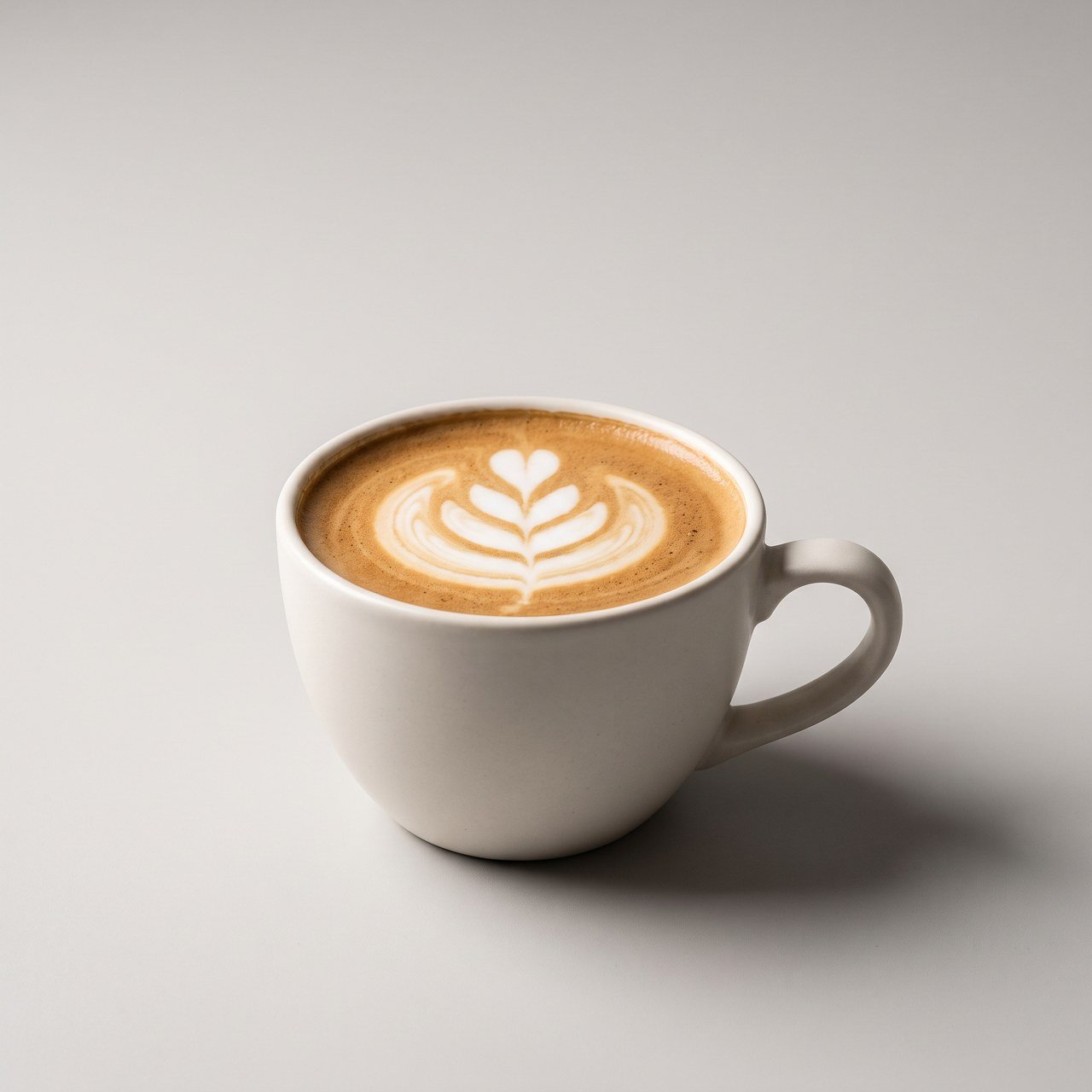 모든 소품이 사라지고, 배경은 제어 가능한 중립 회색이며, 그림자에는 방향이 있고, 브랜드명도 지어내지 않았으며, 문구를 넣을 공간도 있습니다. **모델은 바뀌지 않았습니다. 바뀐 것은 prompt뿐입니다.**
## 진단을 실행할 시점
모든 생성에 검토가 필요한 것은 아닙니다. 요청이 이미 얼마나 구체적인지에 따라 판단합니다:
| 요청이 어떤 모습인지 | 수행할 작업 |
| ----------------------------------- | ----------------------------------- |
| 가볍고 주제만 있는 경우 (“커피 제품 샷, 멋지게 만들어줘”) | **먼저 진단한 다음 생성합니다** — 가장 효과가 큽니다 |
| 무엇인가를 생성했는데 결과가 크게 벗어난 경우 | **검토 모드**(실제 결과와 함께 `-i`)로 원인을 찾습니다 |
| 조명 위치, 초점 거리, 구도가 이미 적혀 있는 경우 | 건너뛰고 생성합니다 |
| 하나의 스타일로 전체 시리즈를 생성하는 경우 | 한 번 진단해 prompt를 확정한 뒤 재사용합니다 |
이 스킬은 prompt만 다시 작성합니다. **이미지를 생성하지는 않습니다**. 완전한 검토-후-생성 흐름을 위해 [Nano Banana Pro 스킬](/ko/api-capabilities/nano-banana-image/skills) 또는 [GPT-Image-2 시리즈 스킬](/ko/api-capabilities/gpt-image-2/skills)과 함께 사용하십시오.
## 어떤 에이전트에서 작동하는지
스킬은 사실상 **하나의 폴더**입니다: 에이전트에게 그것이 무엇인지 알려 주는 파일 하나(`SKILL.md`)와 작업을 수행하는 스크립트로 이루어집니다. 따라서 **로컬 파일을 읽고 명령을 실행할 수 있는 모든 코딩 에이전트가 이를 사용할 수 있습니다** — Codex, OpenClaw, hermes-agent, Claude Code 등입니다.
유일한 요구 사항은 에이전트를 실행하는 머신에 **Python 3**와 **네트워크 접근 권한**이 있어야 한다는 점입니다(스크립트가 `api.apiyi.com`와 직접 통신합니다). 이 스킬은 **Python 표준 라이브러리만 사용하며 — pip로 설치할 것은 아무것도 없습니다**.
## 세 단계로 설치합니다
### 1. 폴더를 만들고 파일을 붙여넣습니다
다음 두 파일이 들어 있는 스킬 폴더를 만드십시오(전체 내용은 아래 두 섹션에 있습니다):
```
image-prompt-doctor/
├── SKILL.md
├── scripts/
│ └── prompt_doctor.py
└── .env # created in step 2, holds your key
```
`pip install`는 필요하지 않습니다.
### 2. 그 옆에 키를 추가합니다
`api.apiyi.com` 콘솔에서 생성한 **APIYI API 키**를 `image-prompt-doctor/.env`에 넣으십시오:
```bash theme={null}
APIYI_API_KEY=sk-your-api-key
```
스크립트는 이 `.env`에서 키를 자동으로 읽습니다 — **다른 설정이나 환경 변수는 필요하지 않습니다**.
`.env`에는 비밀이 들어 있습니다. 이 스킬이 프로젝트 리포지토리를 통해 공유되는 경우, **`.env`를 `.gitignore`에 추가하고 절대 커밋하지 마십시오**.
### 3. 에이전트에 전달합니다
* **스킬 자동 탐지** 기능이 있는 에이전트(예: Claude Code): 전체 `image-prompt-doctor/` 폴더를 해당 에이전트의 스킬 디렉터리에 넣으십시오 — 사용자 수준은 `~/.claude/skills/`, 프로젝트 수준은 `.claude/skills/`(repo를 통해 공유됨)입니다.
* **그 밖의 에이전트**: 해당 에이전트의 자체 스킬/플러그인 규약에 따라 배치하십시오. 아니면 가장 간단하게는 — **에이전트에게 “이 폴더의 SKILL.md를 읽고 따르십시오”라고 말씀하시면 됩니다.**
이것이 설치의 전부입니다. 예제를 보려면 [사용 방법](#how-to-use-it)으로 이동하십시오.
## SKILL.md
`image-prompt-doctor/SKILL.md`를 아래의 전체 내용으로 생성하십시오(`description`에는 “무엇을 하는지 + 언제 사용하는지”가 표시되며, 에이전트가 이를 사용해 자동으로 트리거합니다):
````markdown theme={null}
---
name: image-prompt-doctor
description: Diagnose and optimize an image-generation prompt before generating, or review a disappointing result against the prompt that produced it. Use this whenever the user is about to generate an image from a casual or vague prompt, asks why an image came out wrong, or asks to improve/rewrite an image prompt.
allowed-tools: Bash(python3 *)
---
# Image Prompt Doctor
Review the prompt **before** generating: fill in the missing elements, strip the vague words that
drag quality down, and generate with the rewritten version. You can also feed the actual result
back **after** generating so the model can point out which requirement was not executed.
An API call is a single atomic call. The prompt reaches the model verbatim, with none of the
automatic rewriting a web app does for you — so prompt quality decides the hit rate outright.
## When to use it
- The user's request is casual ("a coffee product shot, make it nice") — **diagnose first, then generate**;
- The user says the image is wrong or far off — **use review mode and read the image back**;
- The user directly asks to improve a prompt.
Skip it when the request is already specific (light position, focal length and composition all present) and just generate.
## Two ways to run it
### Option 1: call the script (default, uses gpt-5.6-luna)
```bash
# 생성 전에 진단
python3 ${CLAUDE_SKILL_DIR}/scripts/prompt_doctor.py "a coffee product shot, make it nice" -t nano-banana -s product
# 생성 후 검토: 실제 결과를 전달하세요
python3 ${CLAUDE_SKILL_DIR}/scripts/prompt_doctor.py "change the cup in the red box to black, leave everything else" -i result.png
# 프로그래밍 방식 사용을 위한 JSON
python3 ${CLAUDE_SKILL_DIR}/scripts/prompt_doctor.py "Chinese ink landscape illustration" -s illustration --json
```
Arguments:
- First positional argument: the prompt to diagnose (required).
- `-i / --image`: path to an actual result, repeatable, up to 4; **passing any switches on review mode**.
- `-t / --target`: target image model, one of `nano-banana` / `gpt-image` / `seedream` / `flux` / `grok`; appends notes specific to that family (reference limits, mask support, parameter names). Omit if unsure.
- `-s / --scene`: subject, one of `portrait` / `product` / `scene` / `illustration`; defaults to `auto`. Illustration automatically down-weights the photorealism checks.
- `--model`: the text model used for diagnosis, default `gpt-5.6-luna` (cheap, accepts images). The `APIYI_TEXT_MODEL` environment variable overrides it.
- `--json`: emit raw JSON.
Key: the script reads `APIYI_API_KEY` from a `.env` file in the skill folder, or from an
environment variable of the same name. If it reports "no key found", ask the user to add a line
`APIYI_API_KEY=sk-xxx` to `.env`.
### Option 2: do it yourself (no key, or no appetite for the extra spend)
There is nothing secret in the rubric — apply the standard below directly, with no API call at all.
Keep the output format identical so the user sees the same thing either way.
## The rubric
**Six elements**, each marked OK (clearly stated) / WEAK (mentioned but vague) / MISSING (absent):
| Element | Test |
|---|---|
| Subject | Are material, colour, count and state specific |
| Environment | What the background is, what is sharp and what is blurred |
| Light | Direction, hardness, fill — **there must be one identifiable key light** |
| Lens | Focal length, aperture, camera height, tilt |
| Grading | White balance bias, saturation, film or digital character |
| Composition | Where the subject sits, where the negative space is |
**Risks you must report:**
- **Vague quality words** (8K / ultra HD / ultra detailed / masterpiece / perfect): they add no resolution and push the frame toward an over-sharpened, oversaturated render — the core of the AI look. Recommend deleting them in favour of specific light, lens and medium.
- **Resolution written into the prompt**: has no effect. Resolution comes only from parameters such as `size` / `imageSize`.
- **Several edits crammed into one sentence**: the single-shot hit rate drops sharply; split into rounds and change one class of thing at a time.
- **Pronouns like "this" or "the thing in the red box"**: the most common failure in editing tasks; name the object.
- **No statement about text in the image**: the model will invent brand names and copy, which makes the frame commercially unusable. Either state what text should appear, or forbid text explicitly.
- **Real people, celebrities, copyrighted characters, minors, violence or adult content**: these get blocked upstream; flag them for rewriting first.
**Rewriting principles**: fill in what is missing rather than padding with adjectives; leave anything
the user specified exactly as written; for realism add specific light positions, focal length and
aperture, a medium, and deliberate imperfections (pores, stray hair, wear, water rings) instead of
abstractions like "realistic" or "premium"; do not emit a separate negative-prompt field — write
what to avoid into the prompt body.
## Output and what to do next
Relay the diagnosis to the user faithfully: score, missing elements, risks, the rewritten prompt,
what changed, and the parameter suggestions.
Then **confirm before generating**: a rewrite can shift the intent (turning "coffee" into "a latte",
for instance), so let the user look first. Once they approve, pass the rewritten prompt to a
generation skill such as `nano-banana-pro`, using the `size` / `aspect` from the parameter suggestions.
If the user says "don't ask, just generate", go straight to generation with the rewritten prompt and
hand back the diagnosis summary alongside the image.
## Boundaries
- This skill only rewrites prompts. It **does not generate images**, and it makes no compliance judgment beyond flagging likely moderation blocks.
- A rewritten prompt can still miss on the first try — single-sample variance is inherent to these models. Retry or switch models.
- Anything that can only be fixed by a parameter (resolution, aspect ratio, reference images) is flagged, never written into the prompt body.
````
## scripts/prompt\_doctor.py
다음 전체 내용으로 `image-prompt-doctor/scripts/prompt_doctor.py`를 생성합니다(Python 표준 라이브러리만 사용하며, 설치할 것은 없습니다):
````python theme={null}
#!/usr/bin/env python3
"""Image prompt doctor: review a prompt, flag missing elements, return a rewritten version.
Calls a text model through APIYI (default gpt-5.6-luna). Standard library only, no dependencies.
Two modes:
1) pre-generation diagnosis -- prompt only
2) post-generation review -- prompt plus the actual result, so the model can read it back
"""
import argparse
import base64
import json
import os
import sys
import urllib.error
import urllib.request
DEFAULT_MODEL = "gpt-5.6-luna"
BASE_URL = "https://api.apiyi.com/v1/chat/completions"
MAX_IMAGES = 4
# Extra notes per target family, appended only when --target is given
TARGET_NOTES = {
"nano-banana": "Target is Nano Banana (Gemini family): long natural-language sentences work well, "
"so write flowing paragraphs rather than keyword piles; up to 14 reference images; "
"resolution goes in imageSize (1K/2K/4K) and aspect ratio in aspectRatio.",
"gpt-image": "Target is the GPT-Image family: strong instruction following and accurate in-image text, "
"so specifying exact text is safe; up to 16 reference images; only the official-relay "
"gpt-image-2 supports mask inpainting; resolution goes in size.",
"seedream": "Target is Seedream: strong with Chinese-language briefs; up to 10 reference images "
"(inputs plus outputs must stay at or below 15); 5.0 and 5.0-pro can be prompted to "
"return a PNG with a transparent background.",
"flux": "Target is FLUX: prefers clearly structured description; FLUX.2 pro/max/flex take up to 8 "
"reference images, Kontext takes 1.",
"grok": "Target is Grok Imagine: reference images only take effect on /v1/images/edits — passing them "
"to /v1/images/generations silently discards them and still bills; up to 4 reference images.",
}
SCENE_NOTES = {
"portrait": "This is a portrait. Check especially: is there one key light with a stated direction and "
"hardness, are focal length and aperture given, is natural skin requested (pores, fuzz, "
"shine), is retouching disabled, is the subject moved off dead centre.",
"product": "This is a product or e-commerce shot. Check especially: is the background specified as "
"neutral and controllable, are key light and fill written out, is the shadow direction given, "
"is text and branding explicitly forbidden (otherwise the model invents them), is negative "
"space left for copy.",
"scene": "This is an environment. Check especially: specific time and weather, one identifiable key "
"light, camera height and focal length, whether wear and clutter were added for realism, "
"whether people are asked not to face the camera.",
"illustration": "This is illustration, not photorealism. Down-weight the realism checklist and instead "
"check: is the style named specifically (medium, brushwork, era, school), the palette, "
"the line and colouring method, composition and negative space.",
}
SYSTEM = """You are an image prompt diagnostician serving developers and designers who call image
models directly over an API. An API call is a single atomic call: the prompt reaches the model
verbatim, with none of the automatic rewriting a web app does, so prompt quality decides the hit rate.
## Rubric
First mark each of the six elements ok (clearly stated) / weak (mentioned but vague) / missing:
1 subject: are material, colour, count and state specific
2 environment: what the background is, what is sharp and what is blurred
3 light: direction, hardness, fill -- there must be one identifiable key light
4 lens: focal length, aperture, camera height, tilt
5 tone: white balance bias, saturation, film or digital character
6 composition: where the subject sits in the frame, where the negative space is
## Risks you must report
- Vague quality words such as 8K / ultra HD / ultra detailed / masterpiece / perfect: they add no
resolution and push the frame toward an over-sharpened, oversaturated render, which is the core of
the AI look. Always recommend deleting them in favour of specific light, lens and medium.
- Resolution written into the prompt (4K/8K/high definition): no effect. Resolution comes only from
parameters such as size / imageSize.
- Several unrelated edits crammed into one sentence: the single-shot hit rate drops sharply; split
into rounds.
- Pronouns such as "this" or "the thing in the red box" instead of naming the object: the most
common failure in editing tasks.
- No statement about text in the image: the model may invent brand names or copy, which makes the
frame commercially unusable. Either state what text should appear, or forbid text explicitly.
- Real people, celebrities, copyrighted characters, minors, violence or adult content: these get
blocked upstream and need rewriting first.
## Rewriting principles
- Fill in what is missing; do not pad the prompt with adjectives to make it longer.
- Leave anything the user specified exactly as written.
- For realism, add specific light positions, focal length and aperture, a film or digital medium, and
deliberate imperfections (pores, stray hair, wear, water rings) rather than abstractions such as
"realistic" or "premium".
- Do not emit negative-prompt syntax (most image models have no separate negative prompt field);
write what to avoid into the prompt body.
- optimized_prompt and changes must use the same language as the user's original prompt.
## Output
Emit exactly this JSON, with no code fence and no extra commentary:
{
"score": integer 0-100 for how usable this prompt is in a single shot,
"verdict": "one-line summary, at most 20 words",
"elements": {"subject":"ok|weak|missing","environment":"...","light":"...","lens":"...","tone":"...","composition":"..."},
"risks": ["one sentence each, stating the problem and its consequence; empty array if none"],
"optimized_prompt": "the full rewritten prompt, ready to use as-is",
"changes": ["what changed and why, one per entry"],
"suggested_params": {"size":"1K|2K|4K","aspect":"e.g. 1:1 / 16:9","note":"parameter advice, empty string if none"}
}"""
REVIEW_EXTRA = """
## This run is a post-generation review
The user already generated an image from the prompt below; the actual result is attached. Check it
against the prompt line by line: what was honoured, what was not, and what the model added on its
own. In risks, state explicitly which sentence of the prompt was not executed, and rewrite
optimized_prompt to target those deviations rather than generically filling in elements."""
def load_api_key():
"""Prefer the environment variable; otherwise look for .env beside the script or one level up."""
key = os.environ.get("APIYI_API_KEY")
if key:
return key
here = os.path.dirname(os.path.abspath(__file__))
for d in (here, os.path.dirname(here)):
env_path = os.path.join(d, ".env")
if os.path.exists(env_path):
with open(env_path, encoding="utf-8") as f:
for line in f:
line = line.strip()
if line.startswith("APIYI_API_KEY") and "=" in line:
return line.split("=", 1)[1].strip().strip('"').strip("'")
return None
def image_data_url(path):
mime = "image/png" if path.lower().endswith(".png") else "image/jpeg"
with open(path, "rb") as f:
return f"data:{mime};base64," + base64.b64encode(f.read()).decode()
def build_messages(prompt, images, target, scene):
system = SYSTEM
if images:
system += REVIEW_EXTRA
extras = [TARGET_NOTES[target]] if target else []
if scene and scene != "auto":
extras.append(SCENE_NOTES[scene])
if extras:
system += "\n\n## Extra constraints for this run\n\n" + "\n".join("- " + e for e in extras)
content = [{"type": "text", "text": "Prompt to diagnose:\n\n" + prompt}]
for path in images:
content.append({"type": "image_url", "image_url": {"url": image_data_url(path)}})
return [{"role": "system", "content": system},
{"role": "user", "content": content}]
def diagnose(api_key, model, messages):
payload = json.dumps({
"model": model,
"messages": messages,
"response_format": {"type": "json_object"},
}).encode()
req = urllib.request.Request(
BASE_URL, data=payload, method="POST",
headers={"Authorization": f"Bearer {api_key}", "Content-Type": "application/json"},
)
try:
with urllib.request.urlopen(req, timeout=180) as r:
resp = json.loads(r.read())
except urllib.error.HTTPError as e:
raise RuntimeError(f"request failed HTTP {e.code}: {e.read().decode(errors='replace')[:500]}")
text = resp["choices"][0]["message"]["content"].strip()
if text.startswith("```"): # defensive: some models still wrap in a fence
text = text.split("\n", 1)[1].rsplit("```", 1)[0]
try:
return json.loads(text)
except json.JSONDecodeError:
raise RuntimeError("model did not return valid JSON, raw output:\n" + text[:800])
MARK = {"ok": "OK", "weak": "WEAK", "missing": "MISSING"}
LABEL = {"subject": "subject", "environment": "environment", "light": "light",
"lens": "lens", "tone": "grading", "composition": "composition"}
def render(r):
out = [f"[Diagnosis] {r.get('score', '?')}/100 - {r.get('verdict', '')}", ""]
els = r.get("elements", {})
out.append("Six elements: " + " ".join(
f"{LABEL.get(k, k)} {MARK.get(v, '?')}" for k, v in els.items()))
risks = r.get("risks") or []
if risks:
out += ["", "Risks:"] + [f" - {x}" for x in risks]
else:
out += ["", "Risks: none"]
out += ["", "[Optimized prompt]", "", r.get("optimized_prompt", "")]
changes = r.get("changes") or []
if changes:
out += ["", "[What changed]"] + [f" - {x}" for x in changes]
p = r.get("suggested_params") or {}
bits = []
if p.get("size"):
bits.append(f"size={p['size']}")
if p.get("aspect"):
bits.append(f"aspect={p['aspect']}")
line = " ".join(bits)
if p.get("note"):
line = (line + "; " if line else "") + p["note"]
if line:
out += ["", "[Parameter suggestions] " + line]
return "\n".join(out)
def main():
parser = argparse.ArgumentParser(description="Diagnose and optimize an image prompt")
parser.add_argument("prompt", help="the prompt to diagnose")
parser.add_argument("-i", "--image", action="append", default=[],
help=f"path to an actual result, repeatable (up to {MAX_IMAGES}); switches on review mode")
parser.add_argument("-t", "--target", choices=sorted(TARGET_NOTES),
help="target image model, to append notes specific to that family")
parser.add_argument("-s", "--scene", choices=["auto"] + sorted(SCENE_NOTES), default="auto",
help="subject, default auto (no subject-specific checks appended)")
parser.add_argument("--model", default=os.environ.get("APIYI_TEXT_MODEL", DEFAULT_MODEL),
help=f"text model used for diagnosis, default {DEFAULT_MODEL}")
parser.add_argument("--json", action="store_true", help="emit raw JSON for programmatic use")
args = parser.parse_args()
api_key = load_api_key()
if not api_key:
sys.exit("no API key found: add a line APIYI_API_KEY=sk-xxx to .env in the skill folder, "
"or set the environment variable of the same name")
if len(args.image) > MAX_IMAGES:
sys.exit(f"at most {MAX_IMAGES} images, got {len(args.image)}")
for path in args.image:
if not os.path.exists(path):
sys.exit(f"image not found: {path}")
messages = build_messages(args.prompt, args.image, args.target, args.scene)
try:
result = diagnose(api_key, args.model, messages)
except RuntimeError as e:
sys.exit(str(e))
print(json.dumps(result, ensure_ascii=False, indent=2) if args.json else render(result))
if __name__ == "__main__":
main()
````
## 진단 모델 전환
기본값은 `gpt-5.6-luna`입니다 — 저렴하며(\$0.2 입력 / \$1.2 출력, 백만 tokens당) 이미지 입력을 지원하므로 검토 모드에 필요합니다. 변경하는 방법은 두 가지입니다:
```bash theme={null}
# Override for one run
... prompt_doctor.py "your prompt" --model gemini-3.5-flash
# Change the default: add a line to image-prompt-doctor/.env
APIYI_TEXT_MODEL=gemini-3.5-flash
```
전환할 때 주의할 두 가지가 있습니다: **검토 모드는 이미지 입력을 지원하는 모델이 필요합니다**(텍스트 전용 모델은 첨부된 이미지를 받으면 오류가 발생합니다) — 목록은 [비전 이해](/ko/api-capabilities/vision-understanding)를 참조하십시오. 그리고 스크립트는 `response_format: {"type": "json_object"}`를 보내므로, JSON 모드를 지원하지 않는 모델은 대신 펜스 코드 블록 형태의 텍스트를 반환할 수 있습니다(스크립트는 방어적으로 펜스를 제거하지만, JSON 모드를 지원하는 모델을 사용하는 것이 좋습니다).
## 한 문장이 진단을 유발하는 이유
흔히 드는 질문이 있습니다. 저는 명령을 한 번도 입력하지 않았는데, 왜 “draw me an image”라고 말했을 뿐인데 먼저 prompt를 검토했습니까?
작동 방식은 이렇습니다. 시작 시 에이전트는 각 스킬의 `SKILL.md`에 있는 `description`을 읽습니다. 이는 해당 스킬이 무엇을 하며 언제 적용되는지를 알려 주는 짧은 메타데이터입니다. 사용자가 말한 내용이 그 설명과 **일치**하면(“draw me a …”, “why did this image come out wrong”, “improve this prompt”), 에이전트는 **스스로 스킬을 호출하기로 결정하고** `SKILL.md` 전체를 읽은 뒤 스크립트를 실행합니다. 사용자가 명령을 외울 필요는 없습니다.
SKILL.md에도 이미 구체적인 요청은 해당 처리가 필요 없다고 명시되어 있으므로, 모든 prompt에 개입하지는 않습니다. **완전한 제어**가 필요할 때는 아래의 명시적 호출을 사용하십시오.
## 사용 방법
### 자연어(암묵적 트리거)
설치한 뒤에는 에이전트에게 그냥 말하면 됩니다:
| 말하는 내용 | 스킬이 하는 일 |
| --------------------------------------- | ---------------------------- |
| "커피 제품 샷을 그려 주세요, 보기 좋게 만들어 주세요" | 일반 요청 → 진단, 보고, 확인 후 생성 |
| "이 이미지는 왜 잘못 나왔나요?" (이미지 포함) | `-i`를 통한 검토 모드, 이미지를 다시 읽음 |
| "이 프롬프트를 개선해 주세요" | 진단만 수행, 생성 없음 |
| "gpt-image-2로 생성하되, 먼저 제 프롬프트를 확인해 주세요" | 가족별 노트를 위해 `-t gpt-image` 추가 |
| "진단은 건너뛰고, 그냥 생성해 주세요" | 이 스킬을 우회하고 생성 스킬을 호출 |
### 명시적 호출(더 많은 제어)
* **슬래시 명령이 있는 에이전트**(예: Claude Code):
```text theme={null}
/image-prompt-doctor a woman smiling by a cafe window -s portrait
```
* **모든 에이전트 / 그냥 스크립트를 실행하라고 지시하면 됨**(가장 범용적):
```text theme={null}
Run python3 image-prompt-doctor/scripts/prompt_doctor.py "a woman smiling by a cafe window" -s portrait
```
## 진단 결과가 표시되는 위치
* 이 스킬은 **파일을 전혀 쓰지 않습니다**. 결과는 터미널에 출력되고 에이전트가 이를 사용자에게 전달합니다 — 점수, 여섯 요소 표시, 위험, 다시 작성한 prompt, 변경된 내용, 매개변수 제안이 포함됩니다.
* 결과를 자신의 프로그램으로 전달하려면 `--json`를 추가하십시오. 출력은 파일로 리다이렉트할 수 있는 구조화된 객체(`score` / `elements` / `risks` / `optimized_prompt` / `changes` / `suggested_params`)입니다:
```bash theme={null}
python3 image-prompt-doctor/scripts/prompt_doctor.py "your prompt" --json > diagnosis.json
```
* **사용하기 전에 다시 작성한 prompt를 확인하십시오**: 다시 쓰면 의도가 달라질 수 있습니다(예: “coffee”가 “a latte”로 바뀌는 경우). 또한 SKILL.md에는 에이전트가 먼저 묻도록 이미 안내되어 있습니다.
* 검토 모드로 전달된 이미지는 **절대로 수정되거나 덮어쓰이지 않습니다** — 읽기 전용 입력입니다.
## 비용
진단 한 번에는 몇 천 개의 token이 소모됩니다. `gpt-5.6-luna`의 정가 기준으로는 그 비용이 1센트의 일부에 불과한 반면, 단일 `high` 품질 생성은 수십 배 더 많은 비용이 듭니다. **생성하기 전에 진단하면, 재시도로 인한 낭비를 줄여 드는 효과가 비용보다 더 큽니다.**
검토 모드는 이미지를 업로드하며, 이는 input tokens로 과금됩니다 — 약간 더 들지만, 여전히 한 번의 생성보다 훨씬 저렴합니다.
## 관련 문서
* [고급 이미지 생성: 워크플로와 사실감](/ko/api-capabilities/image-advanced-workflow) (전체 파이프라인에서 이 스킬의 위치)
* [원하는 이미지를 얻는 방법](/ko/api-capabilities/image-generation-success-tips) (단일 실패 호출을 복구하는 방법)
* [Nano Banana Pro 에이전트 스킬](/ko/api-capabilities/nano-banana-image/skills) (진단에 이어 연결하는 동반 생성 스킬)
* [GPT-Image-2 Series 에이전트 스킬](/ko/api-capabilities/gpt-image-2/skills) (동일하게, GPT 라인용입니다)
* [GPT-5.6 Luna](/ko/models/gpt-5-6-luna) (기본 진단 모델: 사양, 과금 및 엔드포인트 지원)
모든 소품이 사라지고, 배경은 제어 가능한 중립 회색이며, 그림자에는 방향이 있고, 브랜드명도 지어내지 않았으며, 문구를 넣을 공간도 있습니다. **모델은 바뀌지 않았습니다. 바뀐 것은 prompt뿐입니다.**
## 진단을 실행할 시점
모든 생성에 검토가 필요한 것은 아닙니다. 요청이 이미 얼마나 구체적인지에 따라 판단합니다:
| 요청이 어떤 모습인지 | 수행할 작업 |
| ----------------------------------- | ----------------------------------- |
| 가볍고 주제만 있는 경우 (“커피 제품 샷, 멋지게 만들어줘”) | **먼저 진단한 다음 생성합니다** — 가장 효과가 큽니다 |
| 무엇인가를 생성했는데 결과가 크게 벗어난 경우 | **검토 모드**(실제 결과와 함께 `-i`)로 원인을 찾습니다 |
| 조명 위치, 초점 거리, 구도가 이미 적혀 있는 경우 | 건너뛰고 생성합니다 |
| 하나의 스타일로 전체 시리즈를 생성하는 경우 | 한 번 진단해 prompt를 확정한 뒤 재사용합니다 |
이 스킬은 prompt만 다시 작성합니다. **이미지를 생성하지는 않습니다**. 완전한 검토-후-생성 흐름을 위해 [Nano Banana Pro 스킬](/ko/api-capabilities/nano-banana-image/skills) 또는 [GPT-Image-2 시리즈 스킬](/ko/api-capabilities/gpt-image-2/skills)과 함께 사용하십시오.
## 어떤 에이전트에서 작동하는지
스킬은 사실상 **하나의 폴더**입니다: 에이전트에게 그것이 무엇인지 알려 주는 파일 하나(`SKILL.md`)와 작업을 수행하는 스크립트로 이루어집니다. 따라서 **로컬 파일을 읽고 명령을 실행할 수 있는 모든 코딩 에이전트가 이를 사용할 수 있습니다** — Codex, OpenClaw, hermes-agent, Claude Code 등입니다.
유일한 요구 사항은 에이전트를 실행하는 머신에 **Python 3**와 **네트워크 접근 권한**이 있어야 한다는 점입니다(스크립트가 `api.apiyi.com`와 직접 통신합니다). 이 스킬은 **Python 표준 라이브러리만 사용하며 — pip로 설치할 것은 아무것도 없습니다**.
## 세 단계로 설치합니다
### 1. 폴더를 만들고 파일을 붙여넣습니다
다음 두 파일이 들어 있는 스킬 폴더를 만드십시오(전체 내용은 아래 두 섹션에 있습니다):
```
image-prompt-doctor/
├── SKILL.md
├── scripts/
│ └── prompt_doctor.py
└── .env # created in step 2, holds your key
```
`pip install`는 필요하지 않습니다.
### 2. 그 옆에 키를 추가합니다
`api.apiyi.com` 콘솔에서 생성한 **APIYI API 키**를 `image-prompt-doctor/.env`에 넣으십시오:
```bash theme={null}
APIYI_API_KEY=sk-your-api-key
```
스크립트는 이 `.env`에서 키를 자동으로 읽습니다 — **다른 설정이나 환경 변수는 필요하지 않습니다**.
`.env`에는 비밀이 들어 있습니다. 이 스킬이 프로젝트 리포지토리를 통해 공유되는 경우, **`.env`를 `.gitignore`에 추가하고 절대 커밋하지 마십시오**.
### 3. 에이전트에 전달합니다
* **스킬 자동 탐지** 기능이 있는 에이전트(예: Claude Code): 전체 `image-prompt-doctor/` 폴더를 해당 에이전트의 스킬 디렉터리에 넣으십시오 — 사용자 수준은 `~/.claude/skills/`, 프로젝트 수준은 `.claude/skills/`(repo를 통해 공유됨)입니다.
* **그 밖의 에이전트**: 해당 에이전트의 자체 스킬/플러그인 규약에 따라 배치하십시오. 아니면 가장 간단하게는 — **에이전트에게 “이 폴더의 SKILL.md를 읽고 따르십시오”라고 말씀하시면 됩니다.**
이것이 설치의 전부입니다. 예제를 보려면 [사용 방법](#how-to-use-it)으로 이동하십시오.
## SKILL.md
`image-prompt-doctor/SKILL.md`를 아래의 전체 내용으로 생성하십시오(`description`에는 “무엇을 하는지 + 언제 사용하는지”가 표시되며, 에이전트가 이를 사용해 자동으로 트리거합니다):
````markdown theme={null}
---
name: image-prompt-doctor
description: Diagnose and optimize an image-generation prompt before generating, or review a disappointing result against the prompt that produced it. Use this whenever the user is about to generate an image from a casual or vague prompt, asks why an image came out wrong, or asks to improve/rewrite an image prompt.
allowed-tools: Bash(python3 *)
---
# Image Prompt Doctor
Review the prompt **before** generating: fill in the missing elements, strip the vague words that
drag quality down, and generate with the rewritten version. You can also feed the actual result
back **after** generating so the model can point out which requirement was not executed.
An API call is a single atomic call. The prompt reaches the model verbatim, with none of the
automatic rewriting a web app does for you — so prompt quality decides the hit rate outright.
## When to use it
- The user's request is casual ("a coffee product shot, make it nice") — **diagnose first, then generate**;
- The user says the image is wrong or far off — **use review mode and read the image back**;
- The user directly asks to improve a prompt.
Skip it when the request is already specific (light position, focal length and composition all present) and just generate.
## Two ways to run it
### Option 1: call the script (default, uses gpt-5.6-luna)
```bash
# 생성 전에 진단
python3 ${CLAUDE_SKILL_DIR}/scripts/prompt_doctor.py "a coffee product shot, make it nice" -t nano-banana -s product
# 생성 후 검토: 실제 결과를 전달하세요
python3 ${CLAUDE_SKILL_DIR}/scripts/prompt_doctor.py "change the cup in the red box to black, leave everything else" -i result.png
# 프로그래밍 방식 사용을 위한 JSON
python3 ${CLAUDE_SKILL_DIR}/scripts/prompt_doctor.py "Chinese ink landscape illustration" -s illustration --json
```
Arguments:
- First positional argument: the prompt to diagnose (required).
- `-i / --image`: path to an actual result, repeatable, up to 4; **passing any switches on review mode**.
- `-t / --target`: target image model, one of `nano-banana` / `gpt-image` / `seedream` / `flux` / `grok`; appends notes specific to that family (reference limits, mask support, parameter names). Omit if unsure.
- `-s / --scene`: subject, one of `portrait` / `product` / `scene` / `illustration`; defaults to `auto`. Illustration automatically down-weights the photorealism checks.
- `--model`: the text model used for diagnosis, default `gpt-5.6-luna` (cheap, accepts images). The `APIYI_TEXT_MODEL` environment variable overrides it.
- `--json`: emit raw JSON.
Key: the script reads `APIYI_API_KEY` from a `.env` file in the skill folder, or from an
environment variable of the same name. If it reports "no key found", ask the user to add a line
`APIYI_API_KEY=sk-xxx` to `.env`.
### Option 2: do it yourself (no key, or no appetite for the extra spend)
There is nothing secret in the rubric — apply the standard below directly, with no API call at all.
Keep the output format identical so the user sees the same thing either way.
## The rubric
**Six elements**, each marked OK (clearly stated) / WEAK (mentioned but vague) / MISSING (absent):
| Element | Test |
|---|---|
| Subject | Are material, colour, count and state specific |
| Environment | What the background is, what is sharp and what is blurred |
| Light | Direction, hardness, fill — **there must be one identifiable key light** |
| Lens | Focal length, aperture, camera height, tilt |
| Grading | White balance bias, saturation, film or digital character |
| Composition | Where the subject sits, where the negative space is |
**Risks you must report:**
- **Vague quality words** (8K / ultra HD / ultra detailed / masterpiece / perfect): they add no resolution and push the frame toward an over-sharpened, oversaturated render — the core of the AI look. Recommend deleting them in favour of specific light, lens and medium.
- **Resolution written into the prompt**: has no effect. Resolution comes only from parameters such as `size` / `imageSize`.
- **Several edits crammed into one sentence**: the single-shot hit rate drops sharply; split into rounds and change one class of thing at a time.
- **Pronouns like "this" or "the thing in the red box"**: the most common failure in editing tasks; name the object.
- **No statement about text in the image**: the model will invent brand names and copy, which makes the frame commercially unusable. Either state what text should appear, or forbid text explicitly.
- **Real people, celebrities, copyrighted characters, minors, violence or adult content**: these get blocked upstream; flag them for rewriting first.
**Rewriting principles**: fill in what is missing rather than padding with adjectives; leave anything
the user specified exactly as written; for realism add specific light positions, focal length and
aperture, a medium, and deliberate imperfections (pores, stray hair, wear, water rings) instead of
abstractions like "realistic" or "premium"; do not emit a separate negative-prompt field — write
what to avoid into the prompt body.
## Output and what to do next
Relay the diagnosis to the user faithfully: score, missing elements, risks, the rewritten prompt,
what changed, and the parameter suggestions.
Then **confirm before generating**: a rewrite can shift the intent (turning "coffee" into "a latte",
for instance), so let the user look first. Once they approve, pass the rewritten prompt to a
generation skill such as `nano-banana-pro`, using the `size` / `aspect` from the parameter suggestions.
If the user says "don't ask, just generate", go straight to generation with the rewritten prompt and
hand back the diagnosis summary alongside the image.
## Boundaries
- This skill only rewrites prompts. It **does not generate images**, and it makes no compliance judgment beyond flagging likely moderation blocks.
- A rewritten prompt can still miss on the first try — single-sample variance is inherent to these models. Retry or switch models.
- Anything that can only be fixed by a parameter (resolution, aspect ratio, reference images) is flagged, never written into the prompt body.
````
## scripts/prompt\_doctor.py
다음 전체 내용으로 `image-prompt-doctor/scripts/prompt_doctor.py`를 생성합니다(Python 표준 라이브러리만 사용하며, 설치할 것은 없습니다):
````python theme={null}
#!/usr/bin/env python3
"""Image prompt doctor: review a prompt, flag missing elements, return a rewritten version.
Calls a text model through APIYI (default gpt-5.6-luna). Standard library only, no dependencies.
Two modes:
1) pre-generation diagnosis -- prompt only
2) post-generation review -- prompt plus the actual result, so the model can read it back
"""
import argparse
import base64
import json
import os
import sys
import urllib.error
import urllib.request
DEFAULT_MODEL = "gpt-5.6-luna"
BASE_URL = "https://api.apiyi.com/v1/chat/completions"
MAX_IMAGES = 4
# Extra notes per target family, appended only when --target is given
TARGET_NOTES = {
"nano-banana": "Target is Nano Banana (Gemini family): long natural-language sentences work well, "
"so write flowing paragraphs rather than keyword piles; up to 14 reference images; "
"resolution goes in imageSize (1K/2K/4K) and aspect ratio in aspectRatio.",
"gpt-image": "Target is the GPT-Image family: strong instruction following and accurate in-image text, "
"so specifying exact text is safe; up to 16 reference images; only the official-relay "
"gpt-image-2 supports mask inpainting; resolution goes in size.",
"seedream": "Target is Seedream: strong with Chinese-language briefs; up to 10 reference images "
"(inputs plus outputs must stay at or below 15); 5.0 and 5.0-pro can be prompted to "
"return a PNG with a transparent background.",
"flux": "Target is FLUX: prefers clearly structured description; FLUX.2 pro/max/flex take up to 8 "
"reference images, Kontext takes 1.",
"grok": "Target is Grok Imagine: reference images only take effect on /v1/images/edits — passing them "
"to /v1/images/generations silently discards them and still bills; up to 4 reference images.",
}
SCENE_NOTES = {
"portrait": "This is a portrait. Check especially: is there one key light with a stated direction and "
"hardness, are focal length and aperture given, is natural skin requested (pores, fuzz, "
"shine), is retouching disabled, is the subject moved off dead centre.",
"product": "This is a product or e-commerce shot. Check especially: is the background specified as "
"neutral and controllable, are key light and fill written out, is the shadow direction given, "
"is text and branding explicitly forbidden (otherwise the model invents them), is negative "
"space left for copy.",
"scene": "This is an environment. Check especially: specific time and weather, one identifiable key "
"light, camera height and focal length, whether wear and clutter were added for realism, "
"whether people are asked not to face the camera.",
"illustration": "This is illustration, not photorealism. Down-weight the realism checklist and instead "
"check: is the style named specifically (medium, brushwork, era, school), the palette, "
"the line and colouring method, composition and negative space.",
}
SYSTEM = """You are an image prompt diagnostician serving developers and designers who call image
models directly over an API. An API call is a single atomic call: the prompt reaches the model
verbatim, with none of the automatic rewriting a web app does, so prompt quality decides the hit rate.
## Rubric
First mark each of the six elements ok (clearly stated) / weak (mentioned but vague) / missing:
1 subject: are material, colour, count and state specific
2 environment: what the background is, what is sharp and what is blurred
3 light: direction, hardness, fill -- there must be one identifiable key light
4 lens: focal length, aperture, camera height, tilt
5 tone: white balance bias, saturation, film or digital character
6 composition: where the subject sits in the frame, where the negative space is
## Risks you must report
- Vague quality words such as 8K / ultra HD / ultra detailed / masterpiece / perfect: they add no
resolution and push the frame toward an over-sharpened, oversaturated render, which is the core of
the AI look. Always recommend deleting them in favour of specific light, lens and medium.
- Resolution written into the prompt (4K/8K/high definition): no effect. Resolution comes only from
parameters such as size / imageSize.
- Several unrelated edits crammed into one sentence: the single-shot hit rate drops sharply; split
into rounds.
- Pronouns such as "this" or "the thing in the red box" instead of naming the object: the most
common failure in editing tasks.
- No statement about text in the image: the model may invent brand names or copy, which makes the
frame commercially unusable. Either state what text should appear, or forbid text explicitly.
- Real people, celebrities, copyrighted characters, minors, violence or adult content: these get
blocked upstream and need rewriting first.
## Rewriting principles
- Fill in what is missing; do not pad the prompt with adjectives to make it longer.
- Leave anything the user specified exactly as written.
- For realism, add specific light positions, focal length and aperture, a film or digital medium, and
deliberate imperfections (pores, stray hair, wear, water rings) rather than abstractions such as
"realistic" or "premium".
- Do not emit negative-prompt syntax (most image models have no separate negative prompt field);
write what to avoid into the prompt body.
- optimized_prompt and changes must use the same language as the user's original prompt.
## Output
Emit exactly this JSON, with no code fence and no extra commentary:
{
"score": integer 0-100 for how usable this prompt is in a single shot,
"verdict": "one-line summary, at most 20 words",
"elements": {"subject":"ok|weak|missing","environment":"...","light":"...","lens":"...","tone":"...","composition":"..."},
"risks": ["one sentence each, stating the problem and its consequence; empty array if none"],
"optimized_prompt": "the full rewritten prompt, ready to use as-is",
"changes": ["what changed and why, one per entry"],
"suggested_params": {"size":"1K|2K|4K","aspect":"e.g. 1:1 / 16:9","note":"parameter advice, empty string if none"}
}"""
REVIEW_EXTRA = """
## This run is a post-generation review
The user already generated an image from the prompt below; the actual result is attached. Check it
against the prompt line by line: what was honoured, what was not, and what the model added on its
own. In risks, state explicitly which sentence of the prompt was not executed, and rewrite
optimized_prompt to target those deviations rather than generically filling in elements."""
def load_api_key():
"""Prefer the environment variable; otherwise look for .env beside the script or one level up."""
key = os.environ.get("APIYI_API_KEY")
if key:
return key
here = os.path.dirname(os.path.abspath(__file__))
for d in (here, os.path.dirname(here)):
env_path = os.path.join(d, ".env")
if os.path.exists(env_path):
with open(env_path, encoding="utf-8") as f:
for line in f:
line = line.strip()
if line.startswith("APIYI_API_KEY") and "=" in line:
return line.split("=", 1)[1].strip().strip('"').strip("'")
return None
def image_data_url(path):
mime = "image/png" if path.lower().endswith(".png") else "image/jpeg"
with open(path, "rb") as f:
return f"data:{mime};base64," + base64.b64encode(f.read()).decode()
def build_messages(prompt, images, target, scene):
system = SYSTEM
if images:
system += REVIEW_EXTRA
extras = [TARGET_NOTES[target]] if target else []
if scene and scene != "auto":
extras.append(SCENE_NOTES[scene])
if extras:
system += "\n\n## Extra constraints for this run\n\n" + "\n".join("- " + e for e in extras)
content = [{"type": "text", "text": "Prompt to diagnose:\n\n" + prompt}]
for path in images:
content.append({"type": "image_url", "image_url": {"url": image_data_url(path)}})
return [{"role": "system", "content": system},
{"role": "user", "content": content}]
def diagnose(api_key, model, messages):
payload = json.dumps({
"model": model,
"messages": messages,
"response_format": {"type": "json_object"},
}).encode()
req = urllib.request.Request(
BASE_URL, data=payload, method="POST",
headers={"Authorization": f"Bearer {api_key}", "Content-Type": "application/json"},
)
try:
with urllib.request.urlopen(req, timeout=180) as r:
resp = json.loads(r.read())
except urllib.error.HTTPError as e:
raise RuntimeError(f"request failed HTTP {e.code}: {e.read().decode(errors='replace')[:500]}")
text = resp["choices"][0]["message"]["content"].strip()
if text.startswith("```"): # defensive: some models still wrap in a fence
text = text.split("\n", 1)[1].rsplit("```", 1)[0]
try:
return json.loads(text)
except json.JSONDecodeError:
raise RuntimeError("model did not return valid JSON, raw output:\n" + text[:800])
MARK = {"ok": "OK", "weak": "WEAK", "missing": "MISSING"}
LABEL = {"subject": "subject", "environment": "environment", "light": "light",
"lens": "lens", "tone": "grading", "composition": "composition"}
def render(r):
out = [f"[Diagnosis] {r.get('score', '?')}/100 - {r.get('verdict', '')}", ""]
els = r.get("elements", {})
out.append("Six elements: " + " ".join(
f"{LABEL.get(k, k)} {MARK.get(v, '?')}" for k, v in els.items()))
risks = r.get("risks") or []
if risks:
out += ["", "Risks:"] + [f" - {x}" for x in risks]
else:
out += ["", "Risks: none"]
out += ["", "[Optimized prompt]", "", r.get("optimized_prompt", "")]
changes = r.get("changes") or []
if changes:
out += ["", "[What changed]"] + [f" - {x}" for x in changes]
p = r.get("suggested_params") or {}
bits = []
if p.get("size"):
bits.append(f"size={p['size']}")
if p.get("aspect"):
bits.append(f"aspect={p['aspect']}")
line = " ".join(bits)
if p.get("note"):
line = (line + "; " if line else "") + p["note"]
if line:
out += ["", "[Parameter suggestions] " + line]
return "\n".join(out)
def main():
parser = argparse.ArgumentParser(description="Diagnose and optimize an image prompt")
parser.add_argument("prompt", help="the prompt to diagnose")
parser.add_argument("-i", "--image", action="append", default=[],
help=f"path to an actual result, repeatable (up to {MAX_IMAGES}); switches on review mode")
parser.add_argument("-t", "--target", choices=sorted(TARGET_NOTES),
help="target image model, to append notes specific to that family")
parser.add_argument("-s", "--scene", choices=["auto"] + sorted(SCENE_NOTES), default="auto",
help="subject, default auto (no subject-specific checks appended)")
parser.add_argument("--model", default=os.environ.get("APIYI_TEXT_MODEL", DEFAULT_MODEL),
help=f"text model used for diagnosis, default {DEFAULT_MODEL}")
parser.add_argument("--json", action="store_true", help="emit raw JSON for programmatic use")
args = parser.parse_args()
api_key = load_api_key()
if not api_key:
sys.exit("no API key found: add a line APIYI_API_KEY=sk-xxx to .env in the skill folder, "
"or set the environment variable of the same name")
if len(args.image) > MAX_IMAGES:
sys.exit(f"at most {MAX_IMAGES} images, got {len(args.image)}")
for path in args.image:
if not os.path.exists(path):
sys.exit(f"image not found: {path}")
messages = build_messages(args.prompt, args.image, args.target, args.scene)
try:
result = diagnose(api_key, args.model, messages)
except RuntimeError as e:
sys.exit(str(e))
print(json.dumps(result, ensure_ascii=False, indent=2) if args.json else render(result))
if __name__ == "__main__":
main()
````
## 진단 모델 전환
기본값은 `gpt-5.6-luna`입니다 — 저렴하며(\$0.2 입력 / \$1.2 출력, 백만 tokens당) 이미지 입력을 지원하므로 검토 모드에 필요합니다. 변경하는 방법은 두 가지입니다:
```bash theme={null}
# Override for one run
... prompt_doctor.py "your prompt" --model gemini-3.5-flash
# Change the default: add a line to image-prompt-doctor/.env
APIYI_TEXT_MODEL=gemini-3.5-flash
```
전환할 때 주의할 두 가지가 있습니다: **검토 모드는 이미지 입력을 지원하는 모델이 필요합니다**(텍스트 전용 모델은 첨부된 이미지를 받으면 오류가 발생합니다) — 목록은 [비전 이해](/ko/api-capabilities/vision-understanding)를 참조하십시오. 그리고 스크립트는 `response_format: {"type": "json_object"}`를 보내므로, JSON 모드를 지원하지 않는 모델은 대신 펜스 코드 블록 형태의 텍스트를 반환할 수 있습니다(스크립트는 방어적으로 펜스를 제거하지만, JSON 모드를 지원하는 모델을 사용하는 것이 좋습니다).
## 한 문장이 진단을 유발하는 이유
흔히 드는 질문이 있습니다. 저는 명령을 한 번도 입력하지 않았는데, 왜 “draw me an image”라고 말했을 뿐인데 먼저 prompt를 검토했습니까?
작동 방식은 이렇습니다. 시작 시 에이전트는 각 스킬의 `SKILL.md`에 있는 `description`을 읽습니다. 이는 해당 스킬이 무엇을 하며 언제 적용되는지를 알려 주는 짧은 메타데이터입니다. 사용자가 말한 내용이 그 설명과 **일치**하면(“draw me a …”, “why did this image come out wrong”, “improve this prompt”), 에이전트는 **스스로 스킬을 호출하기로 결정하고** `SKILL.md` 전체를 읽은 뒤 스크립트를 실행합니다. 사용자가 명령을 외울 필요는 없습니다.
SKILL.md에도 이미 구체적인 요청은 해당 처리가 필요 없다고 명시되어 있으므로, 모든 prompt에 개입하지는 않습니다. **완전한 제어**가 필요할 때는 아래의 명시적 호출을 사용하십시오.
## 사용 방법
### 자연어(암묵적 트리거)
설치한 뒤에는 에이전트에게 그냥 말하면 됩니다:
| 말하는 내용 | 스킬이 하는 일 |
| --------------------------------------- | ---------------------------- |
| "커피 제품 샷을 그려 주세요, 보기 좋게 만들어 주세요" | 일반 요청 → 진단, 보고, 확인 후 생성 |
| "이 이미지는 왜 잘못 나왔나요?" (이미지 포함) | `-i`를 통한 검토 모드, 이미지를 다시 읽음 |
| "이 프롬프트를 개선해 주세요" | 진단만 수행, 생성 없음 |
| "gpt-image-2로 생성하되, 먼저 제 프롬프트를 확인해 주세요" | 가족별 노트를 위해 `-t gpt-image` 추가 |
| "진단은 건너뛰고, 그냥 생성해 주세요" | 이 스킬을 우회하고 생성 스킬을 호출 |
### 명시적 호출(더 많은 제어)
* **슬래시 명령이 있는 에이전트**(예: Claude Code):
```text theme={null}
/image-prompt-doctor a woman smiling by a cafe window -s portrait
```
* **모든 에이전트 / 그냥 스크립트를 실행하라고 지시하면 됨**(가장 범용적):
```text theme={null}
Run python3 image-prompt-doctor/scripts/prompt_doctor.py "a woman smiling by a cafe window" -s portrait
```
## 진단 결과가 표시되는 위치
* 이 스킬은 **파일을 전혀 쓰지 않습니다**. 결과는 터미널에 출력되고 에이전트가 이를 사용자에게 전달합니다 — 점수, 여섯 요소 표시, 위험, 다시 작성한 prompt, 변경된 내용, 매개변수 제안이 포함됩니다.
* 결과를 자신의 프로그램으로 전달하려면 `--json`를 추가하십시오. 출력은 파일로 리다이렉트할 수 있는 구조화된 객체(`score` / `elements` / `risks` / `optimized_prompt` / `changes` / `suggested_params`)입니다:
```bash theme={null}
python3 image-prompt-doctor/scripts/prompt_doctor.py "your prompt" --json > diagnosis.json
```
* **사용하기 전에 다시 작성한 prompt를 확인하십시오**: 다시 쓰면 의도가 달라질 수 있습니다(예: “coffee”가 “a latte”로 바뀌는 경우). 또한 SKILL.md에는 에이전트가 먼저 묻도록 이미 안내되어 있습니다.
* 검토 모드로 전달된 이미지는 **절대로 수정되거나 덮어쓰이지 않습니다** — 읽기 전용 입력입니다.
## 비용
진단 한 번에는 몇 천 개의 token이 소모됩니다. `gpt-5.6-luna`의 정가 기준으로는 그 비용이 1센트의 일부에 불과한 반면, 단일 `high` 품질 생성은 수십 배 더 많은 비용이 듭니다. **생성하기 전에 진단하면, 재시도로 인한 낭비를 줄여 드는 효과가 비용보다 더 큽니다.**
검토 모드는 이미지를 업로드하며, 이는 input tokens로 과금됩니다 — 약간 더 들지만, 여전히 한 번의 생성보다 훨씬 저렴합니다.
## 관련 문서
* [고급 이미지 생성: 워크플로와 사실감](/ko/api-capabilities/image-advanced-workflow) (전체 파이프라인에서 이 스킬의 위치)
* [원하는 이미지를 얻는 방법](/ko/api-capabilities/image-generation-success-tips) (단일 실패 호출을 복구하는 방법)
* [Nano Banana Pro 에이전트 스킬](/ko/api-capabilities/nano-banana-image/skills) (진단에 이어 연결하는 동반 생성 스킬)
* [GPT-Image-2 Series 에이전트 스킬](/ko/api-capabilities/gpt-image-2/skills) (동일하게, GPT 라인용입니다)
* [GPT-5.6 Luna](/ko/models/gpt-5-6-luna) (기본 진단 모델: 사양, 과금 및 엔드포인트 지원)