> ## Documentation Index
> Fetch the complete documentation index at: https://docs.apiyi.com/llms.txt
> Use this file to discover all available pages before exploring further.
# Dify
> 시각적 AI 애플리케이션 개발 플랫폼 통합 가이드
Dify는 AI 애플리케이션을 빠르게 구축할 수 있게 해주는 오픈 소스 LLM 애플리케이션 개발 플랫폼입니다. APIYI를 통해 Dify에서 다양한 주류 AI 모델을 사용할 수 있습니다.
## 빠른 연동
### 1. API Key 받기
[APIYI 콘솔](https://vip.apiyi.com)을 방문하여 API key를 받으십시오.
### 2. 모델 제공자 구성
1. Dify 플랫폼에 로그인합니다
2. 사용자명 > 설정을 클릭합니다
3. “Model Provider”를 선택하고 OpenAI-API 호환을 선택합니다
4. 모델 유형에 따라 구성 방법을 선택합니다
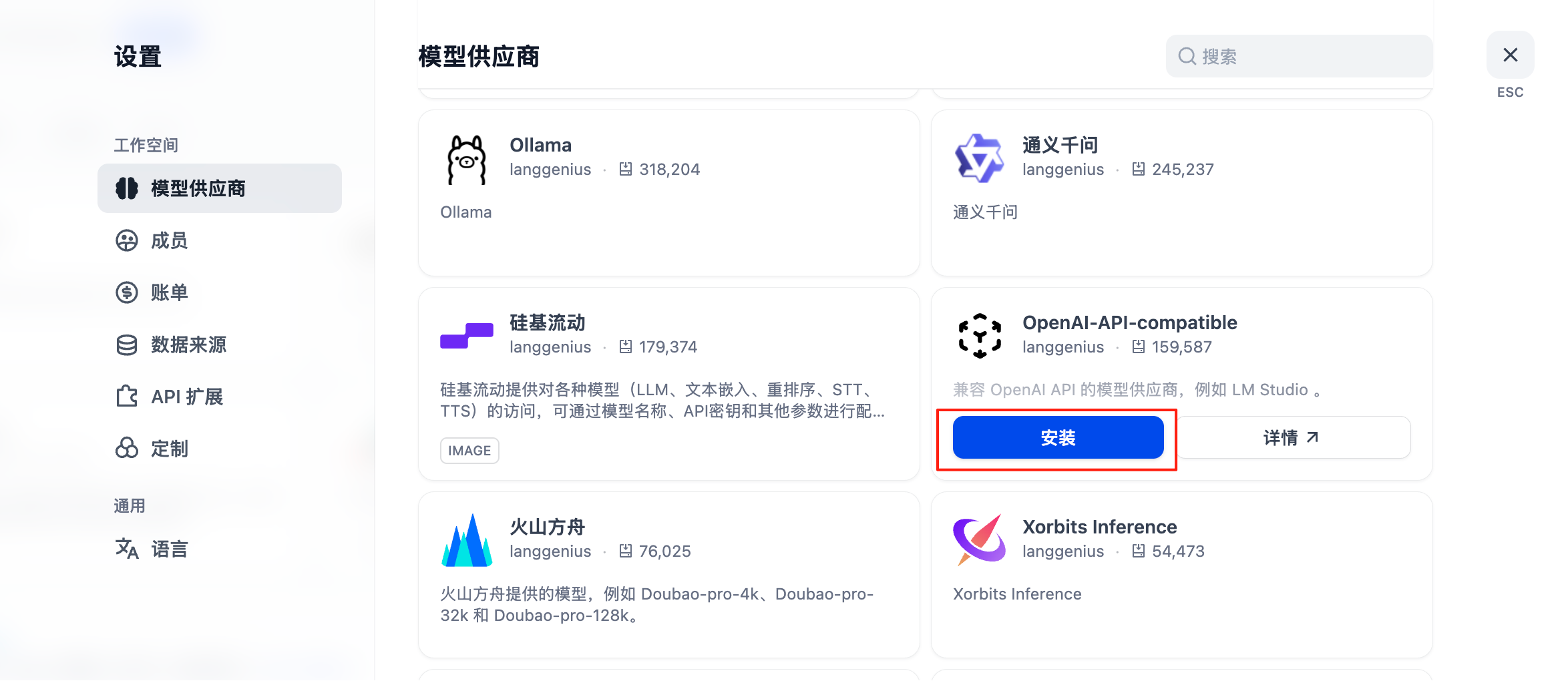 #### GPT, Claude, Gemini를 포함한 모든 모델에 대한 구성
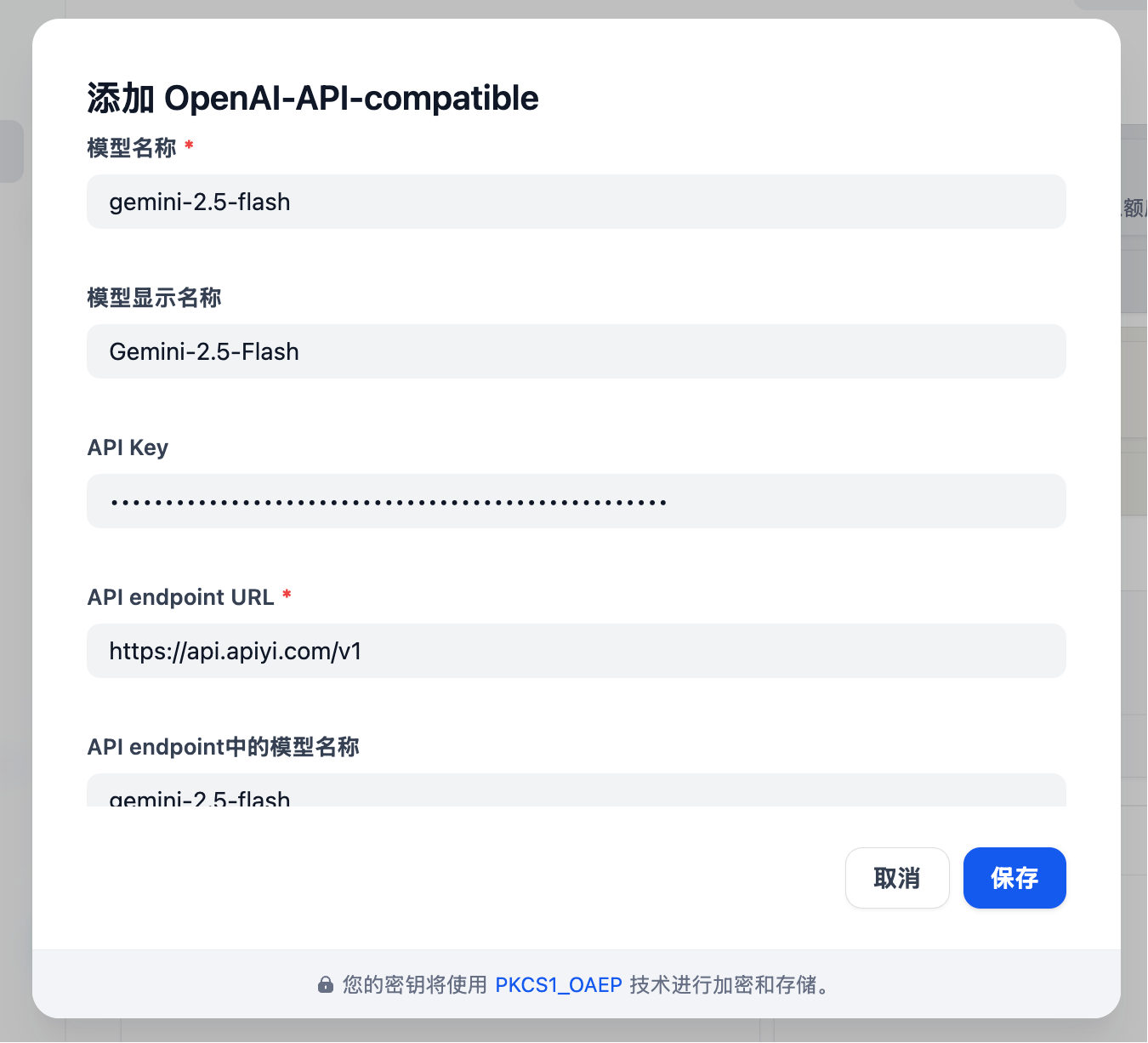
* 모델 유형: LLM 유형을 선택합니다(첫 번째 열, 이미지는 생략됨)
* 모델 이름: 임의가 아니라 **표준 모델 이름**을 입력해야 합니다
* 예시: Gemini 2.5 Flash 대신 gemini-2.5-flash를 입력합니다
* 모델 표시 이름: Gemini 2.5 Flash처럼 식별하기 쉽도록 무엇이든 입력할 수 있습니다
* **API Key**: [APIYI key](https://api.apiyi.com/token)를 입력합니다
* **API 엔드포인트 URL**: `https://api.apiyi.com/v1`
* API 엔드포인트의 모델 이름: gemini-2.5-flash처럼 표준 이름을 사용합니다
#### GPT, Claude, Gemini를 포함한 모든 모델에 대한 구성
* 모델 유형: LLM 유형을 선택합니다(첫 번째 열, 이미지는 생략됨)
* 모델 이름: 임의가 아니라 **표준 모델 이름**을 입력해야 합니다
* 예시: Gemini 2.5 Flash 대신 gemini-2.5-flash를 입력합니다
* 모델 표시 이름: Gemini 2.5 Flash처럼 식별하기 쉽도록 무엇이든 입력할 수 있습니다
* **API Key**: [APIYI key](https://api.apiyi.com/token)를 입력합니다
* **API 엔드포인트 URL**: `https://api.apiyi.com/v1`
* API 엔드포인트의 모델 이름: gemini-2.5-flash처럼 표준 이름을 사용합니다
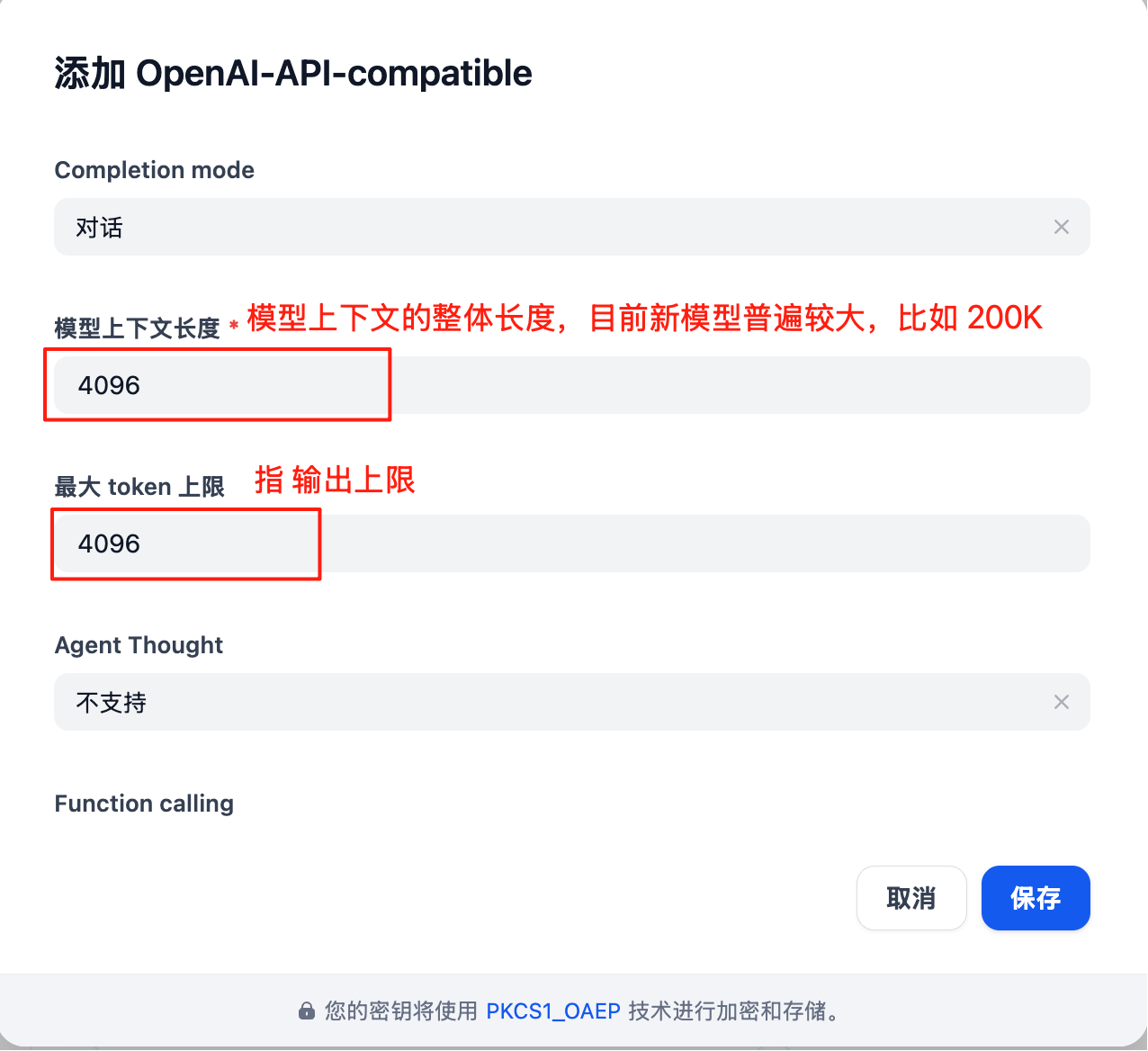
 모델 구성에는 **실제 상황**에 따라 업데이트해야 할 매개변수가 많습니다:
참고: Dify의 모델 구성 인터페이스는 **최신 상태가 아닙니다**, 예를 들어 기본 컨텍스트 길이 4096은 상당히 짧습니다.
각 대형 모델의 구체적인 컨텍스트 길이는 공식 문서를 참조하십시오(이 문서 센터의 Resource Navigation 섹션)
모델 구성에는 **실제 상황**에 따라 업데이트해야 할 매개변수가 많습니다:
참고: Dify의 모델 구성 인터페이스는 **최신 상태가 아닙니다**, 예를 들어 기본 컨텍스트 길이 4096은 상당히 짧습니다.
각 대형 모델의 구체적인 컨텍스트 길이는 공식 문서를 참조하십시오(이 문서 센터의 Resource Navigation 섹션)
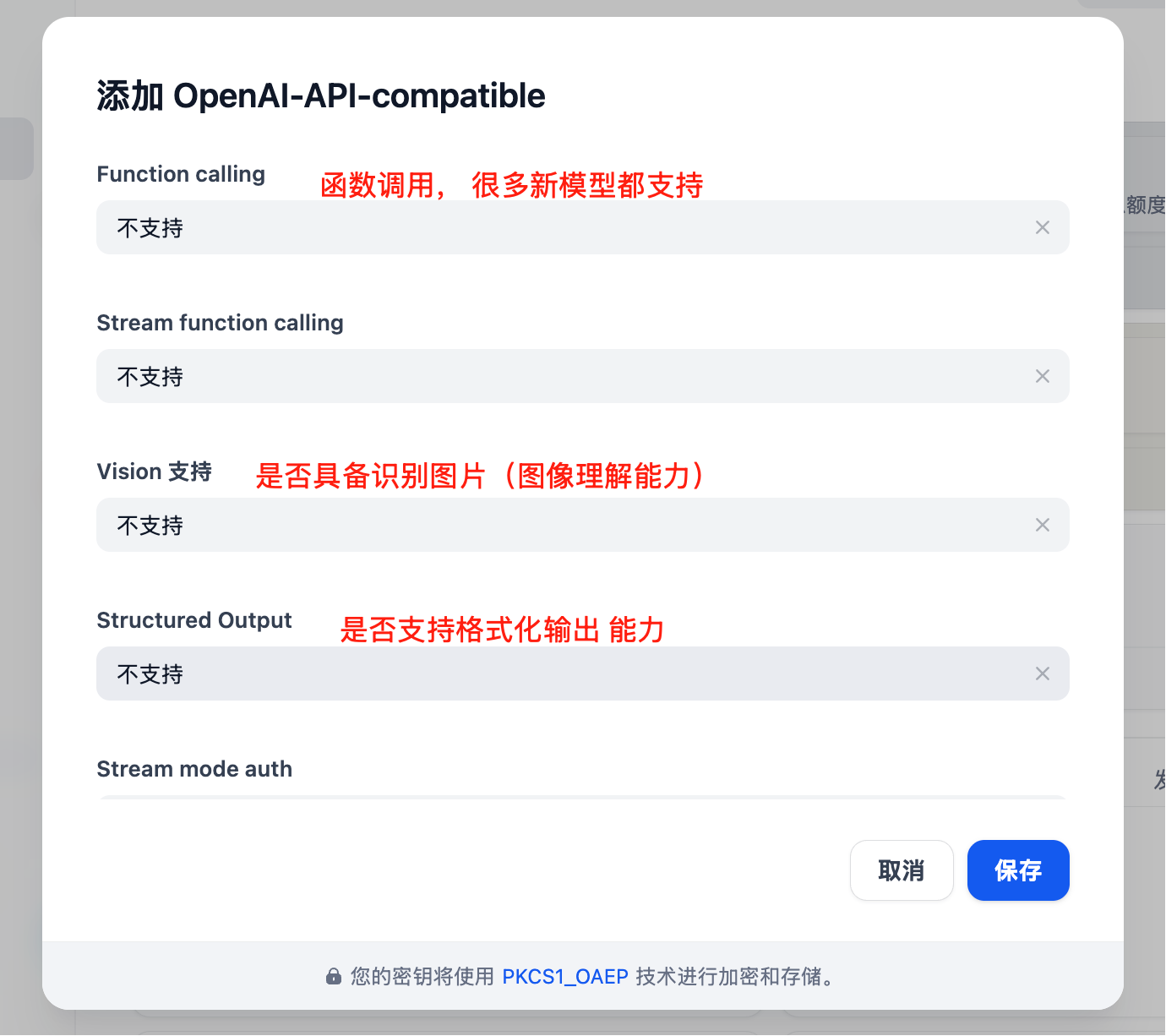
 추가로 사용할 수 있는 매개변수
 ## 핵심 기능
### 채팅 어시스턴트
지능형 채팅 어시스턴트를 생성합니다:
1. "Chat Assistant" 템플릿을 선택합니다
2. 시스템 prompt를 설정합니다:
```text theme={null}
You are a professional customer service assistant responsible for:
- Answering user questions
- Providing product information
- Handling after-sales service
Please maintain a friendly and professional attitude.
```
3. 적절한 모델을 선택합니다(예: GPT-4)
4. 파라미터를 조정합니다:
* Temperature: 0.7(창의성과 정확성의 균형)
* Max Output: 2000 tokens
### 워크플로 애플리케이션
복잡한 AI 워크플로를 구축합니다:
```mermaid theme={null}
graph LR
A[User Input] --> B[Intent Recognition]
B --> C{Determine Type}
C -->|Q&A| D[Knowledge Base Retrieval]
C -->|Creation| E[Creative Generation]
C -->|Analysis| F[Data Analysis]
D --> G[Generate Answer]
E --> G
F --> G
G --> H[Output Result]
```
### 지식 베이스 Q\&A
문서 지식 베이스를 통합합니다:
1. 지식 베이스를 생성합니다
2. 문서를 업로드합니다(PDF, Word, Markdown)
3. 임베딩 모델을 선택합니다: `text-embedding-ada-002`
4. 애플리케이션에서 지식 베이스를 참조합니다
5. 검색 파라미터를 설정합니다:
* 검색 개수: 3-5 세그먼트
* 유사도 임계값: 0.7
* Reranking: 활성화됨
## 애플리케이션 유형
### 1. 채팅 어시스턴트
```yaml theme={null}
Application Type: Chat Assistant
Model: gpt-4
System Prompt: |
You are a professional AI assistant with the following capabilities:
- Answering various questions
- Assisting in problem-solving
- Providing advice and guidance
Please always maintain a friendly, accurate, and helpful attitude.
Temperature: 0.7
Max Length: 2000
```
### 2. 문서 분석
```yaml theme={null}
Application Type: Workflow
Input: Document Upload
Processing Flow:
1. Document Parsing
2. Content Extraction
3. Structured Analysis
4. Generate Summary
Output: Analysis Report
```
### 3. 코드 어시스턴트
```yaml theme={null}
Application Type: Chat Assistant
Model: gpt-4
System Prompt: |
You are a professional programming assistant specializing in:
- Code writing and optimization
- Error debugging
- Architecture design
- Best practice recommendations
Please provide clear and practical code solutions.
```
## 고급 기능
### API 통합
Dify 애플리케이션은 API를 통해 호출할 수 있습니다:
```python theme={null}
import requests
url = "https://your-dify-instance/v1/chat-messages"
headers = {
"Authorization": "Bearer YOUR_APP_API_KEY",
"Content-Type": "application/json"
}
data = {
"inputs": {},
"query": "Hello, please introduce yourself",
"response_mode": "streaming",
"user": "user_123"
}
response = requests.post(url, headers=headers, json=data)
```
### 일괄 처리
대량의 데이터를 처리합니다:
1. CSV 파일을 준비합니다
2. 일괄 작업을 생성합니다
3. 처리 템플릿을 구성합니다
4. 일괄 작업을 실행합니다
5. 결과를 내보냅니다
### 멀티모달 애플리케이션
텍스트와 이미지를 혼합하여 처리할 수 있습니다:
```python theme={null}
# Multimodal input example
{
"inputs": {
"image": "data:image/jpeg;base64,...",
"text": "Analyze the content in this image"
},
"query": "Please describe the image content in detail and provide analysis"
}
```
## 모델 선택 전략
### 시나리오별 선택
| 적용 시나리오 | 권장 모델 | 이유 |
| -------- | --------------- | ------------ |
| 고객 서비스 | GPT-3.5-Turbo | 빠른 응답, 낮은 비용 |
| 콘텐츠 제작 | Claude 3 Sonnet | 뛰어난 창의성 |
| 코드 어시스턴트 | GPT-4 | 정확한 논리 |
| 문서 분석 | Claude 3 Opus | 긴 텍스트 이해에 강함 |
| 데이터 분석 | GPT-4 | 뛰어난 추론 능력 |
### 비용 최적화
```yaml theme={null}
Development Environment:
Model: gpt-3.5-turbo
Max Length: 1000
Temperature: 0.7
Production Environment:
Model: gpt-4
Max Length: 2000
Temperature: 0.5
```
## 모범 사례
### 1. Prompt 최적화
```text theme={null}
# Structured Prompt
## Role Definition
You are a professional [specific role]
## Task Description
Please help users with [specific task]
## Output Format
Please output in the following format:
1. Overview
2. Detailed Analysis
3. Recommendations
## Constraints
- Answers must be accurate
- Language should be clear
- Keep length within 500 words
```
### 2. 워크플로 설계
```mermaid theme={null}
graph TD
A[User Input] --> B[Input Validation]
B --> C[Intent Classification]
C --> D{Select Processing Path}
D -->|Simple Question| E[Quick Answer]
D -->|Complex Question| F[In-depth Analysis]
D -->|Need Search| G[Knowledge Base Retrieval]
E --> H[Output Result]
F --> H
G --> I[Combine Search Results] --> H
```
### 3. 모니터링 및 최적화
정기 점검:
* 사용자 만족도 피드백
* 응답 시간 통계
* 비용 사용량
* 오류율 분석
### 4. 버전 관리
* 애플리케이션 구성을 정기적으로 백업합니다
* 배포 전에 새 버전을 테스트합니다
* 롤백을 위해 여러 버전을 유지합니다
## 문제 해결
### 일반적인 문제
#### 모델 호출 실패
* API 키의 정확성을 확인합니다
* 충분한 계정 잔액을 확인합니다
* 네트워크 연결을 확인합니다
#### 응답 품질 저하
* prompt 설계를 최적화합니다
* 모델 매개변수를 조정합니다
* 컨텍스트 정보를 추가합니다
#### 성능 문제
* 더 빠른 모델을 선택합니다
* 출력 길이 제한을 줄입니다
* 캐싱을 활성화합니다
### 성능 최적화
```yaml theme={null}
Cache Settings:
Enabled: true
Expiration: 3600 seconds
Cache Condition: Same Input
Concurrency Control:
Max Concurrency: 10
Queue Size: 100
Timeout: 30 seconds
Resource Limits:
Memory Limit: 2GB
CPU Limit: 80%
```
## 배포 권장 사항
### 프로덕션 환경
```yaml theme={null}
# docker-compose.yml
version: '3.8'
services:
dify-api:
image: langgenius/dify-api:latest
environment:
- SECRET_KEY=your-secret-key
- DB_HOST=postgres
- REDIS_HOST=redis
- OPENAI_API_KEY=your-apiyi-key
- OPENAI_API_BASE=https://api.apiyi.com/v1
depends_on:
- postgres
- redis
dify-web:
image: langgenius/dify-web:latest
ports:
- "3000:3000"
depends_on:
- dify-api
postgres:
image: postgres:14
environment:
- POSTGRES_DB=dify
- POSTGRES_USER=dify
- POSTGRES_PASSWORD=password
redis:
image: redis:alpine
```
### 보안 구성
* 민감한 정보는 환경 변수를 사용하여 저장합니다
* HTTPS 액세스를 활성화합니다
* 접근 제어를 설정합니다
* 종속성을 정기적으로 업데이트합니다
### 모니터링 설정
```python theme={null}
# Monitoring script example
import requests
import time
def monitor_dify_health():
try:
response = requests.get("http://your-dify-instance/health")
if response.status_code == 200:
print("Dify running normally")
else:
print(f"Dify abnormal, status code: {response.status_code}")
except Exception as e:
print(f"Monitoring failed: {e}")
# Check every minute
while True:
monitor_dify_health()
time.sleep(60)
```
더 도움이 필요하신가요? [상세 통합 문서](/ko/scenarios/engineering/dify)를 확인해 주십시오.
## 핵심 기능
### 채팅 어시스턴트
지능형 채팅 어시스턴트를 생성합니다:
1. "Chat Assistant" 템플릿을 선택합니다
2. 시스템 prompt를 설정합니다:
```text theme={null}
You are a professional customer service assistant responsible for:
- Answering user questions
- Providing product information
- Handling after-sales service
Please maintain a friendly and professional attitude.
```
3. 적절한 모델을 선택합니다(예: GPT-4)
4. 파라미터를 조정합니다:
* Temperature: 0.7(창의성과 정확성의 균형)
* Max Output: 2000 tokens
### 워크플로 애플리케이션
복잡한 AI 워크플로를 구축합니다:
```mermaid theme={null}
graph LR
A[User Input] --> B[Intent Recognition]
B --> C{Determine Type}
C -->|Q&A| D[Knowledge Base Retrieval]
C -->|Creation| E[Creative Generation]
C -->|Analysis| F[Data Analysis]
D --> G[Generate Answer]
E --> G
F --> G
G --> H[Output Result]
```
### 지식 베이스 Q\&A
문서 지식 베이스를 통합합니다:
1. 지식 베이스를 생성합니다
2. 문서를 업로드합니다(PDF, Word, Markdown)
3. 임베딩 모델을 선택합니다: `text-embedding-ada-002`
4. 애플리케이션에서 지식 베이스를 참조합니다
5. 검색 파라미터를 설정합니다:
* 검색 개수: 3-5 세그먼트
* 유사도 임계값: 0.7
* Reranking: 활성화됨
## 애플리케이션 유형
### 1. 채팅 어시스턴트
```yaml theme={null}
Application Type: Chat Assistant
Model: gpt-4
System Prompt: |
You are a professional AI assistant with the following capabilities:
- Answering various questions
- Assisting in problem-solving
- Providing advice and guidance
Please always maintain a friendly, accurate, and helpful attitude.
Temperature: 0.7
Max Length: 2000
```
### 2. 문서 분석
```yaml theme={null}
Application Type: Workflow
Input: Document Upload
Processing Flow:
1. Document Parsing
2. Content Extraction
3. Structured Analysis
4. Generate Summary
Output: Analysis Report
```
### 3. 코드 어시스턴트
```yaml theme={null}
Application Type: Chat Assistant
Model: gpt-4
System Prompt: |
You are a professional programming assistant specializing in:
- Code writing and optimization
- Error debugging
- Architecture design
- Best practice recommendations
Please provide clear and practical code solutions.
```
## 고급 기능
### API 통합
Dify 애플리케이션은 API를 통해 호출할 수 있습니다:
```python theme={null}
import requests
url = "https://your-dify-instance/v1/chat-messages"
headers = {
"Authorization": "Bearer YOUR_APP_API_KEY",
"Content-Type": "application/json"
}
data = {
"inputs": {},
"query": "Hello, please introduce yourself",
"response_mode": "streaming",
"user": "user_123"
}
response = requests.post(url, headers=headers, json=data)
```
### 일괄 처리
대량의 데이터를 처리합니다:
1. CSV 파일을 준비합니다
2. 일괄 작업을 생성합니다
3. 처리 템플릿을 구성합니다
4. 일괄 작업을 실행합니다
5. 결과를 내보냅니다
### 멀티모달 애플리케이션
텍스트와 이미지를 혼합하여 처리할 수 있습니다:
```python theme={null}
# Multimodal input example
{
"inputs": {
"image": "data:image/jpeg;base64,...",
"text": "Analyze the content in this image"
},
"query": "Please describe the image content in detail and provide analysis"
}
```
## 모델 선택 전략
### 시나리오별 선택
| 적용 시나리오 | 권장 모델 | 이유 |
| -------- | --------------- | ------------ |
| 고객 서비스 | GPT-3.5-Turbo | 빠른 응답, 낮은 비용 |
| 콘텐츠 제작 | Claude 3 Sonnet | 뛰어난 창의성 |
| 코드 어시스턴트 | GPT-4 | 정확한 논리 |
| 문서 분석 | Claude 3 Opus | 긴 텍스트 이해에 강함 |
| 데이터 분석 | GPT-4 | 뛰어난 추론 능력 |
### 비용 최적화
```yaml theme={null}
Development Environment:
Model: gpt-3.5-turbo
Max Length: 1000
Temperature: 0.7
Production Environment:
Model: gpt-4
Max Length: 2000
Temperature: 0.5
```
## 모범 사례
### 1. Prompt 최적화
```text theme={null}
# Structured Prompt
## Role Definition
You are a professional [specific role]
## Task Description
Please help users with [specific task]
## Output Format
Please output in the following format:
1. Overview
2. Detailed Analysis
3. Recommendations
## Constraints
- Answers must be accurate
- Language should be clear
- Keep length within 500 words
```
### 2. 워크플로 설계
```mermaid theme={null}
graph TD
A[User Input] --> B[Input Validation]
B --> C[Intent Classification]
C --> D{Select Processing Path}
D -->|Simple Question| E[Quick Answer]
D -->|Complex Question| F[In-depth Analysis]
D -->|Need Search| G[Knowledge Base Retrieval]
E --> H[Output Result]
F --> H
G --> I[Combine Search Results] --> H
```
### 3. 모니터링 및 최적화
정기 점검:
* 사용자 만족도 피드백
* 응답 시간 통계
* 비용 사용량
* 오류율 분석
### 4. 버전 관리
* 애플리케이션 구성을 정기적으로 백업합니다
* 배포 전에 새 버전을 테스트합니다
* 롤백을 위해 여러 버전을 유지합니다
## 문제 해결
### 일반적인 문제
#### 모델 호출 실패
* API 키의 정확성을 확인합니다
* 충분한 계정 잔액을 확인합니다
* 네트워크 연결을 확인합니다
#### 응답 품질 저하
* prompt 설계를 최적화합니다
* 모델 매개변수를 조정합니다
* 컨텍스트 정보를 추가합니다
#### 성능 문제
* 더 빠른 모델을 선택합니다
* 출력 길이 제한을 줄입니다
* 캐싱을 활성화합니다
### 성능 최적화
```yaml theme={null}
Cache Settings:
Enabled: true
Expiration: 3600 seconds
Cache Condition: Same Input
Concurrency Control:
Max Concurrency: 10
Queue Size: 100
Timeout: 30 seconds
Resource Limits:
Memory Limit: 2GB
CPU Limit: 80%
```
## 배포 권장 사항
### 프로덕션 환경
```yaml theme={null}
# docker-compose.yml
version: '3.8'
services:
dify-api:
image: langgenius/dify-api:latest
environment:
- SECRET_KEY=your-secret-key
- DB_HOST=postgres
- REDIS_HOST=redis
- OPENAI_API_KEY=your-apiyi-key
- OPENAI_API_BASE=https://api.apiyi.com/v1
depends_on:
- postgres
- redis
dify-web:
image: langgenius/dify-web:latest
ports:
- "3000:3000"
depends_on:
- dify-api
postgres:
image: postgres:14
environment:
- POSTGRES_DB=dify
- POSTGRES_USER=dify
- POSTGRES_PASSWORD=password
redis:
image: redis:alpine
```
### 보안 구성
* 민감한 정보는 환경 변수를 사용하여 저장합니다
* HTTPS 액세스를 활성화합니다
* 접근 제어를 설정합니다
* 종속성을 정기적으로 업데이트합니다
### 모니터링 설정
```python theme={null}
# Monitoring script example
import requests
import time
def monitor_dify_health():
try:
response = requests.get("http://your-dify-instance/health")
if response.status_code == 200:
print("Dify running normally")
else:
print(f"Dify abnormal, status code: {response.status_code}")
except Exception as e:
print(f"Monitoring failed: {e}")
# Check every minute
while True:
monitor_dify_health()
time.sleep(60)
```
더 도움이 필요하신가요? [상세 통합 문서](/ko/scenarios/engineering/dify)를 확인해 주십시오.