> ## Documentation Index
> Fetch the complete documentation index at: https://docs.apiyi.com/llms.txt
> Use this file to discover all available pages before exploring further.
# 餘額查詢 API
> 獲取賬戶餘額、已使用額度和請求次數等資訊,實現主動餘額告警控制
## 介面概述
餘額查詢介面用於獲取當前賬戶的額度使用情況,包括總配額、已使用額度、剩餘額度和請求次數等資訊。
這個介面可幫助客戶以簡單的方式獲取賬號餘額,以便更主動、自由地控制餘額告警。
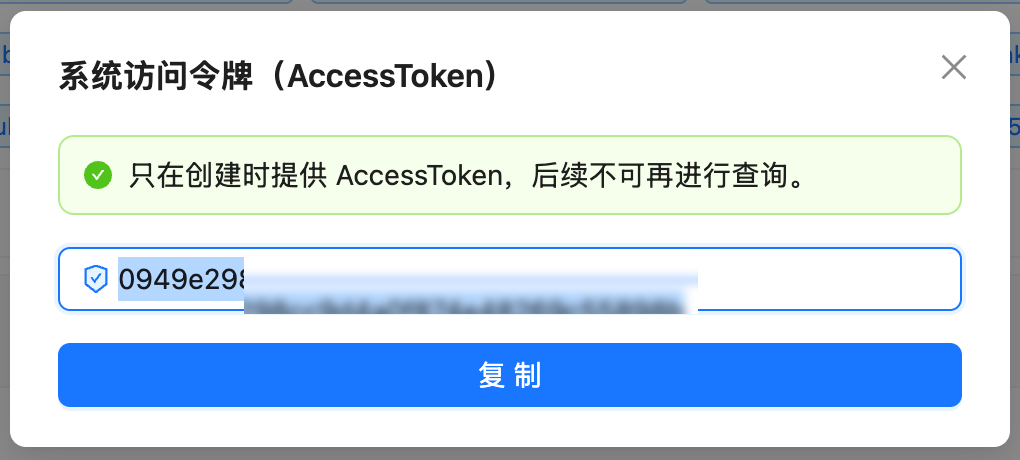
## 如何獲取 Authorization
訪問 `api.apiyi.com/account/profile` 個人中心頁面
在頁面最下方找到"賬號選項 - 系統令牌"部分
輸入當前的賬戶密碼後,會得到一個 AccessToken,該金鑰可用於後續介面的查詢資料
 ## 介面資訊
| 專案 | 說明 |
| --------- | ------------------------------------- |
| **介面URL** | `https://api.apiyi.com/api/user/self` |
| **請求方法** | `GET` |
| **認證方式** | Authorization Header |
| **響應格式** | JSON |
## 請求說明
### 請求 Headers
| Header名稱 | 必填 | 說明 |
| --------------- | -- | ------------------------ |
| `Authorization` | 是 | API訪問令牌,格式:直接填寫token字串 |
| `Accept` | 否 | 建議設定為 `application/json` |
| `Content-Type` | 否 | 建議設定為 `application/json` |
### 請求引數
該介面為 GET 請求,**不需要**傳遞任何請求體(body)引數。
## 響應說明
### 成功響應示例
```json theme={null}
{
"success": true,
"message": null,
"data": {
"id": 19489,
"username": "testnano",
"display_name": "testnano",
"role": 1,
"status": 1,
"email": "",
"quota": 24997909,
"used_quota": 10027091,
"request_count": 339,
"group": "ceshi",
"aff_code": "ZM0H",
"inviter_id": 0,
"access_token": "...",
"ModelFixedPrice": [...]
}
}
```
### 核心響應欄位說明
| 欄位名 | 型別 | 說明 |
| ---------------------- | ------- | ---------------------- |
| `success` | Boolean | 請求是否成功 |
| `message` | String | 錯誤資訊(成功時為null) |
| `data.username` | String | 使用者名稱 |
| `data.display_name` | String | 顯示名稱 |
| `data.quota` | Integer | **剩餘額度**(當前可用餘額,單位:額度) |
| `data.used_quota` | Integer | **已使用額度**(單位:額度) |
| `data.request_count` | Integer | **總請求次數** |
| `data.group` | String | 使用者所屬組 |
| `data.ModelFixedPrice` | Array | 模型價格列表(可忽略) |
### 額度換算說明
500,000 額度 = \$1.00 美金 (USD)
**計算公式:**
* 美金金額 = 額度 ÷ 500,000
* 剩餘額度 = quota(quota 本身就是當前剩餘餘額)
* 剩餘美金 = quota ÷ 500,000
**示例:**
* `quota: 24997909` → \$49.99 USD(當前剩餘餘額)
* `used_quota: 10027091` → \$20.05 USD(已使用)
## 錯誤響應
### HTTP 401 - 認證失敗
```json theme={null}
{
"success": false,
"message": "Unauthorized"
}
```
**原因:** Authorization令牌無效或已過期
**解決方法:** 檢查並更新API令牌
### HTTP 403 - 權限不足
```json theme={null}
{
"success": false,
"message": "Forbidden"
}
```
**原因:** 當前令牌無權訪問該介面
**解決方法:** 聯絡管理員確認權限配置
## 程式碼示例
### cURL 示例
```bash theme={null}
curl --compressed 'https://api.apiyi.com/api/user/self' \
-H 'Accept: application/json' \
-H 'Authorization: YOUR_TOKEN_HERE' \
-H 'Content-Type: application/json'
```
**重要提示:** 必須新增 `--compressed` 選項,因為API返回的是gzip壓縮內容,否則會得到亂碼。
**快速測試(替換YOUR\_TOKEN\_HERE):**
```bash theme={null}
export APIYI_TOKEN='YOUR_TOKEN_HERE'
curl --compressed -s 'https://api.apiyi.com/api/user/self' \
-H 'Accept: application/json' \
-H "Authorization: $APIYI_TOKEN" \
-H 'Content-Type: application/json' | \
jq '.data | {quota, used_quota, request_count}'
```
說明:`-s` 選項隱藏進度條,`--compressed` 自動解壓gzip響應
### Python 示例(基礎版)
```python theme={null}
import requests
{/* 配置 */}
url = "https://api.apiyi.com/api/user/self"
authorization = "YOUR_TOKEN_HERE" # 替換為你的令牌
{/* 請求頭 */}
headers = {
'Accept': 'application/json',
'Authorization': authorization,
'Content-Type': 'application/json'
}
{/* 傳送請求 */}
response = requests.get(url, headers=headers, timeout=10)
{/* 檢查響應 */}
if response.status_code == 200:
data = response.json()
user_data = data['data']
{/* 提取核心資訊 */}
quota = user_data['quota']
used_quota = user_data['used_quota']
request_count = user_data['request_count']
{/* 計算美金金額 */}
{/* 注意:quota 就是當前剩餘餘額 */}
remaining_usd = quota / 500000
used_usd = used_quota / 500000
{/* 列印結果 */}
print(f"剩餘額度:${remaining_usd:.2f} USD ({quota:,} 額度)")
print(f"已使用:${used_usd:.2f} USD ({used_quota:,} 額度)")
print(f"請求次數:{request_count:,} 次")
else:
print(f"請求失敗:HTTP {response.status_code}")
print(response.text)
```
### Python 示例(完整最佳化版)
我們提供了完整的最佳化版指令碼 `quota_optimized.py`,包含以下特性:
完整的異常處理和錯誤捕獲
安全管理令牌,避免硬編碼
美觀的表格展示和數字格式化
自動計算美金金額
**使用方法:**
```bash theme={null}
{/* 方式1:使用環境變數(推薦) */}
export APIYI_TOKEN='YOUR_TOKEN_HERE'
python quota_optimized.py
{/* 方式2:命令列引數 */}
python quota_optimized.py 'YOUR_TOKEN_HERE'
```
**輸出示例:**
```
============================================================
📊 APIYI 賬戶餘額資訊
============================================================
使用者名稱稱:testnano (testnano)
------------------------------------------------------------
剩餘額度:24,997,909 額度 ($49.99 USD)
已使用: 10,027,091 額度 ($20.05 USD)
請求次數:339 次
============================================================
💡 換算說明:500,000 額度 = $1.00 USD
============================================================
```
## 常見問題
請參考上方"如何獲取 Authorization"部分的步驟說明,或訪問控制台的個人中心頁面獲取系統令牌。
否,查詢賬戶餘額介面不會消耗您的配額額度。
建議查詢間隔不少於1秒,避免頻繁請求觸發限流。
該欄位返回各個AI模型的定價資訊。如果您只關心餘額資訊,可以忽略該欄位。
`quota` 欄位就是當前的剩餘額度。如果 `quota` 為 0 或接近 0,說明賬戶餘額不足,需要及時充值。
**問題:** 執行curl命令時得到亂碼,或者jq報錯 "Invalid numeric literal"
**原因:** API返回的是gzip壓縮內容(`Content-Encoding: gzip`),curl沒有自動解壓。
**解決方案:** 新增 `--compressed` 選項讓curl自動解壓:
```bash theme={null}
{/* ✅ 正確(帶 --compressed) */}
curl --compressed 'https://api.apiyi.com/api/user/self' \
-H 'Authorization: YOUR_TOKEN' | jq
{/* ❌ 錯誤(缺少 --compressed) */}
curl 'https://api.apiyi.com/api/user/self' \
-H 'Authorization: YOUR_TOKEN' | jq
```
## 注意事項
**安全性提醒**
* 切勿在程式碼中硬編碼 Authorization 令牌
* 建議使用環境變數或配置檔案管理敏感資訊
* 不要將包含令牌的程式碼提交到公開倉庫
**請求限制**
* 建議設定合理的請求超時時間(推薦10秒)
* 避免過於頻繁的查詢請求
* 務必處理網路異常、超時、認證失敗等錯誤情況
* 建議記錄錯誤日誌便於排查問題
* API返回gzip壓縮內容,使用curl時必須新增 `--compressed` 選項
* Python的requests庫會自動處理gzip解壓,無需額外配置
## 介面資訊
| 專案 | 說明 |
| --------- | ------------------------------------- |
| **介面URL** | `https://api.apiyi.com/api/user/self` |
| **請求方法** | `GET` |
| **認證方式** | Authorization Header |
| **響應格式** | JSON |
## 請求說明
### 請求 Headers
| Header名稱 | 必填 | 說明 |
| --------------- | -- | ------------------------ |
| `Authorization` | 是 | API訪問令牌,格式:直接填寫token字串 |
| `Accept` | 否 | 建議設定為 `application/json` |
| `Content-Type` | 否 | 建議設定為 `application/json` |
### 請求引數
該介面為 GET 請求,**不需要**傳遞任何請求體(body)引數。
## 響應說明
### 成功響應示例
```json theme={null}
{
"success": true,
"message": null,
"data": {
"id": 19489,
"username": "testnano",
"display_name": "testnano",
"role": 1,
"status": 1,
"email": "",
"quota": 24997909,
"used_quota": 10027091,
"request_count": 339,
"group": "ceshi",
"aff_code": "ZM0H",
"inviter_id": 0,
"access_token": "...",
"ModelFixedPrice": [...]
}
}
```
### 核心響應欄位說明
| 欄位名 | 型別 | 說明 |
| ---------------------- | ------- | ---------------------- |
| `success` | Boolean | 請求是否成功 |
| `message` | String | 錯誤資訊(成功時為null) |
| `data.username` | String | 使用者名稱 |
| `data.display_name` | String | 顯示名稱 |
| `data.quota` | Integer | **剩餘額度**(當前可用餘額,單位:額度) |
| `data.used_quota` | Integer | **已使用額度**(單位:額度) |
| `data.request_count` | Integer | **總請求次數** |
| `data.group` | String | 使用者所屬組 |
| `data.ModelFixedPrice` | Array | 模型價格列表(可忽略) |
### 額度換算說明
500,000 額度 = \$1.00 美金 (USD)
**計算公式:**
* 美金金額 = 額度 ÷ 500,000
* 剩餘額度 = quota(quota 本身就是當前剩餘餘額)
* 剩餘美金 = quota ÷ 500,000
**示例:**
* `quota: 24997909` → \$49.99 USD(當前剩餘餘額)
* `used_quota: 10027091` → \$20.05 USD(已使用)
## 錯誤響應
### HTTP 401 - 認證失敗
```json theme={null}
{
"success": false,
"message": "Unauthorized"
}
```
**原因:** Authorization令牌無效或已過期
**解決方法:** 檢查並更新API令牌
### HTTP 403 - 權限不足
```json theme={null}
{
"success": false,
"message": "Forbidden"
}
```
**原因:** 當前令牌無權訪問該介面
**解決方法:** 聯絡管理員確認權限配置
## 程式碼示例
### cURL 示例
```bash theme={null}
curl --compressed 'https://api.apiyi.com/api/user/self' \
-H 'Accept: application/json' \
-H 'Authorization: YOUR_TOKEN_HERE' \
-H 'Content-Type: application/json'
```
**重要提示:** 必須新增 `--compressed` 選項,因為API返回的是gzip壓縮內容,否則會得到亂碼。
**快速測試(替換YOUR\_TOKEN\_HERE):**
```bash theme={null}
export APIYI_TOKEN='YOUR_TOKEN_HERE'
curl --compressed -s 'https://api.apiyi.com/api/user/self' \
-H 'Accept: application/json' \
-H "Authorization: $APIYI_TOKEN" \
-H 'Content-Type: application/json' | \
jq '.data | {quota, used_quota, request_count}'
```
說明:`-s` 選項隱藏進度條,`--compressed` 自動解壓gzip響應
### Python 示例(基礎版)
```python theme={null}
import requests
{/* 配置 */}
url = "https://api.apiyi.com/api/user/self"
authorization = "YOUR_TOKEN_HERE" # 替換為你的令牌
{/* 請求頭 */}
headers = {
'Accept': 'application/json',
'Authorization': authorization,
'Content-Type': 'application/json'
}
{/* 傳送請求 */}
response = requests.get(url, headers=headers, timeout=10)
{/* 檢查響應 */}
if response.status_code == 200:
data = response.json()
user_data = data['data']
{/* 提取核心資訊 */}
quota = user_data['quota']
used_quota = user_data['used_quota']
request_count = user_data['request_count']
{/* 計算美金金額 */}
{/* 注意:quota 就是當前剩餘餘額 */}
remaining_usd = quota / 500000
used_usd = used_quota / 500000
{/* 列印結果 */}
print(f"剩餘額度:${remaining_usd:.2f} USD ({quota:,} 額度)")
print(f"已使用:${used_usd:.2f} USD ({used_quota:,} 額度)")
print(f"請求次數:{request_count:,} 次")
else:
print(f"請求失敗:HTTP {response.status_code}")
print(response.text)
```
### Python 示例(完整最佳化版)
我們提供了完整的最佳化版指令碼 `quota_optimized.py`,包含以下特性:
完整的異常處理和錯誤捕獲
安全管理令牌,避免硬編碼
美觀的表格展示和數字格式化
自動計算美金金額
**使用方法:**
```bash theme={null}
{/* 方式1:使用環境變數(推薦) */}
export APIYI_TOKEN='YOUR_TOKEN_HERE'
python quota_optimized.py
{/* 方式2:命令列引數 */}
python quota_optimized.py 'YOUR_TOKEN_HERE'
```
**輸出示例:**
```
============================================================
📊 APIYI 賬戶餘額資訊
============================================================
使用者名稱稱:testnano (testnano)
------------------------------------------------------------
剩餘額度:24,997,909 額度 ($49.99 USD)
已使用: 10,027,091 額度 ($20.05 USD)
請求次數:339 次
============================================================
💡 換算說明:500,000 額度 = $1.00 USD
============================================================
```
## 常見問題
請參考上方"如何獲取 Authorization"部分的步驟說明,或訪問控制台的個人中心頁面獲取系統令牌。
否,查詢賬戶餘額介面不會消耗您的配額額度。
建議查詢間隔不少於1秒,避免頻繁請求觸發限流。
該欄位返回各個AI模型的定價資訊。如果您只關心餘額資訊,可以忽略該欄位。
`quota` 欄位就是當前的剩餘額度。如果 `quota` 為 0 或接近 0,說明賬戶餘額不足,需要及時充值。
**問題:** 執行curl命令時得到亂碼,或者jq報錯 "Invalid numeric literal"
**原因:** API返回的是gzip壓縮內容(`Content-Encoding: gzip`),curl沒有自動解壓。
**解決方案:** 新增 `--compressed` 選項讓curl自動解壓:
```bash theme={null}
{/* ✅ 正確(帶 --compressed) */}
curl --compressed 'https://api.apiyi.com/api/user/self' \
-H 'Authorization: YOUR_TOKEN' | jq
{/* ❌ 錯誤(缺少 --compressed) */}
curl 'https://api.apiyi.com/api/user/self' \
-H 'Authorization: YOUR_TOKEN' | jq
```
## 注意事項
**安全性提醒**
* 切勿在程式碼中硬編碼 Authorization 令牌
* 建議使用環境變數或配置檔案管理敏感資訊
* 不要將包含令牌的程式碼提交到公開倉庫
**請求限制**
* 建議設定合理的請求超時時間(推薦10秒)
* 避免過於頻繁的查詢請求
* 務必處理網路異常、超時、認證失敗等錯誤情況
* 建議記錄錯誤日誌便於排查問題
* API返回gzip壓縮內容,使用curl時必須新增 `--compressed` 選項
* Python的requests庫會自動處理gzip解壓,無需額外配置