> ## Documentation Index
> Fetch the complete documentation index at: https://docs.apiyi.com/llms.txt
> Use this file to discover all available pages before exploring further.
# Claude Effort 努力檔位與思考指南
> Anthropic 原生格式下 output_config.effort 努力檔位與 adaptive thinking 自適應思考的正確用法,附完整可執行示例。
本文說明如何用 **Anthropic 原生 Messages API** 呼叫 Claude(經 API易 閘道轉 AWS Bedrock),以及 `output_config.effort`(努力檔位)和 `thinking`(自適應思考)的正確用法。
基礎的通道、計費與接入資訊請先看 [Claude API 基礎說明](/zh-Hant/api-capabilities/claude)。
適用模型:Claude Opus 4.8 / 4.7 / 4.6、Sonnet 4.6 等。本文以 **Opus 4.8** 為例。
## 線上測試工具
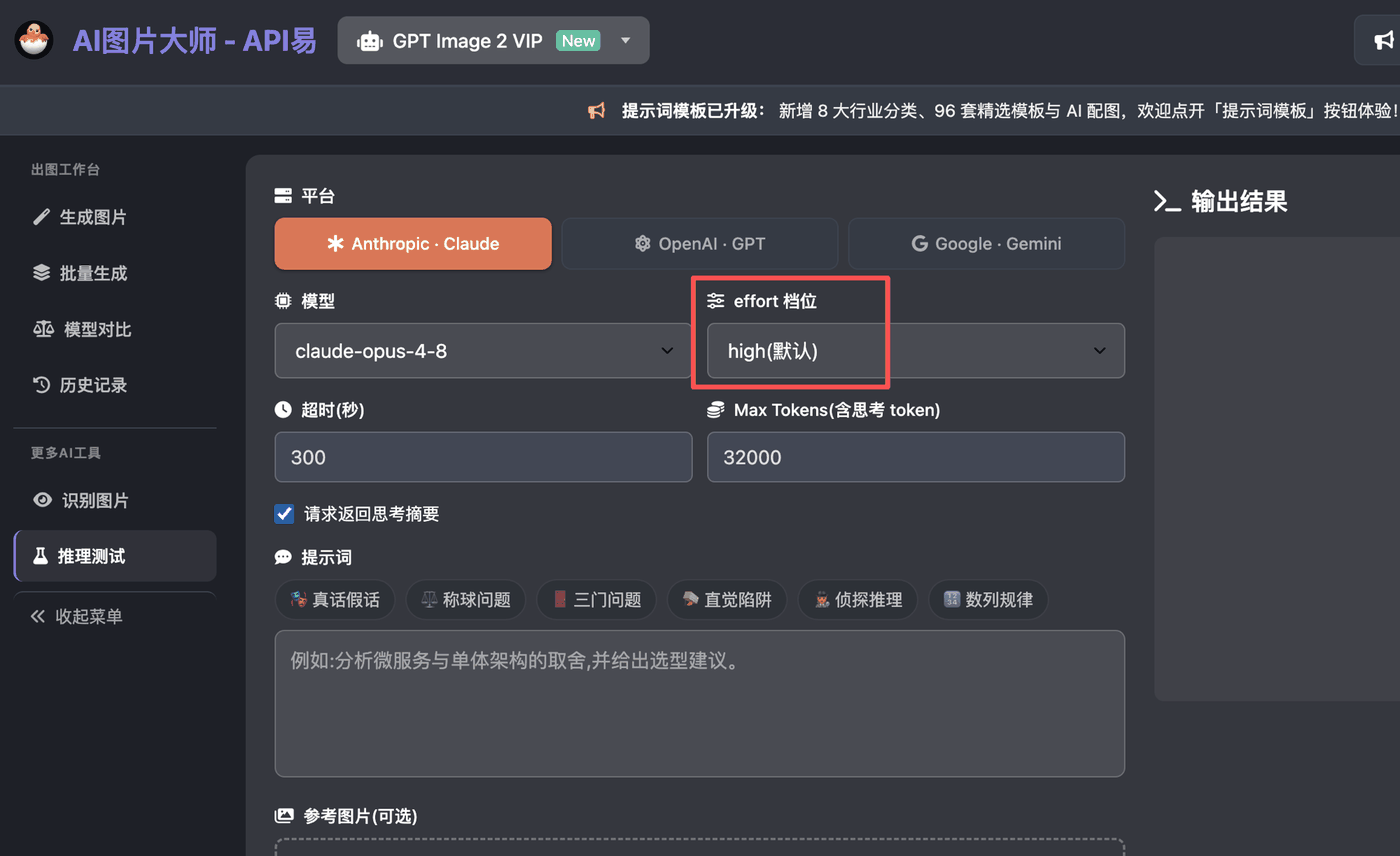
不想寫程式碼?可以先用 API易 線上推理測試工具體驗:選擇模型與 effort 檔位、設定 Max Tokens、勾選「請求返回思考摘要」,即可直接對比不同檔位的推理效果。
網頁端直接呼叫 Claude(也支援 GPT / Gemini)推理測試,無需寫程式碼,填入 API易 令牌即可使用。
 ## 請求的基本結構
### Endpoint 與請求頭
```
POST https://api.apiyi.com/v1/messages
```
| Header | 值 | 說明 |
| ------------------- | ------------------ | ------------------ |
| `content-type` | `application/json` | 固定 |
| `anthropic-version` | `2023-06-01` | Anthropic 原生版本頭,必填 |
| `x-api-key` | `your-apiyi-key` | Anthropic 原生鑑權方式 |
經 API易 轉 Bedrock 時,**客戶端仍用 Anthropic 原生格式**(`x-api-key` + `/v1/messages`),閘道內部負責翻譯成 Bedrock 的 `bedrock-2023-05-31`。你不需要寫 `anthropic_version: bedrock-2023-05-31`。
### 最小請求體
```json theme={null}
{
"model": "claude-opus-4-8",
"max_tokens": 16000,
"messages": [
{ "role": "user", "content": "你的問題" }
]
}
```
## effort 努力檔位
`effort` 控制 Claude 願意花多少 token 來產出結果,在「徹底程度」和「速度/成本」之間權衡。它影響**全部** token 消耗:正文、工具呼叫、以及擴充套件思考。
**關鍵規則**
1. `effort` 必須放在頂層獨立的 `output_config` 物件裡,**不能**放進 `thinking` 裡 —— 放錯會直接 `ValidationException` / 400。
2. **無需 beta 頭**。effort 現已對所有支援的模型開放,不再需要 `anthropic-beta: effort-2025-11-24`。
3. 預設值是 `high`;設成 `"high"` 與完全不傳 `effort` 行為一致。
### 帶 effort 的請求體
```json theme={null}
{
"model": "claude-opus-4-8",
"max_tokens": 16000,
"output_config": {
"effort": "medium"
},
"messages": [
{ "role": "user", "content": "分析微服務與單體架構的取捨" }
]
}
```
### 檔位一覽
| 檔位 | 說明 | 典型場景 |
| -------- | -------------------------- | -------------------------- |
| `low` | 最省。顯著節省 token,能力略降。 | 簡單任務、高併發、子 agent |
| `medium` | 平衡。中等 token 節省。 | 多數 agentic 工作流的折中預設 |
| `high` | 預設值。高能力。 | 複雜推理、難編碼、對品質敏感的任務 |
| `xhigh` | 長程擴充套件能力,介於 high 和 max 之間。 | 長時編碼 / agentic 任務(超 30 分鐘) |
| `max` | 無約束的最強能力。 | 真正前沿的難題,最深推理 |
**Opus 4.8 推薦**:編碼 / agentic 用 `xhigh` 起步,其它智力敏感任務用 `high`,只有在 eval 驗證過品質不掉的前提下才下調到 `medium` / `low`。
跑 `xhigh` / `max` 時把 `max_tokens` 設大(64k 起步),給模型留足思考 + 輸出空間。
### 各模型支援的檔位
不是所有模型都支援全部檔位。`xhigh` 是 Opus 4.7 才新增的,`max` 不支援 Sonnet:
| 檔位 | Opus 4.6 | Opus 4.7 / 4.8 | Sonnet 4.6 |
| ------------------------- | :------: | :------------: | :--------: |
| `low` / `medium` / `high` | ✅ | ✅ | ✅ |
| `xhigh` | ❌ | ✅ | ❌ |
| `max` | ✅ | ✅ | ❌ |
常見誤用:`claude-opus-4-6` 配 `effort: "xhigh"`。4.6 沒有 `xhigh` 檔 —— 請改用 `high` / `max`,或把模型換成 `claude-opus-4-8` 再用 `xhigh`。
## thinking 自適應思考
Opus 4.7 / 4.8 用**自適應思考**:由模型自己決定何時思考、思考多少,配合 effort 控制深度。
```json theme={null}
{
"model": "claude-opus-4-8",
"max_tokens": 16000,
"thinking": {
"type": "adaptive",
"display": "summarized"
},
"output_config": {
"effort": "xhigh"
},
"messages": [
{ "role": "user", "content": "一步步定位這個生產環境 Bug 的根因" }
]
}
```
* `thinking.type: "adaptive"` —— 開啟自適應思考(不傳則不思考)。
* `thinking.display: "summarized"` —— 讓響應裡返回**思考摘要**塊;不需要展示可刪掉。
* effort 與思考的關係:`high` / `xhigh` / `max` 幾乎總會深度思考;`low` / `medium` 在簡單題上可能跳過思考。
* `display` 預設值隨模型不同:**Opus 4.6 預設 `summarized`**,Opus 4.7 / 4.8 預設 `omitted`(思考塊仍在,但 `thinking` 文本為空,前端表現為「正文前一段停頓」)。想穩定拿到摘要就顯式寫 `display: "summarized"`。
* 沒有 `-thinking` 字尾的原生模型。是否思考由 `thinking` **引數**決定,不是靠模型名字尾;`xxx-thinking` 都是第三方別名,直接用基礎模型 ID + `thinking` 引數即可。
Opus 4.7 / 4.8 **不支援** `thinking.type: "enabled"` + `budget_tokens`(會 400)。請改用 adaptive + effort。
### thinking 摘要的本質(重要)
* 摘要由 **Anthropic 官方(模型/服務層)生成**,不是閘道或第三方模型二次加工;原始思維鏈(raw CoT)永不原文返回,你拿到的就是官方摘要。
* **不能用 system prompt 定製 thinking 摘要的語氣/格式**。`system` 影響的是模型「怎麼思考」和「最終回答」的風格,摘要只是內部推理的可讀呈現。語氣、排版、風格等要求請放進對**最終回答**的約束,讓它體現在 `text` 塊裡。
* 不要在 prompt 裡要求模型把內部推理「原文」輸出到回答中 —— 可能觸發拒答(`stop_reason: "refusal"`,`stop_details.category` 可能為 `reasoning_extraction`)。需要看推理就讀 `display: "summarized"` 的摘要。
多輪對話在**同一模型**上繼續時,要把上一輪收到的 thinking 塊原樣回傳(含簽名、含空文本塊)—— API 拒絕被**修改過**的 thinking 塊。展示摘要沒問題,但不要編輯後再回傳。
## 解析響應
響應的 `content` 是一個塊陣列,按 `type` 區分:
```python theme={null}
for block in data["content"]:
if block["type"] == "thinking":
print("[思考摘要]", block["thinking"])
elif block["type"] == "text":
print("[回答]", block["text"])
```
token 用量在 `usage` 欄位:
```json theme={null}
{
"usage": {
"input_tokens": 164,
"output_tokens": 11056,
"service_tier": "standard"
}
}
```
若 `stop_reason` 為 `max_tokens`,說明輸出被 `max_tokens` 截斷(高 effort 下思考容易吃滿),此時正文可能為空 —— 把 `max_tokens` 調大即可。
## 流式(stream)下的 thinking 欄位
`stream: true` 時,思考內容**不走** `delta.text`,而是專門的事件序列:
| 事件 | 欄位 | 說明 |
| --------------------- | -------------------------------------------------- | ------------------------- |
| `content_block_start` | `content_block.type = "thinking"` | 思考塊開始 |
| `content_block_delta` | `delta.type = "thinking_delta"` → `delta.thinking` | 思考摘要增量文本(不是 `delta.text`) |
| `content_block_delta` | `delta.type = "signature_delta"` | 思考塊簽名,多輪迴傳時需原樣保留 |
| `content_block_stop` | — | 思考塊結束,之後才是正文 `text` 塊 |
正文文本仍走 `delta.type = "text_delta"` → `delta.text`。若 `display: "omitted"`,思考塊照常出現但 `delta.thinking` 為空字串。
## 完整可執行示例
```python theme={null}
import os
import requests
from dotenv import load_dotenv
load_dotenv()
API_KEY = os.getenv("APIYI_API_KEY")
BASE_URL = "https://api.apiyi.com"
resp = requests.post(
f"{BASE_URL}/v1/messages",
headers={
"content-type": "application/json",
"anthropic-version": "2023-06-01",
"x-api-key": API_KEY,
},
json={
"model": "claude-opus-4-8",
"max_tokens": 16000,
"thinking": {"type": "adaptive", "display": "summarized"},
"output_config": {"effort": "xhigh"},
"messages": [
{"role": "user", "content": "分析微服務與單體架構的取捨"}
],
},
timeout=300,
)
data = resp.json()
print("status:", resp.status_code, "| usage:", data.get("usage"))
for block in data.get("content", []):
if block.get("type") == "thinking":
print("\n[思考摘要]\n", block.get("thinking", ""))
elif block.get("type") == "text":
print("\n[回答]\n", block.get("text", ""))
```
```bash theme={null}
curl https://api.apiyi.com/v1/messages \
-H "content-type: application/json" \
-H "anthropic-version: 2023-06-01" \
-H "x-api-key: your-apiyi-key" \
-d '{
"model": "claude-opus-4-8",
"max_tokens": 16000,
"thinking": { "type": "adaptive" },
"output_config": { "effort": "xhigh" },
"messages": [{ "role": "user", "content": "分析微服務與單體架構的取捨" }]
}'
```
## 經 Bedrock 時的注意事項
| 項 | 說明 |
| ----------------------- | -------------------------------------------------------------------------------------- |
| `output_config` | **必須放行**。閘道若有 `delete output_config` 覆蓋規則,effort 會被靜默吞掉(返回 200 但無效)。 |
| `effort` 位置 | 頂層 `output_config` 內,不能放進 `thinking`。 |
| beta 頭 | effort 不需要;adaptive thinking 也不需要。 |
| `temperature` / `top_p` | Opus 4.7 / 4.8 配自適應思考時應使用預設取樣;閘道通常會為這兩個模型剝離這兩個引數,屬正常,客戶端不必設定。 |
| 非法 effort 值 | Bedrock 對未知值**寬容降級**(返回 200),不報 400。所以不能用「invalid 是否報錯」判斷是否透傳 —— 要看不同檔位的 token 是否拉開差距。 |
## 常見報錯排查
### `"thinking.type.enabled" is not supported for this model`
經 AWS(Bedrock)通道呼叫 Opus 4.7 / 4.8 時,最常見的一個 400 報錯:
```
status_code=400, InvokeModelWithResponseStream: ... Bedrock Runtime,
StatusCode: 400, ValidationException: "thinking.type.enabled" is not supported
for this model. Use "thinking.type.adaptive" and "output_config.effort" to
control thinking behavior.
```
**原因**:請求體裡傳了舊版的固定預算思考寫法 `thinking: { "type": "enabled", "budget_tokens": N }`。Opus 4.7 / 4.8(以及更新的模型)已**移除**這種寫法,只支援自適應思考;AWS 上游會直接返回 `ValidationException` 400。這與 [thinking 自適應思考](#thinking-自適應思考) 章節的提示一致。
報錯裡的 `thinking.type.enabled` 就是你請求體裡的 `thinking.type` 欄位值為 `"enabled"`。同理,`budget_tokens` 也已不被支援;`temperature` / `top_p` / `top_k` 在這些模型上一併被移除,傳了也會 400。
**解決**:刪掉 `type: "enabled"` 和 `budget_tokens`,改用 `adaptive` + `output_config.effort` 控制思考深度。
```json theme={null}
{
"model": "claude-opus-4-8",
"max_tokens": 16000,
"thinking": { "type": "adaptive", "display": "summarized" },
"output_config": { "effort": "xhigh" },
"messages": [
{ "role": "user", "content": "你的問題" }
]
}
```
| 舊寫法(會 400) | 新寫法 |
| ---------------------------------------------------------- | ------------------------------------------ |
| `"thinking": { "type": "enabled", "budget_tokens": 8000 }` | `"thinking": { "type": "adaptive" }` |
| 用 `budget_tokens` 控制思考量 | 用 `output_config.effort`(`low` \~ `max`)控制 |
| `temperature` / `top_p` / `top_k` | 刪除即可,用 prompt 引導,無需取樣引數 |
不想思考時:Opus 4.7 / 4.8 可傳 `thinking: { "type": "disabled" }`,或乾脆不傳 `thinking` 欄位(不傳即不思考)。
## 參考
* Anthropic — Effort 文件:`platform.claude.com/docs/en/build-with-claude/effort`
* AWS Bedrock — Adaptive thinking:`docs.aws.amazon.com/bedrock/latest/userguide/claude-messages-adaptive-thinking.html`
* AWS Bedrock — Claude Opus 4.8:`docs.aws.amazon.com/bedrock/latest/userguide/model-card-anthropic-claude-opus-4-8.html`
## 請求的基本結構
### Endpoint 與請求頭
```
POST https://api.apiyi.com/v1/messages
```
| Header | 值 | 說明 |
| ------------------- | ------------------ | ------------------ |
| `content-type` | `application/json` | 固定 |
| `anthropic-version` | `2023-06-01` | Anthropic 原生版本頭,必填 |
| `x-api-key` | `your-apiyi-key` | Anthropic 原生鑑權方式 |
經 API易 轉 Bedrock 時,**客戶端仍用 Anthropic 原生格式**(`x-api-key` + `/v1/messages`),閘道內部負責翻譯成 Bedrock 的 `bedrock-2023-05-31`。你不需要寫 `anthropic_version: bedrock-2023-05-31`。
### 最小請求體
```json theme={null}
{
"model": "claude-opus-4-8",
"max_tokens": 16000,
"messages": [
{ "role": "user", "content": "你的問題" }
]
}
```
## effort 努力檔位
`effort` 控制 Claude 願意花多少 token 來產出結果,在「徹底程度」和「速度/成本」之間權衡。它影響**全部** token 消耗:正文、工具呼叫、以及擴充套件思考。
**關鍵規則**
1. `effort` 必須放在頂層獨立的 `output_config` 物件裡,**不能**放進 `thinking` 裡 —— 放錯會直接 `ValidationException` / 400。
2. **無需 beta 頭**。effort 現已對所有支援的模型開放,不再需要 `anthropic-beta: effort-2025-11-24`。
3. 預設值是 `high`;設成 `"high"` 與完全不傳 `effort` 行為一致。
### 帶 effort 的請求體
```json theme={null}
{
"model": "claude-opus-4-8",
"max_tokens": 16000,
"output_config": {
"effort": "medium"
},
"messages": [
{ "role": "user", "content": "分析微服務與單體架構的取捨" }
]
}
```
### 檔位一覽
| 檔位 | 說明 | 典型場景 |
| -------- | -------------------------- | -------------------------- |
| `low` | 最省。顯著節省 token,能力略降。 | 簡單任務、高併發、子 agent |
| `medium` | 平衡。中等 token 節省。 | 多數 agentic 工作流的折中預設 |
| `high` | 預設值。高能力。 | 複雜推理、難編碼、對品質敏感的任務 |
| `xhigh` | 長程擴充套件能力,介於 high 和 max 之間。 | 長時編碼 / agentic 任務(超 30 分鐘) |
| `max` | 無約束的最強能力。 | 真正前沿的難題,最深推理 |
**Opus 4.8 推薦**:編碼 / agentic 用 `xhigh` 起步,其它智力敏感任務用 `high`,只有在 eval 驗證過品質不掉的前提下才下調到 `medium` / `low`。
跑 `xhigh` / `max` 時把 `max_tokens` 設大(64k 起步),給模型留足思考 + 輸出空間。
### 各模型支援的檔位
不是所有模型都支援全部檔位。`xhigh` 是 Opus 4.7 才新增的,`max` 不支援 Sonnet:
| 檔位 | Opus 4.6 | Opus 4.7 / 4.8 | Sonnet 4.6 |
| ------------------------- | :------: | :------------: | :--------: |
| `low` / `medium` / `high` | ✅ | ✅ | ✅ |
| `xhigh` | ❌ | ✅ | ❌ |
| `max` | ✅ | ✅ | ❌ |
常見誤用:`claude-opus-4-6` 配 `effort: "xhigh"`。4.6 沒有 `xhigh` 檔 —— 請改用 `high` / `max`,或把模型換成 `claude-opus-4-8` 再用 `xhigh`。
## thinking 自適應思考
Opus 4.7 / 4.8 用**自適應思考**:由模型自己決定何時思考、思考多少,配合 effort 控制深度。
```json theme={null}
{
"model": "claude-opus-4-8",
"max_tokens": 16000,
"thinking": {
"type": "adaptive",
"display": "summarized"
},
"output_config": {
"effort": "xhigh"
},
"messages": [
{ "role": "user", "content": "一步步定位這個生產環境 Bug 的根因" }
]
}
```
* `thinking.type: "adaptive"` —— 開啟自適應思考(不傳則不思考)。
* `thinking.display: "summarized"` —— 讓響應裡返回**思考摘要**塊;不需要展示可刪掉。
* effort 與思考的關係:`high` / `xhigh` / `max` 幾乎總會深度思考;`low` / `medium` 在簡單題上可能跳過思考。
* `display` 預設值隨模型不同:**Opus 4.6 預設 `summarized`**,Opus 4.7 / 4.8 預設 `omitted`(思考塊仍在,但 `thinking` 文本為空,前端表現為「正文前一段停頓」)。想穩定拿到摘要就顯式寫 `display: "summarized"`。
* 沒有 `-thinking` 字尾的原生模型。是否思考由 `thinking` **引數**決定,不是靠模型名字尾;`xxx-thinking` 都是第三方別名,直接用基礎模型 ID + `thinking` 引數即可。
Opus 4.7 / 4.8 **不支援** `thinking.type: "enabled"` + `budget_tokens`(會 400)。請改用 adaptive + effort。
### thinking 摘要的本質(重要)
* 摘要由 **Anthropic 官方(模型/服務層)生成**,不是閘道或第三方模型二次加工;原始思維鏈(raw CoT)永不原文返回,你拿到的就是官方摘要。
* **不能用 system prompt 定製 thinking 摘要的語氣/格式**。`system` 影響的是模型「怎麼思考」和「最終回答」的風格,摘要只是內部推理的可讀呈現。語氣、排版、風格等要求請放進對**最終回答**的約束,讓它體現在 `text` 塊裡。
* 不要在 prompt 裡要求模型把內部推理「原文」輸出到回答中 —— 可能觸發拒答(`stop_reason: "refusal"`,`stop_details.category` 可能為 `reasoning_extraction`)。需要看推理就讀 `display: "summarized"` 的摘要。
多輪對話在**同一模型**上繼續時,要把上一輪收到的 thinking 塊原樣回傳(含簽名、含空文本塊)—— API 拒絕被**修改過**的 thinking 塊。展示摘要沒問題,但不要編輯後再回傳。
## 解析響應
響應的 `content` 是一個塊陣列,按 `type` 區分:
```python theme={null}
for block in data["content"]:
if block["type"] == "thinking":
print("[思考摘要]", block["thinking"])
elif block["type"] == "text":
print("[回答]", block["text"])
```
token 用量在 `usage` 欄位:
```json theme={null}
{
"usage": {
"input_tokens": 164,
"output_tokens": 11056,
"service_tier": "standard"
}
}
```
若 `stop_reason` 為 `max_tokens`,說明輸出被 `max_tokens` 截斷(高 effort 下思考容易吃滿),此時正文可能為空 —— 把 `max_tokens` 調大即可。
## 流式(stream)下的 thinking 欄位
`stream: true` 時,思考內容**不走** `delta.text`,而是專門的事件序列:
| 事件 | 欄位 | 說明 |
| --------------------- | -------------------------------------------------- | ------------------------- |
| `content_block_start` | `content_block.type = "thinking"` | 思考塊開始 |
| `content_block_delta` | `delta.type = "thinking_delta"` → `delta.thinking` | 思考摘要增量文本(不是 `delta.text`) |
| `content_block_delta` | `delta.type = "signature_delta"` | 思考塊簽名,多輪迴傳時需原樣保留 |
| `content_block_stop` | — | 思考塊結束,之後才是正文 `text` 塊 |
正文文本仍走 `delta.type = "text_delta"` → `delta.text`。若 `display: "omitted"`,思考塊照常出現但 `delta.thinking` 為空字串。
## 完整可執行示例
```python theme={null}
import os
import requests
from dotenv import load_dotenv
load_dotenv()
API_KEY = os.getenv("APIYI_API_KEY")
BASE_URL = "https://api.apiyi.com"
resp = requests.post(
f"{BASE_URL}/v1/messages",
headers={
"content-type": "application/json",
"anthropic-version": "2023-06-01",
"x-api-key": API_KEY,
},
json={
"model": "claude-opus-4-8",
"max_tokens": 16000,
"thinking": {"type": "adaptive", "display": "summarized"},
"output_config": {"effort": "xhigh"},
"messages": [
{"role": "user", "content": "分析微服務與單體架構的取捨"}
],
},
timeout=300,
)
data = resp.json()
print("status:", resp.status_code, "| usage:", data.get("usage"))
for block in data.get("content", []):
if block.get("type") == "thinking":
print("\n[思考摘要]\n", block.get("thinking", ""))
elif block.get("type") == "text":
print("\n[回答]\n", block.get("text", ""))
```
```bash theme={null}
curl https://api.apiyi.com/v1/messages \
-H "content-type: application/json" \
-H "anthropic-version: 2023-06-01" \
-H "x-api-key: your-apiyi-key" \
-d '{
"model": "claude-opus-4-8",
"max_tokens": 16000,
"thinking": { "type": "adaptive" },
"output_config": { "effort": "xhigh" },
"messages": [{ "role": "user", "content": "分析微服務與單體架構的取捨" }]
}'
```
## 經 Bedrock 時的注意事項
| 項 | 說明 |
| ----------------------- | -------------------------------------------------------------------------------------- |
| `output_config` | **必須放行**。閘道若有 `delete output_config` 覆蓋規則,effort 會被靜默吞掉(返回 200 但無效)。 |
| `effort` 位置 | 頂層 `output_config` 內,不能放進 `thinking`。 |
| beta 頭 | effort 不需要;adaptive thinking 也不需要。 |
| `temperature` / `top_p` | Opus 4.7 / 4.8 配自適應思考時應使用預設取樣;閘道通常會為這兩個模型剝離這兩個引數,屬正常,客戶端不必設定。 |
| 非法 effort 值 | Bedrock 對未知值**寬容降級**(返回 200),不報 400。所以不能用「invalid 是否報錯」判斷是否透傳 —— 要看不同檔位的 token 是否拉開差距。 |
## 常見報錯排查
### `"thinking.type.enabled" is not supported for this model`
經 AWS(Bedrock)通道呼叫 Opus 4.7 / 4.8 時,最常見的一個 400 報錯:
```
status_code=400, InvokeModelWithResponseStream: ... Bedrock Runtime,
StatusCode: 400, ValidationException: "thinking.type.enabled" is not supported
for this model. Use "thinking.type.adaptive" and "output_config.effort" to
control thinking behavior.
```
**原因**:請求體裡傳了舊版的固定預算思考寫法 `thinking: { "type": "enabled", "budget_tokens": N }`。Opus 4.7 / 4.8(以及更新的模型)已**移除**這種寫法,只支援自適應思考;AWS 上游會直接返回 `ValidationException` 400。這與 [thinking 自適應思考](#thinking-自適應思考) 章節的提示一致。
報錯裡的 `thinking.type.enabled` 就是你請求體裡的 `thinking.type` 欄位值為 `"enabled"`。同理,`budget_tokens` 也已不被支援;`temperature` / `top_p` / `top_k` 在這些模型上一併被移除,傳了也會 400。
**解決**:刪掉 `type: "enabled"` 和 `budget_tokens`,改用 `adaptive` + `output_config.effort` 控制思考深度。
```json theme={null}
{
"model": "claude-opus-4-8",
"max_tokens": 16000,
"thinking": { "type": "adaptive", "display": "summarized" },
"output_config": { "effort": "xhigh" },
"messages": [
{ "role": "user", "content": "你的問題" }
]
}
```
| 舊寫法(會 400) | 新寫法 |
| ---------------------------------------------------------- | ------------------------------------------ |
| `"thinking": { "type": "enabled", "budget_tokens": 8000 }` | `"thinking": { "type": "adaptive" }` |
| 用 `budget_tokens` 控制思考量 | 用 `output_config.effort`(`low` \~ `max`)控制 |
| `temperature` / `top_p` / `top_k` | 刪除即可,用 prompt 引導,無需取樣引數 |
不想思考時:Opus 4.7 / 4.8 可傳 `thinking: { "type": "disabled" }`,或乾脆不傳 `thinking` 欄位(不傳即不思考)。
## 參考
* Anthropic — Effort 文件:`platform.claude.com/docs/en/build-with-claude/effort`
* AWS Bedrock — Adaptive thinking:`docs.aws.amazon.com/bedrock/latest/userguide/claude-messages-adaptive-thinking.html`
* AWS Bedrock — Claude Opus 4.8:`docs.aws.amazon.com/bedrock/latest/userguide/model-card-anthropic-claude-opus-4-8.html`