> ## Documentation Index
> Fetch the complete documentation index at: https://docs.apiyi.com/llms.txt
> Use this file to discover all available pages before exploring further.
# 圖片編輯 API 參考
> MAI-Image 2.6 圖片編輯 API 參考與線上除錯 — 上傳參考圖 + 指令改圖,支援 image + image2 雙圖融合,必須使用 multipart/form-data 檔案上傳
右側的互動式 Playground 支援直接上傳本地圖片。請在 **Authorization** 中填入你的 API Key(格式:`Bearer sk-xxx`),選擇 `image` 檔案並填入 `prompt`、`model` 後一鍵傳送即可。
**🔴 本介面只接受 `multipart/form-data` 檔案上傳**
傳送 JSON 到 `/v1/images/edits`(`image` 填 URL、data URI 或裸 base64)會返回 400:
```text theme={null}
request Content-Type isn't multipart/form-data
```
**不支援圖片 URL 入參**。手上只有 URL 時,請先在服務端下載成檔案再上傳。檔案上傳不需要圖床,直接傳本地檔案即可。
**場景說明**:本頁用於「基於參考圖改圖 / 雙圖融合」。如需純文本生成圖片,請使用 [文生圖介面](/zh-Hant/api-capabilities/mai-image/text-to-image)。
**⚠️ 多圖欄位名是 `image` + `image2`,不是 `image[]`**
兩張參考圖時,第一張欄位名 `image`、第二張 `image2`。`image[]` 重複兩次、`image` 同名兩次、帶 `mask` 欄位都會返回 400 `File must be attached in a form field with a name starting with 'image'`。
因此 OpenAI SDK 的 `client.images.edit(image=[f1, f2])` 多圖寫法**不可用**(它會發 `image[]`);單圖編輯用 SDK 沒問題。
**引數紅線與文生圖相同**:不要傳 `response_format`、`seed`、`negative_prompt`(返回 400)。返回值固定為 `data[0].b64_json`(PNG)。
## 程式碼示例
### Python(OpenAI SDK · 單圖編輯)
```python theme={null}
from openai import OpenAI
import base64
client = OpenAI(
api_key="sk-your-api-key",
base_url="https://api.apiyi.com/v1",
timeout=180.0
)
# SDK 的 images.edit 內部就是 multipart 檔案上傳;不要傳 response_format
resp = client.images.edit(
model="MAI-Image-2.6-Flash",
image=open("teaset.jpg", "rb"),
prompt="Change the teapot to a deep cobalt blue glaze, keep everything else identical"
)
with open("edited.png", "wb") as f:
f.write(base64.b64decode(resp.data[0].b64_json))
```
### Python(原生 requests · 單圖編輯)
```python theme={null}
import base64
import os
import requests
# 用 files= 傳檔案,requests 會自動設定 multipart/form-data 及 boundary
# 不要用 json=,也不要手動設 Content-Type
with open("teaset.jpg", "rb") as fp:
response = requests.post(
"https://api.apiyi.com/v1/images/edits",
headers={"Authorization": f"Bearer {os.environ['APIYI_API_KEY']}"},
data={
"model": "MAI-Image-2.6",
"prompt": "把茶壺改成深鈷藍釉,其餘部分完全保持不變"
},
files={"image": ("teaset.jpg", fp, "image/jpeg")},
timeout=180
)
response.raise_for_status()
with open("edited.png", "wb") as f:
f.write(base64.b64decode(response.json()["data"][0]["b64_json"]))
```
### Python(雙圖融合 · image + image2)
```python theme={null}
import base64
import os
import requests
files = {
"image": ("scene.jpg", open("scene.jpg", "rb"), "image/jpeg"), # 圖1
"image2": ("person.jpg", open("person.jpg", "rb"), "image/jpeg"), # 圖2,欄位名是 image2
}
response = requests.post(
"https://api.apiyi.com/v1/images/edits",
headers={"Authorization": f"Bearer {os.environ['APIYI_API_KEY']}"},
data={
"model": "MAI-Image-2.6",
"prompt": "讓圖2的人物坐在圖1的桌前,正在擺弄這套茶具,自然光,寫實攝影"
},
files=files,
timeout=180
)
response.raise_for_status()
with open("fused.png", "wb") as f:
f.write(base64.b64decode(response.json()["data"][0]["b64_json"]))
```
### cURL
```bash theme={null}
# 單圖編輯:-F 即 multipart/form-data,@ 字首表示上傳本地檔案
curl -X POST "https://api.apiyi.com/v1/images/edits" \
-H "Authorization: Bearer sk-your-api-key" \
-F "model=MAI-Image-2.6-Flash" \
-F "prompt=把茶壺改成深鈷藍釉,其餘部分完全保持不變" \
-F "image=@teaset.jpg" \
| python3 -c "import sys,json,base64; open('edited.png','wb').write(base64.b64decode(json.load(sys.stdin)['data'][0]['b64_json']))"
```
```bash theme={null}
# 雙圖融合 + 改畫幅為 1536×1024
curl -X POST "https://api.apiyi.com/v1/images/edits" \
-H "Authorization: Bearer sk-your-api-key" \
-F "model=MAI-Image-2.6" \
-F "prompt=讓圖2的人物坐在圖1的桌前,正在擺弄這套茶具" \
-F "width=1536" \
-F "height=1024" \
-F "image=@scene.jpg" \
-F "image2=@person.jpg"
```
### Node.js(原生 fetch + FormData)
```javascript theme={null}
import fs from 'node:fs';
const form = new FormData();
form.append('model', 'MAI-Image-2.6-Flash');
form.append('prompt', '把背景換成雪夜的松林,保持人物不變');
form.append('image', new Blob([fs.readFileSync('./photo.jpg')]), 'photo.jpg');
// 第二張參考圖:form.append('image2', ...)
const resp = await fetch('https://api.apiyi.com/v1/images/edits', {
method: 'POST',
// 不要手動設 Content-Type,交給 FormData 自動帶 boundary
headers: { 'Authorization': `Bearer ${process.env.APIYI_API_KEY}` },
body: form,
signal: AbortSignal.timeout(120000)
});
const data = await resp.json();
fs.writeFileSync('edited.png', Buffer.from(data.data[0].b64_json, 'base64'));
```
## 引數說明速查
| 引數名 | 型別 | 必填 | 預設 | 說明 |
| - | - | - | - | - |
| `model` | string | ✅ | — | `MAI-Image-2.6`(\$0.12/張)或 `MAI-Image-2.6-Flash`(\$0.06/張),**大小寫敏感** |
| `prompt` | string | ✅ | — | 編輯指令。建議寫明「改什麼」並宣告「其餘保持不變」 |
| `image` | file | ✅ | — | 參考圖檔案(第一張) |
| `image2` | file | ❌ | — | 第二張參考圖(雙圖融合時用) |
| `width` / `height` | integer | ❌ | 跟隨原圖比例 | 指定輸出尺寸,規則同文生圖;與原圖比例不同時會**重新構圖** |
| `n` | integer | ❌ | `1` | 出圖張數,**本端點有效**,按張計費 |
| ~~`mask`~~ | — | — | — | **不支援**,傳入返回 400 |
| ~~`response_format`~~ / ~~`seed`~~ / ~~`negative_prompt`~~ | — | — | — | **傳入返回 400** |
**不傳尺寸時的輸出**:按原圖比例貼合到 16 的倍數網格,例如 1344×756 的輸入輸出 1360×768。只想改局部、不想動構圖時,不要傳 `width` / `height`。
## 編輯效果與提示詞寫法
編輯介面會**保留原圖的構圖、配色與細節**,只改提示詞指定的部分:
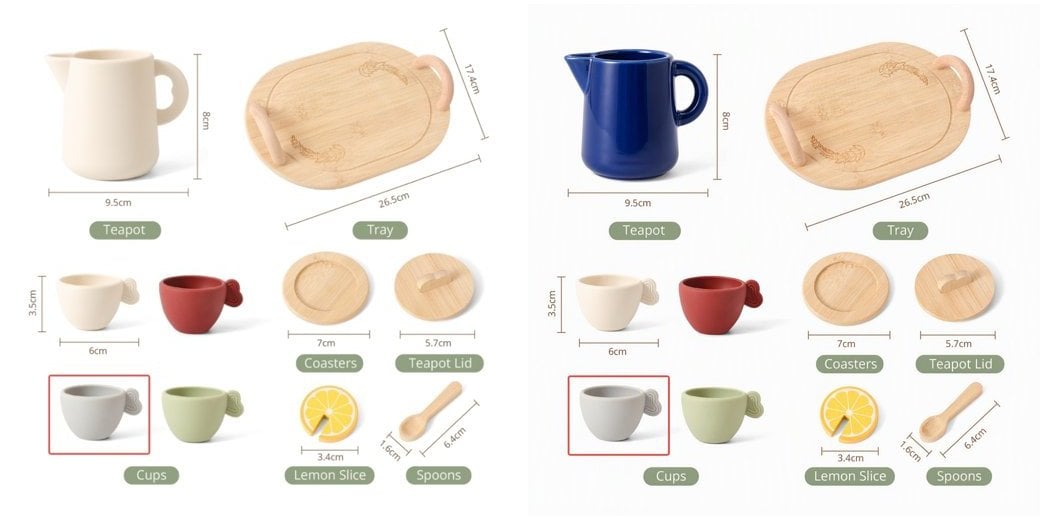 | 寫法 | 效果 |
| - | - |
| ✅ `把茶壺改成深鈷藍釉,其餘部分完全保持不變` | 只有茶壺變色,尺寸標註、其它物件逐畫素保留 |
| ✅ `把這張照片改成水彩畫風格,構圖不變` | 風格整體重繪,構圖保持 |
| ✅ `讓圖2的人物坐在圖1的桌前` | 雙圖融合,圖1提供場景、圖2提供人物 |
| ⚠️ `讓它更好看一點` | 指令過於籠統,改動範圍不可控 |
雙圖融合時在提示詞裡用「圖1 / 圖2」指代 `image` / `image2`。實測人物融合時**身份保真度一般**(臉部特徵可能變化),對人像一致性要求高的場景請先小批次驗證。
## 響應格式
```json theme={null}
{
"created": 1791000788,
"data": [
{
"b64_json": "iVBORw0KGgoAAAANSUhEUgAABAAAAAQACAIAAADwf7zU..."
}
],
"usage": {
"prompt_tokens": 1000,
"total_tokens": 1000,
"input_tokens": 1000,
"output_tokens": 0
}
}
```
**響應欄位說明**
* `b64_json` 是**純 base64,不帶 `data:` 字首**,解碼後為 PNG。
* `n > 1` 時 `data` 陣列有多項,別隻取 `data[0]`。
* 不返回 `url` 與 `revised_prompt`。
**`usage` 不能用來核賬**:是佔位值(`prompt_tokens` 恆為 `1000 × 張數`)。編輯與文生圖**同價**,按張固定計費,真實扣費請以 API易 控制台賬單為準。
## OpenAPI
````yaml api-reference/mai-image-edit-openapi.yaml POST /v1/images/edits
openapi: 3.1.0
info:
title: MAI-Image 2.6 图片编辑 API
description: |
微软 MAI-Image 2.6 图像生成模型 — 图片编辑接口。
- **请求格式必须为 `multipart/form-data`(文件上传)**,发送 JSON 或图片 URL 会返回 400
- 支持单图编辑与双图融合(字段名 `image` + `image2`)
- 不支持 mask;不要传 `response_format` / `seed` / `negative_prompt`
- 按次固定计费,与文生图同价;`n` 在本端点有效、按张计费
**认证方式**:在请求头中添加 `Authorization: Bearer YOUR_API_KEY`
**获取 API Key**:访问 [API易控制台](https://api.apiyi.com/token) 创建令牌
version: 1.0.0
servers:
- url: https://api.apiyi.com
description: 主要端点
security:
- bearerAuth: []
paths:
/v1/images/edits:
post:
tags:
- 图片编辑
summary: 图片编辑:根据指令编辑参考图或融合两张图
description: |
使用 MAI-Image 2.6 模型,根据文本指令对上传的参考图进行编辑或双图融合。
- **必须使用 `multipart/form-data`**,发送 `application/json` 返回
400:`request Content-Type isn't multipart/form-data`
- 第二张参考图字段名为 `image2`;`image[]` 重复、`image` 同名重复、带 `mask` 均返回 400
- 不传 `width` / `height` 时按原图比例输出;传入与原图比例不同的尺寸会重新构图
operationId: editMaiImage
requestBody:
required: true
content:
multipart/form-data:
schema:
$ref: '#/components/schemas/MaiImageEditRequest'
encoding:
image:
contentType: image/png, image/jpeg, image/webp
image2:
contentType: image/png, image/jpeg, image/webp
responses:
'200':
description: 成功生成图片
content:
application/json:
schema:
$ref: '#/components/schemas/ImageResponse'
'400':
description: 请求不是 multipart/form-data、字段名不合规、参数非法,或内容被审核拦截
'401':
description: 未授权 - API Key 无效
'429':
description: 请求频率超限或额度不足
'500':
description: 请求中没有图片文件字段(`image is required`)
security:
- bearerAuth: []
components:
schemas:
MaiImageEditRequest:
type: object
required:
- model
- prompt
- image
properties:
model:
type: string
description: 模型 ID(大小写敏感)
enum:
- MAI-Image-2.6-Flash
- MAI-Image-2.6
default: MAI-Image-2.6-Flash
prompt:
type: string
description: 编辑指令。建议明确「改什么」并声明「其余保持不变」
example: 把茶壶改成深钴蓝釉,其余部分完全保持不变
image:
type: string
format: binary
description: 参考图文件(第一张,提示词中的「图1」)。格式 png / jpg / webp
image2:
type: string
format: binary
description: 可选,第二张参考图(提示词中的「图2」),用于双图融合
width:
type: integer
description: 可选,输出宽度。规则同文生图:每维 ≥ 768、宽×高 ≤ 2,359,296,须与 `height` 成对
minimum: 768
height:
type: integer
description: 可选,输出高度,规则同 `width`
minimum: 768
'n':
type: integer
description: 出图张数,本端点有效,按张计费
minimum: 1
default: 1
example: 1
ImageResponse:
type: object
properties:
created:
type: integer
description: 创建时间戳
example: 1791000788
data:
type: array
description: 图片结果数组,长度等于 `n`
items:
type: object
properties:
b64_json:
type: string
description: '纯 base64 图片数据(PNG,不带 data: 前缀)'
usage:
type: object
description: '**占位值,不能用于核账。** `prompt_tokens` 恒为 `1000 × 张数`'
properties:
prompt_tokens:
type: integer
example: 1000
total_tokens:
type: integer
example: 1000
securitySchemes:
bearerAuth:
type: http
scheme: bearer
description: 在 API易控制台获取的 API Key
````
This documentation is built and hosted on [Mintlify](https://mintlify.com), a developer documentation platform.
| 寫法 | 效果 |
| - | - |
| ✅ `把茶壺改成深鈷藍釉,其餘部分完全保持不變` | 只有茶壺變色,尺寸標註、其它物件逐畫素保留 |
| ✅ `把這張照片改成水彩畫風格,構圖不變` | 風格整體重繪,構圖保持 |
| ✅ `讓圖2的人物坐在圖1的桌前` | 雙圖融合,圖1提供場景、圖2提供人物 |
| ⚠️ `讓它更好看一點` | 指令過於籠統,改動範圍不可控 |
雙圖融合時在提示詞裡用「圖1 / 圖2」指代 `image` / `image2`。實測人物融合時**身份保真度一般**(臉部特徵可能變化),對人像一致性要求高的場景請先小批次驗證。
## 響應格式
```json theme={null}
{
"created": 1791000788,
"data": [
{
"b64_json": "iVBORw0KGgoAAAANSUhEUgAABAAAAAQACAIAAADwf7zU..."
}
],
"usage": {
"prompt_tokens": 1000,
"total_tokens": 1000,
"input_tokens": 1000,
"output_tokens": 0
}
}
```
**響應欄位說明**
* `b64_json` 是**純 base64,不帶 `data:` 字首**,解碼後為 PNG。
* `n > 1` 時 `data` 陣列有多項,別隻取 `data[0]`。
* 不返回 `url` 與 `revised_prompt`。
**`usage` 不能用來核賬**:是佔位值(`prompt_tokens` 恆為 `1000 × 張數`)。編輯與文生圖**同價**,按張固定計費,真實扣費請以 API易 控制台賬單為準。
## OpenAPI
````yaml api-reference/mai-image-edit-openapi.yaml POST /v1/images/edits
openapi: 3.1.0
info:
title: MAI-Image 2.6 图片编辑 API
description: |
微软 MAI-Image 2.6 图像生成模型 — 图片编辑接口。
- **请求格式必须为 `multipart/form-data`(文件上传)**,发送 JSON 或图片 URL 会返回 400
- 支持单图编辑与双图融合(字段名 `image` + `image2`)
- 不支持 mask;不要传 `response_format` / `seed` / `negative_prompt`
- 按次固定计费,与文生图同价;`n` 在本端点有效、按张计费
**认证方式**:在请求头中添加 `Authorization: Bearer YOUR_API_KEY`
**获取 API Key**:访问 [API易控制台](https://api.apiyi.com/token) 创建令牌
version: 1.0.0
servers:
- url: https://api.apiyi.com
description: 主要端点
security:
- bearerAuth: []
paths:
/v1/images/edits:
post:
tags:
- 图片编辑
summary: 图片编辑:根据指令编辑参考图或融合两张图
description: |
使用 MAI-Image 2.6 模型,根据文本指令对上传的参考图进行编辑或双图融合。
- **必须使用 `multipart/form-data`**,发送 `application/json` 返回
400:`request Content-Type isn't multipart/form-data`
- 第二张参考图字段名为 `image2`;`image[]` 重复、`image` 同名重复、带 `mask` 均返回 400
- 不传 `width` / `height` 时按原图比例输出;传入与原图比例不同的尺寸会重新构图
operationId: editMaiImage
requestBody:
required: true
content:
multipart/form-data:
schema:
$ref: '#/components/schemas/MaiImageEditRequest'
encoding:
image:
contentType: image/png, image/jpeg, image/webp
image2:
contentType: image/png, image/jpeg, image/webp
responses:
'200':
description: 成功生成图片
content:
application/json:
schema:
$ref: '#/components/schemas/ImageResponse'
'400':
description: 请求不是 multipart/form-data、字段名不合规、参数非法,或内容被审核拦截
'401':
description: 未授权 - API Key 无效
'429':
description: 请求频率超限或额度不足
'500':
description: 请求中没有图片文件字段(`image is required`)
security:
- bearerAuth: []
components:
schemas:
MaiImageEditRequest:
type: object
required:
- model
- prompt
- image
properties:
model:
type: string
description: 模型 ID(大小写敏感)
enum:
- MAI-Image-2.6-Flash
- MAI-Image-2.6
default: MAI-Image-2.6-Flash
prompt:
type: string
description: 编辑指令。建议明确「改什么」并声明「其余保持不变」
example: 把茶壶改成深钴蓝釉,其余部分完全保持不变
image:
type: string
format: binary
description: 参考图文件(第一张,提示词中的「图1」)。格式 png / jpg / webp
image2:
type: string
format: binary
description: 可选,第二张参考图(提示词中的「图2」),用于双图融合
width:
type: integer
description: 可选,输出宽度。规则同文生图:每维 ≥ 768、宽×高 ≤ 2,359,296,须与 `height` 成对
minimum: 768
height:
type: integer
description: 可选,输出高度,规则同 `width`
minimum: 768
'n':
type: integer
description: 出图张数,本端点有效,按张计费
minimum: 1
default: 1
example: 1
ImageResponse:
type: object
properties:
created:
type: integer
description: 创建时间戳
example: 1791000788
data:
type: array
description: 图片结果数组,长度等于 `n`
items:
type: object
properties:
b64_json:
type: string
description: '纯 base64 图片数据(PNG,不带 data: 前缀)'
usage:
type: object
description: '**占位值,不能用于核账。** `prompt_tokens` 恒为 `1000 × 张数`'
properties:
prompt_tokens:
type: integer
example: 1000
total_tokens:
type: integer
example: 1000
securitySchemes:
bearerAuth:
type: http
scheme: bearer
description: 在 API易控制台获取的 API Key
````
This documentation is built and hosted on [Mintlify](https://mintlify.com), a developer documentation platform.