OpenAI Compatible Mode
APIYI uses OpenAI-compatible format, allowing you to call 200+ mainstream large models with a unified interface:
Supported Model Providers:
- 🤖 OpenAI: gpt-4o, gpt-5-chat-latest, gpt-3.5-turbo, etc.
- 🧠 Anthropic: claude-sonnet-4-20250514, claude-opus-4-1-20250805, etc.
- 💎 Google: gemini-2.5-pro, gemini-2.5-flash, etc.
- 🚀 xAI: grok-4-0709, grok-3, etc.
- 🔍 DeepSeek: deepSeek-r1, deepSeek-v3, etc.
- 🌟 Alibaba: Qwen series models
- 💬 Moonshot: Kimi models, etc.
Feature Support Scope
✅ Supported Features:
- 💬 Chat Completions: Chat Completions interface
- 🖼️ Image Generation: gpt-image-1, flux-kontext-pro, flux-kontext-max, etc.
- 🔊 Audio Processing: Whisper transcription
- 📊 Embeddings: Text vectorization
- ⚡ Function Calling: Function Calling
- 📡 Streaming Output: Real-time response
- 🔧 OpenAI Parameters: temperature, top_p, max_tokens, etc.
- 🆕 Responses Endpoint: OpenAI latest features
❌ Unsupported Features:
- 🔧 Fine-tuning interface
- 📁 Files management interface
- 🏢 Organization management interface
- 💳 Billing management interface
Easy Model Switching
Core Advantage: One Codebase, Multiple Models
After getting your code working with OpenAI format, you only need to change the model name to switch to other models:
# Using GPT-4o
response = client.chat.completions.create(
model="gpt-4o", # OpenAI model
messages=[...]
)
# Switch to Claude, everything else stays the same!
response = client.chat.completions.create(
model="claude-3.5-sonnet", # Only change model name
messages=[...]
)
# Switch to Gemini
response = client.chat.completions.create(
model="gemini-1.5-pro", # Only change model name
messages=[...]
)
This design allows you to easily compare different models’ performance, or flexibly switch models based on cost and performance needs, without rewriting code!
Quick Start
Get API Key
- Visit APIYI Console
- Login to your account
- Click “New” in the token management page to create an API Key
- Copy the generated API Key for API calls
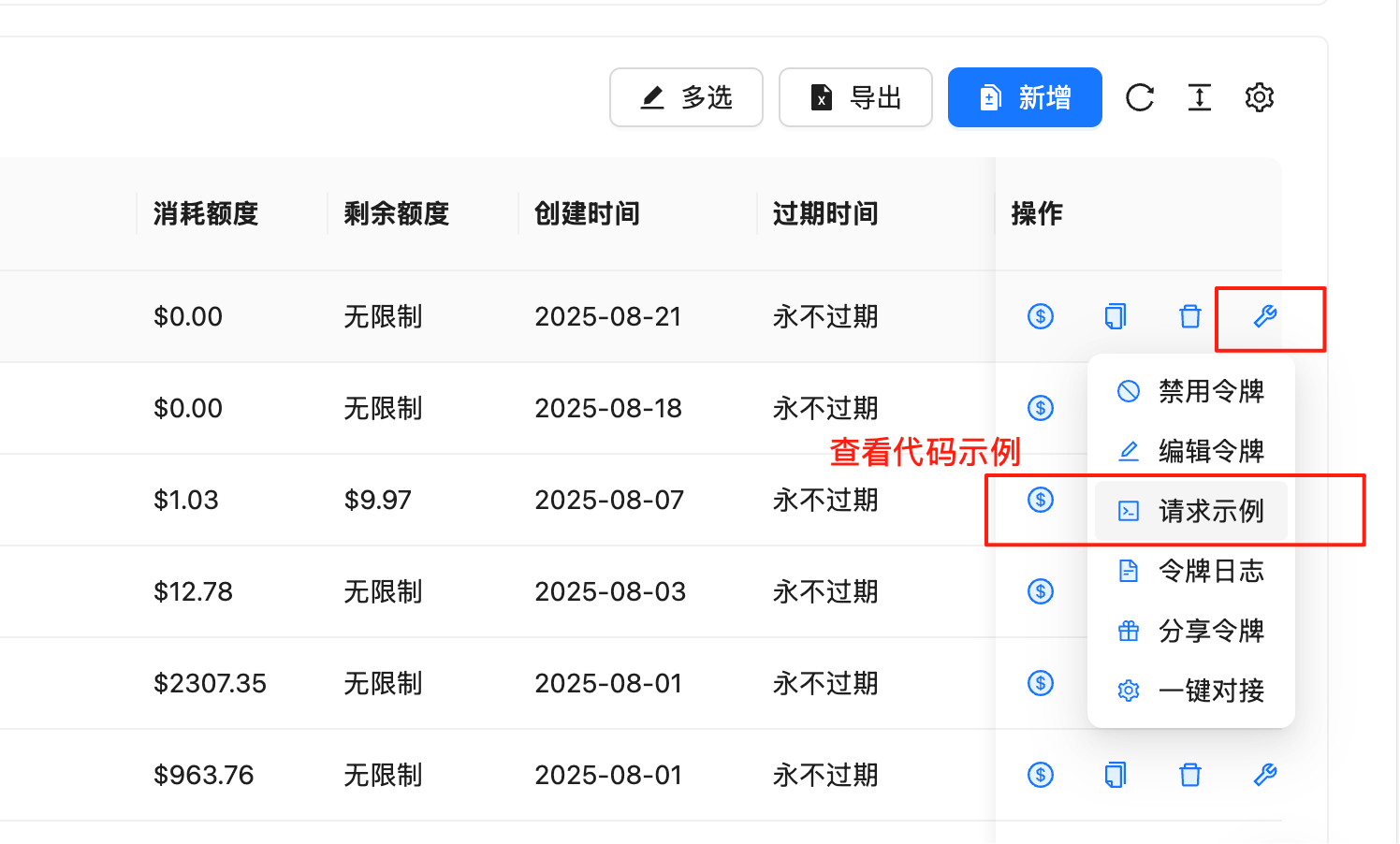
View Request Examples
In the token management page, you can quickly get code examples in various programming languages:
Steps:
- Go to Token Management Page
- Find the row with your API Key
- Click the 🔧wrench icon (tool icon) in the “Actions” column
- Select “Request Examples” in the popup menu
- View complete code examples including the following languages:
Supported Programming Languages:
- cURL - Command line testing
- Python (SDK) - Using official OpenAI library
- Python (requests) - Using requests library
- Node.js - JavaScript/TypeScript
- Java - Java application development
- C# - .NET application development
- Go - Go language development
- PHP - Web development
- Ruby - Ruby application development
- And more languages…
Code Example Features:
- ✅ Complete & Runnable: Copy and paste to use
- ✅ Parameter Descriptions: Detailed parameter configuration
- ✅ Error Handling: Includes exception handling logic
- ✅ Best Practices: Follows development standards of each language
We recommend developers to check the request examples in the backend first. These examples are updated in real-time according to the latest API version, ensuring code accuracy and availability.
API Endpoints
- Primary Endpoint:
https://api.apiyi.com/v1
- Backup Endpoint:
https://vip.apiyi.com/v1
Authentication
All API requests must include authentication information in the Header:
Authorization: Bearer YOUR_API_KEY
- Content-Type:
application/json
- Encoding: UTF-8
- Request Method: POST (most interfaces)
Core Interfaces
1. Chat Completions
Create a chat completion request, supports multi-turn conversations.
Request Endpoint
POST /v1/chat/completions
Request Parameters
| Parameter | Type | Required | Description |
|---|
| model | string | Yes | Model name, e.g. gpt-3.5-turbo |
| messages | array | Yes | Conversation message array |
| temperature | number | No | Sampling temperature, 0-2, default 1 |
| max_tokens | integer | No | Maximum generated tokens |
| stream | boolean | No | Whether to stream response, default false |
| top_p | number | No | Nucleus sampling parameter, 0-1 |
| n | integer | No | Number of generations, default 1 |
| stop | string/array | No | Stop sequences |
| presence_penalty | number | No | Presence penalty, -2 to 2 |
| frequency_penalty | number | No | Frequency penalty, -2 to 2 |
Message Format
{
"role": "system|user|assistant",
"content": "Message content"
}
Complete Code Examples
cURL
Python (SDK)
Python (requests)
Node.js
Java
C#
Go
PHP
Ruby
curl -X POST "https://api.apiyi.com/v1/chat/completions" \
-H "Authorization: Bearer YOUR_API_KEY" \
-H "Content-Type: application/json" \
-d '{
"model": "gpt-3.5-turbo",
"messages": [
{"role": "system", "content": "You are a helpful AI assistant."},
{"role": "user", "content": "Hello! Please introduce yourself."}
],
"temperature": 0.7,
"max_tokens": 1000
}'
from openai import OpenAI
# Initialize client
client = OpenAI(
api_key="YOUR_API_KEY",
base_url="https://api.apiyi.com/v1"
)
# Send chat request
response = client.chat.completions.create(
model="gpt-3.5-turbo",
messages=[
{"role": "system", "content": "You are a helpful AI assistant."},
{"role": "user", "content": "Hello! Please introduce yourself."}
],
temperature=0.7,
max_tokens=1000
)
print(response.choices[0].message.content)
import requests
import json
url = "https://api.apiyi.com/v1/chat/completions"
headers = {
"Authorization": "Bearer YOUR_API_KEY",
"Content-Type": "application/json"
}
data = {
"model": "gpt-3.5-turbo",
"messages": [
{"role": "system", "content": "You are a helpful AI assistant."},
{"role": "user", "content": "Hello! Please introduce yourself."}
],
"temperature": 0.7,
"max_tokens": 1000
}
response = requests.post(url, headers=headers, json=data)
result = response.json()
if response.status_code == 200:
print(result["choices"][0]["message"]["content"])
else:
print(f"Error: {result}")
const OpenAI = require('openai');
const client = new OpenAI({
apiKey: 'YOUR_API_KEY',
baseURL: 'https://api.apiyi.com/v1'
});
async function chatCompletion() {
try {
const response = await client.chat.completions.create({
model: 'gpt-3.5-turbo',
messages: [
{"role": "system", "content": "You are a helpful AI assistant."},
{"role": "user", "content": "Hello! Please introduce yourself."}
],
temperature: 0.7,
max_tokens: 1000
});
console.log(response.choices[0].message.content);
} catch (error) {
console.error('API call error:', error);
}
}
chatCompletion();
import okhttp3.*;
import com.google.gson.Gson;
import java.io.IOException;
import java.util.*;
public class APIYiExample {
private static final String API_KEY = "YOUR_API_KEY";
private static final String BASE_URL = "https://api.apiyi.com/v1";
public static void main(String[] args) throws IOException {
OkHttpClient client = new OkHttpClient();
Gson gson = new Gson();
// Build request body
Map<String, Object> requestBody = new HashMap<>();
requestBody.put("model", "gpt-3.5-turbo");
requestBody.put("temperature", 0.7);
requestBody.put("max_tokens", 1000);
List<Map<String, String>> messages = Arrays.asList(
Map.of("role", "system", "content", "You are a helpful AI assistant."),
Map.of("role", "user", "content", "Hello! Please introduce yourself.")
);
requestBody.put("messages", messages);
RequestBody body = RequestBody.create(
gson.toJson(requestBody),
MediaType.parse("application/json")
);
Request request = new Request.Builder()
.url(BASE_URL + "/chat/completions")
.addHeader("Authorization", "Bearer " + API_KEY)
.addHeader("Content-Type", "application/json")
.post(body)
.build();
try (Response response = client.newCall(request).execute()) {
System.out.println(response.body().string());
}
}
}
using System;
using System.Net.Http;
using System.Text;
using System.Threading.Tasks;
using Newtonsoft.Json;
class Program
{
private static readonly string API_KEY = "YOUR_API_KEY";
private static readonly string BASE_URL = "https://api.apiyi.com/v1";
static async Task Main(string[] args)
{
using var client = new HttpClient();
client.DefaultRequestHeaders.Add("Authorization", $"Bearer {API_KEY}");
var requestBody = new
{
model = "gpt-3.5-turbo",
messages = new[]
{
new { role = "system", content = "You are a helpful AI assistant." },
new { role = "user", content = "Hello! Please introduce yourself." }
},
temperature = 0.7,
max_tokens = 1000
};
var json = JsonConvert.SerializeObject(requestBody);
var content = new StringContent(json, Encoding.UTF8, "application/json");
try
{
var response = await client.PostAsync($"{BASE_URL}/chat/completions", content);
var result = await response.Content.ReadAsStringAsync();
Console.WriteLine(result);
}
catch (Exception ex)
{
Console.WriteLine($"Error: {ex.Message}");
}
}
}
package main
import (
"bytes"
"encoding/json"
"fmt"
"io/ioutil"
"net/http"
)
type Message struct {
Role string `json:"role"`
Content string `json:"content"`
}
type ChatRequest struct {
Model string `json:"model"`
Messages []Message `json:"messages"`
Temperature float64 `json:"temperature"`
MaxTokens int `json:"max_tokens"`
}
func main() {
apiKey := "YOUR_API_KEY"
baseURL := "https://api.apiyi.com/v1"
reqData := ChatRequest{
Model: "gpt-3.5-turbo",
Messages: []Message{
{Role: "system", Content: "You are a helpful AI assistant."},
{Role: "user", Content: "Hello! Please introduce yourself."},
},
Temperature: 0.7,
MaxTokens: 1000,
}
jsonData, _ := json.Marshal(reqData)
req, _ := http.NewRequest("POST", baseURL+"/chat/completions", bytes.NewBuffer(jsonData))
req.Header.Set("Authorization", "Bearer "+apiKey)
req.Header.Set("Content-Type", "application/json")
client := &http.Client{}
resp, err := client.Do(req)
if err != nil {
fmt.Printf("Request error: %v\n", err)
return
}
defer resp.Body.Close()
body, _ := ioutil.ReadAll(resp.Body)
fmt.Println(string(body))
}
<?php
$api_key = 'YOUR_API_KEY';
$base_url = 'https://api.apiyi.com/v1';
$data = array(
'model' => 'gpt-3.5-turbo',
'messages' => array(
array('role' => 'system', 'content' => 'You are a helpful AI assistant.'),
array('role' => 'user', 'content' => 'Hello! Please introduce yourself.')
),
'temperature' => 0.7,
'max_tokens' => 1000
);
$ch = curl_init();
curl_setopt($ch, CURLOPT_URL, $base_url . '/chat/completions');
curl_setopt($ch, CURLOPT_POST, 1);
curl_setopt($ch, CURLOPT_POSTFIELDS, json_encode($data));
curl_setopt($ch, CURLOPT_HTTPHEADER, array(
'Authorization: Bearer ' . $api_key,
'Content-Type: application/json'
));
curl_setopt($ch, CURLOPT_RETURNTRANSFER, true);
$response = curl_exec($ch);
$http_code = curl_getinfo($ch, CURLINFO_HTTP_CODE);
curl_close($ch);
if ($http_code == 200) {
$result = json_decode($response, true);
echo $result['choices'][0]['message']['content'];
} else {
echo "Error: " . $response;
}
?>
require 'net/http'
require 'json'
api_key = 'YOUR_API_KEY'
base_url = 'https://api.apiyi.com/v1'
uri = URI("#{base_url}/chat/completions")
http = Net::HTTP.new(uri.host, uri.port)
http.use_ssl = true
request = Net::HTTP::Post.new(uri)
request['Authorization'] = "Bearer #{api_key}"
request['Content-Type'] = 'application/json'
request.body = {
model: 'gpt-3.5-turbo',
messages: [
{ role: 'system', content: 'You are a helpful AI assistant.' },
{ role: 'user', content: 'Hello! Please introduce yourself.' }
],
temperature: 0.7,
max_tokens: 1000
}.to_json
response = http.request(request)
if response.code == '200'
result = JSON.parse(response.body)
puts result['choices'][0]['message']['content']
else
puts "Error: #{response.body}"
end
Response Example
{
"id": "chatcmpl-123",
"object": "chat.completion",
"created": 1699000000,
"model": "gpt-3.5-turbo",
"choices": [{
"index": 0,
"message": {
"role": "assistant",
"content": "Hello! How can I help you today?"
},
"finish_reason": "stop"
}],
"usage": {
"prompt_tokens": 20,
"completion_tokens": 10,
"total_tokens": 30
}
}
2. Text Completions
Retained for backward compatibility, recommend using Chat Completions.
Request Endpoint
Request Parameters
| Parameter | Type | Required | Description |
|---|
| model | string | Yes | Model name |
| prompt | string/array | Yes | Prompt text |
| max_tokens | integer | No | Maximum generation length |
| temperature | number | No | Sampling temperature |
| top_p | number | No | Nucleus sampling parameter |
| n | integer | No | Number of generations |
| stream | boolean | No | Streaming output |
| stop | string/array | No | Stop sequences |
3. Embeddings
Convert text to vector representation.
Request Endpoint
Request Parameters
| Parameter | Type | Required | Description |
|---|
| model | string | Yes | Model name, e.g. text-embedding-ada-002 |
| input | string/array | Yes | Input text |
| encoding_format | string | No | Encoding format, float or base64 |
Complete Code Examples
cURL
Python (SDK)
Python (requests)
Node.js
curl -X POST "https://api.apiyi.com/v1/embeddings" \
-H "Authorization: Bearer YOUR_API_KEY" \
-H "Content-Type: application/json" \
-d '{
"model": "text-embedding-ada-002",
"input": "This is a text example for vectorization"
}'
from openai import OpenAI
client = OpenAI(
api_key="YOUR_API_KEY",
base_url="https://api.apiyi.com/v1"
)
response = client.embeddings.create(
model="text-embedding-ada-002",
input="This is a text example for vectorization"
)
# Get vector
embedding = response.data[0].embedding
print(f"Vector dimension: {len(embedding)}")
print(f"First 5 values: {embedding[:5]}")
import requests
import json
url = "https://api.apiyi.com/v1/embeddings"
headers = {
"Authorization": "Bearer YOUR_API_KEY",
"Content-Type": "application/json"
}
data = {
"model": "text-embedding-ada-002",
"input": "This is a text example for vectorization"
}
response = requests.post(url, headers=headers, json=data)
result = response.json()
if response.status_code == 200:
embedding = result["data"][0]["embedding"]
print(f"Vector dimension: {len(embedding)}")
print(f"Vector values: {embedding[:5]}") # Show first 5 values
else:
print(f"Error: {result}")
const OpenAI = require('openai');
const client = new OpenAI({
apiKey: 'YOUR_API_KEY',
baseURL: 'https://api.apiyi.com/v1'
});
async function getEmbedding() {
try {
const response = await client.embeddings.create({
model: 'text-embedding-ada-002',
input: 'This is a text example for vectorization'
});
const embedding = response.data[0].embedding;
console.log(`Vector dimension: ${embedding.length}`);
console.log(`First 5 values: ${embedding.slice(0, 5)}`);
} catch (error) {
console.error('API call error:', error);
}
}
getEmbedding();
4. Image Generation
Generate, edit, or transform images.
Generate Images
POST /v1/images/generations
Request Parameters
| Parameter | Type | Required | Description |
|---|
| model | string | Yes | Model name, recommend gpt-image-1 |
| prompt | string | Yes | Image description prompt |
| n | integer | No | Number to generate, default 1 |
| size | string | No | Image size: 1024x1024, 1792x1024, 1024x1792 |
| quality | string | No | Quality: standard or hd |
| style | string | No | Style: vivid or natural |
Complete Code Examples
cURL
Python (SDK)
Node.js
curl -X POST "https://api.apiyi.com/v1/images/generations" \
-H "Authorization: Bearer YOUR_API_KEY" \
-H "Content-Type: application/json" \
-d '{
"model": "gpt-image-1",
"prompt": "A cute orange kitten sitting in a sunny garden",
"n": 1,
"size": "1024x1024",
"quality": "hd"
}'
from openai import OpenAI
client = OpenAI(
api_key="YOUR_API_KEY",
base_url="https://api.apiyi.com/v1"
)
response = client.images.generate(
model="gpt-image-1", # Recommend using gpt-image-1
prompt="A cute orange kitten sitting in a sunny garden",
n=1,
size="1024x1024",
quality="hd"
)
# Get image URL
image_url = response.data[0].url
print(f"Generated image: {image_url}")
# Download image
import requests
img_response = requests.get(image_url)
with open("generated_image.png", "wb") as f:
f.write(img_response.content)
print("Image saved as generated_image.png")
const OpenAI = require('openai');
const fs = require('fs');
const client = new OpenAI({
apiKey: 'YOUR_API_KEY',
baseURL: 'https://api.apiyi.com/v1'
});
async function generateImage() {
try {
const response = await client.images.generate({
model: 'gpt-image-1', // Recommend using gpt-image-1
prompt: 'A cute orange kitten sitting in a sunny garden',
n: 1,
size: '1024x1024',
quality: 'hd'
});
const imageUrl = response.data[0].url;
console.log('Generated image:', imageUrl);
// Download image
const fetch = require('node-fetch');
const imgResponse = await fetch(imageUrl);
const buffer = await imgResponse.buffer();
fs.writeFileSync('generated_image.png', buffer);
console.log('Image saved');
} catch (error) {
console.error('Image generation error:', error);
}
}
generateImage();
5. Audio Transcription
Speech recognition and transcription.
Transcribe Audio
POST /v1/audio/transcriptions
Request Parameters (Form-Data)
| Parameter | Type | Required | Description |
|---|
| file | file | Yes | Audio file |
| model | string | Yes | Model name, e.g. whisper-1 |
| language | string | No | Language code |
| prompt | string | No | Guidance prompt |
| response_format | string | No | Response format |
| temperature | number | No | Sampling temperature |
6. Model List
Get available model list.
Request Endpoint
Response Example
{
"object": "list",
"data": [
{
"id": "gpt-3.5-turbo",
"object": "model",
"created": 1677610602,
"owned_by": "openai"
},
{
"id": "gpt-4o",
"object": "model",
"created": 1687882411,
"owned_by": "openai"
}
]
}
Streaming Response
Enable Streaming Output
Set stream: true in your request:
{
"model": "gpt-3.5-turbo",
"messages": [{"role": "user", "content": "Hello"}],
"stream": true
}
Response will be returned in Server-Sent Events (SSE) format:
data: {"id":"chatcmpl-123","object":"chat.completion.chunk","created":1699000000,"model":"gpt-3.5-turbo","choices":[{"delta":{"content":"Hello"},"index":0}]}
data: {"id":"chatcmpl-123","object":"chat.completion.chunk","created":1699000000,"model":"gpt-3.5-turbo","choices":[{"delta":{"content":" there"},"index":0}]}
data: [DONE]
Handle Streaming Response
import requests
import json
response = requests.post(
'https://api.apiyi.com/v1/chat/completions',
headers={
'Authorization': f'Bearer {api_key}',
'Content-Type': 'application/json'
},
json={
'model': 'gpt-3.5-turbo',
'messages': [{'role': 'user', 'content': 'Hello'}],
'stream': True
},
stream=True
)
for line in response.iter_lines():
if line:
line = line.decode('utf-8')
if line.startswith('data: '):
data = line[6:]
if data != '[DONE]':
chunk = json.loads(data)
content = chunk['choices'][0]['delta'].get('content', '')
print(content, end='')
const response = await fetch('https://api.apiyi.com/v1/chat/completions', {
method: 'POST',
headers: {
'Authorization': `Bearer ${apiKey}`,
'Content-Type': 'application/json'
},
body: JSON.stringify({
model: 'gpt-3.5-turbo',
messages: [{role: 'user', content: 'Hello'}],
stream: true
})
});
const reader = response.body.getReader();
const decoder = new TextDecoder();
while (true) {
const {done, value} = await reader.read();
if (done) break;
const chunk = decoder.decode(value);
const lines = chunk.split('\n');
for (const line of lines) {
if (line.startsWith('data: ')) {
const data = line.slice(6);
if (data !== '[DONE]') {
const json = JSON.parse(data);
const content = json.choices[0].delta.content || '';
process.stdout.write(content);
}
}
}
}
Error Handling
{
"error": {
"message": "Invalid API key provided",
"type": "invalid_request_error",
"param": null,
"code": "invalid_api_key"
}
}
Common Error Codes
| Error Code | HTTP Status | Description |
|---|
| invalid_api_key | 401 | Invalid API key |
| insufficient_quota | 429 | Insufficient quota |
| model_not_found | 404 | Model not found |
| invalid_request_error | 400 | Invalid request parameters |
| server_error | 500 | Internal server error |
| rate_limit_exceeded | 429 | Request rate too high |
Error Handling Example
try:
response = client.chat.completions.create(
model="gpt-3.5-turbo",
messages=[{"role": "user", "content": "Hello"}]
)
except Exception as e:
if hasattr(e, 'status_code'):
if e.status_code == 401:
print("Invalid API key")
elif e.status_code == 429:
print("Request too frequent or insufficient quota")
elif e.status_code == 500:
print("Server error, please try again later")
else:
print(f"Unknown error: {str(e)}")
Best Practices
1. Request Optimization
- Set max_tokens reasonably: Avoid unnecessarily long outputs
- Use temperature: Control output randomness
- Batch processing: Merge multiple requests to reduce calls
2. Error Retry
Implement exponential backoff retry mechanism:
import time
import random
def retry_with_backoff(func, max_retries=3):
for i in range(max_retries):
try:
return func()
except Exception as e:
if i == max_retries - 1:
raise e
wait_time = (2 ** i) + random.uniform(0, 1)
time.sleep(wait_time)
3. Security Recommendations
- Protect API keys: Use environment variables for storage
- Limit permissions: Create different keys for different applications
- Monitor usage: Regularly check API usage logs
- Use streaming output: Improve user experience
- Cache responses: Cache results for identical requests
- Concurrency control: Reasonably control concurrent request count
Rate Limits
APIYI implements the following rate limits:
| Limit Type | Limit Value | Description |
|---|
| RPM (Requests Per Minute) | 3000 | Per API key |
| TPM (Tokens Per Minute) | 1000000 | Per API key |
| Concurrent Requests | 100 | Simultaneous requests |
When limits are exceeded, a 429 error will be returned. Please control request frequency reasonably.
Need Help?
This manual is continuously updated. Please follow the latest version for new features and improvements.