

概述
Seedream 是字节跳动 BytePlus 火山方舟海外版的旗舰图像生成模型系列,统一生成-编辑架构:文生图、单图编辑、多图融合、批量序列生成都通过同一个/v1/images/generations 端点完成,仅参数不同。API易 与 BytePlus 达成官方战略合作,第一时间接入全部活跃版本。
🎨 核心亮点:最新 5.0 Flash 按次 $0.018、约 15–20 秒出图,排版与文字渲染出色,适合大批量素材;全系统一接入 + 4K 高清出图 + 最多 10 张参考图融合 + 批处理 (输入+输出 ≤ 15 张) + 强中文文字渲染。适合电商主图、广告海报、产品摄影、内容创作 等需要高画质 + 文字渲染的生产场景。
图片 API 全部为同步调用:没有异步任务 ID,客户端断开连接结果即丢失、但请求仍会计费。请为本模型设置足够大的 timeout,详见 图片 API 调用须知与最佳实践。
资源版本说明:API易 接入的 Seedream 走海外 BytePlus(国际版)官方资源,而非国内的豆包 / 火山引擎版本。国际版的内容审核策略相对国内版宽松,创作自由度更高——这是本平台的一项优势,但不代表没有安全审核:BytePlus 仍内置内容安全机制,违规提示词或参考图会被 400/403 拦截(拦截不计费)。请在合规前提下使用。
文生图 API
POST /v1/images/generations,纯文本提示词生成图片,支持 1K/2K/3K/4K 与精确像素尺寸。图片编辑 API
同端点 +
image 参数,支持单图改图、多图融合、批量序列生成(最多 15 张)。历史版本
5.0 Flash / 5.0 Pro / 5.0 / 4.5 / 4.0 规格对比、价格差异、迁移指南。
让 AI Agent 帮你接入
复制这段提示词,粘贴给 Codex / Claude Code / Cursor
它会先抓本页的纯文本版(任意文档页地址后加 .md),再按你项目的技术栈写代码——超时、URL 结果要立即转存、编辑走 URL 数组而不是 multipart、以及 seedream-5-0-pro 的禁传参数这几个高频坑已经写死在要求里。
帮我在当前项目里接入 / 排查 Seedream 的「文生图 + 图片编辑」。
先读文档再动手:抓 https://docs.apiyi.com/api-capabilities/seedream-image/overview.md 拿到本页纯文本版;需要更细 …
- 超时:客户端 timeout 按型号分档——4.x 系列和
seedream-5-0-flash60 秒起步(flash 带 1 …
共 7 条接入要求,点下方按钮复制完整版
这段提示词替你挡掉了什么
这段提示词替你挡掉了什么
为什么选 API易 的 Seedream
对标 BytePlus 火山方舟海外版官方通道,针对企业生产场景在 稳定性、成本、接入体验 三方面做了深度优化:官方战略合作 · 资源稳定
与 BytePlus 火山方舟达成官方合作,走授权直连链路,请求和响应行为与官方一致,无协议绕行风险,企业可放心走生产。
不限并发 · 企业可放量
批量出图、多图融合、序列生成等高并发场景下,可线性扩容,不受官方账号 Tier 限制。500 RPM 默认配额,更高量级可申请扩容。
同价 + 充值最高 8 折
默认单价与 BytePlus 官方一致,叠加 充值加赠活动 最低可享 8 折(以 5.0 Flash 为例,约官方的 91 折到 83 折),长期使用成本显著下降。
全球零门槛接入
无需海外服务器或代理,国内机房、家宽网络、海外节点均可直连
api.apiyi.com,省去为 BytePlus ap-southeast-1 / eu-west-1 配置出海链路的麻烦。OpenAI 兼容 · 零代码改动
端点路径
/v1/images/generations 与 OpenAI 一致,OpenAI 官方 SDK 把 base_url 指过来即可调用,扩展参数(image / sequential_image_generation 等)通过 extra_body 透传。注意 OpenAI 的 n 参数上游不支持(传入被静默忽略,仍返回 1 张),多图输出请用 sequential_image_generation。专业服务 · 企业陪跑
团队深耕图像生成场景,在多图融合、文字渲染、批量素材生产等场景具备丰富经验,可为企业客户提供从 PoC 到生产上线的完整技术支持。
核心特性
4K 高保真出图
4.0 / 4.5 支持原生 4K(4096×4096),细节层次丰富,适合海报、印刷物料;5.0-lite 上限 3K,但综合体验更新。
统一生成-编辑架构
文生图 / 单图编辑 / 多图融合 / 序列批量 都走 同一端点同一参数集,仅靠
image 与 sequential_image_generation 切换模式。多图融合 · 最多 10 张参考图
image 字段接受 URL 数组,prompt 中可用「图1/图2」明确指代顺序,配合 sequential_image_generation: "disabled" 做主体一致性控制。文字渲染突破
4.5 版本对小文本渲染大幅改进,海报标题、广告文案、产品文字等场景清晰可读,业界领先。
批量序列生成(最多 15 张)
sequential_image_generation: "auto" + max_images 一次生成成系列的连续图像,适合分镜、品牌视觉、产品系列图。约 15 秒/张 · 速度均衡
单图典型耗时 15 秒左右,4K + hd 档稍长。500 RPM 默认配额,企业批量需求可申请扩容。
灵活尺寸 · 任意比例
支持分辨率档位(
1K/2K/3K/4K)或精确像素,总像素范围 [1280×720, 4096×4096],宽高比 [1/16, 16]。OpenAI SDK 直连
base_url=https://api.apiyi.com/v1 即可用 OpenAI 官方 SDK 调用,扩展参数通过 extra_body 透传,零代码改动迁移。实测效果
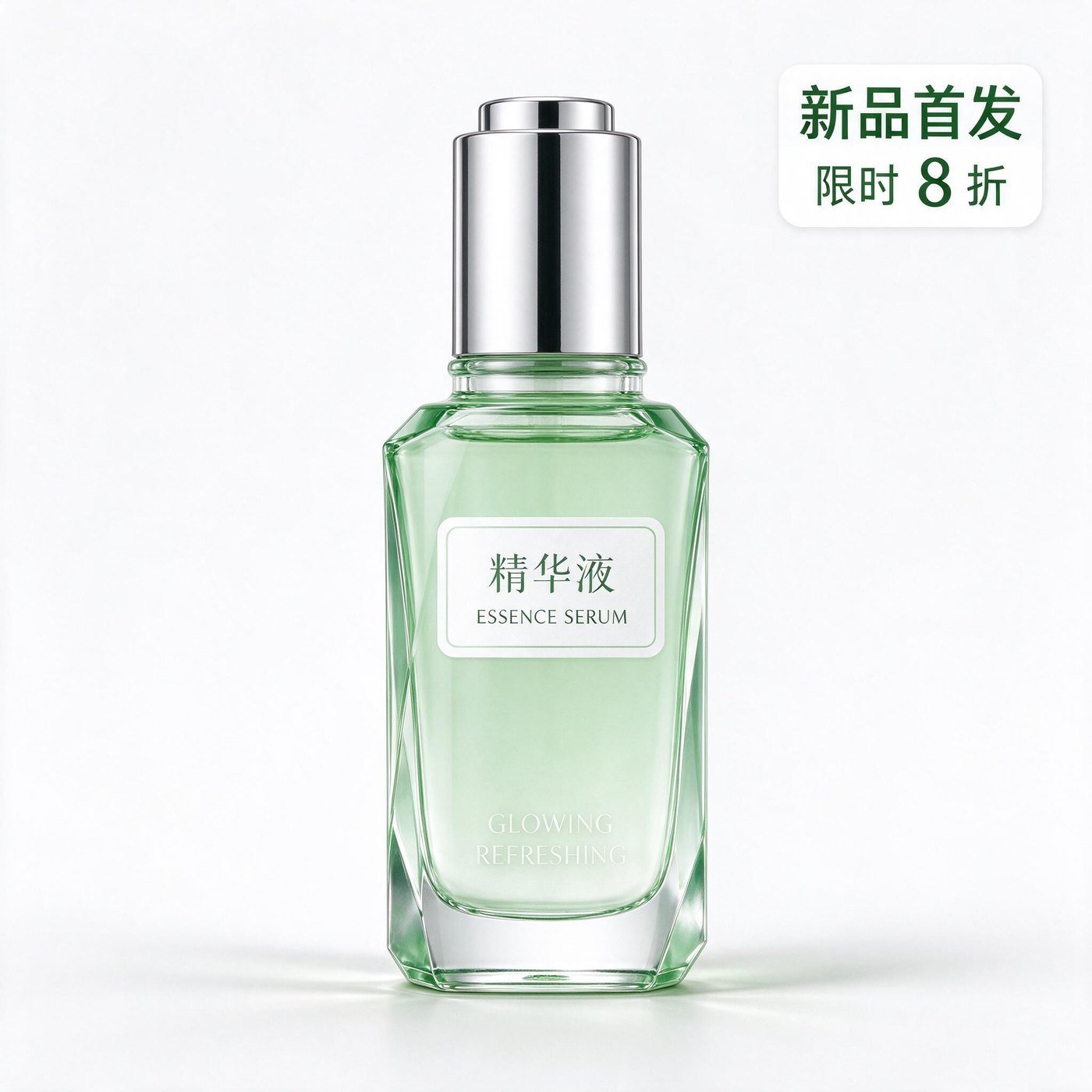
文生图 · 电商主图(seedream-5-0-flash,仅提示词:纯白背景摆一瓶浅绿色精华液,右上角中文标签「新品首发」、下方小字「限时 8 折」):17.1 秒出图,2K 下中文标签笔画准确、没有错字,瓶身造型与商业布光干净。
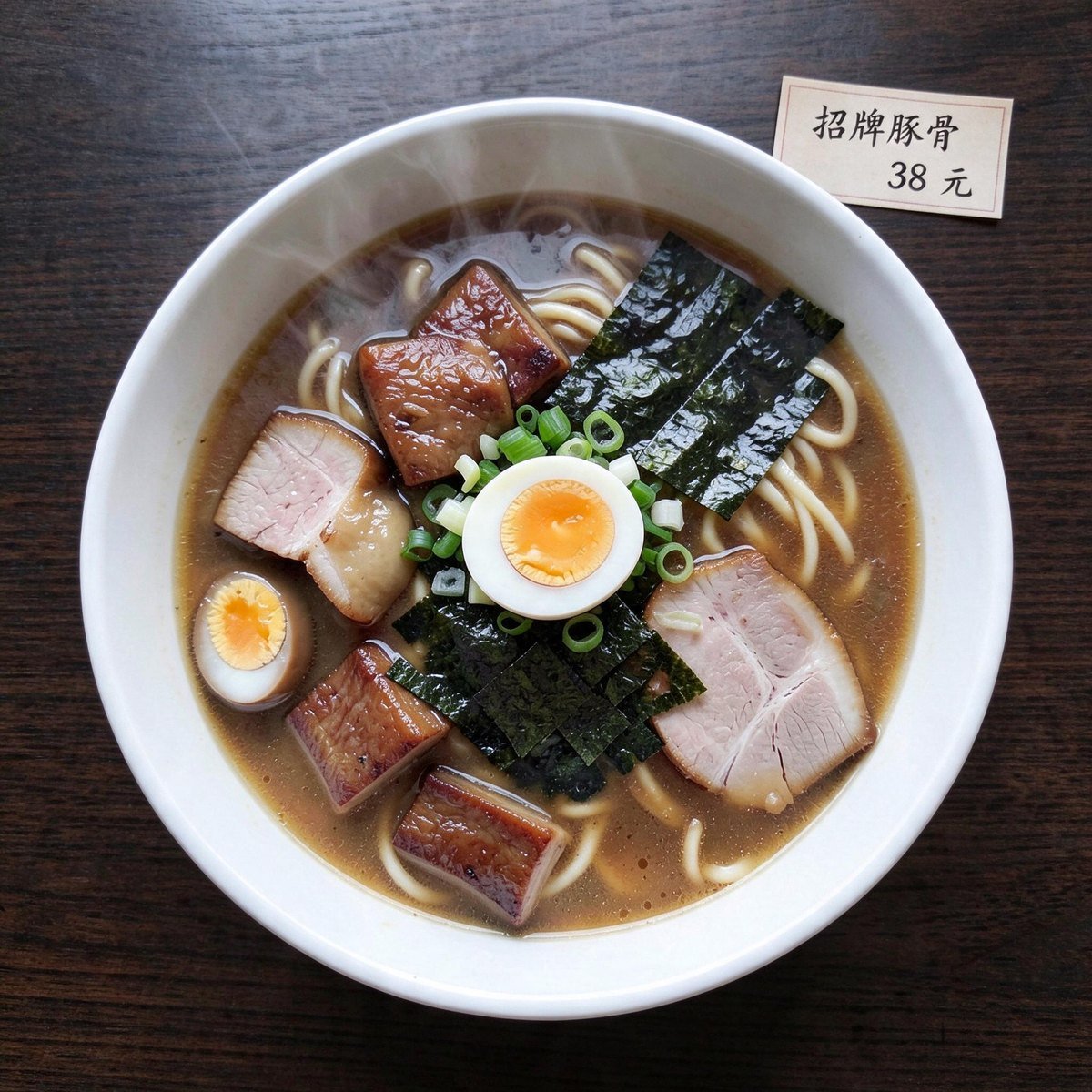
seedream-5-0-flash,参考图为俯拍拉面,提示词:背景换成深色木桌,在碗的右上方加一张中文价签「招牌豚骨 38 元」):33.2 秒出图,价签文字没有错字,拉面、配料与蒸汽保持原样,深色木桌把主体压得更实。
模型定价
按张计费,与 BytePlus 官方同价,叠加充值加赠后实际成本进一步下降。计费说明:
- 按出图张数计费,与 prompt 长度、是否走多图融合无关
seedream-5-0-flash为按次固定价 $0.018,与 BytePlus 官方同价,输入参考图不收费(实测 1 / 3 / 10 张参考图均扣 $0.018)seedream-5-0-pro为按次固定价 $0.12(每次输出 1 张,不支持批量序列)。官方原价按输出像素分两档(≤2.36M / >2.36M 各一价)并对第 2 张起的输入参考图另行收费;API易 简化为按次统一价,不分档、已含输入图费用。该模型官方无任何折扣,API易 按保供原则定价——计入充值加赠活动与税务等成本后基本不盈利,价格如有调整会提前公告sequential_image_generation: "auto"模式下按实际生成张数计费(如max_images: 4出 4 张则计 4 次)- 失败请求(4xx / 内容审核拦截)不计费
- 官方提供 200 张免费图片测试额度(首次接入即享)
- 充值加赠政策见 充值加赠活动
技术规格
生成耗时对比
各版本单次请求的实测耗时(2026-07 实测,5.0 Flash 为 2026-09-24 实测,UTC+8;单位为从发起请求到拿到完整响应的墙钟时间,单次请求有正常波动):端点一览
关键参数详解
size(输出尺寸)
支持两类取值,二选一:
预设档位(按分辨率自动决定宽高比):
精确像素(自定义任意尺寸):
- 总像素范围:[1280×720, 4096×4096]
- 宽高比范围:[1/16, 16]
- 默认值:
2048x2048
1920x1080(FullHD)、3840x2160(横版 4K)、1080x1920(手机壁纸)、2560x1440(横版 2K)
非法示例:5000x5000(超上限)、100x1600(比例超 1/16)
image 与 sequential_image_generation(编辑 / 多图 / 批量模式开关)
/v1/images/generations 端点同时承担文生图与编辑/多图能力,靠 两个参数组合 切换模式:
详细代码示例见 文生图 Playground 和 图片编辑 Playground。
最佳实践
1
选对版本
- 大批量出图 / 海报排版 / 追求速度与成本 →
seedream-5-0-flash-260915($0.018/次、约 15–20 秒、最高约 2K) - 追求最强综合体验 →
seedream-5-0-260128(功能最全,但分辨率上限 3K) - 要 4K 出图 + 强文字渲染 →
seedream-4-5-251128(4K + 文字渲染突破) - 要 4K + 性价比 →
seedream-4-0-250828(最便宜的 4K) - 极致画质 / 复杂指令的专业场景 →
seedream-5-0-pro-260628($0.12/次、约 2 分钟出图、仅 1K/2K,常规场景不建议)
2
尺寸优先选预设
1K/2K/3K/4K 档位经过官方优化,速度和质量更稳定。自定义像素留给真有比例需求的场景,注意各版本支持的档位不同。3
多图融合时显式指代
传入
image 数组时,prompt 里用「把图1的人物放进图2的场景,沿用图3的色彩风格」明确顺序引用,避免模型自行猜测。4
批量序列控制成本
sequential_image_generation: "auto" + max_images: 4 一次出 4 张,按张计费总价乘 4。先用 max_images: 1 验证 prompt,再放大批量。5
输出格式按场景选
5.0 系支持
png 与 jpeg,4.5 / 4.0 仅 jpeg。需要无损细节时用 png,体积敏感的场景用 jpeg。注意 5.0-flash 直接出图的 png 没有 alpha 通道,透明素材要走分层。6
超时配置 ≥ 60 秒
单图约 15 秒,但批量序列(4 张)或 4K + hd 可能 30–60 秒。客户端超时建议 60 秒起步,前端做进度反馈。
seedream-5-0-pro 实测约 2 分钟出图,超时建议 ≥ 240 秒。7
水印按需关闭
watermark: false 关闭水印(默认行为视版本而定,建议显式传)。商用素材建议显式关,避免输出带 BytePlus 标识。错误码与重试
建议客户端:
- 请求超时 60 秒 起步(批量序列或 4K hd 可能 1 分钟)
- 对 5xx 与超时做 指数退避重试(建议 2 次)
- 记录响应头
x-request-id方便排查
常见问题
5.0 Flash / 5.0 Pro / 5.0 / 4.5 / 4.0 应该选哪个?
5.0 Flash / 5.0 Pro / 5.0 / 4.5 / 4.0 应该选哪个?
详见 历史版本对比。
为什么图片编辑也走 generations 端点?
为什么图片编辑也走 generations 端点?
Seedream 是统一生成-编辑架构,没有独立的
/v1/images/edits 端点。和 OpenAI 的 gpt-image-2 不同:OpenAI 的图编辑要 multipart/form-data 上传文件到 /v1/images/edits,Seedream 则统一用 application/json 把图片 URL 数组 传到 image 字段。优点:协议统一、参数复用、容易切换模式。详见 图片编辑 Playground。image 字段接受 base64 吗?
image 字段接受 base64 吗?
接受(已实测验证)。格式必须是 data URI:
data:image/<格式>;base64,<base64编码>,注意 <格式> 小写(如 data:image/jpeg;base64,...),URL 与 base64 也可以混在同一个数组里。但请优先传公网 URL:URL 由 BytePlus 直接从新加坡下载,不经过 API易 网关;base64 请求体要先整体跨境上传,20 MB 以上的请求体在跨境链路慢时会撞原厂 600 秒请求体超时而失败,网关不会替你把 base64 转成 URL。细节见图片编辑页顶部的提示。多图融合最多几张?批量序列最多几张?
多图融合最多几张?批量序列最多几张?
- 多图融合(
image数组):4.5 / 5.0-pro / 5.0-flash 官方明确”最多 10 张”(5.0-flash 实测第 11 张返回 400),5.0 / 4.0 同样支持但官方未单独说明上限 - 批量序列(
max_images):受全局约束 输入参考图 + 输出图 ≤ 15。所以多图 + 序列同时用时要算总和。注意 5.0-pro 与 5.0-flash 不支持批量序列(传sequential_image_generation即 400)。
返回的 b64_json 要不要自己加 data:image 前缀?
返回的 b64_json 要不要自己加 data:image 前缀?
要看
response_format:response_format: "url"(默认)→ 返回data[0].url,直接<img src=...>渲染response_format: "b64_json"→ 返回data[0].b64_json纯 base64 字符串(不含data:image/...;base64,前缀),客户端需base64.b64decode写文件,或浏览器渲染时自行拼前缀
支持流式出图吗?
支持流式出图吗?
5.0 / 4.5 / 4.0 支持,配合
stream: true 启用。流式特别适合长 prompt + 高分辨率场景,前端可提前渲染部分结果。seedream-5-0-pro 与 seedream-5-0-flash 不支持流式——传 stream 参数会直接返回 400。速率限制是多少?
速率限制是多少?
默认 500 张/分钟(Max Images per Minute),各版本统一。如果业务需要更高配额,请联系商务告知预估 QPS,可申请扩容资源。
生成失败会扣费吗?
生成失败会扣费吗?
不会。BytePlus 自带内容安全审核,触发审核或参数非法时直接返回
400/403 错误并不计费。其它常见 0 计费错误:401(令牌无效)、429(限流)。只有请求实际进入模型生成阶段(200 + 有效响应)才按张计费。可以用 OpenAI 官方 SDK 直连吗?
可以用 OpenAI 官方 SDK 直连吗?
可以,零代码改动。把
base_url 指向 https://api.apiyi.com/v1,扩展参数(image / sequential_image_generation / watermark 等)通过 extra_body 透传:生成的图片版权归谁?
生成的图片版权归谁?
通过 API 生成的图片,用户拥有完整的使用权,可用于商业和非商业用途。具体条款详见 BytePlus 服务协议。
支持透明背景吗?
支持透明背景吗?
seedream-5-0 / seedream-5-0-pro 支持 png 输出格式,可在 prompt 中要求”transparent background, alpha channel”得到带透明的图。seedream-5-0-flash 直接出图时即使要求透明背景也不带 alpha 通道,要透明素材请用 layer_decomposition: true 分层,拿到背景底图 + 多张透明图层(按输出张数计费),见 图片编辑 · 分层。seedream-4-5 / 4-0 仅 jpeg 输出,不支持透明背景,需自行后处理抠图。主动取消生成任务可以吗?
主动取消生成任务可以吗?
不支持。
/v1/images/generations 是同步端点,请求一旦提交会跑到结束。客户端即使断开连接,服务端仍会完整执行并照常计费。建议客户端做好超时控制,不要依赖”断连不计费”。相关文档
- 文生图 Playground -
POST /v1/images/generations在线调试,5 段语言代码示例 - 图片编辑 Playground -
image+sequential_image_generation用法详解 - 历史版本与迁移 - 5.0 Flash / 5.0 Pro / 5.0 / 4.5 / 4.0 规格对比、价格差异、迁移建议
- Seedream 4.5 上线公告 - News 文章
- API 使用手册 - 通用调用规范
- 图像生成测试工具 - 在线试玩
- BytePlus 官方文档:
docs.byteplus.com/en/docs/ModelArk/1824121- Seedream 4.0-5.0 tutorial(英文)
Seedream 系列是 API易 与 BytePlus 火山方舟达成战略合作后推出的高品质图像生成服务。各版本统一接入、统一鉴权,按需切换。如有问题或建议,欢迎在控制台工单中反馈。