
API Overview

The Balance Query API retrieves your account’s current quota usage, including total quota, used quota, remaining balance, and request count. This API helps you easily monitor your account balance, enabling proactive and flexible balance alert management.

How to Get Authorization Token

1

Access Console

Visit api.apiyi.com/account/profile to access your profile page
2

Find System Token

Locate the “Account Options - System Token” section at the bottom of the page
3

Generate AccessToken

Enter your account password to receive an AccessToken that can be used for subsequent API queries
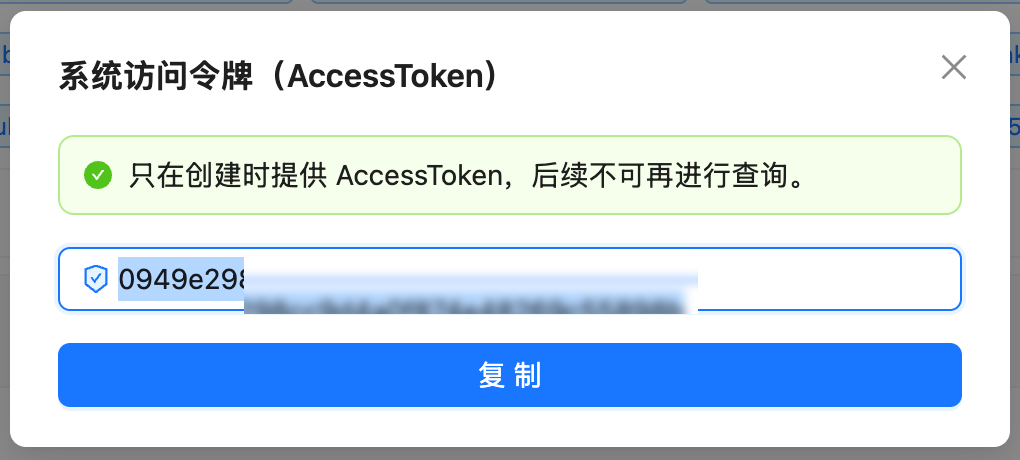
Get System Token

API Information

ItemDescription
API URLhttps://api.apiyi.com/api/user/self
MethodGET
AuthenticationAuthorization Header
Response FormatJSON

Request Details

Request Headers

Header NameRequiredDescription
AuthorizationYesAPI access token, format: direct token string
AcceptNoRecommended: application/json
Content-TypeNoRecommended: application/json

Request Parameters

This is a GET request and does not require any request body parameters.

Response Details

Success Response Example

{
  "success": true,
  "message": null,
  "data": {
    "id": 19489,
    "username": "testnano",
    "display_name": "testnano",
    "role": 1,
    "status": 1,
    "email": "",
    "quota": 24997909,
    "used_quota": 10027091,
    "request_count": 339,
    "group": "ceshi",
    "aff_code": "ZM0H",
    "inviter_id": 0,
    "access_token": "...",
    "ModelFixedPrice": [...]
  }
}

Key Response Fields

Field NameTypeDescription
successBooleanWhether the request was successful
messageStringError message (null on success)
data.usernameStringUsername
data.display_nameStringDisplay name
data.quotaIntegerRemaining quota (current available balance, in quota units)
data.used_quotaIntegerUsed quota (in quota units)
data.request_countIntegerTotal request count
data.groupStringUser group
data.ModelFixedPriceArrayModel pricing list (can be ignored)

Quota Conversion

Conversion Rule

500,000 quota = $1.00 USD
Calculation Formulas:
  • USD amount = quota ÷ 500,000
  • Remaining quota = quota (quota represents current remaining balance)
  • Remaining USD = quota ÷ 500,000
Examples:
  • quota: 24997909 → $49.99 USD (current remaining balance)
  • used_quota: 10027091 → $20.05 USD (used amount)

Error Responses

HTTP 401 - Authentication Failed

{
  "success": false,
  "message": "Unauthorized"
}
Reason: Authorization token is invalid or expired Solution: Verify and update your API token

HTTP 403 - Permission Denied

{
  "success": false,
  "message": "Forbidden"
}
Reason: Current token lacks permission to access this API Solution: Contact administrator to verify permission settings

Code Examples

cURL Example

curl --compressed 'https://api.apiyi.com/api/user/self' \
  -H 'Accept: application/json' \
  -H 'Authorization: YOUR_TOKEN_HERE' \
  -H 'Content-Type: application/json'
Important: The --compressed option is required because the API returns gzip-compressed content, otherwise you’ll receive garbled output.
Quick Test (replace YOUR_TOKEN_HERE):
export APIYI_TOKEN='YOUR_TOKEN_HERE'

curl --compressed -s 'https://api.apiyi.com/api/user/self' \
  -H 'Accept: application/json' \
  -H "Authorization: $APIYI_TOKEN" \
  -H 'Content-Type: application/json' | \
  jq '.data | {quota, used_quota, request_count}'
Note: The -s option hides progress bar, --compressed automatically decompresses gzip response

Python Example (Basic)

import requests

{/* Configuration */}
url = "https://api.apiyi.com/api/user/self"
authorization = "YOUR_TOKEN_HERE"  # Replace with your token

{/* Request headers */}
headers = {
    'Accept': 'application/json',
    'Authorization': authorization,
    'Content-Type': 'application/json'
}

{/* Send request */}
response = requests.get(url, headers=headers, timeout=10)

{/* Check response */}
if response.status_code == 200:
    data = response.json()
    user_data = data['data']

    {/* Extract key information */}
    quota = user_data['quota']
    used_quota = user_data['used_quota']
    request_count = user_data['request_count']

    {/* Calculate USD amounts */}
    {/* Note: quota represents current remaining balance */}
    remaining_usd = quota / 500000
    used_usd = used_quota / 500000

    {/* Print results */}
    print(f"Remaining quota: ${remaining_usd:.2f} USD ({quota:,} quota)")
    print(f"Used: ${used_usd:.2f} USD ({used_quota:,} quota)")
    print(f"Request count: {request_count:,} times")
else:
    print(f"Request failed: HTTP {response.status_code}")
    print(response.text)

Python Example (Optimized)

We provide a complete optimized script quota_optimized.py with the following features:

Error Handling

Complete exception handling and error capture

Environment Variables

Secure token management, avoid hardcoding

Formatted Output

Beautiful table display and number formatting

Auto Conversion

Automatic USD amount calculation
Usage:
{/* Method 1: Using environment variable (recommended) */}
export APIYI_TOKEN='YOUR_TOKEN_HERE'
python quota_optimized.py

{/* Method 2: Command line argument */}
python quota_optimized.py 'YOUR_TOKEN_HERE'
Output Example:
============================================================
📊 APIYI Account Balance Information
============================================================
Username: testnano (testnano)
------------------------------------------------------------
Remaining quota: 24,997,909 quota ($49.99 USD)
Used:           10,027,091 quota ($20.05 USD)
Request count: 339 times
============================================================
💡 Conversion: 500,000 quota = $1.00 USD
============================================================

FAQ

Please refer to the “How to Get Authorization Token” section above, or visit the profile page in the console to obtain a system token.
No, the balance query API does not consume your quota.
We recommend a query interval of at least 1 second to avoid triggering rate limits.
This field returns pricing information for various AI models. You can ignore it if you only need balance information.
The quota field represents the current remaining balance. If quota is 0 or close to 0, your account balance is insufficient and needs recharging.
Issue: Executing curl returns garbled text, or jq reports “Invalid numeric literal”Reason: The API returns gzip-compressed content (Content-Encoding: gzip), and curl doesn’t automatically decompress it.Solution: Add the --compressed option to make curl decompress automatically:
{/* Correct (with --compressed) */}
curl --compressed 'https://api.apiyi.com/api/user/self' \
  -H 'Authorization: YOUR_TOKEN' | jq

{/* Wrong (missing --compressed) */}
curl 'https://api.apiyi.com/api/user/self' \
  -H 'Authorization: YOUR_TOKEN' | jq

Important Notes

Security Reminders
  • Never hardcode Authorization tokens in your code
  • Use environment variables or configuration files to manage sensitive information
  • Don’t commit code containing tokens to public repositories
Request Limits
  • Set reasonable request timeout (recommended: 10 seconds)
  • Avoid excessively frequent query requests

Exception Handling Recommendations

  • Always handle network exceptions, timeouts, and authentication failures
  • Log errors for easier troubleshooting

Response Format Notes

  • API returns gzip-compressed content; curl requires the --compressed option
  • Python’s requests library automatically handles gzip decompression without additional configuration