

Image editing: edit a reference image or fuse two images
curl --request POST \
  --url https://api.apiyi.com/v1/images/edits \
  --header 'Authorization: Bearer <token>' \
  --header 'Content-Type: multipart/form-data' \
  --form model=MAI-Image-2.6-Flash \
  --form 'prompt=Change the teapot to a deep cobalt blue glaze, keep everything else identical' \
  --form image='@example-file' \
  --form image2='@example-file'
import requests
url = "https://api.apiyi.com/v1/images/edits"
files = {
"image": ("example-file", open("example-file", "rb")),
"image2": ("example-file", open("example-file", "rb"))
}
payload = {
"model": "MAI-Image-2.6-Flash",
"prompt": "Change the teapot to a deep cobalt blue glaze, keep everything else identical"
}
headers = {"Authorization": "Bearer <token>"}
response = requests.post(url, data=payload, files=files, headers=headers)
print(response.text)const form = new FormData();
form.append('model', 'MAI-Image-2.6-Flash');
form.append('prompt', 'Change the teapot to a deep cobalt blue glaze, keep everything else identical');
form.append('image', '<string>');
form.append('image2', '{
"fileName": "example-file"
}');
const options = {method: 'POST', headers: {Authorization: 'Bearer <token>'}};
options.body = form;
fetch('https://api.apiyi.com/v1/images/edits', options)
.then(res => res.json())
.then(res => console.log(res))
.catch(err => console.error(err));<?php
$curl = curl_init();
curl_setopt_array($curl, [
CURLOPT_URL => "https://api.apiyi.com/v1/images/edits",
CURLOPT_RETURNTRANSFER => true,
CURLOPT_ENCODING => "",
CURLOPT_MAXREDIRS => 10,
CURLOPT_TIMEOUT => 30,
CURLOPT_HTTP_VERSION => CURL_HTTP_VERSION_1_1,
CURLOPT_CUSTOMREQUEST => "POST",
CURLOPT_POSTFIELDS => "-----011000010111000001101001\r\nContent-Disposition: form-data; name=\"model\"\r\n\r\nMAI-Image-2.6-Flash\r\n-----011000010111000001101001\r\nContent-Disposition: form-data; name=\"prompt\"\r\n\r\nChange the teapot to a deep cobalt blue glaze, keep everything else identical\r\n-----011000010111000001101001\r\nContent-Disposition: form-data; name=\"image\"; filename=\"example-file\"\r\nContent-Type: application/octet-stream\r\n\r\n<string>\r\n-----011000010111000001101001\r\nContent-Disposition: form-data; name=\"image2\"; filename=\"example-file\"\r\nContent-Type: application/octet-stream\r\n\r\n{\r\n \"fileName\": \"example-file\"\r\n}\r\n-----011000010111000001101001--",
CURLOPT_HTTPHEADER => [
"Authorization: Bearer <token>",
"Content-Type: multipart/form-data"
],
]);
$response = curl_exec($curl);
$err = curl_error($curl);
curl_close($curl);
if ($err) {
echo "cURL Error #:" . $err;
} else {
echo $response;
}package main
import (
"fmt"
"strings"
"net/http"
"io"
)
func main() {
url := "https://api.apiyi.com/v1/images/edits"
payload := strings.NewReader("-----011000010111000001101001\r\nContent-Disposition: form-data; name=\"model\"\r\n\r\nMAI-Image-2.6-Flash\r\n-----011000010111000001101001\r\nContent-Disposition: form-data; name=\"prompt\"\r\n\r\nChange the teapot to a deep cobalt blue glaze, keep everything else identical\r\n-----011000010111000001101001\r\nContent-Disposition: form-data; name=\"image\"; filename=\"example-file\"\r\nContent-Type: application/octet-stream\r\n\r\n<string>\r\n-----011000010111000001101001\r\nContent-Disposition: form-data; name=\"image2\"; filename=\"example-file\"\r\nContent-Type: application/octet-stream\r\n\r\n{\r\n \"fileName\": \"example-file\"\r\n}\r\n-----011000010111000001101001--")
req, _ := http.NewRequest("POST", url, payload)
req.Header.Add("Authorization", "Bearer <token>")
res, _ := http.DefaultClient.Do(req)
defer res.Body.Close()
body, _ := io.ReadAll(res.Body)
fmt.Println(string(body))
}HttpResponse<String> response = Unirest.post("https://api.apiyi.com/v1/images/edits")
.header("Authorization", "Bearer <token>")
.body("-----011000010111000001101001\r\nContent-Disposition: form-data; name=\"model\"\r\n\r\nMAI-Image-2.6-Flash\r\n-----011000010111000001101001\r\nContent-Disposition: form-data; name=\"prompt\"\r\n\r\nChange the teapot to a deep cobalt blue glaze, keep everything else identical\r\n-----011000010111000001101001\r\nContent-Disposition: form-data; name=\"image\"; filename=\"example-file\"\r\nContent-Type: application/octet-stream\r\n\r\n<string>\r\n-----011000010111000001101001\r\nContent-Disposition: form-data; name=\"image2\"; filename=\"example-file\"\r\nContent-Type: application/octet-stream\r\n\r\n{\r\n \"fileName\": \"example-file\"\r\n}\r\n-----011000010111000001101001--")
.asString();require 'uri'
require 'net/http'
url = URI("https://api.apiyi.com/v1/images/edits")
http = Net::HTTP.new(url.host, url.port)
http.use_ssl = true
request = Net::HTTP::Post.new(url)
request["Authorization"] = 'Bearer <token>'
request.body = "-----011000010111000001101001\r\nContent-Disposition: form-data; name=\"model\"\r\n\r\nMAI-Image-2.6-Flash\r\n-----011000010111000001101001\r\nContent-Disposition: form-data; name=\"prompt\"\r\n\r\nChange the teapot to a deep cobalt blue glaze, keep everything else identical\r\n-----011000010111000001101001\r\nContent-Disposition: form-data; name=\"image\"; filename=\"example-file\"\r\nContent-Type: application/octet-stream\r\n\r\n<string>\r\n-----011000010111000001101001\r\nContent-Disposition: form-data; name=\"image2\"; filename=\"example-file\"\r\nContent-Type: application/octet-stream\r\n\r\n{\r\n \"fileName\": \"example-file\"\r\n}\r\n-----011000010111000001101001--"
response = http.request(request)
puts response.read_body{
"created": 1791000788,
"data": [
{
"b64_json": "<string>"
}
],
"usage": {
"prompt_tokens": 1000,
"total_tokens": 1000
}
}MAI-Image 2.6 이미지 생성 및 편집
이미지 편집 API 레퍼런스
실시간 Playground를 지원하는 MAI-Image 2.6 이미지 편집 API 레퍼런스 — 참조 이미지 및 지시사항 업로드, image + image2를 통한 두 이미지 합성, multipart/form-data 파일 업로드만 지원
POST
/
v1
/
images
/
edits
Image editing: edit a reference image or fuse two images
curl --request POST \
  --url https://api.apiyi.com/v1/images/edits \
  --header 'Authorization: Bearer <token>' \
  --header 'Content-Type: multipart/form-data' \
  --form model=MAI-Image-2.6-Flash \
  --form 'prompt=Change the teapot to a deep cobalt blue glaze, keep everything else identical' \
  --form image='@example-file' \
  --form image2='@example-file'
import requests
url = "https://api.apiyi.com/v1/images/edits"
files = {
"image": ("example-file", open("example-file", "rb")),
"image2": ("example-file", open("example-file", "rb"))
}
payload = {
"model": "MAI-Image-2.6-Flash",
"prompt": "Change the teapot to a deep cobalt blue glaze, keep everything else identical"
}
headers = {"Authorization": "Bearer <token>"}
response = requests.post(url, data=payload, files=files, headers=headers)
print(response.text)const form = new FormData();
form.append('model', 'MAI-Image-2.6-Flash');
form.append('prompt', 'Change the teapot to a deep cobalt blue glaze, keep everything else identical');
form.append('image', '<string>');
form.append('image2', '{
"fileName": "example-file"
}');
const options = {method: 'POST', headers: {Authorization: 'Bearer <token>'}};
options.body = form;
fetch('https://api.apiyi.com/v1/images/edits', options)
.then(res => res.json())
.then(res => console.log(res))
.catch(err => console.error(err));<?php
$curl = curl_init();
curl_setopt_array($curl, [
CURLOPT_URL => "https://api.apiyi.com/v1/images/edits",
CURLOPT_RETURNTRANSFER => true,
CURLOPT_ENCODING => "",
CURLOPT_MAXREDIRS => 10,
CURLOPT_TIMEOUT => 30,
CURLOPT_HTTP_VERSION => CURL_HTTP_VERSION_1_1,
CURLOPT_CUSTOMREQUEST => "POST",
CURLOPT_POSTFIELDS => "-----011000010111000001101001\r\nContent-Disposition: form-data; name=\"model\"\r\n\r\nMAI-Image-2.6-Flash\r\n-----011000010111000001101001\r\nContent-Disposition: form-data; name=\"prompt\"\r\n\r\nChange the teapot to a deep cobalt blue glaze, keep everything else identical\r\n-----011000010111000001101001\r\nContent-Disposition: form-data; name=\"image\"; filename=\"example-file\"\r\nContent-Type: application/octet-stream\r\n\r\n<string>\r\n-----011000010111000001101001\r\nContent-Disposition: form-data; name=\"image2\"; filename=\"example-file\"\r\nContent-Type: application/octet-stream\r\n\r\n{\r\n \"fileName\": \"example-file\"\r\n}\r\n-----011000010111000001101001--",
CURLOPT_HTTPHEADER => [
"Authorization: Bearer <token>",
"Content-Type: multipart/form-data"
],
]);
$response = curl_exec($curl);
$err = curl_error($curl);
curl_close($curl);
if ($err) {
echo "cURL Error #:" . $err;
} else {
echo $response;
}package main
import (
"fmt"
"strings"
"net/http"
"io"
)
func main() {
url := "https://api.apiyi.com/v1/images/edits"
payload := strings.NewReader("-----011000010111000001101001\r\nContent-Disposition: form-data; name=\"model\"\r\n\r\nMAI-Image-2.6-Flash\r\n-----011000010111000001101001\r\nContent-Disposition: form-data; name=\"prompt\"\r\n\r\nChange the teapot to a deep cobalt blue glaze, keep everything else identical\r\n-----011000010111000001101001\r\nContent-Disposition: form-data; name=\"image\"; filename=\"example-file\"\r\nContent-Type: application/octet-stream\r\n\r\n<string>\r\n-----011000010111000001101001\r\nContent-Disposition: form-data; name=\"image2\"; filename=\"example-file\"\r\nContent-Type: application/octet-stream\r\n\r\n{\r\n \"fileName\": \"example-file\"\r\n}\r\n-----011000010111000001101001--")
req, _ := http.NewRequest("POST", url, payload)
req.Header.Add("Authorization", "Bearer <token>")
res, _ := http.DefaultClient.Do(req)
defer res.Body.Close()
body, _ := io.ReadAll(res.Body)
fmt.Println(string(body))
}HttpResponse<String> response = Unirest.post("https://api.apiyi.com/v1/images/edits")
.header("Authorization", "Bearer <token>")
.body("-----011000010111000001101001\r\nContent-Disposition: form-data; name=\"model\"\r\n\r\nMAI-Image-2.6-Flash\r\n-----011000010111000001101001\r\nContent-Disposition: form-data; name=\"prompt\"\r\n\r\nChange the teapot to a deep cobalt blue glaze, keep everything else identical\r\n-----011000010111000001101001\r\nContent-Disposition: form-data; name=\"image\"; filename=\"example-file\"\r\nContent-Type: application/octet-stream\r\n\r\n<string>\r\n-----011000010111000001101001\r\nContent-Disposition: form-data; name=\"image2\"; filename=\"example-file\"\r\nContent-Type: application/octet-stream\r\n\r\n{\r\n \"fileName\": \"example-file\"\r\n}\r\n-----011000010111000001101001--")
.asString();require 'uri'
require 'net/http'
url = URI("https://api.apiyi.com/v1/images/edits")
http = Net::HTTP.new(url.host, url.port)
http.use_ssl = true
request = Net::HTTP::Post.new(url)
request["Authorization"] = 'Bearer <token>'
request.body = "-----011000010111000001101001\r\nContent-Disposition: form-data; name=\"model\"\r\n\r\nMAI-Image-2.6-Flash\r\n-----011000010111000001101001\r\nContent-Disposition: form-data; name=\"prompt\"\r\n\r\nChange the teapot to a deep cobalt blue glaze, keep everything else identical\r\n-----011000010111000001101001\r\nContent-Disposition: form-data; name=\"image\"; filename=\"example-file\"\r\nContent-Type: application/octet-stream\r\n\r\n<string>\r\n-----011000010111000001101001\r\nContent-Disposition: form-data; name=\"image2\"; filename=\"example-file\"\r\nContent-Type: application/octet-stream\r\n\r\n{\r\n \"fileName\": \"example-file\"\r\n}\r\n-----011000010111000001101001--"
response = http.request(request)
puts response.read_body{
"created": 1791000788,
"data": [
{
"b64_json": "<string>"
}
],
"usage": {
"prompt_tokens": 1000,
"total_tokens": 1000
}
}오른쪽의 대화형 Playground에서는 로컬 이미지 업로드를 지원합니다. Authorization 아래에 API 키(형식:
Bearer sk-xxx)를 입력하고, image 파일을 선택한 후, prompt 및 model 항목을 입력하고 전송하십시오.🔴 이 엔드포인트는 이미지 URL은 입력으로 지원되지 않습니다. URL만 보유하고 있는 경우, 먼저 서버에서 다운로드한 후 해당 파일을 업로드하십시오. 파일 업로드는 이미지 호스팅이 필요하지 않으며, 로컬 파일만 전송하면 됩니다.
multipart/form-data 파일 업로드만 허용합니다/v1/images/edits에 JSON을 전송하면(image를 URL, 데이터 URI 또는 원시 base64로 지정) 400 오류가 반환됩니다:request Content-Type isn't multipart/form-data
사용 사례: 이 페이지는 참조 이미지를 편집하거나 두 이미지를 합성하는 용도입니다. 텍스트로만 생성하려면 텍스트-이미지 API를 사용하십시오.
⚠️ 두 개의 이미지의 경우 필드 이름은
image[]이 아니라 image + image2입니다두 개의 참조 이미지를 사용하는 경우, 첫 번째 필드 이름을 image, 두 번째 필드 이름을 image2(으)로 지정하십시오. image[]를 반복하거나, image를 반복하거나, mask 필드를 추가하면 모두 400 File must be attached in a form field with a name starting with 'image' 오류가 반환됩니다.즉, OpenAI SDK의 다중 이미지 형식 client.images.edit(image=[f1, f2])은 작동하지 않습니다(image[]을(를) 전송함). SDK를 통한 단일 이미지 편집은 정상 작동합니다.텍스트-이미지와 동일한 금지 파라미터:
response_format, seed 또는 negative_prompt를 전송하지 마십시오(400). 응답은 항상 data[0].b64_json(PNG)입니다.코드 예제
Python (OpenAI SDK · 단일 이미지)
from openai import OpenAI
import base64

client = OpenAI(
    api_key="sk-your-api-key",
    base_url="https://api.apiyi.com/v1",
    timeout=180.0
)

# images.edit uses a multipart file upload under the hood; do not pass response_format
resp = client.images.edit(
    model="MAI-Image-2.6-Flash",
    image=open("teaset.jpg", "rb"),
    prompt="Change the teapot to a deep cobalt blue glaze, keep everything else identical"
)

with open("edited.png", "wb") as f:
    f.write(base64.b64decode(resp.data[0].b64_json))
Python (requests · 단일 이미지)
import base64
import os
import requests

# Pass the file via files=; requests sets multipart/form-data and the boundary for you
# Do not use json=, and do not set Content-Type by hand
with open("teaset.jpg", "rb") as fp:
    response = requests.post(
        "https://api.apiyi.com/v1/images/edits",
        headers={"Authorization": f"Bearer {os.environ['APIYI_API_KEY']}"},
        data={
            "model": "MAI-Image-2.6",
            "prompt": "Change the teapot to a deep cobalt blue glaze, keep everything else exactly the same"
        },
        files={"image": ("teaset.jpg", fp, "image/jpeg")},
        timeout=180
    )
response.raise_for_status()

with open("edited.png", "wb") as f:
    f.write(base64.b64decode(response.json()["data"][0]["b64_json"]))
Python (두 이미지 합성 · image + image2)
import base64
import os
import requests

files = {
    "image": ("scene.jpg", open("scene.jpg", "rb"), "image/jpeg"),     # image 1
    "image2": ("person.jpg", open("person.jpg", "rb"), "image/jpeg"),  # image 2: field name is image2
}

response = requests.post(
    "https://api.apiyi.com/v1/images/edits",
    headers={"Authorization": f"Bearer {os.environ['APIYI_API_KEY']}"},
    data={
        "model": "MAI-Image-2.6",
        "prompt": "Have the person from image 2 sit at the table in image 1, arranging the tea set, natural light, photorealistic"
    },
    files=files,
    timeout=180
)
response.raise_for_status()

with open("fused.png", "wb") as f:
    f.write(base64.b64decode(response.json()["data"][0]["b64_json"]))
cURL
# Single-image edit: -F means multipart/form-data, @ uploads a local file
curl -X POST "https://api.apiyi.com/v1/images/edits" \
  -H "Authorization: Bearer sk-your-api-key" \
  -F "model=MAI-Image-2.6-Flash" \
  -F "prompt=Change the teapot to a deep cobalt blue glaze, keep everything else identical" \
  -F "[email protected]" \
  | python3 -c "import sys,json,base64; open('edited.png','wb').write(base64.b64decode(json.load(sys.stdin)['data'][0]['b64_json']))"
# Two-image fusion with the canvas changed to 1536×1024
curl -X POST "https://api.apiyi.com/v1/images/edits" \
  -H "Authorization: Bearer sk-your-api-key" \
  -F "model=MAI-Image-2.6" \
  -F "prompt=Have the person from image 2 sit at the table in image 1, arranging the tea set" \
  -F "width=1536" \
  -F "height=1024" \
  -F "[email protected]" \
  -F "[email protected]"
Node.js (fetch + FormData)
import fs from 'node:fs';

const form = new FormData();
form.append('model', 'MAI-Image-2.6-Flash');
form.append('prompt', 'Replace the background with a snowy pine forest at night, keep the person unchanged');
form.append('image', new Blob([fs.readFileSync('./photo.jpg')]), 'photo.jpg');
// Second reference image: form.append('image2', ...)

const resp = await fetch('https://api.apiyi.com/v1/images/edits', {
    method: 'POST',
    // Do not set Content-Type by hand; FormData adds the boundary
    headers: { 'Authorization': `Bearer ${process.env.APIYI_API_KEY}` },
    body: form,
    signal: AbortSignal.timeout(120000)
});

const data = await resp.json();
fs.writeFileSync('edited.png', Buffer.from(data.data[0].b64_json, 'base64'));
파라미터 레퍼런스
| 파라미터 | 타입 | 필수 여부 | 기본값 | 설명 |
|---|---|---|---|---|
model | string | ✅ | — | MAI-Image-2.6 ($0.12/image) 또는 MAI-Image-2.6-Flash ($0.06/image), 대소문자 구분 |
prompt | string | ✅ | — | 편집 지시사항입니다. 변경할 내용과 그 외 나머지는 그대로 유지하도록 명시하십시오 |
image | file | ✅ | — | 참조 이미지 파일(첫 번째) |
image2 | file | ❌ | — | 두 번째 참조 이미지(2개 이미지 합성용) |
width / height | integer | ❌ | 원본 비율 따름 | 출력 크기, 텍스트-투-이미지와 동일한 규칙이 적용되며, 다른 가로세로 비율을 지정하면 이미지가 재구성됩니다 |
n | integer | ❌ | 1 | 이미지 수입니다. 이 엔드포인트에서 지원되며, 이미지당 과금됩니다 |
mask | — | — | — | 지원되지 않음, 400을 반환합니다 |
response_formatseednegative_prompt | — | — | — | 400 반환 |
생략 시 출력 크기: 출력은 16의 배수로 맞춰진 원본의 가로세로 비율을 따릅니다(예: 1344×756 입력 시 1360×768 출력). 구도를 유지해야 하는 부분 편집의 경우
width / height을 전송하지 마십시오.편집 결과 및 prompt 작성
편집 엔드포인트는 원본의 구도, 색상 및 세부 사항을 유지하며 prompt에서 요청한 부분만 변경합니다: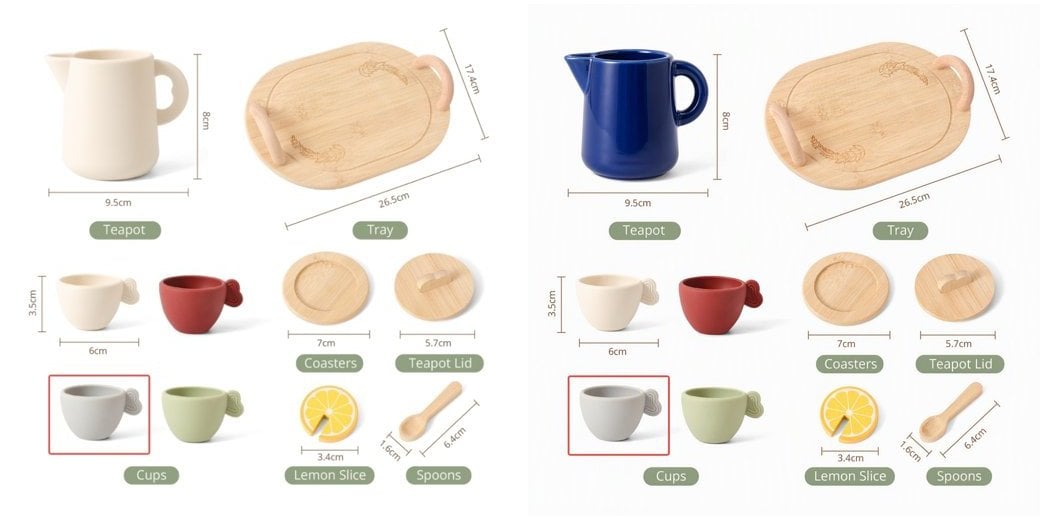
| Prompt | 결과 |
|---|---|
✅ Change the teapot to a deep cobalt blue glaze, keep everything else exactly the same | 티팟의 색상만 변경되며, 라벨과 기타 객체는 픽셀 단위까지 동일하게 유지됩니다 |
✅ Turn this photo into a watercolor painting, keep the composition | 스타일이 다시 렌더링되며 구도는 유지됩니다 |
✅ Have the person from image 2 sit at the table in image 1 | 두 이미지 합성: 이미지 1이 배경 장면을 제공하고 이미지 2가 인물을 제공합니다 |
⚠️ Make it look better | 너무 모호하여 변경 범위 예측이 불가능합니다 |
두 이미지 합성의 경우, prompt 내에서
image / image2을 “image 1 / image 2”로 지칭하십시오. 테스트 결과 인물에 대한 동일성 재현율은 보통 수준(이목구비 특징이 달라질 수 있음)이므로, 인물 사진의 일관성이 중요하다면 먼저 소량 배치로 검증하십시오.응답 형식
{
  "created": 1791000788,
  "data": [
    {
      "b64_json": "iVBORw0KGgoAAAANSUhEUgAABAAAAAQACAIAAADwf7zU..."
    }
  ],
  "usage": {
    "prompt_tokens": 1000,
    "total_tokens": 1000,
    "input_tokens": 1000,
    "output_tokens": 0
  }
}
응답 필드
b64_json은data:접두사가 없는 일반 base64이며 PNG로 디코딩됩니다.n > 1사용 시data배열에 여러 항목이 포함되므로data[0]만 읽지 마십시오.url및revised_prompt는 반환되지 않습니다.
usage으로 과금을 대조하지 마십시오: 해당 필드는 플레이스홀더 값을 담고 있습니다(prompt_tokens는 항상 이미지 수 × 1000입니다). 편집은 텍스트 기반 이미지 생성과 비용이 동일하며, 이미지당 과금됩니다. APIYI 콘솔의 과금 내역이 공식 기준입니다.인증
API key from the APIYI console
본문
multipart/form-data
Model ID (case-sensitive)
사용 가능한 옵션:
MAI-Image-2.6-Flash, MAI-Image-2.6 Edit instruction. State what to change and that everything else stays the same
예시:
"Change the teapot to a deep cobalt blue glaze, keep everything else identical"
Reference image file (the first one, "image 1" in the prompt). png / jpg / webp
Optional second reference image ("image 2" in the prompt), for two-image fusion
Optional output width. Same rules as text-to-image: each side ≥ 768, width × height ≤ 2,359,296, sent together with height
필수 범위:
x >= 768Optional output height, same rules as width
필수 범위:
x >= 768Number of images. Works on this endpoint, billed per image
필수 범위:
x >= 1예시:
1
이 페이지가 도움이 되었나요?