Два способа интеграции APIYI — передайте документацию вашему AI-кодинг-агенту и позвольте ему выполнить работу, либо настройте всё самостоятельно за три шага.
Новые аккаунты получают $0.05 пробного кредита, поэтому вы можете сделать первый вызов ниже без пополнения баланса. Легковесной модели, такой как gpt-5.4-mini, более чем достаточно, чтобы убедиться, что ваша интеграция работает.
Скопируйте один prompt в Codex, Claude Code или Cursor. Он читает документацию, пишет код и запускает его. Лучше всего, если вы уже работаете с агентом для написания кода.
Сделайте это сами
Зарегистрируйтесь, создайте ключ, выполните первый запрос. Три шага, пять минут. Лучше всего, если вы хотите разобраться в каждом элементе.
Оба пути начинаются одинаково: вы сами регистрируете аккаунт и создаете ключ. То, что ИИ может взять на себя после этого, — это выбор модели, правильная настройка базового URL, написание примера и его отладка.
Пусть агент для написания кода самостоятельно интегрирует APIYI. Скопируйте и вставьте этот текст в Codex, Claude Code, Cursor или аналогичные инструменты.
https://docs.apiyi.com/skill.md — это справочник по интеграции, составленный для машин: эндпоинты, аутентификация, правило именования моделей, известные подводные камни и контрольный список проверки. Прочитав его, агент получит всё необходимое для интеграции APIYI.
2
Будет находить страницы по мере необходимости
llms.txt — это индекс всех страниц на этом сайте. Агент выбирает необходимые страницы и добавляет к ним .md, чтобы прочитать их как обычный текст.
3
Напишет код и действительно запустит его
Он напишет пример на существующем в вашем проекте языке программирования и с использованием его зависимостей, а не просто скопирует Python-код из документации. Работа не считается завершённой, пока вызов не выполнится успешно.
Например, версия этой страницы в виде обычного текста находится по адресу https://docs.apiyi.com/en/getting-started.md. Все страницы сайта поддерживают этот суффикс.
На каждой странице документации в правом верхнем углу есть кнопка Копировать страницу. При нажатии на стрелку рядом с ней открываются дополнительные параметры:
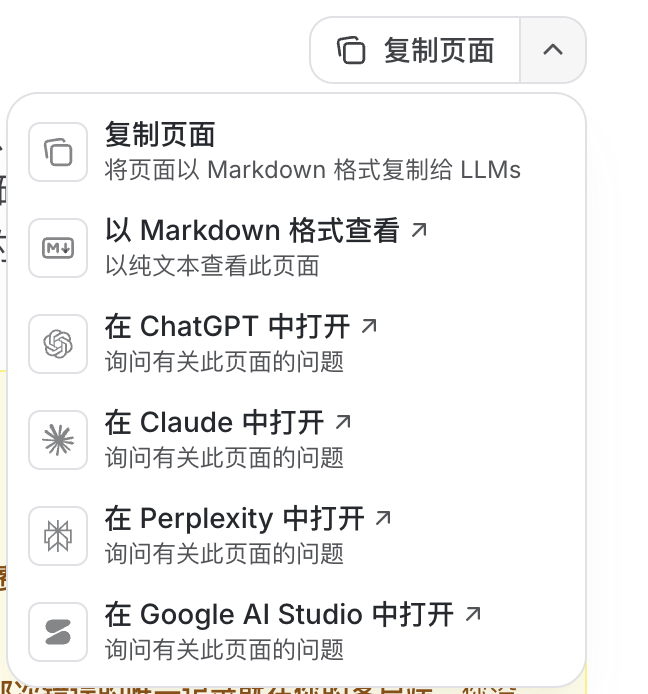
Параметр
Что он делает
Копировать страницу
Копирует текущую страницу в формате Markdown в буфер обмена, чтобы её можно было вставить в любой ИИ
Просмотреть в формате Markdown
Открывает версию в виде обычного текста в браузере — удобно для проверки или отправки ссылки
Открыть в ChatGPT
Переходит в ChatGPT и передаёт эту страницу в качестве контекста
Открыть в Claude
То же действие для Claude
Открыть в Perplexity
То же действие для Perplexity
Открыть в Google AI Studio
То же действие для Google AI Studio
Если у вас возникла проблема с определённой моделью, быстрее всего открыть страницу этой модели, нажать Копировать страницу и отправить её ИИ вместе с описанием ошибки.
Перейдите на сайт APIYI, зарегистрируйтесь с помощью электронной почты и подтвердите её (рекомендуется использовать университетский или корпоративный адрес), затем войдите в консоль.
Сразу после регистрации привяжите 2FA или Passkey, чтобы добавить второй этап проверки: даже в случае утечки пароля никто не сможет войти без вашего устройства или одноразового кода. Это займет всего пару минут: см. Как защитить свой аккаунт.
Вы можете скопировать token по умолчанию и сразу использовать его (значок копирования справа)
Или нажмите New в правом верхнем углу, чтобы создать новый, задайте ему имя (например, test-key) и подтвердите
Ключи начинаются с sk-. Подробнее см. в руководстве Как создать ключ.
3
Пополнение при необходимости
Когда пробный баланс в $0.05 закончится, выполните пополнение через консоль. Минимальные суммы и правила расчетов зависят от способа оплаты — см. Способы оплаты, — а бонусная политика описана в разделе Акции при пополнении.
Выбирайте базовый URL в зависимости от SDK, а не от модели. Это самая распространенная ошибка интеграции:
Ваш SDK
Базовый URL
Причина
OpenAI SDK (и большинство клиентов)
https://api.apiyi.com/v1
SDK сам добавляет /chat/completions, поэтому /v1 здесь обязателен
Anthropic SDK (нативный Claude)
https://api.apiyi.com
SDK сам добавляет /v1/messages — добавление /v1 приведет к /v1/v1/messages и ошибке 404
Google GenAI SDK (нативный Gemini)
https://api.apiyi.com
Также укажите api_version: "v1beta"
Не оставляйте завершающий слеш в base_url — это приведет к двойному слешу и ошибке 404. Подробная информация и выбор узла приведены в разделе Настройка базового URL.
// Using the official OpenAI Java libraryOpenAiService service = new OpenAiService( System.getenv("APIYI_API_KEY"), Duration.ofSeconds(60), "https://api.apiyi.com/v1");ChatCompletionRequest request = ChatCompletionRequest.builder() .model("gpt-5.4-mini") .messages(List.of( new ChatMessage(ChatMessageRole.USER, "Hello!") )) .build();ChatCompletionResult result = service.createChatCompletion(request);System.out.println(result.getChoices().get(0).getMessage().getContent());
Для серии gpt-5 и выше действуют три ограничения на параметры: temperature должен быть равен 1, используйте max_completion_tokens вместо max_tokens и не отправляйте top_p.
{ "model": "gpt-5.6-sol", // Use GPT-5.6 Sol "model": "claude-opus-5", // Use Claude Opus 5 "model": "gemini-3.6-flash" // Use Gemini 3.6 Flash}
Идентификаторы моделей используют точки, а не дефисы. Дефисы в URL документации — это замена для безопасного использования URL; настоящий идентификатор модели сохраняет точки. Страница /models/qwen3-7-max соответствует идентификатору модели qwen3.7-max. Если указать gpt-5-4-mini, вернётся 404 — правильная форма: gpt-5.4-mini.Если сомневаетесь, выведите их списком: GET https://api.apiyi.com/v1/models.
Совет: храните ваш API key в безопасном месте и регулярно проверяйте журналы использования в консоли. Каждый запрос содержит историю сообщений для оптимизации затрат.
Приятной работы!
Была ли эта страница полезной?
{"docsConfig":{"theme":"mint","$schema":"https://mintlify.com/docs.json","name":"API易文档中心","description":"企业级专业稳定的AI大模型API中转站,一个令牌、无限模型。支持OpenAI、Claude、Gemini、DeepSeek、Qwen等400+热门AI模型。","colors":{"primary":"#2563eb","light":"#3b82f6","dark":"#1d4ed8"},"logo":{"light":"https://mintcdn.com/apiyillc/LjCT1O0GrSur6F2v/logo/light.svg?fit=max\u0026auto=format\u0026n=LjCT1O0GrSur6F2v\u0026q=85\u0026s=4119ef17a74cc54be127f34578d8b5fa","dark":"https://mintcdn.com/apiyillc/LjCT1O0GrSur6F2v/logo/dark.svg?fit=max\u0026auto=format\u0026n=LjCT1O0GrSur6F2v\u0026q=85\u0026s=1f046ae9580247d96549ade642b5ecc4"},"favicon":"https://mintcdn.com/apiyillc/OMY6ItCc2mC1yzgA/logo/logo.webp?fit=max\u0026auto=format\u0026n=OMY6ItCc2mC1yzgA\u0026q=85\u0026s=62a7977ef801070e689df2d0291b9d13","api":{"openapi":["api-reference/nano-banana-2-generate-openapi.yaml","api-reference/nano-banana-2-edit-openapi.yaml","api-reference/nano-banana-2-generate-openapi-en.yaml","api-reference/nano-banana-2-edit-openapi-en.yaml","api-reference/nano-banana-pro-generate-openapi.yaml","api-reference/nano-banana-pro-edit-openapi.yaml","api-reference/nano-banana-pro-generate-openapi-en.yaml","api-reference/nano-banana-pro-edit-openapi-en.yaml","api-reference/gpt-image-2-all-generate-openapi.yaml","api-reference/gpt-image-2-all-edit-openapi.yaml","api-reference/gpt-image-2-all-generate-openapi-en.yaml","api-reference/gpt-image-2-all-edit-openapi-en.yaml","api-reference/gpt-image-2-all-chat-openapi.yaml","api-reference/gpt-image-2-all-chat-openapi-en.yaml","api-reference/gpt-image-2-vip-generate-openapi.yaml","api-reference/gpt-image-2-vip-edit-openapi.yaml","api-reference/gpt-image-2-vip-chat-openapi.yaml","api-reference/gpt-image-2-vip-generate-openapi-en.yaml","api-reference/gpt-image-2-vip-edit-openapi-en.yaml","api-reference/gpt-image-2-vip-chat-openapi-en.yaml"],"playground":{"display":"interactive","proxy":true},"examples":{"defaults":"required"}},"navbar":{"links":[{"href":"https://api.apiyi.com","label":"首页"},{"href":"https://imagen.apiyi.com","label":"AI出图"},{"href":"https://icover.ai","label":"AI视频"}],"primary":{"type":"button","label":"控制台","href":"https://api.apiyi.com/account/profile"}},"footer":{"socials":{"website":"https://api.apiyi.com"},"links":[{"header":"AI 集成","items":[{"label":"skill.md","href":"https://docs.apiyi.com/skill.md"},{"label":"llms.txt","href":"https://docs.apiyi.com/llms.txt"},{"label":"llms-full.txt","href":"https://docs.apiyi.com/llms-full.txt"},{"label":"model-registry.json","href":"https://docs.apiyi.com/model-registry.json"},{"label":"AI 开发者套件(中文)","href":"/developer-kit"},{"label":"AI Developer Kit (EN)","href":"/en/developer-kit"}]},{"header":"用户口碑 / Wall of Love","items":[{"label":"用户口碑(中文)","href":"/wall-of-love"},{"label":"Wall of Love (EN)","href":"/en/wall-of-love"}]}]},"seo":{"indexing":"all"},"icons":{"library":"lucide"},"banner":{"content":"🚀 **gemini-4-argon 和 Nano Banana 2.1 均已上线 | Now Live**:[详情 Details](https://docs.apiyi.com/changelog)","dismissible":true},"contextual":{"options":["copy","view","chatgpt","claude","perplexity","aistudio"],"display":"header"},"metadata":{"timestamp":false},"styling":{"latex":true},"navigation":{"global":{"anchors":[]},"languages":[{"language":"zh","href":""},{"language":"en","navbar":{"links":[{"href":"https://api.apiyi.com","label":"Home"},{"href":"https://imagen.apiyi.com","label":"AI Image"},{"href":"https://icover.ai","label":"AI Video"}],"primary":{"type":"button","label":"Console","href":"https://api.apiyi.com/account/profile"}},"href":"en"},{"language":"zh-Hant","banner":{"content":"本頁由程式自動轉換為繁體中文,用詞以台灣正體為準;如有歧義請以[簡體中文版](/)為準。","dismissible":true},"footer":{"socials":{"website":"https://api.apiyi.com"},"links":[{"header":"AI 整合","items":[{"label":"skill.md","href":"https://docs.apiyi.com/skill.md"},{"label":"llms.txt","href":"https://docs.apiyi.com/llms.txt"},{"label":"llms-full.txt","href":"https://docs.apiyi.com/llms-full.txt"},{"label":"model-registry.json","href":"https://docs.apiyi.com/model-registry.json"},{"label":"AI 開發者套件(中文)","href":"/developer-kit"},{"label":"AI Developer Kit (EN)","href":"/en/developer-kit"}]},{"header":"使用者口碑 / Wall of Love","items":[{"label":"使用者口碑(中文)","href":"/wall-of-love"},{"label":"Wall of Love (EN)","href":"/en/wall-of-love"}]}]},"navbar":{"links":[{"href":"https://api.apiyi.com","label":"首頁"},{"href":"https://imagen.apiyi.com","label":"AI出圖"},{"href":"https://icover.ai","label":"AI影片"}],"primary":{"type":"button","label":"控制台","href":"https://api.apiyi.com/account/profile"}},"href":"zh-Hant"},{"language":"ja","banner":{"content":"このページは AI により翻訳されています。内容に相違がある場合は[English 版](/en)を正としてください。","dismissible":true},"footer":{"socials":{"website":"https://api.apiyi.com"},"links":[{"header":"AI統合","items":[{"label":"skill.md","href":"https://docs.apiyi.com/skill.md"},{"label":"llms.txt","href":"https://docs.apiyi.com/llms.txt"},{"label":"llms-full.txt","href":"https://docs.apiyi.com/llms-full.txt"},{"label":"model-registry.json","href":"https://docs.apiyi.com/model-registry.json"},{"label":"AI開発者キット(中国語)","href":"/developer-kit"},{"label":"AI Developer Kit (EN)","href":"/en/developer-kit"}]},{"header":"ユーザーの声 / Wall of Love","items":[{"label":"ユーザーの声(中国語)","href":"/wall-of-love"},{"label":"Wall of Love(英語)","href":"/en/wall-of-love"}]}]},"navbar":{"links":[{"href":"https://api.apiyi.com","label":"ホーム"},{"href":"https://imagen.apiyi.com","label":"AI画像生成"},{"href":"https://icover.ai","label":"AI動画生成"}],"primary":{"type":"button","label":"コンソール","href":"https://api.apiyi.com/account/profile"}},"href":"ja"},{"language":"ko","banner":{"content":"이 페이지는 AI로 번역되었습니다. 내용이 다를 경우 [English 버전](/en)을 기준으로 하십시오.","dismissible":true},"footer":{"socials":{"website":"https://api.apiyi.com"},"links":[{"header":"AI 통합","items":[{"label":"skill.md","href":"https://docs.apiyi.com/skill.md"},{"label":"llms.txt","href":"https://docs.apiyi.com/llms.txt"},{"label":"llms-full.txt","href":"https://docs.apiyi.com/llms-full.txt"},{"label":"model-registry.json","href":"https://docs.apiyi.com/model-registry.json"},{"label":"AI 개발자 키트(중국어)","href":"/developer-kit"},{"label":"AI Developer Kit (EN)","href":"/en/developer-kit"}]},{"header":"사용자 후기 / Wall of Love","items":[{"label":"사용자 후기(중국어)","href":"/wall-of-love"},{"label":"Wall of Love (영문)","href":"/en/wall-of-love"}]}]},"navbar":{"links":[{"href":"https://api.apiyi.com","label":"홈"},{"href":"https://imagen.apiyi.com","label":"AI 이미지 생성"},{"href":"https://icover.ai","label":"AI 동영상 생성"}],"primary":{"type":"button","label":"콘솔","href":"https://api.apiyi.com/account/profile"}},"href":"ko"},{"language":"ru","banner":{"content":"Эта страница переведена с помощью ИИ. При расхождениях ориентируйтесь на [английскую версию](/en).","dismissible":true},"footer":{"socials":{"website":"https://api.apiyi.com"},"links":[{"header":"AI-интеграция","items":[{"label":"skill.md","href":"https://docs.apiyi.com/skill.md"},{"label":"llms.txt","href":"https://docs.apiyi.com/llms.txt"},{"label":"llms-full.txt","href":"https://docs.apiyi.com/llms-full.txt"},{"label":"model-registry.json","href":"https://docs.apiyi.com/model-registry.json"},{"label":"Набор AI-разработчика (кит.)","href":"/developer-kit"},{"label":"AI Developer Kit (EN)","href":"/en/developer-kit"}]},{"header":"Отзывы пользователей / Wall of Love","items":[{"label":"Отзывы пользователей (на китайском)","href":"/wall-of-love"},{"label":"Wall of Love (EN)","href":"/en/wall-of-love"}]}]},"navbar":{"links":[{"href":"https://api.apiyi.com","label":"Главная"},{"href":"https://imagen.apiyi.com","label":"Генерация изображений"},{"href":"https://icover.ai","label":"Генерация видео"}],"primary":{"type":"button","label":"Консоль","href":"https://api.apiyi.com/account/profile"}},"href":"ru"}]}},"deployment":{"deploymentMetadataValue":{"subdomain":"apiyillc","hasAudioNarration":false,"actualSubdomain":"apiyillc","customDomains":["docs.apiyi.com"],"gitSource":{"type":"github","owner":"pdmaker","repo":"docs","deployBranch":"main","contentDirectory":"","isPrivate":true,"mountPath":"","label":""},"chroma":{"liveDeploymentHistoryId":"6add97229e1712172edccbf5","collectionId":"2342a635-4ad9-4a7e-a518-07278f9e55d3","schemaVersion":"v3","latestBuiltDeploymentHistoryId":"6add97229e1712172edccbf5"},"feedback":{"thumbs":true,"agentFeedback":true},"entitlements":{},"buildId":"6add97229e1712172edccbf5","clientVersion":"0.0.3965","searchFilterCounts":[{"language":"zh","tag":"首页","count":213},{"language":"en","tag":"Home","count":213},{"language":"ja","tag":"ホーム","count":213},{"language":"ko","tag":"홈","count":213},{"language":"ru","tag":"Главная","count":213},{"language":"zh-Hant","tag":"首頁","count":213},{"language":"zh","tag":"图片 API(官转)","count":80},{"language":"en","tag":"Image API (Official)","count":80},{"language":"ja","tag":"画像API(公式)","count":80},{"language":"ko","tag":"이미지 API (공식)","count":80},{"language":"ru","tag":"Image API (официальный)","count":80},{"language":"zh-Hant","tag":"圖片 API(官轉)","count":80},{"language":"zh","tag":"公告","count":75},{"language":"en","tag":"Announcements","count":75},{"language":"zh","tag":"AI风向标","count":72},{"language":"en","tag":"AI Radar","count":72},{"language":"zh","tag":"常见问题","count":63},{"language":"en","tag":"FAQ","count":63},{"language":"ja","tag":"FAQ","count":63},{"language":"ko","tag":"FAQ","count":63},{"language":"ru","tag":"FAQ","count":63},{"language":"zh-Hant","tag":"常見問題","count":63},{"language":"zh","tag":"使用场景","count":49},{"language":"en","tag":"Use Cases","count":49},{"language":"ja","tag":"活用例","count":49},{"language":"ko","tag":"활용 사례","count":49},{"language":"ru","tag":"Сценарии использования","count":49},{"language":"zh-Hant","tag":"使用場景","count":49},{"language":"zh","tag":"基础 API","count":47},{"language":"en","tag":"Basic API","count":47},{"language":"ja","tag":"基本API","count":47},{"language":"ko","tag":"기본 API","count":47},{"language":"ru","tag":"Базовый API","count":47},{"language":"zh-Hant","tag":"基礎 API","count":47},{"language":"zh","tag":"视频 API(官转)","count":38},{"language":"en","tag":"Video API (Official)","count":38},{"language":"ja","tag":"動画API(公式)","count":38},{"language":"ko","tag":"동영상 API (공식)","count":38},{"language":"ru","tag":"Video API (официальный)","count":38},{"language":"zh-Hant","tag":"影片 API(官轉)","count":38},{"language":"zh","tag":"模型价格","count":35},{"language":"en","tag":"Model Pricing","count":35},{"language":"ja","tag":"モデル料金","count":35},{"language":"ko","tag":"모델 요금","count":35},{"language":"ru","tag":"Цены на модели","count":35},{"language":"zh-Hant","tag":"模型價格","count":35},{"language":"zh","tag":"文本生成","count":27},{"language":"en","tag":"Text Generation","count":27},{"language":"ja","tag":"テキスト生成","count":27},{"language":"ko","tag":"텍스트 생성","count":27},{"language":"ru","tag":"Генерация текста","count":27},{"language":"zh-Hant","tag":"文本生成","count":27},{"language":"ja","tag":"課金とセキュリティ","count":17},{"language":"ko","tag":"결제 및 보안","count":17},{"language":"ru","tag":"Оплата и безопасность","count":17},{"language":"zh-Hant","tag":"充值與安全","count":17},{"language":"ja","tag":"NanoBananaベストプラクティス","count":15},{"language":"ko","tag":"NanoBanana 모범 사례","count":15},{"language":"ru","tag":"Лучшие практики NanoBanana","count":15},{"language":"zh-Hant","tag":"NanoBanana最佳實踐","count":15}]},"assistantConfig":{},"hasChatPermissions":false,"hasWebMcpPermissions":false,"toggles":[{"name":"kill-isr","enabled":true,"variant":{"name":"disabled","enabled":false,"feature_enabled":true},"impressionData":false},{"name":"agent-mintlify-slack","enabled":true,"variant":{"name":"disabled","enabled":false,"feature_enabled":true},"impressionData":false},{"name":"editor-v7-file-tree","enabled":true,"variant":{"name":"disabled","enabled":false,"feature_enabled":true},"impressionData":false},{"name":"agent-integrations-settings","enabled":true,"variant":{"name":"disabled","enabled":false,"feature_enabled":true},"impressionData":false},{"name":"automations-pr-grouping","enabled":true,"variant":{"name":"disabled","enabled":false,"feature_enabled":true},"impressionData":false},{"name":"custom-prefix","enabled":true,"variant":{"name":"disabled","enabled":false,"feature_enabled":true},"impressionData":false},{"name":"analytics-v7","enabled":true,"variant":{"name":"disabled","enabled":false,"feature_enabled":true},"impressionData":false},{"name":"user-flows-analytics","enabled":true,"variant":{"name":"disabled","enabled":false,"feature_enabled":true},"impressionData":false},{"name":"no-publish-flow","enabled":true,"variant":{"name":"disabled","enabled":false,"feature_enabled":true},"impressionData":false},{"name":"workos-onboarding","enabled":true,"variant":{"name":"disabled","enabled":false,"feature_enabled":true},"impressionData":false},{"name":"llms-txt-v2","enabled":true,"variant":{"name":"disabled","enabled":false,"feature_enabled":true},"impressionData":false},{"name":"pause-universal-search-reconcile","enabled":true,"variant":{"name":"disabled","enabled":false,"feature_enabled":true},"impressionData":false},{"name":"snapshot-serving-live","enabled":true,"variant":{"name":"disabled","enabled":false,"feature_enabled":true},"impressionData":false},{"name":"stripTemperatureMiddleware","enabled":true,"variant":{"name":"disabled","enabled":false,"feature_enabled":true},"impressionData":false},{"name":"per-site-search-delta","enabled":true,"variant":{"name":"disabled","enabled":false,"feature_enabled":true},"impressionData":false},{"name":"support-platform-pylon-zendesk","enabled":true,"variant":{"name":"disabled","enabled":false,"feature_enabled":true},"impressionData":false},{"name":"snapshot-serving","enabled":true,"variant":{"name":"disabled","enabled":false,"feature_enabled":true},"impressionData":false},{"name":"instant-rollback","enabled":true,"variant":{"name":"disabled","enabled":false,"feature_enabled":true},"impressionData":false},{"name":"granular-notifications-server","enabled":true,"variant":{"name":"disabled","enabled":false,"feature_enabled":true},"impressionData":false},{"name":"granular-notifications","enabled":true,"variant":{"name":"disabled","enabled":false,"feature_enabled":true},"impressionData":false},{"name":"editor-private-page-search","enabled":true,"variant":{"name":"disabled","enabled":false,"feature_enabled":true},"impressionData":false},{"name":"automations-fable","enabled":true,"variant":{"name":"disabled","enabled":false,"feature_enabled":true},"impressionData":false},{"name":"fixed-ai-action-pricing","enabled":true,"variant":{"name":"disabled","enabled":false,"feature_enabled":true},"impressionData":false},{"name":"automation-resolve-merge-conflict","enabled":true,"variant":{"name":"disabled","enabled":false,"feature_enabled":true},"impressionData":false},{"name":"scoped-publishing","enabled":true,"variant":{"name":"disabled","enabled":false,"feature_enabled":true},"impressionData":false},{"name":"mintql","enabled":true,"variant":{"name":"disabled","enabled":false,"feature_enabled":true},"impressionData":false},{"name":"page-level-analytics","enabled":true,"variant":{"name":"disabled","enabled":false,"feature_enabled":true},"impressionData":false},{"name":"editor-version-history-v2","enabled":true,"variant":{"name":"disabled","enabled":false,"feature_enabled":true},"impressionData":false},{"name":"editor-nav-generations","enabled":true,"variant":{"name":"disabled","enabled":false,"feature_enabled":true},"impressionData":false},{"name":"billing-page-v2","enabled":true,"variant":{"name":"disabled","enabled":false,"feature_enabled":true},"impressionData":false},{"name":"workspace-projects","enabled":true,"variant":{"name":"disabled","enabled":false,"feature_enabled":true},"impressionData":false},{"name":"assistant-v5","enabled":true,"variant":{"name":"disabled","enabled":false,"feature_enabled":true},"impressionData":false},{"name":"byok-sep-25","enabled":true,"variant":{"name":"disabled","enabled":false,"feature_enabled":true},"impressionData":false},{"name":"fork-pr-previews","enabled":true,"variant":{"name":"disabled","enabled":false,"feature_enabled":true},"impressionData":false},{"name":"revalidation-jwt","enabled":true,"variant":{"name":"disabled","enabled":false,"feature_enabled":true},"impressionData":false},{"name":"vite-origin","enabled":true,"variant":{"name":"disabled","enabled":false,"feature_enabled":true},"impressionData":false},{"name":"editor-agent-model-picker","enabled":true,"variant":{"name":"disabled","enabled":false,"feature_enabled":true},"impressionData":false},{"name":"billing-updated-9-15","enabled":true,"variant":{"name":"disabled","enabled":false,"feature_enabled":true},"impressionData":false},{"name":"hobby-abuse-scan","enabled":true,"variant":{"name":"disabled","enabled":false,"feature_enabled":true},"impressionData":false},{"name":"dashboard-inbox","enabled":true,"variant":{"name":"disabled","enabled":false,"feature_enabled":true},"impressionData":false}],"isAtlas":false,"googleFontsInlined":false},"customCss":[{"filePath":"models/models.css","content":".mp-layout{display:flex;gap:2.5rem;max-width:1400px;margin:0 auto;padding:2.5rem 1.5rem 4rem;font-size:15px;line-height:1.7;color:rgb(var(--gray-500, 113 115 119))}html.dark .mp-layout{color:rgb(var(--gray-400, 159 161 165))}.mp-rail{display:none}@media (min-width:1024px){.mp-rail{display:block;width:13rem;flex-shrink:0}}.mp-rail-nav{position:sticky;top:9.25rem;font-size:.875rem}.mp-rail-head{font-weight:600;margin:0 0 .375rem;color:rgb(var(--gray-900, 23 25 29))}html.dark .mp-rail-head{color:rgb(var(--gray-200, 223 225 229))}.mp-rail-link{display:block;padding:.22rem 0;color:rgb(var(--gray-500, 113 115 119));text-decoration:none;overflow:hidden;text-overflow:ellipsis;white-space:nowrap}.mp-content a,.mp-content code.mp-ep-rec,.mp-rail-link:hover{color:rgb(var(--primary, 37 99 235))}html.dark .mp-rail-link{color:rgb(var(--gray-400, 159 161 165))}html.dark .mp-content a,html.dark .mp-content code.mp-ep-rec,html.dark .mp-rail-link:hover{color:rgb(var(--primary-light, 59 130 246))}.mp-rail-vendors{max-height:45vh;overflow-y:auto}.mp-mt{margin-top:1rem}.mp-content{min-width:0;flex:1}.mp-content h2,.mp-title{color:rgb(var(--gray-900, 23 25 29))}.mp-title{font-size:2rem;font-weight:700;letter-spacing:-.02em;margin:0 0 .5rem}html.dark .mp-content strong,html.dark .mp-title{color:#fff}.mp-desc{color:rgb(var(--gray-500, 113 115 119));margin:0 0 1.5rem}html.dark .mp-content th,html.dark .mp-desc{color:rgb(var(--gray-400, 159 161 165))}.mp-content h2{font-size:1.375rem;font-weight:600;margin:2.75rem 0 1rem;padding-bottom:.45rem;border-bottom:1px solid rgb(var(--gray-200, 223 225 229)/.7);scroll-margin-top:12rem}@media (min-width:1024px){.mp-content h2{scroll-margin-top:16.5rem}}html.dark .mp-content h2{border-color:rgb(255 255 255/.1);color:#fff}.mp-content p,.mp-content ul{margin:.75rem 0}.mp-content ul{padding-left:1.4rem}.mp-content li{margin:.4rem 0}.mp-content strong{color:rgb(var(--gray-900, 23 25 29))}.mp-content a{text-decoration:none}.mp-content a:hover{text-decoration:underline}.mp-content code{font-size:.85em;background:rgb(var(--gray-100, 239 241 245)/.8);border:1px solid rgb(var(--gray-200, 223 225 229)/.7);padding:.1em .35em;border-radius:.375rem}html.dark .mp-content code{background:rgb(255 255 255/.06);border-color:rgb(255 255 255/.1)}.mp-content code.mp-ep-rec{background:rgb(var(--primary, 37 99 235)/.08);border-color:rgb(var(--primary, 37 99 235)/.45);font-weight:600}html.dark .mp-content code.mp-ep-rec{background:rgb(var(--primary-light, 59 130 246)/.14);border-color:rgb(var(--primary-light, 59 130 246)/.5)}.mp-content table{display:block;max-width:100%;overflow-x:auto;border-collapse:collapse;font-size:.875rem;margin:1rem 0 1.5rem}.mp-content td,.mp-content th{padding:.55rem 1.25rem .55rem 0;white-space:nowrap}.mp-content th{text-align:left;font-weight:500;color:rgb(var(--gray-500, 113 115 119));border-bottom:1px solid rgb(var(--gray-200, 223 225 229)/.7)}.mp-content td{border-bottom:1px solid rgb(var(--gray-200, 223 225 229)/.45)}html.dark .mp-content th{border-color:rgb(255 255 255/.1)}html.dark .mp-content td{border-color:rgb(255 255 255/.07)}.mp-search{display:contents}.mp-search-bar{position:sticky;top:5rem;z-index:20;margin:0 0 1.75rem;background:rgb(var(--background-light, 255 255 255));padding:.75rem 0 .85rem;box-shadow:0 10px 14px -10px rgb(var(--gray-950, 11 13 17)/.28)}@media (min-width:1024px){.mp-search-bar{top:9.25rem}}html.dark .mp-search-bar{background:rgb(var(--background-dark, 10 11 16));box-shadow:0 8px 12px -10px rgb(0 0 0/.7)}.mp-search-label{margin:0 0 .5rem;padding-left:.6rem;border-left:3px solid rgb(var(--primary, 37 99 235));font-size:.9rem;font-weight:600;line-height:1.4;color:rgb(var(--primary, 37 99 235))}html.dark .mp-search-label{border-left-color:rgb(var(--primary-light, 59 130 246));color:rgb(var(--primary-light, 59 130 246))}.mp-search-input{width:100%;box-sizing:border-box;border:1px solid rgb(var(--gray-400, 159 161 165)/.3);border-radius:.75rem;padding:.7rem 1rem .7rem 2.65rem;font-size:.9rem;background-color:rgb(var(--background-light, 255 255 255));background-image:url(\"data:image/svg+xml,%3Csvg xmlns='http://www.w3.org/2000/svg' width='18' height='18' viewBox='0 0 24 24' fill='none' stroke='%23717377' stroke-width='2' stroke-linecap='round' stroke-linejoin='round'%3E%3Ccircle cx='11' cy='11' r='8'/%3E%3Cpath d='m21 21-4.3-4.3'/%3E%3C/svg%3E\");background-repeat:no-repeat;background-position:.9rem center;color:rgb(var(--gray-900, 23 25 29));outline:0;transition:border-color .15s ease,background-color .15s ease,box-shadow .15s ease}.mp-search-input::placeholder{color:rgb(var(--gray-500, 113 115 119))}.mp-search-input:hover{border-color:rgb(var(--gray-600, 81 83 87)/.3)}.mp-search-input:focus{border-color:rgb(var(--primary, 37 99 235));box-shadow:0 0 0 3px rgb(var(--primary, 37 99 235)/.16)}html.dark .mp-search-input{background-color:rgb(var(--background-dark, 10 11 16));background-image:url(\"data:image/svg+xml,%3Csvg xmlns='http://www.w3.org/2000/svg' width='18' height='18' viewBox='0 0 24 24' fill='none' stroke='%239fa1a5' stroke-width='2' stroke-linecap='round' stroke-linejoin='round'%3E%3Ccircle cx='11' cy='11' r='8'/%3E%3Cpath d='m21 21-4.3-4.3'/%3E%3C/svg%3E\");border-color:rgb(var(--gray-600, 81 83 87)/.3);color:rgb(var(--gray-100, 239 241 245))}html.dark .mp-search-input::placeholder{color:rgb(255 255 255/.5)}html.dark .mp-search-input:hover{border-color:rgb(var(--gray-500, 113 115 119)/.35)}html.dark .mp-search-input:focus{border-color:rgb(var(--primary-light, 59 130 246));box-shadow:0 0 0 3px rgb(var(--primary-light, 59 130 246)/.22)}.mp-search-empty,.mp-search-meta{color:rgb(var(--gray-500, 113 115 119))}.mp-search-meta{font-size:.75rem;margin:.75rem 0 .25rem}.mp-search-empty{font-size:.875rem;margin-top:.75rem}html.dark .mp-search-empty,html.dark .mp-search-meta{color:rgb(var(--gray-400, 159 161 165))}.mp-mono{font-family:ui-monospace,SFMono-Regular,Menlo,Consolas,monospace;font-size:.8125rem}@media (min-width:1024px){.mp-jump{display:none}}"},{"filePath":"styles/agent-prompt.css","content":"div.prompt{border:1.5px solid rgb(var(--primary, 37 99 235)/.35);background:rgb(var(--primary, 37 99 235)/.035);padding:1.25rem 1.25rem 1rem;row-gap:.75rem}html.dark div.prompt{border-color:rgb(var(--primary-light, 59 130 246)/.4);background:rgb(var(--primary-light, 59 130 246)/.06)}div.prompt [data-component-part=prompt-content-wrapper]{width:100%}div.prompt [data-component-part=prompt-actions-wrapper]{width:100%;justify-content:flex-end}div.prompt [data-component-part=prompt-description]{flex:1;font-size:14px;line-height:1.65}div.prompt [data-component-part=prompt-description]>div>*{margin:0}div.prompt [data-component-part=prompt-description]>div>*+*{margin-top:.6rem}div.prompt [data-component-part=prompt-description] strong{font-size:15px;font-weight:650;color:rgb(var(--gray-900, 23 25 29))}html.dark div.prompt [data-component-part=prompt-description] strong{color:#fff}div.prompt [data-component-part=prompt-description]>div>*+p{color:rgb(var(--gray-600, 80 82 86))}html.dark div.prompt [data-component-part=prompt-description]>div>*+p{color:rgb(var(--gray-400, 159 161 165))}div.prompt [data-component-part=prompt-description] code{font-size:.85em;background:rgb(var(--gray-100, 239 241 245)/.9);border:1px solid rgb(var(--gray-200, 223 225 229)/.7);padding:.05em .35em;border-radius:.375rem}html.dark div.prompt [data-component-part=prompt-description] code{background:rgb(255 255 255/.06);border-color:rgb(255 255 255/.1)}div.prompt [data-component-part=prompt-description] blockquote{margin:0;padding:.75rem .9rem;font-style:normal;border:1px dashed rgb(var(--gray-300, 191 193 197));border-radius:.6rem;background:rgb(var(--background-light, 255 255 255));font-family:ui-monospace,SFMono-Regular,Menlo,Consolas,monospace;font-size:12.5px;line-height:1.6;color:rgb(var(--gray-600, 80 82 86));overflow-wrap:anywhere;-webkit-mask-image:linear-gradient(to bottom,#000 70%,transparent 100%);mask-image:linear-gradient(to bottom,#000 70%,transparent 100%)}div.prompt [data-component-part=prompt-description] blockquote ol,div.prompt [data-component-part=prompt-description] blockquote p{margin:0}div.prompt [data-component-part=prompt-description] blockquote li{padding:0}div.prompt [data-component-part=prompt-description] blockquote>*+*{margin-top:.5rem}div.prompt [data-component-part=prompt-description] blockquote code{background:0 0;border:0;padding:0;font-size:1em}div.prompt [data-component-part=prompt-description] blockquote a{color:inherit;text-decoration:none;pointer-events:none}html.dark div.prompt [data-component-part=prompt-description] blockquote{border-color:rgb(255 255 255/.15);background:rgb(var(--background-dark, 13 13 13));color:rgb(var(--gray-400, 159 161 165))}div.prompt [data-component-part=prompt-action-copy-button]{padding:.6rem 1.25rem;font-size:14px;line-height:20px;font-weight:600;border-radius:.65rem;gap:.45rem;box-shadow:0 1px 2px rgb(0 0 0/.08),0 4px 12px rgb(var(--primary, 37 99 235)/.25)}div.prompt [data-component-part=prompt-action-copy-button]::before{content:\"\";width:16px;height:16px;flex-shrink:0;background:currentColor;-webkit-mask:url(\"data:image/svg+xml,%3Csvg xmlns='http://www.w3.org/2000/svg' viewBox='0 0 24 24' fill='none' stroke='black' stroke-width='2' stroke-linecap='round' stroke-linejoin='round'%3E%3Crect width='14' height='14' x='8' y='8' rx='2' ry='2'/%3E%3Cpath d='M4 16c-1.1 0-2-.9-2-2V4c0-1.1.9-2 2-2h10c1.1 0 2 .9 2 2'/%3E%3C/svg%3E\") center/contain no-repeat;mask:url(\"data:image/svg+xml,%3Csvg xmlns='http://www.w3.org/2000/svg' viewBox='0 0 24 24' fill='none' stroke='black' stroke-width='2' stroke-linecap='round' stroke-linejoin='round'%3E%3Crect width='14' height='14' x='8' y='8' rx='2' ry='2'/%3E%3Cpath d='M4 16c-1.1 0-2-.9-2-2V4c0-1.1.9-2 2-2h10c1.1 0 2 .9 2 2'/%3E%3C/svg%3E\") center/contain no-repeat}div.prompt [data-component-part=prompt-action-copy-button] svg{width:12px;height:12px}@media (max-width:640px){div.prompt [data-component-part=prompt-actions-wrapper]>*{flex:1}}"}],"page":{"pagePath":"ru/getting-started","slug":"/ru/getting-started","pageMetadata":{"title":"Быстрый старт","description":"Два способа интеграции APIYI — передайте документацию вашему AI-кодинг-агенту и позвольте ему выполнить работу, либо настройте всё самостоятельно за три шага.","icon":"rocket","href":"/ru/getting-started"},"description":{"compiledSource":"\"use strict\";\nconst {jsx: _jsx} = arguments[0];\nconst {useMDXComponents: _provideComponents} = arguments[0];\nfunction _createMdxContent(props) {\n const _components = {\n p: \"p\",\n ..._provideComponents(),\n ...props.components\n };\n return _jsx(_components.p, {\n children: \"Два способа интеграции APIYI — передайте документацию вашему AI-кодинг-агенту и позвольте ему выполнить работу, либо настройте всё самостоятельно за три шага.\"\n });\n}\nfunction MDXContent(props = {}) {\n const {wrapper: MDXLayout} = {\n ..._provideComponents(),\n ...props.components\n };\n return MDXLayout ? _jsx(MDXLayout, {\n ...props,\n children: _jsx(_createMdxContent, {\n ...props\n })\n }) : _createMdxContent(props);\n}\nreturn {\n default: MDXContent\n};\n","frontmatter":{},"scope":{}},"pageType":"default","mdx":{"mdxSource":{"compiledSource":"\"use strict\";const{Fragment:_Fragment,jsx:_jsx,jsxs:_jsxs}=arguments[0];const{useMDXComponents:_provideComponents}=arguments[0];function _createMdxContent(props){const _components={a:`a`,code:`code`,li:`li`,ol:`ol`,p:`p`,pre:`pre`,span:`span`,strong:`strong`,tbody:`tbody`,td:`td`,th:`th`,thead:`thead`,tr:`tr`,ul:`ul`,..._provideComponents(),...props.components},{Card,CardGroup,CodeBlock,Heading,Info,Note,OptimizedImage,Prompt,Step,Steps,Tab,Table,Tabs,Tip,Warning}=_components;if(!Card)_missingMdxReference(`Card`,true);if(!CardGroup)_missingMdxReference(`CardGroup`,true);if(!CodeBlock)_missingMdxReference(`CodeBlock`,true);if(!Heading)_missingMdxReference(`Heading`,true);if(!Info)_missingMdxReference(`Info`,true);if(!Note)_missingMdxReference(`Note`,true);if(!OptimizedImage)_missingMdxReference(`OptimizedImage`,true);if(!Prompt)_missingMdxReference(`Prompt`,true);if(!Step)_missingMdxReference(`Step`,true);if(!Steps)_missingMdxReference(`Steps`,true);if(!Tab)_missingMdxReference(`Tab`,true);if(!Table)_missingMdxReference(`Table`,true);if(!Tabs)_missingMdxReference(`Tabs`,true);if(!Tip)_missingMdxReference(`Tip`,true);if(!Warning)_missingMdxReference(`Warning`,true);return _jsxs(_Fragment,{children:[_jsx(Note,{children:_jsxs(_components.p,{children:[`Новые аккаунты получают `,_jsx(_components.strong,{children:`$0.05`}),` пробного кредита, поэтому вы можете сделать первый вызов ниже без пополнения баланса. Легковесной модели, такой как `,_jsx(_components.code,{children:`gpt-5.4-mini`}),`, более чем достаточно, чтобы убедиться, что ваша интеграция работает.`]})}),`\n`,_jsx(Heading,{level:`2`,id:`два-пути-выберите-один`,children:`Два пути, выберите один`}),`\n`,_jsxs(CardGroup,{cols:2,children:[_jsx(Card,{title:`Пусть ИИ сделает это`,icon:`bot`,href:`#let-an-ai-do-it`,children:_jsx(_components.p,{children:`Скопируйте один prompt в Codex, Claude Code или Cursor. Он читает документацию, пишет код и запускает его. Лучше всего, если вы уже работаете с агентом для написания кода.`})}),_jsx(Card,{title:`Сделайте это сами`,icon:`wrench`,href:`#do-it-yourself`,children:_jsx(_components.p,{children:`Зарегистрируйтесь, создайте ключ, выполните первый запрос. Три шага, пять минут. Лучше всего, если вы хотите разобраться в каждом элементе.`})})]}),`\n`,_jsx(Info,{children:_jsxs(_components.p,{children:[_jsx(_components.strong,{children:`Оба пути начинаются одинаково`}),`: вы сами регистрируете аккаунт и создаете ключ. То, что ИИ может взять на себя после этого, — это выбор модели, правильная настройка базового URL, написание примера и его отладка.`]})}),`\n`,_jsx(Heading,{level:`2`,id:`пусть-это-сделает-ии`,children:`Пусть это сделает ИИ`}),`\n`,_jsx(Heading,{level:`3`,id:`отправьте-своему-агенту-этот-промпт`,children:`Отправьте своему агенту этот промпт`}),`\n`,_jsx(Prompt,{description:`Пусть агент для написания кода самостоятельно интегрирует APIYI. Скопируйте и вставьте этот текст в Codex, Claude Code, Cursor или аналогичные инструменты.`,icon:`bot`,actions:[`copy`],children:`Интегрируйте APIYI в этот проект.\n\n1. Сначала загрузите сведения об интеграции: выполните \\`npx skills add https://docs.apiyi.com\\`\n для установки навыка APIYI. Если эта команда не работает, просто загрузите и полностью прочитайте\n [https://docs.apiyi.com/skill.md](https://docs.apiyi.com/skill.md) — содержимое то же.\n2. Для получения более конкретной информации найдите нужную страницу в [https://docs.apiyi.com/llms.txt](https://docs.apiyi.com/llms.txt);\n добавьте \\`.md\\` к любому URL документации, чтобы получить версию в обычном Markdown,\n которая требует значительно меньше token, чем извлечение данных из HTML.\n3. Запросите у меня API key (я скопирую его со страницы [https://api.apiyi.com/token](https://api.apiyi.com/token)) и поместите\n его в переменную окружения \\`APIYI_API_KEY\\`. **Не встраивайте его в код и не\n фиксируйте его в git.**\n4. Напишите минимальный запускаемый пример в существующем стеке этого проекта, начав с модели \\`gpt-5.4-mini\\`.\n Обратите внимание: базовый URL зависит от SDK: OpenAI SDK использует \\`https://api.apiyi.com/v1\\`,\n Anthropic SDK использует корневой домен \\`https://api.apiyi.com\\` без /v1, а Google GenAI SDK использует корневой\n домен с параметром api\\\\_version, установленным в v1beta.\n5. Действительно запустите пример и покажите мне ответ. После успешного выполнения сообщите,\n сколько стоил вызов и на какую модель вы бы переключились для реального использования.`}),`\n`,_jsx(Heading,{level:`3`,id:`что-он-будет-делать`,children:`Что он будет делать`}),`\n`,_jsxs(Steps,{children:[_jsx(Step,{title:`Установит навык или напрямую прочитает skill.md`,children:_jsxs(_components.p,{children:[_jsx(_components.code,{children:`https://docs.apiyi.com/skill.md`}),` — это справочник по интеграции, составленный для машин: эндпоинты, аутентификация, правило именования моделей, известные подводные камни и контрольный список проверки. Прочитав его, агент получит всё необходимое для интеграции APIYI.`]})}),_jsx(Step,{title:`Будет находить страницы по мере необходимости`,children:_jsxs(_components.p,{children:[_jsx(_components.code,{children:`llms.txt`}),` — это индекс всех страниц на этом сайте. Агент выбирает необходимые страницы и добавляет к ним `,_jsx(_components.code,{children:`.md`}),`, чтобы прочитать их как обычный текст.`]})}),_jsx(Step,{title:`Напишет код и действительно запустит его`,children:_jsx(_components.p,{children:`Он напишет пример на существующем в вашем проекте языке программирования и с использованием его зависимостей, а не просто скопирует Python-код из документации. Работа не считается завершённой, пока вызов не выполнится успешно.`})})]}),`\n`,_jsx(Heading,{level:`3`,id:`пять-способов-передать-данные-ии`,children:`Пять способов передать данные ИИ`}),`\n`,_jsxs(Table,{children:[_jsx(_components.thead,{children:_jsxs(_components.tr,{children:[_jsx(_components.th,{children:`Точка входа`}),_jsx(_components.th,{children:`URL`}),_jsx(_components.th,{children:`Когда использовать`})]})}),_jsxs(_components.tbody,{children:[_jsxs(_components.tr,{children:[_jsx(_components.td,{children:_jsx(_components.strong,{children:`Навык`})}),_jsx(_components.td,{children:_jsx(_components.code,{children:`https://docs.apiyi.com/skill.md`})}),_jsx(_components.td,{children:`Передайте агенту полный справочник по интеграции одним сообщением. Начните отсюда.`})]}),_jsxs(_components.tr,{children:[_jsx(_components.td,{children:_jsx(_components.strong,{children:`Индекс страниц`})}),_jsx(_components.td,{children:_jsx(_components.code,{children:`https://docs.apiyi.com/llms.txt`})}),_jsx(_components.td,{children:`Позвольте агенту решить, какая страница ему нужна`})]}),_jsxs(_components.tr,{children:[_jsx(_components.td,{children:_jsx(_components.strong,{children:`Отдельная страница в виде текста`})}),_jsxs(_components.td,{children:[`Добавьте `,_jsx(_components.code,{children:`.md`}),` к любому URL документации`]}),_jsx(_components.td,{children:`Если вас интересует только одна страница — это дешевле, чем HTML`})]}),_jsxs(_components.tr,{children:[_jsx(_components.td,{children:_jsx(_components.strong,{children:`MCP-сервер`})}),_jsx(_components.td,{children:_jsx(_components.code,{children:`https://docs.apiyi.com/mcp`})}),_jsx(_components.td,{children:`Подключите этот сайт документации как MCP-сервер, чтобы агент мог искать информацию в нём в реальном времени`})]}),_jsxs(_components.tr,{children:[_jsx(_components.td,{children:_jsx(_components.strong,{children:`Реестр моделей`})}),_jsx(_components.td,{children:_jsx(_components.code,{children:`https://docs.apiyi.com/model-registry.json`})}),_jsx(_components.td,{children:`Машиночитаемые идентификаторы моделей, эндпоинты, группы и опубликованные цены, чтобы агент перестал делать предположения`})]})]})]}),`\n`,_jsxs(_components.p,{children:[`Навык, CLI и путь с контрактом и реестром для агентов, пишущих код, описаны в `,_jsx(_components.a,{href:`/ru/developer-kit`,children:`наборе инструментов для разработчиков ИИ`}),`.`]}),`\n`,_jsx(Tip,{children:_jsxs(_components.p,{children:[`Например, версия этой страницы в виде обычного текста находится по адресу `,_jsx(_components.code,{children:`https://docs.apiyi.com/en/getting-started.md`}),`. Все страницы сайта поддерживают этот суффикс.`]})}),`\n`,_jsx(Heading,{level:`3`,id:`отправляйте-любую-страницу-напрямую-ии`,children:`Отправляйте любую страницу напрямую ИИ`}),`\n`,_jsxs(_components.p,{children:[`На каждой странице документации в правом верхнем углу есть кнопка `,_jsx(_components.strong,{children:`Копировать страницу`}),`. При нажатии на стрелку рядом с ней открываются дополнительные параметры:`]}),`\n`,_jsx(OptimizedImage,{src:`https://mintcdn.com/apiyillc/pSJvB-WdRHZF62ww/images/contextual-menu-copy-page.png?fit=max\u0026auto=format\u0026n=pSJvB-WdRHZF62ww\u0026q=85\u0026s=34ae33d4f4555c0b9436364f12bab88b`,alt:`Меню копирования страницы в правом верхнем углу страницы документации с параметрами копирования страницы, просмотра в виде Markdown и открытия в ChatGPT, Claude, Perplexity или Google AI Studio`,\"data-og-width\":`648`,width:`648`,\"data-og-height\":`694`,height:`694`,\"data-path\":`images/contextual-menu-copy-page.png`,\"data-optimize\":`true`,\"data-opv\":`3`,srcset:`https://mintcdn.com/apiyillc/pSJvB-WdRHZF62ww/images/contextual-menu-copy-page.png?w=280\u0026fit=max\u0026auto=format\u0026n=pSJvB-WdRHZF62ww\u0026q=85\u0026s=4c5517c48ec731b8356984a8f90849dd 280w, https://mintcdn.com/apiyillc/pSJvB-WdRHZF62ww/images/contextual-menu-copy-page.png?w=560\u0026fit=max\u0026auto=format\u0026n=pSJvB-WdRHZF62ww\u0026q=85\u0026s=9aae993845144051c94420df3267bf0d 560w, https://mintcdn.com/apiyillc/pSJvB-WdRHZF62ww/images/contextual-menu-copy-page.png?w=840\u0026fit=max\u0026auto=format\u0026n=pSJvB-WdRHZF62ww\u0026q=85\u0026s=d459612acc1dabc6517cd39b08b4ae74 840w, https://mintcdn.com/apiyillc/pSJvB-WdRHZF62ww/images/contextual-menu-copy-page.png?w=1100\u0026fit=max\u0026auto=format\u0026n=pSJvB-WdRHZF62ww\u0026q=85\u0026s=6bbfa80d6997f1766ce37689f940ea72 1100w, https://mintcdn.com/apiyillc/pSJvB-WdRHZF62ww/images/contextual-menu-copy-page.png?w=1650\u0026fit=max\u0026auto=format\u0026n=pSJvB-WdRHZF62ww\u0026q=85\u0026s=f58d3190d864f0f2303df9ed5f06b7e1 1650w, https://mintcdn.com/apiyillc/pSJvB-WdRHZF62ww/images/contextual-menu-copy-page.png?w=2500\u0026fit=max\u0026auto=format\u0026n=pSJvB-WdRHZF62ww\u0026q=85\u0026s=2001bbb73feb850105055a1e73c4bfd7 2500w`}),`\n`,_jsxs(Table,{children:[_jsx(_components.thead,{children:_jsxs(_components.tr,{children:[_jsx(_components.th,{children:`Параметр`}),_jsx(_components.th,{children:`Что он делает`})]})}),_jsxs(_components.tbody,{children:[_jsxs(_components.tr,{children:[_jsx(_components.td,{children:_jsx(_components.strong,{children:`Копировать страницу`})}),_jsx(_components.td,{children:`Копирует текущую страницу в формате Markdown в буфер обмена, чтобы её можно было вставить в любой ИИ`})]}),_jsxs(_components.tr,{children:[_jsx(_components.td,{children:_jsx(_components.strong,{children:`Просмотреть в формате Markdown`})}),_jsx(_components.td,{children:`Открывает версию в виде обычного текста в браузере — удобно для проверки или отправки ссылки`})]}),_jsxs(_components.tr,{children:[_jsx(_components.td,{children:_jsx(_components.strong,{children:`Открыть в ChatGPT`})}),_jsx(_components.td,{children:`Переходит в ChatGPT и передаёт эту страницу в качестве контекста`})]}),_jsxs(_components.tr,{children:[_jsx(_components.td,{children:_jsx(_components.strong,{children:`Открыть в Claude`})}),_jsx(_components.td,{children:`То же действие для Claude`})]}),_jsxs(_components.tr,{children:[_jsx(_components.td,{children:_jsx(_components.strong,{children:`Открыть в Perplexity`})}),_jsx(_components.td,{children:`То же действие для Perplexity`})]}),_jsxs(_components.tr,{children:[_jsx(_components.td,{children:_jsx(_components.strong,{children:`Открыть в Google AI Studio`})}),_jsx(_components.td,{children:`То же действие для Google AI Studio`})]})]})]}),`\n`,_jsxs(_components.p,{children:[`Если у вас возникла проблема с определённой моделью, быстрее всего открыть страницу этой модели, нажать `,_jsx(_components.strong,{children:`Копировать страницу`}),` и отправить её ИИ вместе с описанием ошибки.`]}),`\n`,_jsx(Heading,{level:`2`,id:`самостоятельная-настройка`,children:`Самостоятельная настройка`}),`\n`,_jsx(Heading,{level:`3`,id:`шаг-1-регистрация-и-получение-ключа`,children:`Шаг 1. Регистрация и получение ключа`}),`\n`,_jsxs(Steps,{children:[_jsxs(Step,{title:`Создание аккаунта`,children:[_jsxs(_components.p,{children:[`Перейдите на `,_jsx(_components.a,{href:`https://api.apiyi.com`,children:`сайт APIYI`}),`, зарегистрируйтесь с помощью электронной почты и подтвердите её (рекомендуется использовать университетский или корпоративный адрес), затем войдите в консоль.`]}),_jsx(Tip,{children:_jsxs(_components.p,{children:[`Сразу после регистрации привяжите `,_jsx(_components.strong,{children:`2FA или Passkey`}),`, чтобы добавить второй этап проверки: даже в случае утечки пароля никто не сможет войти без вашего устройства или одноразового кода. Это займет всего пару минут: см. `,_jsx(_components.a,{href:`/ru/faq/account-security-2fa-passkey`,children:`Как защитить свой аккаунт`}),`.`]})})]}),_jsxs(Step,{title:`Создание API-ключа`,children:[_jsxs(_components.p,{children:[`Откройте `,_jsx(_components.a,{href:`https://api.apiyi.com/token`,children:`страницу token`}),`:`]}),_jsxs(_components.ol,{children:[`\n`,_jsxs(_components.li,{children:[`Вы можете скопировать `,_jsx(_components.strong,{children:`token по умолчанию`}),` и сразу использовать его (значок копирования справа)`]}),`\n`,_jsxs(_components.li,{children:[`Или нажмите `,_jsx(_components.strong,{children:`New`}),` в правом верхнем углу, чтобы создать новый, задайте ему имя (например, `,_jsx(_components.code,{children:`test-key`}),`) и подтвердите`]}),`\n`]}),_jsxs(_components.p,{children:[`Ключи начинаются с `,_jsx(_components.code,{children:`sk-`}),`. Подробнее см. в руководстве `,_jsx(_components.a,{href:`/ru/faq/token-management`,children:`Как создать ключ`}),`.`]})]}),_jsx(Step,{title:`Пополнение при необходимости`,children:_jsxs(_components.p,{children:[`Когда пробный баланс в $0.05 закончится, выполните пополнение через консоль. Минимальные суммы и правила расчетов зависят от способа оплаты — см. `,_jsx(_components.a,{href:`/ru/faq/payment-methods`,children:`Способы оплаты`}),`, — а бонусная политика описана в разделе `,_jsx(_components.a,{href:`/ru/faq/recharge-promotions`,children:`Акции при пополнении`}),`.`]})})]}),`\n`,_jsx(Heading,{level:`3`,id:`шаг-2-настройка-параметров-подключения`,children:`Шаг 2. Настройка параметров подключения`}),`\n`,_jsxs(_components.p,{children:[_jsx(_components.strong,{children:`Выбирайте базовый URL в зависимости от SDK, а не от модели.`}),` Это самая распространенная ошибка интеграции:`]}),`\n`,_jsxs(Table,{children:[_jsx(_components.thead,{children:_jsxs(_components.tr,{children:[_jsx(_components.th,{children:`Ваш SDK`}),_jsx(_components.th,{children:`Базовый URL`}),_jsx(_components.th,{children:`Причина`})]})}),_jsxs(_components.tbody,{children:[_jsxs(_components.tr,{children:[_jsx(_components.td,{children:`OpenAI SDK (и большинство клиентов)`}),_jsx(_components.td,{children:_jsx(_components.code,{children:`https://api.apiyi.com/v1`})}),_jsxs(_components.td,{children:[`SDK сам добавляет `,_jsx(_components.code,{children:`/chat/completions`}),`, поэтому `,_jsx(_components.code,{children:`/v1`}),` здесь обязателен`]})]}),_jsxs(_components.tr,{children:[_jsx(_components.td,{children:`Anthropic SDK (нативный Claude)`}),_jsx(_components.td,{children:_jsx(_components.code,{children:`https://api.apiyi.com`})}),_jsxs(_components.td,{children:[`SDK сам добавляет `,_jsx(_components.code,{children:`/v1/messages`}),` — `,_jsxs(_components.strong,{children:[`добавление `,_jsx(_components.code,{children:`/v1`}),` приведет к `,_jsx(_components.code,{children:`/v1/v1/messages`}),` и ошибке 404`]})]})]}),_jsxs(_components.tr,{children:[_jsx(_components.td,{children:`Google GenAI SDK (нативный Gemini)`}),_jsx(_components.td,{children:_jsx(_components.code,{children:`https://api.apiyi.com`})}),_jsxs(_components.td,{children:[`Также укажите `,_jsx(_components.code,{children:`api_version: \"v1beta\"`})]})]})]})]}),`\n`,_jsx(Warning,{children:_jsxs(_components.p,{children:[_jsx(_components.strong,{children:`Не`}),` оставляйте завершающий слеш в `,_jsx(_components.code,{children:`base_url`}),` — это приведет к двойному слешу и ошибке 404. Подробная информация и выбор узла приведены в разделе `,_jsx(_components.a,{href:`/ru/faq/base-url-config`,children:`Настройка базового URL`}),`.`]})}),`\n`,_jsx(Heading,{level:`3`,id:`шаг-3-выполните-первый-вызов`,children:`Шаг 3. Выполните первый вызов`}),`\n`,_jsx(CodeBlock,{filename:``,numberOfLines:`7`,language:`shellscript`,children:_jsx(_components.pre,{className:`shiki shiki-themes github-light-default dark-plus`,style:{backgroundColor:`#ffffff`,\"--shiki-dark-bg\":`#0B0C0E`,color:`#1f2328`,\"--shiki-dark\":`#D4D4D4`},language:`shellscript`,children:_jsxs(_components.code,{language:`shellscript`,numberOfLines:`7`,children:[_jsxs(_components.span,{className:`line`,children:[_jsx(_components.span,{style:{color:`#953800`,\"--shiki-dark\":`#DCDCAA`},children:`curl`}),_jsx(_components.span,{style:{color:`#0A3069`,\"--shiki-dark\":`#CE9178`},children:` https://api.apiyi.com/v1/chat/completions`}),_jsx(_components.span,{style:{color:`#CF222E`,\"--shiki-dark\":`#D7BA7D`},children:` \\\\`})]}),`\n`,_jsxs(_components.span,{className:`line`,children:[_jsx(_components.span,{style:{color:`#0550AE`,\"--shiki-dark\":`#569CD6`},children:` -H`}),_jsx(_components.span,{style:{color:`#0A3069`,\"--shiki-dark\":`#CE9178`},children:` \"Content-Type: application/json\"`}),_jsx(_components.span,{style:{color:`#CF222E`,\"--shiki-dark\":`#D7BA7D`},children:` \\\\`})]}),`\n`,_jsxs(_components.span,{className:`line`,children:[_jsx(_components.span,{style:{color:`#0550AE`,\"--shiki-dark\":`#569CD6`},children:` -H`}),_jsx(_components.span,{style:{color:`#0A3069`,\"--shiki-dark\":`#CE9178`},children:` \"Authorization: Bearer `}),_jsx(_components.span,{style:{color:`#1F2328`,\"--shiki-dark\":`#9CDCFE`},children:`$APIYI_API_KEY`}),_jsx(_components.span,{style:{color:`#0A3069`,\"--shiki-dark\":`#CE9178`},children:`\"`}),_jsx(_components.span,{style:{color:`#CF222E`,\"--shiki-dark\":`#D7BA7D`},children:` \\\\`})]}),`\n`,_jsxs(_components.span,{className:`line`,children:[_jsx(_components.span,{style:{color:`#0550AE`,\"--shiki-dark\":`#569CD6`},children:` -d`}),_jsx(_components.span,{style:{color:`#0A3069`,\"--shiki-dark\":`#CE9178`},children:` '{`})]}),`\n`,_jsx(_components.span,{className:`line`,children:_jsx(_components.span,{style:{color:`#0A3069`,\"--shiki-dark\":`#CE9178`},children:` \"model\": \"gpt-5.4-mini\",`})}),`\n`,_jsx(_components.span,{className:`line`,children:_jsx(_components.span,{style:{color:`#0A3069`,\"--shiki-dark\":`#CE9178`},children:` \"messages\": [{\"role\": \"user\", \"content\": \"Hello!\"}]`})}),`\n`,_jsx(_components.span,{className:`line`,children:_jsx(_components.span,{style:{color:`#0A3069`,\"--shiki-dark\":`#CE9178`},children:` }'`})}),`\n`]})})}),`\n`,_jsxs(Tabs,{children:[_jsx(Tab,{title:`Python`,id:`python`,children:_jsx(CodeBlock,{filename:``,numberOfLines:`16`,language:`python`,children:_jsx(_components.pre,{className:`shiki shiki-themes github-light-default dark-plus`,style:{backgroundColor:`#ffffff`,\"--shiki-dark-bg\":`#0B0C0E`,color:`#1f2328`,\"--shiki-dark\":`#D4D4D4`},language:`python`,children:_jsxs(_components.code,{language:`python`,numberOfLines:`16`,children:[_jsxs(_components.span,{className:`line`,children:[_jsx(_components.span,{style:{color:`#CF222E`,\"--shiki-dark\":`#C586C0`},children:`import`}),_jsx(_components.span,{style:{color:`#1F2328`,\"--shiki-dark\":`#D4D4D4`},children:` os`})]}),`\n`,_jsxs(_components.span,{className:`line`,children:[_jsx(_components.span,{style:{color:`#CF222E`,\"--shiki-dark\":`#C586C0`},children:`from`}),_jsx(_components.span,{style:{color:`#1F2328`,\"--shiki-dark\":`#D4D4D4`},children:` openai `}),_jsx(_components.span,{style:{color:`#CF222E`,\"--shiki-dark\":`#C586C0`},children:`import`}),_jsx(_components.span,{style:{color:`#1F2328`,\"--shiki-dark\":`#D4D4D4`},children:` OpenAI`})]}),`\n`,_jsx(_components.span,{className:`line`}),`\n`,_jsxs(_components.span,{className:`line`,children:[_jsx(_components.span,{style:{color:`#1F2328`,\"--shiki-dark\":`#D4D4D4`},children:`client `}),_jsx(_components.span,{style:{color:`#CF222E`,\"--shiki-dark\":`#D4D4D4`},children:`=`}),_jsx(_components.span,{style:{color:`#1F2328`,\"--shiki-dark\":`#D4D4D4`},children:` OpenAI(`})]}),`\n`,_jsxs(_components.span,{className:`line`,children:[_jsx(_components.span,{style:{color:`#953800`,\"--shiki-dark\":`#9CDCFE`},children:` api_key`}),_jsx(_components.span,{style:{color:`#CF222E`,\"--shiki-dark\":`#D4D4D4`},children:`=`}),_jsx(_components.span,{style:{color:`#1F2328`,\"--shiki-dark\":`#D4D4D4`},children:`os.environ[`}),_jsx(_components.span,{style:{color:`#0A3069`,\"--shiki-dark\":`#CE9178`},children:`\"APIYI_API_KEY\"`}),_jsx(_components.span,{style:{color:`#1F2328`,\"--shiki-dark\":`#D4D4D4`},children:`],`})]}),`\n`,_jsxs(_components.span,{className:`line`,children:[_jsx(_components.span,{style:{color:`#953800`,\"--shiki-dark\":`#9CDCFE`},children:` base_url`}),_jsx(_components.span,{style:{color:`#CF222E`,\"--shiki-dark\":`#D4D4D4`},children:`=`}),_jsx(_components.span,{style:{color:`#0A3069`,\"--shiki-dark\":`#CE9178`},children:`\"https://api.apiyi.com/v1\"`})]}),`\n`,_jsx(_components.span,{className:`line`,children:_jsx(_components.span,{style:{color:`#1F2328`,\"--shiki-dark\":`#D4D4D4`},children:`)`})}),`\n`,_jsx(_components.span,{className:`line`}),`\n`,_jsxs(_components.span,{className:`line`,children:[_jsx(_components.span,{style:{color:`#1F2328`,\"--shiki-dark\":`#D4D4D4`},children:`response `}),_jsx(_components.span,{style:{color:`#CF222E`,\"--shiki-dark\":`#D4D4D4`},children:`=`}),_jsx(_components.span,{style:{color:`#1F2328`,\"--shiki-dark\":`#D4D4D4`},children:` client.chat.completions.create(`})]}),`\n`,_jsxs(_components.span,{className:`line`,children:[_jsx(_components.span,{style:{color:`#953800`,\"--shiki-dark\":`#9CDCFE`},children:` model`}),_jsx(_components.span,{style:{color:`#CF222E`,\"--shiki-dark\":`#D4D4D4`},children:`=`}),_jsx(_components.span,{style:{color:`#0A3069`,\"--shiki-dark\":`#CE9178`},children:`\"gpt-5.4-mini\"`}),_jsx(_components.span,{style:{color:`#1F2328`,\"--shiki-dark\":`#D4D4D4`},children:`,`})]}),`\n`,_jsxs(_components.span,{className:`line`,children:[_jsx(_components.span,{style:{color:`#953800`,\"--shiki-dark\":`#9CDCFE`},children:` messages`}),_jsx(_components.span,{style:{color:`#CF222E`,\"--shiki-dark\":`#D4D4D4`},children:`=`}),_jsx(_components.span,{style:{color:`#1F2328`,\"--shiki-dark\":`#D4D4D4`},children:`[`})]}),`\n`,_jsxs(_components.span,{className:`line`,children:[_jsx(_components.span,{style:{color:`#1F2328`,\"--shiki-dark\":`#D4D4D4`},children:` {`}),_jsx(_components.span,{style:{color:`#0A3069`,\"--shiki-dark\":`#CE9178`},children:`\"role\"`}),_jsx(_components.span,{style:{color:`#1F2328`,\"--shiki-dark\":`#D4D4D4`},children:`: `}),_jsx(_components.span,{style:{color:`#0A3069`,\"--shiki-dark\":`#CE9178`},children:`\"user\"`}),_jsx(_components.span,{style:{color:`#1F2328`,\"--shiki-dark\":`#D4D4D4`},children:`, `}),_jsx(_components.span,{style:{color:`#0A3069`,\"--shiki-dark\":`#CE9178`},children:`\"content\"`}),_jsx(_components.span,{style:{color:`#1F2328`,\"--shiki-dark\":`#D4D4D4`},children:`: `}),_jsx(_components.span,{style:{color:`#0A3069`,\"--shiki-dark\":`#CE9178`},children:`\"Hello!\"`}),_jsx(_components.span,{style:{color:`#1F2328`,\"--shiki-dark\":`#D4D4D4`},children:`}`})]}),`\n`,_jsx(_components.span,{className:`line`,children:_jsx(_components.span,{style:{color:`#1F2328`,\"--shiki-dark\":`#D4D4D4`},children:` ]`})}),`\n`,_jsx(_components.span,{className:`line`,children:_jsx(_components.span,{style:{color:`#1F2328`,\"--shiki-dark\":`#D4D4D4`},children:`)`})}),`\n`,_jsx(_components.span,{className:`line`}),`\n`,_jsxs(_components.span,{className:`line`,children:[_jsx(_components.span,{style:{color:`#0550AE`,\"--shiki-dark\":`#DCDCAA`},children:`print`}),_jsx(_components.span,{style:{color:`#1F2328`,\"--shiki-dark\":`#D4D4D4`},children:`(response.choices[`}),_jsx(_components.span,{style:{color:`#0550AE`,\"--shiki-dark\":`#B5CEA8`},children:`0`}),_jsx(_components.span,{style:{color:`#1F2328`,\"--shiki-dark\":`#D4D4D4`},children:`].message.content)`})]}),`\n`]})})})}),_jsx(Tab,{title:`Node.js`,id:`node-js`,children:_jsx(CodeBlock,{filename:``,numberOfLines:`13`,language:`javascript`,children:_jsx(_components.pre,{className:`shiki shiki-themes github-light-default dark-plus`,style:{backgroundColor:`#ffffff`,\"--shiki-dark-bg\":`#0B0C0E`,color:`#1f2328`,\"--shiki-dark\":`#D4D4D4`},language:`javascript`,children:_jsxs(_components.code,{language:`javascript`,numberOfLines:`13`,children:[_jsxs(_components.span,{className:`line`,children:[_jsx(_components.span,{style:{color:`#CF222E`,\"--shiki-dark\":`#C586C0`},children:`import`}),_jsx(_components.span,{style:{color:`#1F2328`,\"--shiki-dark\":`#9CDCFE`},children:` OpenAI`}),_jsx(_components.span,{style:{color:`#CF222E`,\"--shiki-dark\":`#C586C0`},children:` from`}),_jsx(_components.span,{style:{color:`#0A3069`,\"--shiki-dark\":`#CE9178`},children:` 'openai'`}),_jsx(_components.span,{style:{color:`#1F2328`,\"--shiki-dark\":`#D4D4D4`},children:`;`})]}),`\n`,_jsx(_components.span,{className:`line`}),`\n`,_jsxs(_components.span,{className:`line`,children:[_jsx(_components.span,{style:{color:`#CF222E`,\"--shiki-dark\":`#569CD6`},children:`const`}),_jsx(_components.span,{style:{color:`#0550AE`,\"--shiki-dark\":`#4FC1FF`},children:` openai`}),_jsx(_components.span,{style:{color:`#CF222E`,\"--shiki-dark\":`#D4D4D4`},children:` =`}),_jsx(_components.span,{style:{color:`#CF222E`,\"--shiki-dark\":`#569CD6`},children:` new`}),_jsx(_components.span,{style:{color:`#8250DF`,\"--shiki-dark\":`#DCDCAA`},children:` OpenAI`}),_jsx(_components.span,{style:{color:`#1F2328`,\"--shiki-dark\":`#D4D4D4`},children:`({`})]}),`\n`,_jsxs(_components.span,{className:`line`,children:[_jsx(_components.span,{style:{color:`#1F2328`,\"--shiki-dark\":`#9CDCFE`},children:` apiKey:`}),_jsx(_components.span,{style:{color:`#1F2328`,\"--shiki-dark\":`#9CDCFE`},children:` process`}),_jsx(_components.span,{style:{color:`#1F2328`,\"--shiki-dark\":`#D4D4D4`},children:`.`}),_jsx(_components.span,{style:{color:`#1F2328`,\"--shiki-dark\":`#9CDCFE`},children:`env`}),_jsx(_components.span,{style:{color:`#1F2328`,\"--shiki-dark\":`#D4D4D4`},children:`.`}),_jsx(_components.span,{style:{color:`#0550AE`,\"--shiki-dark\":`#4FC1FF`},children:`APIYI_API_KEY`}),_jsx(_components.span,{style:{color:`#1F2328`,\"--shiki-dark\":`#D4D4D4`},children:`,`})]}),`\n`,_jsxs(_components.span,{className:`line`,children:[_jsx(_components.span,{style:{color:`#1F2328`,\"--shiki-dark\":`#9CDCFE`},children:` baseURL:`}),_jsx(_components.span,{style:{color:`#0A3069`,\"--shiki-dark\":`#CE9178`},children:` 'https://api.apiyi.com/v1'`})]}),`\n`,_jsx(_components.span,{className:`line`,children:_jsx(_components.span,{style:{color:`#1F2328`,\"--shiki-dark\":`#D4D4D4`},children:`});`})}),`\n`,_jsx(_components.span,{className:`line`}),`\n`,_jsxs(_components.span,{className:`line`,children:[_jsx(_components.span,{style:{color:`#CF222E`,\"--shiki-dark\":`#569CD6`},children:`const`}),_jsx(_components.span,{style:{color:`#0550AE`,\"--shiki-dark\":`#4FC1FF`},children:` response`}),_jsx(_components.span,{style:{color:`#CF222E`,\"--shiki-dark\":`#D4D4D4`},children:` =`}),_jsx(_components.span,{style:{color:`#CF222E`,\"--shiki-dark\":`#C586C0`},children:` await`}),_jsx(_components.span,{style:{color:`#1F2328`,\"--shiki-dark\":`#9CDCFE`},children:` openai`}),_jsx(_components.span,{style:{color:`#1F2328`,\"--shiki-dark\":`#D4D4D4`},children:`.`}),_jsx(_components.span,{style:{color:`#1F2328`,\"--shiki-dark\":`#9CDCFE`},children:`chat`}),_jsx(_components.span,{style:{color:`#1F2328`,\"--shiki-dark\":`#D4D4D4`},children:`.`}),_jsx(_components.span,{style:{color:`#1F2328`,\"--shiki-dark\":`#9CDCFE`},children:`completions`}),_jsx(_components.span,{style:{color:`#1F2328`,\"--shiki-dark\":`#D4D4D4`},children:`.`}),_jsx(_components.span,{style:{color:`#8250DF`,\"--shiki-dark\":`#DCDCAA`},children:`create`}),_jsx(_components.span,{style:{color:`#1F2328`,\"--shiki-dark\":`#D4D4D4`},children:`({`})]}),`\n`,_jsxs(_components.span,{className:`line`,children:[_jsx(_components.span,{style:{color:`#1F2328`,\"--shiki-dark\":`#9CDCFE`},children:` model:`}),_jsx(_components.span,{style:{color:`#0A3069`,\"--shiki-dark\":`#CE9178`},children:` 'gpt-5.4-mini'`}),_jsx(_components.span,{style:{color:`#1F2328`,\"--shiki-dark\":`#D4D4D4`},children:`,`})]}),`\n`,_jsxs(_components.span,{className:`line`,children:[_jsx(_components.span,{style:{color:`#1F2328`,\"--shiki-dark\":`#9CDCFE`},children:` messages:`}),_jsx(_components.span,{style:{color:`#1F2328`,\"--shiki-dark\":`#D4D4D4`},children:` [{ `}),_jsx(_components.span,{style:{color:`#1F2328`,\"--shiki-dark\":`#9CDCFE`},children:`role:`}),_jsx(_components.span,{style:{color:`#0A3069`,\"--shiki-dark\":`#CE9178`},children:` 'user'`}),_jsx(_components.span,{style:{color:`#1F2328`,\"--shiki-dark\":`#D4D4D4`},children:`, `}),_jsx(_components.span,{style:{color:`#1F2328`,\"--shiki-dark\":`#9CDCFE`},children:`content:`}),_jsx(_components.span,{style:{color:`#0A3069`,\"--shiki-dark\":`#CE9178`},children:` 'Hello!'`}),_jsx(_components.span,{style:{color:`#1F2328`,\"--shiki-dark\":`#D4D4D4`},children:` }]`})]}),`\n`,_jsx(_components.span,{className:`line`,children:_jsx(_components.span,{style:{color:`#1F2328`,\"--shiki-dark\":`#D4D4D4`},children:`});`})}),`\n`,_jsx(_components.span,{className:`line`}),`\n`,_jsxs(_components.span,{className:`line`,children:[_jsx(_components.span,{style:{color:`#1F2328`,\"--shiki-dark\":`#9CDCFE`},children:`console`}),_jsx(_components.span,{style:{color:`#1F2328`,\"--shiki-dark\":`#D4D4D4`},children:`.`}),_jsx(_components.span,{style:{color:`#8250DF`,\"--shiki-dark\":`#DCDCAA`},children:`log`}),_jsx(_components.span,{style:{color:`#1F2328`,\"--shiki-dark\":`#D4D4D4`},children:`(`}),_jsx(_components.span,{style:{color:`#1F2328`,\"--shiki-dark\":`#9CDCFE`},children:`response`}),_jsx(_components.span,{style:{color:`#1F2328`,\"--shiki-dark\":`#D4D4D4`},children:`.`}),_jsx(_components.span,{style:{color:`#1F2328`,\"--shiki-dark\":`#9CDCFE`},children:`choices`}),_jsx(_components.span,{style:{color:`#1F2328`,\"--shiki-dark\":`#D4D4D4`},children:`[`}),_jsx(_components.span,{style:{color:`#0550AE`,\"--shiki-dark\":`#B5CEA8`},children:`0`}),_jsx(_components.span,{style:{color:`#1F2328`,\"--shiki-dark\":`#D4D4D4`},children:`].`}),_jsx(_components.span,{style:{color:`#1F2328`,\"--shiki-dark\":`#9CDCFE`},children:`message`}),_jsx(_components.span,{style:{color:`#1F2328`,\"--shiki-dark\":`#D4D4D4`},children:`.`}),_jsx(_components.span,{style:{color:`#1F2328`,\"--shiki-dark\":`#9CDCFE`},children:`content`}),_jsx(_components.span,{style:{color:`#1F2328`,\"--shiki-dark\":`#D4D4D4`},children:`);`})]}),`\n`]})})})}),_jsx(Tab,{title:`Java`,id:`java`,children:_jsx(CodeBlock,{filename:``,numberOfLines:`16`,language:`java`,children:_jsx(_components.pre,{className:`shiki shiki-themes github-light-default dark-plus`,style:{backgroundColor:`#ffffff`,\"--shiki-dark-bg\":`#0B0C0E`,color:`#1f2328`,\"--shiki-dark\":`#D4D4D4`},language:`java`,children:_jsxs(_components.code,{language:`java`,numberOfLines:`16`,children:[_jsx(_components.span,{className:`line`,children:_jsx(_components.span,{style:{color:`#6E7781`,\"--shiki-dark\":`#6A9955`},children:`// Using the official OpenAI Java library`})}),`\n`,_jsxs(_components.span,{className:`line`,children:[_jsx(_components.span,{style:{color:`#1F2328`,\"--shiki-dark\":`#4EC9B0`},children:`OpenAiService`}),_jsx(_components.span,{style:{color:`#1F2328`,\"--shiki-dark\":`#9CDCFE`},children:` service`}),_jsx(_components.span,{style:{color:`#CF222E`,\"--shiki-dark\":`#D4D4D4`},children:` =`}),_jsx(_components.span,{style:{color:`#CF222E`,\"--shiki-dark\":`#C586C0`},children:` new`}),_jsx(_components.span,{style:{color:`#8250DF`,\"--shiki-dark\":`#DCDCAA`},children:` OpenAiService`}),_jsx(_components.span,{style:{color:`#1F2328`,\"--shiki-dark\":`#D4D4D4`},children:`(`})]}),`\n`,_jsxs(_components.span,{className:`line`,children:[_jsx(_components.span,{style:{color:`#1F2328`,\"--shiki-dark\":`#9CDCFE`},children:` System`}),_jsx(_components.span,{style:{color:`#1F2328`,\"--shiki-dark\":`#D4D4D4`},children:`.`}),_jsx(_components.span,{style:{color:`#8250DF`,\"--shiki-dark\":`#DCDCAA`},children:`getenv`}),_jsx(_components.span,{style:{color:`#1F2328`,\"--shiki-dark\":`#D4D4D4`},children:`(`}),_jsx(_components.span,{style:{color:`#0A3069`,\"--shiki-dark\":`#CE9178`},children:`\"APIYI_API_KEY\"`}),_jsx(_components.span,{style:{color:`#1F2328`,\"--shiki-dark\":`#D4D4D4`},children:`),`})]}),`\n`,_jsxs(_components.span,{className:`line`,children:[_jsx(_components.span,{style:{color:`#1F2328`,\"--shiki-dark\":`#9CDCFE`},children:` Duration`}),_jsx(_components.span,{style:{color:`#1F2328`,\"--shiki-dark\":`#D4D4D4`},children:`.`}),_jsx(_components.span,{style:{color:`#8250DF`,\"--shiki-dark\":`#DCDCAA`},children:`ofSeconds`}),_jsx(_components.span,{style:{color:`#1F2328`,\"--shiki-dark\":`#D4D4D4`},children:`(`}),_jsx(_components.span,{style:{color:`#0550AE`,\"--shiki-dark\":`#B5CEA8`},children:`60`}),_jsx(_components.span,{style:{color:`#1F2328`,\"--shiki-dark\":`#D4D4D4`},children:`),`})]}),`\n`,_jsx(_components.span,{className:`line`,children:_jsx(_components.span,{style:{color:`#0A3069`,\"--shiki-dark\":`#CE9178`},children:` \"https://api.apiyi.com/v1\"`})}),`\n`,_jsx(_components.span,{className:`line`,children:_jsx(_components.span,{style:{color:`#1F2328`,\"--shiki-dark\":`#D4D4D4`},children:`);`})}),`\n`,_jsx(_components.span,{className:`line`}),`\n`,_jsxs(_components.span,{className:`line`,children:[_jsx(_components.span,{style:{color:`#1F2328`,\"--shiki-dark\":`#4EC9B0`},children:`ChatCompletionRequest`}),_jsx(_components.span,{style:{color:`#1F2328`,\"--shiki-dark\":`#9CDCFE`},children:` request`}),_jsx(_components.span,{style:{color:`#CF222E`,\"--shiki-dark\":`#D4D4D4`},children:` =`}),_jsx(_components.span,{style:{color:`#1F2328`,\"--shiki-dark\":`#9CDCFE`},children:` ChatCompletionRequest`}),_jsx(_components.span,{style:{color:`#1F2328`,\"--shiki-dark\":`#D4D4D4`},children:`.`}),_jsx(_components.span,{style:{color:`#8250DF`,\"--shiki-dark\":`#DCDCAA`},children:`builder`}),_jsx(_components.span,{style:{color:`#1F2328`,\"--shiki-dark\":`#D4D4D4`},children:`()`})]}),`\n`,_jsxs(_components.span,{className:`line`,children:[_jsx(_components.span,{style:{color:`#1F2328`,\"--shiki-dark\":`#D4D4D4`},children:` .`}),_jsx(_components.span,{style:{color:`#8250DF`,\"--shiki-dark\":`#DCDCAA`},children:`model`}),_jsx(_components.span,{style:{color:`#1F2328`,\"--shiki-dark\":`#D4D4D4`},children:`(`}),_jsx(_components.span,{style:{color:`#0A3069`,\"--shiki-dark\":`#CE9178`},children:`\"gpt-5.4-mini\"`}),_jsx(_components.span,{style:{color:`#1F2328`,\"--shiki-dark\":`#D4D4D4`},children:`)`})]}),`\n`,_jsxs(_components.span,{className:`line`,children:[_jsx(_components.span,{style:{color:`#1F2328`,\"--shiki-dark\":`#D4D4D4`},children:` .`}),_jsx(_components.span,{style:{color:`#8250DF`,\"--shiki-dark\":`#DCDCAA`},children:`messages`}),_jsx(_components.span,{style:{color:`#1F2328`,\"--shiki-dark\":`#D4D4D4`},children:`(`}),_jsx(_components.span,{style:{color:`#1F2328`,\"--shiki-dark\":`#9CDCFE`},children:`List`}),_jsx(_components.span,{style:{color:`#1F2328`,\"--shiki-dark\":`#D4D4D4`},children:`.`}),_jsx(_components.span,{style:{color:`#8250DF`,\"--shiki-dark\":`#DCDCAA`},children:`of`}),_jsx(_components.span,{style:{color:`#1F2328`,\"--shiki-dark\":`#D4D4D4`},children:`(`})]}),`\n`,_jsxs(_components.span,{className:`line`,children:[_jsx(_components.span,{style:{color:`#CF222E`,\"--shiki-dark\":`#C586C0`},children:` new`}),_jsx(_components.span,{style:{color:`#8250DF`,\"--shiki-dark\":`#DCDCAA`},children:` ChatMessage`}),_jsx(_components.span,{style:{color:`#1F2328`,\"--shiki-dark\":`#D4D4D4`},children:`(`}),_jsx(_components.span,{style:{color:`#1F2328`,\"--shiki-dark\":`#9CDCFE`},children:`ChatMessageRole`}),_jsx(_components.span,{style:{color:`#1F2328`,\"--shiki-dark\":`#D4D4D4`},children:`.`}),_jsx(_components.span,{style:{color:`#1F2328`,\"--shiki-dark\":`#9CDCFE`},children:`USER`}),_jsx(_components.span,{style:{color:`#1F2328`,\"--shiki-dark\":`#D4D4D4`},children:`, `}),_jsx(_components.span,{style:{color:`#0A3069`,\"--shiki-dark\":`#CE9178`},children:`\"Hello!\"`}),_jsx(_components.span,{style:{color:`#1F2328`,\"--shiki-dark\":`#D4D4D4`},children:`)`})]}),`\n`,_jsx(_components.span,{className:`line`,children:_jsx(_components.span,{style:{color:`#1F2328`,\"--shiki-dark\":`#D4D4D4`},children:` ))`})}),`\n`,_jsxs(_components.span,{className:`line`,children:[_jsx(_components.span,{style:{color:`#1F2328`,\"--shiki-dark\":`#D4D4D4`},children:` .`}),_jsx(_components.span,{style:{color:`#8250DF`,\"--shiki-dark\":`#DCDCAA`},children:`build`}),_jsx(_components.span,{style:{color:`#1F2328`,\"--shiki-dark\":`#D4D4D4`},children:`();`})]}),`\n`,_jsx(_components.span,{className:`line`}),`\n`,_jsxs(_components.span,{className:`line`,children:[_jsx(_components.span,{style:{color:`#1F2328`,\"--shiki-dark\":`#4EC9B0`},children:`ChatCompletionResult`}),_jsx(_components.span,{style:{color:`#1F2328`,\"--shiki-dark\":`#9CDCFE`},children:` result`}),_jsx(_components.span,{style:{color:`#CF222E`,\"--shiki-dark\":`#D4D4D4`},children:` =`}),_jsx(_components.span,{style:{color:`#1F2328`,\"--shiki-dark\":`#9CDCFE`},children:` service`}),_jsx(_components.span,{style:{color:`#1F2328`,\"--shiki-dark\":`#D4D4D4`},children:`.`}),_jsx(_components.span,{style:{color:`#8250DF`,\"--shiki-dark\":`#DCDCAA`},children:`createChatCompletion`}),_jsx(_components.span,{style:{color:`#1F2328`,\"--shiki-dark\":`#D4D4D4`},children:`(request);`})]}),`\n`,_jsxs(_components.span,{className:`line`,children:[_jsx(_components.span,{style:{color:`#1F2328`,\"--shiki-dark\":`#9CDCFE`},children:`System`}),_jsx(_components.span,{style:{color:`#1F2328`,\"--shiki-dark\":`#D4D4D4`},children:`.`}),_jsx(_components.span,{style:{color:`#1F2328`,\"--shiki-dark\":`#9CDCFE`},children:`out`}),_jsx(_components.span,{style:{color:`#1F2328`,\"--shiki-dark\":`#D4D4D4`},children:`.`}),_jsx(_components.span,{style:{color:`#8250DF`,\"--shiki-dark\":`#DCDCAA`},children:`println`}),_jsx(_components.span,{style:{color:`#1F2328`,\"--shiki-dark\":`#D4D4D4`},children:`(`}),_jsx(_components.span,{style:{color:`#1F2328`,\"--shiki-dark\":`#9CDCFE`},children:`result`}),_jsx(_components.span,{style:{color:`#1F2328`,\"--shiki-dark\":`#D4D4D4`},children:`.`}),_jsx(_components.span,{style:{color:`#8250DF`,\"--shiki-dark\":`#DCDCAA`},children:`getChoices`}),_jsx(_components.span,{style:{color:`#1F2328`,\"--shiki-dark\":`#D4D4D4`},children:`().`}),_jsx(_components.span,{style:{color:`#8250DF`,\"--shiki-dark\":`#DCDCAA`},children:`get`}),_jsx(_components.span,{style:{color:`#1F2328`,\"--shiki-dark\":`#D4D4D4`},children:`(`}),_jsx(_components.span,{style:{color:`#0550AE`,\"--shiki-dark\":`#B5CEA8`},children:`0`}),_jsx(_components.span,{style:{color:`#1F2328`,\"--shiki-dark\":`#D4D4D4`},children:`).`}),_jsx(_components.span,{style:{color:`#8250DF`,\"--shiki-dark\":`#DCDCAA`},children:`getMessage`}),_jsx(_components.span,{style:{color:`#1F2328`,\"--shiki-dark\":`#D4D4D4`},children:`().`}),_jsx(_components.span,{style:{color:`#8250DF`,\"--shiki-dark\":`#DCDCAA`},children:`getContent`}),_jsx(_components.span,{style:{color:`#1F2328`,\"--shiki-dark\":`#D4D4D4`},children:`());`})]}),`\n`]})})})})]}),`\n`,_jsx(Warning,{children:_jsxs(_components.p,{children:[`Для серии `,_jsx(_components.code,{children:`gpt-5`}),` и выше действуют три ограничения на параметры: `,_jsx(_components.code,{children:`temperature`}),` должен быть равен 1, используйте `,_jsx(_components.code,{children:`max_completion_tokens`}),` вместо `,_jsx(_components.code,{children:`max_tokens`}),` и не отправляйте `,_jsx(_components.code,{children:`top_p`}),`.`]})}),`\n`,_jsx(Heading,{level:`2`,id:`следующие-шаги`,children:`Следующие шаги`}),`\n`,_jsxs(CardGroup,{cols:2,children:[_jsx(Card,{title:`Подключите Claude Code`,icon:`terminal`,href:`/ru/scenarios/programming/claude-code`,children:_jsxs(_components.p,{children:[`Настройте `,_jsx(_components.code,{children:`ANTHROPIC_BASE_URL`}),` и управляйте Claude Code через APIYI`]})}),_jsx(Card,{title:`Подключите Codex`,icon:`square-terminal`,href:`/ru/scenarios/programming/codex-cli`,children:_jsxs(_components.p,{children:[`Одна `,_jsx(_components.code,{children:`config.toml`}),` охватывает настольное приложение, плагин IDE и CLI`]})}),_jsx(Card,{title:`Изучите список моделей`,icon:`bot`,href:`/ru/api-capabilities/model-info`,children:_jsx(_components.p,{children:`Каждая поддерживаемая модель и шпаргалка по возможностям`})}),_jsx(Card,{title:`Прочитайте руководство по API`,icon:`book`,href:`/ru/api-manual`,children:_jsx(_components.p,{children:`Полный справочник по эндпоинтам, коды ошибок и отладка`})})]}),`\n`,_jsx(Heading,{level:`2`,id:`faq`,children:`FAQ`}),`\n`,_jsx(Heading,{level:`3`,id:`как-переключать-модели`,children:`Как переключать модели?`}),`\n`,_jsxs(_components.p,{children:[`Просто измените параметр `,_jsx(_components.code,{children:`model`}),` в вашем запросе:`]}),`\n`,_jsx(CodeBlock,{filename:``,numberOfLines:`5`,language:`json`,children:_jsx(_components.pre,{className:`shiki shiki-themes github-light-default dark-plus`,style:{backgroundColor:`#ffffff`,\"--shiki-dark-bg\":`#0B0C0E`,color:`#1f2328`,\"--shiki-dark\":`#D4D4D4`},language:`json`,children:_jsxs(_components.code,{language:`json`,numberOfLines:`5`,children:[_jsx(_components.span,{className:`line`,children:_jsx(_components.span,{style:{color:`#1F2328`,\"--shiki-dark\":`#D4D4D4`},children:`{`})}),`\n`,_jsxs(_components.span,{className:`line`,children:[_jsx(_components.span,{style:{color:`#116329`,\"--shiki-dark\":`#9CDCFE`},children:` \"model\"`}),_jsx(_components.span,{style:{color:`#1F2328`,\"--shiki-dark\":`#D4D4D4`},children:`: `}),_jsx(_components.span,{style:{color:`#0A3069`,\"--shiki-dark\":`#CE9178`},children:`\"gpt-5.6-sol\"`}),_jsx(_components.span,{style:{color:`#1F2328`,\"--shiki-dark\":`#D4D4D4`},children:`, `}),_jsx(_components.span,{style:{color:`#6E7781`,\"--shiki-dark\":`#6A9955`},children:`// Use GPT-5.6 Sol`})]}),`\n`,_jsxs(_components.span,{className:`line`,children:[_jsx(_components.span,{style:{color:`#116329`,\"--shiki-dark\":`#9CDCFE`},children:` \"model\"`}),_jsx(_components.span,{style:{color:`#1F2328`,\"--shiki-dark\":`#D4D4D4`},children:`: `}),_jsx(_components.span,{style:{color:`#0A3069`,\"--shiki-dark\":`#CE9178`},children:`\"claude-opus-5\"`}),_jsx(_components.span,{style:{color:`#1F2328`,\"--shiki-dark\":`#D4D4D4`},children:`, `}),_jsx(_components.span,{style:{color:`#6E7781`,\"--shiki-dark\":`#6A9955`},children:`// Use Claude Opus 5`})]}),`\n`,_jsxs(_components.span,{className:`line`,children:[_jsx(_components.span,{style:{color:`#116329`,\"--shiki-dark\":`#9CDCFE`},children:` \"model\"`}),_jsx(_components.span,{style:{color:`#1F2328`,\"--shiki-dark\":`#D4D4D4`},children:`: `}),_jsx(_components.span,{style:{color:`#0A3069`,\"--shiki-dark\":`#CE9178`},children:`\"gemini-3.6-flash\"`}),_jsx(_components.span,{style:{color:`#6E7781`,\"--shiki-dark\":`#6A9955`},children:` // Use Gemini 3.6 Flash`})]}),`\n`,_jsx(_components.span,{className:`line`,children:_jsx(_components.span,{style:{color:`#1F2328`,\"--shiki-dark\":`#D4D4D4`},children:`}`})}),`\n`]})})}),`\n`,_jsxs(Warning,{children:[_jsxs(_components.p,{children:[_jsx(_components.strong,{children:`Идентификаторы моделей используют точки, а не дефисы.`}),` Дефисы в URL документации — это замена для безопасного использования URL; настоящий идентификатор модели сохраняет точки. Страница `,_jsx(_components.code,{children:`/models/qwen3-7-max`}),` соответствует идентификатору модели `,_jsx(_components.code,{children:`qwen3.7-max`}),`. Если указать `,_jsx(_components.code,{children:`gpt-5-4-mini`}),`, вернётся 404 — правильная форма: `,_jsx(_components.code,{children:`gpt-5.4-mini`}),`.`]}),_jsxs(_components.p,{children:[`Если сомневаетесь, выведите их списком: `,_jsx(_components.code,{children:`GET https://api.apiyi.com/v1/models`}),`.`]})]}),`\n`,_jsx(Heading,{level:`3`,id:`какие-языки-программирования-поддерживаются`,children:`Какие языки программирования поддерживаются?`}),`\n`,_jsx(_components.p,{children:`APIYI совместим со стандартами OpenAI API и поддерживает все языки, которые поддерживают SDK OpenAI:`}),`\n`,_jsxs(_components.ul,{children:[`\n`,_jsx(_components.li,{children:`Python`}),`\n`,_jsx(_components.li,{children:`JavaScript/TypeScript`}),`\n`,_jsx(_components.li,{children:`Java`}),`\n`,_jsx(_components.li,{children:`C#/.NET`}),`\n`,_jsx(_components.li,{children:`Go`}),`\n`,_jsx(_components.li,{children:`Ruby`}),`\n`,_jsx(_components.li,{children:`PHP`}),`\n`,_jsx(_components.li,{children:`И другие…`}),`\n`]}),`\n`,_jsx(Heading,{level:`3`,id:`как-проверить-баланс`,children:`Как проверить баланс?`}),`\n`,_jsxs(_components.p,{children:[`Войдите в `,_jsx(_components.a,{href:`https://api.apiyi.com/account/profile`,children:`консоль`}),`, чтобы просмотреть:`]}),`\n`,_jsxs(_components.ul,{children:[`\n`,_jsx(_components.li,{children:`Баланс аккаунта`}),`\n`,_jsx(_components.li,{children:`Историю использования`}),`\n`,_jsx(_components.li,{children:`Статистику потребления`}),`\n`]}),`\n`,_jsx(_components.p,{children:`Вы также можете выполнить запрос программно через API:`}),`\n`,_jsxs(_components.ul,{children:[`\n`,_jsxs(_components.li,{children:[_jsx(_components.a,{href:`/ru/api-capabilities/balance-query`,children:`API запроса баланса`}),`: Получите баланс аккаунта, дату истечения и многое другое через API`]}),`\n`,_jsxs(_components.li,{children:[_jsx(_components.a,{href:`/ru/faq/balance-alerts`,children:`Настройка оповещения о низком балансе`}),`: Автоматически уведомлять при низком балансе, чтобы избежать прерывания работы сервиса`]}),`\n`]}),`\n`,_jsx(Heading,{level:`3`,id:`что-делать-если-возникла-проблема`,children:`Что делать, если возникла проблема?`}),`\n`,_jsxs(_components.ol,{children:[`\n`,_jsxs(_components.li,{children:[`Откройте страницу, с которой у вас возникла проблема, нажмите `,_jsx(_components.strong,{children:`Copy page`}),` в правом верхнем углу и отправьте её в AI вместе с вашей ошибкой`]}),`\n`,_jsxs(_components.li,{children:[`Ознакомьтесь с `,_jsx(_components.a,{href:`/ru/api-manual`,children:`руководством API`})]}),`\n`,_jsxs(_components.li,{children:[`Просмотрите `,_jsx(_components.a,{href:`/ru/faq/invalid-api-key`,children:`частые ошибки`})]}),`\n`,_jsxs(_components.li,{children:[`Свяжитесь со службой поддержки: `,_jsx(_components.a,{href:`mailto:[email protected]`,children:`[email protected]`})]}),`\n`]}),`\n`,_jsx(Info,{children:_jsx(_components.p,{children:`Совет: храните ваш API key в безопасном месте и регулярно проверяйте журналы использования в консоли. Каждый запрос содержит историю сообщений для оптимизации затрат.\nПриятной работы!`})})]})}function MDXContent(props={}){const{wrapper:MDXLayout}={..._provideComponents(),...props.components};return MDXLayout?_jsx(MDXLayout,{...props,children:_jsx(_createMdxContent,{...props})}):_createMdxContent(props)}return{default:MDXContent};function _missingMdxReference(id,component){throw new Error(`Expected `+(component?`component`:`object`)+\" `\"+id+\"` to be defined: you likely forgot to import, pass, or provide it.\")}","frontmatter":{},"scope":{"config":{},"pageMetadata":{"title":"Быстрый старт","description":"Два способа интеграции APIYI — передайте документацию вашему AI-кодинг-агенту и позвольте ему выполнить работу, либо настройте всё самостоятельно за три шага.","icon":"rocket","href":"/ru/getting-started"}}},"mdxSourceWithNoJs":null},"mdxExtracts":{"tableOfContents":[{"title":"Два пути, выберите один","slug":"два-пути-выберите-один","depth":2,"children":[]},{"title":"Пусть это сделает ИИ","slug":"пусть-это-сделает-ии","depth":2,"children":[{"title":"Отправьте своему агенту этот промпт","slug":"отправьте-своему-агенту-этот-промпт","depth":3,"children":[]},{"title":"Что он будет делать","slug":"что-он-будет-делать","depth":3,"children":[]},{"title":"Пять способов передать данные ИИ","slug":"пять-способов-передать-данные-ии","depth":3,"children":[]},{"title":"Отправляйте любую страницу напрямую ИИ","slug":"отправляйте-любую-страницу-напрямую-ии","depth":3,"children":[]}]},{"title":"Самостоятельная настройка","slug":"самостоятельная-настройка","depth":2,"children":[{"title":"Шаг 1. Регистрация и получение ключа","slug":"шаг-1-регистрация-и-получение-ключа","depth":3,"children":[]},{"title":"Шаг 2. Настройка параметров подключения","slug":"шаг-2-настройка-параметров-подключения","depth":3,"children":[]},{"title":"Шаг 3. Выполните первый вызов","slug":"шаг-3-выполните-первый-вызов","depth":3,"children":[]}]},{"title":"Следующие шаги","slug":"следующие-шаги","depth":2,"children":[]},{"title":"FAQ","slug":"faq","depth":2,"children":[{"title":"Как переключать модели?","slug":"как-переключать-модели","depth":3,"children":[]},{"title":"Какие языки программирования поддерживаются?","slug":"какие-языки-программирования-поддерживаются","depth":3,"children":[]},{"title":"Как проверить баланс?","slug":"как-проверить-баланс","depth":3,"children":[]},{"title":"Что делать, если возникла проблема?","slug":"что-делать-если-возникла-проблема","depth":3,"children":[]}]}],"codeExamples":{}},"jsLinks":[],"subdomain":"apiyillc","siteName":"API易文档中心","title":"Быстрый старт - API易文档中心","navMaps":{"firstHrefInVersion":{},"firstHrefInLanguage":{"zh":{"href":"/getting-started","matchLevel":1},"en":{"href":"/en/getting-started","matchLevel":1},"zh-Hant":{"href":"/zh-Hant/getting-started","matchLevel":1},"ja":{"href":"/ja/getting-started","matchLevel":1},"ko":{"href":"/ko/getting-started","matchLevel":1},"ru":{"href":"/ru/getting-started","matchLevel":0}}},"lastModified":"2026-10-19T03:03:16.571Z","originalFileLocation":"ru/getting-started.mdx","locale":"ru"},"headHtml":"\u003cscript data-mint-head>(function(){var d=document.documentElement,p=null;if(!p){try{p=localStorage.getItem(\"isDarkMode\")}catch(e){}if(p==='true')p='dark';else if(p==='false')p='light';if(p!=='light'\u0026\u0026p!=='dark'\u0026\u0026p!=='system')p=\"system\"}var r=p==='system'?(matchMedia(\"(prefers-color-scheme: dark)\").matches?'dark':'light'):p;d.classList.remove(r==='dark'?'light':'dark');d.classList.add(r);d.setAttribute(\"data-theme-preference\",p)})();\u003c/script>\u003cmeta data-mint-head name=\"description\" content=\"Два способа интеграции APIYI — передайте документацию вашему AI-кодинг-агенту и позвольте ему выполнить работу, либо настройте всё самостоятельно за три шага.\">\u003cmeta data-mint-head name=\"application-name\" content=\"API易文档中心\">\u003cmeta data-mint-head name=\"generator\" content=\"Mintlify\">\u003clink data-mint-head rel=\"icon\" type=\"image/png\" sizes=\"192x192\" href=\"/mintlify-assets/_mintlify/favicons/apiyillc/sQlsuRwD6o27XLvg/_generated/favicon/android-chrome-192x192.png\" media=\"(prefers-color-scheme: light)\">\u003clink data-mint-head rel=\"apple-touch-icon\" type=\"image/png\" sizes=\"180x180\" href=\"/mintlify-assets/_mintlify/favicons/apiyillc/sQlsuRwD6o27XLvg/_generated/favicon/apple-touch-icon.png\">\u003clink data-mint-head rel=\"icon\" type=\"image/png\" sizes=\"16x16\" href=\"/mintlify-assets/_mintlify/favicons/apiyillc/sQlsuRwD6o27XLvg/_generated/favicon/favicon-16x16.png\" media=\"(prefers-color-scheme: light)\">\u003clink data-mint-head rel=\"icon\" type=\"image/png\" sizes=\"32x32\" href=\"/mintlify-assets/_mintlify/favicons/apiyillc/sQlsuRwD6o27XLvg/_generated/favicon/favicon-32x32.png\" media=\"(prefers-color-scheme: light)\">\u003clink data-mint-head rel=\"shortcut icon\" type=\"image/x-icon\" href=\"/mintlify-assets/_mintlify/favicons/apiyillc/sQlsuRwD6o27XLvg/_generated/favicon/favicon.ico\" media=\"(prefers-color-scheme: light)\">\u003clink data-mint-head rel=\"icon\" type=\"image/png\" sizes=\"192x192\" href=\"/mintlify-assets/_mintlify/favicons/apiyillc/sQlsuRwD6o27XLvg/_generated/favicon-dark/android-chrome-192x192.png\" media=\"(prefers-color-scheme: dark)\">\u003clink data-mint-head rel=\"icon\" type=\"image/png\" sizes=\"16x16\" href=\"/mintlify-assets/_mintlify/favicons/apiyillc/sQlsuRwD6o27XLvg/_generated/favicon-dark/favicon-16x16.png\" media=\"(prefers-color-scheme: dark)\">\u003clink data-mint-head rel=\"icon\" type=\"image/png\" sizes=\"32x32\" href=\"/mintlify-assets/_mintlify/favicons/apiyillc/sQlsuRwD6o27XLvg/_generated/favicon-dark/favicon-32x32.png\" media=\"(prefers-color-scheme: dark)\">\u003clink data-mint-head rel=\"shortcut icon\" type=\"image/x-icon\" href=\"/mintlify-assets/_mintlify/favicons/apiyillc/sQlsuRwD6o27XLvg/_generated/favicon-dark/favicon.ico\" media=\"(prefers-color-scheme: dark)\">\u003cmeta data-mint-head property=\"og:title\" content=\"Быстрый старт - API易文档中心\">\u003cmeta data-mint-head property=\"og:description\" content=\"Два способа интеграции APIYI — передайте документацию вашему AI-кодинг-агенту и позвольте ему выполнить работу, либо настройте всё самостоятельно за три шага.\">\u003cmeta data-mint-head property=\"og:site_name\" content=\"API易文档中心\">\u003cmeta data-mint-head property=\"og:url\" content=\"https://docs.apiyi.com/ru/getting-started\">\u003cmeta data-mint-head property=\"og:type\" content=\"website\">\u003cmeta data-mint-head property=\"og:image\" content=\"https://apiyillc.mintlify.app/_mintlify/api/og/v2?division=%D0%9E%D1%81%D0%BD%D0%BE%D0%B2%D1%8B\u0026amp;title=%D0%91%D1%8B%D1%81%D1%82%D1%80%D1%8B%D0%B9+%D1%81%D1%82%D0%B0%D1%80%D1%82\u0026amp;description=%D0%94%D0%B2%D0%B0+%D1%81%D0%BF%D0%BE%D1%81%D0%BE%D0%B1%D0%B0+%D0%B8%D0%BD%D1%82%D0%B5%D0%B3%D1%80%D0%B0%D1%86%D0%B8%D0%B8+APIYI+%E2%80%94+%D0%BF%D0%B5%D1%80%D0%B5%D0%B4%D0%B0%D0%B9%D1%82%D0%B5+%D0%B4%D0%BE%D0%BA%D1%83%D0%BC%D0%B5%D0%BD%D1%82%D0%B0%D1%86%D0%B8%D1%8E+%D0%B2%D0%B0%D1%88%D0%B5%D0%BC%D1%83+AI-%D0%BA%D0%BE%D0%B4%D0%B8%D0%BD%D0%B3-%D0%B0%D0%B3%D0%B5%D0%BD%D1%82%D1%83+%D0%B8+%D0%BF%D0%BE%D0%B7%D0%B2%D0%BE%D0%BB%D1%8C%D1%82%D0%B5+%D0%B5%D0%BC%D1%83+%D0%B2%D1%8B%D0%BF%D0%BE%D0%BB%D0%BD%D0%B8%D1%82%D1%8C+%D1%80%D0%B0%D0%B1%D0%BE%D1%82%D1%83%2C+%D0%BB%D0%B8%D0%B1%D0%BE+%D0%BD%D0%B0%D1%81%D1%82%D1%80%D0%BE%D0%B9%D1%82%D0%B5+%D0%B2%D1%81%D1%91+%D1%81%D0%B0%D0%BC%D0%BE%D1%81%D1%82%D0%BE%D1%8F%D1%82%D0%B5%D0%BB%D1%8C%D0%BD%D0%BE+%D0%B7%D0%B0+%D1%82%D1%80%D0%B8+%D1%88%D0%B0%D0%B3%D0%B0.\u0026amp;theme=421dcf1ed22dd4b5d53fa3cb\u0026amp;signature=5edff95975793569905da628f9fc1c4ba96e6f0eec8ef84ccc8c8a3a94600e28\">\u003cmeta data-mint-head property=\"og:image:width\" content=\"1200\">\u003cmeta data-mint-head property=\"og:image:height\" content=\"630\">\u003cmeta data-mint-head name=\"twitter:card\" content=\"summary_large_image\">\u003cmeta data-mint-head name=\"twitter:title\" content=\"Быстрый старт - API易文档中心\">\u003cmeta data-mint-head name=\"twitter:description\" content=\"Два способа интеграции APIYI — передайте документацию вашему AI-кодинг-агенту и позвольте ему выполнить работу, либо настройте всё самостоятельно за три шага.\">\u003cmeta data-mint-head name=\"twitter:image\" content=\"https://apiyillc.mintlify.app/_mintlify/api/og/v2?division=%D0%9E%D1%81%D0%BD%D0%BE%D0%B2%D1%8B\u0026amp;title=%D0%91%D1%8B%D1%81%D1%82%D1%80%D1%8B%D0%B9+%D1%81%D1%82%D0%B0%D1%80%D1%82\u0026amp;description=%D0%94%D0%B2%D0%B0+%D1%81%D0%BF%D0%BE%D1%81%D0%BE%D0%B1%D0%B0+%D0%B8%D0%BD%D1%82%D0%B5%D0%B3%D1%80%D0%B0%D1%86%D0%B8%D0%B8+APIYI+%E2%80%94+%D0%BF%D0%B5%D1%80%D0%B5%D0%B4%D0%B0%D0%B9%D1%82%D0%B5+%D0%B4%D0%BE%D0%BA%D1%83%D0%BC%D0%B5%D0%BD%D1%82%D0%B0%D1%86%D0%B8%D1%8E+%D0%B2%D0%B0%D1%88%D0%B5%D0%BC%D1%83+AI-%D0%BA%D0%BE%D0%B4%D0%B8%D0%BD%D0%B3-%D0%B0%D0%B3%D0%B5%D0%BD%D1%82%D1%83+%D0%B8+%D0%BF%D0%BE%D0%B7%D0%B2%D0%BE%D0%BB%D1%8C%D1%82%D0%B5+%D0%B5%D0%BC%D1%83+%D0%B2%D1%8B%D0%BF%D0%BE%D0%BB%D0%BD%D0%B8%D1%82%D1%8C+%D1%80%D0%B0%D0%B1%D0%BE%D1%82%D1%83%2C+%D0%BB%D0%B8%D0%B1%D0%BE+%D0%BD%D0%B0%D1%81%D1%82%D1%80%D0%BE%D0%B9%D1%82%D0%B5+%D0%B2%D1%81%D1%91+%D1%81%D0%B0%D0%BC%D0%BE%D1%81%D1%82%D0%BE%D1%8F%D1%82%D0%B5%D0%BB%D1%8C%D0%BD%D0%BE+%D0%B7%D0%B0+%D1%82%D1%80%D0%B8+%D1%88%D0%B0%D0%B3%D0%B0.\u0026amp;theme=421dcf1ed22dd4b5d53fa3cb\u0026amp;signature=5edff95975793569905da628f9fc1c4ba96e6f0eec8ef84ccc8c8a3a94600e28\">\u003cmeta data-mint-head name=\"twitter:image:width\" content=\"1200\">\u003cmeta data-mint-head name=\"twitter:image:height\" content=\"630\">\u003cmeta data-mint-head name=\"msapplication-config\" content=\"/mintlify-assets/_mintlify/favicons/apiyillc/sQlsuRwD6o27XLvg/_generated/favicon/browserconfig.xml\">\u003cmeta data-mint-head name=\"apple-mobile-web-app-title\" content=\"API易文档中心\">\u003cmeta data-mint-head name=\"msapplication-TileColor\" content=\"#2563eb\">\u003clink data-mint-head rel=\"canonical\" href=\"https://docs.apiyi.com/ru/getting-started\">\u003clink data-mint-head rel=\"alternate\" type=\"application/xml\" href=\"/sitemap.xml\">\u003clink data-mint-head rel=\"alternate\" type=\"text/markdown\" href=\"/ru/getting-started.md\">\u003clink data-mint-head rel=\"alternate\" hreflang=\"ru\" href=\"https://docs.apiyi.com/ru/getting-started\">\u003clink data-mint-head rel=\"alternate\" hreflang=\"zh\" href=\"https://docs.apiyi.com/getting-started\">\u003clink data-mint-head rel=\"alternate\" hreflang=\"en\" href=\"https://docs.apiyi.com/en/getting-started\">\u003clink data-mint-head rel=\"alternate\" hreflang=\"zh-Hant\" href=\"https://docs.apiyi.com/zh-Hant/getting-started\">\u003clink data-mint-head rel=\"alternate\" hreflang=\"ja\" href=\"https://docs.apiyi.com/ja/getting-started\">\u003clink data-mint-head rel=\"alternate\" hreflang=\"ko\" href=\"https://docs.apiyi.com/ko/getting-started\">\u003clink data-mint-head rel=\"alternate\" hreflang=\"x-default\" href=\"https://docs.apiyi.com/getting-started\">\u003cscript data-mint-head type=\"application/ld+json\">{\"@context\":\"https://schema.org\",\"@graph\":[{\"@type\":\"Organization\",\"@id\":\"https://docs.apiyi.com/#organization\",\"name\":\"API易文档中心\",\"url\":\"https://docs.apiyi.com\",\"logo\":{\"@type\":\"ImageObject\",\"url\":\"https://mintcdn.com/apiyillc/LjCT1O0GrSur6F2v/logo/light.svg?fit=max\u0026auto=format\u0026n=LjCT1O0GrSur6F2v\u0026q=85\u0026s=4119ef17a74cc54be127f34578d8b5fa\"}},{\"@type\":\"WebSite\",\"@id\":\"https://docs.apiyi.com#website\",\"name\":\"API易文档中心\",\"url\":\"https://docs.apiyi.com\",\"publisher\":{\"@id\":\"https://docs.apiyi.com/#organization\"}},{\"@type\":\"WebPage\",\"@id\":\"https://docs.apiyi.com/ru/getting-started#webpage\",\"url\":\"https://docs.apiyi.com/ru/getting-started\",\"name\":\"Быстрый старт\",\"description\":\"Два способа интеграции APIYI — передайте документацию вашему AI-кодинг-агенту и позвольте ему выполнить работу, либо настройте всё самостоятельно за три шага.\",\"dateModified\":\"2026-10-19T03:03:16.571Z\",\"isPartOf\":{\"@id\":\"https://docs.apiyi.com#website\"},\"breadcrumb\":{\"@id\":\"https://docs.apiyi.com/ru/getting-started#breadcrumb\"}},{\"@type\":\"BreadcrumbList\",\"@id\":\"https://docs.apiyi.com/ru/getting-started#breadcrumb\",\"itemListElement\":[{\"@type\":\"ListItem\",\"position\":1,\"name\":\"Основы\",\"item\":\"https://docs.apiyi.com/ru/index\"},{\"@type\":\"ListItem\",\"position\":2,\"name\":\"Быстрый старт\",\"item\":\"https://docs.apiyi.com/ru/getting-started\"}]},{\"@type\":[\"Article\",\"TechArticle\"],\"@id\":\"https://docs.apiyi.com/ru/getting-started#article\",\"headline\":\"Быстрый старт\",\"name\":\"Быстрый старт\",\"description\":\"Два способа интеграции APIYI — передайте документацию вашему AI-кодинг-агенту и позвольте ему выполнить работу, либо настройте всё самостоятельно за три шага.\",\"url\":\"https://docs.apiyi.com/ru/getting-started\",\"mainEntityOfPage\":{\"@id\":\"https://docs.apiyi.com/ru/getting-started#webpage\"},\"dateModified\":\"2026-10-19T03:03:16.571Z\",\"publisher\":{\"@id\":\"https://docs.apiyi.com/#organization\"},\"isPartOf\":{\"@id\":\"https://docs.apiyi.com#website\"}}]}\u003c/script>\u003cscript data-mint-head type=\"application/ld+json\">{\"@context\":\"https://schema.org\",\"@type\":\"WebSite\",\"name\":\"API易文档中心\",\"creator\":{\"@type\":\"Organization\",\"name\":\"Mintlify\",\"url\":\"https://mintlify.com\"}}\u003c/script>","siteName":"API易文档中心","nav":{"global":{"anchors":[]},"languages":[{"language":"zh","pages":[{"title":"zh","href":"/getting-started"}]},{"language":"en","navbar":{"links":[{"href":"https://api.apiyi.com","label":"Home"},{"href":"https://imagen.apiyi.com","label":"AI Image"},{"href":"https://icover.ai","label":"AI Video"}],"primary":{"type":"button","label":"Console","href":"https://api.apiyi.com/account/profile"}},"pages":[{"title":"en","href":"/en/getting-started"}]},{"language":"zh-Hant","banner":{"content":"本頁由程式自動轉換為繁體中文,用詞以台灣正體為準;如有歧義請以[簡體中文版](/)為準。","dismissible":true},"footer":{"socials":{"website":"https://api.apiyi.com"},"links":[{"header":"AI 整合","items":[{"label":"skill.md","href":"https://docs.apiyi.com/skill.md"},{"label":"llms.txt","href":"https://docs.apiyi.com/llms.txt"},{"label":"llms-full.txt","href":"https://docs.apiyi.com/llms-full.txt"},{"label":"model-registry.json","href":"https://docs.apiyi.com/model-registry.json"},{"label":"AI 開發者套件(中文)","href":"/developer-kit"},{"label":"AI Developer Kit (EN)","href":"/en/developer-kit"}]},{"header":"使用者口碑 / Wall of Love","items":[{"label":"使用者口碑(中文)","href":"/wall-of-love"},{"label":"Wall of Love (EN)","href":"/en/wall-of-love"}]}]},"navbar":{"links":[{"href":"https://api.apiyi.com","label":"首頁"},{"href":"https://imagen.apiyi.com","label":"AI出圖"},{"href":"https://icover.ai","label":"AI影片"}],"primary":{"type":"button","label":"控制台","href":"https://api.apiyi.com/account/profile"}},"pages":[{"title":"zh-Hant","href":"/zh-Hant/getting-started"}]},{"language":"ja","banner":{"content":"このページは AI により翻訳されています。内容に相違がある場合は[English 版](/en)を正としてください。","dismissible":true},"footer":{"socials":{"website":"https://api.apiyi.com"},"links":[{"header":"AI統合","items":[{"label":"skill.md","href":"https://docs.apiyi.com/skill.md"},{"label":"llms.txt","href":"https://docs.apiyi.com/llms.txt"},{"label":"llms-full.txt","href":"https://docs.apiyi.com/llms-full.txt"},{"label":"model-registry.json","href":"https://docs.apiyi.com/model-registry.json"},{"label":"AI開発者キット(中国語)","href":"/developer-kit"},{"label":"AI Developer Kit (EN)","href":"/en/developer-kit"}]},{"header":"ユーザーの声 / Wall of Love","items":[{"label":"ユーザーの声(中国語)","href":"/wall-of-love"},{"label":"Wall of Love(英語)","href":"/en/wall-of-love"}]}]},"navbar":{"links":[{"href":"https://api.apiyi.com","label":"ホーム"},{"href":"https://imagen.apiyi.com","label":"AI画像生成"},{"href":"https://icover.ai","label":"AI動画生成"}],"primary":{"type":"button","label":"コンソール","href":"https://api.apiyi.com/account/profile"}},"pages":[{"title":"ja","href":"/ja/getting-started"}]},{"language":"ko","banner":{"content":"이 페이지는 AI로 번역되었습니다. 내용이 다를 경우 [English 버전](/en)을 기준으로 하십시오.","dismissible":true},"footer":{"socials":{"website":"https://api.apiyi.com"},"links":[{"header":"AI 통합","items":[{"label":"skill.md","href":"https://docs.apiyi.com/skill.md"},{"label":"llms.txt","href":"https://docs.apiyi.com/llms.txt"},{"label":"llms-full.txt","href":"https://docs.apiyi.com/llms-full.txt"},{"label":"model-registry.json","href":"https://docs.apiyi.com/model-registry.json"},{"label":"AI 개발자 키트(중국어)","href":"/developer-kit"},{"label":"AI Developer Kit (EN)","href":"/en/developer-kit"}]},{"header":"사용자 후기 / Wall of Love","items":[{"label":"사용자 후기(중국어)","href":"/wall-of-love"},{"label":"Wall of Love (영문)","href":"/en/wall-of-love"}]}]},"navbar":{"links":[{"href":"https://api.apiyi.com","label":"홈"},{"href":"https://imagen.apiyi.com","label":"AI 이미지 생성"},{"href":"https://icover.ai","label":"AI 동영상 생성"}],"primary":{"type":"button","label":"콘솔","href":"https://api.apiyi.com/account/profile"}},"pages":[{"title":"ko","href":"/ko/getting-started"}]},{"language":"ru","banner":{"content":"Эта страница переведена с помощью ИИ. При расхождениях ориентируйтесь на [английскую версию](/en).","dismissible":true},"footer":{"socials":{"website":"https://api.apiyi.com"},"links":[{"header":"AI-интеграция","items":[{"label":"skill.md","href":"https://docs.apiyi.com/skill.md"},{"label":"llms.txt","href":"https://docs.apiyi.com/llms.txt"},{"label":"llms-full.txt","href":"https://docs.apiyi.com/llms-full.txt"},{"label":"model-registry.json","href":"https://docs.apiyi.com/model-registry.json"},{"label":"Набор AI-разработчика (кит.)","href":"/developer-kit"},{"label":"AI Developer Kit (EN)","href":"/en/developer-kit"}]},{"header":"Отзывы пользователей / Wall of Love","items":[{"label":"Отзывы пользователей (на китайском)","href":"/wall-of-love"},{"label":"Wall of Love (EN)","href":"/en/wall-of-love"}]}]},"navbar":{"links":[{"href":"https://api.apiyi.com","label":"Главная"},{"href":"https://imagen.apiyi.com","label":"Генерация изображений"},{"href":"https://icover.ai","label":"Генерация видео"}],"primary":{"type":"button","label":"Консоль","href":"https://api.apiyi.com/account/profile"}},"tabs":[{"tab":"Главная","icon":"house","groups":[{"group":"Основы","pages":[{"title":"APIYI - Хаб API моделей ИИ","sidebarTitle":"Введение","description":"Агрегация API моделей ИИ корпоративного уровня: один ключ для 400+ моделей, совместимость с нативными форматами OpenAI, Claude и Gemini, более 2 лет работы и 150 тыс. посетителей в месяц","icon":"house","href":"/ru"},{"title":"Быстрый старт","icon":"rocket","href":"/ru/getting-started"},{"group":"Набор инструментов разработчика ИИ","icon":"terminal","pages":[{"title":"Набор инструментов для разработчиков ИИ","sidebarTitle":"Набор инструментов для разработчиков ИИ","description":"Передайте интеграцию APIYI ИИ: чат-агенты устанавливают навык, терминал получает CLI, а агенты для программирования изучают контракт и реестр моделей перед написанием кода. Для каждого пути предусмотрен промпт, который можно скопировать.","icon":"bot","href":"/ru/developer-kit"},{"title":"Почему терминал сообщает, что команда apiyi не найдена?","icon":"terminal","href":"/ru/faq/apiyi-cli-command-not-found"}]},{"group":"Руководство по API","icon":"book","pages":[{"title":"Руководство по API","sidebarTitle":"Обзор руководства","icon":"book","href":"/ru/api-manual"},{"title":"Захват деталей ошибок API","sidebarTitle":"Захват ошибок","icon":"clipboard-list","href":"/ru/api-manual/error-reporting"},{"group":"Подключение API: частые вопросы","icon":"circle-question-mark","expanded":false,"pages":[{"title":"Поддерживает ли APIYI API файлов?","icon":"file-up","href":"/ru/faq/files-api-not-supported"},{"title":"Как настроить Base URL? Различия между /v1, корневым доменом и /v1beta","icon":"link","href":"/ru/faq/base-url-config"},{"title":"Как устранить ошибки API модели?","icon":"alert-triangle","href":"/ru/faq/model-error-troubleshooting"},{"title":"Каковы лимиты параллельных запросов API?","icon":"gauge","href":"/ru/faq/api-concurrency"}]}]},{"title":"Тарифы","icon":"badge-dollar-sign","href":"/ru/pricing"}]},{"group":"Базовый API","icon":"box","pages":[{"group":"Информация о моделях","icon":"cpu","pages":[{"title":"Популярные модели","icon":"database","href":"/ru/api-capabilities/model-info"},{"group":"Модели: частые вопросы","icon":"circle-question-mark","expanded":false,"pages":[{"title":"Как выбрать подходящую модель ИИ?","icon":"compass","href":"/ru/faq/model-selection-guide"},{"title":"Почему официальные веб-приложения и API дают разные результаты?","icon":"layers","href":"/ru/faq/webapp-vs-api-difference"},{"title":"Почему модели ИИ не знают свою собственную версию?","icon":"circle-question-mark","href":"/ru/faq/model-version-identity"}]}]},{"title":"Модели генерации изображений и видео","icon":"palette","href":"/ru/api-capabilities/image-video-models"},{"group":"Вызовы OpenAI API","icon":"sparkles","pages":[{"title":"Руководство по нативному OpenAI Responses API","sidebarTitle":"Нативные вызовы","icon":"zap","href":"/ru/api-capabilities/openai/native"},{"title":"Режим совместимости OpenAI Chat Completions","sidebarTitle":"Совместимый режим","icon":"plug","href":"/ru/api-capabilities/openai/compatible"},{"title":"Выбор эндпоинта: миграция GPT-5.4+ на Responses","sidebarTitle":"Эндпоинт и миграция","icon":"route","href":"/ru/api-capabilities/openai/responses-migration"},{"title":"Режим совместимости OpenAI: обработка ответов","sidebarTitle":"Обработка ответов","icon":"braces","href":"/ru/api-capabilities/openai/response-handling"},{"title":"OpenAI Compatible Mode: Вывод модели рассуждений","sidebarTitle":"Вывод модели рассуждений","icon":"brain","href":"/ru/api-capabilities/openai/reasoning-models"},{"title":"Руководство по тарификации Prompt Caching OpenAI","sidebarTitle":"Тарификация кэша","icon":"database","href":"/ru/api-capabilities/openai/prompt-caching"},{"title":"Руководство по Function Calling OpenAI","sidebarTitle":"Function Calling","icon":"wrench","href":"/ru/api-capabilities/openai/function-calling"},{"title":"Руководство по веб-поиску в OpenAI API","sidebarTitle":"Веб-поиск","icon":"globe","href":"/ru/api-capabilities/openai/web-search"},{"group":"OpenAI: частые вопросы","icon":"circle-question-mark","pages":[{"title":"Поддерживает ли APIYI быстрый / сверхбыстрый режим OpenAI?","icon":"gauge","href":"/ru/faq/openai-service-tier-fast-mode"},{"title":"Чем отличаются запросы с потоковой передачей и без неё при фильтрации контента?","sidebarTitle":"Потоковая передача и фильтрация контента","icon":"shield-half","href":"/ru/faq/streaming-content-filter"},{"title":"Как выглядит отказ модели OpenAI?","icon":"message-square-x","href":"/ru/faq/openai-content-safety-refusal"}]}]},{"group":"Официальный Claude","icon":"sparkles","pages":[{"title":"Основы вызовов API Claude","sidebarTitle":"Основы API Claude","icon":"sparkles","href":"/ru/api-capabilities/claude"},{"title":"Нативный формат Claude: потоковая передача и ответы без потоковой передачи","sidebarTitle":"Потоковая передача и ответы","icon":"braces","href":"/ru/api-capabilities/claude-response-handling"},{"title":"Руководство Claude по кэшированию промптов","sidebarTitle":"Кэширование промптов","icon":"database","href":"/ru/api-capabilities/claude-prompt-caching"},{"title":"Руководство по Effort и Thinking для Claude","sidebarTitle":"Effort и Thinking","icon":"gauge","href":"/ru/api-capabilities/claude-effort-thinking"},{"title":"Руководство по веб-поиску Claude API","sidebarTitle":"Веб-поиск Claude","icon":"globe","href":"/ru/api-capabilities/claude-web-search"},{"group":"Claude: частые вопросы","icon":"circle-question-mark","pages":[{"title":"Почему Claude утверждает, что он Qwen или DeepSeek?","icon":"venetian-mask","href":"/ru/faq/claude-identity-confusion"},{"title":"Как исправить ошибку недействительной подписи thinking в Claude?","icon":"file-signature","href":"/ru/faq/claude-thinking-signature-invalid"},{"title":"Почему при отказе Claude возвращается пустое содержимое?","icon":"message-square-x","href":"/ru/faq/claude-content-safety-refusal"}]}]},{"group":"Нативные вызовы Gemini","icon":"sparkles","pages":[{"title":"Руководство по нативному формату Gemini","sidebarTitle":"Нативные вызовы","icon":"zap","href":"/ru/api-capabilities/gemini/native"},{"title":"Interactions API против generateContent","sidebarTitle":"Сравнение Interactions API","icon":"git-compare","href":"/ru/api-capabilities/gemini/interactions-api"},{"title":"Нативный формат Gemini: потоковые и непотоковые ответы","sidebarTitle":"Потоковая передача и ответы","icon":"braces","href":"/ru/api-capabilities/gemini/response-handling"},{"title":"Мультимодальный ввод и выполнение кода в Gemini","sidebarTitle":"Мультимодальность и выполнение кода","icon":"images","href":"/ru/api-capabilities/gemini/multimodal"},{"title":"Руководство по тарификации неявного кэширования Gemini","sidebarTitle":"Тарификация кэша","icon":"database","href":"/ru/api-capabilities/gemini/prompt-caching"},{"title":"Руководство по вызову функций Gemini","sidebarTitle":"Вызов функций","icon":"wrench","href":"/ru/api-capabilities/gemini/function-calling"},{"title":"Руководство по веб-поиску для Gemini API","sidebarTitle":"Веб-поиск","icon":"globe","href":"/ru/api-capabilities/gemini/web-search"},{"title":"Как исправить ошибки 400 (Thought Signature) в Gemini при вызовах инструментов?","icon":"file-signature","href":"/ru/faq/gemini-thought-signature-missing"}]},{"group":"Вызовы API Grok","icon":"sparkles","pages":[{"title":"Руководство по серии моделей Grok","sidebarTitle":"Обзор Grok","icon":"rocket","href":"/ru/api-capabilities/grok/overview"},{"title":"Руководство по Grok Chat и рассуждению","sidebarTitle":"Чат и рассуждение","icon":"message-square","href":"/ru/api-capabilities/grok/chat"},{"title":"Руководство по Web Search и X Search в Grok","sidebarTitle":"Web и X Search","icon":"globe","href":"/ru/api-capabilities/grok/web-search"},{"title":"Выполнение кода и руководство по Remote MCP для Grok","sidebarTitle":"Выполнение кода и MCP","icon":"terminal","href":"/ru/api-capabilities/grok/code-execution-mcp"},{"title":"Руководство по модели Grok Multi-Agent","sidebarTitle":"Мультиагентная модель","icon":"users","href":"/ru/api-capabilities/grok/multi-agent"},{"title":"Руководство по тарификации кэширования Grok","sidebarTitle":"Тарификация кэша","icon":"database","href":"/ru/api-capabilities/grok/prompt-caching"}]},{"group":"Лучшие практики текстового API","icon":"book-check","pages":[{"title":"Практики работы с длинными ответами","sidebarTitle":"Длинные ответы","icon":"book-check","href":"/ru/api-capabilities/long-form-output-practices"},{"title":"Руководство по многотуровому диалогу","sidebarTitle":"Многотуровый диалог","icon":"messages-square","href":"/ru/api-capabilities/multi-turn-conversation"},{"group":"Текст: частые вопросы","icon":"circle-question-mark","expanded":false,"pages":[{"title":"В чём разница между вызовами с потоковой передачей и без потоковой передачи?","sidebarTitle":"Потоковая передача vs без потоковой передачи","icon":"audio-lines","href":"/ru/faq/streaming-vs-non-streaming"},{"title":"Что такое max_tokens? Что произойдет, если не задавать?","icon":"sliders-horizontal","href":"/ru/faq/max-tokens"},{"title":"Есть ли у API память, как у ChatGPT?","icon":"brain","href":"/ru/faq/api-memory"}]}]},{"title":"API запроса баланса","icon":"wallet","href":"/ru/api-capabilities/balance-query"},{"title":"API запроса журналов","icon":"file-text","href":"/ru/api-capabilities/log-query"},{"title":"Управление token API","icon":"key","href":"/ru/api-capabilities/token-management"},{"title":"Устаревшие модели","icon":"triangle-alert","href":"/ru/api-capabilities/deprecated-models"}]},{"group":"Image API (официальный)","icon":"image","pages":[{"group":"Основы Image API","icon":"book-check","pages":[{"title":"Основы API изображений и лучшие практики","sidebarTitle":"Обязательно к прочтению и лучшие практики","icon":"book-check","href":"/ru/api-capabilities/image-api-best-practices"},{"title":"Устранение обрывов соединения с API изображений","sidebarTitle":"Обрывы соединения","icon":"unplug","href":"/ru/api-capabilities/image-connection-drops"},{"title":"Запросы на изображение, которые зависают после получения данных","sidebarTitle":"Запросы, зависающие в конце","icon":"hourglass","href":"/ru/api-capabilities/image-tail-stall"},{"title":"Сжатие изображений и выходное разрешение","sidebarTitle":"Сжатие и разрешение","icon":"scaling","href":"/ru/api-capabilities/image-compression-resolution"},{"title":"Как получать удовлетворительные изображения","sidebarTitle":"Получение удовлетворительных изображений","icon":"target","href":"/ru/api-capabilities/image-generation-success-tips"},{"title":"Устранение отклонений по соображениям безопасности: найдите триггерное слово методом абляции","sidebarTitle":"Отклонения по соображениям безопасности","icon":"shield-alert","href":"/ru/api-capabilities/image-safety-troubleshooting"},{"title":"Длинные prompt и двухэтапная генерация: откуда берется лимит в 32K","sidebarTitle":"Длинные prompt","icon":"text-quote","href":"/ru/api-capabilities/image-long-prompt"},{"title":"Продвинутая генерация изображений: рабочий процесс и реализм","sidebarTitle":"Продвинутый рабочий процесс","icon":"workflow","href":"/ru/api-capabilities/image-advanced-workflow"},{"title":"Навык Image Prompt Doctor","sidebarTitle":"Навык Prompt Doctor","icon":"stethoscope","href":"/ru/api-capabilities/image-prompt-doctor"},{"group":"Изображения: частые вопросы","icon":"circle-question-mark","pages":[{"title":"Есть ли conversational API, который выводит и текст, и сгенерированные изображения?","sidebarTitle":"Текст + изображение в одном API","icon":"images","href":"/ru/faq/text-and-image-in-one-api"},{"title":"Запрос на генерацию изображения зависает без результата, но в журнале указана ошибка записи?","icon":"hourglass","href":"/ru/faq/image-direct-large-response-stall"},{"title":"Запросы на генерацию изображений обрываются примерно через 90 секунд при работе через прокси?","icon":"unplug","href":"/ru/faq/proxy-idle-timeout-disconnect"},{"title":"Почему сгенерированное изображение сильно отличается от референса?","icon":"image","href":"/ru/faq/image-result-differs-from-reference"},{"title":"Как исправить ошибку несоответствия содержимого изображения MIME-типу?","icon":"image","href":"/ru/faq/image-mime-type-mismatch-with-query"},{"title":"Есть ли асинхронный API для генерации изображений? Можно ли запрашивать результаты по ID задачи?","icon":"image","href":"/ru/faq/image-async-api"}]}]},{"group":"Генерация изображений GPT-Image-2.5 / 2","icon":"sparkles","pages":[{"title":"GPT-Image-2.5 / 2 Генерация/редактирование изображений","sidebarTitle":"GPT-Image-2.5 / 2 Обзор","icon":"sparkles","href":"/ru/api-capabilities/gpt-image-2/overview"},{"title":"Справочник API преобразования текста в изображение","openapi":"api-reference/gpt-image-2-generate-openapi-en.yaml POST /v1/images/generations","icon":"wand-sparkles","href":"/ru/api-capabilities/gpt-image-2/text-to-image"},{"title":"Справочник API редактирования изображений","openapi":"api-reference/gpt-image-2-edit-openapi-en.yaml POST /v1/images/edits","icon":"image","href":"/ru/api-capabilities/gpt-image-2/image-edit"},{"title":"GPT-Image-2.5 / 2 Серия навыка агента","icon":"blocks","href":"/ru/api-capabilities/gpt-image-2/skills"},{"title":"Руководство по масковому inpainting","sidebarTitle":"Масковый inpainting","icon":"brush","href":"/ru/api-capabilities/gpt-image-2/mask-editing"},{"title":"Устаревшие версии GPT-Image","sidebarTitle":"Устаревшие версии GPT-Image","icon":"rotate-ccw-clock","href":"/ru/api-capabilities/gpt-image-2/historical-versions"},{"group":"GPT-Image: частые вопросы","icon":"circle-question-mark","pages":[{"title":"Как генерировать изображения с прозрачным фоном (PNG без фона)?","icon":"layers","href":"/ru/faq/image-transparent-background"},{"title":"Почему у GPT Image так много output tokens?","icon":"calculator","href":"/ru/faq/gpt-image-output-token-calculation"},{"title":"Интеграция Codex для GPT-Image завершается ошибкой из-за неверного API-ключа","sidebarTitle":"Ключ изображения отклонён OpenAI","icon":"key-round","href":"/ru/faq/gpt-image-incorrect-api-key-openai"}]}]},{"title":"GPT-image-2.5 / 2: официальные модели против reverse-версий","sidebarTitle":"GPT-image-2.5 / 2: официальные против reverse-версий","icon":"scale","href":"/ru/api-capabilities/gpt-image-2/vs-gpt-image-2-all"},{"group":"Генерация изображений GPT-Image-2.5-All","icon":"sparkles","pages":[{"title":"GPT-Image-2.5-All: генерация/редактирование изображений","sidebarTitle":"Обзор GPT-Image-2.5-All","icon":"sparkles","href":"/ru/api-capabilities/gpt-image-2-all/overview"},{"title":"Справочник по API генерации изображений по тексту","openapi":"api-reference/gpt-image-2-all-generate-openapi-en.yaml POST /v1/images/generations","icon":"wand-sparkles","href":"/ru/api-capabilities/gpt-image-2-all/text-to-image"},{"title":"Справочник по API редактирования изображений","openapi":"api-reference/gpt-image-2-all-edit-openapi-en.yaml POST /v1/images/edits","icon":"image","href":"/ru/api-capabilities/gpt-image-2-all/image-edit"},{"title":"Навык агента GPT-Image-2.5-All","icon":"blocks","href":"/ru/api-capabilities/gpt-image-2-all/skills"}]},{"group":"Генерация изображений GPT-Image-2.5-VIP","icon":"expand","pages":[{"title":"GPT-Image-2.5-VIP: генерация/редактирование изображений","sidebarTitle":"Обзор GPT-Image-2.5-VIP","icon":"expand","href":"/ru/api-capabilities/gpt-image-2-vip/overview"},{"title":"Справочник API Text-to-Image","openapi":"api-reference/gpt-image-2-vip-generate-openapi-en.yaml POST /v1/images/generations","icon":"wand-sparkles","href":"/ru/api-capabilities/gpt-image-2-vip/text-to-image"},{"title":"Справочник API редактирования изображений","openapi":"api-reference/gpt-image-2-vip-edit-openapi-en.yaml POST /v1/images/edits","icon":"image","href":"/ru/api-capabilities/gpt-image-2-vip/image-edit"},{"title":"Навык агента GPT-Image-2.5-VIP","icon":"blocks","href":"/ru/api-capabilities/gpt-image-2-vip/skills"}]},{"title":"Тарифы серии Nano Banana","icon":"tag","href":"/ru/api-capabilities/nano-banana-pricing"},{"group":"Лучшие практики NanoBanana","icon":"lightbulb","pages":[{"title":"Руководство разработчика по серии Nano Banana","icon":"compass","href":"/ru/api-capabilities/nano-banana-dev-guide"},{"title":"Пояснение полей Usage и вывода","sidebarTitle":"Пояснение полей Usage и вывода","icon":"receipt-text","href":"/ru/api-capabilities/nano-banana-usage-metadata"},{"title":"Руководство по обработке ошибок API генерации изображений Gemini","icon":"triangle-alert","href":"/ru/api-capabilities/gemini-image-error-handling"},{"title":"Руководство по тестированию слияния нескольких изображений","sidebarTitle":"Тестирование слияния нескольких изображений","icon":"layers","href":"/ru/api-capabilities/multi-image-fusion-testing"},{"title":"План возмещения кредитов за неудачную генерацию Nano Banana Pro","icon":"shield-check","href":"/ru/api-capabilities/nano-banana-pro-guarantee"},{"title":"Группа Nano Banana OSS","icon":"link","href":"/ru/api-capabilities/nano-banana-oss-group"},{"group":"NB: частые вопросы","icon":"circle-question-mark","pages":[{"title":"Запускаются ли модели Google в AI Studio или Vertex?","icon":"split","href":"/ru/faq/google-upstream-aistudio-vertex"},{"title":"При редактировании изображений возвращается Unable to Process Input Image?","icon":"image-off","href":"/ru/faq/gemini-empty-inlinedata"},{"title":"Почему Gemini Image возвращает IMAGE_OTHER?","sidebarTitle":"IMAGE_OTHER","icon":"image-minus","href":"/ru/faq/gemini-image-other"},{"title":"Почему Gemini Image возвращает blockReason: OTHER?","sidebarTitle":"blockReason: OTHER","icon":"shield-alert","href":"/ru/faq/gemini-image-input-blocked"},{"title":"Основные причины сбоев генерации изображений Nano Banana","icon":"image-off","href":"/ru/faq/nano-banana-image-failure"},{"title":"Почему API Gemini для генерации изображений возвращает NO_IMAGE?","icon":"image-off","href":"/ru/faq/gemini-no-image"},{"title":"Почему мое изображение становится красноватым после редактирования в Nano Banana Pro?","icon":"image","href":"/ru/faq/banana-pro-edit-red-cast"},{"title":"Как исправить искажения при смене одежды с Nano Banana Pro?","icon":"shirt","href":"/ru/faq/nano-banana-pro-print-distortion"},{"title":"Почему на изображении с белым фоном появляются чёрные пятна, грязные разводы или размытые цветные блоки?","icon":"triangle-alert","href":"/ru/faq/white-background-image-artifacts"}]}]},{"group":"Генерация изображений Nano Banana 2.1","icon":"banana","pages":[{"title":"Nano Banana 2.1: генерация и редактирование изображений","icon":"banana","href":"/ru/api-capabilities/gemini-nano-banana-2.1/overview"},{"title":"Справочник по API Text-to-Image","openapi":"api-reference/gemini-nano-banana-2.1-generate-openapi-en.yaml POST /v1beta/models/gemini-nano-banana-2.1:generateContent","icon":"wand-sparkles","href":"/ru/api-capabilities/gemini-nano-banana-2.1/text-to-image"},{"title":"Справочник по API редактирования изображений","openapi":"api-reference/gemini-nano-banana-2.1-edit-openapi-en.yaml POST /v1beta/models/gemini-nano-banana-2.1:generateContent","icon":"image","href":"/ru/api-capabilities/gemini-nano-banana-2.1/image-edit"},{"title":"Agent Skill для Nano Banana 2.1","icon":"blocks","href":"/ru/api-capabilities/gemini-nano-banana-2.1/skills"}]},{"group":"Генерация изображений Nano Banana Pro","icon":"banana","pages":[{"title":"Генерация изображений Nano Banana Pro","icon":"banana","href":"/ru/api-capabilities/nano-banana-image/overview"},{"title":"Справочник API для генерации изображений по тексту","openapi":"api-reference/nano-banana-pro-generate-openapi-en.yaml POST /v1beta/models/gemini-3-pro-image:generateContent","icon":"wand-sparkles","href":"/ru/api-capabilities/nano-banana-image/text-to-image"},{"title":"Справочник API редактирования изображений","openapi":"api-reference/nano-banana-pro-edit-openapi-en.yaml POST /v1beta/models/gemini-3-pro-image:generateContent","icon":"image","href":"/ru/api-capabilities/nano-banana-image/image-edit"},{"title":"Навык агента Nano Banana Pro","icon":"blocks","href":"/ru/api-capabilities/nano-banana-image/skills"}]},{"group":"Генерация изображений Nano Banana 2","icon":"banana","pages":[{"title":"Nano Banana 2: генерация и редактирование изображений","icon":"banana","href":"/ru/api-capabilities/nano-banana-2-image/overview"},{"title":"Справочник API для преобразования текста в изображение","openapi":"api-reference/nano-banana-2-generate-openapi-en.yaml POST /v1beta/models/gemini-3.1-flash-image:generateContent","icon":"wand-sparkles","href":"/ru/api-capabilities/nano-banana-2-image/text-to-image"},{"title":"Справочник API редактирования изображений","openapi":"api-reference/nano-banana-2-edit-openapi-en.yaml POST /v1beta/models/gemini-3.1-flash-image:generateContent","icon":"image","href":"/ru/api-capabilities/nano-banana-2-image/image-edit"},{"title":"Навык агента Nano Banana 2","icon":"blocks","href":"/ru/api-capabilities/nano-banana-2-image/skills"}]},{"group":"Генерация изображений Nano Banana Lite","icon":"banana","pages":[{"title":"Nano Banana Lite Генерация/редактирование изображений","icon":"banana","href":"/ru/api-capabilities/nano-banana-lite-image/overview"},{"title":"Справочник API Text-to-Image","openapi":"api-reference/nano-banana-lite-generate-openapi-en.yaml POST /v1beta/models/gemini-3.1-flash-lite-image:generateContent","icon":"wand-sparkles","href":"/ru/api-capabilities/nano-banana-lite-image/text-to-image"},{"title":"Справочник API для редактирования изображений","openapi":"api-reference/nano-banana-lite-edit-openapi-en.yaml POST /v1beta/models/gemini-3.1-flash-lite-image:generateContent","icon":"image","href":"/ru/api-capabilities/nano-banana-lite-image/image-edit"},{"title":"Навык Agent Skill для Nano Banana Lite","icon":"blocks","href":"/ru/api-capabilities/nano-banana-lite-image/skills"}]},{"group":"Генерация и редактирование изображений FLUX","icon":"sparkles","pages":[{"title":"Генерация и редактирование изображений FLUX","sidebarTitle":"Обзор FLUX","icon":"sparkles","href":"/ru/api-capabilities/flux/overview"},{"title":"Справочник API для преобразования текста в изображение","openapi":"api-reference/flux-generate-openapi-en.yaml POST /v1/images/generations","icon":"wand-sparkles","href":"/ru/api-capabilities/flux/text-to-image"},{"title":"Справочник API по редактированию изображений","openapi":"api-reference/flux-edit-openapi-en.yaml POST /v1/images/generations","icon":"image","href":"/ru/api-capabilities/flux/image-edit"},{"title":"Исторические версии FLUX","sidebarTitle":"Исторические версии","icon":"rotate-ccw-clock","href":"/ru/api-capabilities/flux/historical-versions"}]},{"group":"Серия Seedream 5.0","icon":"sparkles","pages":[{"title":"Генерация и редактирование изображений Seedream","sidebarTitle":"Обзор Seedream","icon":"sparkles","href":"/ru/api-capabilities/seedream-image/overview"},{"title":"Справочник API Text-to-Image","openapi":"api-reference/seedream-image-generate-openapi-en.yaml POST /v1/images/generations","icon":"wand-sparkles","href":"/ru/api-capabilities/seedream-image/text-to-image"},{"title":"Справочник API для редактирования изображений","openapi":"api-reference/seedream-image-edit-openapi-en.yaml POST /v1/images/generations","icon":"image","href":"/ru/api-capabilities/seedream-image/image-edit"},{"title":"Предыдущие версии Seedream","sidebarTitle":"Предыдущие версии","icon":"rotate-ccw-clock","href":"/ru/api-capabilities/seedream-image/historical-versions"}]},{"group":"Grok Imagine: официальная генерация изображений","icon":"sparkles","pages":[{"title":"Официальная генерация изображений Grok Imagine","sidebarTitle":"Официальный обзор Grok Imagine","icon":"sparkles","href":"/ru/api-capabilities/grok-imagine-image-official/overview"},{"title":"Справочник по официальному API генерации изображений по тексту Grok Imagine","sidebarTitle":"Генерация изображений по тексту","openapi":"api-reference/grok-imagine-image-official-generate-openapi-en.yaml POST /v1/images/generations","icon":"wand-sparkles","href":"/ru/api-capabilities/grok-imagine-image-official/text-to-image"}]},{"group":"Grok Imagine (reverse): генерация и редактирование изображений","icon":"sparkles","pages":[{"title":"Grok Imagine Reverse: генерация и редактирование изображений","sidebarTitle":"Обзор Grok Imagine Reverse","icon":"sparkles","href":"/ru/api-capabilities/grok-imagine-image/overview"},{"title":"Справочник API генерации изображений по тексту","openapi":"api-reference/grok-imagine-image-generate-openapi-en.yaml POST /v1/images/generations","icon":"wand-sparkles","href":"/ru/api-capabilities/grok-imagine-image/text-to-image"},{"title":"Справочник API для редактирования изображений","openapi":"api-reference/grok-imagine-image-edit-openapi-en.yaml POST /v1/images/edits","icon":"image","href":"/ru/api-capabilities/grok-imagine-image/image-edit"}]},{"group":"Генерация и редактирование изображений MAI-Image 2.6","icon":"sparkles","pages":[{"title":"MAI-Image 2.6: генерация и редактирование изображений","sidebarTitle":"Обзор MAI-Image 2.6","icon":"sparkles","href":"/ru/api-capabilities/mai-image/overview"},{"title":"Справочник по Text-to-Image API","openapi":"api-reference/mai-image-generate-openapi-en.yaml POST /v1/images/generations","icon":"wand-sparkles","href":"/ru/api-capabilities/mai-image/text-to-image"},{"title":"Справочник API редактирования изображений","openapi":"api-reference/mai-image-edit-openapi-en.yaml POST /v1/images/edits","icon":"image","href":"/ru/api-capabilities/mai-image/image-edit"}]},{"title":"Практика интеграции Image API: создайте собственную асинхронную очередь","sidebarTitle":"Самостоятельно размещенная асинхронная очередь","icon":"list-checks","href":"/ru/api-capabilities/image-async-queue"}]},{"group":"Video API (официальный)","icon":"video","pages":[{"group":"Seedance 2.0 / 2.5 (Volcano Engine)","icon":"film","pages":[{"title":"Генерация видео Seedance 2.0 / 2.5","sidebarTitle":"Обзор Seedance 2.0 / 2.5","icon":"film","href":"/ru/api-capabilities/seedance2/overview"},{"title":"Справочник API генерации видео Seedance 2.0 / 2.5","sidebarTitle":"Генерация видео","openapi":"api-reference/seedance2-video-openapi-en.yaml POST /seedance/api/v3/contents/generations/tasks","icon":"video","href":"/ru/api-capabilities/seedance2/video-generation"},{"title":"Навык агента для генерации видео Seedance 2.0","icon":"blocks","href":"/ru/api-capabilities/seedance2/skills"},{"title":"Библиотека ассетов Seedance 2.0 (видео с сохранением персонажа)","sidebarTitle":"Библиотека ассетов","icon":"images","href":"/ru/api-capabilities/seedance2/asset-library"},{"title":"Генерация видео с привязкой к asset в коде","sidebarTitle":"Руководство по ссылкам на asset","icon":"clapperboard","href":"/ru/api-capabilities/seedance2/asset-reference"},{"title":"Сначала ресурсы: более быстрая и надёжная передача изображений и видео","sidebarTitle":"Рабочий процесс «Сначала ресурсы»","icon":"gauge","href":"/ru/api-capabilities/seedance2/asset-first-workflow"},{"group":"SD: частые вопросы","icon":"circle-question-mark","pages":[{"title":"Seedance сообщает, что первый/последний кадр нельзя смешивать с референсными медиа","sidebarTitle":"Смешивание первого кадра с референсом","icon":"layers","href":"/ru/faq/seedance-first-frame-mixed-with-reference"},{"title":"Seedance сообщает об ошибке invalid image format, но ссылка открывается в браузере","sidebarTitle":"Ссылка на изображение открывается, но не работает","icon":"link","href":"/ru/faq/seedance-image-url-invalid-format"},{"title":"Seedance 2.5: референс-видео и редактирование видео","icon":"split","href":"/ru/faq/seedance2-reference-vs-edit"},{"title":"Можно ли отменить задачу Seedance после отправки?","icon":"video","href":"/ru/faq/seedance-video-task-cancel"},{"title":"Как узнать фактическую стоимость видео Seedance по task_id?","icon":"receipt","href":"/ru/faq/seedance-task-cost-lookup"},{"title":"Загружает ли Seedance 2.0 автоматически референсы лиц в библиотеку ассетов? Срабатывает ли при этом фильтр deepfake?","icon":"banana","href":"/ru/faq/seedance2-asset-face-reference"},{"title":"Почему Seedance 2.0 / 2.5 блокирует ассеты с лицами?","icon":"scan-face","href":"/ru/faq/seedance2-face-asset-whitelist"}]}]},{"group":"Генерация видео Wan3.0 (Alibaba Cloud)","icon":"video","pages":[{"title":"Генерация видео Wan3.0 (Alibaba Tongyi Wanxiang)","sidebarTitle":"Обзор","icon":"video","href":"/ru/api-capabilities/wan3/overview"},{"title":"Справочник API генерации видео Wan3.0","sidebarTitle":"Генерация видео","openapi":"api-reference/wan3-video-openapi-en.yaml POST /wan/api/v1/services/aigc/video-generation/video-synthesis","icon":"wand-sparkles","href":"/ru/api-capabilities/wan3/video-generation"}]},{"group":"Генерация видео Wan2.7 (Alibaba Cloud)","icon":"videotape","pages":[{"title":"Генерация видео Wan (Alibaba Cloud Tongyi Wanxiang)","sidebarTitle":"Обзор Wan","icon":"video","href":"/ru/api-capabilities/wan/overview"},{"title":"Wan2.7 Справочник API для преобразования текста в видео","sidebarTitle":"Преобразование текста в видео","openapi":"api-reference/wan-text-to-video-openapi-en.yaml POST /wan/api/v1/services/aigc/video-generation/video-synthesis","icon":"wand-sparkles","href":"/ru/api-capabilities/wan/text-to-video"},{"title":"Wan2.7 Image-to-Video API Reference","sidebarTitle":"Изображение-в-видео","openapi":"api-reference/wan-image-to-video-openapi-en.yaml POST /wan/api/v1/services/aigc/video-generation/video-synthesis","icon":"image","href":"/ru/api-capabilities/wan/image-to-video"},{"title":"Справочник API Wan2.7 для генерации видео по референсу","sidebarTitle":"Генерация видео по референсу","openapi":"api-reference/wan-reference-to-video-openapi-en.yaml POST /wan/api/v1/services/aigc/video-generation/video-synthesis","icon":"users","href":"/ru/api-capabilities/wan/reference-to-video"},{"title":"Справочник API для редактирования видео Wan2.7","sidebarTitle":"Редактирование видео","openapi":"api-reference/wan-video-edit-openapi-en.yaml POST /wan/api/v1/services/aigc/video-generation/video-synthesis","icon":"scissors","href":"/ru/api-capabilities/wan/video-edit"},{"title":"Навык Agent Skill для видео Wan2.7 и HappyHorse","icon":"blocks","href":"/ru/api-capabilities/wan/skills"},{"title":"Исторические версии Wan (Wan2.6)","sidebarTitle":"Исторические версии","icon":"rotate-ccw-clock","href":"/ru/api-capabilities/wan/historical-versions"}]},{"group":"Генерация видео HappyHorse (Alibaba Cloud)","icon":"monitor-play","pages":[{"title":"Генерация видео HappyHorse (Alibaba Cloud)","sidebarTitle":"Обзор HappyHorse","icon":"monitor-play","href":"/ru/api-capabilities/happyhorse/overview"},{"title":"HappyHorse Текст-в-видео справочник API","sidebarTitle":"Текст-в-видео","openapi":"api-reference/happyhorse-text-to-video-openapi-en.yaml POST /wan/api/v1/services/aigc/video-generation/video-synthesis","icon":"wand-sparkles","href":"/ru/api-capabilities/happyhorse/text-to-video"},{"title":"Справочник API HappyHorse по преобразованию изображения в видео","sidebarTitle":"Изображение в видео","openapi":"api-reference/happyhorse-image-to-video-openapi-en.yaml POST /wan/api/v1/services/aigc/video-generation/video-synthesis","icon":"image","href":"/ru/api-capabilities/happyhorse/image-to-video"},{"title":"Справочник API Reference-to-Video HappyHorse","sidebarTitle":"Reference-to-Video","openapi":"api-reference/happyhorse-reference-to-video-openapi-en.yaml POST /wan/api/v1/services/aigc/video-generation/video-synthesis","icon":"users","href":"/ru/api-capabilities/happyhorse/reference-to-video"},{"title":"Справочник API для редактирования видео HappyHorse","sidebarTitle":"Редактирование видео","openapi":"api-reference/happyhorse-video-edit-openapi-en.yaml POST /wan/api/v1/services/aigc/video-generation/video-synthesis","icon":"scissors","href":"/ru/api-capabilities/happyhorse/video-edit"},{"title":"Навык видео-агента HappyHorse","icon":"blocks","href":"/ru/api-capabilities/happyhorse/skills"}]},{"group":"VEO 3.1 (Google)","icon":"clapperboard","pages":[{"title":"VEO 3.1 Официальная генерация видео","sidebarTitle":"VEO 3.1 Официальный обзор","icon":"video","href":"/ru/api-capabilities/veo-3-1-official/overview"},{"title":"Официальный API VEO 3.1 для преобразования текста в видео","sidebarTitle":"Текст в видео","openapi":"api-reference/veo-3-1-official-text-to-video-openapi-en.yaml POST /v1/videos","icon":"wand-sparkles","href":"/ru/api-capabilities/veo-3-1-official/text-to-video"},{"title":"VEO 3.1 Официальный API преобразования изображения в видео","sidebarTitle":"Изображение в видео","openapi":"api-reference/veo-3-1-official-image-to-video-openapi-en.yaml POST /v1/videos","icon":"image","href":"/ru/api-capabilities/veo-3-1-official/image-to-video"},{"title":"Сравнение VEO 3.1 Official и Reverse Channel","sidebarTitle":"Official vs Reverse","icon":"scale","href":"/ru/api-capabilities/veo-3-1-official/vs-veo-reverse"}]},{"group":"Grok Imagine: генерация видео (xAI)","icon":"camera","pages":[{"title":"Генерация видео Grok Imagine","sidebarTitle":"Обзор Grok Imagine Video","icon":"video","href":"/ru/api-capabilities/grok-imagine-video/overview"},{"title":"Справочник по API генерации видео Grok Imagine","sidebarTitle":"Генерация видео","openapi":"api-reference/grok-imagine-video-openapi-en.yaml POST /v1/videos","icon":"wand-sparkles","href":"/ru/api-capabilities/grok-imagine-video/video-generation"}]},{"group":"MiniMax H3: генерация видео (собственное развёртывание)","icon":"film","pages":[{"title":"Генерация видео MiniMax-H3","sidebarTitle":"Обзор MiniMax-H3","icon":"video","href":"/ru/api-capabilities/minimax-h3/overview"},{"title":"Справочник API по генерации видео MiniMax-H3","sidebarTitle":"Генерация видео","openapi":"api-reference/minimax-h3-video-openapi-en.yaml POST /hailuo/v2/video_generation","icon":"video","href":"/ru/api-capabilities/minimax-h3/video-generation"}]},{"group":"Oxygen: генерация видео (AZ8)","icon":"clapperboard","pages":[{"title":"Генерация видео Oxygen","sidebarTitle":"Обзор Oxygen","icon":"video","href":"/ru/api-capabilities/oxygen/overview"},{"title":"Справочник по API генерации видео Oxygen","sidebarTitle":"Генерация видео","openapi":"api-reference/oxygen-video-openapi-en.yaml POST /videos","icon":"video","href":"/ru/api-capabilities/oxygen/video-generation"}]}]},{"group":"API мультимодального понимания","icon":"eye","pages":[{"title":"API зрительного восприятия (распознавание изображений)","icon":"eye","href":"/ru/api-capabilities/vision-understanding"},{"title":"API анализа видео","icon":"video","href":"/ru/api-capabilities/video-understanding"},{"title":"Запросы на анализ изображений завершаются по таймауту — изображение слишком большое?","icon":"image","href":"/ru/faq/vision-image-too-large"}]},{"group":"Генерация текста","icon":"file-text","pages":[{"title":"Генерация текста (Chat Completions)","icon":"message-square","href":"/ru/api-capabilities/text-generation"},{"group":"Gemini 4 Argon","icon":"sparkles","pages":[{"title":"Генерация текста Gemini 4 Argon","sidebarTitle":"Обзор Gemini 4 Argon","icon":"sparkles","href":"/ru/api-capabilities/gemini-4-argon/overview"}]},{"group":"GPT-6 Astra","icon":"sparkles","pages":[{"title":"Генерация текста GPT-6 Astra","sidebarTitle":"Обзор GPT-6 Astra","icon":"sparkles","href":"/ru/api-capabilities/gpt-6-astra/overview"}]},{"group":"DeepSeek V4 Flash Vision","icon":"eye","pages":[{"title":"DeepSeek V4 Flash Vision","sidebarTitle":"Обзор","icon":"eye","href":"/ru/api-capabilities/deepseek-v4-flash-vision/overview"},{"title":"Справочник Chat API для DeepSeek V4 Flash Vision","sidebarTitle":"Песочница чата","openapi":"api-reference/deepseek-v4-flash-vision-chat-openapi-en.yaml POST /v1/chat/completions","icon":"terminal","href":"/ru/api-capabilities/deepseek-v4-flash-vision/chat-completions"},{"title":"DeepSeek V4 Flash Vision Messages API Reference","sidebarTitle":"Песочница сообщений","openapi":"api-reference/deepseek-v4-flash-vision-messages-openapi-en.yaml POST /v1/messages","icon":"terminal","href":"/ru/api-capabilities/deepseek-v4-flash-vision/messages"}]},{"group":"DeepSeek V4 Flash","icon":"zap","pages":[{"title":"DeepSeek V4 Flash Генерация текста","sidebarTitle":"Обзор","icon":"zap","href":"/ru/api-capabilities/deepseek-v4-flash/overview"},{"title":"Справочник по Chat API DeepSeek V4 Flash","sidebarTitle":"Песочница чата","openapi":"api-reference/deepseek-v4-flash-chat-openapi-en.yaml POST /v1/chat/completions","icon":"terminal","href":"/ru/api-capabilities/deepseek-v4-flash/chat-completions"},{"title":"DeepSeek V4 Flash Responses — справочник API","sidebarTitle":"Песочница Responses","openapi":"api-reference/deepseek-v4-flash-responses-openapi-en.yaml POST /v1/responses","icon":"git-fork","href":"/ru/api-capabilities/deepseek-v4-flash/responses"}]},{"group":"DeepSeek Search \u0026 Fetch","icon":"search","pages":[{"title":"API DeepSeek Web Search и Fetch","sidebarTitle":"Обзор","icon":"search","href":"/ru/api-capabilities/deepseek-search-fetch/overview"},{"title":"Справочник по DeepSeek Web Search API","sidebarTitle":"Песочница поиска","openapi":"api-reference/deepseek-search-openapi-en.yaml POST /v1/tools/search","icon":"terminal","href":"/ru/api-capabilities/deepseek-search-fetch/search-api"},{"title":"Справочник по DeepSeek Web Fetch API","sidebarTitle":"Песочница Fetch","openapi":"api-reference/deepseek-fetch-openapi-en.yaml POST /v1/tools/fetch","icon":"terminal","href":"/ru/api-capabilities/deepseek-search-fetch/fetch-api"}]},{"group":"Seed 2.1 Turbo","icon":"zap","pages":[{"title":"Генерация текста Seed 2.1 Turbo","sidebarTitle":"Обзор","icon":"message-square","href":"/ru/api-capabilities/dola-seed-2-1-turbo/overview"},{"title":"Справочник API чата Seed 2.1 Turbo","sidebarTitle":"Песочница чата","openapi":"api-reference/dola-seed-2-1-turbo-chat-openapi-en.yaml POST /v1/chat/completions","icon":"terminal","href":"/ru/api-capabilities/dola-seed-2-1-turbo/chat-completions"},{"title":"Справочник по Responses API для Seed 2.1 Turbo","sidebarTitle":"Песочница Responses","openapi":"api-reference/dola-seed-2-1-turbo-responses-openapi-en.yaml POST /v1/responses","icon":"messages-square","href":"/ru/api-capabilities/dola-seed-2-1-turbo/responses"}]},{"group":"Серия Gemini Flash","icon":"sparkles","pages":[{"title":"Генерация текста с Gemini 3.8 Flash","sidebarTitle":"Обзор Gemini 3.8 Flash","icon":"sparkles","href":"/ru/api-capabilities/gemini-3-8-flash/overview"},{"title":"Генерация текста с Gemini 3.6 Flash","sidebarTitle":"Обзор Gemini 3.6 Flash","icon":"sparkles","href":"/ru/api-capabilities/gemini-3-6-flash/overview"},{"title":"Справочник по нативному API Gemini 3.6 Flash","sidebarTitle":"Нативная площадка 3.6","openapi":"api-reference/gemini-3-6-flash-native-openapi-en.yaml POST /v1beta/models/gemini-3.6-flash:generateContent","icon":"terminal","href":"/ru/api-capabilities/gemini-3-6-flash/generate-content"},{"title":"Справочник API чата Gemini 3.6 Flash","sidebarTitle":"Песочница чата 3.6","openapi":"api-reference/gemini-3-6-flash-chat-openapi-en.yaml POST /v1/chat/completions","icon":"terminal","href":"/ru/api-capabilities/gemini-3-6-flash/chat-completions"}]},{"group":"Gemini 3.5 Flash-Lite","icon":"feather","pages":[{"title":"Gemini 3.5 Flash-Lite Генерация текста","sidebarTitle":"Обзор","icon":"feather","href":"/ru/api-capabilities/gemini-3-5-flash-lite/overview"},{"title":"Gemini 3.5 Flash-Lite Нативная справка по API","sidebarTitle":"Нативная песочница","openapi":"api-reference/gemini-3-5-flash-lite-native-openapi-en.yaml POST /v1beta/models/gemini-3.5-flash-lite:generateContent","icon":"terminal","href":"/ru/api-capabilities/gemini-3-5-flash-lite/generate-content"},{"title":"Gemini 3.5 Flash-Lite Справочник Chat API","sidebarTitle":"Песочница Chat","openapi":"api-reference/gemini-3-5-flash-lite-chat-openapi-en.yaml POST /v1/chat/completions","icon":"terminal","href":"/ru/api-capabilities/gemini-3-5-flash-lite/chat-completions"}]},{"group":"Серия Qwen3","icon":"puzzle","pages":[{"title":"Генерация текста Qwen3.8-Max","sidebarTitle":"Обзор","icon":"puzzle","href":"/ru/api-capabilities/qwen-3-8/overview"},{"title":"Справка по Chat API Qwen3.8-Max","sidebarTitle":"Песочница Chat","openapi":"api-reference/qwen-3-8-max-chat-openapi-en.yaml POST /v1/chat/completions","icon":"terminal","href":"/ru/api-capabilities/qwen-3-8/chat-completions"},{"title":"Серия текстовых моделей Qwen3.6 (устаревшая)","sidebarTitle":"Qwen3.6 (устаревшая)","icon":"puzzle","href":"/ru/api-capabilities/qwen-3-6/overview"}]},{"group":"Kimi K3.1 Pro","icon":"moon","pages":[{"title":"Обзор Kimi K3.1 Pro","sidebarTitle":"Обзор","icon":"brain","href":"/ru/api-capabilities/kimi-k3-1/overview"}]},{"title":"Генерация текста Kimi K2.5","sidebarTitle":"Kimi K2.5","icon":"bot","href":"/ru/api-capabilities/kimi-k2-5"}]},{"group":"Audio API (официальный)","icon":"audio-lines","pages":[{"title":"Голосовой режим реального времени (WebSocket)","sidebarTitle":"Обзор голосового режима реального времени","icon":"audio-lines","href":"/ru/api-capabilities/realtime/overview"}]},{"group":"Поиск и безопасность","icon":"search","pages":[{"title":"API векторизации текста","icon":"vector-square","href":"/ru/api-capabilities/text-embedding"},{"title":"Практическая настройка embedding","sidebarTitle":"Настройка embedding","icon":"sliders-horizontal","href":"/ru/api-capabilities/embedding-best-practices"},{"group":"Реранжирование","icon":"list-ordered","pages":[{"title":"bge-reranker-v2-m3 Переранжирование текста","sidebarTitle":"Обзор","icon":"list-ordered","href":"/ru/api-capabilities/rerank/overview"},{"title":"Справочник Rerank API","sidebarTitle":"Песочница","openapi":"api-reference/bge-reranker-v2-m3-rerank-openapi-en.yaml POST /v1/rerank","icon":"terminal","href":"/ru/api-capabilities/rerank/rerank-api"},{"title":"Настройка RAG на практике","sidebarTitle":"Настройка RAG","icon":"sliders-horizontal","href":"/ru/api-capabilities/rerank/rag-best-practices"}]},{"title":"Модерация текста","icon":"shield-check","href":"/ru/api-capabilities/text-moderation"}]}]},{"tab":"Сценарии использования","icon":"layout-grid","pages":[{"title":"Сценарии использования","href":"/ru/scenarios"}]},{"tab":"FAQ","icon":"circle-question-mark","pages":[{"title":"FAQ","href":"/ru/faq"}]},{"tab":"Акции","icon":"gift","pages":[{"title":"Акции","href":"/ru/faq/recharge-promotions"}]},{"tab":"Цены на модели","icon":"circle-dollar-sign","pages":[{"title":"Цены на модели","href":"/ru/models"}]}]}]},"title":"Быстрый старт - API易文档中心","buildId":"dpl_849ArpqvBiCczQiT1Y1stNGpbqHT","deploymentId":"dpl_849ArpqvBiCczQiT1Y1stNGpbqHT","dynamics":["10e4515597","869c33ed97","a74be98ba7"],"chunks":["BannerMarkdown-cfwQA_n9.js","dist-2LoAhjKH.js","lib--scc4DXi.js","lib-B8HbPgcC.js","clsx-DZLdJUrt.js","html-void-elements-mCSPHezU.js","katex-YMM-FMeD.js","marked.esm-CZWythHk.js","Prompt-emrwXCV5.js","zoom-image-lightbox-CaUwvYH3.js","lightbox-handle-r17bVUz3.js"]}