Documentation Index

Fetch the complete documentation index at: https://docs.apiyi.com/llms.txt

Use this file to discover all available pages before exploring further.

Overview

This is a custom Python plugin for the Coze platform that wraps APIYI’s Nano Banana Pro model (gemini-3-pro-image-preview) into a node any Coze workflow can call directly. The plugin includes a complete request builder, fine-grained error classification, content-violation detection, and Aliyun OSS upload — what comes back is a public URL ready to display, so you don’t need an extra forwarding node downstream.
Project Info
  • 📦 Form: Shared as a code package (not published on GitHub)
  • 👤 Author: Shuaila1996
  • 🎯 Platforms: Coze CN / Global custom plugins
  • 🔌 Model: gemini-3-pro-image-preview (via APIYI)
  • 📝 The full source code is embedded below in the “Plugin Full Source” section — copy and paste, no separate download needed

Core Features

Unified text-to-image / image-to-image

Auto-switches between txt2img and img2img modes based on whether fileurls is empty — no need for two parallel branches in your workflow

Multi-reference editing

Pass an array of image URLs and they’re downloaded and injected as inline_data, preserving original detail

Granular error classification

Distinguishes ZERO_CANDIDATES_TOKEN, FINISH_REASON, INLINE_DATA_EMPTY, TEXT_RESPONSE and more, so workflow branches can react precisely

Auto violation labeling

For watermark removal / face-swap / NSFW / out-of-knowledge-cutoff prompts, returns a clear refusal type instead of forcing users to guess

Direct OSS upload

The base64 result is uploaded straight to Aliyun OSS — your workflow gets back a URL ready to share or store

Resolution-aware timeout

Independent timeouts for 1K / 2K / 4K (360s / 600s / 1200s), so 4K HD jobs don’t get cut off

Supported APIYI Models

ModelIdentifierUseAPI Doc
Nano Banana Progemini-3-pro-image-previewText-to-image, image-to-imageView doc
The plugin calls APIYI’s https://api.apiyi.com/v1beta/models/gemini-3-pro-image-preview:generateContent endpoint (Gemini-native protocol), identical to Google AI Studio — so existing prompts port cleanly.

Plugin Architecture

Coze plugin configuration Core flow:
Coze workflow input (cleantext / fileurls / aspect_ratio / resolution / apikey)

    handler() entry

generate_image()  — build parts + call APIYI endpoint

   parse candidates / fallback errors

upload_base64_to_oss()  — upload to Aliyun OSS

return { analysis, url, error }

Inputs and Outputs

Input

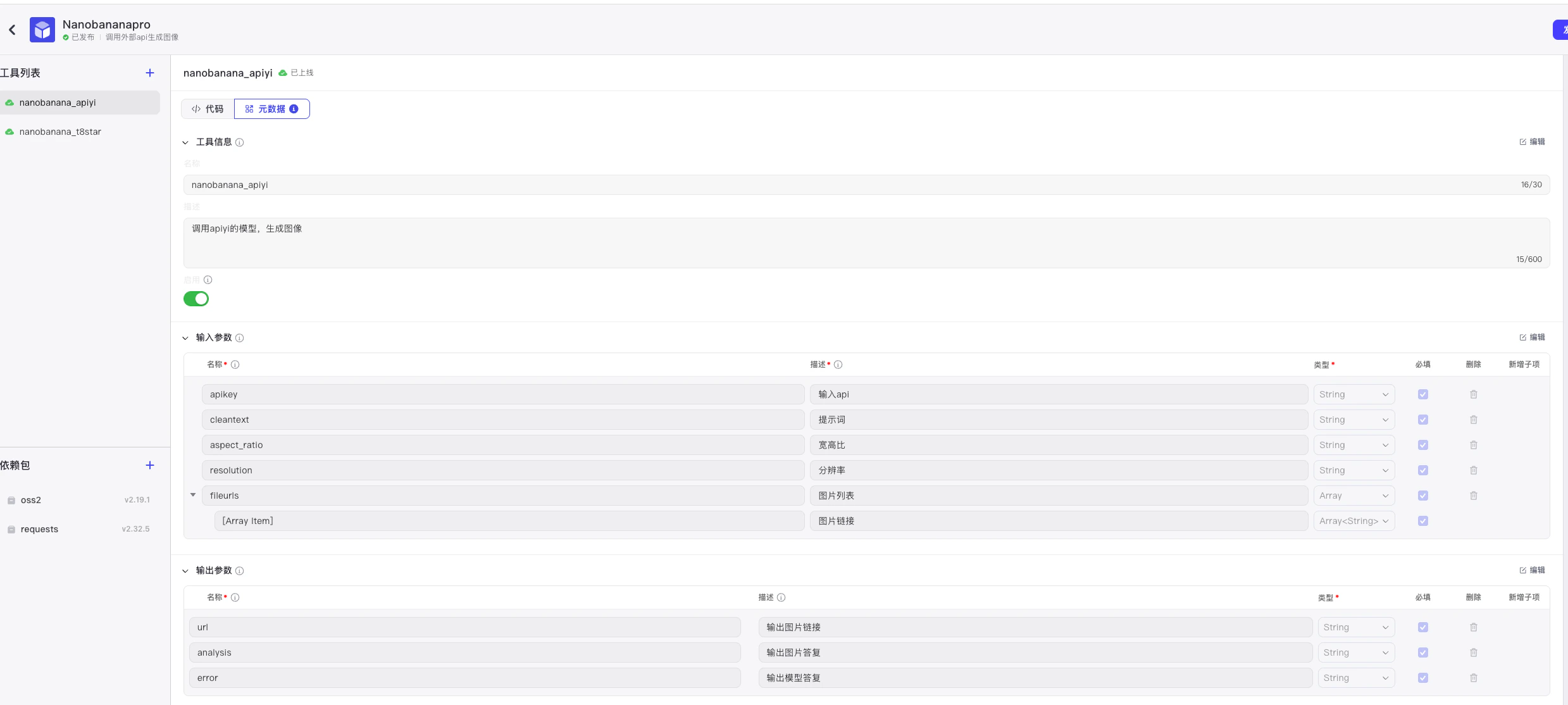
FieldTypeRequiredDescription
cleantextstringyesUser prompt or edit instruction
fileurlsstring[]noReference image URLs; empty triggers text-to-image
aspect_ratiostringyesAspect ratio, e.g. 1:1, 16:9, 9:16
resolutionstringyesResolution, must be uppercase: 1K / 2K / 4K
apikeystringyesAPIYI key (recommended: distribute per-user via the upstream node)

Output

FieldTypeDescription
analysisstringStatus label: 图片生成成功 / 图片生成失败
urlstring | nullOSS public URL on success
errorstring | nullFriendly error message on failure

Deployment

1

Step 1: Prepare APIYI and OSS credentials

  • Generate an APIYI key (starts with sk-) at APIYI Console
  • Create an Aliyun OSS Bucket and a RAM sub-account with oss:PutObject permission on that bucket
  • Note down AccessKey ID, AccessKey Secret, Bucket name, and Endpoint (e.g. oss-cn-beijing.aliyuncs.com)
2

Step 2: Create a custom plugin in Coze

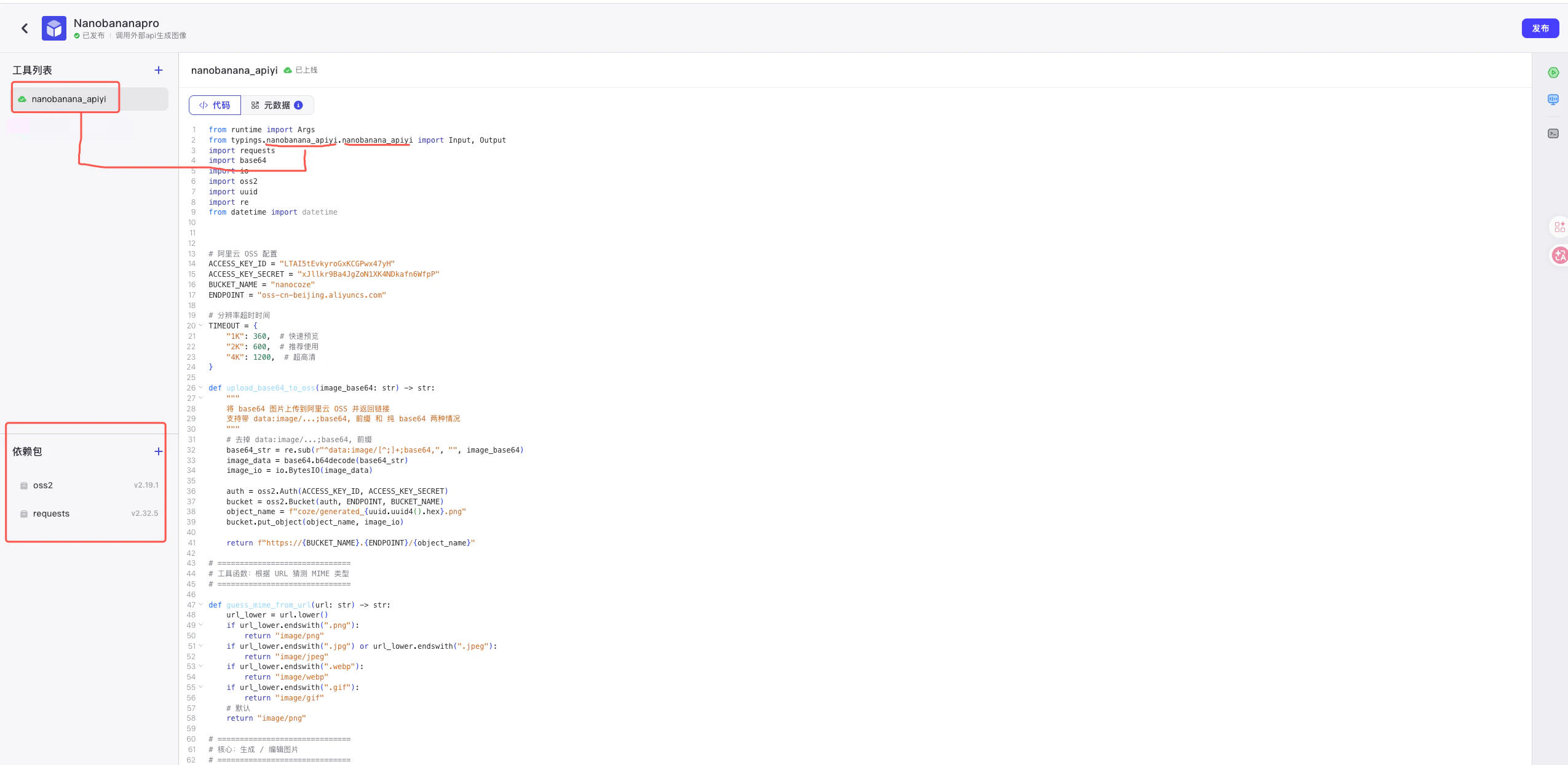
  1. Go to Coze Workspace → Library → Create custom plugin
  2. Pick “Cloud-side plugin — create in Coze IDE”
  3. Runtime: Python
  4. Add dependencies: requests, oss2
3

Step 3: Paste the plugin code

Copy the complete Python code from the “Plugin Full Source” section below into Coze IDE, then update the 4 OSS config lines at the top of the file with your own values:
# Aliyun OSS configuration
ACCESS_KEY_ID = "your-AK"
ACCESS_KEY_SECRET = "your-SK"
BUCKET_NAME = "your-bucket"
ENDPOINT = "oss-cn-beijing.aliyuncs.com"
4

Step 4: Configure metadata, inputs, and outputs

Configure Input / Output fields and required flags as below, matching the args.input fields in code:Coze plugin metadata configuration
5

Step 5: Test and publish

  • In the Coze IDE, fill in test parameters (recommended: 1K + simple prompt to validate the OSS path first)
  • When green, hit “Publish” and the node is now draggable in any workflow

Error Classification Strategy

The plugin doesn’t just return a boolean — it identifies failure causes in this priority order, so workflow branches can react differently:
PriorityError typeTriggerRecommended action
1ZERO_CANDIDATES_TOKENusageMetadata.candidatesTokenCount == 0Prompt or image flagged in moderation; rewrite
2NO_CANDIDATEScandidates is emptySystem error; retry
3FINISH_REASONfinishReason not STOPMapped: PROHIBITED_CONTENT / SAFETY / etc.
4NO_PARTScontent.parts is emptyRetry
5INLINE_DATA_EMPTYinlineData present but data emptyRetry or rephrase
6TEXT_RESPONSEOnly text returnedAuto-categorized as watermark / face-swap / NSFW / year-cutoff

Plugin Full Source

Below is the complete coze-nanobanana-pro.py. You can copy it into Coze IDE as-is — just update the 4 OSS config lines at the top and you’re ready to publish.
coze-nanobanana-pro.py
from runtime import Args
from typings.nanobanana_apiyi.nanobanana_apiyi import Input, Output
import requests
import base64
import io
import oss2
import uuid
import re
from datetime import datetime


# 阿里云 OSS 配置
ACCESS_KEY_ID = ""  #填入自己的阿里云 Access Key ID
ACCESS_KEY_SECRET = "" #填入自己的阿里云 Access Key Secret
BUCKET_NAME = "" #填入自己的阿里云 OSS Bucket 名称
ENDPOINT = "oss-cn-beijing.aliyuncs.com" #填入自己的阿里云 OSS Endpoint,例如 "oss-cn-beijing.aliyuncs.com"

# 分辨率超时时间
TIMEOUT = {
    "1K": 360,  # 快速预览
    "2K": 600,  # 推荐使用
    "4K": 1200,  # 超高清
}

def upload_base64_to_oss(image_base64: str) -> str:
    """
    将 base64 图片上传到阿里云 OSS 并返回链接
    支持带 data:image/...;base64, 前缀 和 纯 base64 两种情况
    """
    # 去掉 data:image/...;base64, 前缀
    base64_str = re.sub(r"^data:image/[^;]+;base64,", "", image_base64)
    image_data = base64.b64decode(base64_str)
    image_io = io.BytesIO(image_data)

    auth = oss2.Auth(ACCESS_KEY_ID, ACCESS_KEY_SECRET)
    bucket = oss2.Bucket(auth, ENDPOINT, BUCKET_NAME)
    object_name = f"coze/generated_{uuid.uuid4().hex}.png"
    bucket.put_object(object_name, image_io)

    return f"https://{BUCKET_NAME}.{ENDPOINT}/{object_name}"

# ==============================
# 工具函数:根据 URL 猜测 MIME 类型
# ==============================

def guess_mime_from_url(url: str) -> str:
    url_lower = url.lower()
    if url_lower.endswith(".png"):
        return "image/png"
    if url_lower.endswith(".jpg") or url_lower.endswith(".jpeg"):
        return "image/jpeg"
    if url_lower.endswith(".webp"):
        return "image/webp"
    if url_lower.endswith(".gif"):
        return "image/gif"
    # 默认
    return "image/png"

# ==============================
# 核心:生成 / 编辑图片
# ==============================

def generate_image(prompt: str, aspect_ratio: str, resolution: str, apikey:str,apiurl:str,image_urls=None):
    """
    生成 / 编辑图片的核心函数

    - 如果 image_urls 为空:纯文生图
    - 如果 image_urls 不为空:把 URL 指向的图片下载下来,按 inline_data 方式传给 API,实现改图
    """

    # 组装 parts
    parts = []

    # 1. 如果有图片 URL,则按 apiyi 改图 demo 的方式构造 inline_data
    if image_urls:
        for url in image_urls:
            try:
                resp = requests.get(url, timeout=180)
                if resp.status_code != 200:
                    return {
                        "success": False,
                        "error": f"图片上传阶段,获取图片失败({url})HTTP {resp.status_code}"
                    }

                image_bytes = resp.content
                image_base64 = base64.b64encode(image_bytes).decode("utf-8")
                mime_type = guess_mime_from_url(url)

                parts.append({
                    "inline_data": {
                        "mime_type": mime_type,
                        "data": image_base64
                    }
                })
            except Exception as e:
                return {
                    "success": False,
                    "error": f"图片上传阶段,获取图片失败({url}): {e}"
                }

    # 2. 文字部分(编辑指令或文生图提示词)
    #    注意:这里不再把图片 URL 塞进 prompt 里,仅用纯文字描述
    if prompt:
        parts.append({"text": prompt})
    else:
        # 没有文字时给一个默认提示(可按需要修改)
        parts.append({"text": "根据图片进行合理的编辑生成。"})

    # 3. 构造请求 payload(和官方改图 demo 一致的结构)
    payload = {
        "contents": [
            {
                "parts": parts
            }
        ],
        "generationConfig": {
            "responseModalities": ["IMAGE"],
            "imageConfig": {
                "aspectRatio": aspect_ratio,
                "image_size": resolution
            }
        }
    }

    headers = {
        "Authorization": f"Bearer {apikey}",
        "Content-Type": "application/json"
    }

    try:
        response = requests.post(apiurl, headers=headers, json=payload, timeout=TIMEOUT[resolution])

        # HTTP 非200
        if response.status_code != 200:
            return {"success": False, "error": f"HTTP {response.status_code}: {response.text}"}

        # JSON 解析
        try:
            data = response.json()
        except ValueError:
            return {"success": False, "error": "响应不是有效JSON", "response": (response.text or "")[:500]}

        # 1️⃣ 最高优先级:candidatesTokenCount
        usage = data.get("usageMetadata") or {}
        if usage.get("candidatesTokenCount") == 0:
            return {
                "success": False,
                "errorType": "ZERO_CANDIDATES_TOKEN",
                "error": "❌ 内容审核失败\n您的请求在内容审核阶段被拒绝,请修改提示词或图片",
                "response": data
            }

        # 2️⃣ candidates 检查
        candidates = data.get("candidates")
        if not isinstance(candidates, list) or len(candidates) == 0:
            return {
                "success": False,
                "errorType": "NO_CANDIDATES",
                "error": "系统出错,请稍后重试",
                "response": data
            }

        candidate = candidates[0] if isinstance(candidates[0], dict) else None
        if candidate is None:
            return {
                "success": False,
                "errorType": "NO_CANDIDATES",
                "error": "系统出错,请稍后重试(candidates[0]结构异常)",
                "response": data
            }

        # 3️⃣ finishReason
        finish_reason = candidate.get("finishReason")
        if isinstance(finish_reason, str) and finish_reason != "STOP":
            reason_map = {
                "PROHIBITED_CONTENT": "内容违反安全策略,已被拒绝处理",
                "SAFETY": "内容触发了安全过滤器",
                "RECITATION": "内容可能涉及版权问题",
                "MAX_TOKENS": "内容长度超出限制",
            }
            return {
                "success": False,
                "errorType": "FINISH_REASON",
                "finishReason": finish_reason,
                "error": reason_map.get(finish_reason, f"请求被拒绝:{finish_reason}"),
                "response": data
            }

        # 4️⃣ content.parts
        content = candidate.get("content") or {}
        parts = content.get("parts")
        if not isinstance(parts, list) or len(parts) == 0:
            return {
                "success": False,
                "errorType": "NO_PARTS",
                "error": "生成失败,请重试(content.parts为空)",
                "response": data
            }

        # 5️⃣ 提取图片和文本(更精准:识别 inlineData 存在但 data 为空)
        images = []
        texts = []
        saw_inline_but_empty = False

        for i, part in enumerate(parts):
            if not isinstance(part, dict):
                continue

            # 收集 text(即使有 thoughtSignature,也照收)
            t = part.get("text")
            if isinstance(t, str) and t.strip() and not t.startswith("data:image/"):
                texts.append(t.strip())

            # 兼容 inlineData / inline_data
            inline = None
            if isinstance(part.get("inlineData"), dict):
                inline = part["inlineData"]
            elif isinstance(part.get("inline_data"), dict):
                inline = part["inline_data"]

            if inline is not None:
                b64 = inline.get("data")
                if not isinstance(b64, str) or not b64.strip():
                    saw_inline_but_empty = True
                    continue
                images.append(b64.strip())

        # ✅ 更精准:inlineData 存在但全都没 data
        if not images and saw_inline_but_empty:
            return {
                "success": False,
                "errorType": "INLINE_DATA_EMPTY",
                "error": "生成失败:检测到 inlineData 但图片数据为空(inlineData.data为空)",
                "response": data
            }

        # 6️⃣ 有图片:成功(保持你原来的返回结构)
        if images:
            return {"success": True, "image_data": images[0]}

        # 7️⃣ 无图片:有文本 -> TEXT_RESPONSE
        if texts:
            text_content = "\n".join(texts)

            # —— 可选:不做函数,直接就地识别类型(想更简单可删掉这段 detectedType)——
            low = text_content.lower()
            detected = "general"
            if any(k in low for k in ["watermark", "remove watermark", "去水印", "移除水印", "删除水印"]):
                detected = "拒绝处理水印任务"
            elif any(k in low for k in ["faceswap", "face swap", "换脸", "deepfake"]):
                detected = "拒绝处理换脸任务"
            elif any(k in low for k in ["sexually", "explicit", "porn", "nude", "nsfw", "色情", "不雅", "裸"]):
                detected = "拒绝色情任务"
            elif any(str(y) in low for y in range(2026, 2101)):
                detected = "拒绝超过知识库范围任务"

            return {
                "success": False,
                "errorType": "TEXT_RESPONSE",
                "error": detected,   # 你文档要求:直接展示 API text
                "response": data
            }

        # ✅ 更精准:parts 有结构但既无图也无文本
        return {
            "success": False,
            "error": "生成失败:parts存在但未找到图片数据或文本说明",
            "response": data
        }

    except requests.exceptions.Timeout:
        return {"success": False, "error": f"图片生成请求超时(超过 {TIMEOUT[resolution]} 秒)"}
    except Exception as e:
        return {"success": False, "error": f"图片生成请求失败: {str(e)}"}


# ==============================
# Coze Node 入口
# ==============================

def handler(args: Args[Input]) -> Output:
    """
    Coze / NanobananaPro 节点入口

    - args.input.cleantext: 用户文字提示词
    - args.input.fileurls:  用户上传图片的 URL 列表(用于改图)
    - args.input.aspect_ratio: 宽高比,如 "1:1" / "9:16"
    - args.input.resolution: 分辨率,如 "1K" / "2K" / "4K"
    """
    API_URL = "https://api.apiyi.com/v1beta/models/gemini-3-pro-image-preview:generateContent"
    API_KEY = args.input.apikey
    cleanttext = args.input.cleantext or ""
    fileurls = args.input.fileurls or []
    aspectratio = args.input.aspect_ratio
    resolution = args.input.resolution
    # - 图片通过 image_urls 传入 generate_image,走 inline_data 改图逻辑
    prompt = cleanttext.strip()

    # 调用 Gemini 3 Pro 生成 / 编辑图片
    # 如果 fileurls 不为空,会按"改图"模式调用

    result = generate_image(prompt, aspectratio, resolution, API_KEY,API_URL,image_urls=fileurls if fileurls else None)

    if result["success"]:
        image_base64 = result["image_data"]
        oss_url = upload_base64_to_oss(image_base64)
        return {"analysis": "图片生成成功", "url": oss_url, "error": None}
    else:
        return {"analysis": "图片生成失败", "url": None, "error": result["error"]}

Using It in a Coze Workflow

Once published, drag the plugin node into your Coze workflow and wire it like this:
Start node (user prompt + images)

Prompt / image splitter (code node)

Per-user API key dictionary (route by caller name)

nanobanana_apiyi plugin node (this plugin)

Success / failure branch

End node (output url or error)
Pair it with the Feishu Bitable AI Image Generation Workflow for a no-code production line — operators just fill rows in Feishu Bitable to batch-generate images.

FAQ

Downstream Coze workflow nodes (especially Feishu field shortcuts) generally need an accessible URL to convert results into image attachments. Returning base64 means the data hops through the workflow inefficiently, and Feishu can’t render it directly. OSS links also make long-term archiving and external sharing trivial.
Coze custom plugins don’t expose system environment variables today. Recommended approach: keep the OSS credentials as constants at the top of the file and protect them with Coze’s plugin encryption feature. For multi-tenant workflows, also write per-tenant prefixes into the OSS path.
To distribute different keys per caller. Add a “Per-user API key” dictionary node upstream that maps a caller’s name to their APIYI key — clean for usage accounting and access control.
Nano Banana Pro 4K generation is genuinely slow (typically 5–15 minutes). The plugin already configures a 1200-second timeout for 4K. If still timing out:
  1. Drop to 2K to debug your prompt
  2. Check APIYI Console for rate limits
  3. Reduce concurrent calls
This usually means the model refused (violation, year-cutoff, etc.). The plugin auto-classifies the type: watermark removal / face-swap / NSFW / year > 2025. Show the error field to the user — don’t retry, the result will be the same.
Yes. The “Plugin Full Source” section above contains the complete coze-nanobanana-pro.py (contributed by Shuaila1996). Just update the 4 OSS config lines at the top and paste it into Coze IDE — no separate download needed.If you also need:

Feishu Bitable AI Image Generation

The perfect companion: hook this Coze workflow into Feishu Bitable so operators just fill rows to batch-generate

Nano Banana Pro Doc

Full Nano Banana Pro API doc, pricing, and generation samples

Image generation failure FAQ

Nano Banana failure-troubleshooting guide aligned with this plugin’s error codes

APIYI Console

Manage API keys, view usage and balance