

Overview
This is a complete, turn-Feishu-Bitable-into-an-image-production-line workflow: operators fill prompt + reference attachments in a row, attachments auto-convert to OSS URLs, a Coze workflow then calls Nano Banana Pro, and finally the generated image lands back in the row as an attachment — zero code touches required from the user. The author (Shuaila1996) consolidated this from real production use; it includes 3 independent-but-cooperating pieces: a Feishu field shortcut, an Aliyun Function Compute function, and a Coze plugin.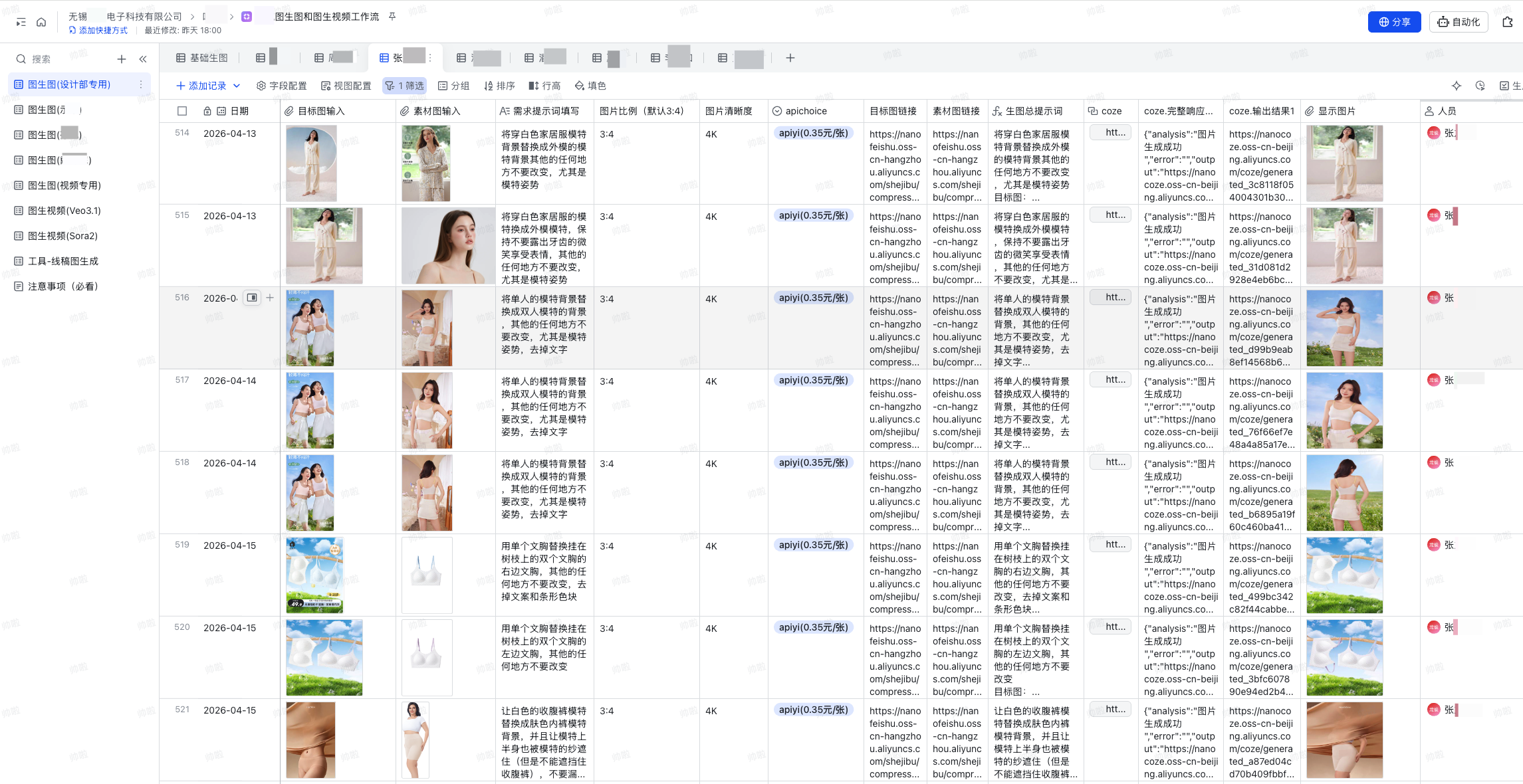
Project Info
- 📦 Form: Shared as a code package (not published on GitHub)
- 👤 Author: Shuaila1996
- 🎯 Use case: Feishu Enterprise Bitable + Aliyun + Coze CN
- 🔌 Model:
gemini-3-pro-image(Nano Banana Pro, via APIYI) - 📝 Full source for the Feishu shortcut and Aliyun function is embedded in this doc; the Coze plugin source is in Nano Banana Pro Coze Plugin
Core Features
Bitable as the workbench
Operators fill prompts and upload reference images in Feishu Bitable — no code, no workflow editor
Auto attachment → OSS
A custom Feishu field shortcut downloads the binary, forwards it to Aliyun FC, which compresses and uploads to OSS
Per-user multi-key
The Coze workflow includes a “per-user API key” dictionary that routes APIYI keys per caller — for clean usage accounting
Batch generation
Bitable’s native batch row operations + the field shortcut = one click to generate dozens to hundreds of images
Direct row write-back
The OSS URL returned from Coze is written back via Feishu’s official “URL → attachment” shortcut, displayed inline as an image attachment
Clear error feedback
Moderation failures, refusals, timeouts come back as friendly text in the row, easy to triage
Supported APIYI Models
Architecture
Deployment Steps
1
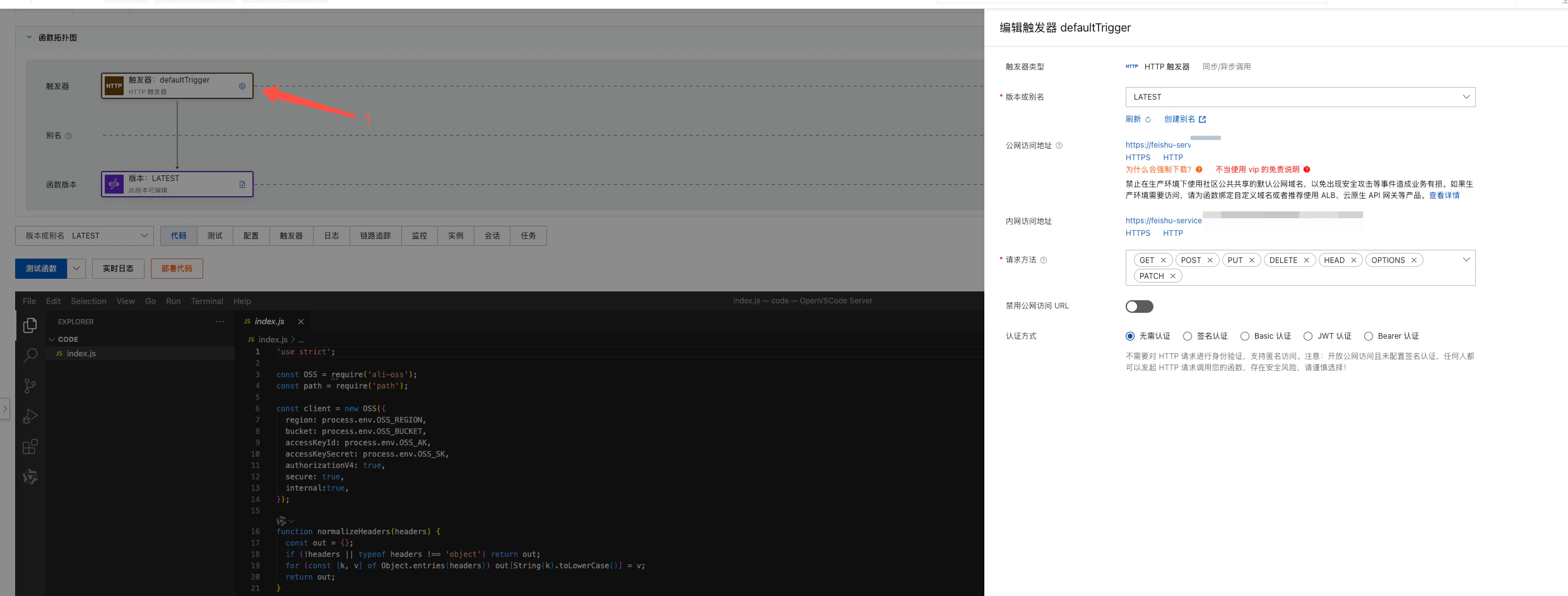
Step 1: Aliyun infrastructure
- Provision an OSS bucket; create a RAM sub-account with
oss:PutObjectandoss:ProcessObjectpermissions - Provision Function Compute (FC); create an HTTP-triggered function on Node.js 18+
- Install dependency:
ali-oss - Configure environment variables (never hardcode keys):
2
Step 2: Deploy the Aliyun FC function
Drop the author’s
aliyun-fc-oss-upload.js into your FC function. The function:- Receives the binary forwarded from the Feishu shortcut
- Uploads the original via
client.put - Saves a compressed copy via
client.processObjectSave(long-edge 4500 / quality 95) - Wraps the compressed public URL in a
feishuWrapperstructure that Feishu can parse
3
Step 3: Build the Feishu field shortcut
Use the Feishu field shortcut framework to deploy Package and submit to Feishu’s official team to upload to your enterprise shortcut library.
feishu-attachment-to-oss.ts. Two replacements:4
Step 4: Configure Feishu Bitable fields
Set up these fields in your Bitable:
Formula example for
Merged prompt:5
Step 5: Deploy the Coze plugin and workflow
- Deploy the Python plugin per Nano Banana Pro Coze Plugin
- Import the author’s Coze workflow export, which includes:
- A code node to split images and prompt
- A “per-user API key” dictionary node (caller name → APIYI key)
- The Nano Banana Pro plugin node
- Success / failure / error aggregation
- Maintain the “per-user API key” dictionary inside the workflow
6
Step 6: Wire up Feishu's Coze workflow shortcut
Add either Feishu’s official or a custom “Coze workflow call” field shortcut to the Bitable, configured as below: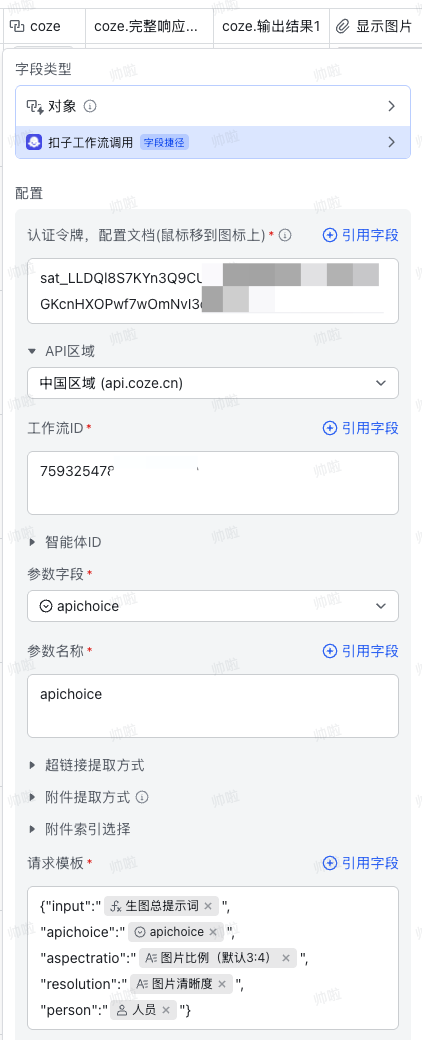
- Fill in the workflow token and workflow ID from Coze
- Field names in the request template must exactly match Coze workflow input names
- Required fields follow Coze workflow’s required flag
- The
apichoicecolumn should holdapiyi, not display strings likeapiyi(0.35元/张)— the dictionary lookup will fail otherwise
7
Step 7: URL → attachment to render results
Last step: convert the URL Coze returns into a Feishu image attachment. Two options:
- Buy directly: use the official Coze “URL → attachment” field shortcut
- Build your own: implement a custom URL-to-attachment field shortcut following the Feishu doc
Bitable Merge Formula
The “Merged prompt” formula in Bitable:CHAR(10) is a newline, letting the Coze code node split prompt vs. image URLs by \n.
Feishu Field Shortcut Full Source
Below is the completefeishu-attachment-to-oss.ts, ready to drop into the Feishu field-shortcut framework. Before deploying, only the two feishu-service placeholders need replacing with your Aliyun FC public domain / URL.
feishu-attachment-to-oss.ts
Aliyun Function Compute Full Source
Below is the completealiyun-fc-oss-upload.js, ready to paste into Aliyun Function Compute (Node.js 18+). All credentials are read from environment variables — never hardcode.
aliyun-fc-oss-upload.js
Coze Plugin Source
The Python plugincoze-nanobanana-pro.py is fully embedded in Nano Banana Pro Coze Plugin under the “Plugin Full Source” section — copy and paste, no separate download.
Security Notes
FAQ
Feishu shortcut can't reach Aliyun FC
Feishu shortcut can't reach Aliyun FC
Two checks:
- Is the FC public domain in
basekit.addDomainList(without https://)? - Is
context.fetchusing the fullhttps://URL?
Coze workflow says account or config error
Coze workflow says account or config error
Check first:
- Does the
apichoicecolumn holdapiyi(not display strings likeapiyi(0.35元/张))? - Is the caller listed in the “per-user API key” dictionary?
- Does the caller’s name match the Bitable person field exactly (whitespace, simplified vs. traditional)?
Image generated but Feishu doesn't show it
Image generated but Feishu doesn't show it
Coze returns a text URL by default; Feishu needs another “URL → attachment” shortcut to render. Either:
- Buy Coze’s official “URL → attachment” shortcut (easiest)
- Build your own URL-to-attachment shortcut
Aliyun FC returns 500 but OSS upload succeeded
Aliyun FC returns 500 but OSS upload succeeded
Usually
processObjectSave parameter or bucket region mismatch. Check:- Is image processing enabled on the bucket?
- Does
process.env.OSS_REGIONmatch the bucket’s actual region? - Does the RAM sub-account have
oss:ProcessObjectpermission?
How do I throttle batch generation?
How do I throttle batch generation?
Nano Banana Pro 4K is slow. Recommended:
- Add concurrency limits at the Coze workflow entry
- Trigger field shortcuts in Bitable in batches of 5–10 rows at a time
- Distribute different APIYI keys across callers to spread out rate limits
Where's the full code? Can I copy it directly?
Where's the full code? Can I copy it directly?
Yes — every piece is embedded in the docs (contributed by Shuaila1996), copy-paste ready:
feishu-attachment-to-oss.ts(Feishu field shortcut) → see “Feishu Field Shortcut Full Source” above on this pagealiyun-fc-oss-upload.js(Aliyun FC) → see “Aliyun Function Compute Full Source” above on this pagecoze-nanobanana-pro.py(Coze plugin) → see “Plugin Full Source” in Nano Banana Pro Coze Plugin
Related Resources
Nano Banana Pro Coze Plugin
The companion Coze plugin code and detailed guide — also useful standalone for any Coze workflow that needs Nano Banana Pro
Nano Banana Pro Doc
Full API doc, pricing, and generation samples
Image generation failure FAQ
Nano Banana failure-troubleshooting guide
APIYI Console
Manage API keys, view usage and balance