

Overview
CC Switch is a desktop application built with Tauri 2 that unifies management of five AI CLI tools: Claude Code, Codex CLI, Gemini CLI, OpenCode, and OpenClaw. No more manual config file editing — switch API providers, models, and keys through a graphical interface. By configuring APIYI as your provider, you get:🚀 One-Click Switching
Manage all CLI tool configs through a GUI, no more manual editing
💰 88% Discount
Create tokens with the ClaudeCode group for 88% pricing
📊 Usage Tracking
Built-in Usage Dashboard for real-time spending, requests, and token tracking
🔄 Smart Failover
Local proxy with hot-switching, auto-failover, and circuit breaker
Project Info
- 🔗 Repository:
github.com/farion1231/cc-switch - 📜 License: MIT
- 👤 Author: Jason Young (farion1231)
- 🏷️ Latest Version: v3.12.0
Core Features
Provider Management
- 50+ built-in presets including AWS Bedrock and NVIDIA NIM
- One-click switching, drag-and-drop sorting, import/export
- System tray quick access
MCP Server Management
- Unified MCP server configuration across all CLI tools
- Bidirectional sync — changes propagate to all applications
More Features
- Prompts Management: Markdown editor + cross-app synchronization
- Skills Installation: Install skills from GitHub repos or ZIP files
- Session Browser: View and restore conversation history
- Cloud Sync: Dropbox, OneDrive, iCloud, and WebDAV support
- Deep Link:
ccswitch://protocol for one-click config imports
Quick Start
Step 1: Install CC Switch
- macOS
- Windows
- Linux
Install via Homebrew:Or download the DMG installer from GitHub Releases.
System Requirements: Windows 10+, macOS 10.15 (Catalina)+, Ubuntu 22.04+ / Debian 11+ / Fedora 34+
Step 2: Get Your APIYI API Key
- Visit APIYI Console - Token Page
- Click to create a new token
- Important: Select the 【ClaudeCode】group for 88% discount
- Copy the generated key (starts with
sk-)
Step 3: Configure APIYI in CC Switch
- Open CC Switch
- Go to the Provider management page, click add, and select “Custom Gateway”:
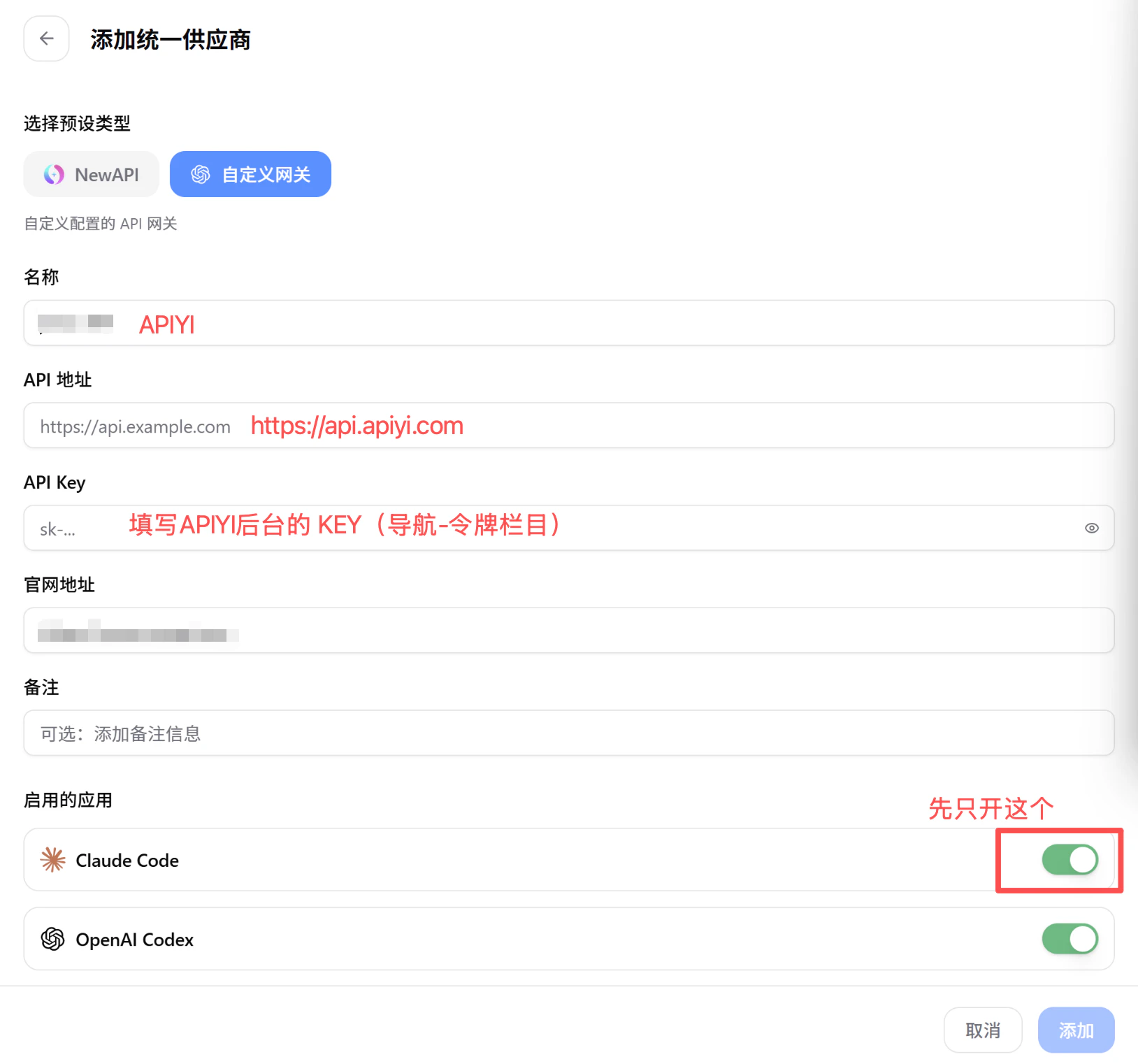
- Fill in the following information as shown above:
- Name:
APIYI - API Address:
https://api.apiyi.com - API Key: Paste the key from the previous step
- Enabled Apps: Enable Claude Code (enable others as needed)
- Name:
- Click “Add” to save the configuration
Step 4: Add Models
Add the following models in your Provider configuration: Standard Models:
Reasoning Models (forced chain-of-thought):
Step 5: One-Click Switch
Once configured, select APIYI as the active Provider in CC Switch. All linked CLI tools (Claude Code, Codex CLI, etc.) will automatically switch to the APIYI configuration.Usage Guide
Managing Multiple CLI Tools
CC Switch supports managing these 5 AI CLI tools simultaneously:- Claude Code — Anthropic’s official CLI programming assistant
- Codex CLI — OpenAI’s command-line programming tool
- Gemini CLI — Google’s command-line AI assistant
- OpenCode — Open-source CLI programming tool
- OpenClaw — Open-source local AI Agent
Local Proxy
CC Switch includes a built-in local proxy server with:- Hot-switching: Switch providers without restarting
- Auto-failover: Automatically switch to backup when current provider is down
- Circuit breaker: Stops requests on persistent failures to prevent resource waste
Configuration Backup
- Auto-backup system retains the 10 most recent versions
- Import/export complete configurations
- Cloud sync via Dropbox, OneDrive, iCloud, WebDAV
Model Recommendations
View More Programming Model Recommendations
Besides the Claude series, APIYI supports 400+ mainstream AI models. Check out the complete programming model recommendations, performance comparisons, and scenario-based suggestions.
FAQ
Which operating systems does CC Switch support?
Which operating systems does CC Switch support?
Windows 10+, macOS 10.15 (Catalina)+, and major Linux distributions (Ubuntu 22.04+, Debian 11+, Fedora 34+, Arch Linux).
How do I get group discount pricing?
How do I get group discount pricing?
Some groups (e.g. the ClaudeCode group) offer discounted pricing when creating a token at APIYI Console — check the console for the current rate. Stack it with a recharge bonus for an even lower effective cost.
Claude Code can't connect after configuration?
Claude Code can't connect after configuration?
Please check:
- API Key is correct (starts with
sk-) - Base URL is set to
https://api.apiyi.com - APIYI account balance is sufficient
- CC Switch has synced the configuration to Claude Code
What's the difference between standard and Thinking models?
What's the difference between standard and Thinking models?
Thinking (reasoning) models force chain-of-thought mode, performing deep reasoning analysis before responding. They’re ideal for complex logic, architecture design, and deep thinking scenarios. Standard models respond faster and are suitable for daily coding and simple tasks.
How to migrate from other configuration methods to CC Switch?
How to migrate from other configuration methods to CC Switch?
CC Switch supports import functionality and can automatically detect existing environment variables and config files. After installation, open the app and it will auto-detect installed CLI tools and their existing configurations.
Is CC Switch free?
Is CC Switch free?
CC Switch itself is completely free and open source (MIT License). Only API calls incur costs — using the ClaudeCode group through APIYI gives you 88% discounted pricing.
Best Practices
Related Resources
Claude Code Setup
Detailed Claude Code configuration tutorial
Model Recommendations
Latest AI model recommendations
APIYI Console
Manage API keys and view usage
Other Programming Tools
Explore other tools like Cursor