

Open-source & Self-hostable
Desktop, web, Docker, or Vercel — your data, your control
Plugins & Multimodal
Built-in web search, code interpreter, vision, and video generation plugins
Local Knowledge Base
Upload PDFs and Markdown to build a RAG pipeline over your private data
Quick Start
1. Get your APIYI API key
See the API Key Management Guide to get your API key.2. Install LobeHub
LobeHub offers three ways to use it:- Desktop: Official client for Windows, macOS, and Linux — download from
lobechat.com - Web (official): Just visit
lobechat.com, sign up, and use it without any self-hosting - Self-hosted: Deploy via Docker / Vercel / local source — great for enterprise or privacy needs
3. Create a custom provider
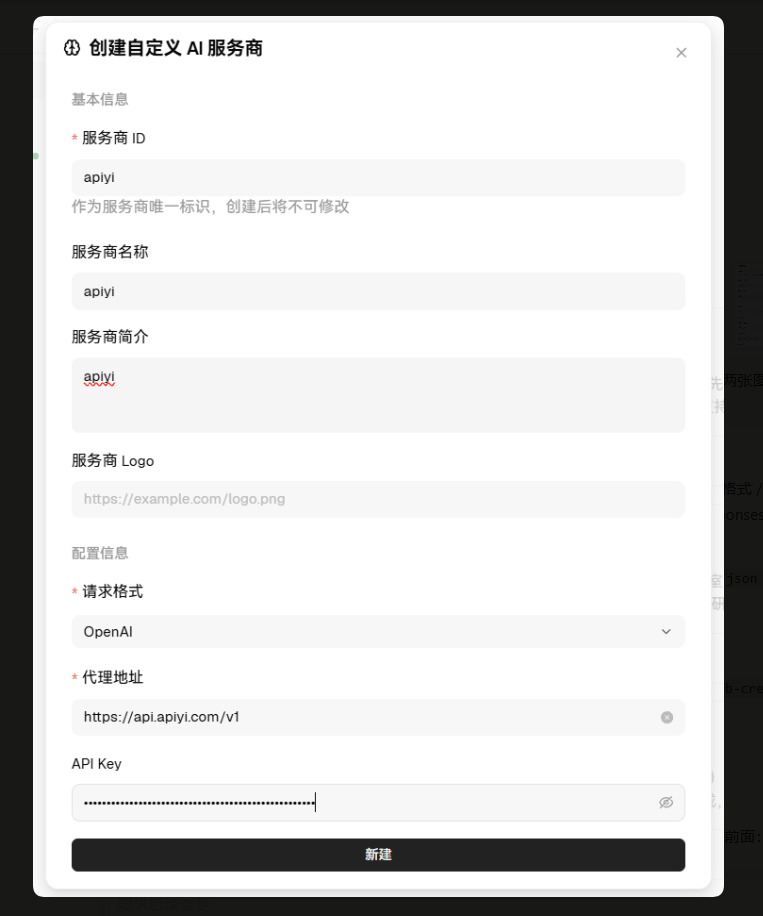
Settings → Model Providers, click the + icon at the top right to add a custom provider, and fill in the fields as shown above:
Click the Create button at the bottom right to save.
Configuration tips
- The
Proxy URLMUST end with/v1, otherwise requests will fail to route - Trim any leading/trailing spaces from your API key when pasting
- Choose
OpenAIas the request format to access all 400+ APIYI models - One key works across all enabled models — pay only for what you use
4. Verify connectivity
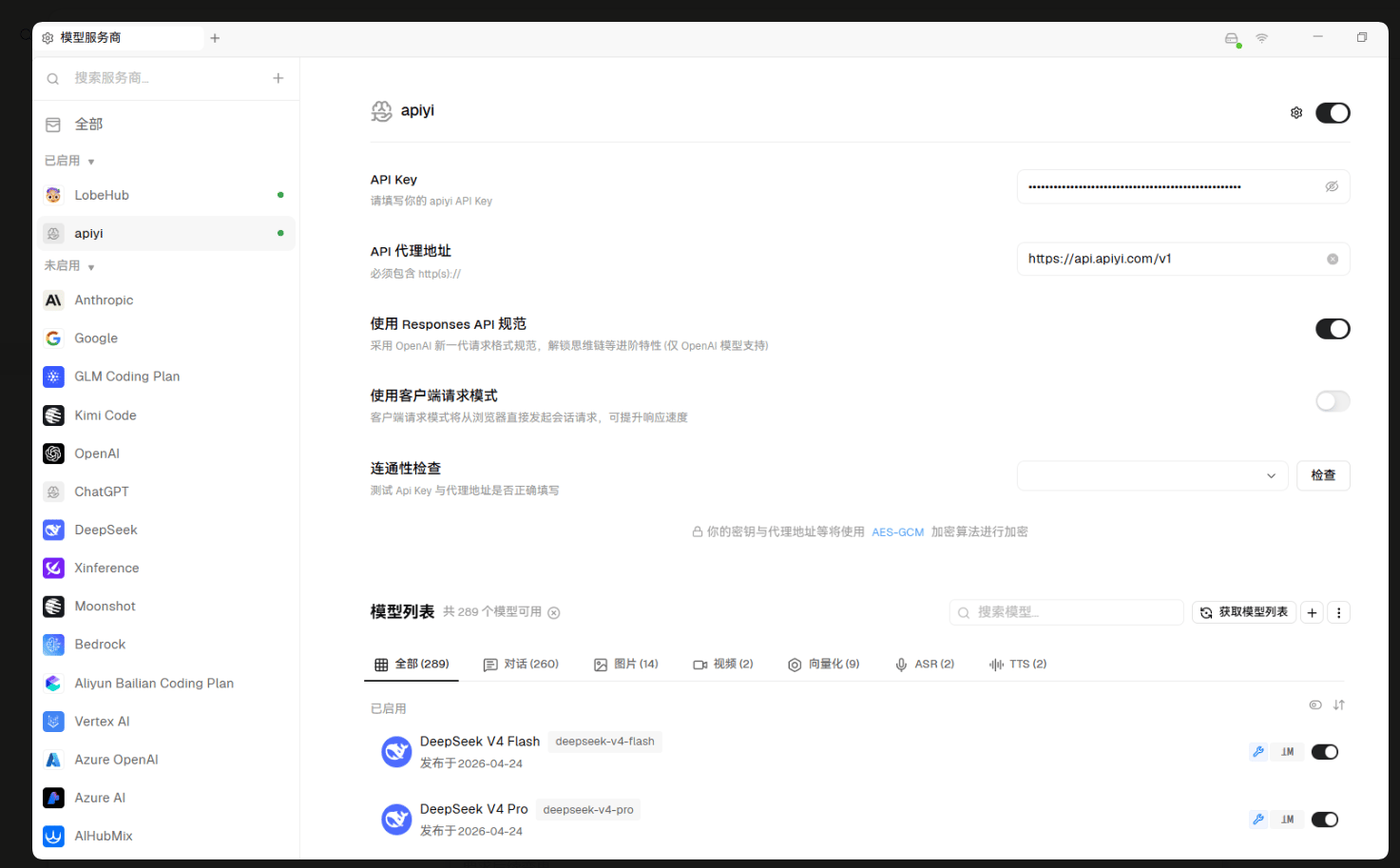
- Confirm or update the API Key and Proxy URL
- Enable advanced options (optional):
Use Responses API spec— enables OpenAI’s newer request format (OpenAI models only)Use client-side request mode— browser sends requests directly, can improve response speed
- Connectivity check — pick a model from the dropdown and click Check
- Fetch model list — click the Fetch model list button to pull all available models from APIYI
Model list shows everything APIYI currently offers, grouped by type: Chat, Image, Video, Embedding, ASR, TTS.
5. Pick a model and start chatting
In the chat UI’s model dropdown, select a model likeclaude-opus-5, gpt-5-6-terra, or deepseek-v4-pro and you’re ready to go.
See today's top model recommendations
Browse the latest model recommendations, performance comparisons, and scenario-based usage tips — covering writing, coding, fast response, image generation, video generation, and more.
Why no concrete model list here?AI models iterate extremely fast. To keep recommendations accurate, we maintain the latest model list, performance data, and usage tips in the Model Recommendation page.
Access All 400+ Models With One Provider
LobeHub ships with built-in channels for many mainstream providers, each needing its own key. With APIYI you create one custom provider that covers every model:LobeHub Features Deep Dive
Plugin marketplace
LobeHub ships with a rich plugin marketplace (Settings → Plugins). Recommended plugins:
- Web Search — give models real-time internet access
- Code Interpreter — run Python in-chat for data analysis and visualization
- Chart Generation — auto-generate flowcharts and mind maps
- Image Generation — generate images via models like
gpt-image-2andgemini-3-pro-image
Local knowledge base (RAG)
LobeHub can build a local vector store from your files:- Go to the
Knowledge Basepage and create a new knowledge base - Upload PDF, Markdown, Word, Excel, or TXT files
- The system chunks and embeds them automatically
- In chat, select the knowledge base and the model will answer grounded in your files
Multimodal chat
Upload images for vision understanding, recognition, and OCR:- Recommended vision models:
gemini-3-6-flash,claude-opus-5,gpt-5-6-terra - Just drag an image into the chat input and the model will recognize it
Agent marketplace
LobeHub ships with a rich set of preset agents (translation, writing, coding, interview prep, etc.). You can also:- One-click enable any community-shared agent from the
Agent marketplace - Build your own agent — custom persona, prompt, opening line, knowledge base, and plugins
Conversation management
- Branch conversations, edit messages, regenerate responses
- Export conversations as Markdown, PNG, or JSON
- Global search across message history
Advanced configuration
Custom request parameters
You can tune common parameters on the provider detail page:Network proxy and self-hosting
For proxy use or self-hosted LobeHub:- Desktop client:
Settings → Networkto configure HTTP/HTTPS proxy - Self-hosted (Docker): inject APIYI config via environment variables:
- Client-side request mode: enables browser-direct requests (only if the browser can reach APIYI)
Keyboard shortcuts
Mobile
LobeHub’s desktop client runs on Windows / macOS / Linux. For mobile, use the responsive web app atlobechat.com — no separate install required.
Troubleshooting
Connection failure / connectivity check fails
Model list is empty
- Click Fetch model list to pull again
- Wait 1-2 seconds, then refresh the page
- Confirm the API key is active in the APIYI console
Slow response or stream interruptions
- Switch to a faster model (e.g.,
gemini-3-5-flash-lite,claude-haiku-4-5,deepseek-v4-flash) - Disable unneeded plugins
- Check network latency
- Trim long context (close stale conversations)
Knowledge base retrieval is inaccurate
- Reduce chunk size for finer-grained retrieval
- Switch to a stronger embedding model on APIYI
- Add more relevant documents to boost recall
Best Practices
Model selection strategy
Use the right model for the right task — match by complexity:- Daily chat / simple Q&A:
gemini-3-5-flash-lite,claude-haiku-4-5,deepseek-v4-flash - Complex reasoning / long-doc analysis:
claude-opus-5,gpt-5-6-sol,deepseek-v4-pro - Coding:
claude-opus-5,gpt-5-6-sol,claude-sonnet-5 - Image understanding:
gemini-3-6-flash,claude-opus-5,gpt-5-6-terra - Image generation:
gpt-image-2,gemini-3-pro-image
Context management
- Periodically prune stale conversations
- Break complex tasks into shorter conversations
- Use the
branch conversationfeature to explore alternative replies
Security and privacy
- Don’t share your API key in public
- Rotate keys periodically (one-click reset in the APIYI console)
- For sensitive conversations, self-host LobeHub — data stays local
Self-hosting tips
- Use Docker + PostgreSQL in production, not the built-in DB
- Put Cloudflare in front as a reverse proxy
- Manage secrets via environment variables for easy multi-instance deployment
Comparison with other clients
All three clients connect to APIYI the same way (OpenAI-compatible protocol). They differ mainly in deployment model and feature focus:
Need more help? Check the
lobechat.com docs or visit the APIYI website.