

Overview
Trae is an AI-native IDE launched by ByteDance in January 2025, positioned as a “Vibe Coding” productivity tool for professional developers — describe what you want in natural language and the AI handles completion, bug fixing, project scaffolding, and one-click preview. Trae ships in two flavors: TRAE CN (trae.cn) and the international TRAE (trae.ai), with the SOLO series (Desktop / App / Web) letting the agent take over the full task lifecycle.
By wiring APIYI in through Trae’s “Custom Model” feature, you get:
🔌 Dual-Protocol Coverage
Configure both OpenAI and Anthropic providers — one token, two protocols
🤖 400+ Models
GPT, Claude, Gemini, DeepSeek, Doubao, Qwen — all behind one gateway
💰 5% Off on Claude
Pick the ClaudeCode group when creating a token to save 5% on Claude, stackable with top-up bonuses
🛡️ Stable Direct Connect
api.apiyi.com is directly reachable from mainland China — no extra proxy neededProduct Info
- 🔗 International:
www.trae.ai - 🔗 China edition:
www.trae.cn - 👥 Developer: ByteDance
- 📅 First released: January 2025
- 🧩 Modes: Builder (agent) / Chat (sidebar) / Inline Chat
- 🌐 Protocols supported: OpenAI, Anthropic, plus many other third-party providers
Core Features
Three Interaction Modes
- Builder mode: agent takes over — reads/writes files, runs commands, scaffolds projects
- Chat mode: sidebar conversation, similar to Cursor Chat / Cline, great for Q&A and snippets
- Inline Chat:
Cmd/Ctrl + Iopens an in-editor inline conversation — fastest path for completion and refactoring
MCP and Tooling Ecosystem
- Built-in MCP (Model Context Protocol) support for external tools and APIs
- Remote-SSH support — remote dev feels identical to local
.rulesfiles for project-level AI behavior
Custom Model (focus of this guide)
The international Trae ships presets for Anthropic, OpenAI, Gemini, xAI, OpenRouter, Ollama, DeepSeek, Volcano Engine, Aliyun, Tencent Cloud, SiliconFlow, PPIO, Novita, BytePlus and more. Every preset lets you fill in a custom model ID + API key + custom request URL — that’s the entry point we’ll use to plug APIYI in.Quick Start
Step 1: Install Trae
- International (TRAE)
- China edition (TRAE CN)
Download from
www.trae.ai — supports macOS, Windows, Linux. The international build ships GPT / Claude / Gemini presets out of the box.Step 2: Get an APIYI Token
- Visit the APIYI token console:
api.apiyi.com/token - Click “New Token”
- For Claude-heavy usage: pick the ClaudeCode group — Claude calls get 5% off, stackable with the 10%-20% top-up bonus
- For mixed GPT/Gemini/DeepSeek usage: the Default group is fine
- Copy the
sk-prefixed key
Step 3: Open the Custom Model Panel in Trae
- IDE mode: click the ⚙️ icon in the top-right → Models in the left nav → “Add model” / “Custom model”
- SOLO mode: click ⚙️ in the top-right of the chat panel → Models → Add
Step 4: Add the OpenAI-Protocol Entry (GPT / Gemini / DeepSeek / Doubao, etc.)
Fill in as shown below. The custom request URL must include the full/v1/chat/completions path — not just the domain:
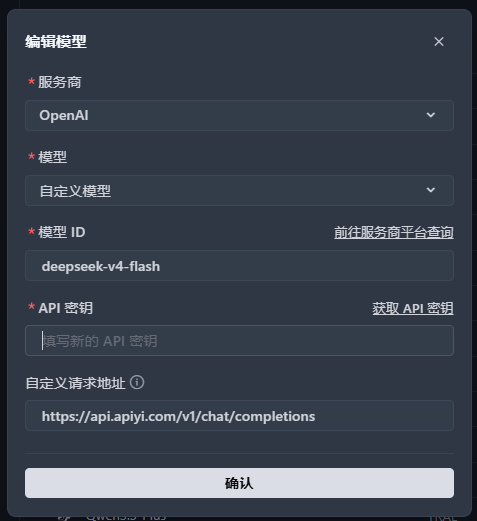
Models this entry is for:
gpt-5.1 / gpt-5.2, Gemini, DeepSeek, Doubao, Qwen and other models unrestricted on the chat protocol. gpt-5.4 and newer GPT models (5.5 / 5.6 series) do NOT work here — see “Model compatibility” above; use the Codex app for those.Step 5: Add the Anthropic-Protocol Entry (Claude family)
If you also want Claude Opus 4.6 / Sonnet 4.6 / Haiku 4.5, add a second provider entry: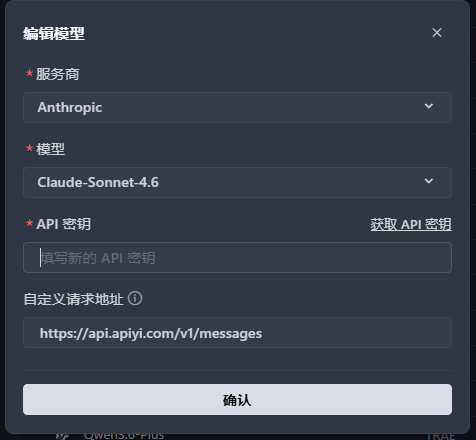
Two protocols, two paths: OpenAI protocol goes through
/v1/chat/completions; Anthropic protocol goes through /v1/messages. APIYI hosts both endpoints, so the same token can be bound to both Trae provider entries simultaneously without conflict.Step 6: Switch Models and Start Coding
Back in the editor, click the model dropdown at the top — both providers and all of their models will appear. Pick one and start chatting or enter Builder mode.Recommended Model Lineups
Daily Coding (best value)
Claude Sonnet 4.6 (Anthropic) + GPT-5.1 (OpenAI)Sonnet 4.6 has top-tier coding ability at great pricing; GPT-5.1 is faster for casual Chat
Complex Architecture (flagship)
Claude Opus 4.6 (Anthropic)Best for large refactors, cross-file analysis, architectural decisions — pair with Builder mode
Deep Reasoning
Claude Sonnet 4.6 Thinking / GPT-5.1 ThinkingForces chain-of-thought — great for algorithms, logic puzzles, security review
Cost-Optimized (CN models)
DeepSeek V4 / Doubao 1.5 Pro / Qwen3 CoderRoutes through OpenAI protocol — low per-token cost and natural Chinese output
Why the latest GPT models (5.4 and newer) are missing from this list: Trae doesn’t support the Responses protocol, so
gpt-5.4 / gpt-5.5 / gpt-5.6 all fail with 400 in Builder / Chat tool-calling scenarios (see “Model compatibility” above). Use the Codex app for those; for agent tasks inside Trae, the Claude family (native Anthropic protocol) is the most reliable choice.See the full model list and coding recommendations
APIYI exposes 400+ models behind a unified gateway. The model recommendations page is kept up to date with latest performance and pricing comparisons.
Pro Tips
1
Keep both provider entries
Add both the OpenAI and Anthropic entries — switching GPT/Gemini ↔ Claude no longer requires editing the baseURL.
2
Can't find the latest model in the dropdown?
Trae’s built-in model presets lag behind APIYI’s actual supply. Pick “Custom model” and type the ID by hand — refer to the APIYI console or the model recommendations page for the canonical ID.
3
Prefer Claude for Builder mode
Claude (especially Sonnet 4.6 / Opus 4.6) is meaningfully more reliable at instruction following and multi-turn tool calls in agent workflows.
4
Add the -thinking suffix for hard tasks
Append
-thinking to the model ID (e.g. claude-sonnet-4-6-thinking) to force chain-of-thought. Markedly reduces hallucinations on architecture decisions and security audits in Builder mode.5
Split tokens by group
Create one ClaudeCode-group token (95% pricing) specifically for the Anthropic entry, and a Default-group token for GPT/Gemini/DeepSeek. Cleaner billing and quota visibility.
FAQ
TRAE CN vs international TRAE — any difference for APIYI integration?
TRAE CN vs international TRAE — any difference for APIYI integration?
No difference — both versions support Custom Model and both accept adding OpenAI and Anthropic provider entries simultaneously. The only real difference is the built-in preset models (CN focuses on Doubao/DeepSeek; international focuses on GPT/Claude/Gemini).Recommendation: pick TRAE CN (
trae.cn) if you’re in mainland China, pick international TRAE (trae.ai) for global teams or when you need the overseas preset models.Why does the baseURL need to go all the way to /v1/chat/completions?
Why does the baseURL need to go all the way to /v1/chat/completions?
Starting from v3.3.51, Trae changed how the custom-model baseURL is parsed — it’s now used verbatim in the request without auto-appending
/chat/completions.Correct:- OpenAI protocol:
https://api.apiyi.com/v1/chat/completions - Anthropic protocol:
https://api.apiyi.com/v1/messages
- ❌
https://api.apiyi.com - ❌
https://api.apiyi.com/v1
Can I use 'Custom Model' under the Anthropic provider to type any model ID?
Can I use 'Custom Model' under the Anthropic provider to type any model ID?
Yes. The Anthropic provider entry also offers a “Custom Model” option — type IDs like
claude-opus-4-6 / claude-sonnet-4-6-thinking / claude-haiku-4-5-20251001 directly. APIYI’s /v1/messages endpoint is fully compatible with official model IDs.How do I get the 5% Claude discount?
How do I get the 5% Claude discount?
When creating a token at
api.apiyi.com/token, pick the ClaudeCode group — Claude calls automatically get 5% off, stackable with the 10%-20% top-up bonus.Paste this ClaudeCode-group token into the Anthropic provider entry in Trae and the discount applies automatically.Why don't I see GPT-5.1 / Claude 4.6 / latest models in Trae?
Why don't I see GPT-5.1 / Claude 4.6 / latest models in Trae?
Trae’s preset list trails actual upstream availability. Best practice: pick “Custom model” and type the ID by hand — whatever APIYI’s backend supports will work, no need to wait for the Trae client to update its presets.
Builder mode keeps hanging / tool calls fail
Builder mode keeps hanging / tool calls fail
- Prefer Claude Sonnet 4.6 or Opus 4.6: they’re notably more reliable in tool-call workflows
- Avoid small non-reasoning models: DeepSeek-Chat / smaller Qwen variants can loop in Builder mode — switch to the
thinkingvariant - Watch context length: for large multi-file changes switch to Opus 4.6 (200K context)
- Check APIYI live status: occasional upstream wobbles affect all clients — confirm it’s not a channel issue
gpt-5.6 / gpt-5.5 / gpt-5.4 fails with 400: Function tools with reasoning_effort are not supported?
gpt-5.6 / gpt-5.5 / gpt-5.4 fails with 400: Function tools with reasoning_effort are not supported?
The full error usually reads:
Function tools with reasoning_effort are not supported for gpt-5.6-sol in /v1/chat/completions. To use function tools, use /v1/responses or set reasoning_effort to 'none'. (400, invalid_request_error).This is an official OpenAI restriction introduced with the GPT-5.4 series — not an APIYI channel issue: on the /v1/chat/completions endpoint, function tools cannot be combined with a reasoning_effort other than none. OpenAI offers two ways out: switch to the /v1/responses endpoint, or explicitly set reasoning_effort to none (giving up reasoning). Full diagnosis and migration steps: Endpoint & Migration.Trae can do neither: custom models only support /v1/chat/completions (OpenAI protocol) and /v1/messages (Anthropic protocol) — no Responses API — and there is no reasoning_effort setting. Builder / Chat mode always sends tool definitions, so there is no client-side workaround. JetBrains AI Assistant, opencode, and other clients hit the same wall on GPT-5.4+.What to do:- Switch to an unaffected model in Trae:
gpt-5.1/gpt-5.2(OpenAI protocol), or the Claude family (Anthropic protocol via/v1/messages), Gemini / DeepSeek, etc. - Stay inside Trae: install the Roo Code plugin in Trae — its “OpenAI” provider uses
/v1/responses, and we verified tool calls work inside Trae, effectively adding a Responses channel. Note Roo Code is discontinued and its preset model list stops atgpt-5.4 - If you need gpt-5.5 / 5.6 reasoning together with tool calls: use a client that supports the Responses API — Codex app / CLI or opencode; see the full client support table in the OpenAI Responses API Native Guide
What about Trae's telemetry / data upload?
What about Trae's telemetry / data upload?
Trae is a ByteDance client and uploads telemetry and conversation data per its official privacy policy. If you’re sensitive about client-side telemetry, consider:
- Allow-listing at the corporate egress
- Redacting sensitive snippets before entering Builder mode
- Choosing open-source / auditable clients like Claude Code or Cline as an alternative
Trae vs Cursor / Cline / Claude Code — how do I pick?
Trae vs Cursor / Cline / Claude Code — how do I pick?
See each integration guide: Cursor · Cline · Claude Code · Codex CLI
How to debug 401 / 403 errors?
How to debug 401 / 403 errors?
- Verify the API key starts with
sk-and has no extra whitespace - Verify the baseURL is correct — especially the trailing path (
/v1/chat/completionsvs/v1/messages) - In the APIYI console, check the token is enabled and the target model is bound to the token’s group
- Insufficient balance can also surface as 401 — double-check the account balance
Related Resources
Model Recommendations
Performance comparison and coding-scenario picks across 400+ models
APIYI Console
Create tokens, view usage, manage groups
Cursor Integration
Setup guide for another mainstream AI IDE
Cline Plugin
Full-featured agent inside VS Code
Codex App Integration
Native Responses protocol — the right home for the latest GPT series (5.4+)
Need more help? Visit
api.apiyi.com or join the official community for technical support.