

Image editing: edit a reference image or fuse two images
curl --request POST \
  --url https://api.apiyi.com/v1/images/edits \
  --header 'Authorization: Bearer <token>' \
  --header 'Content-Type: multipart/form-data' \
  --form model=MAI-Image-2.6-Flash \
  --form 'prompt=Change the teapot to a deep cobalt blue glaze, keep everything else identical' \
  --form image='@example-file' \
  --form image2='@example-file'
import requests
url = "https://api.apiyi.com/v1/images/edits"
files = {
"image": ("example-file", open("example-file", "rb")),
"image2": ("example-file", open("example-file", "rb"))
}
payload = {
"model": "MAI-Image-2.6-Flash",
"prompt": "Change the teapot to a deep cobalt blue glaze, keep everything else identical"
}
headers = {"Authorization": "Bearer <token>"}
response = requests.post(url, data=payload, files=files, headers=headers)
print(response.text)const form = new FormData();
form.append('model', 'MAI-Image-2.6-Flash');
form.append('prompt', 'Change the teapot to a deep cobalt blue glaze, keep everything else identical');
form.append('image', '<string>');
form.append('image2', '{
"fileName": "example-file"
}');
const options = {method: 'POST', headers: {Authorization: 'Bearer <token>'}};
options.body = form;
fetch('https://api.apiyi.com/v1/images/edits', options)
.then(res => res.json())
.then(res => console.log(res))
.catch(err => console.error(err));<?php
$curl = curl_init();
curl_setopt_array($curl, [
CURLOPT_URL => "https://api.apiyi.com/v1/images/edits",
CURLOPT_RETURNTRANSFER => true,
CURLOPT_ENCODING => "",
CURLOPT_MAXREDIRS => 10,
CURLOPT_TIMEOUT => 30,
CURLOPT_HTTP_VERSION => CURL_HTTP_VERSION_1_1,
CURLOPT_CUSTOMREQUEST => "POST",
CURLOPT_POSTFIELDS => "-----011000010111000001101001\r\nContent-Disposition: form-data; name=\"model\"\r\n\r\nMAI-Image-2.6-Flash\r\n-----011000010111000001101001\r\nContent-Disposition: form-data; name=\"prompt\"\r\n\r\nChange the teapot to a deep cobalt blue glaze, keep everything else identical\r\n-----011000010111000001101001\r\nContent-Disposition: form-data; name=\"image\"; filename=\"example-file\"\r\nContent-Type: application/octet-stream\r\n\r\n<string>\r\n-----011000010111000001101001\r\nContent-Disposition: form-data; name=\"image2\"; filename=\"example-file\"\r\nContent-Type: application/octet-stream\r\n\r\n{\r\n \"fileName\": \"example-file\"\r\n}\r\n-----011000010111000001101001--",
CURLOPT_HTTPHEADER => [
"Authorization: Bearer <token>",
"Content-Type: multipart/form-data"
],
]);
$response = curl_exec($curl);
$err = curl_error($curl);
curl_close($curl);
if ($err) {
echo "cURL Error #:" . $err;
} else {
echo $response;
}package main
import (
"fmt"
"strings"
"net/http"
"io"
)
func main() {
url := "https://api.apiyi.com/v1/images/edits"
payload := strings.NewReader("-----011000010111000001101001\r\nContent-Disposition: form-data; name=\"model\"\r\n\r\nMAI-Image-2.6-Flash\r\n-----011000010111000001101001\r\nContent-Disposition: form-data; name=\"prompt\"\r\n\r\nChange the teapot to a deep cobalt blue glaze, keep everything else identical\r\n-----011000010111000001101001\r\nContent-Disposition: form-data; name=\"image\"; filename=\"example-file\"\r\nContent-Type: application/octet-stream\r\n\r\n<string>\r\n-----011000010111000001101001\r\nContent-Disposition: form-data; name=\"image2\"; filename=\"example-file\"\r\nContent-Type: application/octet-stream\r\n\r\n{\r\n \"fileName\": \"example-file\"\r\n}\r\n-----011000010111000001101001--")
req, _ := http.NewRequest("POST", url, payload)
req.Header.Add("Authorization", "Bearer <token>")
res, _ := http.DefaultClient.Do(req)
defer res.Body.Close()
body, _ := io.ReadAll(res.Body)
fmt.Println(string(body))
}HttpResponse<String> response = Unirest.post("https://api.apiyi.com/v1/images/edits")
.header("Authorization", "Bearer <token>")
.body("-----011000010111000001101001\r\nContent-Disposition: form-data; name=\"model\"\r\n\r\nMAI-Image-2.6-Flash\r\n-----011000010111000001101001\r\nContent-Disposition: form-data; name=\"prompt\"\r\n\r\nChange the teapot to a deep cobalt blue glaze, keep everything else identical\r\n-----011000010111000001101001\r\nContent-Disposition: form-data; name=\"image\"; filename=\"example-file\"\r\nContent-Type: application/octet-stream\r\n\r\n<string>\r\n-----011000010111000001101001\r\nContent-Disposition: form-data; name=\"image2\"; filename=\"example-file\"\r\nContent-Type: application/octet-stream\r\n\r\n{\r\n \"fileName\": \"example-file\"\r\n}\r\n-----011000010111000001101001--")
.asString();require 'uri'
require 'net/http'
url = URI("https://api.apiyi.com/v1/images/edits")
http = Net::HTTP.new(url.host, url.port)
http.use_ssl = true
request = Net::HTTP::Post.new(url)
request["Authorization"] = 'Bearer <token>'
request.body = "-----011000010111000001101001\r\nContent-Disposition: form-data; name=\"model\"\r\n\r\nMAI-Image-2.6-Flash\r\n-----011000010111000001101001\r\nContent-Disposition: form-data; name=\"prompt\"\r\n\r\nChange the teapot to a deep cobalt blue glaze, keep everything else identical\r\n-----011000010111000001101001\r\nContent-Disposition: form-data; name=\"image\"; filename=\"example-file\"\r\nContent-Type: application/octet-stream\r\n\r\n<string>\r\n-----011000010111000001101001\r\nContent-Disposition: form-data; name=\"image2\"; filename=\"example-file\"\r\nContent-Type: application/octet-stream\r\n\r\n{\r\n \"fileName\": \"example-file\"\r\n}\r\n-----011000010111000001101001--"
response = http.request(request)
puts response.read_body{
"created": 1791000788,
"data": [
{
"b64_json": "<string>"
}
],
"usage": {
"prompt_tokens": 1000,
"total_tokens": 1000
}
}MAI-Image 2.6画像生成・編集
画像編集 API リファレンス
MAI-Image 2.6 画像編集 API リファレンス(ライブ Playground 付き)— 参照画像と指示のアップロード、image + image2 による2画像合成、multipart/form-data ファイルアップロードのみに対応
POST
/
v1
/
images
/
edits
Image editing: edit a reference image or fuse two images
curl --request POST \
  --url https://api.apiyi.com/v1/images/edits \
  --header 'Authorization: Bearer <token>' \
  --header 'Content-Type: multipart/form-data' \
  --form model=MAI-Image-2.6-Flash \
  --form 'prompt=Change the teapot to a deep cobalt blue glaze, keep everything else identical' \
  --form image='@example-file' \
  --form image2='@example-file'
import requests
url = "https://api.apiyi.com/v1/images/edits"
files = {
"image": ("example-file", open("example-file", "rb")),
"image2": ("example-file", open("example-file", "rb"))
}
payload = {
"model": "MAI-Image-2.6-Flash",
"prompt": "Change the teapot to a deep cobalt blue glaze, keep everything else identical"
}
headers = {"Authorization": "Bearer <token>"}
response = requests.post(url, data=payload, files=files, headers=headers)
print(response.text)const form = new FormData();
form.append('model', 'MAI-Image-2.6-Flash');
form.append('prompt', 'Change the teapot to a deep cobalt blue glaze, keep everything else identical');
form.append('image', '<string>');
form.append('image2', '{
"fileName": "example-file"
}');
const options = {method: 'POST', headers: {Authorization: 'Bearer <token>'}};
options.body = form;
fetch('https://api.apiyi.com/v1/images/edits', options)
.then(res => res.json())
.then(res => console.log(res))
.catch(err => console.error(err));<?php
$curl = curl_init();
curl_setopt_array($curl, [
CURLOPT_URL => "https://api.apiyi.com/v1/images/edits",
CURLOPT_RETURNTRANSFER => true,
CURLOPT_ENCODING => "",
CURLOPT_MAXREDIRS => 10,
CURLOPT_TIMEOUT => 30,
CURLOPT_HTTP_VERSION => CURL_HTTP_VERSION_1_1,
CURLOPT_CUSTOMREQUEST => "POST",
CURLOPT_POSTFIELDS => "-----011000010111000001101001\r\nContent-Disposition: form-data; name=\"model\"\r\n\r\nMAI-Image-2.6-Flash\r\n-----011000010111000001101001\r\nContent-Disposition: form-data; name=\"prompt\"\r\n\r\nChange the teapot to a deep cobalt blue glaze, keep everything else identical\r\n-----011000010111000001101001\r\nContent-Disposition: form-data; name=\"image\"; filename=\"example-file\"\r\nContent-Type: application/octet-stream\r\n\r\n<string>\r\n-----011000010111000001101001\r\nContent-Disposition: form-data; name=\"image2\"; filename=\"example-file\"\r\nContent-Type: application/octet-stream\r\n\r\n{\r\n \"fileName\": \"example-file\"\r\n}\r\n-----011000010111000001101001--",
CURLOPT_HTTPHEADER => [
"Authorization: Bearer <token>",
"Content-Type: multipart/form-data"
],
]);
$response = curl_exec($curl);
$err = curl_error($curl);
curl_close($curl);
if ($err) {
echo "cURL Error #:" . $err;
} else {
echo $response;
}package main
import (
"fmt"
"strings"
"net/http"
"io"
)
func main() {
url := "https://api.apiyi.com/v1/images/edits"
payload := strings.NewReader("-----011000010111000001101001\r\nContent-Disposition: form-data; name=\"model\"\r\n\r\nMAI-Image-2.6-Flash\r\n-----011000010111000001101001\r\nContent-Disposition: form-data; name=\"prompt\"\r\n\r\nChange the teapot to a deep cobalt blue glaze, keep everything else identical\r\n-----011000010111000001101001\r\nContent-Disposition: form-data; name=\"image\"; filename=\"example-file\"\r\nContent-Type: application/octet-stream\r\n\r\n<string>\r\n-----011000010111000001101001\r\nContent-Disposition: form-data; name=\"image2\"; filename=\"example-file\"\r\nContent-Type: application/octet-stream\r\n\r\n{\r\n \"fileName\": \"example-file\"\r\n}\r\n-----011000010111000001101001--")
req, _ := http.NewRequest("POST", url, payload)
req.Header.Add("Authorization", "Bearer <token>")
res, _ := http.DefaultClient.Do(req)
defer res.Body.Close()
body, _ := io.ReadAll(res.Body)
fmt.Println(string(body))
}HttpResponse<String> response = Unirest.post("https://api.apiyi.com/v1/images/edits")
.header("Authorization", "Bearer <token>")
.body("-----011000010111000001101001\r\nContent-Disposition: form-data; name=\"model\"\r\n\r\nMAI-Image-2.6-Flash\r\n-----011000010111000001101001\r\nContent-Disposition: form-data; name=\"prompt\"\r\n\r\nChange the teapot to a deep cobalt blue glaze, keep everything else identical\r\n-----011000010111000001101001\r\nContent-Disposition: form-data; name=\"image\"; filename=\"example-file\"\r\nContent-Type: application/octet-stream\r\n\r\n<string>\r\n-----011000010111000001101001\r\nContent-Disposition: form-data; name=\"image2\"; filename=\"example-file\"\r\nContent-Type: application/octet-stream\r\n\r\n{\r\n \"fileName\": \"example-file\"\r\n}\r\n-----011000010111000001101001--")
.asString();require 'uri'
require 'net/http'
url = URI("https://api.apiyi.com/v1/images/edits")
http = Net::HTTP.new(url.host, url.port)
http.use_ssl = true
request = Net::HTTP::Post.new(url)
request["Authorization"] = 'Bearer <token>'
request.body = "-----011000010111000001101001\r\nContent-Disposition: form-data; name=\"model\"\r\n\r\nMAI-Image-2.6-Flash\r\n-----011000010111000001101001\r\nContent-Disposition: form-data; name=\"prompt\"\r\n\r\nChange the teapot to a deep cobalt blue glaze, keep everything else identical\r\n-----011000010111000001101001\r\nContent-Disposition: form-data; name=\"image\"; filename=\"example-file\"\r\nContent-Type: application/octet-stream\r\n\r\n<string>\r\n-----011000010111000001101001\r\nContent-Disposition: form-data; name=\"image2\"; filename=\"example-file\"\r\nContent-Type: application/octet-stream\r\n\r\n{\r\n \"fileName\": \"example-file\"\r\n}\r\n-----011000010111000001101001--"
response = http.request(request)
puts response.read_body{
"created": 1791000788,
"data": [
{
"b64_json": "<string>"
}
],
"usage": {
"prompt_tokens": 1000,
"total_tokens": 1000
}
}右側のインタラクティブなPlaygroundでは、ローカル画像のアップロードに対応しています。Authorization にAPIキーを入力し(形式:
Bearer sk-xxx)、image ファイルを選択し、prompt と model を入力して送信してください。🔴 このエンドポイントは 入力としての画像URLはサポートされていません。 URLのみをお持ちの場合は、まずサーバー側でダウンロードしてからファイルをアップロードしてください。ファイルアップロードには画像のホスティングは不要です。ローカルファイルをそのまま送信してください。
multipart/form-data ファイルのアップロードのみを受け付けます/v1/images/edits に(image をURL、データURI、または生の base64 として)JSONを送信すると、400 が返されます:request Content-Type isn't multipart/form-data
ユースケース: このページは参照画像の編集や2枚の画像の合成を対象としています。テキストのみから生成する場合は、Text-to-Image APIをご利用ください。
⚠️ 2枚の画像を使用する場合、フィールド名は
image + image2 であり、image[] ではありません2枚の参照画像を使用する場合、最初のフィールド名を image、2番目を image2 と指定してください。image[] の重複、image の重複、または mask フィールドの追加は、すべて 400 File must be attached in a form field with a name starting with 'image' を返します。これは、OpenAI SDKの複数画像フォーム client.images.edit(image=[f1, f2]) が動作しないことを意味します(image[] が送信されるため)。SDKを使用した単一画像の編集は問題なく動作します。テキストからの画像生成と同じ禁止パラメータ:
response_format、seed、または negative_prompt は送信しないでください(400が返されます)。レスポンスは常に data[0].b64_json(PNG)です。コード例
Python(OpenAI SDK・単一画像)
from openai import OpenAI
import base64

client = OpenAI(
    api_key="sk-your-api-key",
    base_url="https://api.apiyi.com/v1",
    timeout=180.0
)

# images.edit uses a multipart file upload under the hood; do not pass response_format
resp = client.images.edit(
    model="MAI-Image-2.6-Flash",
    image=open("teaset.jpg", "rb"),
    prompt="Change the teapot to a deep cobalt blue glaze, keep everything else identical"
)

with open("edited.png", "wb") as f:
    f.write(base64.b64decode(resp.data[0].b64_json))
Python(requests・単一画像)
import base64
import os
import requests

# Pass the file via files=; requests sets multipart/form-data and the boundary for you
# Do not use json=, and do not set Content-Type by hand
with open("teaset.jpg", "rb") as fp:
    response = requests.post(
        "https://api.apiyi.com/v1/images/edits",
        headers={"Authorization": f"Bearer {os.environ['APIYI_API_KEY']}"},
        data={
            "model": "MAI-Image-2.6",
            "prompt": "Change the teapot to a deep cobalt blue glaze, keep everything else exactly the same"
        },
        files={"image": ("teaset.jpg", fp, "image/jpeg")},
        timeout=180
    )
response.raise_for_status()

with open("edited.png", "wb") as f:
    f.write(base64.b64decode(response.json()["data"][0]["b64_json"]))
Python(2画像合成・image + image2)
import base64
import os
import requests

files = {
    "image": ("scene.jpg", open("scene.jpg", "rb"), "image/jpeg"),     # image 1
    "image2": ("person.jpg", open("person.jpg", "rb"), "image/jpeg"),  # image 2: field name is image2
}

response = requests.post(
    "https://api.apiyi.com/v1/images/edits",
    headers={"Authorization": f"Bearer {os.environ['APIYI_API_KEY']}"},
    data={
        "model": "MAI-Image-2.6",
        "prompt": "Have the person from image 2 sit at the table in image 1, arranging the tea set, natural light, photorealistic"
    },
    files=files,
    timeout=180
)
response.raise_for_status()

with open("fused.png", "wb") as f:
    f.write(base64.b64decode(response.json()["data"][0]["b64_json"]))
cURL
# Single-image edit: -F means multipart/form-data, @ uploads a local file
curl -X POST "https://api.apiyi.com/v1/images/edits" \
  -H "Authorization: Bearer sk-your-api-key" \
  -F "model=MAI-Image-2.6-Flash" \
  -F "prompt=Change the teapot to a deep cobalt blue glaze, keep everything else identical" \
  -F "[email protected]" \
  | python3 -c "import sys,json,base64; open('edited.png','wb').write(base64.b64decode(json.load(sys.stdin)['data'][0]['b64_json']))"
# Two-image fusion with the canvas changed to 1536×1024
curl -X POST "https://api.apiyi.com/v1/images/edits" \
  -H "Authorization: Bearer sk-your-api-key" \
  -F "model=MAI-Image-2.6" \
  -F "prompt=Have the person from image 2 sit at the table in image 1, arranging the tea set" \
  -F "width=1536" \
  -F "height=1024" \
  -F "[email protected]" \
  -F "[email protected]"
Node.js(fetch + FormData)
import fs from 'node:fs';

const form = new FormData();
form.append('model', 'MAI-Image-2.6-Flash');
form.append('prompt', 'Replace the background with a snowy pine forest at night, keep the person unchanged');
form.append('image', new Blob([fs.readFileSync('./photo.jpg')]), 'photo.jpg');
// Second reference image: form.append('image2', ...)

const resp = await fetch('https://api.apiyi.com/v1/images/edits', {
    method: 'POST',
    // Do not set Content-Type by hand; FormData adds the boundary
    headers: { 'Authorization': `Bearer ${process.env.APIYI_API_KEY}` },
    body: form,
    signal: AbortSignal.timeout(120000)
});

const data = await resp.json();
fs.writeFileSync('edited.png', Buffer.from(data.data[0].b64_json, 'base64'));
パラメータリファレンス
| パラメータ | 型 | 必須 | デフォルト値 | 説明 |
|---|---|---|---|---|
model | string | ✅ | — | MAI-Image-2.6($0.12/画像)または MAI-Image-2.6-Flash($0.06/画像)、大文字と小文字を区別 |
prompt | string | ✅ | — | 編集指示。変更する内容と、それ以外はそのまま維持することを明記します |
image | file | ✅ | — | 参照画像ファイル(1枚目) |
image2 | file | ❌ | — | 2枚目の参照画像(2枚の画像合成用) |
width / height | integer | ❌ | 元画像のアスペクト比に従う | 出力サイズ。テキストからの画像生成と同じルールが適用されます。アスペクト比を変更すると画像が再構成されます |
n | integer | ❌ | 1 | 画像の枚数。このエンドポイントで有効で、画像ごとに課金されます |
mask | — | — | — | 非対応。400を返します |
response_formatseednegative_prompt | — | — | — | 400を返します |
省略時の出力サイズ: 出力は元画像のアスペクト比に従い、16の倍数に調整されます(例: 1344×756 の入力は 1360×768 になります)。構図を維持したい部分編集の場合は、
width / height を送信しないでください。編集結果とプロンプティング
編集エンドポイントは、元の構図、色、ディテールを維持し、promptで指定された内容のみを変更します: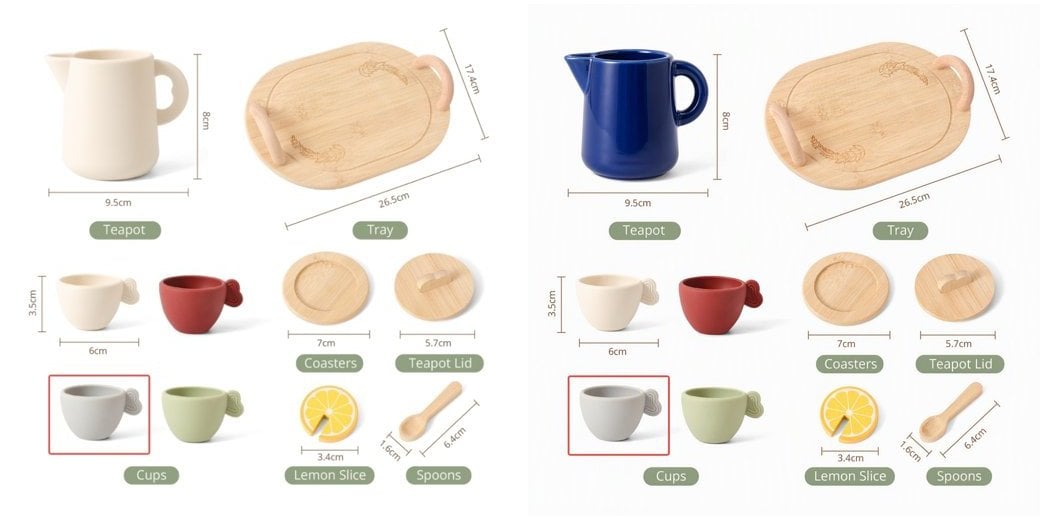
| prompt | 結果 |
|---|---|
✅ Change the teapot to a deep cobalt blue glaze, keep everything else exactly the same | ティーポットの色のみが変更され、ラベルやその他のオブジェクトはピクセル単位で同一のまま維持されます |
✅ Turn this photo into a watercolor painting, keep the composition | スタイルが描き直され、構図は維持されます |
✅ Have the person from image 2 sit at the table in image 1 | 2画像の融合:画像1がシーンを提供し、画像2が人物を提供します |
⚠️ Make it look better | 曖昧すぎます。変更の範囲が予測できません |
2画像の融合を行う場合は、prompt内で
image / image2を「image 1 / image 2」として参照してください。テストでは人物の同一性の再現度は中程度にとどまる(顔の特徴が変化する可能性があります)ため、ポートレートの一貫性が重要な場合は、まず少量のバッチで検証してください。レスポンス形式
{
  "created": 1791000788,
  "data": [
    {
      "b64_json": "iVBORw0KGgoAAAANSUhEUgAABAAAAAQACAIAAADwf7zU..."
    }
  ],
  "usage": {
    "prompt_tokens": 1000,
    "total_tokens": 1000,
    "input_tokens": 1000,
    "output_tokens": 0
  }
}
レスポンスフィールド
b64_jsonはdata:プレフィックスのないプレーンな base64 であり、PNG にデコードされます。n > 1の場合、data配列には複数のアイテムが含まれます。data[0]のみを取得しないようにしてください。urlおよびrevised_promptは返されません。
usage で課金の照合を行わないでください:プレースホルダーが保持されています(prompt_tokens は常に画像数 × 1000 となります)。画像編集のコストは Text-to-Image と同一であり、画像単位で課金されます。APIYI コンソールの請求明細が正式なものとなります。承認
API key from the APIYI console
ボディ
multipart/form-data
Model ID (case-sensitive)
利用可能なオプション:
MAI-Image-2.6-Flash, MAI-Image-2.6 Edit instruction. State what to change and that everything else stays the same
例:
"Change the teapot to a deep cobalt blue glaze, keep everything else identical"
Reference image file (the first one, "image 1" in the prompt). png / jpg / webp
Optional second reference image ("image 2" in the prompt), for two-image fusion
Optional output width. Same rules as text-to-image: each side ≥ 768, width × height ≤ 2,359,296, sent together with height
必須範囲:
x >= 768Optional output height, same rules as width
必須範囲:
x >= 768Number of images. Works on this endpoint, billed per image
必須範囲:
x >= 1例:
1
このページは役に立ちましたか?