

Overview
This page covers OpenAI’s GPT-Image 2.5 / 2 series via APIYI’s official relay:gpt-image-2.5-flare (speed-first), gpt-image-2.5-sunburst (quality- and editing-precision-first) and the previous-generation gpt-image-2. The 2.5 models shipped on 2026-09-08 with higher quality than gpt-image-2, more precise editing and two new quality tiers (xhigh / max), at exactly the same price and parameters as gpt-image-2. Shared across the series: any valid resolution (incl. 2K / 3840×2160 4K), auto high-fidelity on reference images, per-token billing. APIYI’s gateway is fully compatible with the OpenAI Images API — point the official OpenAI SDK’s base_url here for zero-code direct connection.
xhigh / max quality tiers in 2.5. Best for production scenarios that need precise size/quality control, must match the OpenAI official API exactly, or require 4K output; default text-to-image to gpt-image-2.5-flare and edits to gpt-image-2.5-sunburst.Text-to-Image API
/v1/images/generations — generate images from text prompts with size / quality / output_format control.Image Edit API
/v1/images/edits — multipart upload of reference images (up to 16) + edit/fusion instructions, with mask inpainting support.Let an AI Agent Do the Integration
Copy this prompt and paste it into Codex / Claude Code / Cursor
It first fetches the plain-text version of this page (append .md to any docs URL), then writes code in your project's own stack — the four highest-frequency pitfalls (timeout, base64 rendering, upload compression, quality tier) are already baked into the requirements.
Integrate / troubleshoot GPT-Image 2.5 series text-to-image and image editing in this project: use
gpt-image-2.5-flarefor text-to-image andgpt-image-2.5-sunburstfor imag …Read the docs before you touch code: fetch https://docs.apiyi.com/en/api-capabilities/gpt-image-2/overview.md for the plain-text version of this page. For finer parameter detail, append
.mdto the …
- Timeout: raise the client timeout to 360 seconds. The image APIs are synchronous — there is no task ID, so if the client disconnects the result is lost …
7 requirements in total. Use the button below to copy the full prompt.
What this prompt saves you from
What this prompt saves you from
Why Choose APIYI’s GPT-image-2 Official Relay?
Built on OpenAI’s official channel, deeply optimized for enterprise production workloads across reliability, cost, and integration experience:Official Channel · Same as Official
No Concurrency Limits
Same Price + Up to 15% Off
Global Zero-Barrier Access
api.apiyi.com from domestic data centers, home broadband, or overseas nodes — stable latency, no cross-border re-architecture.Full Model Lineup
gpt-image-2-all ($0.025/image flat), or the cost-leader Nano Banana Pro / 2 — mix and match per scenario.Professional Enterprise Support
Model Selection: flare / sunburst / gpt-image-2
Since 2026-09-08 this doc group covers three OpenAI GPT-Image 2.5 / 2 models. All three share the same price, parameters, groups and endpoints; switching is a one-fieldmodel change:
Core Features
Any Resolution (incl. 4K)
Auto High-Fidelity
input_fidelity (will error).20-30% Cheaper
Chinese + Text Rendering
high quality.Multi-Image Fusion (up to 16)
image[] array accepts up to 16 reference images. Use “image 1 / image 2 / image 3” in the prompt to reference them by upload order.Mask Inpainting
Multiple Output Formats
output_compression for jpeg/webp to control file size.OpenAI SDK Direct
base_url to https://api.apiyi.com/v1 and call directly with the official OpenAI SDK — zero-code migration.Pricing
APIYI’sgpt-image-2.5-flare / gpt-image-2.5-sunburst / gpt-image-2 (Default group) share one price list that matches OpenAI’s official rates exactly — the discount comes from our top-up bonus instead: top up $100 and get a 10% bonus, up to 20%. 📖 Learn about top-up promotions.
Token rates (same as OpenAI’s list)
Token-metered — one request = input text + input image + output image tokens:Per-image cost reference (official table, gpt-image-2)
Typical per-image cost forgpt-image-2 at 1K preset sizes (the 2.5 models use different token counts for the same tier names; see the next section):
- Unit prices match OpenAI’s list; stack the top-up bonus (10% on $100, up to 20%) and your effective cost lands below going direct
- 2K / 4K has no fixed per-image price — billed by actual input + output tokens
- Edit requests have noticeably higher input tokens than text-to-image due to forced high-fidelity
- Streaming (
stream: true+partial_images: N) costs an extra 100 output image tokens per partial - Compared to
gpt-image-1.5at the same size and quality,gpt-image-2is about 20-30% cheaper
Quality tiers and measured cost on the 2.5 models (measured 2026-09-09)
The same tier name does not mean the same token count on 2.5 and gpt-image-2: 2.5 re-grades the quality ladder.low is unchanged, 2.5’s high equals gpt-image-2’s medium, and 2.5’s max is what equals gpt-image-2’s high. The table shows usage.output_tokens and the output cost at $30 / 1M for 1024×1024 text-to-image, same prompt, one serial run each (flare and sunburst produce identical token counts per tier; only latency differs):
How Multiple Input Images Affect the Price (verified July 2026)
A common customer question: “Is each reference image a flat fee, or do bigger images cost more tokens?” The answer is both matter, and image count adds up strictly linearly.gpt-image-2 processes every input image at forced high fidelity (input_fidelity is not adjustable — passing it returns 400), and each reference image is converted to image tokens based on its dimensions and aspect ratio. Controlled measurements (edits endpoint, 2026-07-15):
- Count is strictly linear: N reference images ≈ N × single-image tokens. 16 reference images at 1024² ≈ 16384 tokens ≈ $0.13 — the same order of magnitude as one
highoutput ($0.211), so it’s no longer negligible in multi-image fusion. - Size has both a floor and a cap: square images at or below 1024² are all billed at 1024 tokens (shrinking to 512 saves nothing); 2048² and 4096² both cost 1521 tokens (oversized images are downscaled before conversion — capped). A single reference image lands roughly in the 800-1600 token range, aspect ratio included.
- Tokens are determined by pixel dimensions, not file size: compressing to 1.5MB helps upload stability and speed but does not reduce image tokens; conversely, uploading a 50MB original won’t blow up your bill either (the cap applies).
2K/4K cost estimate (pixel-ratio extrapolation, ⚠️ not an official fixed price)
OpenAI only publishes a fixed per-image price table for 1K sizes — there’s no official per-size pricing for 2K/4K. The table below is APIYI’s own extrapolation from the 1K official rates above, scaled by pixel count, for budgeting purposes only:How this differs from SaaS subscription / credit-based billing
Image-generation tool vendors typically bill in one of two ways:- Monthly subscription plans: a flat monthly fee for an “N images per month” quota. That quota is priced around an oversell assumption — the vendor bakes in the expectation that most users won’t use their full allowance, so the advertised “cost per image” is just the plan price divided by the quota cap, not what any single image actually costs to generate for you.
- Credit / point-based metering: different quality/size jobs get converted into opaque “credits.” This is really usage-based billing underneath, just repackaged behind a credit unit that hides the real token consumption.
How to check the real token count for each call
Both/v1/images/generations and /v1/images/edits return a usage field, and image input tokens and text input tokens come back as separate fields — no estimating needed, just read them for exact per-call cost. Here’s the full usage object from a real edit request with one reference image (captured live):
Group Setup
All three GPT-Image 2.5 / 2 models share the same official-relay groups. Switch in dashboard → Token Settings → Group:image2Enterprise to ride out the spike.
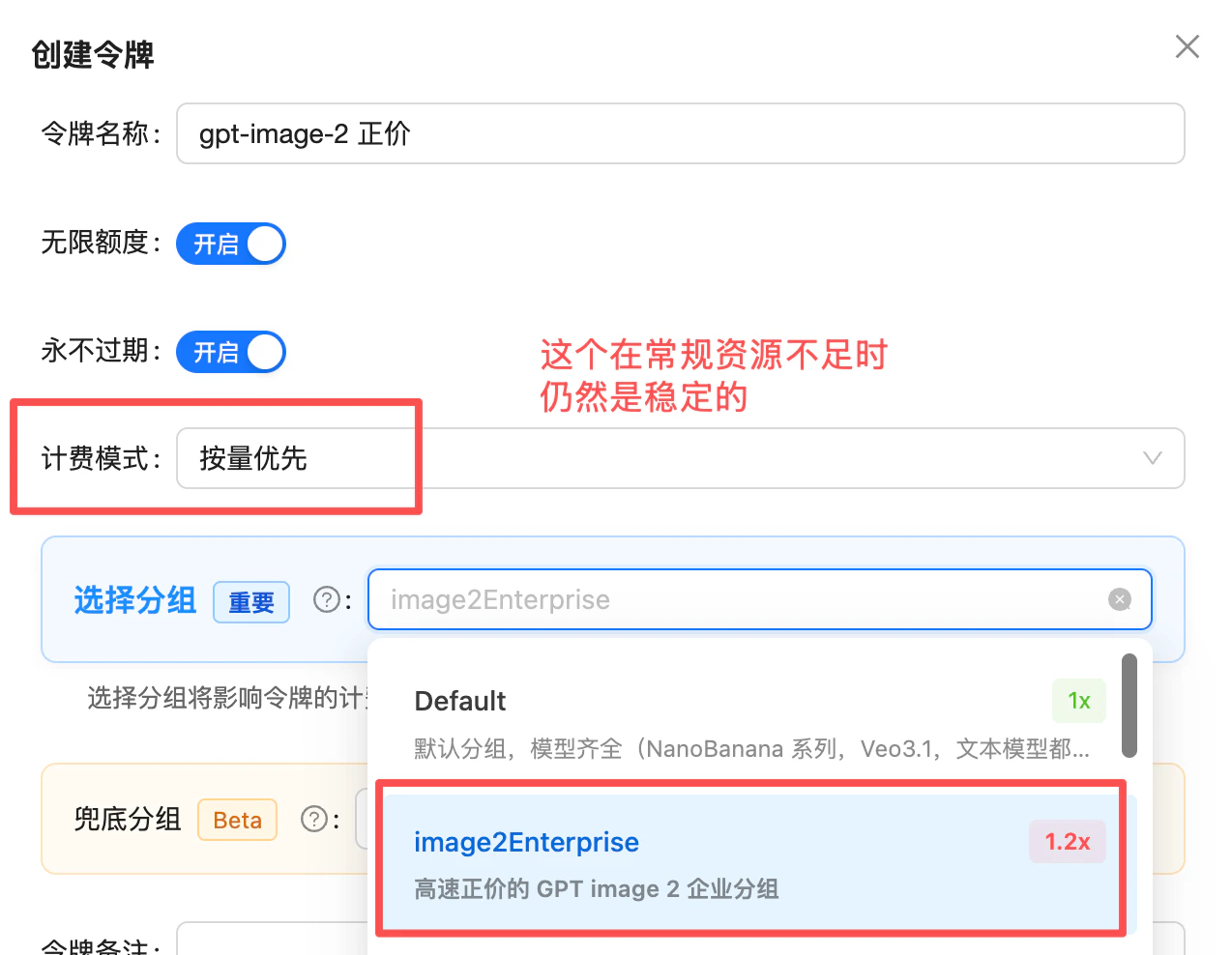
Token settings: pick the image2Enterprise group (1.2x) — stable when default capacity is tight
Technical Specifications
Endpoints
Size Reference
Preset Sizes
Custom Size Constraints
gpt-image-2 accepts any valid size that satisfies all of:
- Max edge ≤ 3840px
- Both edges are multiples of 16
- Aspect ratio ≤ 3:1
- Total pixels ∈ [655,360, 8,294,400] (~0.65MP to ~8.3MP)
1600x1200, 1792x1024, 2048x1536, 3200x1800
Invalid examples: 1000x1000 (not multiple of 16), 4000x4000 (over max), 3840x1000 (ratio > 3:1)
Quality Reference
Available tiers
quality has the largest impact on price — more than size. Output image token count is driven by quality × size, but quality carries far more weight: at the same size, going from low to high can change per-image cost by 30×+ (see the “per-image cost” table above: gpt-image-2 at 1024×1024 ranges from low $0.006 to high $0.211; the 2.5 models range from low $0.006 to max $0.211). Estimate cost by quality first, then layer in the effect of size.Best Practices
Integrate with low first
quality=low + a preset size to validate the full call chain (auth, params, timeouts, error handling). low is several times faster than high, so functional issues surface quickly without being masked by long latency.Prefer preset sizes
Match quality to scenario
low; daily / final → medium; text, fine textures, print → high. Note that low ↔ high is more than visual fidelity — it’s also a step change in inference complexity, so latency scales accordingly.Choose JPEG output
output_format=jpeg + output_compression=85 is faster than PNG and roughly half the size.Lock high for text scenarios
quality=high for signage and poster scenarios.Prepare reference images
Transparent background: pass the parameter, and keep scenes out of the prompt
gpt-image-2.5-flare / gpt-image-2.5-sunburst support transparency (gpt-image-2 has been rejected by OpenAI with a 400 since 2026-09-30). background: "transparent" with png / webp only guarantees an alpha channel. If the prompt or the reference image describes a full scene (a forest, a room, a street), the model paints that scene and the parameter will not stop it — this is the main reason transparency “sometimes works”, and it has nothing to do with quality (measured 2026-09-11: subject-only prompts 16/16 transparent, scene prompts 0/3, medium and high alike). End the prompt with isolated subject on a transparent background, no scenery, no ground; when the reference image has a background, say remove the background entirely, keep only the subject in the edit prompt. See the transparent background FAQ.Tier your client timeout (high → 600s safety net)
quality and size — especially quality. Configure client timeouts per tier:high mode, set 600s as the safety-net timeout to absorb queueing, long-tail variance, and upstream jitter. Show progress in the UI; consider a task queue server-side.Migration notes
gpt-image-1.5: drop input_fidelity (forced high-fidelity, will error if passed); for transparent backgrounds move to one of the two 2.5 models (gpt-image-2 no longer accepts background: transparent since 2026-09-30). Migrating from legacy DALL·E 2/3 code: drop response_format (GPT Image models reject it with 400 Unknown parameter: 'response_format'; output is always b64_json).Errors & Retries
- Tier request timeout by
quality:low≥ 120 seconds /medium≥ 240 seconds /high≥ 600 seconds (safety net — observed 3–5 minutes; configuring around 120s/360s causes many false timeouts) - Integrate with
quality=lowfirst, then move up tomedium/highas real quality needs demand - Exponential backoff for 5xx and timeouts (suggest 2 retries)
- Log
x-request-idheader for support
FAQ
How do I fix 400 Unknown parameter: 'response_format'?
How do I fix 400 Unknown parameter: 'response_format'?
response_format parameter — this is currently the most common 400 error. gpt-image-2 (and the entire GPT Image series) does not accept response_format: the output format is fixed to b64_json and cannot be changed. Passing it returns:url / b64_json), and plenty of old sample code and some third-party libraries still include it by default. When migrating to gpt-image-2, delete the field and read data[0].b64_json directly (raw base64 — decode it to get the image file). The error is returned at the input-validation stage and is not billed.If your workflow genuinely needs an image URL instead of base64:- Official
gpt-image-2has no URL output — decode the base64 and upload to your own object storage - Or switch to the reverse-engineered
gpt-image-2-all, which supportsresponse_format: "url"and returns a CDN link valid for 24 hours
Do I need to add the data:image/png;base64, prefix to b64_json?
Do I need to add the data:image/png;base64, prefix to b64_json?
gpt-image-2 returns a raw base64 string (no prefix), unlike gpt-image-2-all. Two client patterns:- Write file:
base64.b64decode(b64_str)→ write to disk - Browser render:
img.src = 'data:image/png;base64,' + b64_str(prepend manually)
Why does passing input_fidelity return 400?
Why does passing input_fidelity return 400?
gpt-image-2 forces high-fidelity processing of reference images and no longer accepts input_fidelity. When migrating from 1.5, just remove this field — no replacement needed.What if I need a transparent background?
What if I need a transparent background?
gpt-image-2.5-flare or gpt-image-2.5-sunburst and pass background: "transparent" with output_format set to png or webp. What comes back is a real alpha-channel image — no cutout post-processing needed. Both text-to-image and image editing support it. gpt-image-2 does not: OpenAI shut down its transparent background on 2026-09-30 and it now returns 400 — change the model name and keep the other parameters.Two boundaries: jpeg has no alpha channel and is mutually exclusive with transparency (returns 400); and on the edit endpoint transparency is a re-draw, not a precise trace of the original outline, so subject detail will shift. For pixel-exact extraction, run rembg / PIL / sharp yourself.The third boundary is the one people miss: if the prompt or the reference image describes a scene, the model paints the scene — the parameter cannot override it, and raising quality does not help. Describe the subject only and end with isolated subject on a transparent background, no scenery, no ground.Full details and per-model support: How do I generate images with a transparent background.How many images per call?
How many images per call?
n=1). For N images, issue N parallel requests. Each is independently token-billed.Why is 2K/4K so slow?
Why is 2K/4K so slow?
quality=high + high resolution take ≈ 235 seconds (~4 minutes) per image in real customer integrations, and 3840×2160 + high long-tail can stretch close to 5 minutes. Recommendations:- Integrate with
quality=lowfirst to validate the call chain, then move up as real quality needs demand - Tier client timeout by quality:
low≥ 120s /medium≥ 240s /high≥ 600s (safety net) - Show “generating” progress in the UI
- Use 1024×1024 / 1536×1024 1K presets when 4K isn’t needed
Will I actually benefit from cached input pricing?
Will I actually benefit from cached input pricing?
Why are edit requests more expensive than text-to-image?
Why are edit requests more expensive than text-to-image?
gpt-image-2 auto-enables high-fidelity processing of reference images, the references themselves convert to large input token counts via the Vision pricing rules. Edit input tokens are noticeably higher than text-to-image — budget accordingly.Same size and reference images — why does each call still cost a different amount?
Same size and reference images — why does each call still cost a different amount?
quality was set to auto (or omitted). We’ve had customers report “identical size, resolution, and reference images, yet the price swings up and down.” On investigation, both size and quality were set to auto.The culprit is quality: auto: in auto mode the model interprets the request and picks a different quality tier on the fly for each generation. A different tier means a different output image token count, which means a different price. Below are three real billing entries with identical input (1061 input tokens each) yet costs differing several-fold:auto resolved to a higher quality tier, output tokens jumped to 5146, and the price rose to ~3.5×.Fix: don’t let quality stay on auto — pass low / medium / high explicitly. With a fixed tier, output token count and price for identical input become stable and predictable. See the “Quality Reference” section above.What are the image count and size limits for the edit endpoint?
What are the image count and size limits for the edit endpoint?
gpt-image-2 image edit endpoint (/v1/images/edits) supports up to 16 reference images:- multipart/form-data file upload: each image must be under 50MB, formats
png/jpg/webp - base64 data URL: the field length limit is about 20MiB (schema
maxLength: 20971520— a string-field limit, not the same as the 50MB multipart cap), so keep original images within 15MB - mask file: separately limited to PNG under 4MB
The edit endpoint returns 400 'Invalid image file or mode for image 1' — what now?
The edit endpoint returns 400 'Invalid image file or mode for image 1' — what now?
code: invalid_image_file) means: the Nth reference image is not a standard png / jpg / webp file (1-indexed — use the index to locate the offending image).The most common root cause is MPO format from phone cameras: .jpg files straight out of Huawei Mate-series phones embed an HDR gain-map sub-frame and are actually multi-frame JPEG containers (MPO). The header is the same FFD8, and both the extension and the file command report JPEG — impossible to spot by eye. Verified July 2026: MPO files are always rejected, and the same images re-encoded as standard JPEG/PNG succeed at the full original resolution (unrelated to dimensions, the image[] field name, or quality/size params). The error is returned at the input-validation stage and is not billed.Fix: re-encode with Pillow before upload (if Image.open(f).format returns "MPO", it needs conversion):How do I prepare a mask file?
How do I prepare a mask file?
- Same size as the original, PNG format, under 4MB
- Must have alpha channel: transparent (alpha=0) = inpaint area, opaque = preserve
- Only applies to the first image
- Mask is a “soft guide” — the model may extend or contract around the masked region
gpt-image-2 vs gpt-image-2-all: which to pick?
gpt-image-2 vs gpt-image-2-all: which to pick?
Can I use the official OpenAI SDK directly?
Can I use the official OpenAI SDK directly?
base_url to https://api.apiyi.com/v1 and set api_key to your APIYI token:Can I cancel a generation in progress?
Can I cancel a generation in progress?
gpt-image-2 uses OpenAI’s official synchronous endpoint — once a request is submitted, it runs to completion with no “cancel” signal. Even if the client disconnects, the server still finishes generation and bills normally. Configure client-side timeouts carefully — do not assume “disconnect = no charge”.Is there a rate limit (RPM)?
Is there a rate limit (RPM)?
Does it support async invocation?
Does it support async invocation?
gpt-image-2 strictly mirrors the OpenAI official API — synchronous only. The request blocks until the result is returned (high + 4K realistically 1–2 minutes). If you need an async queue or callback mechanism:- Wrap it yourself with a task queue (Celery / BullMQ, etc.) at the business layer
- Or use
gpt-image-2-all— generates in 30–60s, easier to poll from the front end
Is there a prompt length limit? Why can I paste more into the ChatGPT web app?
Is there a prompt length limit? Why can I paste more into the ChatGPT web app?
gpt-image-2 and both 2.5 models); APIYI’s official relay does not tighten it. Above it the provider returns no error: it silently ignores the entire prompt and generates an unrelated image (often a realistic portrait or an interior), and usage.input_tokens_details.text_tokens reports a single-digit count (8 in our tests). The documentation states 32,000 characters; 32,000 English characters is about 8K tokens, so the two roughly coincide, but Chinese is denser and hits the limit at about 11,000 characters. If an image has nothing to do with your prompt, check text_tokens for that call first. The web app only looks unlimited because the chat model reads what you paste and then writes its own short prompt for the image tool, so the image model never sees the material. For long material such as brand books or packaging specs, distill it with a text model into a 1K to 3K character structured prompt first, see Long Prompts.400 with safety_violations=[sexual] on a prompt that is not explicit. What now?
400 with safety_violations=[sexual] on a prompt that is not explicit. What now?
moderation: low only lowers prompt-side moderation and does not help here. The most common cause is a character described by mood but not by clothing, so the model improvises and crosses the line: add one explicit clothing phrase first (leave everything else untouched), and only then ablate one word at a time. Full case and the 20-call log: Safety Rejections.Do failed generations get billed?
Do failed generations get billed?
400 error, and no charge is incurred. Typical response:401 (invalid token), 429 (rate limit). Token billing only kicks in once the request actually reaches the model generation stage (i.e., 200 + b64_json received).Related Docs
- ⚖️ Official vs Reverse Comparison - Side-by-side selection guide
- Text-to-Image Playground -
/v1/images/generationsinteractive testing - Image Edit Playground -
/v1/images/editsmulti-image fusion + mask - Deep Dive: GPT-image-2.5 Launches, Flare Is Faster, Sunburst Is Sharper - News article
- Deep Dive: gpt-image-2 Launch - News article
- Full Integration Doc - Complete API reference
- GPT-Image-2-All (Reverse-Engineered) - Cheaper, faster alternative
- Community: Luck GPT-Image 2 ComfyUI Nodes - Call
gpt-image-2/gpt-image-2.5-flare/gpt-image-2.5-sunburstdirectly in ComfyUI (mask / 16 reference images / six quality tiers / custom sizes) - Community: APIYI GPT-Image 2 Skills - Invoke from Codex CLI / Cursor / Gemini CLI and other AI coding tools with one sentence
- API Manual - General usage guide
gpt-image-2.5-flare / gpt-image-2.5-sunburst / gpt-image-2 are OpenAI’s official models, billed by token. If you prioritize flat pricing ($0.025/image) and faster generation (30–60s), see gpt-image-2-all.