

Overview
gpt-image-2.5-all and gpt-image-2-all are APIYI’s GPT image generation reverse-engineered models (ChatGPT web line). The ChatGPT web app has moved to Images 2.5 as a whole, sogpt-image-2-all already produces 2.5 images; the new gpt-image-2.5-all name simply makes that upgrade explicit — both names share the same price and behavior and are interchangeable; new projects should use gpt-image-2.5-all. With extremely competitive pricing at $0.025/image per call (cut from $0.03 on 2026-10-10), it generates images in about 30–60 seconds and supports text-to-image / single-image editing / multi-image fusion / natural-language editing — with high text-rendering fidelity and native support for Chinese prompts.
/v1/images/generations (text-to-image) and /v1/images/edits (image editing).Need to lock the output size or 4K? Switch to the sister model gpt-image-2-vip — same call format, just one extra size field.Text-to-Image API
/v1/images/generations — generate images from text prompts.Image Editing API
/v1/images/edits — multipart upload with edit/fusion instructions.Let an AI Agent Do the Integration
Copy this prompt and paste it into Codex / Claude Code / Cursor
It first fetches the plain-text version of this page (append .md to any docs URL), then writes code in your project's own stack — timeout, base64 rendering, upload compression, and the parameters this model rejects are already baked into the requirements.
Integrate / troubleshoot gpt-image-2-all text-to-image and image editing in this project.
Read the docs before you touch code: fetch https://docs.apiyi.com/en/api-capabilities/gpt-image-2-all/overview.md for the plain-text version of this page. For finer parameter detail, append
.mdto …
- Timeout: raise the client timeout to 360 seconds. The image APIs are synchronous — there is no task ID, so if the client disconnects the result is lost …
6 requirements in total. Use the button below to copy the full prompt.
What this prompt saves you from
What this prompt saves you from
Core Features
Highly Competitive Pricing
High Text Rendering
Chinese Prompt Friendly
Multi-Image Fusion
Faster Output
gpt-image-2-vip and the official-relay gpt-image-2R2 CDN Accelerated
response_format: "url" explicitly for R2 CDN links with low-latency global deliveryNatural-Language Editing
Standard Endpoint Support
/images/generations and /images/editsPricing
- Flat pricing; no tiers by resolution, quality, or prompt length
- Failed requests are not charged (auth failures, parameter validation errors)
- For N images, call the API N times in parallel
Group Setup
gpt-image-2-all lives on the Default group — no extra group needed. The reverse channel currently has stable supply, so there’s no enterprise-group fallback story like the official-relay gpt-image-2 has.
Need deterministic URL output → switch to the image2_OSS group
As measured in July 2026 on the default group, gpt-image-2-all (and gpt-image-2-vip) return b64_json when response_format is omitted; pass response_format: "url" explicitly to get an image URL. The default group’s output format is not guaranteed — it has historically defaulted to url with fallback to b64_json under load, and has changed across channel versions.
If your business depends on URL output (writing URLs straight to your database, frontend rendering by URL, base64 not acceptable), switch your token’s group to image2_OSS — a group purpose-built for deterministic URL output, at a 1x multiplier (no surcharge), effective for both reverse models gpt-image-2-all and gpt-image-2-vip. It guarantees the response always carries an image URL and never falls back to base64.
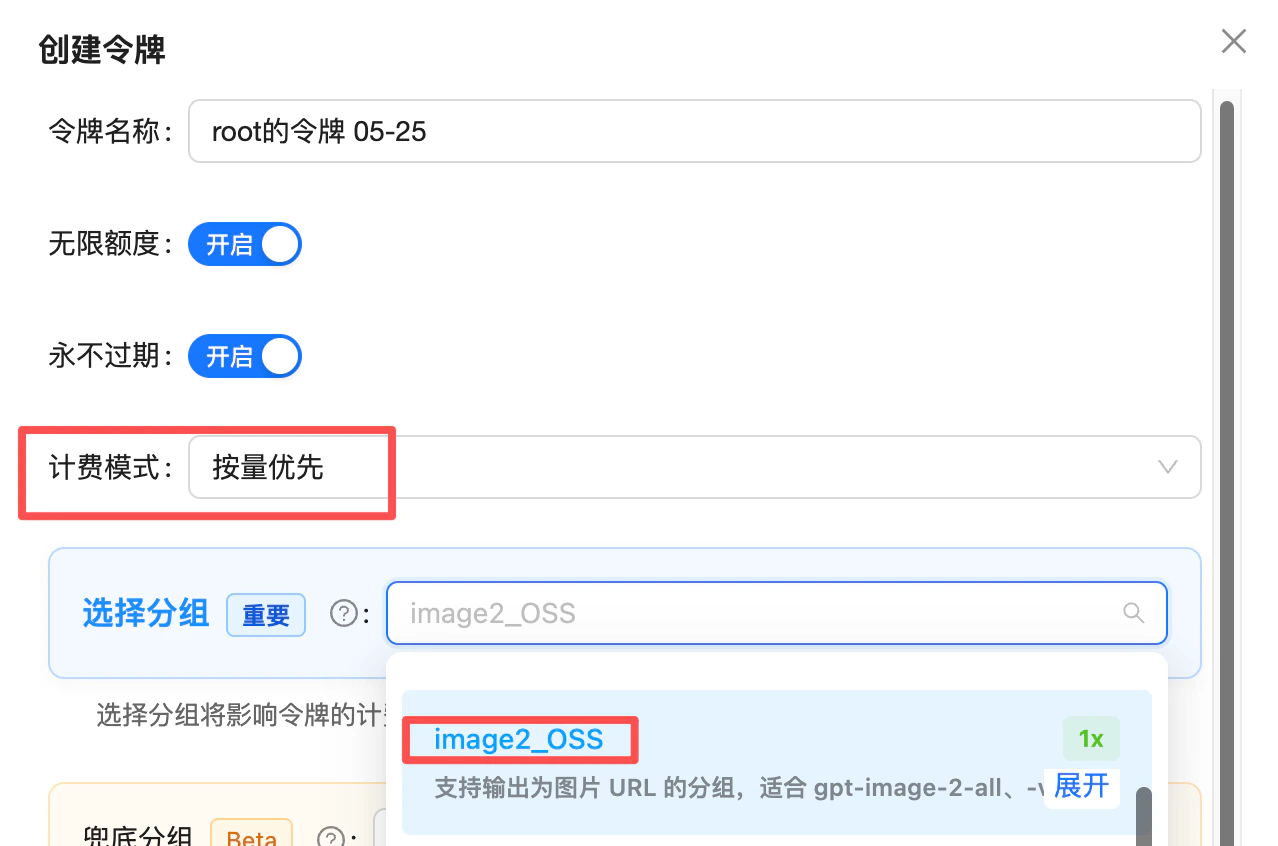
Token creation: set billing mode to "pay-as-you-go first" and pick the image2_OSS group (1x) — use it when you need deterministic URL output
image2Enterprise group: /en/live/2026-04/image2-enterprise-stable
Technical Specs
Endpoints
size parameter? Use the sister model gpt-image-2-vip — identical endpoints, just one extra size field (30 explicit sizes including 4K).Size and Aspect Ratio Control (describe in prompt)
gpt-image-2-all has no size parameter — size is described in the prompt. If you need strictly locked output sizes (e-commerce hero shots, poster templates, 4K wallpapers), use gpt-image-2-vip instead.
Verified “prompt phrasing → actual resolution” table
The 8 phrasings below have been empirically verified to reproduce reliably. Put the first-column phrasing at the start of your prompt and you’ll get the resolution shown in the second column (all outputs sit at the ~1.5K-pixel tier):- All outputs are in the ~1.5K-pixel tier (longest edge between 1500 and 2000 px). This is the model’s effective ceiling — it’s not truly “any resolution”.
- Reproducibility is highest when the prompt only contains a phrasing from the table; mixing in other composition words causes drift.
- The Chinese strings are the actual values you send; we recommend keeping them as-is rather than translating.
Stylistic phrasings (no fixed resolution)
The phrasings below have no verified resolution — use them only as style modifiers, paired with the table above:Exposing this table to your end users
Even thoughgpt-image-2-all has no size parameter, you can still offer your users a “Size / Aspect Ratio” dropdown that feels just like an official size field:
- Use the prompt phrasing from the table above as the option
value(e.g.,横版 16:9) - Show the expected resolution in the option label (e.g.,
Landscape 16:9 (1672×941)) so users know what they’ll get - On the backend, prepend the selected phrasing to the user’s original prompt before sending it to the API
Best Practices
Compress input images to under 1.5MB (image edit / multi-image fusion)
4K / 8K into the prompt does not produce a high-resolution image either; for reliable larger output, use the verified phrasings in the “Verified prompt phrasing → actual resolution” table above.Put size at the start of the prompt
Use text elements confidently
Annotate multi-image order
image field is meaningful. Reference explicitly as “image1/image2/image3” in the prompt.Choose response format by need
b64_json for direct web rendering; url for server-side storage/forwarding.Use a 300s timeout
Trim rejected parameters
gpt-image-2-all rejects size, n, quality, aspect_ratio — sending them may trigger validation errors. To pass size, switch to gpt-image-2-vip.Error Codes and Retries
- Request timeout starting at 300 seconds (conservative; typical 30–60s, but image upload / download and reverse-channel peak tails cause wide variance — 120s causes frequent false timeouts)
- Use exponential backoff for 5xx and timeouts (2–3 retries recommended)
- Log the
request-idresponse header for debugging
FAQ
I see both gpt-image-2-all and gpt-image-2-vip — which should I pick?
I see both gpt-image-2-all and gpt-image-2-vip — which should I pick?
size support, generation time, and stability:- Don’t need strict size control, want faster and steadier output →
gpt-image-2-all(~30–60s, describe size in the prompt, 1K–1.5K output). - Need locked output size or 4K →
gpt-image-2-vip(~90–150s, 30 explicit sizes incl. 4K). - Need a
qualityknob or full OpenAI-API field parity → use the officialgpt-image-2.
Can I generate multiple images at once?
Can I generate multiple images at once?
Does it support the n parameter? What happens if I pass n=3?
Does it support the n parameter? What happens if I pass n=3?
n=3 in the request, billing will be 0.025 × 3 = $0.075, but only 1 image is actually returned. Make sure to drop the n field from your requests to avoid wasted charges.If the content is rejected or the model replies 'I can't do that', is it billed?
If the content is rejected or the model replies 'I can't do that', is it billed?
- ✅ Pre-filter and warn users: add a keyword/scenario filter at the frontend or gateway (real-person names, copyrighted characters, sensitive topics) and surface a UI hint like “Celebrity / IP topics may fail and still be billed by upstream policy.” This cuts wasted charges sharply.
- ✅ Monthly reimbursement for consumer products: we understand consumer-facing products can’t fully gate user input. If your monthly spend is large enough ($1000+/month), you can batch your logs monthly (short-latency calls are usually soft refusals) and contact support for a one-off manual credit — no need to file per-call appeals.
Do I need to add data:image/png;base64, prefix to b64_json?
Do I need to add data:image/png;base64, prefix to b64_json?
b64_json is raw base64 without the data: prefix — decode it to write a file, or prepend the prefix yourself before rendering; earlier versions did include the prefix. Add a startsWith('data:') check in your code: if the prefix is present, use the value directly as img src; if not, decode or prepend first — this avoids double-prefixing or decoding a prefixed string into a broken image.Why am I getting a different size even though the prompt says 1024x1024?
Why am I getting a different size even though the prompt says 1024x1024?
cinematic, phone poster, square composition).For phrasings that reliably map to a specific resolution, see the “Verified prompt phrasing → actual resolution” table earlier in this page (under “Size and Aspect Ratio Control”).Should I compress input images? Does writing 4K / 8K in the prompt help?
Should I compress input images? Does writing 4K / 8K in the prompt help?
4K / 8K into the prompt does not actually produce a high-resolution image — those words are decoration, the model doesn’t bump resolution because of them. For reliable larger output, use the verified phrasings in the “Verified prompt phrasing → actual resolution” table above (e.g., cinematic, phone poster, square composition). For strict size locking or 4K, switch to gpt-image-2-vip (30 explicit sizes incl. 4K, flat $0.03/image).What's the max reference image size and supported formats?
What's the max reference image size and supported formats?
png / jpg / webp. Overly large images may hit gateway limits. Each image in multi-image fusion must meet this limit.How long are the returned image URLs valid? Do I need to download them?
How long are the returned image URLs valid? Do I need to download them?
url field of a url-mode response is an R2 CDN link that expires in about 1 day (24 hours) — requests after that will 404.Strongly recommended: download and persist generated images to your own object storage (S3 / OSS / R2), CDN, or database shortly after generation. Don’t hotlink the returned URL long-term.Two recommended approaches:- Server-side proxy: immediately
requests.get(url)after the response, store to your own storage, and return your own URL to the frontend; - Use
b64_json: add"response_format": "b64_json"to your request to get base64 image data directly — one less cross-origin download, ideal for frontend rendering or writing straight to a file.
Does it support streaming?
Does it support streaming?
Can I use the official OpenAI SDK?
Can I use the official OpenAI SDK?
base_url to https://api.apiyi.com/v1 and set api_key to your APIYI token. However, client.images.generate() sends size/n by default — this model rejects both parameters, so we recommend making raw HTTP calls with requests / fetch against /v1/images/generations and /v1/images/edits.Are Chinese and English prompts meaningfully different?
Are Chinese and English prompts meaningfully different?
Can I still generate images via /v1/chat/completions?
Can I still generate images via /v1/chat/completions?
/v1/images/generations and /v1/images/edits instead (more stable, and the same code works with the official-relay gpt-image-2).The chat-based style only makes sense in two scenarios: multi-turn iterative editing, or passing online image URLs directly. Note that when the image intent is ambiguous, the model may return plain text instead of an image (prepend a fixed prefix like “Generate an image:” to your prompt to reinforce it).For full parameters, see the chat-based API reference.Related Documentation
- ⚖️ Official vs Reverse Comparison - Side-by-side selection guide vs the official
gpt-image-2 - Text-to-Image Playground -
/v1/images/generationscompatible endpoint - Image Editing Playground -
/v1/images/editsmulti-image fusion and editing - GPT-Image-2-VIP (same price, supports
sizeand 4K) - Same-price sister model with 30 explicit sizes (incl. 4K); identical call format - GPT-Image-2 Official (token-billed) - For
qualityparameter / mask-based repaint / strict OpenAI-API field parity - GPT-Image Series Overview - Official GPT-Image comparison
- Community: Luck GPT-Image 2 ComfyUI Nodes - Call
gpt-image-2-alldirectly in ComfyUI (dual endpoints: chat_completions / images_api) - Community: APIYI GPT-Image 2 Skills - Invoke from Codex CLI / Cursor / Gemini CLI and other AI coding tools with one sentence
- API Manual - General calling conventions