

API Overview
The Log Query API returns a detailed record of every API call made under your account, including the model used, the actual amount charged, latency, whether the call was streamed, and the error code when a call fails. It complements the Balance Query API: balance query tells you how much credit is left, log query tells you where it went. Three typical use cases:Automated reconciliation
Aggregate actual spend by time range or by model and reconcile it against your own billing
Self-service troubleshooting
Inspect error codes on failed requests to tell parameter problems from upstream problems
Support tickets
Provide the
request_id to support so they can pinpoint the exact callLogs are also viewable in the console under the Logs page. This API is the programmatic entry
point to the same data, intended for automated reconciliation, scheduled exports, or feeding
your own monitoring. For manual inspection, use the console — see
How to view my call records.
How to Get a Personal Access Token
The Log Query API authenticates with a personal access token (starting withnap_), which is not the same thing as an
API key (see Important Notes at the end of this page).
1
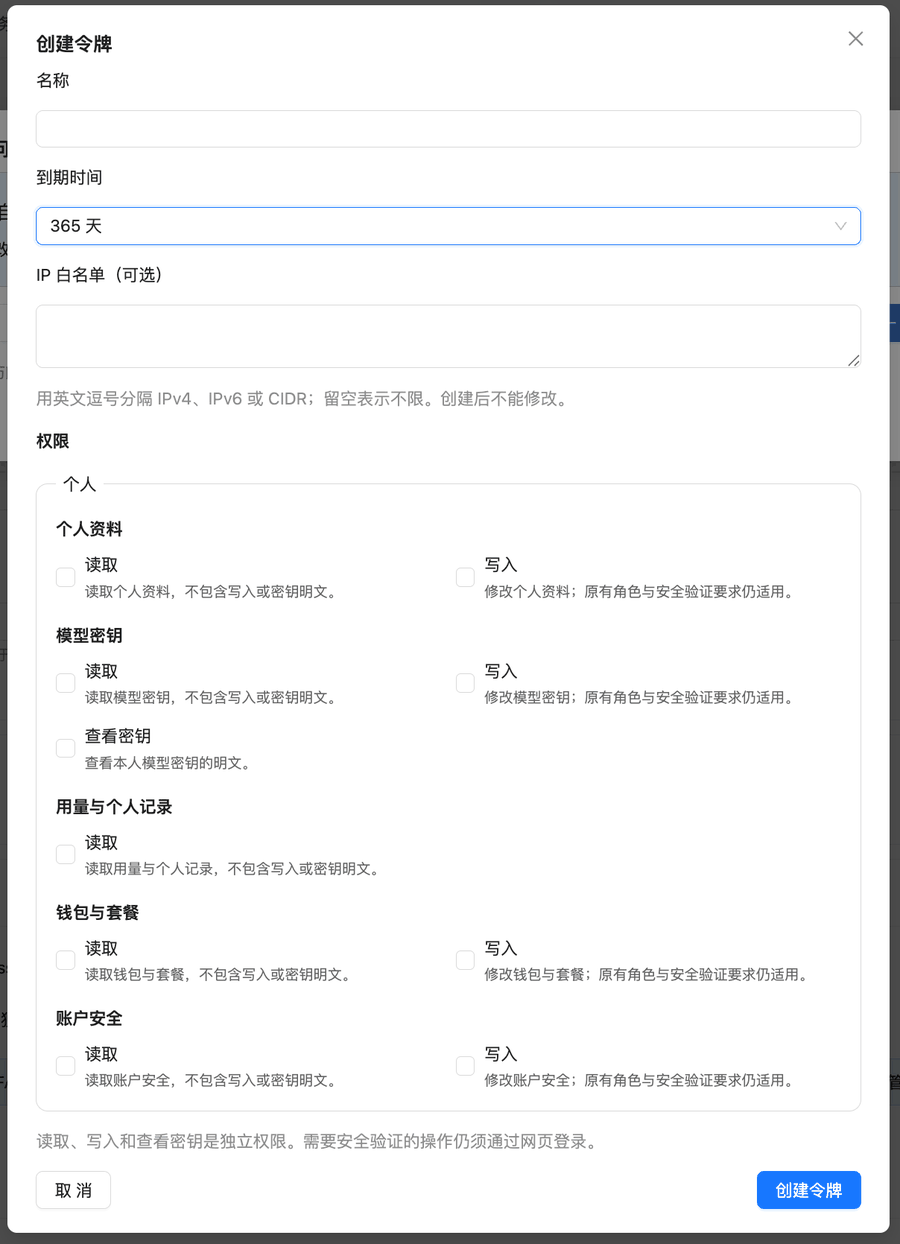
Open Personal Access Tokens
Go to your profile page at
api.apiyi.com/account/profile. Under Account Options, click Personal Access Tokens → Create Token.2
Select permissions
This API only needs Usage & personal records · Read. For a daily scheduled job, choose a longer expiry. The default is 30 days, and the script gets 401 once the token expires.
3
Set an IP allowlist (optional)
Recommended if your sync script runs on a server with a fixed IP. The allowlist can’t be edited after creation. Get the script working without one first, then create a separate production token with an allowlist.
API Information
Request Details
Request Headers
Query Parameters
Raising
pageSize is the single most effective optimization for this endpoint. At 10 records
per page, an account making 500,000 calls a day needs 50,000 requests; at 5000 per page it needs
100. Two orders of magnitude fewer requests, and the pagination offset drops with it — see
Performance Notes below.A 5000-record page measures roughly 700 KB gzipped and takes about 2.5 seconds. If bandwidth or
memory is tight, 1000 is a comfortable middle ground.Performance Notes
The cost of a single request is not fixed. It depends on three things. Follow these rules and the API is fast; ignore them and you will hit the server-side 60-second query limit and get an error back.
Four practical rules:
- Always pass
start_timestampandend_timestamp. Omitting the window is the single most expensive way to call this API. - Raise
pageSize. This is the easy one: going from 10 to 1000–5000 records per page cuts the request count by two orders of magnitude, and the offset falls with it. - Shrink the window instead of deepening the offset. What costs money is not “which page” but “how many records were skipped to get there”, and that grows super-linearly. Rather than paging all the way through one large window, split it into 24 one-hour windows so every window starts again from offset 0.
- Backfill history once, store it, then only sync increments. Old data costs far more to query than recent data, so repeatedly re-reading the same history is pure waste.
If a window still takes dozens of pages at
pageSize=1000, your call volume for that period is
high — split the window in half and fetch each half separately. That is much faster than
paging deeper. The MAX_PAGES constant in the Python example below does exactly this.60 seconds is a hard limit, and exceeding it returns an error
The server caps any single query at 60 seconds. Past that you do not get a slow response — you get an error, and the time already spent buys you no data at all. These three patterns are likely to trigger it. Avoid them outright rather than retrying and hoping:
Retrying with the same parameters will not be faster, it just costs another 60 seconds. The
right response is to narrow the time window, or raise
pageSize so there is less paging —
either way, give the server less data to work through per call.
Log Types
Response Details
Success Response Example
Key Response Fields
The
other field holds a JSON string, not a nested object, so it needs a second parse
(json.loads() in Python, JSON.parse() in JavaScript). It contains billing_type,
request_path (the endpoint actually called), group_ratio, model_ratio, and usage.Settlement entries for async video tasks also carry final_quota (the task’s final total), original_quota
(the pre-charge taken at submission), adjustment_quota (this entry’s difference) and actual_tokens; see the FAQ below.Quota Conversion
Conversion Rule
500,000 quota = $1.00 USD
quota ÷ 500,000
Examples:
quota: 7500→ $0.015 USDquota: 22500→ $0.045 USDquota: 18→ $0.000036 USD
Error Responses
HTTP 401 - Authentication Failed
sk-) was
mistakenly used as a personal access token. Changing the account password, two-factor authentication
or passkey revokes every personal access token.
Solution: Create a new personal access token in the console.
Two other 401 responses carry an explicit message:
HTTP 403 - Permission Denied
Code Examples
cURL Example (single page, quick check)
Use this to confirm your token works. For real reconciliation, use the daily sync script below.
Python Example: daily incremental sync (ready to use as a cron job)
This is the recommended standard usage: run it once a day, pull only what is new since the last sync, and write it into a local SQLite database. Re-running is safe (records are deduplicated onrequest_id), and a run interrupted halfway resumes from where it stopped.
Once the data is local, every breakdown you need — by model, by day, by token — runs against
your own database, so you never have to query the API again for it. That is far faster, and
it sidesteps the problem of wanting data that has already aged out of the retention window.
Node.js Example (single time window)
Same idea: split by the hour, page serially, and shrink the window if pagination gets too deep.Both the Python requests library and the Node.js fetch API decompress gzip automatically,
so no extra configuration is needed there. Only curl requires the explicit
--compressed flag.Common Scenarios
Daily reconciliation (the recommended approach)
Schedule the Python script above to run once a day and land the logs in a local database. Every breakdown you need — total spend, per model, per token — is then a SQL query against your own database. Three reasons this is the right shape: local queries are fast; you are not exposed to the log retention window; and you avoid slowing the API down by repeatedly re-reading old history. To sync only one model’s records, add themodel_name parameter to the request.
Finding failed calls
Once the data is local, query your own table directly:Requests rejected by the gateway (invalid parameters and similar) have
quota of 0 and
are not charged. The error_code in the log lets you separate “the call failed” from
“the call succeeded but I did not like the result.”Providing a request ID for support
Locate the problematic call in the logs and give support therequest_id. That identifies the
exact request end to end, which is far more efficient than describing “a call to some model
failed around a certain time.”
FAQ
My request is slow, or times out entirely — what should I do?
My request is slow, or times out entirely — what should I do?
Check these three things first; almost every slow query comes from one of them:
- Are you passing
start_timestampandend_timestamp? Omitting the time window is the most expensive way to call this API — the server searches your entire history. - Is the window too old or too wide? Querying data from a month ago costs far more than querying yesterday. Keep the span under one day, and split by the hour for high volumes.
- Has
preached several thousand? Pagination cost grows super-linearly. The fix is to shrink the time window so each window needs only a few dozen pages, not to page deeper within one large window.
Why do I only get 10 records?
Why do I only get 10 records?
Nine times out of ten, the parameter was spelled The maximum is 5000, and going above that returns a clear error. For large volumes you still
need to paginate (
page_size in snake_case.The correct spelling is camelCase pageSize. It is the only camelCase parameter on this
endpoint — everything else (model_name, token_name, start_timestamp, …) is snake_case,
which makes this an easy one to get wrong. It does not raise an error; the server treats the
parameter as absent and falls back to 10 records per page.p=0, p=1, …) until the response returns an empty array — the Python and
Node.js examples above already encapsulate this.Can I look up one specific call by request ID?
Can I look up one specific call by request ID?
Yes — pass When investigating one specific call, this is much faster than pulling a time range and
filtering it yourself.
request_id, and only that record is returned:Some fields in the response are empty — is something wrong?
Some fields in the response are empty — is something wrong?
No. Certain fields hold platform-internal information and are empty or zero from a regular
account’s perspective. This is expected and does not affect the fields you need for
reconciliation or troubleshooting —
quota, model_name, error_code, and request_id
are all fully populated.Why does token_group differ from the group name shown in the console?
Why does token_group differ from the group name shown in the console?
The API returns the group identifier, while the console displays the group’s label.
These can differ — for example the API returns
default while the console shows Default.The full mapping is available from the public endpoint https://api.apiyi.com/api/pricing
under the usable_group field, which maps identifier to label. If you want your reports to
match the console, apply that mapping yourself.How far back can I query?
How far back can I query?
Design your sync logic assuming only the last 30 days are queryable.In practice the queryable range is usually longer, but we make no commitment on retention
— it changes with log cleanup policy, and changes are not announced separately. Treat 30 days
as your planning floor and your reconciliation will not break when that policy shifts.Separately, the older the window, the more the query costs: even when the data is still
there, reaching it is much slower.So the right pattern is to sync once a day into your own database and run historical
analysis locally. Anything you need to keep long term, archive yourself — do not rely on this
API to fetch it back.
curl returns garbled text, or jq throws an error
curl returns garbled text, or jq throws an error
Reason: the API returns gzip-compressed content (The Python requests library and the Node.js fetch API decompress automatically.
Content-Encoding: gzip) and curl is
not decompressing it.Solution: add the --compressed flag:A video task produced two log entries. How do I map them to a task_id and get the video's cost?
A video task produced two log entries. How do I map them to a task_id and get the video's cost?
Async video tasks (Seedance and similar) are billed as “pre-charge at submission, settle the difference on completion”,
so one video leaves two entries: the pre-charge (Note that its paging parameters are snake_case
completion_tokens is 0, request_id present) and the settlement
(completion_tokens is the actual usage, request_id is empty, quota is only the difference).
Neither entry carries the task_id, so this API cannot pair entries to tasks.To get a video’s real cost, query the task API by task_id; its quota is the sum of the two entries:page_size with p starting at 1, the opposite of this API.
A failed task still shows its pre-charge in quota, but its real cost is 0 (the logs contain a negative type=11 refund entry).
Full walkthrough: How to look up a Seedance video’s real cost by task_id.Does querying logs consume quota?
Does querying logs consume quota?
No. The log query endpoint does not consume any quota.
Important Notes
Recommended call pattern
- Sync once a day — no need to go more often; each run pulls only what is new
- Use
pageSizeof 1000–5000, not the default of 10 — this one matters more than the rest combined - Call serially, roughly one second between pages, never concurrently
- Set the client timeout to 60 seconds (the server-side query limit is also 60 seconds)
- Keep each time window to one day or less; split by the hour for high-volume accounts
- On a timeout, shrink the window before retrying — an identical retry will not be faster
Related Documentation
- Balance Query API — check remaining account credit
- Token Management API — create and manage API keys programmatically
- How to view my call records — manual inspection in the console
- Understanding logs and billing — how to read the billing fields