

API Overview
The Token Management API lets you handle the full lifecycle of your API keys in code, instead of clicking through the console one key at a time. The most common use case is batch issuance: giving each team member, downstream customer, or project its own key, each with its own limits on how much it can spend, which models it can call, and how long it stays valid. Combined with a scheduled job, you can also give each key a daily budget that resets automatically.Quota limit
remain_quota caps how much this key can spend in totalModel limit
models sets an allowlist; calls to anything outside it are rejectedExpiry limit
expired_time sets an expiry timestamp, after which the key stops workingIf you only need one or two keys, the console is faster — see
How to create an API key. This API is aimed at automated issuance,
scheduled rotation, or integrating key management into your own systems.
How to Get a Personal Access Token
The Token Management API authenticates with a personal access token (starting withnap_), which is not the same thing as
an API key.
1
Open Personal Access Tokens
Go to your profile page at
api.apiyi.com/account/profile. Under Account Options, click Personal Access Tokens → Create Token.2
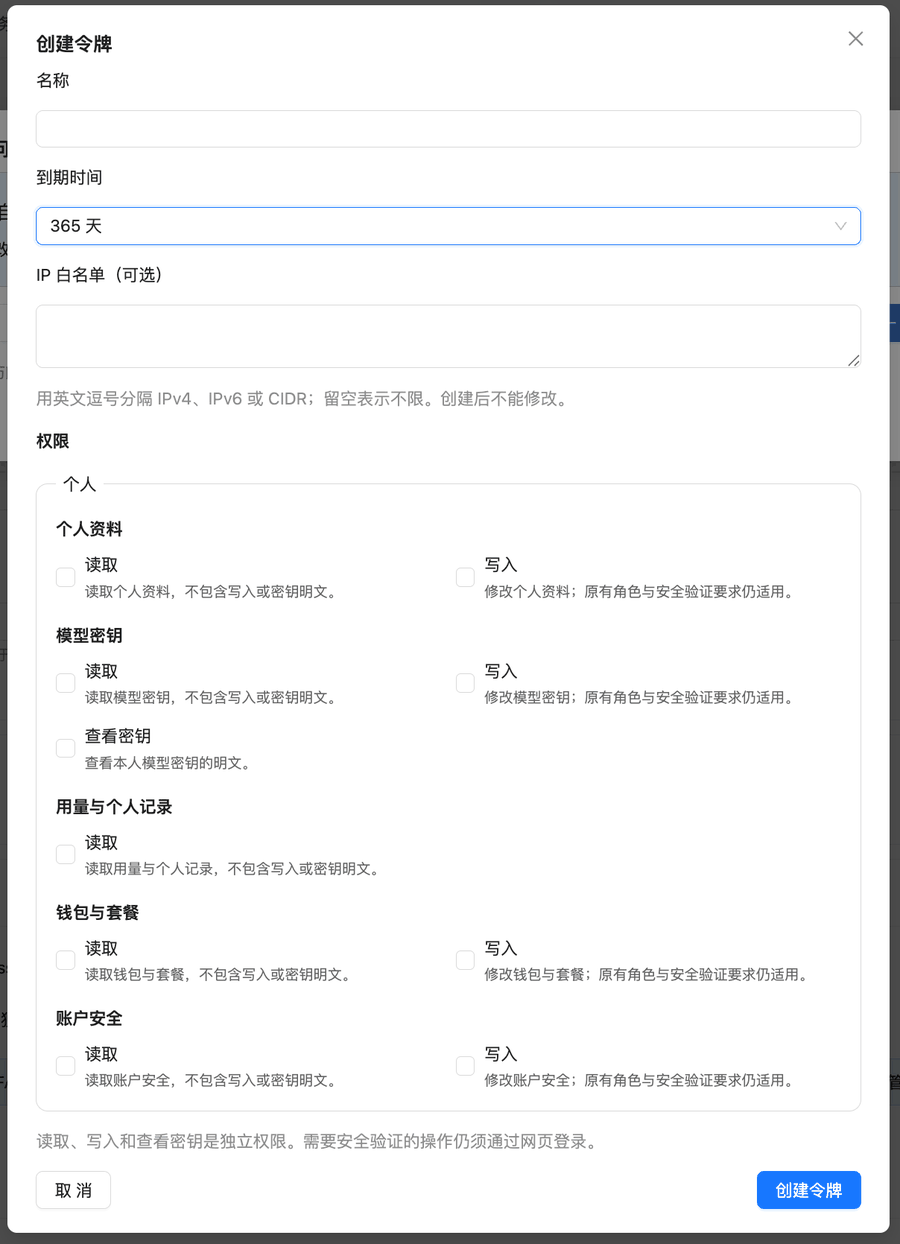
Select the Model keys permissions you need
The three permissions are independent. Select only the ones you use:
A bulk-issuance script needs all three. A usage-monitoring script only needs Read.
3
Set the expiry and IP allowlist
The default expiry is 30 days, so we recommend a longer period. If your issuance script runs on a server with a fixed IP, we strongly recommend an IP allowlist. The allowlist can’t be edited after creation, so get the script working without one first, then create a separate production token with an allowlist.
Endpoints
All endpoints authenticate the same way: put the personal access token in theAuthorization header.
The Bearer prefix is optional.
The base URL is
https://api.apiyi.com.
Creating a Token
Request Example
Request Fields
Response Example
Retrieve the Key Plaintext
- The personal access token needs Model keys · Reveal secret, otherwise you get 403
ACCESS_TOKEN_SCOPE_DENIED. - The returned
keydoes not include thesk-prefix. Prepend it yourself. In the example above, the actual API key issk-K1RPzapu…. - Save it right away and distribute it over a secure channel. Don’t leave the response body in log files.
Batch Creation
There is no server-side batch endpoint — passing something likecount in the request body
has no effect and still creates a single token. Batch issuance is done by looping on the client.
- Python
- Node.js
- cURL
Using the Three Limits
Quota limit
remain_quota caps what the token can spend. The conversion matches the
Balance Query API:
Conversion Rule
500,000 quota = $1.00 USD
remain_quota to
5000000 with unlimited_quota set to false. Consumption so far is readable from the token’s
used_quota field.
remain_quota is a one-off total and does not refill on its own. For a daily budget, see Scenario: Daily Per-Key Limits That Reset Automatically below.
Model limit
models is a comma-separated allowlist. Once set, calling a model outside the list is rejected:
models means no restriction.
Expiry limit
expired_time is a Unix-seconds timestamp, with -1 meaning never. For example, a key that
expires in 30 days:
Listing Tokens
Updating a Token
Scenario: Daily Per-Key Limits That Reset Automatically
When a company hands keys to workflows, team members, or downstream projects, a common requirement is “each key may spend at most $5 a day, and the limit comes back the next day”. If a workflow runs away, the damage is capped at one day’s budget. The platform has no built-in “daily quota” field yet, but the update endpoint above plus a scheduled job that runs once at midnight does the job: every day it setsremain_quota on those
keys back to the daily cap. The keys themselves never change, so team members keep using the same key.
Once a key’s budget is used up for the day, calls are rejected (and not charged); after the midnight
reset they work again.
1
Prepare a personal access token
Grant Model keys · Read and Model keys · Write; Reveal secret is not needed.
If the script runs on a server with a fixed IP, set an IP allowlist on the token.
2
List the keys to limit and their daily caps
Look up each key’s
id with the listing endpoint and fill them into DAILY_BUDGET_USD in the script below.3
Run the script once a day at 00:00 (UTC+8)
cron, a cloud-function timer, or any scheduler will do — see below.
Reset script
- No double resets: if it fires twice in one day (a scheduler catch-up run, a manual rerun), it does not hand out another day’s budget
- Carries overspend forward: the quota is a soft cap (see below), so whatever went over yesterday is
deducted today, keeping the daily average within the cap over time. Set
CARRY_OVERDRAFTtoFalseif you don’t want this - Prints yesterday’s spend: each run logs how much every key spent in the previous period, so the log doubles as a simple daily report
Scheduling
Put the token in an environment file only you can read, then trigger the script daily with cron:TZ in the script.
Things to know before you rely on it
- A reset overwrites, it doesn’t add: unused budget does not roll over to the next day. Any manual change you make to these keys’ quota in the console is also overwritten at the next reset
- Requests in flight around midnight: a request sent before midnight that finishes after it may be billed against the new day — usually a small amount
- If the script doesn’t run, keys stay exhausted: calls are temporarily blocked, but nothing extra is spent. Add failure alerts to the scheduled job
- The account balance is still the master limit: if the keys’ daily caps add up to more than your account balance, the balance runs out first and every key stops
- Need to give one key a bit more today? Raise that key’s
remain_quotawith the update endpoint; it resets back to the cap the next day as usual
Disabling and Deleting
Disable (keeps the record)
Once disabled, the key stops working immediately — calls with it return 401 — but the token record and its usage history are retained.Delete (irreversible)
Deletion cannot be undone. If you only want to suspend a key temporarily, disable it instead —
the usage history stays available for reconciliation.
FAQ
The key returned at creation does not work — why?
The key returned at creation does not work — why?
The create endpoint returns a masked
key (with a run of * in the middle), so it can’t be used directly.
Call POST /api/token/{id}/key with the returned id to get the plaintext (needs the Reveal secret permission),
then prepend sk-. If an older script uses the key from the create response directly, add this step when you switch to a personal access token.Why does my newly created token report insufficient quota?
Why does my newly created token report insufficient quota?
Most likely neither
remain_quota was set nor unlimited_quota was set to true at creation.
That default combination produces a token with zero quota. Recreate it with one of the two
specified explicitly.Why do model_limits or allow_ips have no effect?
Why do model_limits or allow_ips have no effect?
Those fields — along with
model_limits_enabled — currently do not take effect. Passing them
raises no error but nothing is stored. Use models to restrict available models; source-IP
restrictions need to be handled on your own side for now.Can I create several tokens in a single request?
Can I create several tokens in a single request?
There is no server-side batch endpoint, and passing something like
count in the body has no
effect. Loop the create call on the client instead — see the batch creation section above.How many tokens can one account hold?
How many tokens can one account hold?
At most 1,000 per user, and tokens that are disabled but not deleted count toward that total.
Once you reach the cap, creation fails until you delete tokens you no longer need. When
rotating keys, remember to finish with the delete step — disabling alone keeps the slot taken.
Can I cap each key's daily spend and have it reset the next day?
Can I cap each key's daily spend and have it reset the next day?
There is no built-in daily quota field, but a scheduled job does it: at 00:00 (UTC+8) every day,
call the update endpoint to set those keys’
remain_quota back to the daily cap. The keys don’t
change; once a key’s budget is used up, calls are rejected and not charged, and it works again the next day.
See Scenario: Daily Per-Key Limits That Reset Automatically above for the full script and caveats.My other fields got cleared after an update
My other fields got cleared after an update
The update endpoint requires the complete object.
GET the full object first, modify it, then
PUT the whole thing back rather than sending only the changed fields.What is the difference between disabling and deleting?
What is the difference between disabling and deleting?
Disabling (
status: 2) stops the key working immediately but keeps the record and usage
history, and you can set it back to 1 at any time. Deleting is irreversible and removes the
record. For temporary suspension, prefer disabling.How do I see how much each key has spent?
How do I see how much each key has spent?
The token’s
used_quota field is that key’s cumulative spend (÷ 500,000 = USD). For a
per-period breakdown or call-level detail, filter by token name on the console log page — see
How to view my call records.Important Notes
Operational tips
- When creating in bulk, add a modest delay between calls to avoid high instantaneous concurrency
- Give each key a meaningful
name(such asteam-aliceorprod-webhook) so you can attribute usage bytoken_namein the logs later - For rotation: create the new key, shift traffic, disable the old key, observe for a while, and only delete it once you confirm no calls remain
Related Documentation
- How to view my call records — per-key call detail and charges in the console
- Balance Query API — remaining account credit
- How to create an API key — manual creation in the console
- Tokens and groups — what groups do and how to choose