

curl --request POST \
  --url https://api.apiyi.com/v1/images/edits \
  --header 'Authorization: Bearer <token>' \
  --header 'Content-Type: multipart/form-data' \
  --form model=MAI-Image-2.6-Flash \
  --form 'prompt=Change the teapot to a deep cobalt blue glaze, keep everything else identical' \
  --form image='@example-file' \
  --form image2='@example-file'
import requests
url = "https://api.apiyi.com/v1/images/edits"
files = {
"image": ("example-file", open("example-file", "rb")),
"image2": ("example-file", open("example-file", "rb"))
}
payload = {
"model": "MAI-Image-2.6-Flash",
"prompt": "Change the teapot to a deep cobalt blue glaze, keep everything else identical"
}
headers = {"Authorization": "Bearer <token>"}
response = requests.post(url, data=payload, files=files, headers=headers)
print(response.text)const form = new FormData();
form.append('model', 'MAI-Image-2.6-Flash');
form.append('prompt', 'Change the teapot to a deep cobalt blue glaze, keep everything else identical');
form.append('image', '<string>');
form.append('image2', '{
"fileName": "example-file"
}');
const options = {method: 'POST', headers: {Authorization: 'Bearer <token>'}};
options.body = form;
fetch('https://api.apiyi.com/v1/images/edits', options)
.then(res => res.json())
.then(res => console.log(res))
.catch(err => console.error(err));<?php
$curl = curl_init();
curl_setopt_array($curl, [
CURLOPT_URL => "https://api.apiyi.com/v1/images/edits",
CURLOPT_RETURNTRANSFER => true,
CURLOPT_ENCODING => "",
CURLOPT_MAXREDIRS => 10,
CURLOPT_TIMEOUT => 30,
CURLOPT_HTTP_VERSION => CURL_HTTP_VERSION_1_1,
CURLOPT_CUSTOMREQUEST => "POST",
CURLOPT_POSTFIELDS => "-----011000010111000001101001\r\nContent-Disposition: form-data; name=\"model\"\r\n\r\nMAI-Image-2.6-Flash\r\n-----011000010111000001101001\r\nContent-Disposition: form-data; name=\"prompt\"\r\n\r\nChange the teapot to a deep cobalt blue glaze, keep everything else identical\r\n-----011000010111000001101001\r\nContent-Disposition: form-data; name=\"image\"; filename=\"example-file\"\r\nContent-Type: application/octet-stream\r\n\r\n<string>\r\n-----011000010111000001101001\r\nContent-Disposition: form-data; name=\"image2\"; filename=\"example-file\"\r\nContent-Type: application/octet-stream\r\n\r\n{\r\n \"fileName\": \"example-file\"\r\n}\r\n-----011000010111000001101001--",
CURLOPT_HTTPHEADER => [
"Authorization: Bearer <token>",
"Content-Type: multipart/form-data"
],
]);
$response = curl_exec($curl);
$err = curl_error($curl);
curl_close($curl);
if ($err) {
echo "cURL Error #:" . $err;
} else {
echo $response;
}package main
import (
"fmt"
"strings"
"net/http"
"io"
)
func main() {
url := "https://api.apiyi.com/v1/images/edits"
payload := strings.NewReader("-----011000010111000001101001\r\nContent-Disposition: form-data; name=\"model\"\r\n\r\nMAI-Image-2.6-Flash\r\n-----011000010111000001101001\r\nContent-Disposition: form-data; name=\"prompt\"\r\n\r\nChange the teapot to a deep cobalt blue glaze, keep everything else identical\r\n-----011000010111000001101001\r\nContent-Disposition: form-data; name=\"image\"; filename=\"example-file\"\r\nContent-Type: application/octet-stream\r\n\r\n<string>\r\n-----011000010111000001101001\r\nContent-Disposition: form-data; name=\"image2\"; filename=\"example-file\"\r\nContent-Type: application/octet-stream\r\n\r\n{\r\n \"fileName\": \"example-file\"\r\n}\r\n-----011000010111000001101001--")
req, _ := http.NewRequest("POST", url, payload)
req.Header.Add("Authorization", "Bearer <token>")
res, _ := http.DefaultClient.Do(req)
defer res.Body.Close()
body, _ := io.ReadAll(res.Body)
fmt.Println(string(body))
}HttpResponse<String> response = Unirest.post("https://api.apiyi.com/v1/images/edits")
.header("Authorization", "Bearer <token>")
.body("-----011000010111000001101001\r\nContent-Disposition: form-data; name=\"model\"\r\n\r\nMAI-Image-2.6-Flash\r\n-----011000010111000001101001\r\nContent-Disposition: form-data; name=\"prompt\"\r\n\r\nChange the teapot to a deep cobalt blue glaze, keep everything else identical\r\n-----011000010111000001101001\r\nContent-Disposition: form-data; name=\"image\"; filename=\"example-file\"\r\nContent-Type: application/octet-stream\r\n\r\n<string>\r\n-----011000010111000001101001\r\nContent-Disposition: form-data; name=\"image2\"; filename=\"example-file\"\r\nContent-Type: application/octet-stream\r\n\r\n{\r\n \"fileName\": \"example-file\"\r\n}\r\n-----011000010111000001101001--")
.asString();require 'uri'
require 'net/http'
url = URI("https://api.apiyi.com/v1/images/edits")
http = Net::HTTP.new(url.host, url.port)
http.use_ssl = true
request = Net::HTTP::Post.new(url)
request["Authorization"] = 'Bearer <token>'
request.body = "-----011000010111000001101001\r\nContent-Disposition: form-data; name=\"model\"\r\n\r\nMAI-Image-2.6-Flash\r\n-----011000010111000001101001\r\nContent-Disposition: form-data; name=\"prompt\"\r\n\r\nChange the teapot to a deep cobalt blue glaze, keep everything else identical\r\n-----011000010111000001101001\r\nContent-Disposition: form-data; name=\"image\"; filename=\"example-file\"\r\nContent-Type: application/octet-stream\r\n\r\n<string>\r\n-----011000010111000001101001\r\nContent-Disposition: form-data; name=\"image2\"; filename=\"example-file\"\r\nContent-Type: application/octet-stream\r\n\r\n{\r\n \"fileName\": \"example-file\"\r\n}\r\n-----011000010111000001101001--"
response = http.request(request)
puts response.read_body{
"created": 1791000788,
"data": [
{
"b64_json": "<string>"
}
],
"usage": {
"prompt_tokens": 1000,
"total_tokens": 1000
}
}Image Editing API Reference
MAI-Image 2.6 image editing API reference with live Playground — upload a reference image plus an instruction, two-image fusion via image + image2, multipart/form-data file upload only
curl --request POST \
  --url https://api.apiyi.com/v1/images/edits \
  --header 'Authorization: Bearer <token>' \
  --header 'Content-Type: multipart/form-data' \
  --form model=MAI-Image-2.6-Flash \
  --form 'prompt=Change the teapot to a deep cobalt blue glaze, keep everything else identical' \
  --form image='@example-file' \
  --form image2='@example-file'
import requests
url = "https://api.apiyi.com/v1/images/edits"
files = {
"image": ("example-file", open("example-file", "rb")),
"image2": ("example-file", open("example-file", "rb"))
}
payload = {
"model": "MAI-Image-2.6-Flash",
"prompt": "Change the teapot to a deep cobalt blue glaze, keep everything else identical"
}
headers = {"Authorization": "Bearer <token>"}
response = requests.post(url, data=payload, files=files, headers=headers)
print(response.text)const form = new FormData();
form.append('model', 'MAI-Image-2.6-Flash');
form.append('prompt', 'Change the teapot to a deep cobalt blue glaze, keep everything else identical');
form.append('image', '<string>');
form.append('image2', '{
"fileName": "example-file"
}');
const options = {method: 'POST', headers: {Authorization: 'Bearer <token>'}};
options.body = form;
fetch('https://api.apiyi.com/v1/images/edits', options)
.then(res => res.json())
.then(res => console.log(res))
.catch(err => console.error(err));<?php
$curl = curl_init();
curl_setopt_array($curl, [
CURLOPT_URL => "https://api.apiyi.com/v1/images/edits",
CURLOPT_RETURNTRANSFER => true,
CURLOPT_ENCODING => "",
CURLOPT_MAXREDIRS => 10,
CURLOPT_TIMEOUT => 30,
CURLOPT_HTTP_VERSION => CURL_HTTP_VERSION_1_1,
CURLOPT_CUSTOMREQUEST => "POST",
CURLOPT_POSTFIELDS => "-----011000010111000001101001\r\nContent-Disposition: form-data; name=\"model\"\r\n\r\nMAI-Image-2.6-Flash\r\n-----011000010111000001101001\r\nContent-Disposition: form-data; name=\"prompt\"\r\n\r\nChange the teapot to a deep cobalt blue glaze, keep everything else identical\r\n-----011000010111000001101001\r\nContent-Disposition: form-data; name=\"image\"; filename=\"example-file\"\r\nContent-Type: application/octet-stream\r\n\r\n<string>\r\n-----011000010111000001101001\r\nContent-Disposition: form-data; name=\"image2\"; filename=\"example-file\"\r\nContent-Type: application/octet-stream\r\n\r\n{\r\n \"fileName\": \"example-file\"\r\n}\r\n-----011000010111000001101001--",
CURLOPT_HTTPHEADER => [
"Authorization: Bearer <token>",
"Content-Type: multipart/form-data"
],
]);
$response = curl_exec($curl);
$err = curl_error($curl);
curl_close($curl);
if ($err) {
echo "cURL Error #:" . $err;
} else {
echo $response;
}package main
import (
"fmt"
"strings"
"net/http"
"io"
)
func main() {
url := "https://api.apiyi.com/v1/images/edits"
payload := strings.NewReader("-----011000010111000001101001\r\nContent-Disposition: form-data; name=\"model\"\r\n\r\nMAI-Image-2.6-Flash\r\n-----011000010111000001101001\r\nContent-Disposition: form-data; name=\"prompt\"\r\n\r\nChange the teapot to a deep cobalt blue glaze, keep everything else identical\r\n-----011000010111000001101001\r\nContent-Disposition: form-data; name=\"image\"; filename=\"example-file\"\r\nContent-Type: application/octet-stream\r\n\r\n<string>\r\n-----011000010111000001101001\r\nContent-Disposition: form-data; name=\"image2\"; filename=\"example-file\"\r\nContent-Type: application/octet-stream\r\n\r\n{\r\n \"fileName\": \"example-file\"\r\n}\r\n-----011000010111000001101001--")
req, _ := http.NewRequest("POST", url, payload)
req.Header.Add("Authorization", "Bearer <token>")
res, _ := http.DefaultClient.Do(req)
defer res.Body.Close()
body, _ := io.ReadAll(res.Body)
fmt.Println(string(body))
}HttpResponse<String> response = Unirest.post("https://api.apiyi.com/v1/images/edits")
.header("Authorization", "Bearer <token>")
.body("-----011000010111000001101001\r\nContent-Disposition: form-data; name=\"model\"\r\n\r\nMAI-Image-2.6-Flash\r\n-----011000010111000001101001\r\nContent-Disposition: form-data; name=\"prompt\"\r\n\r\nChange the teapot to a deep cobalt blue glaze, keep everything else identical\r\n-----011000010111000001101001\r\nContent-Disposition: form-data; name=\"image\"; filename=\"example-file\"\r\nContent-Type: application/octet-stream\r\n\r\n<string>\r\n-----011000010111000001101001\r\nContent-Disposition: form-data; name=\"image2\"; filename=\"example-file\"\r\nContent-Type: application/octet-stream\r\n\r\n{\r\n \"fileName\": \"example-file\"\r\n}\r\n-----011000010111000001101001--")
.asString();require 'uri'
require 'net/http'
url = URI("https://api.apiyi.com/v1/images/edits")
http = Net::HTTP.new(url.host, url.port)
http.use_ssl = true
request = Net::HTTP::Post.new(url)
request["Authorization"] = 'Bearer <token>'
request.body = "-----011000010111000001101001\r\nContent-Disposition: form-data; name=\"model\"\r\n\r\nMAI-Image-2.6-Flash\r\n-----011000010111000001101001\r\nContent-Disposition: form-data; name=\"prompt\"\r\n\r\nChange the teapot to a deep cobalt blue glaze, keep everything else identical\r\n-----011000010111000001101001\r\nContent-Disposition: form-data; name=\"image\"; filename=\"example-file\"\r\nContent-Type: application/octet-stream\r\n\r\n<string>\r\n-----011000010111000001101001\r\nContent-Disposition: form-data; name=\"image2\"; filename=\"example-file\"\r\nContent-Type: application/octet-stream\r\n\r\n{\r\n \"fileName\": \"example-file\"\r\n}\r\n-----011000010111000001101001--"
response = http.request(request)
puts response.read_body{
"created": 1791000788,
"data": [
{
"b64_json": "<string>"
}
],
"usage": {
"prompt_tokens": 1000,
"total_tokens": 1000
}
}Bearer sk-xxx), pick an image file, fill in prompt and model, and send.multipart/form-data file uploadsSending JSON to /v1/images/edits (with image as a URL, data URI, or raw base64) returns 400:request Content-Type isn't multipart/form-data
image + image2, not image[]With two reference images, name the first field image and the second image2. Repeating image[], repeating image, or adding a mask field all return 400 File must be attached in a form field with a name starting with 'image'.That means the OpenAI SDK’s multi-image form client.images.edit(image=[f1, f2]) does not work (it sends image[]). Single-image edits with the SDK work fine.response_format, seed, or negative_prompt (400). The response is always data[0].b64_json (PNG).Code Examples
Python (OpenAI SDK · single image)
from openai import OpenAI
import base64

client = OpenAI(
    api_key="sk-your-api-key",
    base_url="https://api.apiyi.com/v1",
    timeout=180.0
)

# images.edit uses a multipart file upload under the hood; do not pass response_format
resp = client.images.edit(
    model="MAI-Image-2.6-Flash",
    image=open("teaset.jpg", "rb"),
    prompt="Change the teapot to a deep cobalt blue glaze, keep everything else identical"
)

with open("edited.png", "wb") as f:
    f.write(base64.b64decode(resp.data[0].b64_json))
Python (requests · single image)
import base64
import os
import requests

# Pass the file via files=; requests sets multipart/form-data and the boundary for you
# Do not use json=, and do not set Content-Type by hand
with open("teaset.jpg", "rb") as fp:
    response = requests.post(
        "https://api.apiyi.com/v1/images/edits",
        headers={"Authorization": f"Bearer {os.environ['APIYI_API_KEY']}"},
        data={
            "model": "MAI-Image-2.6",
            "prompt": "Change the teapot to a deep cobalt blue glaze, keep everything else exactly the same"
        },
        files={"image": ("teaset.jpg", fp, "image/jpeg")},
        timeout=180
    )
response.raise_for_status()

with open("edited.png", "wb") as f:
    f.write(base64.b64decode(response.json()["data"][0]["b64_json"]))
Python (two-image fusion · image + image2)
import base64
import os
import requests

files = {
    "image": ("scene.jpg", open("scene.jpg", "rb"), "image/jpeg"),     # image 1
    "image2": ("person.jpg", open("person.jpg", "rb"), "image/jpeg"),  # image 2: field name is image2
}

response = requests.post(
    "https://api.apiyi.com/v1/images/edits",
    headers={"Authorization": f"Bearer {os.environ['APIYI_API_KEY']}"},
    data={
        "model": "MAI-Image-2.6",
        "prompt": "Have the person from image 2 sit at the table in image 1, arranging the tea set, natural light, photorealistic"
    },
    files=files,
    timeout=180
)
response.raise_for_status()

with open("fused.png", "wb") as f:
    f.write(base64.b64decode(response.json()["data"][0]["b64_json"]))
cURL
# Single-image edit: -F means multipart/form-data, @ uploads a local file
curl -X POST "https://api.apiyi.com/v1/images/edits" \
  -H "Authorization: Bearer sk-your-api-key" \
  -F "model=MAI-Image-2.6-Flash" \
  -F "prompt=Change the teapot to a deep cobalt blue glaze, keep everything else identical" \
  -F "[email protected]" \
  | python3 -c "import sys,json,base64; open('edited.png','wb').write(base64.b64decode(json.load(sys.stdin)['data'][0]['b64_json']))"
# Two-image fusion with the canvas changed to 1536×1024
curl -X POST "https://api.apiyi.com/v1/images/edits" \
  -H "Authorization: Bearer sk-your-api-key" \
  -F "model=MAI-Image-2.6" \
  -F "prompt=Have the person from image 2 sit at the table in image 1, arranging the tea set" \
  -F "width=1536" \
  -F "height=1024" \
  -F "[email protected]" \
  -F "[email protected]"
Node.js (fetch + FormData)
import fs from 'node:fs';

const form = new FormData();
form.append('model', 'MAI-Image-2.6-Flash');
form.append('prompt', 'Replace the background with a snowy pine forest at night, keep the person unchanged');
form.append('image', new Blob([fs.readFileSync('./photo.jpg')]), 'photo.jpg');
// Second reference image: form.append('image2', ...)

const resp = await fetch('https://api.apiyi.com/v1/images/edits', {
    method: 'POST',
    // Do not set Content-Type by hand; FormData adds the boundary
    headers: { 'Authorization': `Bearer ${process.env.APIYI_API_KEY}` },
    body: form,
    signal: AbortSignal.timeout(120000)
});

const data = await resp.json();
fs.writeFileSync('edited.png', Buffer.from(data.data[0].b64_json, 'base64'));
Parameter Reference
| Parameter | Type | Required | Default | Description |
|---|---|---|---|---|
model | string | ✅ | — | MAI-Image-2.6 ($0.12/image) or MAI-Image-2.6-Flash ($0.06/image), case-sensitive |
prompt | string | ✅ | — | Edit instruction. State what to change and that everything else stays the same |
image | file | ✅ | — | Reference image file (the first one) |
image2 | file | ❌ | — | Second reference image (for two-image fusion) |
width / height | integer | ❌ | Follows the original’s ratio | Output size, same rules as text-to-image; a different aspect ratio recomposes the image |
n | integer | ❌ | 1 | Number of images. Works on this endpoint, billed per image |
mask | — | — | — | Not supported; returns 400 |
response_formatseednegative_prompt | — | — | — | Return 400 |
width / height.Editing Results and Prompting
The editing endpoint keeps the original’s composition, colors, and details and only changes what the prompt asks for: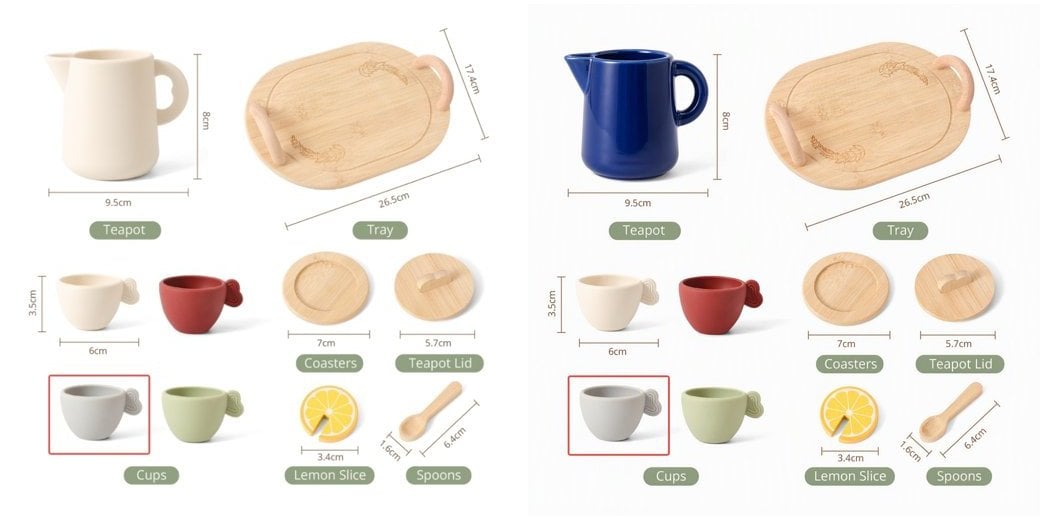
| Prompt | Result |
|---|---|
✅ Change the teapot to a deep cobalt blue glaze, keep everything else exactly the same | Only the teapot changes color; labels and other objects stay pixel-identical |
✅ Turn this photo into a watercolor painting, keep the composition | Style is repainted, composition kept |
✅ Have the person from image 2 sit at the table in image 1 | Two-image fusion: image 1 provides the scene, image 2 the person |
⚠️ Make it look better | Too vague; the scope of changes is unpredictable |
image / image2 as “image 1 / image 2” in the prompt. In our tests identity fidelity for people is only moderate (facial features may drift), so validate on a small batch first if portrait consistency matters.Response Format
{
  "created": 1791000788,
  "data": [
    {
      "b64_json": "iVBORw0KGgoAAAANSUhEUgAABAAAAAQACAIAAADwf7zU..."
    }
  ],
  "usage": {
    "prompt_tokens": 1000,
    "total_tokens": 1000,
    "input_tokens": 1000,
    "output_tokens": 0
  }
}
b64_jsonis plain base64 without adata:prefix and decodes to a PNG.- With
n > 1thedataarray has several items; don’t read onlydata[0]. - No
urland norevised_promptare returned.
usage: it holds placeholders (prompt_tokens is always 1000 × the image count). Editing costs the same as text-to-image, billed per image; the APIYI console bill is authoritative.Authorizations
API key from the APIYI console
Body
Model ID (case-sensitive)
MAI-Image-2.6-Flash, MAI-Image-2.6 Edit instruction. State what to change and that everything else stays the same
"Change the teapot to a deep cobalt blue glaze, keep everything else identical"
Reference image file (the first one, "image 1" in the prompt). png / jpg / webp
Optional second reference image ("image 2" in the prompt), for two-image fusion
Optional output width. Same rules as text-to-image: each side ≥ 768, width × height ≤ 2,359,296, sent together with height
x >= 768Optional output height, same rules as width
x >= 768Number of images. Works on this endpoint, billed per image
x >= 11
Was this page helpful?