

Overview
MAI-Image 2.6 is Microsoft AI’s in-house image generation model, released on 2026-09-04 and available in public preview on Microsoft Foundry. At launch it ranked No. 2 for both text-to-image and image editing on Arena, and No. 1 for image editing on Artificial Analysis (as of 2026-09-04, per Microsoft’s announcement). APIYI serves two variants through Microsoft’s official channel. Both share the same endpoints and parameters:MAI-Image-2.6: the flagship, tuned for quality and precisionMAI-Image-2.6-Flash: the fast variant. Microsoft says it generates 2.8× faster than GPT-Image-2-Medium, and it suits high-throughput production workloads
width + height (up to a 1536×1536 area), and flat per-image pricing regardless of size. A 1024×1024 image takes about 17 s on Flash and about 30 s on 2.6.Text-to-Image API
Image Editing API
Let an AI Agent Integrate It for You
.md to any docs URL), then writes code for your stack. The common pitfalls are spelled out: timeouts, the three parameters that return 400, width/height instead of size, and file-upload-only editing.Have a coding agent integrate or debug MAI-Image 2.6 text-to-image and image editing. Copy and paste it into Codex, Claude Code, Cursor, etc.
What this prompt protects you from
What this prompt protects you from
Why Use MAI-Image 2.6 on APIYI
Official Microsoft Channel
/v1/images/generations and /v1/images/edits endpoints, with responses shaped like the OpenAI Images API.Per-Image Pricing
Access From Anywhere
api.apiyi.com directly from data centers, home networks, or overseas nodes, with one key for every model.Full Model Lineup
Key Features
Chinese Text Rendering
High-Fidelity Editing
Custom Canvas
width + height combination, with the long side up to 3072 (e.g. a 3072×768 banner) and an area cap of 1536×1536Two Speed Tiers
Sample Results
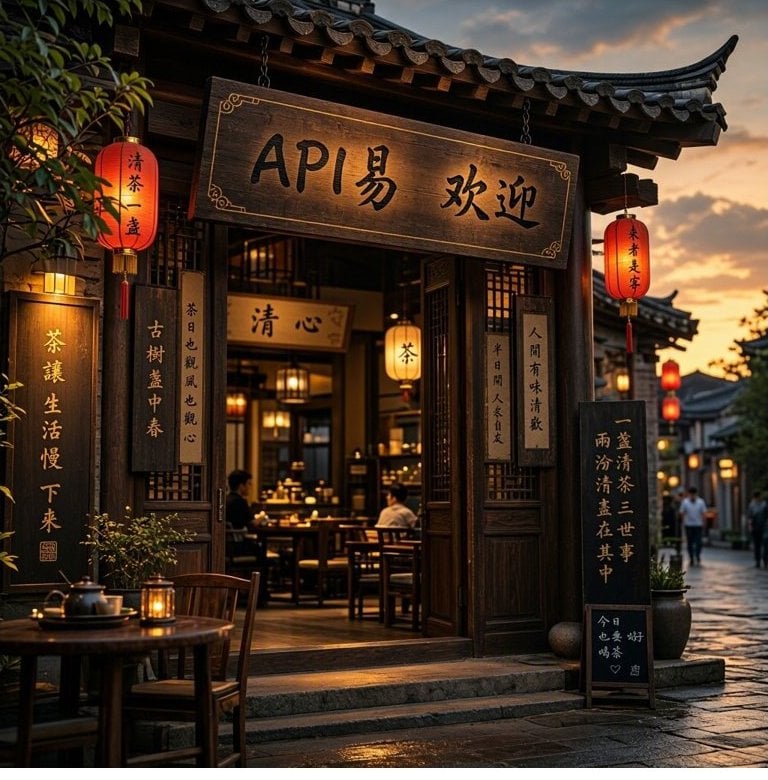
Chinese text rendering (MAI-Image-2.6-Flash, prompt asked for a Chinese sign welcoming visitors to APIYI): the sign, lanterns, vertical couplets, and chalkboard all show legible Chinese.
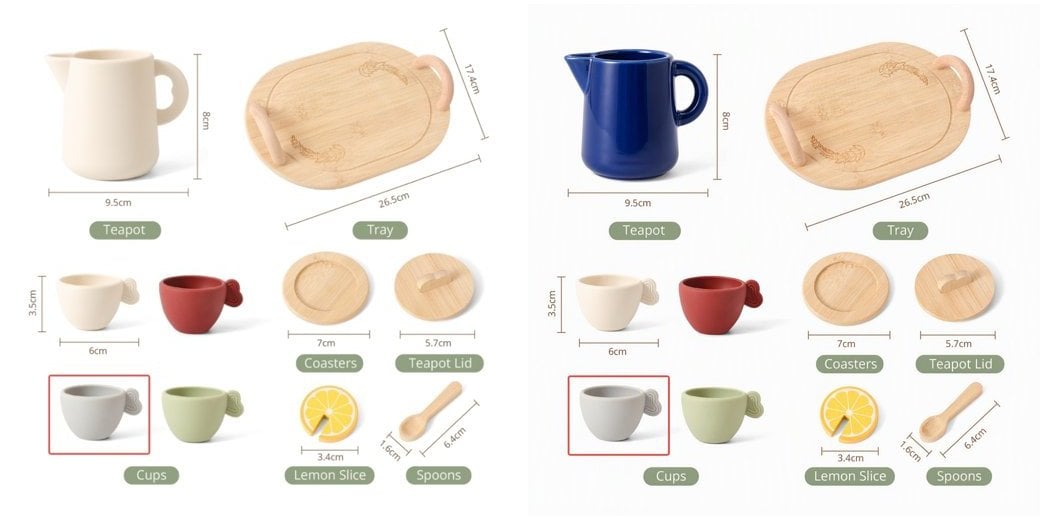
MAI-Image-2.6-Flash, instruction “Change the teapot to a deep cobalt blue glaze, keep everything else identical”): original on the left, result on the right. Only the teapot changes color; the dimension labels and other objects are untouched.
Pricing
- Per image, regardless of size: 768×768 and 1536×1536 cost the same, and prompt length does not affect the price.
- Editing costs the same as text-to-image: single-image edits and two-image fusion are each billed as one image;
n=2on the editing endpoint is billed as 2 images. - Requests that fail with 400 (moderation or invalid parameters) produce no image.
- Do not reconcile with the
usagefield in the response:prompt_tokensis always 1000 × the image count, a placeholder. The console bill is authoritative. - Stacks with the top-up bonus promotion.
Groups and Tokens
This series is in theDefault group. Any newly created token can call it; no application is needed.
Pay-as-you-go Priority and Per-request work for this series. We recommend Pay-as-you-go Priority, so the same token also works with the token-billed models on the platform.Rate: keep a single key under 50 RPM. For large batch workloads, contact support in advance.Technical Specs
Endpoints
Key Parameters
width and height (output size)
n (image count)
- Text-to-image:
nhas no effect. Sending 2, 4, or 10 still returns 1 image (and bills 1). Send parallel requests for more. - Editing:
nworks.n=2returns 2 images, billed as 2.
Best Practices
Pick the variant by use case
MAI-Image-2.6-Flash. Hero posters, complex compositions, or high quality bars → MAI-Image-2.6. Parameters are identical, so switching is just a model-name change.Quote the text you want rendered
Say 'keep everything else unchanged' when editing
Changing the canvas recomposes the image
width / height with a different aspect ratio from the original, the model re-lays out the scene instead of cropping or padding. For local edits, omit the size and the output follows the original’s ratio snapped to multiples of 16 (e.g. a 1344×756 input → 1360×768 output).Need several images? Send parallel requests
Error Codes and Retries
429 are worth retrying, with exponential backoff and at most 3 attempts. Keep in mind that requests dropped by a client timeout are still billed, so raise the timeout first.FAQ
Why does sending response_format return 400?
Why does sending response_format return 400?
b64_json and does not accept the response_format parameter. Even "b64_json" returns 400 Invalid parameters: response_format.Code migrated from gpt-image / DALL·E often sets it explicitly. Remove it; the image is still in data[0].b64_json. The same applies to seed and negative_prompt.I passed size: 1536x1024, why is the result still square?
I passed size: 1536x1024, why is the result still square?
size. It silently ignores it and renders the default 1024×1024. Use "width": 1536, "height": 1024 instead.On the editing endpoint size does work, but use width + height on both for consistency.Can I edit using an image URL?
Can I edit using an image URL?
multipart/form-data file uploads. Passing a URL, data URI, or base64 string as image returns 400.If you only have a URL, download it on your server first, then upload it:How do I send two reference images? Why doesn't the OpenAI SDK work?
How do I send two reference images? Why doesn't the OpenAI SDK work?
image2:client.images.edit(image=[f1, f2]) sends both files as image[]. This series does not accept repeated file fields and returns 400. Single-image edits with the SDK work fine.Is mask inpainting supported?
Is mask inpainting supported?
mask field returns 400. For local changes, describe the area in the prompt, e.g. “Only make the teapot blue, keep everything else exactly the same”. In our tests the model follows such constraints closely.Can I use it in Cherry Studio / LobeChat?
Can I use it in Cherry Studio / LobeChat?
/v1/chat/completions, which returns 404 for this series. Use a tool that supports the OpenAI Images API, or call it directly with the code samples in these docs.How many images per request?
How many images per request?
n you send, you get and pay for 1 image. Send parallel requests for more.On the editing endpoint n works: n=2 returns 2 images and is billed as 2.Can I reconcile billing with the token counts in usage?
Can I reconcile billing with the token counts in usage?
usage.prompt_tokens is always 1000 × the image count and output_tokens is always 0; these are placeholders. This series is billed per image, and the APIYI console bill is authoritative.How strict is moderation? What does a block look like?
How strict is moderation? What does a block look like?
400 content_safety_violation with the specific reason in the message. Prompt-level blocks usually come back within 5–8 s; a few are applied after generation and take about as long as a normal image. Retrying the same prompt won’t help; rephrase it.Is streaming supported?
Is streaming supported?
Getting 503 no available channels?
Getting 503 no available channels?
MAI-Image-2.6 or MAI-Image-2.6-Flash; mai-image-2.6-flash returns 503.Related Docs
- MAI-Image 2.6 Text-to-Image API - API reference with Playground
- MAI-Image 2.6 Image Editing API - Reference-image editing and two-image fusion
- Image API Essentials & Best Practices - Timeouts, disconnects, compression
- Top-Up Bonus Promotion