

Overview
Seedream is the flagship image-generation model series from ByteDance BytePlus ModelArk, with a unified generation-editing architecture: text-to-image, single-image editing, multi-image fusion, and batch sequence generation all run through one/v1/images/generations endpoint — only the parameters differ. APIYI has a strategic partnership with BytePlus and integrates every active version on day one.
Text-to-Image API
POST /v1/images/generations. Generate images from prompts at 1K / 2K / 3K / 4K or exact pixel sizes.Image Editing API
image parameter. Single-image editing, multi-image fusion, and batch sequence (up to 15 images).Historical Versions
Let an AI Agent Do the Integration
Copy this prompt and paste it into Codex / Claude Code / Cursor
It first fetches the plain-text version of this page (append .md to any docs URL), then writes code in your project's own stack — timeout, re-hosting URL results immediately, editing via a URL array rather than multipart, and the parameters seedream-5-0-pro rejects are already baked into the requirements.
Integrate / troubleshoot Seedream text-to-image and image editing in this project.
Read the docs before you touch code: fetch https://docs.apiyi.com/en/api-capabilities/seedream-image/overview.md for the plain-text version of this page. For finer parameter detail, append
.mdto …
- Timeout: tier the client timeout by model — start at 60 seconds for the 4.x series and
seedream-5-0-flash(flash takes about 30 seconds with 10 refer …
7 requirements in total. Use the button below to copy the full prompt.
What this prompt saves you from
What this prompt saves you from
Why APIYI’s Seedream
Drop-in replacement for the BytePlus ModelArk official channel, optimized for production use along three axes — stability, cost, integration:Strategic partnership · stable resources
Unlimited concurrency · enterprise-ready
Same price + up to 20% off via top-ups
Global zero-friction access
api.apiyi.com from mainland China data centers, residential networks, and overseas nodes. No need to set up routing for BytePlus ap-southeast-1 / eu-west-1 regions.OpenAI-compatible · zero code change
/v1/images/generations is identical to OpenAI. Point the OpenAI SDK’s base_url at APIYI and call the API as-is. Pass extension parameters (image / sequential_image_generation etc.) via extra_body. Note that OpenAI’s n parameter is not supported upstream (silently ignored — you still get 1 image); use sequential_image_generation for multi-image output.Professional support · enterprise concierge
Key Features
4K high-fidelity output
Unified generation-editing
image and sequential_image_generation.Multi-image fusion · up to 10 references
image accepts a URL array. Refer to “image 1 / image 2” in the prompt for explicit ordering. Pair with sequential_image_generation: "disabled" for subject-consistent fusion.Text rendering breakthrough
Batch sequence (up to 15)
sequential_image_generation: "auto" plus max_images outputs a coherent series — perfect for storyboards, brand visuals, and product series.≈ 15s per image · balanced speed
Flexible sizes · arbitrary aspect
1K/2K/3K/4K) or exact pixels. Total pixels ∈ [1280×720, 4096×4096], aspect ratio ∈ [1/16, 16].Drop-in OpenAI SDK
base_url=https://api.apiyi.com/v1 and call with the official OpenAI SDK. Extension params go through extra_body. Zero code change for migration.Sample Results
Text-to-image · e-commerce hero image (seedream-5-0-flash; prompt only: a pale green serum bottle on a pure white background, a Chinese label reading 新品首发 in the top right and 限时 8 折 below it): 17.1 s, the Chinese labels are stroke-accurate at 2K with no wrong characters, and the bottle shape and commercial lighting are clean.

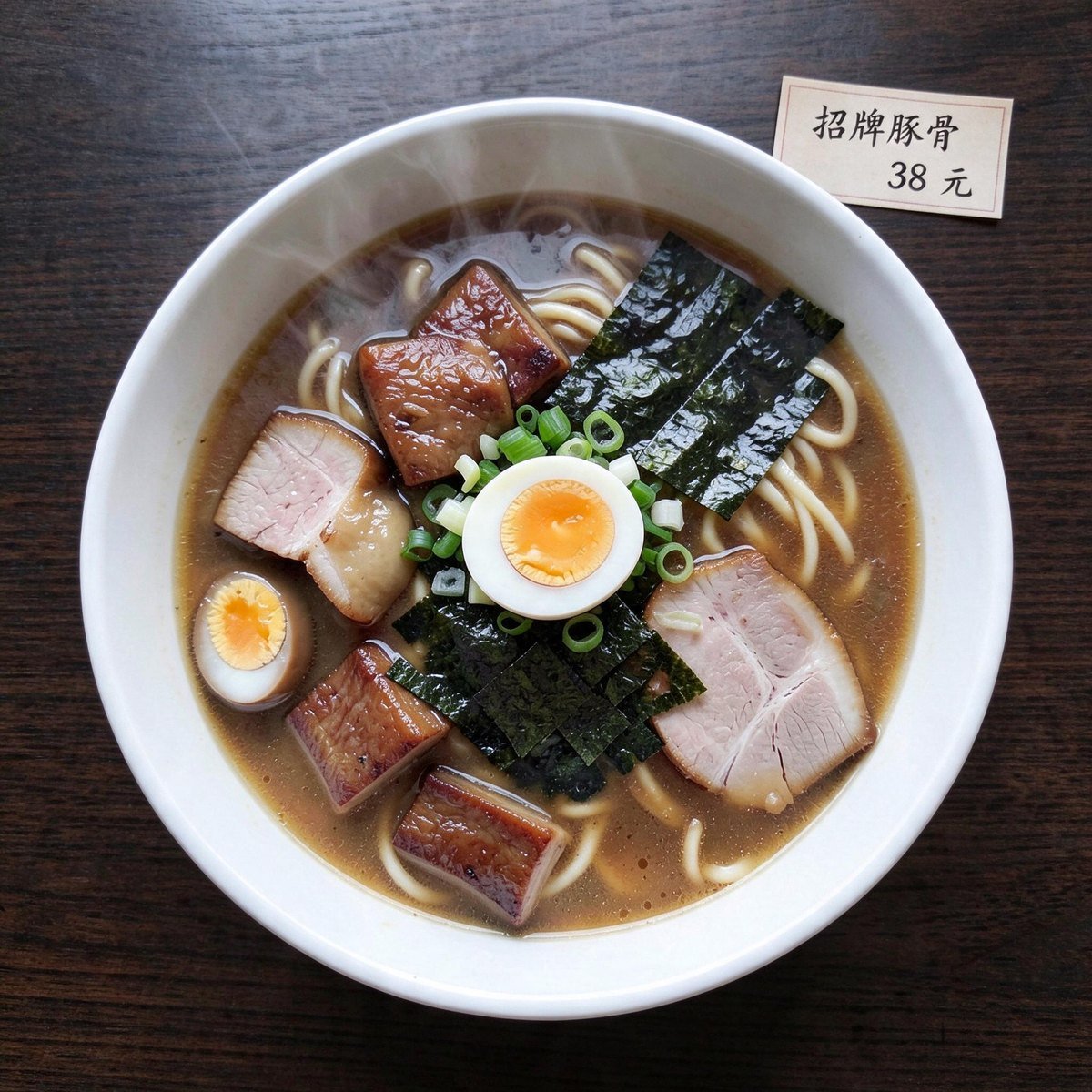
seedream-5-0-flash; reference is an overhead ramen shot, prompt: swap the background for a dark wood table and add a Chinese price tag reading 招牌豚骨 38 元 at the upper right of the bowl): 33.2 s, the tag text has no wrong characters, the ramen, toppings and steam stay as they were, and the dark wood grounds the subject.
Pricing
Per-image billing, same price as BytePlus official. Top-up bonuses lower the effective unit price further.- Billed per generated image, regardless of prompt length or fusion mode
seedream-5-0-flashis billed at a fixed $0.018 per request, the same as BytePlus official pricing, and reference images are free (1, 3 and 10 reference images each billed $0.018 in our tests)seedream-5-0-prois billed at a fixed $0.12 per request (1 image per request; batch sequence not supported). Officially the model uses two output-pixel price tiers (one price for ≤2.36M px, one for >2.36M px) plus a per-image fee for reference images beyond the first; APIYI simplifies this to a flat per-request price — no tiers, input-image fees included. This model carries no official discount of any kind; APIYI prices it on a supply-guarantee basis — effectively at no margin once top-up bonuses and tax costs are factored in — and any price change will be announced in advance- In
sequential_image_generation: "auto"mode, billing is by actual output count (e.g.max_images: 4outputs 4 → 4 billed) - Failed requests (4xx / blocked by moderation) are not billed
- Free trial: 200 free images on first onboarding (provided by BytePlus)
- Top-up bonus details: see Top-up Promotions
Technical Specs
Generation Time Comparison
Measured single-request latency per version (measured 2026-07, 5.0 Flash on 2026-09-24, UTC+8; wall-clock time from request to full response — expect normal per-request variance):API Endpoints
Key Parameters in Detail
size (output size)
Two value families — pick one:
Preset tiers (model decides aspect ratio):
- Total pixels ∈ [1280×720, 4096×4096]
- Aspect ratio ∈ [1/16, 16]
- Default:
2048x2048
1920x1080 (FullHD), 3840x2160 (landscape 4K), 1080x1920 (phone portrait), 2560x1440 (landscape 2K)
Invalid examples: 5000x5000 (over the cap), 100x1600 (aspect under 1/16)
image and sequential_image_generation (mode switches)
The /v1/images/generations endpoint covers both text-to-image and editing/fusion. Two parameters together select the mode:
Best Practices
Pick the right version
- High volume / poster layouts / speed and cost →
seedream-5-0-flash-260915($0.018/request, ~15–20 s, up to about 2K) - Best overall experience →
seedream-5-0-260128(most features, but 3K cap) - 4K + strong text rendering →
seedream-4-5-251128(4K + text breakthrough) - 4K + best price →
seedream-4-0-250828(cheapest 4K) - Top image quality / complex instructions (professional work) →
seedream-5-0-pro-260628($0.12/request, ~2 min per image, 1K/2K only — not recommended for everyday use)
Prefer preset sizes
1K/2K/3K/4K are tuned by BytePlus for stable speed and quality. Use exact pixels only when you have a real aspect requirement. Note version differences in supported tiers.Refer to images explicitly
image URLs, write the prompt with explicit references — “Place the person from image 1 into the scene of image 2 using the colour palette of image 3” — instead of letting the model guess.Control batch sequence cost
sequential_image_generation: "auto" + max_images: 4 outputs 4 — billed × 4. Validate with max_images: 1 first, then scale up.Pick output format by use case
png and jpeg; 4.5 / 4.0 only jpeg. Use png when you need lossless detail (5.0-flash png has no alpha channel when generating directly; use layer separation for transparency), jpeg for size-sensitive scenarios.Set client timeout ≥ 60 seconds
seedream-5-0-pro takes ~2 minutes per image — use a timeout of 240s or more.Disable watermark when needed
watermark: false to remove the BytePlus watermark (defaults vary by version, so set it explicitly). Required for commercial assets.Error Codes & Retries
- Start with a 60-second request timeout (batch sequence or 4K + hd may take a minute)
- Apply exponential backoff for 5xx and timeouts (suggested 2 retries)
- Log the
x-request-idresponse header for support tickets
FAQ
5.0 Flash / 5.0 Pro / 5.0 / 4.5 / 4.0 — which to pick?
5.0 Flash / 5.0 Pro / 5.0 / 4.5 / 4.0 — which to pick?
Why does image editing also use the generations endpoint?
Why does image editing also use the generations endpoint?
/v1/images/edits endpoint. Unlike OpenAI’s gpt-image-2 (multipart upload to /v1/images/edits), Seedream uses application/json and passes image URLs as an array in the image field.Benefits: protocol consistency, parameter reuse, easy mode switching. See Image Editing for details.Does the image field accept base64?
Does the image field accept base64?
data:image/<format>;base64,<base64 string> with the <format> in lowercase (e.g. data:image/jpeg;base64,...). URLs and base64 entries can be mixed in the same array. Prefer public URLs whenever you can: URLs are downloaded by BytePlus directly from Singapore without passing through the APIYI gateway, while a base64 body must first be uploaded across the border in full. Bodies above 20 MB can hit the provider’s 600-second request-body timeout when that link is slow, and the gateway does not convert base64 into a URL for you. See the warning at the top of the image editing page.Multi-image fusion limit? Batch sequence limit?
Multi-image fusion limit? Batch sequence limit?
- Multi-image fusion (
imagearray): 4.5 / 5.0-pro / 5.0-flash explicitly support up to 10 (an 11th returns 400 on 5.0-flash in our tests). 5.0 / 4.0 also support multi-image, though no explicit ceiling is documented. - Batch sequence (
max_images): bounded by the global rule input references + output ≤ 15. When combining fusion and sequence, count the total. Note 5.0-pro and 5.0-flash do not support batch sequence (passingsequential_image_generationreturns 400).
Does b64_json need a data:image prefix?
Does b64_json need a data:image prefix?
response_format:response_format: "url"(default) →data[0].urlis a temp signed URL, render directly with<img src=...>response_format: "b64_json"→data[0].b64_jsonis a plain base64 string (nodata:image/...;base64,prefix). Decode and write to disk, or prepend the prefix manually for browser rendering.
Is streaming output supported?
Is streaming output supported?
stream: true. Streaming is especially useful for long prompts and high-resolution images — the frontend can render partial results progressively. seedream-5-0-pro and seedream-5-0-flash do not support streaming — passing stream returns 400.Rate limit?
Rate limit?
Are failed requests billed?
Are failed requests billed?
400 / 403 and are not billed. Other zero-billed errors: 401 (invalid token), 429 (rate limited). Only successful generation (200 with valid response) is billed.Can I use the official OpenAI SDK?
Can I use the official OpenAI SDK?
base_url at https://api.apiyi.com/v1 and pass extension params (image / sequential_image_generation / watermark etc.) via extra_body:Who owns the generated images?
Who owns the generated images?
Are transparent backgrounds supported?
Are transparent backgrounds supported?
seedream-5-0 / seedream-5-0-pro support png output and can produce transparent backgrounds when prompted (“transparent background, alpha channel”). seedream-5-0-flash returns no alpha channel even when asked for a transparent background; use layer_decomposition: true to get a background base plus several transparent layers (billed per output image), see Image Editing. seedream-4-5 / 4-0 output only jpeg and do not support transparency — post-process to remove the background yourself.Can I cancel a generation in flight?
Can I cancel a generation in flight?
/v1/images/generations is synchronous. Once submitted, the request runs to completion. The server still completes and bills even if the client disconnects. Set client timeouts and avoid the assumption that disconnect saves cost.Related Docs
- Text-to-Image Playground —
POST /v1/images/generationswith five language code samples - Image Editing Playground —
image+sequential_image_generationpatterns - Historical Versions — 5.0 Flash / 5.0 Pro / 5.0 / 4.5 / 4.0 comparison and migration
- API Manual — general invocation guide
- Image Generation Sandbox — try it online
- BytePlus official docs:
docs.byteplus.com/en/docs/ModelArk/1824121— Seedream 4.0-5.0 tutorial