

Overview
Wan3.0 is Tongyi Wanxiang’s all-in-one video model. Unlike Wan2.7, which makes you switch between four model IDs (t2v / i2v / r2v / videoedit), Wan3.0 handles every mode through a single model ID — what you send as media decides what it does. Text-to-video, image-to-video, reference-to-video and video editing all share one request body.
Two variants, identical capabilities, different speed and price:
Both variants share exactly the same parameters, endpoint and media rules — only speed and unit price differ. Build against
wan3.0-video first, then switch latency-sensitive production traffic to wan3.0-video-prime.What changed from Wan2.7
Wan2.7 remains fully available — see Wan2.7 Video Generation.
Key features
Four modes, one model
Text-to-video, image-to-video (first/last frame), reference-to-video (image, video, audio) and video editing share one model ID and one endpoint, distinguished by the
type in input.media[].Up to 30 seconds
Up to 30 seconds per request (input reference video + output combined) — double Wan2.7’s 15 seconds, enough for a full voice-over segment or a short-drama shot.
Native audio
Output ships with a
soun track by default, no driving audio required. Use reference_audio when you want a specific voice timbre.Three resolution tiers
The new 480P tier costs a quarter of 1080P — draft cheaply, then upscale for the final render.
Group setup
Wan3.0 shares theWan&HappyHorse group with Wan2.7 and HappyHorse — one key calls them all. Video is billed per second, so your key must satisfy two conditions to route successfully:
- Billing mode: choose “Pay-as-you-go priority” or “Pay-as-you-go” — per-second video cannot route on a per-call key
- Group: include
Wan&HappyHorse
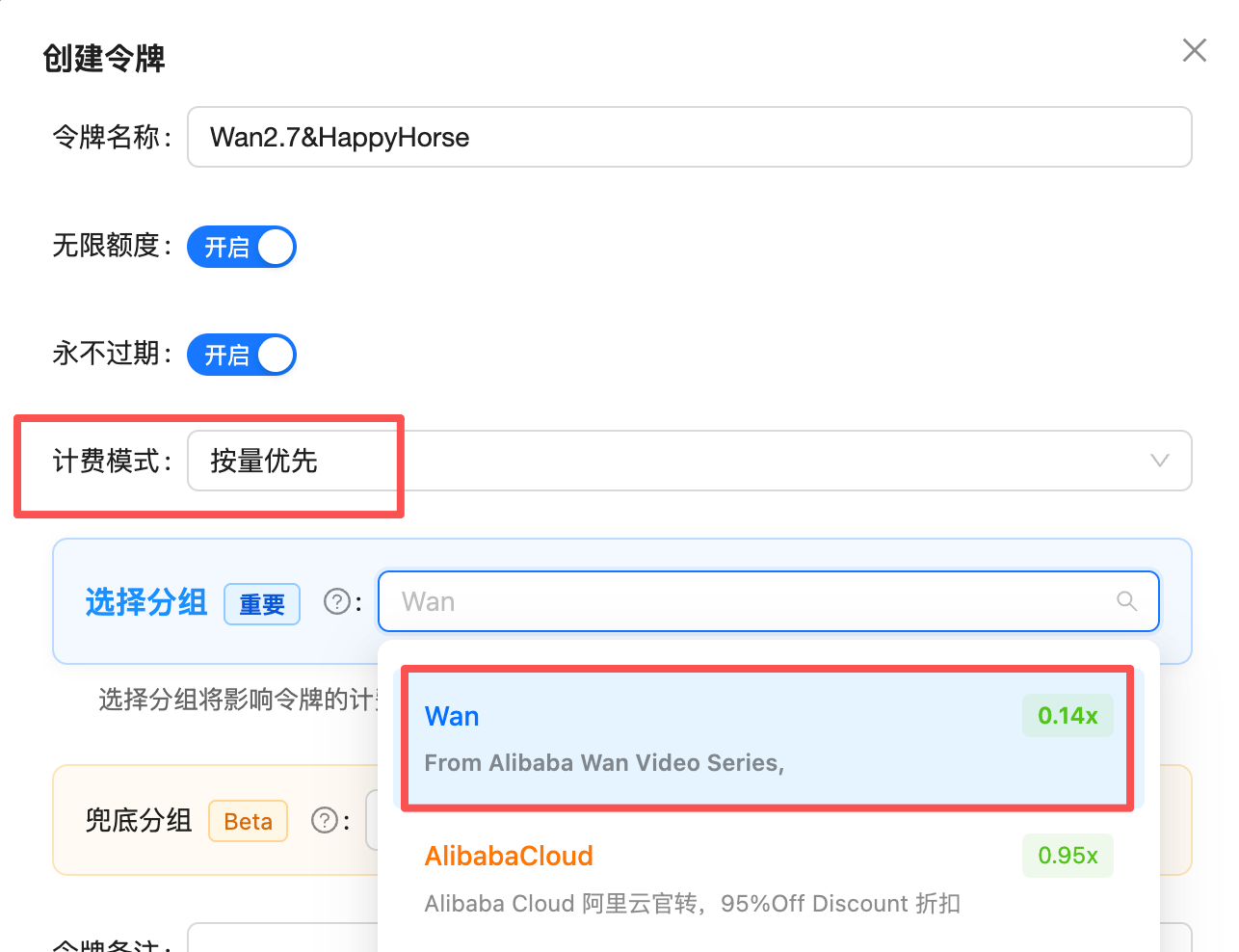
Create a key: set billing mode to pay-as-you-go priority and select the Wan&HappyHorse group (0.14x) to call every Wan3.0 / Wan2.7 / HappyHorse video model (the screenshot shows the old group name Wan)
Pricing
98% of Alibaba’s official price by default — as low as 81.7% with the highest top-up bonus.
That puts 480P at $0.0245/sec (≈ ¥0.17/sec) and 720P at $0.049/sec (≈ ¥0.34/sec) for
wan3.0-video.How the rate is derived: 0.98x by default, as low as 0.817x with bonuses
The console shows theWan&HappyHorse group at a 0.14x multiplier, denominated in CNY. APIYI settles in USD at a fixed 1:7 exchange rate:
Table 1: APIYI pricing in detail (billed per second)
“With 10% / 20% bonus” is the effective unit price after a top-up bonus scales your credited balance — the amount deducted on each call is still the default price.
Table 2: Tier-by-tier against Alibaba’s official pricing
wan3.0-video currently carries an official limited-time 30% discount (applied to all users by default), and APIYI pricing follows the discounted rate. wan3.0-video-prime has no discount. APIYI pricing will be adjusted when the promotion ends.Table 3: Total cost for common durations
Stacking top-up bonuses
With a top-up bonus, credited balance scales by up to ~1.2x, pushing the effective rate lower:
1:7 is a fixed settlement rate (not a promotional rate) and applies to all USD top-ups.
Prices match the provider’s official rates and may change along with them; the table above is for reference only, and the Model Pricing tab in the top navigation is authoritative: Model Pricing.
⚠️ Billing rules (different from other video models)
Pre-authorization and settlement
- Without a reference video: the requested
durationis charged up front and that is the final amount — no settlement entry. - With a reference video: at submit time the gateway does not yet know how long your input video is, so it pre-authorizes at the 30-second cap, then recalculates against the actual billed seconds and refunds the difference (a separate negative entry on your bill).
The cap-based hold temporarily freezes a larger amount: $0.147 at 480P, $0.294 at 720P, $0.588 at 1080P (
wan3.0-video, 30 seconds). Keep enough balance available; the refund lands within seconds of task completion.⚠️ Endpoint choice (most important)
APIYI exposes two paths, but only the DashScope passthrough endpoint works fully with Wan3.0:Async workflow
1
Create the task
POST /wan/api/v1/services/aigc/video-generation/video-synthesis with the X-DashScope-Async: enable header. Returns a task_id immediately.2
Poll for status
GET /v1/tasks/{task_id} (with Authorization), every 5–10 seconds (never below 3), until status becomes completed.3
Download the video
GET the
result_url from the response directly — without the Authorization header (it is a signed OSS link; sending auth returns 403). Valid for 24 hours.Task states
Complete Python client
Parameter reference
The request body uses the nested DashScope structure:{ model, input: { prompt, media[] }, parameters: {...} }.
input fields
media[] types and the mode they select
Every media object needs at least
type and url. The url must be a publicly reachable https link (upload local files to OSS / a CDN first, and keep them reachable until the task finishes).
parameters fields
Choosing: Wan3.0 / Wan2.7 / HappyHorse
Best practices
Iterate at 480P, render the final cut at 1080P
Iterate at 480P, render the final cut at 1080P
480P costs a quarter of 1080P. Nail the prompt and camera movement cheaply — the price of one 5-second 1080P render buys four drafts.
Trim reference videos before uploading
Trim reference videos before uploading
Input video seconds are billed. If you only need 3 seconds of a clip, do not upload the 30-second original — this is the easiest cost trap on Wan3.0.
Describe motion, not just the picture
Describe motion, not just the picture
Video models respond to “who does what, and how the camera moves”. “A ginger cat stretching on a windowsill, slow dolly-in” beats “a cute ginger cat, sunlight, high definition”.
Never poll faster than every 3 seconds
Never poll faster than every 3 seconds
Measured delivery for a 5-second clip: ~100 sec at 480P, ~120 sec at 720P, ~170 sec at 1080P. Polling every 5–10 seconds is plenty.
Do not auto-retry the same prompt on failure
Do not auto-retry the same prompt on failure
Failed tasks are refunded in full, but resubmitting bills again. For moderation failures change the prompt; for asset failures check URL reachability first.
FAQ
Why are the billed seconds longer than my output video?
Why are the billed seconds longer than my output video?
Billed seconds = input reference video duration + output duration. A 10-second reference with a 2-second output bills 12 seconds. Reference images, audio and files are free.
Why was a large amount charged at submit and then refunded?
Why was a large amount charged at submit and then refunded?
Tasks with a reference video pre-authorize at the 30-second cap, then settle against actual billed seconds and refund the difference. You will see a negative adjustment entry on your bill.
The task stays in_progress with progress stuck at 30%?
The task stays in_progress with progress stuck at 30%?
That is coarse upstream reporting, not a stall. 1080P or long clips can take 3–5 minutes. Keep polling.
result_url returns 403 on download?
result_url returns 403 on download?
Do not send the
Authorization header — it is a signed OSS link. Links expire after 24 hours, so re-host promptly.Submit returned 200 but the task failed?
Submit returned 200 but the task failed?
Parameter and asset errors fail asynchronously, not as a synchronous 400. Common causes: unreachable media URL (including expired signed links), input + output above 30 seconds, content moderation. Failed tasks are fully refunded.
Getting "no available channel for this model"?
Getting "no available channel for this model"?
Check that your key’s billing mode is pay-as-you-go (per-call keys cannot route video models) and that its group includes
Wan&HappyHorse.Related documentation
Video Generation API reference
Live Playground plus cURL / Python / Node samples
Wan2.7 Video Generation
The previous four-model generation, with audio-driven lip sync
HappyHorse Video Generation
The other video series in the same group
Model Pricing
Authoritative site-wide pricing table
help.aliyun.com/zh/model-studio/wan3-video-generation-guide, help.aliyun.com/zh/model-studio/wan3-video-generation-api-reference