

Quick Answer
Recommended Setting: When creating a token, choose “Pay-per-Use Priority” billing mode, which suits most scenarios.
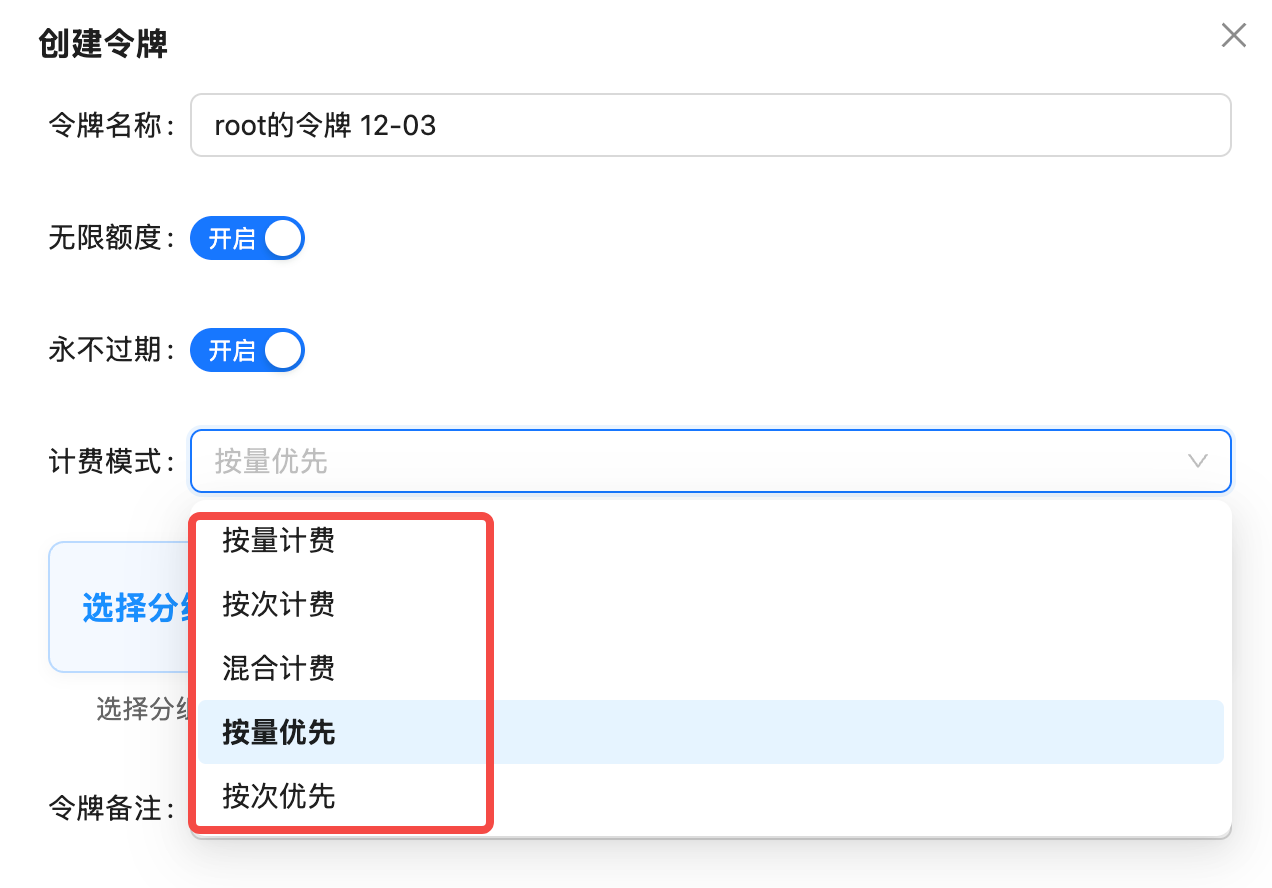
5 Billing Modes Explained
1. Pay-per-Use (Token-based)
Definition: Charges based on the number of Tokens for input and output, pay for what you use. Applicable Models:- Text Generation Models: GPT-4, Claude, Gemini, DeepSeek, etc.
- Multimodal Understanding Models: Models supporting image/audio input
- Special Image Models:
gpt-image-1(charged by Tokens)
gpt-4o: Input $5/million tokens, Output $15/million tokensclaude-3-5-sonnet-20241022: Input $3/million tokens, Output $15/million tokens
2. Pay-per-Call
Definition: Fixed charge per call, unaffected by input and output Tokens. Applicable Models:- Image Generation Models: DALL-E, Flux, Sora Image, etc. (except gpt-image-1)
- Video Generation Models: Sora Video, VEO, etc.
gemini-3-pro-image-preview(aliasnano-banana-pro): $0.09/callsora_video2: $0.15/call (10-second video)flux-1.1-pro: $0.04/call
Advantages of Pay-per-Call:
- Transparent pricing, fixed cost per generation
- No need to calculate Token consumption
- Suitable for fixed output scenarios like images/videos
3. Hybrid Billing
Definition: Supports both pay-per-use and pay-per-call billing, automatically selected based on the model. Status: ⚠️ Not Applicable4. Pay-per-Use Priority (Recommended)
Definition: Smart billing mode that prioritizes pay-per-use billing when a model supports both; automatically switches to pay-per-call if the model only supports that. Why Recommended?- ✅ Includes Pay-per-Call: Can call image/video models charged per call
- ✅ Includes Pay-per-Use: Can call text/multimodal models charged per use
- ✅ Auto-Adapts: System automatically selects the most appropriate billing method
- ✅ Covers All Scenarios: All 400+ models supported
Recommendation Reason: Using “Pay-per-Use Priority” token allows calling all models without creating different tokens for different billing modes.
5. Pay-per-Call Priority
Definition: Prioritizes pay-per-call billing when a model supports both; automatically switches to pay-per-use if the model only supports that. Applicable Scenarios:- Scenarios requiring fixed costs
- Mainly using image/video generation models
Usage Suggestion: Unless there’s a clear cost control requirement, use “Pay-per-Use Priority” as text models are usually more cost-effective with pay-per-use billing.
How to Choose Billing Mode?
Recommended Solution (Suitable for 95% of Users)
Pay-per-Use Priority (Default Recommended)
Applicable Scenarios:
- Using text, image, and video models simultaneously
- Don’t want to create different tokens for different models
- Need maximum flexibility
- Covers all 400+ models
- System automatically selects optimal billing method
- No additional configuration needed
Special Scenarios
- Pure Text Application
- Pure Image/Video Application
- Cost Control
Scenario: Only using GPT, Claude, Gemini and other text modelsRecommended Billing Mode: Pay-per-Use Priority or Pay-per-UseReason: Text models all use pay-per-use billing, both modes have the same effect
FAQ
Why does gpt-image-1 require a pay-per-use token?
Why does gpt-image-1 require a pay-per-use token?
gpt-image-1 is OpenAI’s official image generation model. Although it generates images, its billing method is similar to text models, charged by Tokens.Billing Factors:- Image resolution (1024x1024 consumes ~5000 tokens, 1792x1024 consumes ~8500 tokens)
- Image quality (HD quality increases Token consumption)
- Use “Pay-per-Use Priority” or “Pay-per-Use” token
- Using “Pay-per-Call” token will prevent calling
gpt-image-1
I already created a pay-per-call token, can I change it to pay-per-use priority?
I already created a pay-per-call token, can I change it to pay-per-use priority?
Yes, you can modify it. Steps:
- Log in to API.YI Token Management Page
- Find the corresponding token, click the “Edit” button on the right
- Select “Pay-per-Use Priority” in the “Billing Mode” dropdown menu
- Save configuration
What's the difference between pay-per-use priority and pay-per-call priority?
What's the difference between pay-per-use priority and pay-per-call priority?
Different priorities:
Recommendation: Use “Pay-per-Use Priority” in most cases.
Will calling fail if I choose the wrong billing mode?
Will calling fail if I choose the wrong billing mode?
Won’t fail immediately, but may not be able to call certain models.Example Scenarios:
- If token is “Pay-per-Call”, calling
gpt-4owill fail (because gpt-4o only supports pay-per-use billing) - If token is “Pay-per-Use”, calling
gemini-3-pro-image-previewmay fail (because this model only supports pay-per-call billing)
Why is hybrid billing not applicable?
Why is hybrid billing not applicable?
Hybrid billing theoretically supports both pay-per-use and pay-per-call, but in practice may cause:
- Unclear billing logic
- Difficult cost prediction
- System compatibility issues
Summary Recommendations
Best Practice: When creating a token, choose “Pay-per-Use Priority” billing mode to cover all usage scenarios without creating different tokens for different models.