

Default Privacy Protection Policy
For privacy and security reasons, APIYI does not store customer input and output content by default - we only act as a transparent proxy for forwarding requests. This means:- ✅ Your data privacy is maximally protected
- ✅ Reduced data storage costs
- ✅ Compliant with data security best practices
- ❌ Admin backend cannot view specific conversation content
Challenges in Batch Processing Scenarios
Many customers encounter this frustration when running batch processes:Administrator-Assisted Troubleshooting
If you encounter issues requiring technical support assistance, we can temporarily enable detailed logging for administrators to help diagnose problems.Important Notice
- This feature is only enabled in the administrator backend and cannot be controlled by customers
- Detailed log content is only visible to administrators, not exposed to customers
- This is an assistance feature for troubleshooting, not for regular use
How to Request Enablement
1
Contact Support with Issue Details
Reach out via customer service channels (Telegram, email, etc.) to describe the problem in detail and request troubleshooting assistance
2
Administrator Evaluation
Technical support staff will evaluate whether detailed logging is needed to diagnose the issue
3
Temporary Activation
Administrator will temporarily enable log detail recording for your account in the backend
4
Assisted Troubleshooting
Administrator will review detailed logs to help locate and resolve the issue
5
Feature Deactivation
After resolving the issue, administrator will promptly disable detailed logging
Administrator Backend Interface
This is the administrator backend log detail control interface (not accessible to customers):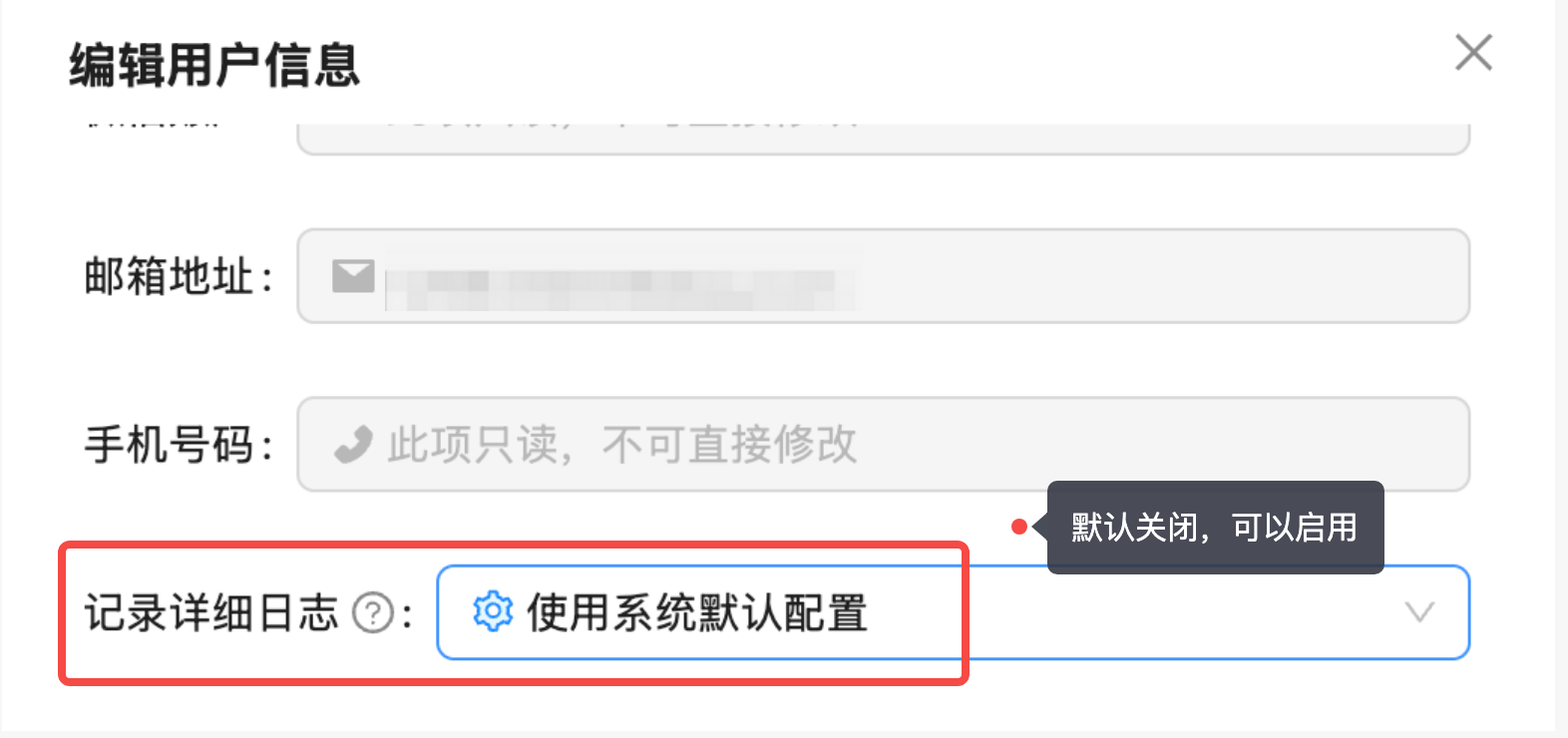
Content Included in Detailed Logs
When administrators enable detailed logging, the system additionally records:Input Content
- Complete user prompts
- System messages
- Conversation history context
- Function call parameters
Output Content
- Complete AI model responses
- Function call results
- Full streaming output content
- Returned metadata
Applicable Scenarios
Recommended Request Scenarios
Contact support to request administrator assistance in these situations:- 🔍 API Errors: Frequent errors occurring without clear cause
- 📊 Batch Task Anomalies: Some batch tasks failing, need to track specific problematic requests
- 🧪 Output Quality Issues: Abnormal model outputs, need to analyze specific input/output content
- 📈 Performance Issues: Unusual call latency, need detailed logs to analyze bottlenecks
- 🐛 Suspected Bugs: Suspecting system issues, need to provide detailed information to tech team
When Enablement Not Needed
Detailed logging typically not required in these scenarios:- ✅ Normal Usage: API calls functioning normally without anomalies
- ✅ Common Issues: Basic logs (token stats, error types) sufficient for diagnosis
- ✅ Privacy Sensitive: Processing extremely sensitive data, prefer no viewing by anyone
Data Security Notice
Important NoticeEven with temporarily enabled detailed logging, we will:
- ✅ Use encrypted storage to protect your data
- ✅ Strictly limit log access permissions (authorized administrators only)
- ✅ Disable feature immediately after issue resolution
- ✅ Regularly auto-clean expired log data
- ✅ Comply with relevant data protection regulations
- ✅ Detailed logs will not be disclosed to any third parties
FAQ
Can I enable this feature myself in the backend?
No. This feature is only enabled in the administrator backend and cannot be operated by customers. Please contact support if you need assistance troubleshooting.Can I view detailed logs after enablement?
No. Detailed log content is only visible to administrators for technical support purposes. Customers can only view basic call records (token stats, error types, etc.).Does enabling detailed logging affect performance?
Minimal impact - mainly adds a small amount of log writing time (typically < 10ms), won’t affect normal usage.How long are logs retained?
Detailed logs are retained for 7-30 days by default. Administrators will promptly disable recording after issue resolution.Will administrators see all my request content?
Only requests during the detailed logging period will be recorded. Administrators only view relevant logs when assisting with troubleshooting, strictly following confidentiality agreements.Can logs be recorded only for specific time periods?
Yes. You can coordinate with support for specific enablement time periods, such as temporarily enabling only when reproducing issues.Contact Us
If you encounter technical issues requiring administrator assistance, please contact us via:Email Support
[email protected]Describe issues and reproduction steps in detail
Enterprise WeChat

Telegram
@apiyi001Instant messaging, efficient resolution